SQL Server 2008/2008 R2 Diagnostic Queries for March 2012

Since it is nearly March, I will go ahead and jump the gun by a few days and post an updated version of my SQL Server 2008/2008 R2 Diagnostic Queries for March 2012.

For this version, I have added information about the latest SQL Server 2008 R2 Cumulative Updates, added some more interpretation information for many of the queries, and added some new columns to some of the existing queries.

This set of queries is only for SQL Server 2008 or SQL Server 2008 R2. Some of the queries (which are marked), will only work with SQL Server 2008 R2 SP1 since they use DMVs or DMFs that were added in SP1.

As always, I recommend that you run the queries one at a time, after reading the comments and instructions for each query. You should not make any rash decisions based on the results of a single query. Instead, you should gather more information and use your good judgment and experience before you do something like dropping an index.

Posted in SQL Server 2008 R2 | Tagged | 7 Comments

New Cumulative Updates For SQL Server 2008 R2

On Feb 22, 2012, Microsoft released SQL Server 2008 R2 SP1 Cumulative Update 5, which is Build 10.50.2806. This CU has 16 fixes listed.

If you are still on the SQL Server 2008 R2 RTM code branch, you would want to take a look at SQL Server 2008 R2 Cumulative Update 12, which is Build 10.50.1810. This CU only has three fixes listed. Really, I think you should be making plans to get off of the RTM branch, and get on to the SP1 branch for SQL Server 2008 R2, especially since a number of useful new DMVs were added to SP1. Another reason to get on SP1 is that Microsoft will eventually retire the RTM branch, leaving you on an “unsupported service pack” when that happens.

As always, keep in mind that these Cumulative Updates are only for SQL Server 2008 R2, not for SQL Server 2008.

Posted in Microsoft, SQL Server 2008 R2 | Tagged | 3 Comments

Behemoth of the Server Room?

Back during the PASS 2011 Summit in Seattle, I was interviewed by Tony Davis, Andrew Clark, and Rodney Landrum about hardware, storage subsystems and virtualization.  This was a fun little impromptu interview, filmed in a somewhat quiet location during the Summit.  It is always a little strange (at least for me) to see and hear yourself on video.

If you are interested in my SQL Server Hardware Book, you can get some more information here. You can also get it from Barnes and Noble, since Amazon seems to be having trouble with their inventory. It is also available at SoftPro Books in Centennial, CO.

Posted in Computer Hardware, PASS, Processors, SQL Server 2008 R2, SQL Server 2012, Storage Subsystems | Tagged , | Leave a comment

Building or Buying a Desktop Based Development and Test Database Server

Back in April of 2011, I wrote a post that compared the merits of using an ancient, but actual rack mounted server versus a new desktop based system for testing and development work. It is pretty common for old retired Production server hardware to be passed down for use in Development and Testing environments. In an ideal world, you would have a Test environment that was an exact match from a hardware perspective for your Production environment, but I have never seen this actually happen due to budget constraints.

The basic argument is that the typical two or four socket server from several years ago would have much less CPU capacity in almost every case and would sometimes have less memory capacity than a decent, new single socket desktop-based system. The limiting factor in both cases will more than likely be I/O capacity and performance. Since I wrote this post nine moths ago, a few things have changed, so that seems like a good reason to revisit the subject.

Your three main good desktop platform choices right now are an older 45nm Core i7 “Bloomfield” system (using a Core i7 960 processor) with an X58 chipset, a newer 32nm Core i7 “Sandy Bridge” (using a Core i7-2600, 2600K or 2700K processor) with an H67 or Z68 chipset, or an even newer 32nm Core i7 “Sandy Bridge-E” (using an Intel Core i7-3930K processor) with an X79 chipset.

The older 45nm Nehalem-based Core i7 system has six memory slots, so it can support 24GB of RAM using 4GB DDR3 RAM sticks. It will have plenty of CPU performance and capacity for most development and testing purposes (more than many older four socket rack mounted production servers), and you should not have any driver issues with Windows Server 2008 R2. The newer 32nm Sandy Bridge Core i7 system only has four memory slots, so it can currently support 32GB of RAM (with 8GB DDR3 RAM sticks). The Sandy Bridge system will have about 50% more CPU capacity than the Nehalem system.  Both the venerable Bloomfield and newer Sandy Bridge have four cores, plus hyper threading so you will see eight logical processors in the operating system.

The newest 32nm Sandy Bridge-E system can have eight memory slots, so it can support up to 64GB of RAM with 8GB DDR3 memory sticks (which currently cost about $70 each). The Core i7-3930K processor has six cores, plus hyper threading so you will see twelve logical processors in the operating system. It is basically the desktop version of the upcoming Sandy Bridge-EP Xeon that is supposed to be released in April for the two socket server space. The Sandy Bridge-EP will have up to eight cores. Of course the Sandy Bridge-E uses a different processor socket than the older Sandy Bridge. Sandy Bridge-E motherboards are about twice as expensive as Sandy Bridge motherboards, and the Core i7 3930K processor is about twice as much money as the Core i7 2600K. It does not make much sense to spring for the top of the line Core i7-3960X processor in this context.

The other big variable that is changed is storage. Due to the disastrous and tragic flooding in Thailand, there is an ongoing shortage of traditional hard drives that is predicted to continue for quite some time. It has been difficult to even buy traditional hard drives, and the prices have at least doubled in many cases. This means that you might want to look a little more seriously at springing for some SSD storage, assuming your budget and space requirements will let you go down that route. If you decide to build your own desktop system, you can buy a larger tower case that has room for a lot of drives inside (anywhere from six to twelve). You can also pick a motherboard that can support a large number of SATA devices, plus you can supplement it with additional PCI-E SATA controllers. You will want to get a decent power supply with lots of SATA power connectors (which you can supplement using splitters and Molex to SATA connectors).  Whatever you do, don’t hobble your shiny new desktop test server by trying to run it with just one or two 7200 rpm SATA drives. The more drives you can afford, the more I/O performance you can support, by splitting your data and log files on different drives, having multiple data files on different drives, having your backup files on different drives, having TempDB on a separate drive, etc. Just like a real database server!

One new SSD choice that I am pretty excited about is Intel’s 520 series. It uses the high performance SandForce 2281 controller that Intel has spent nearly a year tweaking for better reliability. AnandTech has a good review of it here. The 180GB size seems to be the sweet-spot for price/performance.

Posted in Computer Hardware, Processors, SQL Server 2008 R2, SQL Server 2012 | Tagged , | 6 Comments

AMD 2012-2013 Server Roadmap

AMD had their 2012 Financial Analyst Day today, which is basically a dog and pony show for stock analysts.

Previously, AMD had talked about introducing a new G2012 platform in 2012/2013, which would use 10 and 20-core processors called Sepang and Terramar. Those plans have been cancelled, and what we will get instead is a drop-in G34 socket replacement for existing Opteron 6200 CPUs, which will be “Abu Dhabi” and “Seoul” , using the upcoming Piledriver core.

If you take the current Opteron 6200 lineup, upgrade the CPU cores to Piledriver ,  you get “Abu Dhabi” and “Seoul”. The sockets will remain the same, as do the core counts, but performance should go up. Since they will use the same sockets as Interlagos and Valencia, they won’t require a server refresh from the system vendors.

AMD hasn’t released any more detail as to what Piledriver will have other than to say that it’s a higher IPC version of Bulldozer. The next core designs after that are called “Steamroller” and “Excavator”. You have to love AMD’s code-names, which show a perhaps unwarranted optimism about their destiny in the marketplace. As I have said before, I am actually rooting for AMD to do better to try to keep Intel honest.


Posted in Computer Hardware, Processors, SQL Server 2008 R2, SQL Server 2012 | Tagged , | Leave a comment

January 2012 SQL Server 2008/2008 R2 Diagnostic Information Queries

Since Microsoft recently released a couple of new Cumulative Updates for SQL Server 2008, I thought it was finally time to release a new version of my SQL Server 2008/2008 R2 Diagnostic Information Queries for January 2012. You will need VIEW SERVER STATE permission for most of these queries, and some of them will only work with SQL Server 2008 R2 SP1 or greater (as noted in the comments for the individual queries). As always. I strongly recommend that you run each query individually, after reading the comments and instructions. I also recommend that you don’t make any rash decisions based on the results of a single query.

For example, if you see many rows returned from the “missing indexes” query, you should not just start adding indexes in a willy-nilly fashion. Instead, you should consider your complete workload, do some more information gathering and analysis, and finally use your own good judgment as you decide what to do based on these queries.

Posted in SQL Server 2008, SQL Server 2008 R2 | Tagged , | 4 Comments

Database Mirroring From SQL Server 2005 to SQL Server 2008 R2 SP1 CU3

I recently ran into a production instance of SQL Server 2005 SP2 (Build 3042) that is running in a two node, single instance fail-over cluster, running on Windows Server 2003 R2 SP2. As you may be aware, this entire stack is out of Mainstream support from Microsoft (both the OS and SQL Server). The objective is to be able to migrate a single, important database from this cluster to a new server running SQL Server 2008 R2 SP1 CU3 on top of Windows Server 2008 R2 SP1. Based on previous experience moving from SQL Server 2005 to SQL Server 2008, I was pretty sure that we would need to install a newer build of SQL Server 2005 on the cluster (at least SQL Server 2005 SP2 CU5) in order to be able to establish a database mirroring partnership from SQL Server 2005 to SQL Server 2008 or greater.

My first instinct was to install SQL Server 2005 SP4 on the fail-over cluster, but unfortunately, you cannot easily do a graceful rolling upgrade of a SQL Server 2005 cluster. Instead, you have to run the Service Pack setup from the node that owns the cluster resources (aka the “active node”), which means that the entire cluster will go down during the installation, plus the nodes will probably require a reboot. This would have meant at least a 15-20 minute outage, which was unacceptable.

Since I have a pretty decent test lab of machines on a Windows domain down in my basement, I decided to do some testing before I made any rash decisions. I had to look around a bit to find an x64 Windows Server 2003 R2 disc, along with an x64 SQL Server 2005 Enterprise Edition disc. After getting Windows Server 2003 R2 with SP2 installed on an actual physical machine, I had to download and install the chipset and NIC drivers, and then install about 150 updates from Windows Update to get the OS fully patched.

Then I installed the RTM (Build 1399) of SQL Server 2005 on the machine with no issues. Next, I tried to establish a mirroring session from SQL Server 2005 RTM to a separate physical machine running SQL Server 2008 R2 SP1 CU3 on top of Windows Server 2008 R2 SP1. I was able to “prepare the mirror” by running a full database backup and a transaction log backup on the Principal instance, and then restoring the two backups on the Mirror instance with no recovery. When I tried to create the mirroring TCP endpoints, I got an error about database mirroring being disabled in SQL Server 2005 RTM unless you enabled a trace flag. This was the case until Microsoft released SQL Server 2005 SP1.

Rather than installing SQL Server 2005 SP1, I just jumped to SP2, since this was what I had in Production. I reinitialized the mirror, and then to my surprise, I was able to create the mirroring endpoints and establish the database mirroring partnership between 9.0.3042 and 10.50.2789 (as you see in Figure 1).  This combination did not work when I had to do it  in back in 2008, going from SQL Server 2005 to SQL Server 2008, until we upgraded to a newer build of SQL Server 2005.

Next, I tried failing over the database, (which is a one-way trip), and this worked, although it puts the mirroring session into a suspended status and essentially breaks the mirror.  After failing over from 2005 to 2008 or greater, you will have to remove the mirroring partnership, and your 2005 database may be corrupted. That is the expected behavior, and it is just fine with me.
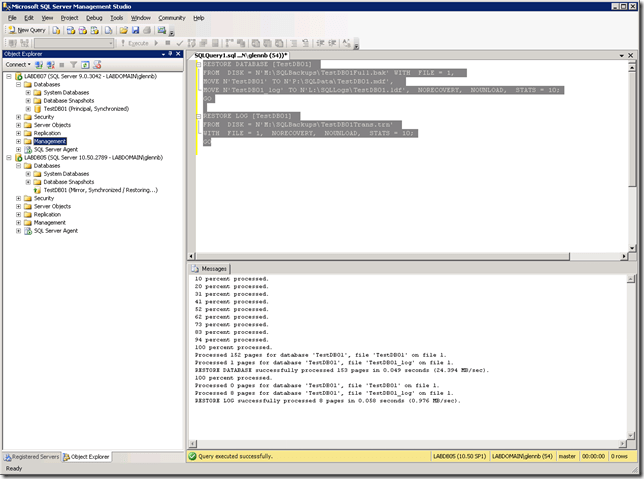
 

clip_image001

Figure 1: Mirroring From SQL Server 2005 SP2 to SQL Server 2008 R2 SP1 CU3

I guess the moral of this story is the value of a test lab to validate things like this before you are forced to try them in a Production environment. Having a few physical machines available rather than just a collection of VMs is also useful in some situations.

Posted in Microsoft, SQL Server 2005, SQL Server 2008 R2, Windows Server 2008 R2 | Tagged | 9 Comments

Scaling SQL Server Presentation from SQLSaturday #104 Precon

On Friday, January 6, 2012, I got the opportunity to present an expanded version of my “Scaling SQL Server” presentation down in Colorado Springs. I think it went pretty well, and I got some nice feedback from the attendees. Being in a smaller room gives you a much better opportunity to interact with more people, which is always fun. Whether you attended my session or not, you can download the deck here.

Posted in PASS, Processors, SQL Server 2008, SQL Server 2008 R2, SQL Server 2012 | Tagged | 2 Comments

New TPC-E Benchmark for HP DL385 G7

Somewhat unnoticed during the holiday season, HP has submitted a new TPC-E benchmark for the DL385 G7 two socket database server, equipped with two 32nm 2.6GHz AMD Opteron 6282SE processors. This system, with 256GB of RAM and 84 spindles (in two Violin Memory Systems V3205 Flash Memory arrays), comes in with a 1,232.84 TpsE score.

This score is roughly comparable to an older score of 1284.14 TpsE for an HP DL380 G7 two socket database server, equipped with two 32nm 3.46GHz Intel Xeon X5690 processors, 192GB of RAM, and 84 spindles.

The AMD Opteron 6282SE has 16 physical cores, so that a two socket system will have 32 physical cores. The Intel Xeon X5690 has six physical cores (plus hyper-threading), so a two socket system will have 12 physical cores or 24 logical cores with hyper-threading enabled.

This is very grim news for AMD with the upcoming core-based licensing in SQL Server 2012 Enterprise Edition, which would make the SQL Server 2012 core licenses for the DL385 G7 system cost 2.66 times as much as for the DL380 G7 system. That will be a pretty hard sell to justify that much extra in licensing costs, for no extra performance or scalability.

Posted in Microsoft, SQL Server 2008 R2, Windows Server 2008 R2 | Tagged , | 4 Comments

SQL Server 2008 Diagnostic Information Queries (December 2011)

Here is a fresh set of diagnostic information queries for SQL Server 2008 and 2008 R2 for December 2011. Some of the queries (which are labeled) will only work with SQL Server 2008 R2 Service Pack 1 or later. Most of the queries will also work with SQL Server 2012, but a few will not because Microsoft made some breaking changes to several DMVs between SQL Server 2008 and SQL Server 2012. If you have SQL Server 2012, you would be better off using the matching version of these queries meant for SQL Server 2012.

You will need VIEW SERVER STATE permission to run most of these queries. I recommend that you run each query separately, after reading the instructions and comments. One new feature is links to the Microsoft KB articles that list the builds for each branch of SQL Server 2008 and SQL Server 2008 R2.

I always like to hear your comments and suggestions about these queries.

Posted in SQL Server 2008, SQL Server 2008 R2 | Tagged , | 3 Comments