esign-003-2025
Product: Scrive eSign
Published: 2025-12-31
Change: End of Life
Environment: All
Type: Mandatory, action required
Enforced as of: 2026-02-01 – 2026-06-30
Description
The implemented signing solution Swisscom QES is reaching its end of life and the onboarding methods Video Identification and SRS (Smart Registration Services) will become obsolete.
]]>esign-003-2025
Product: Scrive eSign
Published: 2025-12-31
Change: End of Life
Environment: All
Type: Mandatory, action required
Enforced as of: 2026-02-01 – 2026-06-30
Description
The implemented signing solution Swisscom QES is reaching its end of life and the onboarding methods Video Identification and SRS (Smart Registration Services) will become obsolete.
Therefore, users of the authentication to sign method Swisscom QES must transition to another authentication method. We will introduce Scrive QES Global as an optional replacement.
This affects all processes that are making use of Swisscom QES for authentication to sign in our eSign platform (API, Online, GO, Flow, Integrations, Forms).
Impact
If you are using Swisscom QES in your signing processes, you must replace it with another authentication method. This applies to new processes as well as to existing templates and drafts.
Failure to do so will disrupt all new documents, drafts, and templates from 30 April 2026 and all pending documents after 30 June 2026 on.
Changes
The options for signing (authentication_method_to_sign) with Swisscom QES, i.e. swisscom_qes and swisscom_qes_with_srs will become obsolete. We recommend switching to Scrive QES Global, i.e. scrive_qes_global.
Recommendation
You are required to adapt your processes that utilise swisscom_qes or swisscom_qes_with_srs as an authentication_method_to_sign.
New document processes
Switch to another authentication method for signing. We recommend Scrive QES Global which will be available for all eSign accounts as of 2 February 2026.
You can do this by changing the parameter authentication_method_to_sign to scrive_qes_global.
Update templates and drafts
If you want to use Scrive QES Global, update the parameter authentication_method_to_sign and replace any occurrence of swisscom_qes and swisscom_qes_srs with scrive_qes_global.
Be aware that the function to select registration methods for Swisscom QES (registration_methods) will be sequentially removed.
As of 28 February 2026, it will no longer be possible to start processes with the registration method VideoIdent.
As of 30 April 2026, it will no longer be possible to start processes with the registration methods RoboIdent and InPerson.
Complete remaining pending documents
Pending documents that have been started with the registration method VideoIdent can still be signed until 31 March 2026.
Pending documents that have been started with the registration method RoboIdent can still be signed until 30 June 2026.
After 30 June 2026, any remaining pending documents using obsolete methods will stop working. This can then only be mitigated by withdrawing the process and starting it as a new process with another authentication method for signing like scrive_qes_global.
Already signed documents remain unaffected.
Contact
If you have any further questions, feel free to reach out to Scrive Tech Support by emailing [email protected] referring to esign-003-2025.
]]>On November 17th, we will be moving our DMARC policy to p=reject.
In simple terms, what does this mean?
This change makes it much, much harder for spammers and scammers
]]>On November 17th, we will be moving our DMARC policy to p=reject.
In simple terms, what does this mean?
This change makes it much, much harder for spammers and scammers to impersonate our email address (@scrive.com).
DMARC is an email security standard. Our new "reject" policy tells receiving email servers (like Gmail, Outlook, etc.) to completely block any email that claims to be from us but fails strict authentication checks.
This means fraudulent messages—like phishing attempts or fake invoices—won't just go to your spam folder; they'll be rejected outright.
What do you need to do?
For the vast majority of you, the answer is: nothing! This is a behind-the-scenes change designed to protect you. We have been monitoring our email traffic for months to ensure all our legitimate messages are properly authenticated, and we don't anticipate any disruption.
However, if you or your teams suddenly have trouble receiving expected emails from us, please reach out to our support team immediately.
A note on automatic email forwarding
This new, stricter policy can sometimes affect automated forwarding rules.
If you have set up a rule to automatically forward emails from @scrive.com to another email address (like a personal Gmail account or a different ticketing system), you may need to check your configuration.
Why? When an email is forwarded, it can sometimes fail the new, stricter security checks, causing the final recipient to reject it.
What to do:
- If you use a major, modern email provider (like Google Workspace or Microsoft 365), this is almost always handled correctly for you.
- If you manage your own email server or use an older forwarding system, please ensure it is configured to handle forwarded mail correctly for DMARC.
esign-002-2025
Product: Scrive eSign
Published: 2025-10-27
Edited: 2025-11-19, 2025-11-24, 2025-12-01, 2025-12-03, 2026-01-09, 2026-02-25
Environment: All
Change type: Mandatory, action required
Enforced as of: 2026-01-19 (new documents) 2026-04-01 (remaining pending documents)
Description
Norwegian BankID is upgrading their signing solution from Norwegian BankID to Norwegian BankID QES. This has an impact
]]>esign-002-2025
Product: Scrive eSign
Published: 2025-10-27
Edited: 2025-11-19, 2025-11-24, 2025-12-01, 2025-12-03, 2026-01-09, 2026-02-25
Environment: All
Change type: Mandatory, action required
Enforced as of: 2026-01-19 (new documents) 2026-04-01 (remaining pending documents)
Description
Norwegian BankID is upgrading their signing solution from Norwegian BankID to Norwegian BankID QES. This has an impact on Scrive eSign and you are required to update the signing method on your eSign processes from Norwegian BankID to Norwegian BankID QES.
It is mandatory and will be enforced for new documents, drafts, and templates from 19 January 2026 on and for all remaining pending documents from 1 April 2026 on. This applies to all Scrive eSign products (API, Online, GO, Flow, Forms, and Integrations).
This change does not affect Swedish BankID.
Impact
If you are currently using Norwegian BankID in your signing processes, you must switch to Norwegian BankID QES. This applies to all documents, irrespective of these being new, drafts, or existing templates.
Failure to do so will disrupt all new documents, new drafts as well as new templates from 19 January 2026 on, and all pending documents from 1 April 2026 on.
Changes
The existing option for signing with Norwegian BankID will become obsolete and is replaced with Norwegian BankID QES. Consequently, the authentication_method_to_sign method no_bankid is replaced with no_bankid_qes. The method no_bankid_qes does not require a personal number and if it is added manually, it is not validated against Norwegian BankID data and cannot be used to verify the signatory.
The authentication method Norwegian BankID that is concerning the access to documents will remain available.
This means that no_bankid for both properties, authentication_method_to_view and authentication_method_to_view_archived are not affected by this change.
These can be combined with Norwegian BankID QES to sign the documents.
Standard restrictions for QES
Following standard restrictions for signing with a QES method apply:
- It is not possible to request or add attachments to a started signing process or after signing.
- Every signing_party to a document must use a QES method (cannot be mixed with options for SES/AES). Different QES methods can be mixed.
- Bundled one-click signing is not supported.
- Hiding a personal number on the verification page is only possible when signing with QES. For NO BankID QES only, this limitation will be temporarily removed. However, when combining this possibility to hide the personal number with other QES providers, it will not be possible to start a document with such a conflicting setting.
- Text fields have a fixed width during signing. All text is saved, but long text may appear cut off in the final document. It is therefore important to adapt the field width accordingly so that sufficient space is available when creating new processes. It is also recommended to review existing templates.
- A viewer cannot have any fields placed on the document if a signing_party uses a QES method.
- The field type SignatoryFieldSignDate is not supported on documents that are to be signed with a QES method.
- Sharable Links are not supported in combination with a QES method. You can continue to use Sharable Links by choosing a non-QES method or transition to one of our forms solutions.
- The parameter can_forward is not supported when a document is signed with QES.
- The functionality allows_highlighting can be used during signing but is limited. Highlighted sections will not be added to the sealed document.
Recommendation
The changes described above require your action when Norwegian BankID is used as a signing method on your processes.
The possibility for you to update the settings on your processes will be available to all API users from 8 December 2025 on.
You need to use Norwegian BankID QES going forward. Substitute no_bankid with no_bankid_qes for the property authentication_method_to_sign.
Failure to do so will stop your new processes from 19 January 2026 on.
The need to update this property is not limited to new processes that you start, you also need to update existing templates and drafts.
Beware that already pending documents that do not use Norwegian BankID QES will stop working from 1 April 2026 on. Such processes need to be completed before this deadline.
Already signed documents remain unaffected by this change.
Contact
You can find more information on these changes here.
If you have any further questions, feel free to reach out to Scrive Tech Support by emailing [email protected] referring to esign-002-2025.
]]>We are very proud to contribute our time to Servant, which is one of the finest pieces of software for industrial users of Haskell.
MultiVerb
Servant v0.20.3.0 brings the new MultiVerb type to better express complex API routes.
The inclusion of MultiVerb in the servant code base is the product of a collaboration between Scrive and Wire.
This was a great opportunity for two actors of different industry to combine their strength and make battle-tested solutions available to the public.
This is hopefully only the beginning of more partnerships with Wire, whose open-source code base demonstrates the power of Haskell in production.
Opaque route types
The problem with the traditional way of declaring a route, using the type Verb, is that we can only represent one status code and one HTTP method:
data Verb (method :: k1)
          (statusCode :: Nat)
          (contentTypes :: [Type])
          (a :: Type)
Which means that endpoint definitions using Verb can only represent the happy path of an endpoint. Failures must be expressed out-of-band, by throwing unchecked exceptions.
Ironically, this goes against what we are used to when working with Servant: Getting as much useful information as possible from the route types. Moreover, generated documentation – like OpenAPI specifications – from these types will miss the very real endpoint responses.
Union Verb, or UVerb
Servant already has a mechanism called UVerb, with the U standing for Union.
However, this mechanism suffers from several disadvantages, the most important being that there is a fundamental incompatibilty between Verb and UVerb,
which forces users into using servant-specific functions in their handlers.
For instance, let us consider a route for handling sign-ins:
type CreateSession =
  "new"
    :> ReqBody '[FormUrlEncoded] LoginForm
    :> UVerb 'POST '[HTML] CreateSessionResponses

type CreateSessionResponses =
  '[ -- Failure, send login page back
     WithStatus 403 (Html ())
   , -- Success, redirected to home page
     WithStatus 301 (Headers '[Header "Location" Text, Header "Set-Cookie" SetCookie] NoContent)
   ]
This route declaration reads as
In the
/newpath, we expect a POST request with a body (LoginForm). If the authentication fails we reply with status 403 and HTML. If the authentication is successful we reply with a 301 and redirect to another page while also giving the user a cookie to keep them connected.
And the handler will look something like:
createSessionHandler
  :: LoginForm
  -> m (Union CreateSessionResponses)
createSessionHandler LoginForm{email, password} = do
  mUser <- Query.getUserByEmail email
  case mUser of
    Nothing ->
      respond $ WithStatus @403 $ render Sessions.newSession
    Just user ->
      if Sel.verifyText user.password password
        then do
          sessionId <- persistSession session.sessionId user.userId
          let cookie = craftSessionCookie sessionId True
          respond $ WithStatus @301 $ redirectWithCookie "/" cookie
        else do
          respond $ WithStatus @403 $ render Sessions.newSession

redirectWithCookie
    :: Text
    -> SetCookie
    -> Headers '[Header "Location" Text, Header "Set-Cookie" SetCookie]
               NoContent
redirectWithCookie destination cookie =
  addHeader destination (addHeader cookie NoContent)
UVerb's list of HTTP responses is used both for the type signatures of the route handlers, and as the return values within the handlers.
We see that the WithStatus construct is indeed reflected in the handler and we have to disambiguate the status code as a Type Application, which is rather redundant and prone to error.
A function like redirectWithCookie is also needed in order to bring HTTP response concerns in the code of the handler, which is quite invasive.
Better ergonomics with MultiVerb
In contrast, here is the equivalent route declaration with MultiVerb:
type CreateSessionResponses =
  '[ -- Failure, send login page back
     Respond 403 "Authentication failed" (Html ())
   , -- Success, redirected to home page
     WithHeaders
       '[Header "Location" Text, Header "Set-Cookie" SetCookie]
       (Text, SetCookie)
       (RespondEmpty 301 "Authentication succeeded")
   ]
We have here a type-level list of HTTP responses, with details about the status code and the headers.
These details do not leak into the handler, because we define the values that the handler will return:
data CreateSessionResult
  = AuthenticationFailure (Html ())
  | AuthenticationSuccess (Text, SetCookie)
  deriving stock (Generic)
  deriving
    (AsUnion CreateSessionResponses)
    via GenericAsUnion CreateSessionResponses CreateSessionResult
This is a simple sum type, which we bind to the route responses to ensure consistency. Each member of this union holds a return type that will get serialised on the network: No need for status codes.
Finally, we declare the endpoint as such:
type CreateSession =
  "new"
    :> ReqBody '[FormUrlEncoded] LoginForm
    :> MultiVerb
         'POST
         '[HTML]
         CreateSessionResponses
         CreateSessionResult
And the handler will look as such:
createSessionHandler
  :: LoginForm
  -> m CreateSessionResult
createSessionHandler LoginForm{email, password} = do
  mUser <- Query.getUserByEmail email
  case mUser of
    Nothing -> do
      body <- render Sessions.newSession
      pure $ AuthenticationFailure body
    Just user ->
      if Sel.verifyText user.password password
        then do
          sessionId <- persistSession session.sessionId user.userId
          let sessionCookie = craftSessionCookie sessionId True
          pure $ AuthenticationSuccess ("/", sessionCookie)
        else do
          body <- render templateEnv Sessions.newSession
          pure $ AuthenticationFailure body
We are now using good old pure without having to use type applications, which makes the code much more readable and lets us focus on the important things
This is a good step forward for more expressive and ergonomic endpoint types within Servant, which has always been at the forefront of innovation when
it comes to using type-level programming to bring safety and generated documentation to web development.
Servant.API.Range - Bounded Type-Level Values
Another powerful feature in Servant 0.20.3.0 is the extended use of the Range type, which can enforce compile-time bounds on numeric values.
Strongly-Typed Bounded Values
Flavio Corpa worked on the Range type, that allows you to define values that must fall within specific bounds at the type level:
type MaxAttempts = Range 1 5
This declares a type that can only contain integers between 1 and 5 (inclusive). If you try to construct a value outside these bounds, you'll get a compile-time error.
Usage in API Definitions
This is particularly useful for API parameters that have logical constraints:
type API =
  "limited-query"
    :> QueryParam "attempts" MaxAttempts
    :> Get '[JSON] Response
By using Range, we ensure that handlers only ever receive valid values, eliminating an entire class of runtime checks and potential errors.
Implementation Example
Here's how you might use this in a handler:
handler :: Maybe MaxAttempts -> Handler Response
handler Nothing = -- Default case, perhaps using 3 attempts
  performOperation (fromJust $ mkRange @1 @5 3)
handler (Just attempts) = -- We know attempts is between 1-5
  performOperation attempts

performOperation :: MaxAttempts -> Handler Response
performOperation attempts = do
  -- We can safely use the value knowing it's within bounds
  let attemptCount = unRange attempts
  -- ... rest of implementation
The mkRange smart constructor returns a Maybe that's only Nothing if the value is out of bounds.
Benefits of Type-Level Constraints
Using Range for bounded values provides several advantages:
- Compile-time safety: Invalid values are caught early in the development cycle
- Self-documenting code: The constraints are visible in the type signature
- Elimination of validation boilerplate: No need for runtime checks in handler code
- Clear API contracts: Users of your API know exactly what values are acceptable
Combined with the other features like MultiVerb, Servant continues to leverage Haskell's type system to provide safe, expressive, and robust APIs.
]]>esign-001-2025
Product: Scrive eSign
Published: 2025-01-25
Change: Stricter validations for processes using QES
Environment: All
Type: Mandatory, action necessary
Enforced as of: 2025-01-30
Description
Stricter validation rules will apply to Scrive eSign processes using Qualified Electronic Signature (QES) methods, ensuring a more secure signing experience.
The changes are mandatory
]]>esign-001-2025
Product: Scrive eSign
Published: 2025-01-25
Change: Stricter validations for processes using QES
Environment: All
Type: Mandatory, action necessary
Enforced as of: 2025-01-30
Description
Stricter validation rules will apply to Scrive eSign processes using Qualified Electronic Signature (QES) methods, ensuring a more secure signing experience.
The changes are mandatory and will be enforced starting 30 January 2025.
Impact
If you are using QES methods in your Scrive eSign processes, you must comply with the new validation rules. This applies both when creating new processes and when using existing templates.
Failure to do so will disrupt your processes as of 30 January 2025.
Changes
A new option to add fields to the document will be introduced. It will be available for the following QES methods: swisscom_qes, swisscom_qes_with_srs, itsme_qes, and smart_id_qes.
Field placement will be disabled in specific cases:
- For the method verimi_qes
- Parties with signatory_role set to viewer when another party signs with a QES method
- The field type SignatoryFieldSignDate
Additionally, restrictions will apply for using hide_personal_number:
- The option to hide the personal number from the evidence log and verification page will be disabled when when signing with a QES method.
- It will not be possible to start the signing process for such a document in preparation.
Recommendation
These changes require action from all Scrive eSign users creating processes with QES methods for authentication to sign.
We recommend the following steps:
Review and update your processes
Check all processes where authentication to sign is set to verimi_qes and ensure no fields are placed.
Additionally, confirm that no fields are placed for parties with the signatory_role set to viewer or the field type SignatoryFieldSignDate when a QES method is used for authentication to sign.
Switch to an alternative configuration for the hide_personal_number setting
As stated, the option to hide the personal number from the evidence log and verification page will be disabled when using a QES method for signing.
Instead, you can enable the 'Hide personal number from verification page' option when preparing your document.
To apply this, please contact us so we can adjust your account settings.
You can also learn more about this functionality in our Help center.
Contact
If you have any further question, feel free to reach out to Scrive Tech Support by emailing [email protected] referring to esign-001-2025.
]]>
This article describes a pattern made possible by recent advances in GHC 9.8, to allow library authors to control how internal data constructors can be labelled as unsafe for human consumption, while needing to be exported for test suites.
Making invalid states unrepresentable
One of the mantras of strongly-typed
]]>This article describes a pattern made possible by recent advances in GHC 9.8, to allow library authors to control how internal data constructors can be labelled as unsafe for human consumption, while needing to be exported for test suites.
Making invalid states unrepresentable
One of the mantras of strongly-typed functional programming is "Make invalid states unrepresentable" by construction. This leads to a variety of precautions from the author of libraries, and especially avoiding the export of the "raw" constructor of a data type, in favour of exporting a "smart constructor" that can check pre-conditions in order to return (or not) a value of a certain type.
For instance, a strictly positive type (to hold integers greater than 0) could be internally defined as such:
data Positive = MkPositive WordThe underlying type is Word, that can be of value 0 or greater. That being said we still want to forbid the value 0. We will then hide the data constructor, and only expose a “smart constructor” for our API users.
The smart constructor will be a function like this:
mkPositive :: Word -> Maybe Positive
mkPositive number =
  case number of
    0 -> Nothing
    n -> Just (MkPositive n)
However, in more complex cases, the internals of data types are still needed for writing test cases, and in the case of property testing with QuickCheck, writing instances of the Arbitrary type class.
Let's say we have a type, and while our smart constructors are tested elsewhere, we need to run some checks on the internals themselves.
We have defined this type in our library:
data MyType
  = Constructor1 {…}
  | Constructor2 {…}
  deriving stock (Eq, Ord, Show)
And in our test suite, we have to implement the instance of Arbitrary:
instance Arbitrary MyType where
  arbitrary =
    oneof
      [ Constructor1 <$> arbitrary
      , Constructor2 <$> arbitrary
      ]
Thus the fundamental tension between hiding unsafe ways of constructing a data type, and needing the internal representation for testing.
There have been ways to inform the user of a library that their import is discouraged. Some of them are:
- A section of the exports dedicated to "internal use" entities
- A
DEPRECATEDpragma (SeecreatePoolwithin theresource-poolpackage) - Having the fully-exported data type in an “Internal” module, not meant for general consumption, and a "Public" module will re-export the type only.
However, the first one cannot be readily checked by tooling, and the second is absolutely not granular, because by suppressing the deprecation warning in the module where we import the deprecated entity, we also mute every other deprecation warning from other imported modules.
One method is granular but cannot benefit from automation, and the other benefits from compile-time checks but lacks granularity.
The third option brings two more issues to the table: The age-old debate on the adherence to Haskell's Package Versioning Policy (PVP) by internal modules, and a more recent problem: Our code editor might automatically import such an internal module if we use a declaration from it, when using the Haskell Language Server (HLS).
Since we have no way of decreasing or increasing the preferred origin of a entity for HLS, there are no ways of deprioritise a module's re-exports in favour of another one.
Custom warning categories
Fortunately, GHC 9.8 brings Proposal 541 (WARNING pragmas with categories) so that warnings can be associated to user-defined categories.
The syntax is the following:
{-# WARNING in "x-my-custom-category" <entity-name> "User-facing message" #-}The in keyword makes the warning belong to a user-defined category, whose name has to start with x-, as it is an extension point that GHC knows about.
(Check out the documentation, you'd be surprised about the amount of things you can label with WARNING pragmas)
Let us now write some code. This is our data type:
module MyLib
  ( SuperType(..)
  ) where

data SuperType = MkSuperType
  { a :: Int
  , b :: Bool
  }
  deriving stock (Eq, Ord, Show)
and this is the test module that imports the type:
module Main (main) where

import MyLib

main :: IO ()
main = do
  let st = MkSuperType 2 False
  print st
To classify its constructor (MkSuperType) as "exported for tests only", let's write this pragma next to the definition:
{-# WARNING in "x-unsafe-internals" MkSuperType
    "This record's constructor is exported for tests only" #-}
And while we will not see a warning when using the constructor in the module in which it was defined, using it in the test module will show us this:
  test/Main.hs:9:12: warning: [GHC-63394] [-Wx-unsafe-internals]
      In the use of data constructor ‘MkSuperType’ (imported from MyLib):
      "This record's constructor is exported for tests only"
    |
  9 |   let st = MkSuperType 2 False
    |            ^^^^^^^^^^^
As we can see, the category we have defined is understood by the compiler, and we can ignore this flag in our test modules.
My type and constructor have the same name!
Notice that SuperType's constructor is named MkSuperType. This is fundamental, because according to the documentation of warning pragmas:
A capitalised name, such as T refers to either the type constructor T or the data constructor T, or both if both are in scope. If both are in scope, there is currently no way to specify one without the other […].
Calling the value the same as the type is called "punning". We can encounter it in other contexts, like with records which enables us to write the name of the field and expose a binding of the same name in the scope for it to automatically be picked.
First of all, it's okay. Haskell is still not a fully dependently-typed language yet, and so we can still give the same name to entities that live at the type and value levels, because they will not clash… usually.
But there is a trick. The ExplicitNamespaces extension provides the type and data keywords, allowing us to distinguish precisely between the type and its data constructor in the import list of a module, and in a WARNING pragma.
Let's get back to our code, where we instead define a record whose constructor has the same name as the data type:
data DataType = DataType
  { a :: Int
  , b :: Bool
  }
  deriving stock (Eq, Ord, Show)

{-# WARNING in "x-unsafe-internals" data DataType
    "This record's constructor is exported for tests only" #-}
Do note that the data keyword is now present in the WARNING pragma, to disambiguate the subject of the warning.
and here we import and use the data constructor:
module MyLib
  ( DataType (..)
  ) where
and using it in our test module will raise the same warning:
test/Main.hs:7:12: warning: [GHC-63394] [-Wx-unsafe-internals]
    In the use of data constructor ‘DataType’ (imported from MyLib):
    "This record's constructor is exported for tests only"
  |
7 |   let dt = DataType 3 True
  |            ^^^^^^^^
Then, we will of course suppress this warning by setting the -Wno-x-unsafe-internals option in the consumer module, like this:
{-# OPTIONS_GHC -Wno-x-unsafe-internals #-}
module Main (main) where

import MyLib
[…]
And here we go.
I want to thank the GHC team and the people who have contributed to the powerful and rich system of warning pragmas over the years, as they allow for a level of precision and granularity that is very helpful in the day-to-day practice of Haskell programming.
]]>esign-003-2024
Product: Scrive eSign API
Change: URL parameters are obsolete
Environment: All
Type: Mandatory, action necessary
Enforced as of: 2024-10-01
Description
The Scrive eSign API supported URL parameters. This feature will be obsolete as of 1 October 2024. It is then no longer possible to use URL parameters with
]]>esign-003-2024
Product: Scrive eSign API
Change: URL parameters are obsolete
Environment: All
Type: Mandatory, action necessary
Enforced as of: 2024-10-01
Description
The Scrive eSign API supported URL parameters. This feature will be obsolete as of 1 October 2024. It is then no longer possible to use URL parameters with the API.
This feature is removed to enhance security as well as to follow best practices and industry standards.
Additionally, utilising the body of a request instead of URL parameters comes with benefits making it more suitable for handling larger and more complex data.
Impact
If you are using the Scrive eSign API with URL parameters, you must not do so. Due to being obsolete, API requests will stop working from 1 October 2024.
Recommendation
If you are still supplying data in URL parameters today, for example like:
$ curl --location --request POST \
'https://scrive.com/api/v2/getpersonaltoken?email=youremail%40example.org&password=yourpassword'
You will need to update these requests so that data is sent via normal form parameters.
$ curl --location 'https://scrive.com/api/v2/getpersonaltoken' \
--form 'email="[email protected]"' \
--form 'password="yourpassword"'
This ensures that passwords and other sensitive data are not logged in plain text as a part of the URL.
Contact
If you have any further questions, feel free to reach out to Scrive Tech Support by writing an email to [email protected] referring to esign-003-2024.
]]>esign-001-2024
Product: Scrive eSign Online
Change: Option to use iframes is obsolete
Environment: All
Type: Mandatory, action necessary
Enforced as of: 2024-04-09
Description
The possibility to use iframes will become obsolete due to it being vulnerable to Cross-site scripting (XSS), clickjacking as well as due to privacy concerns.
Impact
]]>esign-001-2024
Product: Scrive eSign Online
Change: Option to use iframes is obsolete
Environment: All
Type: Mandatory, action necessary
Enforced as of: 2024-04-09
Description
The possibility to use iframes will become obsolete due to it being vulnerable to Cross-site scripting (XSS), clickjacking as well as due to privacy concerns.
Impact
If you are using iframes when using eSign Online within your own integration, you cannot do so after 9 April 2024.
You must adapt your integration.
Recommendation
Instead of using iframes, you can either
- refer to the respective URL, i.e. https://scrive.com/[...] directly, or
- set up your integration in a way so that the URL is opened in a new window.
Contact
If you have any further questions, feel free to reach out to Scrive Tech Support by writing an email to [email protected] referring to esign-001-2024.
]]>go-001-2024
Product: Scrive eSign GO
Change: Discontinuing support for Internet Explorer 11
Type: Mandatory, user action necessary
Enforced as of: 2024-02-01
Description
The browser Internet Explorer 11 has been fully discontinued by Microsoft in June 2022.
Due to this, as of 1 February 2024, eSign GO cannot be
]]>go-001-2024
Product: Scrive eSign GO
Change: Discontinuing support for Internet Explorer 11
Type: Mandatory, user action necessary
Enforced as of: 2024-02-01
Description
The browser Internet Explorer 11 has been fully discontinued by Microsoft in June 2022.
Due to this, as of 1 February 2024, eSign GO cannot be used with Internet Explorer 11.
You must switch to either Microsoft Edge or Google Chrome before this date in order to use the eSign GO browser extension.
Recommendation
In this example, we assume that you want to use eSign GO with Microsoft Edge.
Using eSign GO with your Browser
- Follow the steps described in our Help Center to setup the browser extension.
- Next time when you start a signing process, open Microsoft Edge instead of Internet Explorer.
Starting a signing process via another tool
When you start a signing process via another tool and your default browser is set to Internet Explorer, you need to change this setting.
- Start Microsoft Edge,
- Click on the three dots in the upper right corner to open a menu with different options,
- Select “Settings”,
- In the new window click on “Default Browser” and then on the button “Make Default”,
- Follow the instructions of your Operating System to finalise the change.
Contact
If you have any further questions, feel free to reach out to Scrive Tech Support by writing an email to [email protected] referring to go-001-2024.
]]>esign-002-2024
Product: Scrive eSign
Change: Disabling unsafe OpenSSL legacy renegotiation
Environment: All
Type: Mandatory, action necessary
Enforced as of: 2024-05-02
Description
The TLS protocol as it is implemented for example by Microsoft, as well as the SSL protocol 3.0 and possibly earlier versions, have been found to be
]]>esign-002-2024
Product: Scrive eSign
Change: Disabling unsafe OpenSSL legacy renegotiation
Environment: All
Type: Mandatory, action necessary
Enforced as of: 2024-05-02
Description
The TLS protocol as it is implemented for example by Microsoft, as well as the SSL protocol 3.0 and possibly earlier versions, have been found to be vulnerable to man-in-the-middle attacks, see CVE-2009-3555.
As a result, these protocols will be disabled in Scrive eSign as of 2 May 2024.
Impact
If you have an integration with Scrive eSign. You need to review and if necessary adapt your integration.
Recommendation
- Identify any used HTTP clients that are connected to Scrive eSign.
- Assess the capabilities of the HTTP clients used. You can do this also by making sure that these can connect reliably to our api-testbed environment where the new limitations on the TLS handshake are already in force.
Contact
If you have any further questions, feel free to reach out to Scrive Tech Support by writing an email to [email protected] referring to esign-002-2024.
]]>
The content of this article has been adapted from internal Scrive documentation, initially authored by Tom Feron.
Rollout Flags
Rollout flags are a software component used to control the progressive activation of new code paths throughout a system, at runtime. They are designed in a way that allows for partial activation over the population of users (or user groups) in the system.
The main advantage is avoiding the risk of breaking the system and the users' workflows when a new release exposes a new code path to all users.
What Rollout Flags are not
Given the nature of rollout flags, it would be easy to misuse them for feature (de)activation; that's not what they are meant for. For this use case we have Feature flags.
Whilst they work very similarly on a technical level, by enabling code paths according to the activation status of a flag, rollout flags are not intended to persist in time. This is a major difference, because the users of a system may have a feature flag enabled due to an agreement with the service provider (by upgrading to a paid plan, for instance).
Rollout flags must have an expiration date, as we intend to end up with the new code either fully deployed, or not. The in-between that rollout flags allow is helpful to monitor the system's reaction to the new code paths enabled in select parts, but the progressive deployment of a code path should indeed aim for total deployment — be it in the code's current form or a later one — as we can refine the code based on our system's observability.
But to every rule there are exceptions, and in some cases rollout flags can stay around indefinitely. The most common example would be when the removal of the rollout flag depends on a customer fixing their integration with the system.
Some heuristics
Here are a few situations that are appropriate for the use of rollout flags:
- Is the feature (or code path) likely to break something in production?
- Rewrite/optimisation of complex code and SQL queries. They may have been tested, but test data and real-world data tend to be fairly different.
- You need to alter an endpoint behaviour.
- You have to introduce new validations/checks that were missing, but are critical for the proper function of your software.
There are sometimes a few customers that manage to misuse this and you would break their integrations, so you want to be able to disable the new checks for the few affected customers, while they work on the fix. The rollout flag in this case may actually be quite long-lived.
- You have to introduce new validations/checks that were missing, but are critical for the proper function of your software.
- You're introducing an experimental feature.
- This one is not a clear-cut, as it depends if the feature will be controlled by a Feature flag later.
If so, you may save yourself some work and use feature flag immediately, but for features that will be eventually rolled out to everyone, the rollout flag is a good choice.
- This one is not a clear-cut, as it depends if the feature will be controlled by a Feature flag later.
- You're updating or replacing an external tool.
- These kinds of changes always pose some risk of not working with data provided by some users (e.g. when they use some specific format or feature).
It's good to have the option to revert to the old tool for those users quickly, without needing to redeploy your software.
- These kinds of changes always pose some risk of not working with data provided by some users (e.g. when they use some specific format or feature).
Dealing with complexity over time
Rollout flags do increase complexity of the code, but it can be manageable if flags are used in a fairly isolated way. More than half of our rollout flags have only a single check in the code, most of them have less than 5 checks, because they have to be used in different components.
When adding a new rollout flag, do consider if other rollout flags can be removed.
Here is an example implementation of rollout flags.
Flags Metadata
We are going to start with a list of the flags:
data RolloutFlag
    = EnableEmailValildation
    | EnableWritingHandValidation
    | EnableBiscuitToken
    deriving stock (Eq, Ord, Show)
And we will define a record to store metadata about the flag:
data RolloutFlagInfo = RolloutFlagInfo
    { title :: Text
      -- ^ User friendly name to be displayed.
    , owner :: Text
      -- ^ Full name of developer who owns this flag.
    , defaultValue :: Bool
      -- ^ Enable/disable rollout flag by default.
      --   In most cases, the flag should start as disabled
    , description :: Text
      -- ^ Explanation of what it is supposed to do.
    }
    deriving stock (Eq, Ord, Show)
You can also add other fields like the link to a ticket in your tracking system.
Connecting Flags and their Information
Then, we establish the mapping between RolloutFlags and their corresponding RolloutFlagInfo:
rolloutFlagInfo :: RolloutFlag -> RolloutFlagInfo
rolloutFlagInfo = \case
  EnableEmailValildation -> RolloutFlagInfo
    { title        = "Enable email validation"
    , owner        = "Agnieszka Konstantinopoulos"
    , defaultValue = False
    , description  = "Email must contain '@'"
    }
As mentioned above, the default value for this rollout flag is False.
it is much better to enable it manually at a given time, especially if you need
someone from your SRE or Customer Support team to be warned beforehand.
Then, create a function that takes a RolloutFlag and gives you its value:
getRolloutFlag :: RolloutFlag -> m Bool(Usually, m would be IO, MonadIO, or your effect system's own monad)
Here is a sample use-case:
Let us take a code path that starts with someFunctionInTheCode. We wish to replace its behaviour for something different that may break some things in production.
What we can do is extract the old implementation into a function that would be called makeNewEmail, and implement the new code path as a function called parseEmail:
someFunctionInTheCode :: Text -> m (Maybe Email)
someFunctionInTheCode x = do
  rolloutFlag <- getRolloutFlag EnableEmailValildation
  case rolloutFlag of
    True -> parseEmail x
    False -> pure (Just (makeNewEmail x))
    ^ -- We used to unconditionally create new email addresses

parseEmail :: Text -> m (Maybe Text)
parseEmail x =
  -- New implementation

makeNewEmail :: Text -> Email
makeNewEmail x =
  -- Old implementation
The function someFunctionInTheCode handles the dispatching of the control flow according to the value of the flag.
Operating Rollout Flags
To preserve consistency, it is recommended that the rollout flag settings be stored in your main database, so that these settings are preserved across deployments and application reboots. To avoid needing people touch the database by hand, an interface should be created in your back-office (for administrators):
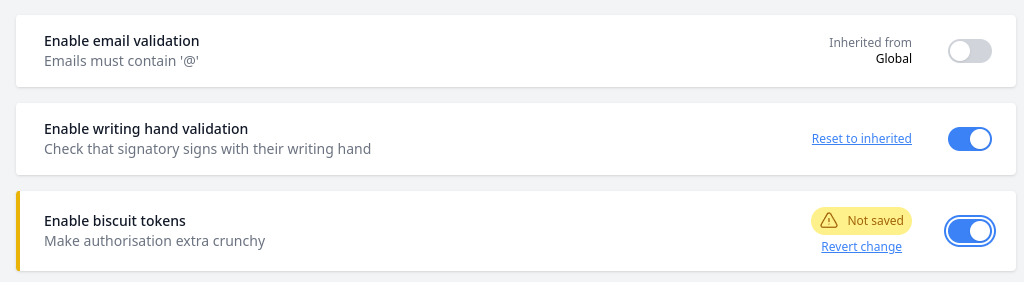
I hope this introduction can give you some ideas on how to implement rollout flags in your application!
]]>