CodeOwners

Maintaining the stability and code quality is an important tasks that helps ensures standards are met and reduce the likelihood bugs are introduced.

If you are using a version control tool like git, the CODEOWNERS feature is a great way to achieve this.

Here are some ways to use CODEOWNERS:

1. Code Owners arounds submodules or specific packages. Add team members who are experts on certain parts of an application or framework.

app
  - module1
  - module2

2. Code Owners around build and pipeline files. This is good if there is an expert on maven or an SRE who is maintaining the CD infrastructure files.

3. Code Owners around test packages. Having QA check the testcases during a pull request review will help improve and speed up the continuous delivery pipeline instead of leaving the test review til a later time.

For more information regarding CODEOWNERS and how to use it check out the guide on github: https://docs.github.com/en/github/creating-cloning-and-archiving-repositories/about-code-owners

Builder Design Pattern

When a class has many parameters, you run into several issues:
1. Unreadable. The constructor is long.
2. Parameters are not optional. If some parameters are optional then you would need to pass in a 0 or null. Another way is creating multiple constructors however that will become easily unmaintainable.

I will give an example in the context of trading systems. Imagine you need a class to store the details for a stock order. Here’s what a class would look like:

public class Order {

    private double quantity;

    private double price;

    private String stock;

    private String side;

    public Order(double quantity, double price, String stock, String side) {
        this.quantity = quantity;
        this.price = price;
        this.stock = stock;
        this.side = side;
    }

}

To instantiate the class, it would like this:

        Order order = new Order(100.0, 50.0, "GOOG", "BUY");

As you can see, it is hard to tell what if the 100.0 is the quantity or price since the types are the same. Furthermore, an order can contain over 20 values and the constructor will be come huge. Now, let’s take a look how the builder pattern can help.

Here’s an order builder class:

public class OrderBuilder {

    private double quantity;
    private double price;
    private String stock;
    private String side;

    public OrderBuilder quantity(double quantity) {
        this.quantity = quantity;
        return this;
    }

    public OrderBuilder price(double price) {
        this.price = price;
        return this;
    }

    public OrderBuilder stock(String stock) {
        this.stock = stock;
        return this;
    }

    public OrderBuilder side(String side) {
        this.side = side;
        return this;
    }

    public Order build() {
        return new Order(quantity, price, stock, side);
    }

}

Here’s code using the builder class:

OrderBuilder orderBuilder = new OrderBuilder().quantity(100).price(50.0).stock("GOOG");

Order order = orderBuilder.side("BUY").build();

From the code above, you can tell the meaning of the values and it is fluent to read. Additionally, you don’t need to build the Order right away. You can pass around the the order builder and keep setting the values then call build().

Resources

https://dzone.com/articles/design-patterns-the-builder-pattern

Tech Analogies: Buffers

If you live in a home, you receive mail. Your mailman delivers mail between a certain time, let’s say 9 AM to 12 PM. During that time, you are at work and can’t be home. So your mail main drops the mail into the mail box. When you come home at 4 PM, you pick up your mail from the mail box. That mail box is analogous to a buffer in computer science. If you did not have a mailbox, you would need to be home to pick it up so the buffer allows you to do other work and pick it up when you are ready.

Let’s say your best friend wants to send a 20 page essay to your home. However, the mail envelope can only fit 10 pages. So your friend has to send the essay in two envelopes (2 envelopes * 10 max size = 20 pages). That envelope size of 10 pages is known as the maximum transmission unit.

Your friend delivers the essay into two envelopes. At the same time, you decide to go on a one week vacation. During that time all your friends send a birthday card to your mail. Your mail man delivers the birthday cards every day until one day your mailbox is full and can no longer take any mail. What do you do? Should the mailman leave the mail on the floor, come back the next day or remove the old mail and throw it away? This is called a congestion strategy.

Java Performance Tip: For Loops

A for loop is used to iterate over sequence of elements.

There are a couple of ways to write a for loop in java:

  1. Traditional For Loop
for (int i = 0; i < nums.size(); i++) {
  System.out.println(nums.get(i) + 1);
}

2. Enhanced For Loop

for (Integer num: nums) {
  System.out.println(num + 1);
}

3. Streams

words.stream().forEach(num -> System.out.println(num + 1));

Doing a quick performance test using System.nanos:

        long start = System.nanoTime();
        // for loop code
        long end = System.nanoTime();
        System.out.println(end - start);

The results were: Option #1 = 3511729, Option #2 = 3701567, Option #3 = 3790359

Option 1 performed the best. Options 2 & 3 performed the worst and can be attributed to creating an iterator thereby generating garbage that will impact your gc time in addition to the unboxing of the integer.

Sometimes the simplest and the old fashion way of doing things is the way to go.

It is important to benchmark and profile your code to understand the bottlenecks. When doing performance improvements, attack the largest bottlenecks before doing micro optimizations. Additionally before looking at your java code, make sure your hardward is optimized to the fullest as that is usually the largest bottleneck. For one of our projects, we optimized the largest bottle necks until we reached the for loop optimization as one of the largest performance boost.

Resources:

Java Performance Tip: Use Primitives

Java has two types: primitives and objects. Primitives are predefined types such as byte, short, int, long, float, double, char and boolean. Objects are created by the User.

Primitives are stored on the stack. Objects are stored on the heap with the reference variable stored on the stack.

https://images.techhive.com/images/article/2014/05/primitives-100265868-medium.idge.png

When considering performance, use primitives when possible.

Performance Reasons

  • Accessing the stack is faster than accessing the heap. Here was jhm test looping through an array and comparing each element to the value of the last element.
https://www.baeldung.com/wp-content/uploads/2018/08/plot-benchmark-primitive-wrapper-3.gif
  • Primitives do not need garbage collection compared to objects. GC can pause your application thread thereby slowing your application.
  • Primitives use less memory than objects. For example the Object Boolean is 128 bits while the primitive boolean is 1 bit. Note the size depends on the jvm.

Here’s a test performed comparing double and Double used in a matrix creation code.

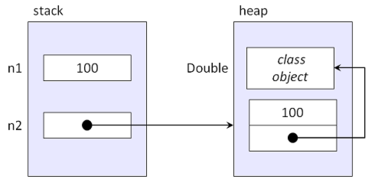
The author states: “I I would expect a single double such as n1 to occupy 8 bytes (64 bits), and I would expect a single Double such as n2 to occupy 24 bytes — 8 for the reference to the object, 8 for the double value stored in the object, and 8 for the reference to the class object for Double. Plus, Java uses extra memory to support garbage collection for objects types but not for primitive types.” which is validated by his experiment.

Table 1. Memory utilization of double versus Double

VersionTotal bytesBytes per entry
Using double8,380,7688.381
Using Double28,166,07228.166
https://www.infoworld.com/article/2150208/a-case-for-keeping-primitives-in-java.html

The author then performs a matrix multiplication and concluded using Double was 4 times slower than double.

Table 2. Runtime performance of double versus Double

VersionSeconds
Using double11.31
Using Double48.48
https://www.infoworld.com/article/2150208/a-case-for-keeping-primitives-in-java.html

Null Value
The default values for primitives are defined and there’s no concept of null. So your business logic needs a concept of not defined, consider using -1 or a number that’s not possible as meaning null.

References

https://www.geeksforgeeks.org/primitive-data-type-vs-object-data-type-in-java-with-examples/

https://www.baeldung.com/java-primitives-vs-objects

https://www.infoworld.com/article/2150208/a-case-for-keeping-primitives-in-java.html

https://www.drdobbs.com/jvm/a-modern-primitive-discussion/232601450

Linux: Cut Command

The cut utility cuts out selected portions of each line from files or standard input.

Given a file named file.csv with contents:

$ cat file.csv
sy,price
AAPL,305.5
IBM,116.99
GOOG,1373.06

MCD

Cut by byte position

Use the -b option to cut by bytes

$ echo 'hello world 100' | cut -b 1
h

$ echo 'hello world 100' | cut -b 1,7
hw

$ echo 'hello world 100' | cut -b 1-5
hello


$ echo 'hello world 100' | cut -b -3
hel

$ echo 'hello world 100' | cut -b 3-
llo world 100

Cut by character position

Use the -c option to cut by characters. This option is useful when a character takes up more than one byte such as ♥.

$ echo "♥" | cut -b 1


$ echo "♥" | cut -c 1

To avoid splitting multiple byte characters we can use the -n option.

$ echo "hi♥" | cut -b 1-4 -n
hi

Cut base on delimiter

The option -d cuts a file using delimiter, providing -f specifies the fields that should be cut.

$ cut -d ',' -f 1 file.csv
sy
AAPL
IBM
GOOG

MCD

$ cut -d ',' -f 1-2 file.csv
sy,price
AAPL,305.5
IBM,116.99
GOOG,1373.06

MCD

To skip lines with delimiters, use the -s option

$ cut -d ',' -f 1 -s file.csv
sy
AAPL
IBM
GOOG

Cut the complement

Use the option --complement to do the opposite of your cut command 


Examples commands used with cut

$ cut -d ',' -f 1 -s file.csv | sort
AAPL

GOOG
IBM
sy

$ ping google.com -o | grep time | cut -d ' ' -f 7
time=16.307


// get unique values after cutting
$ ping google.com -c 5 | grep time | cut -d ' ' -f 1 | uniq
64


Further Readings:
https://linux.die.net/man/1/cut
https://www.ubuntupit.com/simple-and-useful-linux-cut-command-in-unix/