TurboPING
Continue to app
Free Version
Publisher Description
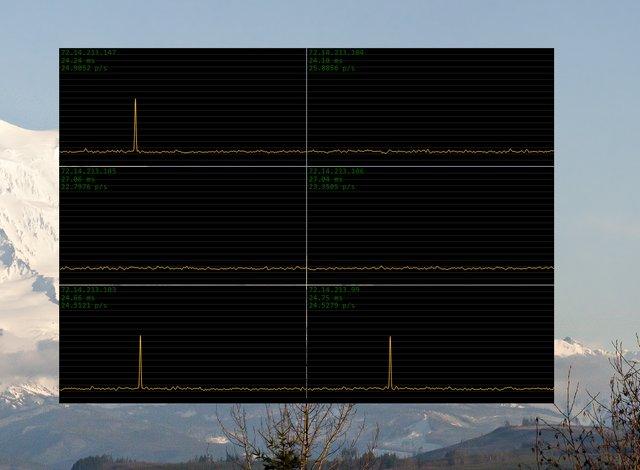


TurboPING is a utility I wrote to monitor, in real-time, a number of network connections. The minimum delay between pings can be set to one millisecond, in practice this means that you can continuously ping at a rate of about 60 pings per second.
Features- Enter the IP address or hostname to ping
- Set the delay in milliseconds between pings (1 ms - 10,000 ms)
- Set the number of pings displayed per pixel (in the screenshots you are looking at a resolution of 5 and 20 pings per pixel)
- Due to the high noise when pinging that fast (spikes are common), I applied a low-pass Gaussian filtering before drawing the graph
- Timeouts are visible as spikes
- The address, average ping time (calculated within viewable window) and number of pings per second (overall) are visible at all times
- The window is made to be always on top, at all times
- Clicking the window hides (and shows) the window frame, title bar and settings
- In minimal display mode, use the arrow keys to move the window 1 pixel, hold shift to move 10 pixels
About TurboPING
TurboPING is a free software published in the Other list of programs, part of System Utilities.
This program is available in English. It was last updated on 08 March, 2026. TurboPING is compatible with the following operating systems: Linux, Mac, Windows.
The company that develops TurboPING is staplerfahrer. The latest version released by its developer is 1.0 . This version was rated by 3 users of our site and has an average rating of 4.5.
The download we have available for TurboPING has a file size of 44.8 KB. Just click the green Download button above to start the downloading process. The program is listed on our website since 2011-03-02 and was downloaded 2,198 times. We have already checked if the download link is safe, however for your own protection we recommend that you scan the downloaded software with your antivirus. Your antivirus may detect the TurboPING as malware if the download link is broken.
How to install TurboPING on your Windows device:
This program is available in English. It was last updated on 08 March, 2026. TurboPING is compatible with the following operating systems: Linux, Mac, Windows.
The company that develops TurboPING is staplerfahrer. The latest version released by its developer is 1.0 . This version was rated by 3 users of our site and has an average rating of 4.5.
The download we have available for TurboPING has a file size of 44.8 KB. Just click the green Download button above to start the downloading process. The program is listed on our website since 2011-03-02 and was downloaded 2,198 times. We have already checked if the download link is safe, however for your own protection we recommend that you scan the downloaded software with your antivirus. Your antivirus may detect the TurboPING as malware if the download link is broken.
How to install TurboPING on your Windows device:
- Click on the Download button on our website. This will start the download from the website of the developer.
- Once the TurboPING is downloaded click on it to start the setup process (assuming you are on a desktop computer).
- When the installation is finished you should be able to see and run the program.
Program Details
System requirements
Operating systems
mac,windows,linux
Download information
File size
44.8 KB
Total downloads
2,198
Pricing
License model
Free
Price
Version History
Here you can find the changelog of TurboPING since it was posted on our website on 2015-04-28. The latest version is and it was updated on Soft112 on 08 March, 2026. See below the changes in each version:
version
posted on 2011-03-02
version Executable%20%28debug%20build%29
posted on 2011-03-02
Several fixes and updates