
Last updated on March 13, 2026
Google Cloud SQL Cheat Sheet
- A fully managed relational database service. Cloud SQL is available for:
- MySQL
- PostgreSQL
- SQL Server
Features
- Scale instantly with a single API call as your data grows.
- Automated and on-demand backups are available.
- You can restore your database instance to its state at an earlier point in time by enabling binary logging.
- Data replication between multiple zones with automatic failover.
- Enterprise and Enterprise Plus editions: Enterprise Plus offers higher performance (up to 4x faster reads for SQL Server), 99.99% availability SLA, and sub-second downtime maintenance (<10 seconds for MySQL/PostgreSQL).
- C4A instances: Built on Google Axion Processors for enhanced performance.
- Memory-optimized machines (SQL Server only): 1:32 core memory ratio for memory-intensive workloads.
- Gemini in Cloud SQL (Preview): AI-powered assistance for database operations including development, performance optimization, fleet management, governance, and migration.
- Database Center: Proactive fleet management with intelligent performance and security recommendations. Natural-language chat interface for troubleshooting and optimization.
- Firebase Data Connect: Build mobile and web apps with PostgreSQL backend, vector search, and Gemini AI for schema generation.
- Enhanced point-in-time recovery (PITR):
- Recover deleted instances using PITR with source instance deletion timestamp
- Restore unavailable instances in FAILED or MAINTENANCE state
- Backup vault support for enhanced backups
- You can perform an analytics job by using BigQuery to directly query your CloudSQL instance.

Editions
- Cloud SQL Enterprise:
- General purpose workloads
- 1-96 vCPUs, up to 624 GB memory
- 99.95% availability SLA
- <60 seconds planned downtime
- Cloud SQL Enterprise Plus:
- High-performance workloads
- Up to 128 vCPUs, up to 824 GB memory
- 99.99% availability SLA
- <10 seconds planned downtime (MySQL, PostgreSQL)
- 2x read/write performance (MySQL, PostgreSQL)
- Up to 4x better read performance (SQL Server)
- Memory-optimized machines: 1:32 core ratio (SQL Server only, up to 512 GB)
- Local SSD storage option
- Up to 35 days PITR log retention (included free)
Gemini in Cloud SQL (Preview)
- AI-powered assistance for:
- Database development and schema generation
- Performance optimization and troubleshooting
- Fleet management with Database Center
- Governance and security recommendations
- Natural-language chat interface for query resolution
- Migration assistance for stored procedures, triggers, and functions
Networking
- Can be easily connected to App Engine, Compute Engine, Google Kubernetes Engine, and your workstation.
Security
- Data is encrypted at rest and in transit and can be encrypted using customer-managed encryption keys.
- It supports private connectivity with Virtual Private Cloud.
- Every Cloud SQL instance includes a network firewall to allow you to publicly control network access to your database instances.
- Compliant with SSAE 16, ISO 27001, PCI DSS, and supports HIPAA compliance.
Pricing
Cloud SQL follows a pay-as-you-go model with per-second billing. Costs depend on:
- Compute:
- Enterprise edition: General purpose workloads with balanced performance
- Enterprise Plus edition: High-performance workloads with enhanced availability and faster maintenance
- C4A instances: Powered by Google Axion Processors for improved price-performance
- SQL Server memory-optimized machines: 1:32 core ratio for memory-intensive workloads
- Memory:
- Billed based on provisioned memory size
- Higher memory options available in Enterprise Plus
- Storage:
- SSD storage: Billed per GB per month (varies by region)
- Local SSD (Enterprise Plus only): Higher-performance temporary storage
- PITR Logs:
- Enterprise: Up to 7 days retention (included)
- Enterprise Plus: Up to 35 days retention (included)
Committed use discounts available for 1-year or 3-year terms.
For current pricing details, refer to the official Google Cloud SQL pricing page.
Validate Your Knowledge
Question 1
You are working for a finance company and are assigned to configure a relational database solution on Google Cloud Platform to support a small set of operational data in a particular geographical location. Your company requires the database to be highly reliable and supports point-in-time recovery while minimizing operating costs.
What should you do?
- Choose Cloud SQL (MySQL) and verify that the enable binary logging option is selected.
- Choose Cloud SQL (MySQL) and select the create failover replicas option.
- Choose Cloud Spanner and configure your instance with 2 nodes.
- Choose Cloud Spanner and set up your instance as multi-regional.
Correct Answer: 1
Cloud SQL for MySQL is a fully-managed database service that helps you set up, maintain, manage, and administer your MySQL relational databases on Google Cloud Platform.
If you use Cloud SQL, the fully managed Google Cloud MySQL database, you should enable automated backups and binary logging for your Cloud SQL instances. This allows you to perform a point-in-time recovery, which restores your database from a backup and recovers it to a fresh Cloud SQL instance.
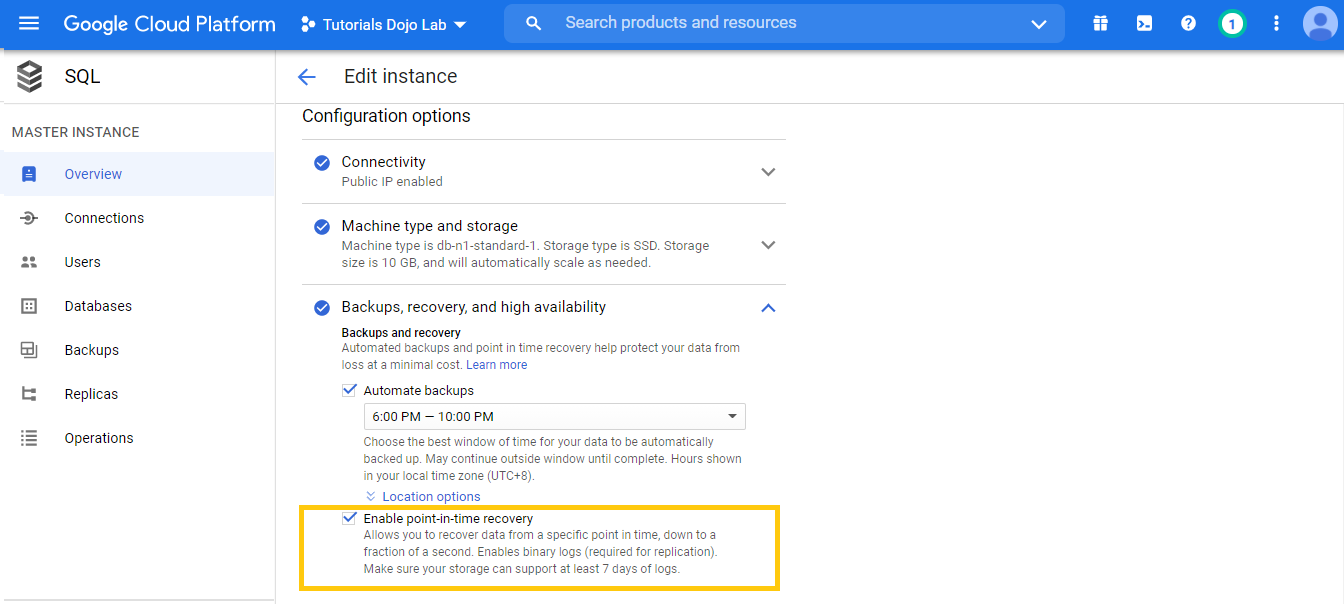
In Cloud SQL, point-in-time recovery (PITR) uses binary logs. These logs update regularly and use storage space. The binary logs are automatically deleted with their associated automatic backup, which generally happens after about 7 days. If the size of your binary logs is causing an issue for your instance, you can increase the instance storage size, but the binary log size increase in disk usage might be temporary. To avoid unexpected storage issues, it is recommended to enable automatic storage increases when using PITR.
Cloud Spanner is a fully managed, mission-critical, relational database service that offers transactional consistency at a global scale, schemas, SQL (ANSI 2011 with extensions), and automatic, synchronous replication for high availability.
Hence, the correct answer is: Choose Cloud SQL (MySQL) and verify that the enable binary logging option is selected.
The option that says: Choose Cloud SQL (MySQL) and select the create failover replicas is incorrect because this just helps in creating a standby instance that serves data when the primary instance fails. You have to enable the binary logging option to enable point-in-time recovery.
The option that says: Choose Cloud Spanner and configure your instance with 2 nodes is incorrect because this is expensive and does not support point-in-time recovery. Cloud Spanner is most suitable for serving data in multiple geographic locations.
The option that says: Choose Cloud Spanner and set up your instance as multi-regional is incorrect because this is not a cost-effective solution when compared to using Cloud SQL. Moreover, Cloud Spanner does not support point-in-time recovery.
References:
https://cloud.google.com/sql/docs/
https://cloud.google.com/sql/docs/mysql/backup-recovery/pitr
Note: This question was extracted from our Google Certified Associate Cloud Engineer Practice Exams.
For more Google Cloud practice exam questions with detailed explanations, check out the Tutorials Dojo Portal:
Google Cloud SQL Cheat Sheet References:
https://cloud.google.com/sql
https://cloud.google.com/sql/docs/
https://cloud.google.com/sql/docs/mysql/backup-recovery/pitr
🌸 25% OFF All Reviewers on our International Women’s Month Sale! Save 10% OFF All Subscriptions Plans & 5% OFF Store Credits/Gift Cards!

Learn AWS with our PlayCloud Hands-On Labs

$2.99 AWS and Azure Exam Study Guide eBooks

New AWS Generative AI Developer Professional Course AIP-C01

Learn GCP By Doing! Try Our GCP PlayCloud

Learn Azure with our Azure PlayCloud

FREE AI and AWS Digital Courses

FREE AWS, Azure, GCP Practice Test Samplers

Subscribe to our YouTube Channel

Follow Us On Linkedin


Written by: Jon Bonso


