The post Unveiling Least Privilege Vulnerabilities with Stryker: How Veza Access Platform Empowers Security Teams to Prevent Device Wipe Breaches Related To Microsoft AD and Intune environments appeared first on Veza.
]]>
Medical technology giant Stryker recently suffered a devastating cyberattack. Pro-Iranian hackers from the group Handala claimed responsibility for wiping data from over 200,000 devices, including servers, laptops, and employee mobile phones, while allegedly extracting 50 terabytes of sensitive information. This attack forced global shutdowns across Stryker’s operations in 79 countries, disrupting manufacturing, shipping, and daily workflows. Reports indicate the attackers exploited administrative access in Stryker’s Microsoft 365, Entra ID (formerly Azure AD), and Intune environment to issue remote wipe commands via Intune—a legitimate mobile device management (MDM) tool turned into a weapon. The incident highlights critical gaps in identity and access management (IAM), where overly permissive roles and weak authentication controls can lead to catastrophic outcomes.
As organizations increasingly rely on cloud-based tools like Microsoft Intune for device management, the risk of such “living-off-the-land” attacks—where adversaries use built-in features rather than malware—grows. But what if you could proactively identify and mitigate these vulnerabilities before they’re exploited? Enter Veza where we can provide deep visibility into permissions, roles, and access paths across cloud environments. By querying complex relationships in systems like Azure AD and Intune, Veza helps security teams uncover hidden risks that traditional tools might miss.
In light of the Stryker breach, we’ve developed a specialized dashboard in Veza to monitor and detect vulnerabilities related to device wipe capabilities. This dashboard draws on real-time queries to spotlight misconfigurations and excessive privileges that could enable similar attacks. Below, we break down four key queries from this dashboard, demonstrating Veza’s power in preventing unauthorized device wipes.

1. Azure AD Admins with No Conditional Access Policy Applied with Phishable MFA Methods (Using Phishable Methods)
One of the most common entry points for attackers is compromised admin credentials without robust multi-factor authentication (MFA). In the Stryker case, gaining admin-level access allowed hackers to weaponize Intune features. Veza’s query identifies Azure AD admins who lack enforced MFA via conditional access policies, including those using phishable MFA methods (e.g., SMS or phone calls, which are vulnerable to SIM-swapping or social engineering).
Why it matters: Without mandatory and phishing-resistant MFA (like hardware keys or authenticator apps), admins can perform highly privileged actions—such as issuing wipe commands—without additional verification. This query reveals users who could be a single phishing email away from granting attackers full control.
How Veza Helps: Running this query surfaces a list of at-risk admins, complete with their roles and access paths, enabling quick remediation like policy enforcement or role adjustments.
2. Intune Roles That Contain Device Wipe Permissions
Intune roles like Global Administrator, Intune Administrator, and Helpdesk Operator often include permissions to wipe devices—capabilities that are frequently overlooked in permission reviews. The Stryker attackers likely abused such roles to execute wipes at scale.
Why it matters: These roles are “privileged by default” in many setups, but not all users assigned to them need wipe access. Over-provisioning creates unnecessary attack surfaces, especially if roles are assigned broadly.
How Veza Helps: Veza maps out all Intune roles with individual permissions, highlighting often-ignored ones like Helpdesk Administrator. Security teams can then audit assignments and implement least-privilege principles, reducing the blast radius of a potential breach.
3. Azure AD Users with Device Wipe Actions for Intune Actions
Beyond roles, specific Intune actions (e.g., “Wipe Device” or “Retire Device”) can be granted directly to users, bypassing traditional role boundaries. In a breach like Stryker’s, where Intune was the kill switch, these granular permissions could be the weak link.
Why it matters: Users with these actions might not even realize their potential for abuse, but attackers certainly do. This exposes organizations to insider threats or external compromises where low-level users escalate privileges.
How Veza Helps: Veza queries drill into user-level permissions, identifying anyone with direct wipe capabilities. The dashboard visualizes these as access graphs, making it easy to spot anomalies and revoke unnecessary rights.
4. Azure AD Users with Privileged Intune Roles
Privileged roles in Intune, tied to Azure AD, often cascade permissions across ecosystems. The Stryker incident underscores how a single compromised privileged user can trigger widespread destruction.
Why it matters: These users have elevated access that extends to device management, making them prime targets. Without visibility, organizations can’t enforce segmentation or monitoring effectively.
How Veza Helps: This query lists all Azure AD users holding privileged Intune roles, cross-referencing with other entitlements. It empowers teams to implement just-in-time access or continuous monitoring, preventing persistent over-privileging.
Veza’s dashboard aggregates these queries offering real-time alerts, visualizations, and remediation recommendations. For instance, it can flag unusual access patterns or simulate attack paths, helping teams stay ahead of threats like those seen at Stryker. In a world where IAM misconfigurations are exploited in seconds, tools like Veza aren’t just helpful—they’re essential.

If your organization uses Azure AD and Intune, don’t wait for a breach to expose your vulnerabilities. Reach out to us to explore how Veza can fortify your defenses, or check out our dashboard for the Stryker-inspired security incident. Stay secure, stay proactive.

The post Unveiling Least Privilege Vulnerabilities with Stryker: How Veza Access Platform Empowers Security Teams to Prevent Device Wipe Breaches Related To Microsoft AD and Intune environments appeared first on Veza.
]]>The post Veza Product Updates – February 2026 appeared first on Veza.
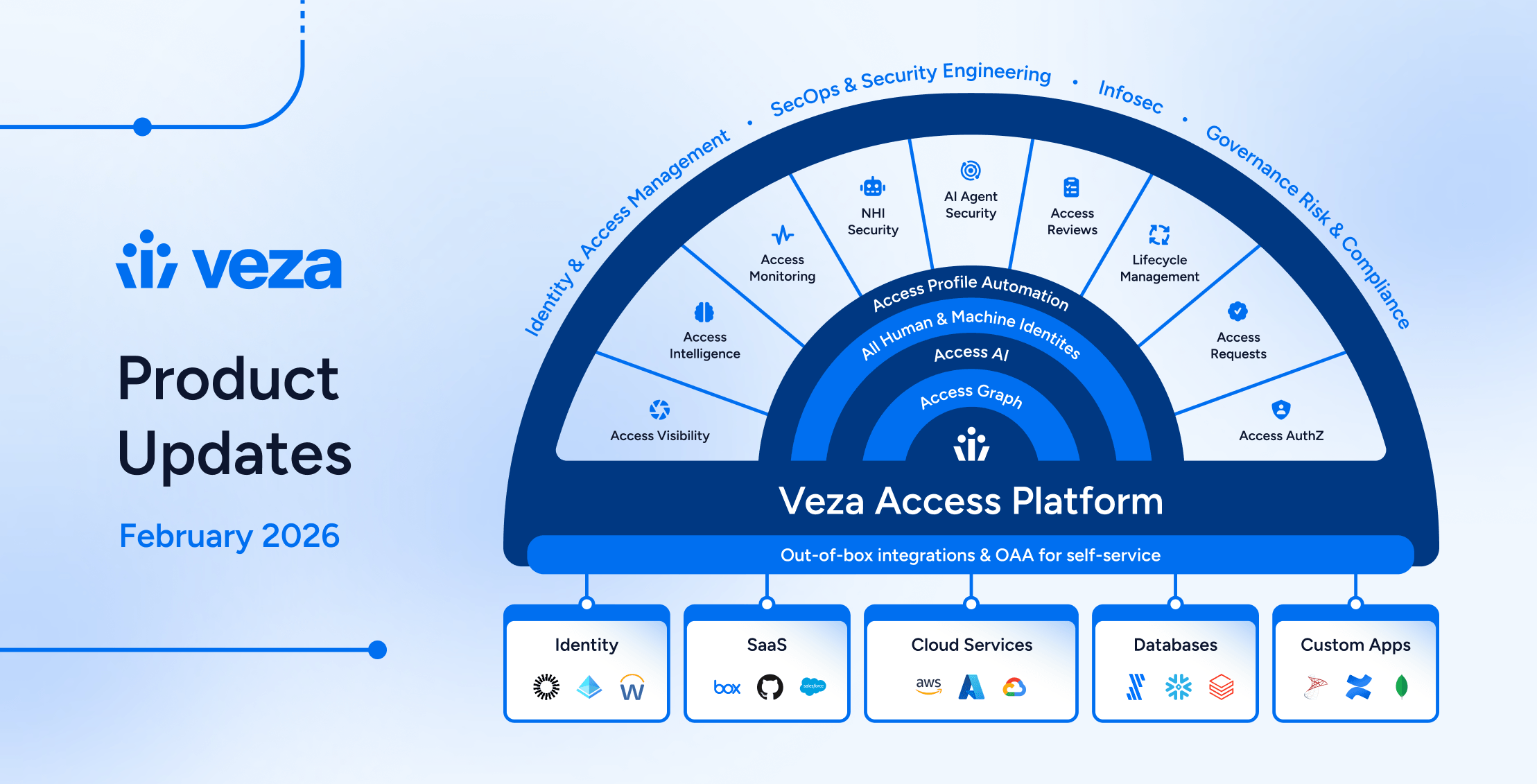
]]>
News and Highlights from Veza Releases
Identity governance now extends beyond traditional user lifecycle management into the realms of non-human identities, AI agents, and cross-system provisioning. To address these complexities, teams need governance tools that operate with precision and safety while automating business operations.
Veza’s 2026.2 release introduces new capabilities for security engineers, app and data owners, and IT, IAM and audit teams, with highlights including:
- Enterprise integration enhancements (Active Directory, CyberArk, Oracle EBS, Okta) expand reliability and visibility across enterprise identity infrastructure.
- Veza Platform now features a redesigned global navigation with three-column layout, with Reports and Dashboards transformed into a unified experience.
- Access Visibility now includes Query Builder union queries, enabling users to combine multiple independent query sets and view merged results in a single table.
- Access Reviews support Slack as a direct notification channel for reviewers, granular bulk action controls for administrators, and extended decision attribution for compliance reporting.
- NHI & AI Agent Security products now support the Public MCP Server Registry for extended authorization visibility into AI agent tooling ecosystems, and ServiceNow OAuth applications and tokens. Automated enrichment rules for NHI owner assignment are now available in early access, reducing manual governance overhead. An OOTB AI Agent Security dashboard helps teams track and remediate risks based on industry standards (OWASP, NIST AI RMF).
- Lifecycle Management now includes Predictive Safety Limits that block workflow runs before execution, granular change detection for precise mover workflows, and general availability of Send REST Payload actions for external API integration.
See below for complete details on each product area, and contact your Veza representative with questions or feedback.
Veza Navigation and Dashboards
Veza’s interface has been redesigned and refreshed, with a new global navigation and a unified Dashboards experience now available. This includes significant improvements for traversing products and features on the Veza platform, and working with Access Intelligence Dashboards:
New global navigation: A three-column layout replaces the previous sidebar with icon-driven primary navigation, a collapsible secondary panel for product sub-menus, and an enhanced top toolbar. Favorite features such as Dashboards, Graph Search, Query Builder, and Integrations are pinned to the top of the sidebar for direct access.
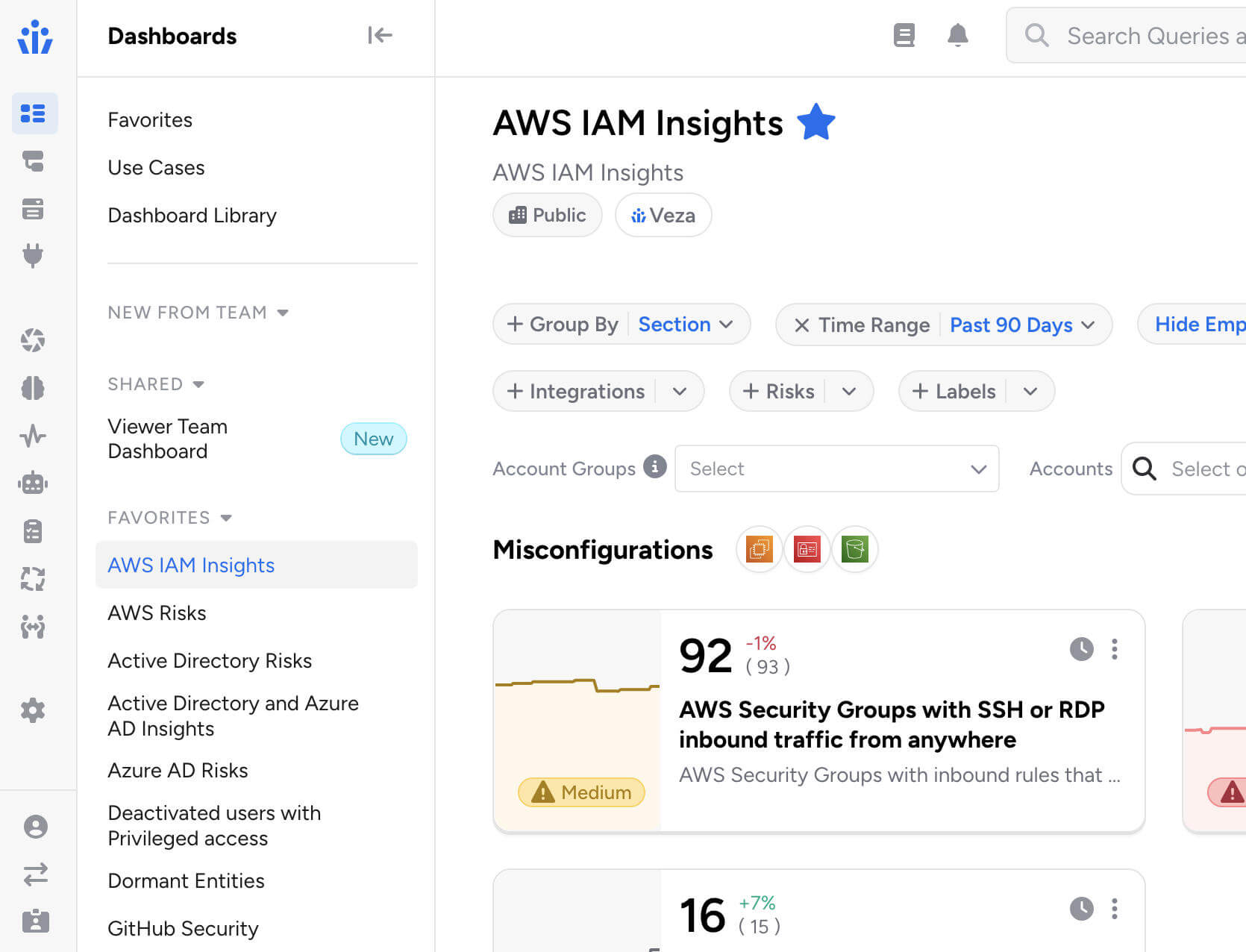
Unified Dashboards: Reports and Dashboards are merged into a single Dashboards experience, featuring tiles and list views alongside an improved full-screen dashboard editor. You can now switch any dashboard from tiles to list view using the controls at the top of the screen:

All existing reports are preserved and accessible in both tiles and list views. Saved links and bookmarks automatically redirect to their new locations.
Veza Integrations
Enterprise Integration Enhancements
Active Directory Domain Controller Failover: Added support for multiple domain controllers with automatic failover.
- Administrators can configure backup domain controllers using the new Failover Hosts field, or enable automatic DC discovery via DNS to dynamically discover all available domain controllers.
- Veza automatically fails over to the next available domain controller if the primary becomes unreachable during data extraction, ensuring uninterrupted collection during maintenance windows or outages.
CyberArk Identity External Groups: The CyberArk Identity integration now includes expanded visibility into external groups (such as Active Directory groups) assigned to Roles. This surfaces users who have role access through an external directory without a direct CyberArk Identity User account.
Oracle E-Business Suite Responsibility Key: The Oracle E-Business Suite integration now exposes the responsibility_key attribute for Responsibility entities, enabling queries using the short name identifier familiar to EBS administrators.
Okta Incremental Extraction Reliability: Enhanced incremental extraction to handle newly created users more reliably, particularly for users imported from Active Directory.
ServiceNow: Added support for integrations using OAuth 2.0 JWT Bearer authentication.
Custom Identity Mappings Performance: Significantly improved performance when configuring identity mappings for integrations with many Custom OAA applications.The Mapping Configuration dropdown now loads faster when hundreds of Custom Application, Custom Principal, or Custom IDP integrations are present.
SCIM Non-Compliant Response Handling: Added handling for non-compliant SCIM API responses where resource arrays are incorrectly nested. This enables Veza to integrate with SCIM server implementations that do not strictly follow the SCIM 2.0 specification.
SQL Server Legacy TLS Compatibility: Resolved connection failures with SQL Server 2008 R2 and other legacy versions by implementing automatic TLS version negotiation. Veza now handles servers that require TLS 1.2, eliminating connection handshake errors without requiring manual configuration changes.
Integrations UX Improvements: Several usability improvements for the Integrations management interface:
- Integration status and last sync timestamp are now displayed in separate, independently sortable columns.
- Pagination settings persist across sessions, preserving your preferred page size between visits.
- Integration error details now display in a more readable format with scrollable containers.
Access Visibility
Query Builder Enhancements
Query Builder Union Queries: Query Builder now supports query unions, enabling users to combine two or more independent query sets and view the combined results in a single table.

Click + Add Query Set in the sidebar to add additional queries, each with its own source type, destination, filters, and constraints. Results are merged into one table with column groups per entity type, and union queries can be saved and reloaded like standard queries.
Please note that Activity Monitoring filters are not available when using multiple query sets, and the Any entity type grouping cannot be used as a source in union queries.
“Does Not Relate To” Queries: Queries can now use the “does not relate to” operator when both the source and destination entity types are the same, enabling queries for relationships such as Active Directory groups with no relationship to other Active Directory groups, or IAM roles not assumed by other IAM roles.
Export Relationship Columns: Exported results now include relationship columns consistent with the on-screen view, when the Show Relationships is enabled in the query configurdministrative Controls
Access Reviews
New Features & Improvements
Veza can now automatically identify assigned reviewers whose accounts have been deactivated or removed from your identity provider after the review has started, and notifies the appropriate parties so rows can be reassigned.
- When enabled on a review configuration and once the review has started, Veza regularly assesses assigned reviewers, flagging inactive and removed users. Notifications are sent to the reviewer’s manager (with a per-manager breakdown of their affected direct reports) and/or a list of additional recipients via email.
- This feature requires a Global Identity Provider (IDP) to be configured and is enabled by adding a Reassignment Needed notification event to the review configuration’s notification settings.
Reviewer Bulk Action Controls: Administrators can now granularly control which bulk actions are available to reviewers, either globally across the tenant or on a per-review configuration basis.
- When a bulk action is disabled, reviewers see only the permitted operations in the interface and receive a clear error if they attempt a restricted action via API. The six configurable operations are: Approve, Reject, Sign off, Clear decisions, Add note, Reassign.
Auto-Complete Now Applies to In-Progress Reviews: When the auto-complete setting is enabled, Veza now immediately evaluates and completes any eligible in-progress reviews (those at the final approval level with all rows signed off) rather than waiting for new review activity to trigger completion.
Slack Notifications for Reviewers: Administrators can now configure Slack as a delivery method for reviewer notifications. Slack notifications now support customizable templates and dynamic placeholders just as email notifications, and include action buttons that link directly to the relevant review.
- Messages include visual cues that flag overdue reviews and approaching deadlines, helping reviewers prioritize their work at a glance.
- Slack notification settings are available under Settings > Access Reviews > Digest Notification Settings or Review Alerts Settings by selecting a configured Slack App Veza Action as the delivery channel.

Automations that apply highlighting rules now support custom colors, for better differentiation when multiple automation rules apply in the reviewer interface. Previously, all highlighted rows used the same default color; now each automation can specify its own color using a highlight_color field (e.g., #FF6B35 for orange, #3A86FF for blue). Colors are set when creating or updating an automation via the Automations API.
Self-review prevention can now be configured individually per review configuration, in addition to the existing global setting.
- Administrators can now include a workflow_id in the API request to override that global default for a specific review configuration. The configuration-level setting takes precedence over the global setting, and configurations without a specific setting continue to inherit the global default.
- This allows organizations to enforce stricter reviewer independence for sensitive reviews while keeping a more permissive default elsewhere. Previously, the SELF_REVIEWER_CHECKING_ENABLED / SELF_REVIEWER_CHECKING_DISABLED setting applied tenant-wide.
Reviewer Decision Attribution in API Responses: Access Reviews API responses now include the decision_by field on each certification (review) result, identifying which user made a given decision.
- This field is available on all review outcomes regardless of decision type, enabling external integrations to track reviewer attribution for audit trails, compliance reporting, and downstream accountability workflows without requiring additional lookups.
NHI & AI Agent Security
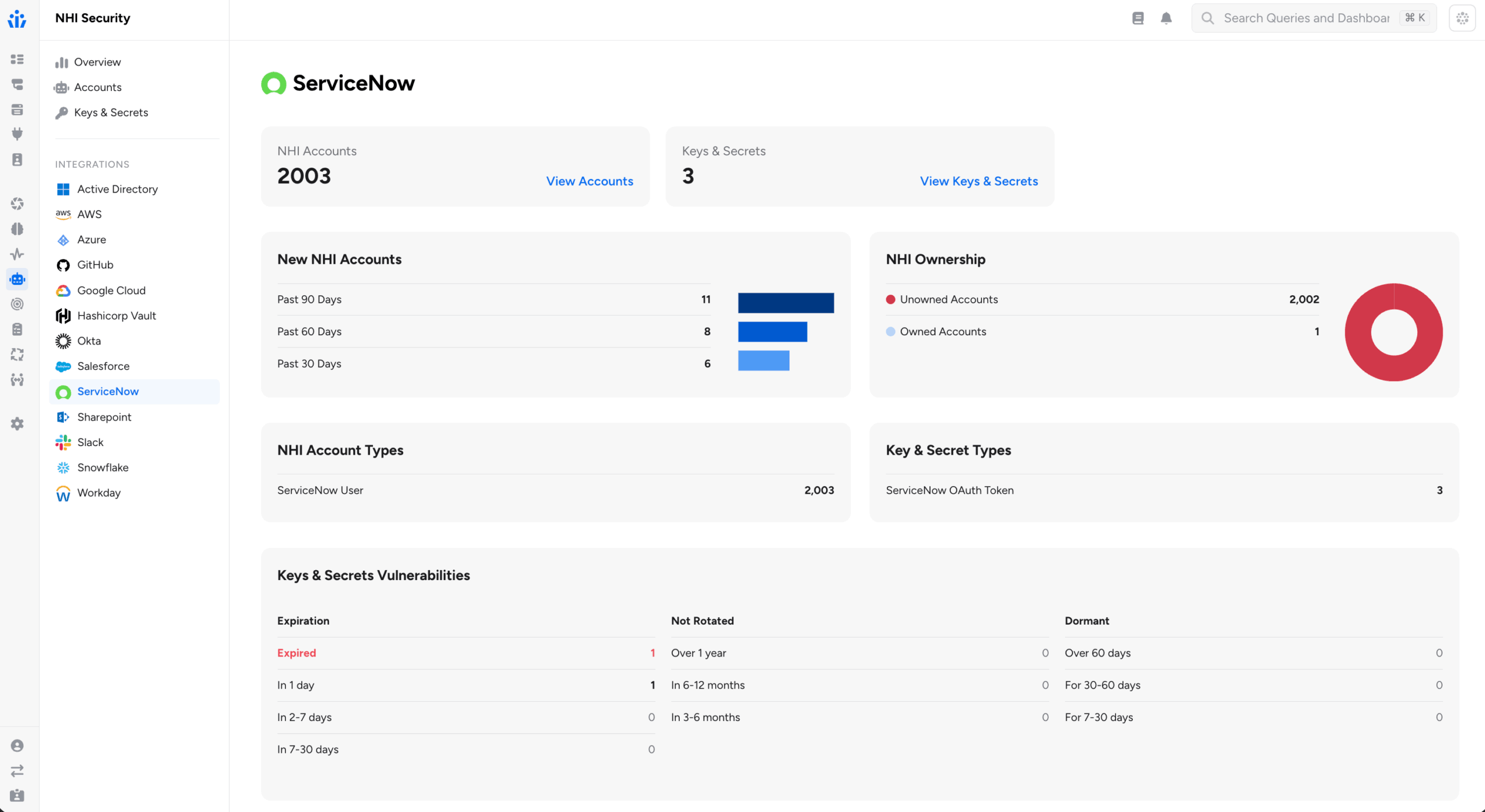
ServiceNow OAuth: The ServiceNow integration now discovers OAuth Applications, OAuth Profiles, and OAuth Tokens as Non-Human Identity entities. This helps security teams to identify long-lived or stale OAuth tokens, determine which users hold active tokens, and understand the scopes and authentication mechanisms in use across ServiceNow OAuth integrations.
- OAuth Tokens include expiry metadata and are linked to the user or application that holds them and to the OAuth Profile under which they were issued.
Automatic NHI Owners Assignment: Enrichment rules support establishing NHI ownership (or assigning an owner to any other entity in Access Graph). Owner enrichment rules can now dynamically identify owners using graph properties, supplementing the original capability to assign owners based on existing attributes.
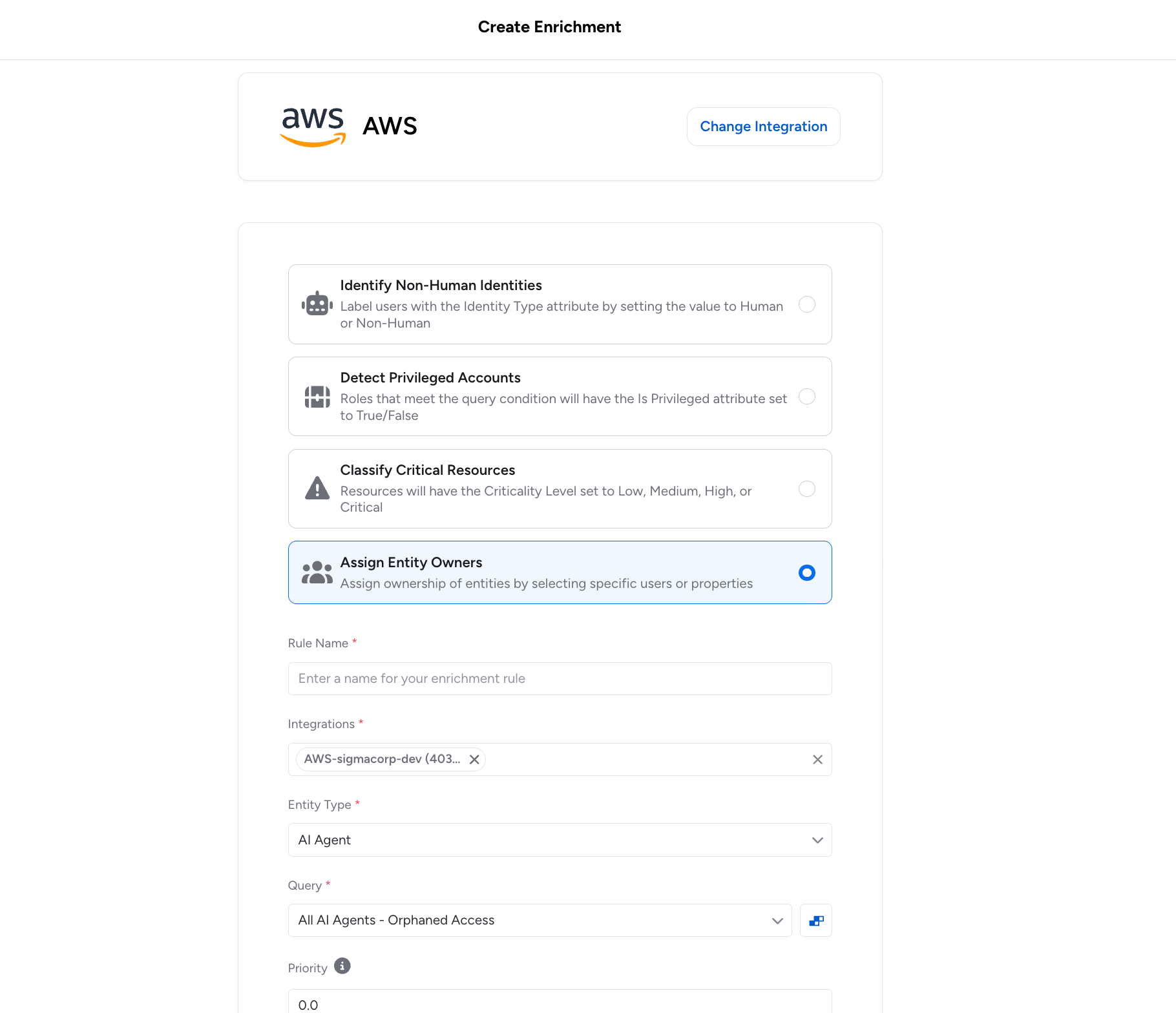
Administrators now configure templates that reference a property on the entity to enrich, or on a related entity found through a second assessment query. Veza substitutes the actual property value at enrichment time.
Two patterns are supported:
- Direct property resolution: The enrichment rule’s owner template references a property on the entity itself using {{property_name}} syntax. For example, you can assign ownership of resources based on an attribute already stored on that entity in the Access Graph, such as a tag value or department field.
- Related entity resolution: When a second query is configured, Veza traverses the graph to find a related entity (for example, an Okta user linked to a service account) and reads a property from that related entity (such as the user’s email or manager_id) to determine the owner.
Because owner assignment is re-evaluated at each extraction cycle, ownership stays current as organizational data changes in connected identity providers and HRIS systems, without requiring administrators to maintain manual owner spreadsheets.
AI Agent Security Dashboard: Out-of-the-box risk dashboards mapped to industry standards (OWASP, NIST AI RMF), enabling teams to track AI agent sprawl, dormant identities, and access drift – with options to trigger automated workflows in ServiceNow or Jira.

Azure AI Foundry: The Azure integration now discovers Azure AI Foundry resources and RBAC permissions, including AI agents, projects, model deployments, vector stores, and guardrails. Agent identities are correlated to Azure AD managed identities.

Public MCP Server Registry: Veza now provides visibility into a curated set of public MCP (Model Context Protocol) servers, tracking their capabilities and connecting them to your AI agent authorization context.
- The integration fetches server listings from the official MCP registry and actively discovers the tools each server exposes by connecting to its HTTP endpoint using the MCP protocol. For each server, Veza surfaces the tool name, description, and input/output schemas.
- When Microsoft Copilot Studio is also configured, Veza automatically links Copilot Studio agent nodes to the MCP servers they use, creating Maps To MCP Server edges in the Access Graph. This lets you trace which AI agents have access to which MCP-enabled services (GitHub, Atlassian, Slack, Salesforce, and more).

Lifecycle Management (LCM)
New Features
Predictive Safety Limits: Lifecycle Management policies now support Predictive Safety Limits, which evaluate the expected scope of a policy and workflow execution before any changes begin and block the run if the projected number of affected identities would exceed configured thresholds.
This helps prevent unintended mass processing of identities occurring when upstream attribute changes in a Source of Identity would otherwise trigger unnecessary workflows across a large population. Safety limits are supported at both the policy level and individual workflow level for more granular control.
With this release, the original Safety Limit feature is renamed Hard Limit to clearly distinguish reactive behavior (which stops processing mid-run) from predictive behavior (which blocks before execution starts).
Property Change Detection: Lifecycle Management now exposes sys_attr_changed__
- For example, the condition department_name eq ‘Sales’ and sys_attr_changed__department_name eq true fires only when an employee transfers into the Sales department, not on any other update to that record.
- Multiple properties can be combined with OR logic to catch any significant change across attributes such as department, manager, title, or location.
Enhancements
Bulk dry runs now surface which identities have attribute values that would change if the policy ran, and filtering the results table to show only those identities. A new Has Attribute Changes filter in the bulk dry run results table enables focused review of accounts that are actually out of sync with policy intent.

For each changed attribute, the dry run records 1) the value Veza last synced, 2) the value currently observed in the target system (which may have drifted), and 3) the value the policy would write. This makes it easier to distinguish configuration drift from expected policy-driven updates.
Send REST Payload: The Send REST Payload action is now generally available for all Veza customers. This action enables Lifecycle Management policies to call external APIs and web services as steps within provisioning workflows, expanding what workflows can automate beyond systems with native Veza integrations. The action supports:
- OAuth2 authentication
- Custom HTTP headers
- JSON payload formatting with attribute transformers
- Response entity extraction for use in downstream workflow actions
JSON Payload Autocomplete: When configuring a Send REST Payload action, the JSON Payload field now provides intelligent autocomplete suggestions for available source attributes and transformers.
- Typing {} inside a JSON string value opens the full suggestion menu, which includes source attributes, transformer functions (UPPER, LOWER, TRIM, and others), lookup table references, and additional available formatters. This makes it faster to construct well-formed payloads without consulting separate reference documentation.
New Identity System Attribute: The trigger condition editor now provides autocomplete support for the sys_attr__is_new_identity system attribute, for writing conditions that target newly created identities and build reliable joiner workflows without manually entering the attribute name.
Identity CSV Export: Administrators can now export identity data directly from the Identities table to CSV. When exporting, users can select which columns to include and optionally add historical change records to the export. This supports compliance audits and cross-system reconciliation without requiring a separate reporting tool or API query.
Identity Internal Metadata: A new Internal Metadata tab is now available in the Identity Details view. When enabled via Lifecycle Management > Settings > Identity Settings > Show internal metadata, the tab displays internal Lifecycle Management sync state including synced entities, action run history, workflow failures, and synced relationships.
- Administrators can now clear individual metadata sections to force a full resync from the identity source on the next sync cycle, helping troubleshoot sync issues without requiring a separate support workflow.
SCIM Alternate Identifiers: SCIM integrations now support alternate values for unique identifier attributes during user provisioning.
- When a username or email address is already in use, Veza automatically attempts the alternate values provided by attribute transformers rather than failing the provisioning request. This reduces manual intervention for identifier conflicts that arise when provisioning into systems with existing accounts.
Entitlement Descriptions: When a target application provides entitlement descriptions, these are now displayed in Access Request selection dropdowns, Catalog views, and Access Profile tables. For example, Azure AD role descriptions and Active Directory group descriptions appear alongside entity names, making it easier to understand what access is being requested or granted.
Note: individual releases can include additional bug fixes and performance improvements that are not detailed in these notes. For more information about any features or bug fixes, contact your Veza representative.
The post Veza Product Updates – February 2026 appeared first on Veza.
]]>The post Achieving DORA Compliance: A Practical Guide for Financial Organizations appeared first on Veza.
]]>
Executive Summary
The European Union’s Digital Operational Resilience Act (DORA), taking effect January 17, 2025, represents a significant shift in how financial organizations must approach Information and Communication Technology (ICT) security and operational resilience. As financial firms face increasing cyber threats and digital dependencies, DORA establishes a comprehensive framework for risk management, incident reporting, resilience testing, and third-party oversight.
While DORA specifically applies to EU financial organizations, similar frameworks are emerging worldwide, such as the NIST Cybersecurity Framework in the US.
Modern identity security platforms can provide financial organizations with the capabilities needed to meet DORA’s requirements while strengthening their overall security posture. Veza’s identity security platform, through its Access Graph foundation and comprehensive control capabilities, enables organizations to maintain continuous visibility into their identity landscape, automate governance processes, and effectively manage third-party risks.
DORA Requirements Overview
DORA mandates four key pillars of compliance for financial organizations:
- ICT risk management and governance
- Incident reporting and classification
- Digital operational resilience testing
- Third-party risk management and oversight
ICT encompasses the broad range of technologies and tools used for processing and transmitting information in the financial sector. DORA focuses on ICT risks and resilience because the financial sector is critically dependent on these technologies for operations, data management, and service delivery.
DORA also applies to non-EU financial firms providing services within the EU, making it crucial for international companies to stay compliant.
For more information on DORA, the following pages offer an effective summary of requirements, potential impact, and intended scope.
- https://www.pwc.co.uk/industries/financial-services/insights/dora-and-its-impact-on-uk-financial-entities-and-ict-service-providers.html
- https://www.navex.com/en-us/solutions/regulations/dora-compliance/
The Role of Identity Security in DORA Compliance
Identity security is at the core of operational resilience and effective ICT risk management. As financial organizations increasingly rely on complex digital systems and third-party services, understanding and controlling who has access to what—and what actions they can take on resources and data—becomes critical for maintaining operational resilience.
Identity security involves ensuring that only authorized individuals can access sensitive systems and data, preventing unauthorized access that could lead to security breaches.
A robust identity security program must address three core components for DORA compliance:
- Access Governance: Organizations need continuous monitoring of access relationships, regular review and certification of access rights, and automated detection of inappropriate access patterns. This foundation ensures that access remains appropriate and documented throughout the identity lifecycle.
- Risk Management: An identity-based risk assessment approach, combined with continuous monitoring of access behaviours, enables early detection of potential security incidents. This proactive stance helps organizations meet DORA’s risk management requirements while reducing manual oversight burden.
- Third-Party Access Control: Precise control over external party access, continuous monitoring of vendor privileges, and automated policy enforcement form the backbone of effective third-party risk management under DORA.
Implementing Identity Security for DORA Compliance
Modern identity platforms like Veza approach DORA compliance through several key capabilities:
Access Intelligence
The foundation of effective compliance lies in maintaining a unified view of identity relationships across the organization’s digital ecosystem. By creating a dynamic, real-time map of all permissions and access paths, organizations can understand who has access to what data and how that access was granted – a fundamental requirement for maintaining operational resilience under DORA.
Access Intelligence refers to the real-time mapping of all permissions, providing visibility into how and where access is granted across systems and applications.
Risk Management Through Continuous Monitoring
Effective risk management requires transforming periodic assessments into continuous, automated processes. Modern platforms maintain constant surveillance over access patterns, detecting anomalies that could indicate security risks before they escalate into reportable incidents.
For instance, if an employee suddenly accesses a large amount of sensitive data, the system flags the behaviour for review, alerting the security team before any breach occurs.
Automated Governance in Practice
Modern identity platforms implement sophisticated governance workflows that align with DORA’s requirements. These automated processes initiate access reviews based on risk levels, route them to appropriate stakeholders, track progress, and maintain comprehensive audit trails.
For financial organizations managing complex systems and numerous third-party relationships, this automation ensures consistent policy enforcement while significantly reducing administrative overhead.
Third-Party Risk Management
DORA places particular emphasis on third-party risk management, requiring organizations to maintain robust oversight of their service providers. An effective identity security approach addresses this through:
- Continuous Monitoring: Real-time visibility into third-party access patterns enables rapid detection and response to potential security threats. This ongoing surveillance helps organizations maintain compliance with DORA’s third-party oversight requirements.
- Access Lifecycle Management: Automating the entire lifecycle of third-party access, from initial provisioning through regular reviews to deprovisioning, ensures that vendor access remains appropriate and documented throughout the relationship.
- Risk-Based Controls: Implementation of precise controls based on vendor risk profiles automatically enforces stricter monitoring and approval requirements for high-risk vendors or critical systems.
Implementation Strategy
Successfully implementing identity security for DORA compliance requires a strategic approach that balances immediate compliance needs with long-term operational resilience goals. Organizations should consider the following implementation phases:
1. Discovery and Assessment
Begin with a comprehensive discovery phase to map existing identity relationships and access patterns. This baseline assessment helps identify immediate compliance gaps and priorities for remediation. During this phase, organizations often uncover hidden access paths and inheritance patterns that require attention.
2. Phased Implementation
Rather than attempting a complete overhaul, implement identity security capabilities in phases aligned with DORA’s key requirements. Start with core visibility, monitoring, and intelligence capabilities, then progressively add advanced risk management features and automated governance. This approach allows organizations to build confidence and expertise while maintaining operational stability.
3. Integration and Automation
Integrate identity security controls with existing security and compliance tools to create a unified control environment. This integration enables automated workflows that reduce manual effort while ensuring consistent policy enforcement across the organization’s technology stack.
4. Measuring Success and Maintaining Compliance
Success in DORA compliance is not a one-time achievement but an ongoing process. Organizations should establish clear metrics and monitoring capabilities to measure and maintain their compliance posture. This includes:
- Regular assessment of key risk indicators through real-time compliance dashboards
- Analysis of access pattern trends and policy violations
- Automated compliance reporting for stakeholder review
- Continuous validation of control effectiveness
The Future of DORA Compliance
As regulatory requirements evolve and technology landscapes become more complex, organizations need a flexible and scalable approach to compliance. Modern identity platforms continue to evolve, offering regular updates that reflect regulatory changes, extensible integration capabilities for new technologies, and scalable architectures supporting growing organizational needs.
Conclusion
Meeting DORA’s requirements represents both a challenge and an opportunity for financial organizations. By implementing comprehensive identity security controls, organizations can transform compliance from a burden to a strategic advantage. The right identity security platform provides the visibility, automated governance, and sophisticated risk management capabilities needed not only for DORA compliance but also for overall operational resilience.
The right identity security platform helps organizations manage access risks, improve operational efficiency, and maintain strong security measures that go beyond compliance.
Success in this journey requires selecting tools that align with your organization’s specific needs while providing the flexibility to adapt to evolving regulatory requirements. With data-driven and intelligent platforms such as Veza, the key lies in building a sustainable approach that combines strong technical capabilities with practical operational processes.
Organizations that successfully implement these controls gain not just compliance but enhanced security posture, improved operational efficiency, and greater confidence in their ability to manage access risks in an increasingly complex digital landscape.
The post Achieving DORA Compliance: A Practical Guide for Financial Organizations appeared first on Veza.
]]>The post How to Secure Non-Human Identities: Best Practices to Manage Bots, Tokens, and API Keys appeared first on Veza.
]]>
Non-Human Identities (NHIs)—the service accounts, bots, and API keys that run modern IT infrastructure—now outnumber human users by a factor of 17 to 1, according to the Veza 2026 State of Identity and Access Report. The report also highlights that a mere 0.01% of NHIs control 80% of cloud resources across the enterprise. While humans have MFA and single sign-on, NHIs are often overlooked, creating a massive “shadow” attack surface.
In this post we will share the top 4 best practices to secure your NHI lifecycle without compromising on deployment speed.
1. Establish a Single Source of Truth
The biggest risk with NHIs is that you can’t protect what you can’t see. Most organizations have “orphaned” identities from former projects still holding administrative privileges.
Continuous Discovery: Move beyond static spreadsheets. Use automated tools to scan code repositories, CI/CD pipelines, and cloud environments to build a real-time inventory of every secret, token, and service account.
Assign Ownership: Every NHI should be mapped to a human “owner” or a specific engineering team. If an identity doesn’t have a clear purpose or owner, it should be flagged for decommissioning.
2. Implement “Identity-First” Security
Treat your machine identities with the same rigor as your human employees. If a developer needs MFA to access a server, why should a service account have a permanent, hard-coded key?
Principle of Least Privilege (PoLP): Review your NHI permissions. Many bots are granted “Owner” or “Admin” roles for simplicity during setup but only require “Read” access for a specific database.
Short-Lived Credentials: Transition away from “forever” API keys. Use Workload Identity Federation or ephemeral tokens that expire in minutes or hours rather than years.
Zero Trust Architecture: Never assume an internal NHI is safe. Require continuous verification for every request, regardless of where the bot is “calling” from.
3. Automate the Lifecycle
Manual secret management is the enemy of security. Humans are prone to forgetting to rotate keys or leaving them in .env files.
Secrets Vaulting: Centralize all NHI credentials in a secure vault. Applications should pull secrets programmatically at runtime rather than having them hard-coded in the source code.
Automated Rotation: Set up automated workflows to rotate keys every 30–90 days. This limits the “blast radius” if a credential is leaked.
Rigorous Offboarding: When a workload or application is retired, the associated NHI must be deleted immediately. This prevents “shadow” identities from lingering in your environment.
4. Monitor Behavioral Patterns
NHIs are predictable. A backup bot should only behave like a backup bot. If it suddenly starts exporting user data at 3 AM from a new IP address, you have a breach.
Anomaly Detection: Establish a baseline for “normal” NHI behavior. Use monitoring tools to alert on spikes in API calls, unusual access times, or attempts to access unauthorized resources.
Audit Logging: Ensure every action taken by an NHI is logged. This is critical for forensic analysis if a machine identity is compromised.
Summary Table: Human vs. Non-Human Identity
| Feature | Human Identities | Non-Human Identities (NHI) |
|---|---|---|
| Volume | Low (1x) | Extremely High (45x+) |
| Security | MFA, SSO, Biometrics | API Keys, Tokens, Certificates |
| Lifespan | Long (Years) | Variable (Minutes to Years) |
| Behavior | Unpredictable | Highly Predictable |
A final word of encouragement for the operations teams in the middle of this battle: The sheer scale of NHI management can feel overwhelming, but the secret lies in a classic engineering principle: decomposition. Break the identity lifecycle into its smallest, most manageable units.
By building a systematized, repeatable workflow, much like a software delivery pipeline, you can transform an unmanageable volume of identities into a streamlined process. As automation takes over, the operational burden drops, ownership becomes clear, and your attack surface is significantly mitigated.
The post How to Secure Non-Human Identities: Best Practices to Manage Bots, Tokens, and API Keys appeared first on Veza.
]]>The post Veza + ServiceNow: The Enterprise Agent Identity Control Plane appeared first on Veza.
]]>
Today is Day 1.
Super excited to share that ServiceNow has officially completed the acquisition of Veza.
Today marks a defining moment in our journey, not only for Veza, but for the future of identity as the foundation of the modern agentic enterprise. Identity is no longer just a governance layer; but the control plane to enable modern enterprises to operate, innovate, and scale across the enterprise.
I could not be prouder that Veza is becoming part of ServiceNow, a leading enterprise platform powered by AI, and an organization that shares our ambition to reshape how businesses responsibly embrace the benefits of agentic AI.
Together, we are building the industry’s firstEnterprise Agent Identity Control Plane that integrates seamlessly into the ServiceNow AI Control Tower.
Aligned Values & Shared Vision & Elite Level Execution
ServiceNow’s founder, Fred Luddy, wrote: “There is no better experience than giving someone a piece of technology that lets them do something they never thought they could do.” That philosophy resonates deeply with us at Veza. Founded in 2020, we built the Veza Access Graph to answer the most challenging and unanswered cybersecurity question facing enterprises for years: “Who can take what action on what data?”
Historically, answering that question with confidence and accuracy was impossible. Our insight was that authorization data is the purest form of identity access, putting the principle of least privilege within reach (finally!) We developed a canonical data model – the Veza Access Graph – that allows customers to eliminate any permissions that are risky, unneeded, unused, or non-compliant.
I’m also excited to work for ServiceNow’s CEO Bill McDermott and Amit Zavery (President, CPO, and COO). Since our engagement in 2025, it’s become clear that ServiceNow embodies – fast decision making, operating with highest level of urgency, winning the heart of customers, and one team – all the fundamental pillars of entrepreneurial spirit are in abundance at ServiceNow.
Why Now?
The era of AI agents demands an entirely new approach to enterprise security. The acquisition of Veza is a direct response to that reality. In a world where workflows are increasingly driven by non-human agents, organizations need a control tower that manages identity for both human users and non-human identities (including AI agents) across the full flow of work. ServiceNow is exceptionally well-positioned to be that control tower: with more than 80 [FD1] [SG2] billion workflows in flight today, operating at a scale few enterprise software companies match and with Veza’s industry-first Access Platform[FD3] integrating across the broader ecosystem while delivering one unified view of the enterprise. Together, the result is: comprehensive identity governance, built for the way work actually gets done today.
The timing of this partnership could not be more perfect for the identity industry. As AI becomes further integrated into enterprise workflows, governance is essential. AI without governance introduces significant security and compliance risks, opening the door to disastrous business outcomes. Without clear, enforceable authorization frameworks, AI agents lack the guardrails required to operate responsibly at scale.
Simply put, AI agents without governance are risks, not assets. ServiceNow has been clear about its ambition to be an AI-defining enterprise software company and this level of ambition has been reflected in Veza’s culture since our founding day. We believe in moving fast and iterating with our customers’ feedback at the forefront. For Vezanites, iteration is the path to perfection. We believe in empowering builders to think bigger, encouraging our customers to define our roadmap, even when it takes us into entirely uncharted territory. We’ve never wanted to be boxed into legacy thinking or confined by the limitations of how identity “has always been done” — via siloed directories of users and groups. Now, we will integrate Veza’s identity control plane across ServiceNow’s platform and unlock a massive new market opportunity.
The Critical Importance of Identity Security
As AI agents proliferate across the enterprise, they are expanding the identity surface area much faster – and with more complexity – than traditional security approaches were designed to handle. This evolution is reflected in the broader market. According to Forrester, identity and access management spending is projected to reach approximately $27.5 billion by 2029, as organizations modernize their identity infrastructure to support cloud, SaaS, on-prem, non-human identities, and now AI agents. Identity is no longer a niche discipline or a siloed IT exercise; it is central to enterprise resilience, digital transformation, and agent adoption.
Together with ServiceNow, we can provide deeper visibility and governance of the access and privileges across human, non-human, and AI agent identities.
One Team. Deep Gratitude.
None of this happens in isolation. I’m deeply grateful to my co-founders, Maohua and Rob, whose partnership and determination laid the foundation for everything Veza has become.
- To our Board of Directors and our investors: Thank you for believing in our mission early and supporting us as we built a category-defining company.
- To Vezanites: Your passion, grit, and commitment to customers are what truly built this company.
- To our customers: Thank you for trusting us. Your feedback, guidance, challenges, and partnership shaped our thinking and strengthened our platform. You pushed us to think bigger and move faster. We would not be here without you.
Joining ServiceNow is not the end of our journey. It’s – A New Beginning! It means we can build faster and partner with companies worldwide. Identity security is the key to unlock #AIEra.
The post Veza + ServiceNow: The Enterprise Agent Identity Control Plane appeared first on Veza.
]]>The post Veza – The Enterprise Agent Identity Control Plane appeared first on Veza.
]]>
Veza’s 2026 State of Identity and Access Report found that in a typical enterprise, an average worker holds 96,000 entitlements, 38% of IdP accounts are dormant and only 55% of permissions are safe and compliant. The volume and complexity of identity-based attacks is exacerbated by the explosion of AI agents and non-human identities (NHIs). In fact, only 26% of organizations report having comprehensive AI security governance policies in place.
Today, with the introduction of Veza Access Agents and expanded capabilities for Veza AI Agent Security, we are reinforcing our vision of Veza as the Enterprise Agent Identity Control Plane.
Introducing Veza Access Agents
With Veza Access Agents, we combine the power of the Veza Access Graph with a set of purpose-built AI Agents to automate complex identity security and access governance tasks. Leveraging AWS Bedrock, Veza ensures enterprise-grade performance, security, and compliance for its AI agents. Currently available in early access, Veza Access Agents include:
The Veza Prompt Agent that provides a conversational, natural language interface, allowing teams to quickly surface insights and hidden risks across human, non-human and AI agent identities.
The Veza Access Search Agent that takes the natural language prompts, applies deep reasoning, and dynamically visualizes complex permission relationships and entitlements for all identities.
The Veza Access Review Agent that accelerates user access reviews by enabling reviewers to focus on high-risk items through AI-assisted reasoning and recommendations backed by detailed explanations.
Advancing Veza AI Agent Security
Autonomous AI agents are accelerating the identity blind spots for organizations. We are building on our December release by expanding our AI Agent Security product to grant deeper visibility and control over third-party AI agents, LLMs, and AI infrastructure. Key capabilities now include:
Expanded Discovery of Tools: Veza now identifies granular tools and actions an AI agent is authorized to invoke within connected applications, extending beyond basic MCP server discovery.
Suggested Owner Agent: To combat “Shadow AI,” this agent automatically maps unmanaged AI agents and service accounts to responsible human owners.
AI Blast Radius Visualization: Veza quantifies the exact action-level blast radius for every AI agent, detailing the specific sensitive data and system resources that could be impacted.
AI Security Posture Management (AISPM): Veza continuously assesses AI infrastructure and maps identity risks directly to the NIST AI Risk Management Framework (AIRMF).
AI Agent Security Dashboard: Provides out-of-the-box dashboards, allowing teams to track agent sprawl and trigger automated remediation workflows in Jira or ServiceNow.
Transformational Journey that IAM needs to take for Agentic AI
To support agentic AI, organizations must treat NHIs and AI agents as first-class identities. This requires a systematic maturity of IAM strategies:
- Trustworthy Human Layer: Ensure reliable lifecycle processes and strict MFA.
- Structured NHI Governance: Define lifecycles, clear ownership, and right-sized access for every bot and API key.
- Contextual Access: Shift from standing permissions to time-bound, task-scoped privileges.

By integrating identity as the core enforcement mechanism, enterprises can secure their modern stack, from SaaS and cloud to data platform, at machine speed.
Ultimately, by defining explicit identity controls for agents, building robust monitoring and governance, and integrating identity as the core enforcement mechanism across all model control planes and data platforms, enterprises can secure access at machine speed – with Veza acting as their central Enterprise Agent Identity Control Plane.
Learn More
The post Veza – The Enterprise Agent Identity Control Plane appeared first on Veza.
]]>The post Veza Product Updates – January 2026 appeared first on Veza.
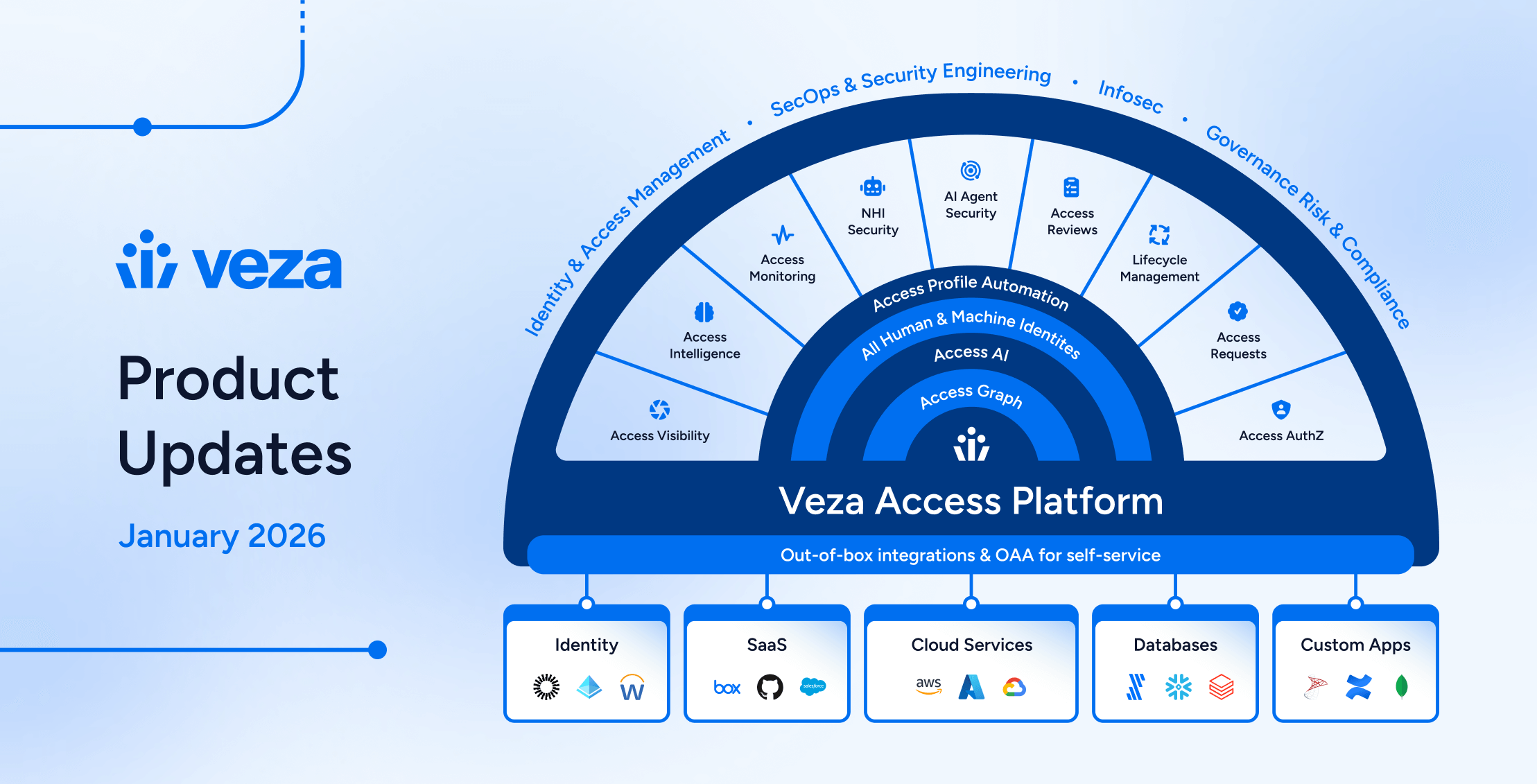
]]>
News and Highlights from Veza Releases
As authorization entitlements proliferate across cloud, SaaS, and on-premises systems, security teams face the dual challenges of identifying which identity risks matter most, and acting on them before they escalate.
Traditional approaches ask teams to manually triage findings across tools, manage tickets in disparate systems, and coordinate remediation ad-hoc, introducing exploitable delays. Simultaneously, the expanding surface area of non-human identities (from service accounts and OAuth tokens to AI agents) creates blind spots that existing governance solutions cannot address.
Veza’s 2026.1 release introduces new capabilities to help teams manage identity risks in the modern cloud, with highlights including:
- Access Reviews with customizable Microsoft Teams notifications, bi-annual and annual scheduling for compliance alignment, and bulk operations for managing multiple reviews simultaneously.
- Risk Profiles categorize authorization risks by business impact (MFA Health, Privileged Access, Dormant Access, Blast Radius), enabling teams to prioritize remediation based on what matters to their organization.
- Dashboard Remediation Actions enable operators to initiate fixes directly via Jira, ServiceNow, or Slack, eliminating multi-day remediation cycles.
- Lifecycle Management extends identity source coverage with ServiceNow support, adds ability to update Exchange Online mailbox settings, and simplifies policy configuration with new attribute formatters.
- New integrations for DevRev and Grafana extend authorization governance to development workflows and observability platforms.
- Enterprise integration enhancements (GitLab, Snowflake, CyberArk) expand Access Graph visibility into the growing landscape of human and non-human identities that drive modern enterprises.
See below for complete details on each product area, and contact your Veza representative with questions or feedback.
Access Intelligence
Enhancements
Risk Profiles (Early Access): The Risks page now features an improved experience with Risk Profiles for categorizing authorization risks, Open/Resolved status tracking, and enhanced analytics for monitoring risk trends over time. Risk Profiles now organize queries into categories such as MFA Health, Dormant Access, and Blast Radius, helping teams prioritize remediation efforts.
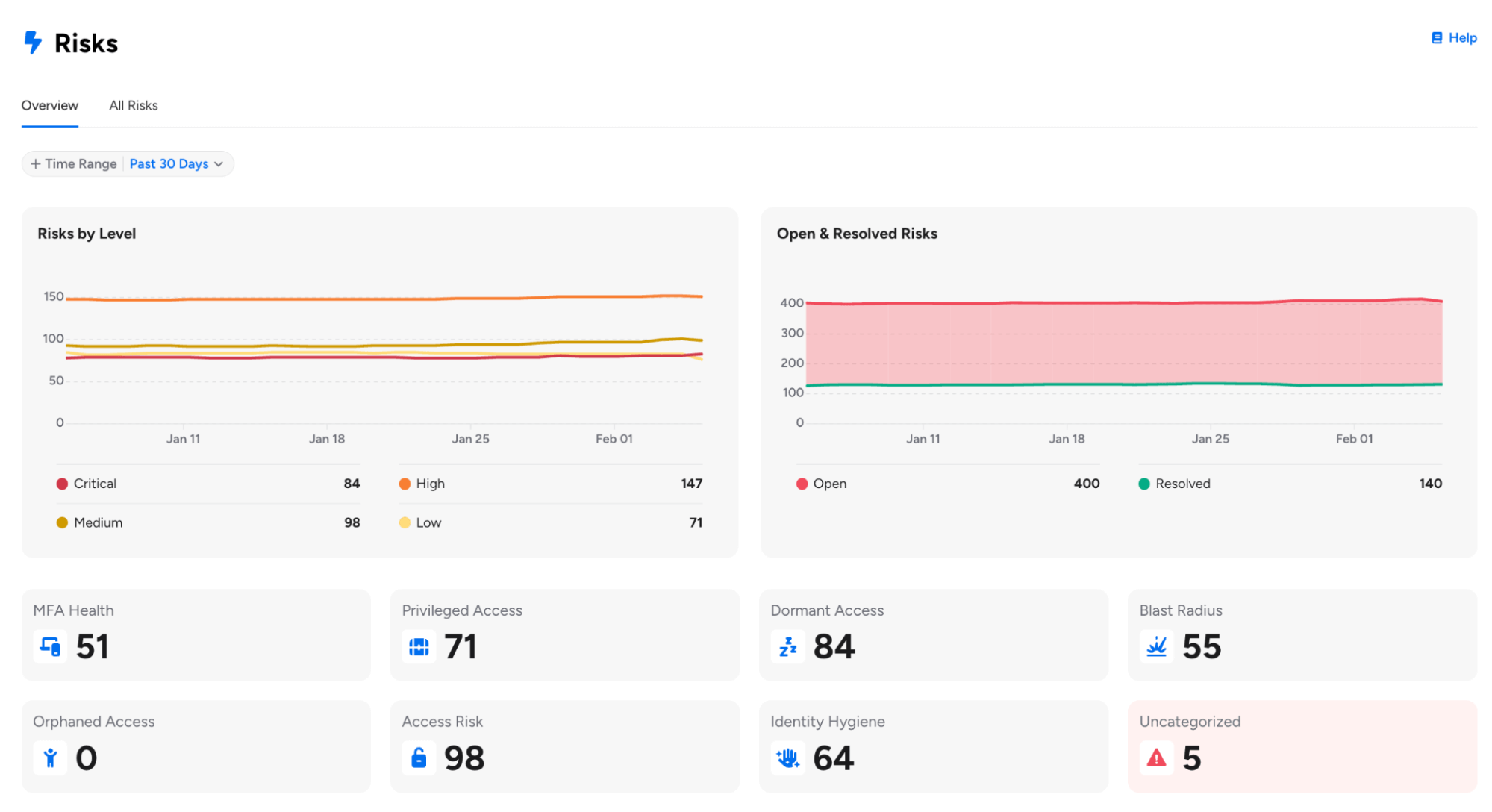
For customers already using Risk Profiles, please note the following enhancements:
- Risk Profiles can now be changed for Veza-created out-of-the-box queries, providing greater flexibility in categorizing pre-built queries according to your organization’s risk taxonomy.
- Risk Profile Bulk Update (Early Access): Users can now select multiple risks from the Risks table and assign a risk profile to all of them at once, with real-time progress tracking showing the percentage of updates completed.
- Risk Profile is now required when saving queries with a risk level, helping ensure proper categorization on the Risks page. Queries without a risk level are automatically assigned the “Informational” profile.
Available risk profiles include MFA Health, Privilege Access, Blast Radius, Dormant Access, Orphaned Access, Access Risk, Identity Hygiene, and Informational (for non-risk queries).
Dashboard Remediation Actions: You can now initiate remediation actions for individual queries or entire Dashboards directly from the Dashboard interface using the Remediate button.
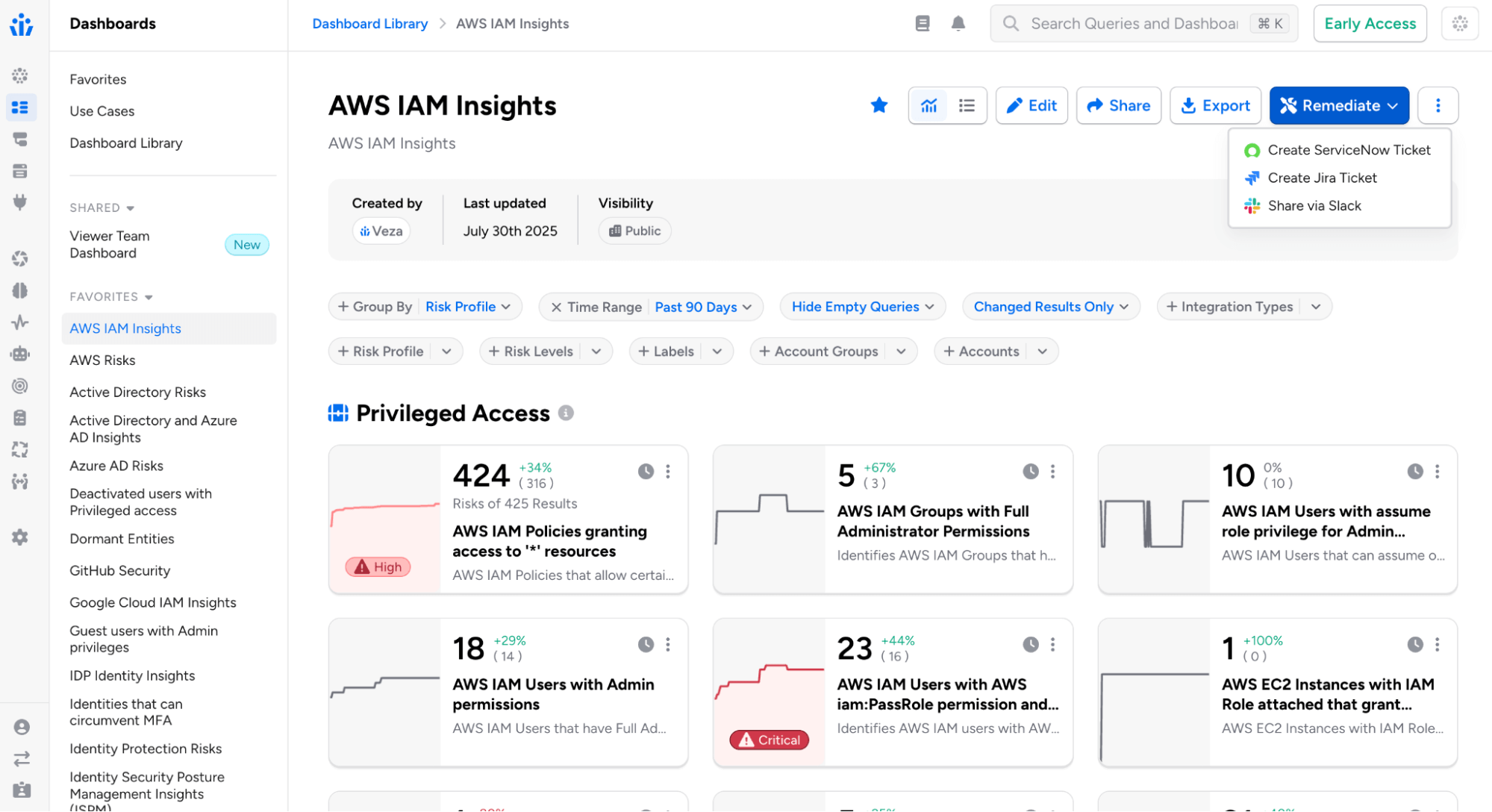
Remediation channels include:
- Email: Select recipients, customize the email subject, and add optional notes for context. Recipients receive an email that includes a direct link to the query or dashboard in Veza.
- Jira: Select one or more Jira Veza Actions, optionally assign a team member, and add contextual notes. Tickets are automatically created in Jira based on the action configurations, each including a direct link back to the corresponding query or dashboard.
- ServiceNow: Choose from configured ServiceNow Veza Actions and add optional notes. Tickets are created in ServiceNow with a direct link to the query or dashboard.
- Slack: Select one or more Slack Veza Actions and add optional notes for context. Messages are posted to configured Slack channels with links to view the findings.
Formatted Alert Email Templates:
Alert and event email notifications can now use formatted HTML templates, providing a more readable alternative to the raw JSON payload.
- The new email format includes structured presentation of alert details (severity, category, event type), timestamps, data values, and direct links to alert details and related queries.
- This option must be enabled in Veza System Settings > Use New Default Email Template.
Risk and Rules Email Templates: Administrators can now create and customize email notification templates for Risks and Alert Rules directly from the System Settings page in the “Risk Alert Email Templates” section.
- Templates support simple placeholder replacement (such as {{RULE_NAME}}, {{ALERT_NODE_COUNT}}) and Handlebars templating for conditional content.
Digest Notification Recipients: Administrators can now control which users receive assessment digest emails through a new global system setting.
- Options include All Users (default behavior) or Admin Users Only, enabling organizations to limit weekly summary digest emails to administrators. This setting is available under Administration > System Settings.
Dashboard Display Defaults in System Settings: Organizations can now set default dashboard display behavior for all users. In System Settings > Dashboards, administrators can customize the default experience for new users:
- Show All Queries by Default: Controls whether empty queries (zero results) are visible or hidden
- Show All Results by Default: Controls whether all results or only changed results appear
- These defaults apply to users who haven’t set personal preferences. Users retain the ability to customize their view using dashboard filter controls, with their preferences persisting across sessions.
Access Search
Query Builder Enhancements
Tag-Based Query Pipelines with Saved Query Filters: When using saved queries to filter other queries, you can now match entities based on tag attributes in addition to standard attributes like ID, name, or owners. Select a tag type (e.g., Veza Tag, AWS Tag, Azure Tag) and tag keys to match between the current and source queries.
Multiple Destination Types in Query Builder: Query Builder now supports selecting multiple destination entity types in a single query, returning results where source entities relate to any of the selected destinations.
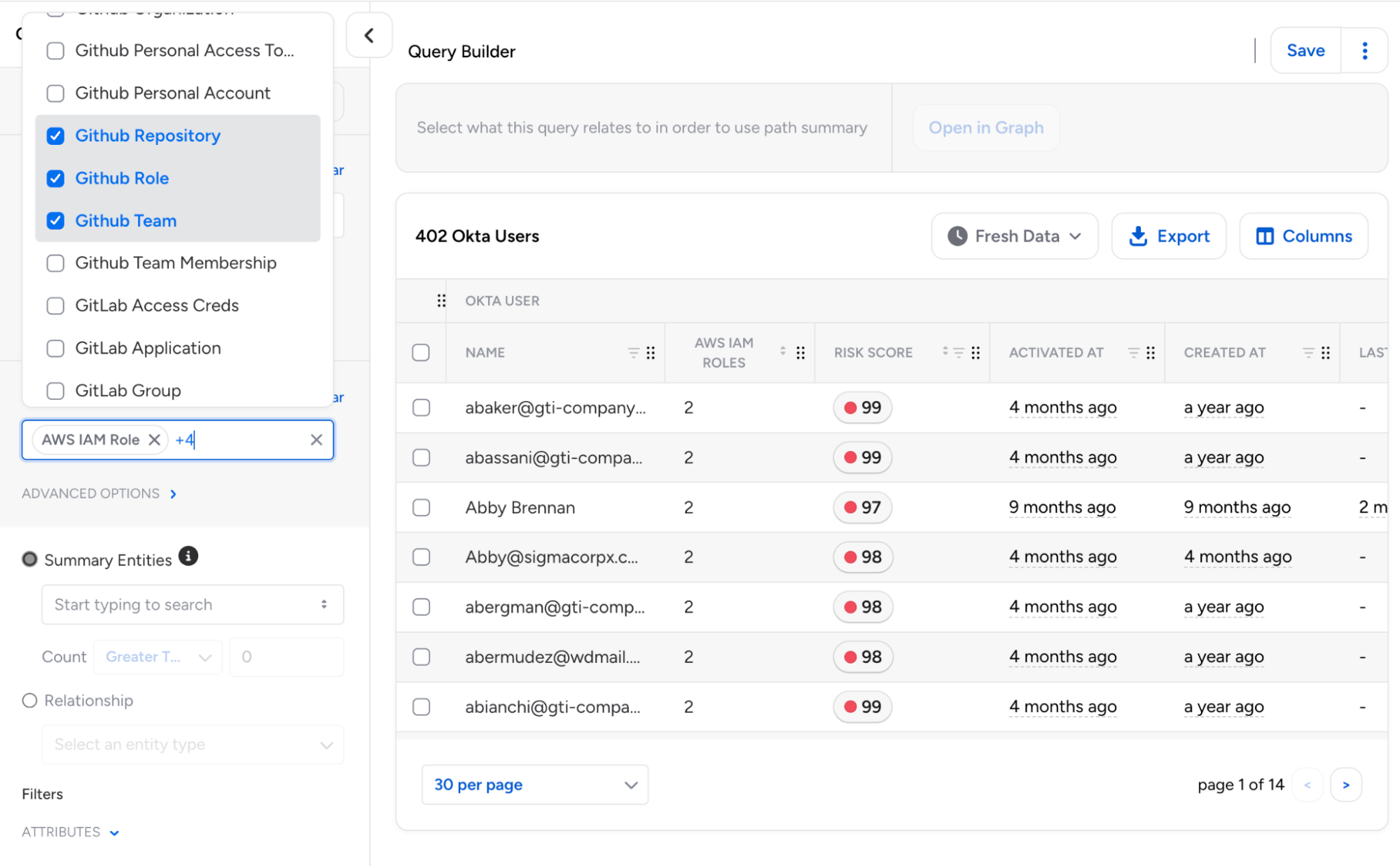
This enables unified searches across different resource types using “OR” logic, eliminating the need for separate queries for each destination type.
- Each destination can be configured independently with its own attribute filters, tags, and permission requirements.
Intermediate Entity Search: Query Builder now allows entity type groupings such as User, Group, or Role to be used directly as summary entities when displaying path information. Additionally, “Waypoint Entity” has been renamed to “Relationship” to align with Access Reviews terminology.
Custom Property Timestamp Handling: Query Builder now correctly identifies and formats timestamp properties based on their schema type definition rather than property naming patterns.
- This ensures that custom properties defined with type TIMESTAMP (including those in OAA-based integrations) display with proper date formatting and support date-relative filtering.
Time Machine UX: Query Builder now features an improved new UX for selecting Time Machine snapshots.
AI Agents and Models: Veza now supports AI Agents and AI Models as entity types in Access Graph, for queries into non-human identities that interact with AI services across your environment.
- Queries and Access Reviews using the new “AI Agent” or “AI Model” types will include standardized properties for AI Agents (publisher information and platform associations) and AI Models (publisher, model family, and model series).
Access Reviews
Microsoft Teams Integration
Microsoft Teams Notifications: Added support for Microsoft Teams as a new notification channel for reviewer reminders and alerts.

Reviewers can now receive both individual review and digest notifications in Teams via Microsoft’s cross-platform Adaptive Cards format with direct links to open reviews in Veza, and support for custom templates.
Improved Administrative Controls
Extended Scheduling Frequencies: Review configurations now support bi-annual and annual scheduling options, in addition to existing weekly, biweekly, monthly, every-other-month, and quarterly frequencies. This makes it easier to align review cadences with annual/bi-annual compliance audits, fiscal year, or other cycles.

Bulk Actions for Reviews: Operators can now multi-select and apply operations to multiple reviews simultaneously using a new actions toolbar on the Reviews page. Bulk operations include publishing draft reviews, deleting reviews, adding/removing/replacing labels on reviews, and updating due dates.
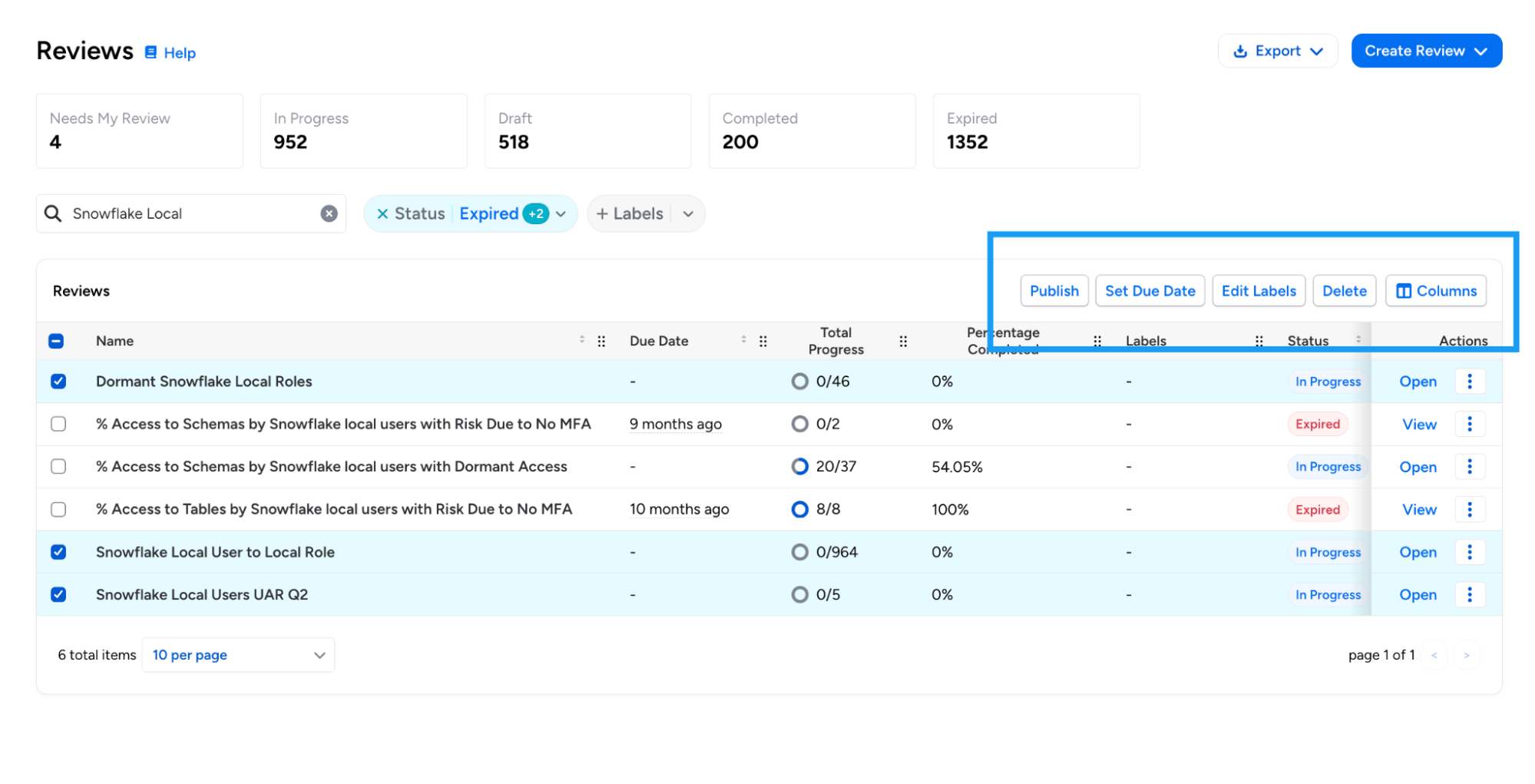
Bulk operations include publishing draft reviews, deleting reviews, adding/removing/replacing labels on reviews, and updating due dates.
Decision Clearing in Action Log: The Action Log now records when a reviewer clears a decision on an access review item, providing a complete audit trail for decision changes.
- The log entry includes the previous decision, original decider, and reason for clearing (either manual clear by the reviewer or automatic clear due to reviewer reassignment).
- This enhancement is particularly relevant in multi-level reviews, where the Level 2 reviewer needs to override the decision made by the Level 1 reviewer.
Access Reviews Events: Veza now logs an audit event when an Access Review is canceled by a user(queueing it for deletion). This event appears as `AccessReviewDeleted` in the Activity Log.
Mandatory Due Date for Access Reviews: Administrators can now require due dates when creating access reviews. When enabled, reviewers cannot create or save reviews without specifying a due date. This option is currently configurable using Global Settings APIs.
Design and Usability Enhancements
Improved Review Prioritization: Due dates on the list of all Reviews now use color coding (red for items due within a week, yellow for those within 15 days). Column ordering has been adjusted to help surface due dates and remaining work earlier in the table.
Review Column Pinning: Reviewers can now pin any column in the review table (including the “Reviewer” column) which automatically freezes the column to the left hand side. This enables reviewers and operators to customize their review list for better efficiency.
Column Order Persistence: Access Review tables now maintain customized column orders when the table schema evolves with new columns. Users can reorder and pin columns with preferences persisting across sessions and version updates.
Lifecycle Management (LCM)
New Features
ServiceNow as Source of Identity: ServiceNow is now supported as a Source of Identity (SOI) for Lifecycle Management (LCM) policies.
This enables identity synchronization and workflow automation based on ServiceNow user data from the sys_user table, including user identity extraction with attributes, group and role memberships, and relationship processing for group memberships and role assignments.
Enhancements
LCM Policies with Alias Definitions (Early Access): LCM Policies now support Alias Definitions as shorthand references for specific integrations and entity types.
Aliases can make attribute formatters and condition strings more readable, and enable greater control when policies use multiple sources of identity with the same integration type, or use the same entity type to both source and synchronize identities.
Azure AD Sync with Exchange Online Mailbox Settings: The Azure AD Sync Identities action now supports updating Exchange Online mailbox settings.
Administrators can now select a mailbox identity to sync both standard mailbox settings (such as AuditEnabled, AuditLogAgeLimit, RecipientLimits, and MaxSendSize) and CAS mailbox settings (such as OWAEnabled, ActiveSyncEnabled, EwsEnabled, MAPIEnabled, PopEnabled, and ImapEnabled).
Custom REST Actions Authentication Options: Administrators can now configure Custom REST Actions to use no authentication when connecting to endpoints that do not require credentials, such as internal services or pre-authenticated URLs.
New Attribute Formatters: Added two new formatters for attribute transformation in LCM policies:
- TITLE_CASE: Capitalizes the first letter of each word, lowercases the rest (e.g., “john doe” becomes “John Doe”). Handles dot-separated values specially (e.g., “john.doe” becomes “John.Doe”).
- SENTENCE_CASE: Capitalizes only the first non-whitespace character and lowercases the rest. Preserves any leading whitespace.
Access Reviews through Workflow Actions: When creating access reviews through the Create Access Review action, administrators can now configure a custom review name using attribute formatters. This is particularly useful for selecting unique, meaningful names for reviews in scenarios where multiple reviews can be created.
Dry Run History Improvements: The Dry Run History table now shows in-progress dry runs, with the option to cancel the run if needed.
Active Directory Account Control Flags: When provisioning Active Directory users, administrators can now specify the full range of userAccountControl flags (such as NORMAL_ACCOUNT, DONT_EXPIRE_PASSWORD, or SMARTCARD_REQUIRED) to configure account security settings during user creation.
Access Profile API Default Version: When retrieving Access Profiles via the API without specifying a version, Veza now returns the published version by default rather than requiring an explicit version number.
Enhanced Formatter Testing Modal: To help users understand the expected data format for each attribute, the inline preview now shows attribute types alongside each input field. Timestamp fields include a tooltip with format examples (ISO8601 or RFC3339), with support for both regular source attributes and alias definitions.

Veza Integrations
New Integrations
DevRev: Veza now supports discovery of DevRev authorization metadata, including users with profile information and SAML identities, groups/teams with membership associations, roles with permission assignments and conditional access (caveats), and field-level permissions.

Grafana: Veza now provides visibility into Grafana platform authorization. The new integration discovers:
- Users including login credentials, authentication methods, and provisioning status
- Teams and membership associations and external sync status
- Service Accounts (Non-human identities with associated token counts)
- RBAC Roles with permission associations (when Grafana RBAC is enabled)
- Permissions (Action-based and scoped)
Enterprise Integration Enhancements
Okta Cross-Application Service Account Discovery: Enhanced Okta integration to support cross-application service account discovery, creating direct App-to-App relationships between entities with the “Can Assume” relationship type. This provides improved visibility into non-human identities that access multiple Okta applications.
AWS Bedrock Guardrail Policies: Added support for AWS Bedrock Guardrail Policies, enabling visibility into AI safety controls and their associated permissions. The AWS integration now discovers content filter configurations (input/output) by severity level, blocked word policies with word counts, and guardrail-to-agent version relationships.
GitLab: The GitLab integration has been enhanced to support service accounts, access tokens, hierarchical resources, and SAML SSO visibility. Administrators can optionally skip user details collection for faster extractions (this will omit Email, IsAdmin, LastLoginAt, and Identity Type attributes).
Workday: When configuring a Workday integration, you can now choose which data sources to discover and extract: Worker data, IAM data, or both. This provides improved flexibility for organizations that only need specific Workday data, and want to omit unneeded metadata collection.
OracleDB: Added support for tracking password and login activity for OracleDB Local Users and Common Users, with support for new attributes including “Password Change Date”, “Password Expiration Date”, and “Last Login Date”.
AWS ECR: Added ecr:PutAccountSetting permission to the supported ECR permission set, enabling visibility into IAM principals that can modify ECR account settings.
Kubernetes: Added support for AWS China and GovCloud EKS cluster ARNs.
UKG Pro: Added optional time zone configuration for employee date fields using IANA format (e.g., America/Los_Angeles) for precise handling of termination dates and hire dates across different time zones.
GitHub Enterprise: Added support for extracting GitHub Enterprise Roles and Role Assignments.
CSV Upload: CSV integrations now feature an “Upload CSV” button directly on the Integration page for faster data uploads.
CyberArk: The CyberArk Identity integration now discovers and analyzes group entities, providing visibility into group-based access control within the CyberArk Security Platform. Groups are automatically discovered from role membership data. When CyberArk Identity uses Azure AD or Active Directory as a directory service, groups are automatically linked to their external IdP counterparts via Object ID (Azure AD) or Distinguished Name (Active Directory) matching.
Appian Role and Group Descriptions: The Appian integration now extracts and displays the description field for both Groups and Roles. These descriptions provide important context about each group’s or role’s purpose and scope, enhancing visibility during access reviews and security investigations.
Snowflake MFA Discovery: Improved coverage of MFA methods for Snowflake, expanding support beyond Duo Security to include all Snowflake-supported MFA providers, with the following attribute changes:
- Duo Security Enabled (duo_security_enabled): New attribute indicating if Duo Security specifically is enabled for a user
- MFA Enabled (mfa_enabled): Now uses Snowflake’s HAS_MFA flag to detect any MFA provider, including Duo Security, Azure, and other methods
Veza Platform
Enhancements
Sign-On Audit Events: Veza now generates audit events when administrators modify sign-on settings. New event types include changes to SSO redirect, SCIM provisioning, SAML enable/disable, MFA requirements, IdP-managed roles, and OIDC configuration.
OIDC Claims from Access Tokens (GA): Reading OIDC claims from JWT access tokens is now generally available. This enables Veza to extract identity information from access tokens issued by OIDC providers for single sign-on (SSO). Administrators can configure custom access token issuer validation, custom audience validation, and attribute extraction from access tokens.
Note: Individual releases can include additional bug fixes and performance improvements that are not detailed in these notes. For more information about any features or bug fixes, contact your Veza representative.
The post Veza Product Updates – January 2026 appeared first on Veza.
]]>The post Taming the M&A Chaos: How Veza Addresses Identity Security Risks During Mergers, Acquisitions, and Divestitures appeared first on Veza.
]]>
Mergers, acquisitions, and divestitures are a part of the healthy and dynamic business environment. However, they introduce massive security, compliance, and operational risk as organizations rapidly combine and separate identities, systems, and access.Their identity programs rarely keep pace with this chaos.
Instead, security teams inherit a patchwork of directories and unknown identity architectures, unmanaged non-human identities, and permission sprawl that neither legacy IGA tools nor cloud identity providers can fully address.
Identity (employees, third parties, service accounts, AI agents, and machines) is the connective tissue of modern enterprises. If identity isn’t unified, nothing else in the business can be.
This is where Veza stands apart.
The Identity Problem during Mergers, Acquisitions, and Divestitures: Complexity, Blind Spots, and Risk
Identity challenges surface not only when organizations integrate new acquisitions, but also when they must cleanly separate identities and access during divestitures, often under even greater regulatory scrutiny.
1. Fragmented Identity Stores
Acquired or divested companies bring their own tech stack: Microsoft Active Directory, HR systems, Identity Providers (IdPs), SaaS apps, CI/CD pipelines, secrets managers, and more. This creates Identity sprawl. There’s no single source of the truth.
Each contains different scopes for “user,” “group,” “role,” and permissions, making consolidation or clean separation nearly impossible with traditional tools.
Legacy IGA tools do not provide the full visibility as they have challenges visualizing nested groups and roles. Further, they do not normalize effective permissions into simple natural language (create, read, update, delete) that can be understood by non-technical people in the organization.
2. Outdated or Unknown Access
Teams must answer critical questions immediately:
 Who are these users spread across multiple IdPs?
- Who currently has access to what?
- Where do dormant or orphaned accounts exist?
- Which entitlements create compliance or segregation-of-duties violations?
- What non-human identities and AI agent identities were created, and who owns them?
- Who still has access to systems that are being divested?
- Which identities violate the principle of least privilege?
Legacy IGA platforms have challenges connecting to all of an organization’s apps and mostly focus on groups and roles. They miss permission-level details.
3. Onboarding & Offboarding at Speed
Business leaders want fast integration. Regulators want proof of control. During M&As, the instances of employees leaving, joining and moving to different roles happen in a concentrated span of time. Lack of a clear line of sight into these dynamic activities leaves a massive blindspot. An overprivileged disgruntled employee might be accessing sensitive data for nefarious purposes.
In divestitures, the problem reverses: organizations must rapidly and precisely remove access without disrupting remaining business operations.
In both cases, manual, script-heavy provisioning processes simply do not scale. They are time-consuming and error-prone.
4. Regulatory Scrutiny Intensifies
Banks, healthcare providers, and public companies experience a spike in audits. Regulators demand proof of “who has access to what.”
During divestitures, this challenge reverses. It requires fast, precise access removal without breaking business operations.
Identity failures become deal blockers.
5. Non-Human Identity & AI Agent Security Multiply Risks
Mergers and acquisitions dramatically increase the number of non-human identities (NHIs) and AI agents (service accounts, API keys, cloud roles, automation, and autonomous agents) that often lack clear ownership or governance.
These identities frequently carry broad, persistent permissions and are rarely reviewed during M&A, creating blind spots that traditional IGA and PAM tools were not designed to address. As AI agents take on more autonomous actions, inherited machine access can significantly expand the attack surface and regulatory risk if left unmanaged.
Why Veza Solves Identity Challenges in Mergers, Acquisitions, and Divestitures Better Than Any Other Platform
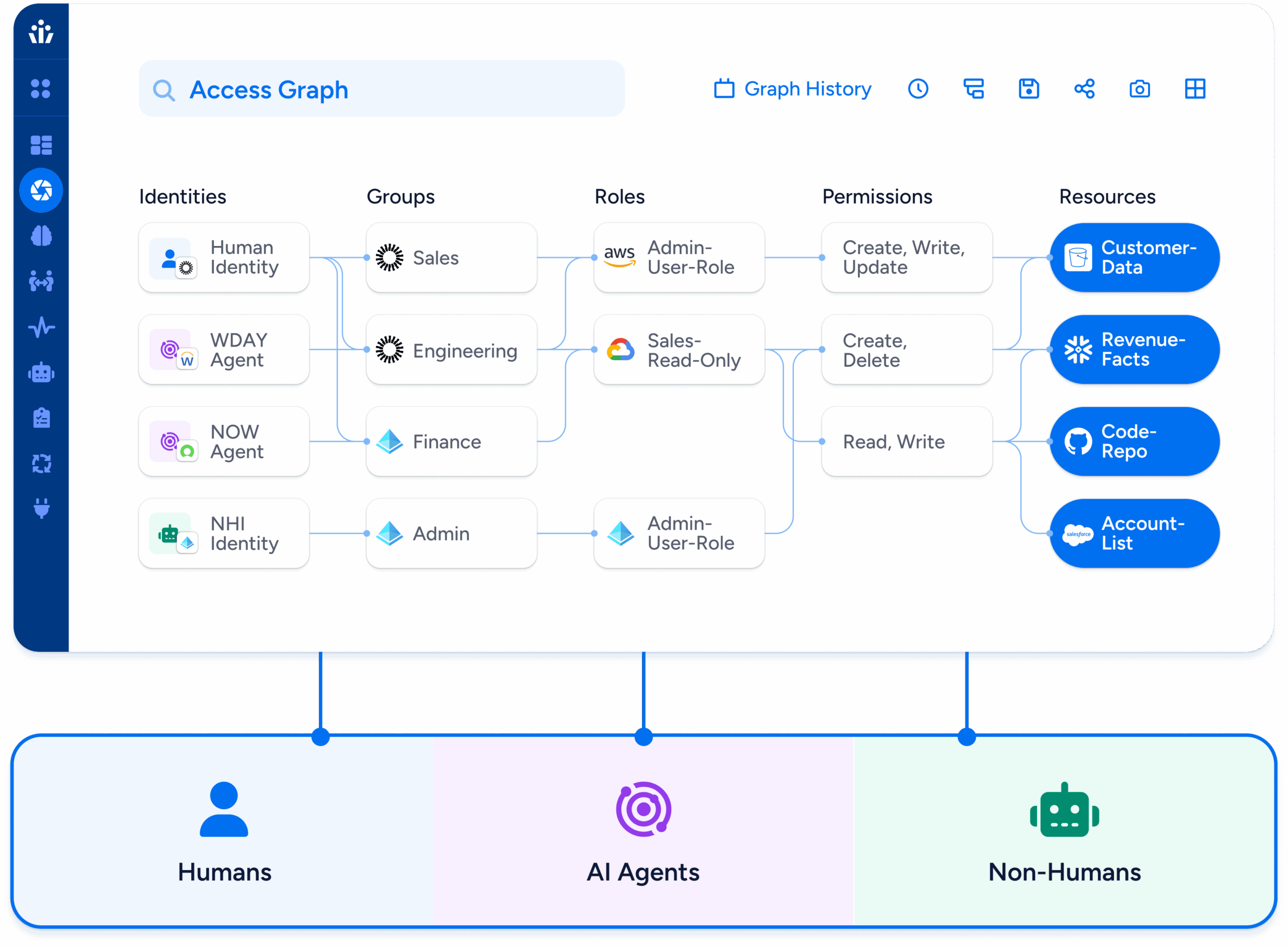
Veza is built on the Access Graph, a normalized, permission-level map of every human, non-human, and AI Agent identity across all systems.
Instead of relying on brittle connectors or generic roles, Veza gives organizations a unified, end-to-end view of identities to resources, improving visibility during M&As.
1. Unified Identity Visibility Across Both Organizations
Veza unifies disparate systems, apps, and fragmented identities:
One normalized data model means one truth.
This is why a major global hospitality company chose Veza to gain immediate visibility into the identity infrastructure they inherited from an acquired company.
2. Fast, Accurate Mapping of Every Permission
Veza shows:
When a company merges, unknown permissions create a massive attack surface. Veza eliminates that uncertainty on Day 1.
After aggressive M&A activity that created identity sprawl across disconnected systems, a business services company embraced Veza’s modern IGA approach—starting with visibility into their identity sprawl to lay the foundation for a scalable identity governance program.

3. Automated, Risk-Aware Onboarding & Offboarding
Veza enables:
A software provider used Veza to automate provisioning for a new business unit—without the complexity of traditional IGA.

4. Rapid Compliance Alignment
Deal teams can’t proceed without audit-ready proof of:
A US bank was growing rapidly via acquisition. Regulators (FDIC, OCC, and Federal Reserve) demanded proof of “who had access to what” and evidence of risk reduction before approving further acquisition. They chose Veza to reduce their identity sprawl and consolidate identity visibility across 2,000+ applications after acquiring multiple banks.

5. Securing Non-Human Identities (NHIs) and AI Agents Across Merged Environments
M&A doubles or triples hidden NHIs. According to Veza’s State of Identity & Access 2026 report, just 0.01% of NHIs control 80% of cloud resources across enterprises—meaning a very small number of accounts can bring an entire business to a halt.
API keys | Service accounts | Bots | Terraform identities | AI agents
Veza is the first unified platform that:
A European bank, formed through a major financial merger, relied on Veza to uncover thousands of risky, inherited service accounts across legacy Active Directories (AD). Prior to Veza, they had shut down what they thought was a dormant service account only to create an outage.

How Veza Supports the Full M&A Lifecycle
Due Diligence/Identity Assessment
This is the task, typically done by the acquiring company, to understand and assess what the identity landscape of the acquired company looks like. This includes outlining risks, developing project plans, and asking for budget allocations. This could be done as part of the official pre-merger due diligence process, but, more often than not, it is after the fact. In either case, it is done on an extremely tight timeframe and has the highest level of executive visibility.
Veza allows organizations to:
Divestiture Identity Redesign and Validation
Divestures pose a particular challenge for identity professionals. In particular, they require separating a single organization into multiple entities, each with their own identity systems. Data and permissions for each organization must be distinct and not violate the new organizational boundaries. Once designed, the implementation must be done and validated for auditors, and is often in the critical path timeline for completing the transaction.
Veza allows organizations to:
Post-Merger Integration
After a merger closes, then the real work begins! Due to lack of visibility, many identity systems and architectures of acquired companies simply run alongside existing ones in perpetuity. Then, at some point, the complexity becomes overwhelming and a massive “identity integration” project is kicked off to try and repair years (or decades) of technical debt. Handling integrations as they come and developing a playbook for future integration saves a tremendous amount of time with modest up-front investment.
Why Veza Delivers What Legacy Identity Tools Can’t
| Requirement | Legacy Tools | Veza |
|---|---|---|
| Permission-level visibility | Limited, app-by-app | Unified Access Graph across all systems |
| Fast integration of acquired apps | Slow, complex, PS-heavy that take months | Hours to days to integrate apps |
| NHI and AI Agent discovery & ownership | Minimal or none | Comprehensive NHI & AI agent identity security |
| Multi-cloud & SaaS entitlement visibility | Incomplete | Full effective permissions + usage context |
| Access Reviews | Narrow, role-only | Enterprise-wide, risk-based reviews and targeted micro-certifications |
Identity Security During Divestitures
While much of the focus in M&A is on integrating identities, divestitures often present an even greater security challenge. When a business unit is carved out, especially in highly regulated industries, organizations must prove, often under tight timelines, that access has been fully and correctly separated.
This requires answering critical questions:
- Who still has access to divested systems?
- Which identities, roles, and service accounts must be removed or retained?
- Are there any lingering permissions that could expose sensitive data post-transaction?
A software provider faced this challenge while divesting a highly regulated business unit. They needed immediate, permission-level visibility to ensure that access was cleanly separated before the transaction could proceed.Rather than relying on traditional Identity Security tools that stakeholders viewed as expensive, slow to deploy, and offering limited visibility, the organization turned to Veza. Veza quickly delivered a unified view of who had access to what across the environment, enabling the team to confidently complete the divestiture without introducing residual risk.
Another example comes from a financial services customer, which was divesting several business units. Traditional IGA tools would have required larger access review campaigns, along with coordinating constant review meetings with the business teams. Instead, the customer used Veza to time-bound and run targeted micro-certifications. This allowed the team to progressively remove access, enforce least-privileged controls and provide clear, auditable proof that access was being safely and systematically separated throughout the divestiture process.
Conclusion: Mergers, Acquisitions and Divestitures Demand Vendor Agnostic Identity Visibility With Data-Driven Insights
Every merger introduces identity debt. Every acquisition expands the attack surface.
Veza gives organizations the ability to:
If identity is the new perimeter, then Veza is the only platform with the depth, scale, and agility to secure that perimeter through the chaos of M&A.
The post Taming the M&A Chaos: How Veza Addresses Identity Security Risks During Mergers, Acquisitions, and Divestitures appeared first on Veza.
]]>The post Veza Product Updates – November 2025 appeared first on Veza.
]]>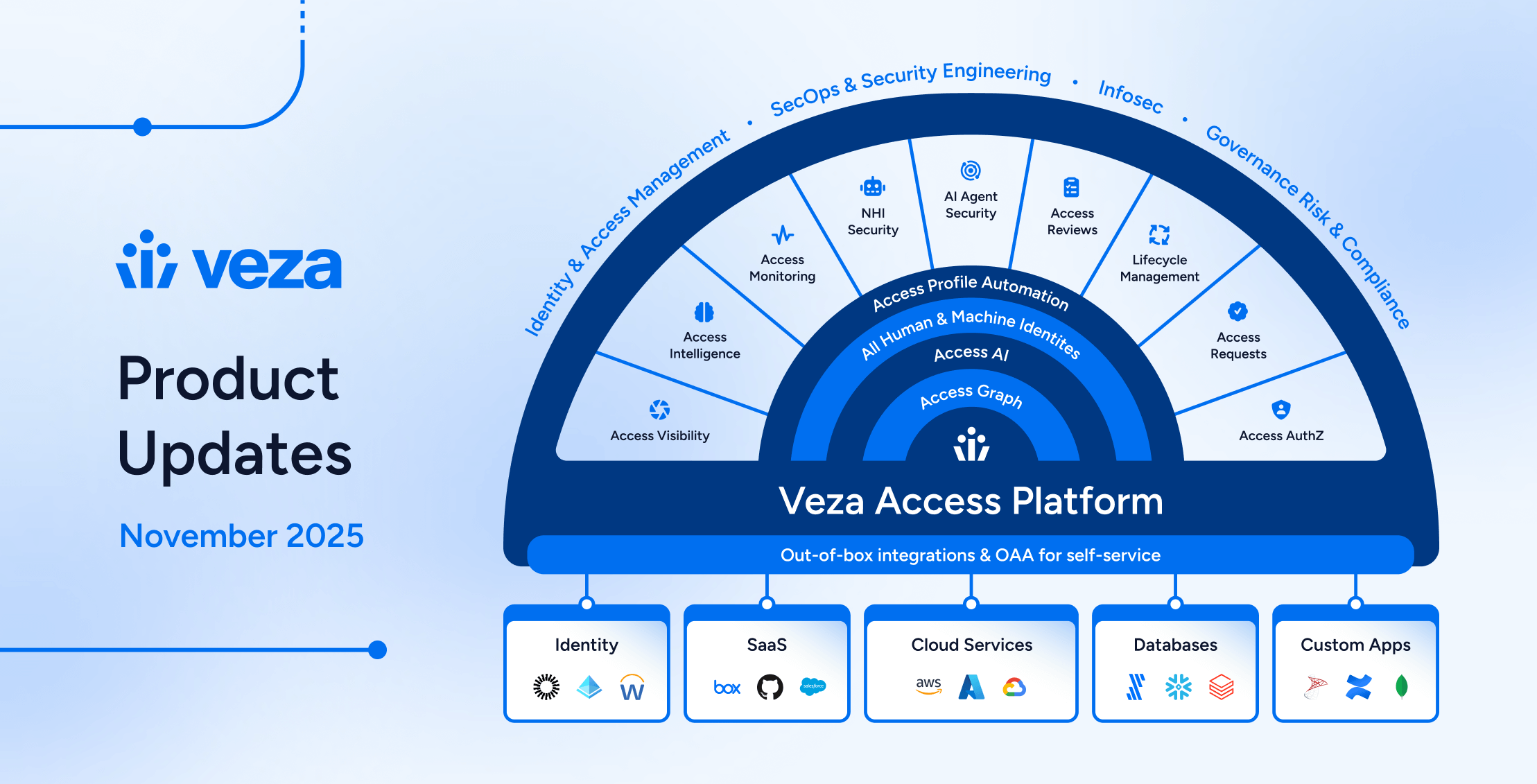
News and Highlights from Veza Releases
Welcome to the monthly Veza product update! As organizations adopt AI infrastructure and expand automation, identity risk extends beyond human users to AI agents, service accounts, and OAuth tokens across every cloud platform. Security teams need visibility into these expanding attack surfaces and the efficiency to act on what they find.
Changes in this release deliver extended coverage for Google Cloud Vertex AI, strengthened lifecycle automation including comprehensive dry run testing, and streamlined access review workflows. Together, these capabilities help teams govern access confidently at scale.
Below you’ll find detailed information on specific updates, along with a summary of release highlights. As always, please contact your Veza support team with questions and feedback.
Release Highlights
Access Reviews
- Reviewer experience improvements: New assignment tabs, “Needs My Review” filter, and improved progress tracking help access reviewers focus on their outstanding work.
- Access Review APIs: Export reviews programmatically and create new reviews via API.
Why it matters
Streamlined reviewer workflows and programmatic review operations reduce certification cycle times while improving auditability.
Lifecycle Management (LCM)
- Azure AD as Source of Identity: Organizations can now drive Lifecycle Management workflows using Microsoft Entra ID as their authoritative identity source.
- Enhanced Dry Run testing: Complete action configurations, identity filtering, and execution history for confident Lifecycle Management policy testing before production deployment.
- Send REST Payload action: Configurable OAuth2 authentication and custom HTTP headers expand integration capabilities with external systems.
Why it matters
Comprehensive dry run testing and expanded identity sources enable organizations to automate identity lifecycle operations across heterogeneous infrastructure with confidence.
Non-Human Identity (NHI) Security
- GCP Vertex AI integration: Visibility into AI agents, model registries, and deployed endpoints with IAM analysis across Vertex AI-specific permissions.
- GitLab service accounts and tokens: Discovery of bot users, group tokens, project tokens, and personal access tokens for NHI security assessments.
- Okta OAuth token monitoring: Activity visibility into OAuth credential usage including client secret reads and refresh token grants.
Why it matters
Expanded coverage for infrastructure and service account tokens enables identification and remediation of over-privileged non-human identities across cloud platforms.
Access Visibility
- Explain Assumed Roles: Visualize AWS IAM role assumption chains through trust relationships and permissions, now generally available for all customers.
- Bulk Tag Operations API: New endpoint supports up to 10,000 tag operations per request for enterprise-scale onboarding, migrations, and automated tagging workflows.
- Query Builder Search: Filter query results to access paths passing through specific intermediate nodes (roles, groups), revealing how users gain access rather than just what they can access.
Why it matters
Help security teams understand not just what access exists, but how it was granted, critical for identifying over-permissioned paths and policy violations.
Integrations
- CockroachDB Cloud: Visibility into distributed SQL database access with effective permissions analysis and inheritance across organization, folder, and cluster levels.
- Integration enhancements: Databricks C2C OAuth, GitHub Organization Roles, LDAP nested groups, NetSuite permission name formatting, and AWS Resource Control Policies.
Why it matters
Expanded integration coverage and authentication options reduce manual effort to model complex environments in Access Graph.
Access Reviews
Reviewer Experience Improvements
Filter Review Items by Assignment: Access Reviews now feature “All” and “Assigned to Me” tabs in the reviewer interface, helping reviewers (who are also administrators with control of unassigned items) pivot between all review line items they can view, and line items specifically assigned to them.

“Needs My Review” Filter: The Reviews page now features a “Needs My Review” filter that helps reviewers (who are also administrators) quickly identify reviews where they are assigned as reviewers with outstanding work.
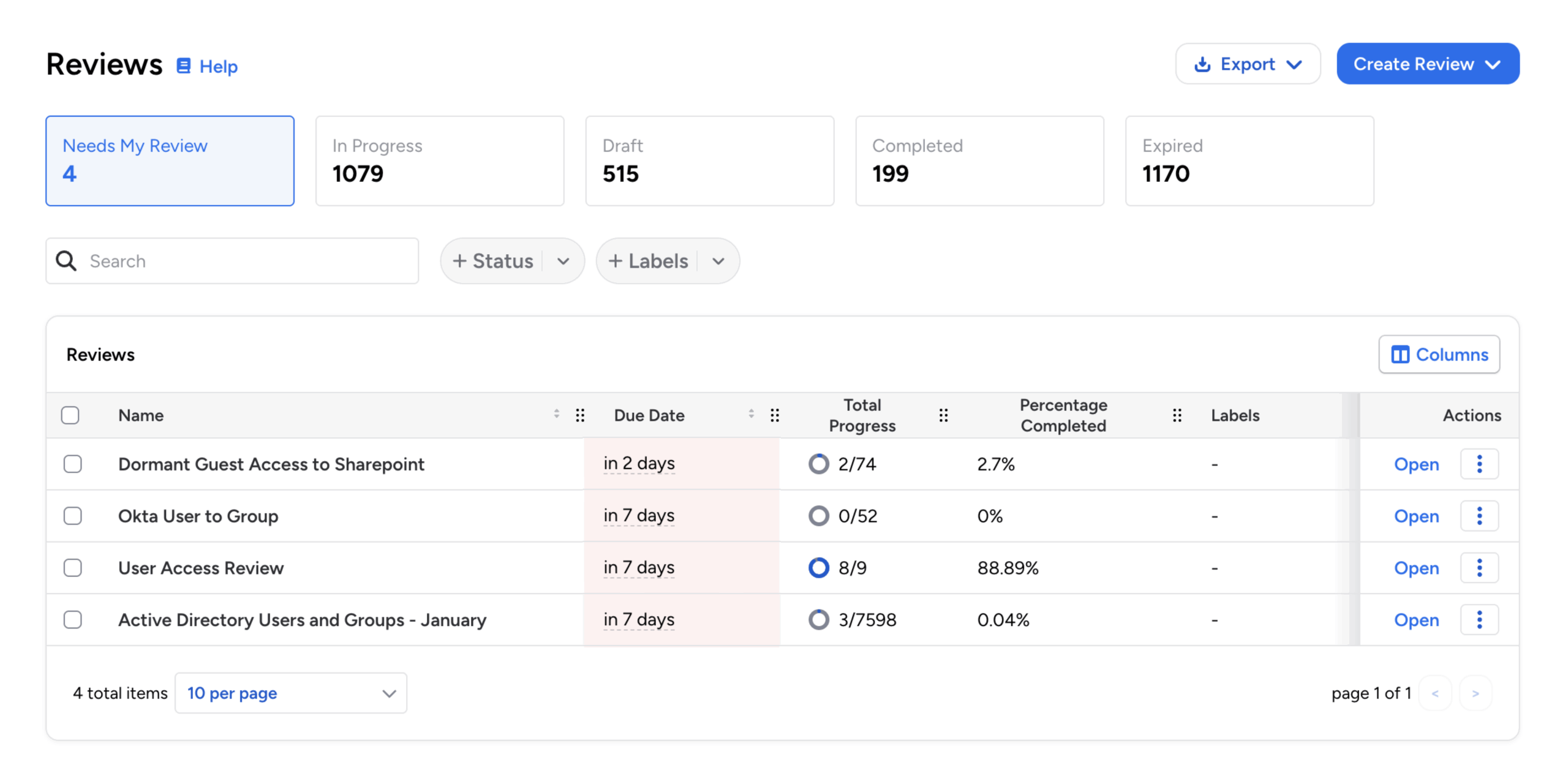
Dual Progress Tracking: For better visibility into individual responsibilities and overall review health, administrators now see two progress bars in the reviewer interface: My Progress (personally assigned review line items), and Total Progress (the overall completion status of the entire review).
Bulk Reassignment Notifications: Access Reviews now shows clear confirmation messages when reviewers perform bulk reassignment operations. Specific notifications now confirm reassignment actions for both single and multiple review items, providing better feedback and visibility into bulk operations.
Permissions for Assigned Reviewers: Any user assigned to specific review items in Access Reviews now receives the same permissions as a standard reviewer for those rows, including the ability to approve, reject, sign off, add notes, and reassign. This supports more flexible delegation workflows, where non-reviewers can take action on items assigned to them without admin intervention.
Configuration and Notifications
Alternate Email for Access Review Notifications: Organizations can now configure alternate email addresses for Access Review notifications. Administrators can configure the specific user property that contains the alternate email address at a global or per-workflow level.
Schedule Time Selection: When scheduling access reviews, Veza now prevents selecting past hours for new schedules. Schedule preview accuracy has also been improved for better visibility into next-run times.
Review Managers: Managers are now more clearly identified as Reviewer Managers when configuring notifications for Access Reviews.
Single-Level Review Label: When viewing the list of reviews, the approval level label for single-level reviews is now explicitly marked 1 of 1 for consistency with multi-level reviews (which are denoted as either 1 of 2 or 2 of 2).
Access Review API Enhancements
Access Review Export API: Introduced new public API endpoint for exporting Access Reviews programmatically. This new API endpoint enables automated creation, monitoring, and download of review results in CSV or XLSX format. This supports exporting Access Reviews information to external reporting and compliance systems, with options for filtering, sorting, and differential exports that compare results over time.
Dynamic User Identity Filtering: The Create Certification endpoint (POST /api/preview/awf/certifications) now supports dynamic user identity filtering. When creating an access review programmatically, the request can include specific user identities via the dynamic_information parameter. This will filter the review results to those users, and can be useful for targeted review use-cases, such as mover reviews (for role changes), leaver reviews (for offboarding), and user-specific audits.
Unpivot Fields for Ownership Attestation (Preview API): Access Reviews now support “unpivoting” multi-value fields, such as Reviewers when multiple reviewers are assigned to a line, to create individual rows for each value. This enables ownership attestation workflows where review line items with multiple owner-reviewers generate separate review items for each owner. For example, a resource with three owners can now create three review rows (one assigned to each owner) allowing independent certification of ownership rather than collective approval.
Access Visibility
Access Graph and Query Builder
Intermediate Node Types in Query Builder: Query Builder now supports waypoint node type filtering, enabling users to filter query results to only include access paths that pass through a specific intermediate entity type (such as a role or group).

For example, this can help find all users with access to a resource only through IAM Roles, excluding users with direct permissions. This matches functionality previously available in Access Reviews queries.
Filter Queries by Owner: Users can now filter saved queries by owner, making it easier to locate specific queries in environments with many custom and out-of-the-box queries. A new Owner filter on the Queries page supports multi-select and works in combination with other filters (Labels, Integrations, Risk Level).
Nested Entity Navigation: Improved “Show Hierarchy” support and edge selection in Access Graph for better exploration of nested entity relationships.
Query Performance: Improved Query Builder performance when sorting results, and improved performance for queries using filters on the Name property of “Relates To” entities.
Explain Assumed AWS IAM Roles
Explain Assumed Roles: The Explain Assumed Roles option in Access Graph is now generally available for all customers. This capability helps users understand complex AWS IAM role assumption chains by visualizing the path from one role to another through trust relationships and permissions.
Bulk Tag Operations
Bulk Tag Operations API: A new API endpoint (POST /graph/private/tags:bulk) now supports adding and removing tags for multiple entities in a single atomic operation. This supports up to 10,000 tag operations per request for bulk onboarding, environment migrations, and enterprise-scale tagging workflows. Additionally, we have extended support for additional characters in Veza tag values.
Lifecycle Management (LCM)
Azure AD as Source of Identity
Azure AD Source of Identity: Added support for Azure AD as a source of identity for Lifecycle Management. Organizations using Azure AD (Microsoft Entra ID) can now configure it as an authoritative identity source, enabling policies to synchronize and manage user identities based on changes in the source of truth.
Enhanced Dry Run Testing
Bulk Dry Run Identity Filtering: Improved support for dry run testing, allowing administrators to safely preview the actions that would be taken before enabling a policy. You can now perform dry runs against all identities or filter to specific identities based on attribute values.
Full Action Configuration in Dry Runs: Dry run results now display the complete action configuration details for all action types that would run, replacing the previous view that only showed attributes to be synced.

This includes the configuration settings for each action, such as Create Email parameters, Reset Password complexity rules, Send REST Payload endpoints and headers, Manage Relationships mappings, and Create Access Review settings.
Dry Run History Table: The Bulk Dry Run feature now includes a complete history table showing all previous dry run task results. Users can review past dry run executions directly from the results page, making it easier to track testing iterations and compare outcomes across multiple runs.
New Actions and Workflow Controls
Okta Suspend Action: Added a new “Suspend” account action specifically for Okta integrations in Veza Lifecycle Management. This action allows policies to suspend Okta user accounts without fully deactivating them.
Show Matching Identities: Lifecycle Management policies now include a “Show Matching Identities” option, replacing the previous “View in Query Builder” button. This enables users to view the identities that match a workflow’s trigger and condition criteria directly on the Identities list.
Email Recipient Formatters: Lifecycle Management event notifications now support formatters in the email recipient field, enabling dynamic email address generation based on identity attributes. Administrators can use formatters to create recipient emails derived from identity data (such as a user’s manager email, department contact, or other attribute-based recipients), providing more flexible and contextual notification routing.
Design and Usability Enhancements
Inline Date Formatter Testing: Added inline testing support for date formatters in Lifecycle Management workflow configurations. Administrators can now test and validate date format transformations with sample data directly within the policy editor.

Optional Identity Columns: The Identities table now supports additional columns that can be shown or hidden through the column selector: Title, Email, and Employee ID. These provide quick access to these attributes when relevant, without requiring drill-down into individual identity details when troubleshooting or auditing identity metadata.
Policy Version Timestamps: The policy version history now displays published timestamps for each policy version. Users can view when each version was published, along with the publisher’s name, and toggle between relative format (“15 days ago”) and absolute format (showing the full date and time zone).
Flexible Attribute Ordering: Formatters no longer require manual attribute reordering when attributes reference other attributes. Previously, attributes had to be positioned above any attributes that referenced them, requiring manual reordering of attributes using up/down arrow controls. Veza now supports attributes referencing other attributes positioned anywhere in the list.
Send REST Payload Enhancements
Custom HTTP Headers: Lifecycle Management workflows now support custom HTTP headers in the Send REST Payload action. Users can add, edit, and remove custom headers, enabling better integration with systems that require specific authentication tokens, content types, or other header-based configurations.
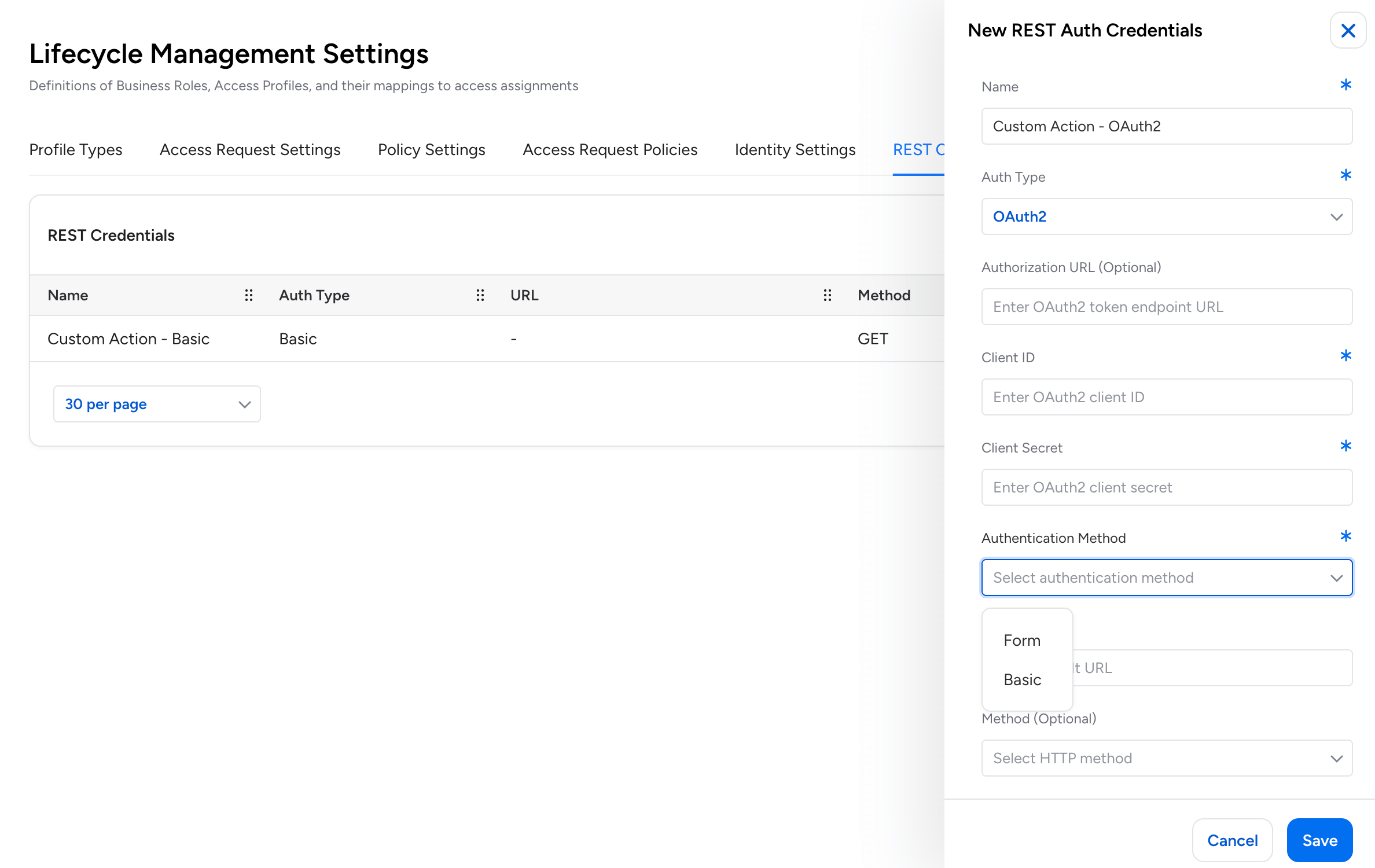
OAuth2 Authentication: The Send REST Payload action now supports OAuth2 authentication and client login flows.
Non-Human Identity (NHI) Security
GCP Vertex AI Integration
Google Cloud Platform – Vertex AI Integration: Veza now supports Google Cloud Platform’s Vertex AI service. New visibility into AI/ML infrastructure includes reasoning engines (AI agents), model registry, deployed endpoints, and their associated permissions.

The integration supports full IAM and Workspace connectivity, effective permission analysis across Vertex AI-specific permissions, and relationships between reasoning engines and service account identities:
- Vertex AI Reasoning Engine: AI agents that execute custom code and tools
- Vertex AI Model: Custom-tuned models from Model Registry (foundation, custom, and imported models)
- Vertex AI Endpoint: Deployed model endpoints serving predictions
- Vertex AI Service: The Vertex AI platform service entity
- Vertex AI Policy: IAM policies for Vertex AI resources
- Vertex AI Role Binding: IAM role grants to identities
Okta OAuth Token Activity Monitoring
When audit logs are enabled, Veza now monitors OAuth credential usage events including client secret reads and refresh token grants. This enables Activity Monitoring visibility into how applications interact with OAuth credentials, supporting Non-Human Identity (NHI) security by tracking programmatic access patterns across Okta environments.
GitLab Service Accounts and Access Tokens
The GitLab integration now discovers service accounts (bot users for automation) and their associated access tokens.
- Veza extracts group access tokens, project access tokens, and service account personal access tokens as Access Credentials, providing visibility into Non-Human Identity (NHI) access patterns.
- Each token includes scope, access level, and expiration metadata to support security assessments of programmatic GitLab access.
AWS Bedrock Visualization
AWS Bedrock Graph Icons: AWS Bedrock entities in Access Graph now feature better visual identification. Primary icons distinguish entity types (Foundation Models, Knowledge Bases), while secondary badge icons identify the AI provider (Anthropic, Amazon, DeepSeek, Mistral AI, Meta, OpenAI). This improvement makes it easier to identify and distinguish AWS Bedrock resources when analyzing authorization paths in Graph search.
Access Security
Destination Node Properties in Assessment Rules: Rules in Veza now support including destination node properties in alert notifications. When configuring rules that evaluate queries with destination nodes (such as queries checking relationships to resources), you can now select to include destination nodes in alerts and choose which destination properties to include from a dropdown menu.
Delete Scheduled Export: When exports are scheduled for a query, you can now delete the scheduled export directly from the row actions menu.
Veza Integrations
New Integrations
CockroachDB Cloud: Veza now supports CockroachDB Cloud, providing visibility into distributed SQL database access and permissions. The integration extracts organization structure, clusters, databases, users, and roles, and supports effective permissions analysis, providing visibility into both direct and inherited access. This includes support for folder hierarchies, group-to-group relationships, and inheritance-based access calculations across organization, folder, and cluster levels.
Enhancements
Databricks: The integration now supports Client-to-Client (C2C) OAuth authentication flow, providing an alternative to Personal Access Token (PAT) authentication. C2C authentication enables secure machine-to-machine communication using OAuth 2.0 client credentials.
Open Authorization API: You can now delete OAA datasources directly from the Veza web interface. Previously, deleting an OAA datasource required using the REST API.
Anaplan: The integration now includes the workspace name as an attribute on Model entities. Previously, only the workspace ID was available, requiring users to cross-reference workspace names when reviewing model access manually.
Active Directory: The integration now uses the replicated lastLogonTimestamp attribute exclusively for tracking user logon activity, providing consistent values across environments with multiple Domain Controllers or load-balanced configurations.
NetSuite Permission Names: The NetSuite integration now supports configurable display of permission names. When editing a NetSuite integration, you can choose whether system permissions display using human-readable names (the new default) or technical shorthand keys (the previous behavior).
AWS Resource Control Policies: Added support for AWS Resource Control Policies.
GitHub Organization Roles: Added support for extracting GitHub Organization Roles and Role Assignments.
LDAP Nested Groups: Added support for nested group memberships.
LDAP Group-to-Group Mapping: Added support for Group-to-Group identity mapping from LDAP IDP providers.
SCIM OAuth: Added support for OAuth authentication using basic auth client_credentials.
Exchange Online: Added support for parallel extraction.
Azure Expiration Handling: Updated the Azure integration to properly handle expiration dates for credentials, keys, secrets, and certificates.
- Microsoft uses Unix epoch (January 1, 1970) as a sentinel value for entities without expiration dates, which can be ambiguous when shown in Veza.
- The Azure integration now converts these epoch sentinels to Veza’s standardized zero-time sentinel, ensuring “never expires” values are consistently represented across Azure entities in Access Graph.
The post Veza Product Updates – November 2025 appeared first on Veza.
]]>The post Automating Veza Access Requests for the Enterprise: Integrating Veza with ServiceNow appeared first on Veza.
]]>
Overview: Streamlining Access Requests
Many organizations struggle to automate access requests because of fragmented identity data. Current solutions often force a choice between efficient processes and rigorous security.
Veza’s APIs solve this by unifying your data, allowing you to automate access at scale without lowering your governance standards.
The Solution: Veza + ServiceNow Integration
We built an integration that combines Veza’s Identity Authorization Platform with ServiceNow’s IT Service Management capabilities to create a seamless, automated access request workflow.
The outcome? Users can request access to multiple resources through a familiar catalog interface, IT admins and/or managers can approve with one click, and access is automatically provisioned—all while maintaining a complete audit trail.
Architecture Overview
The Components
Our integration consists of five key components:
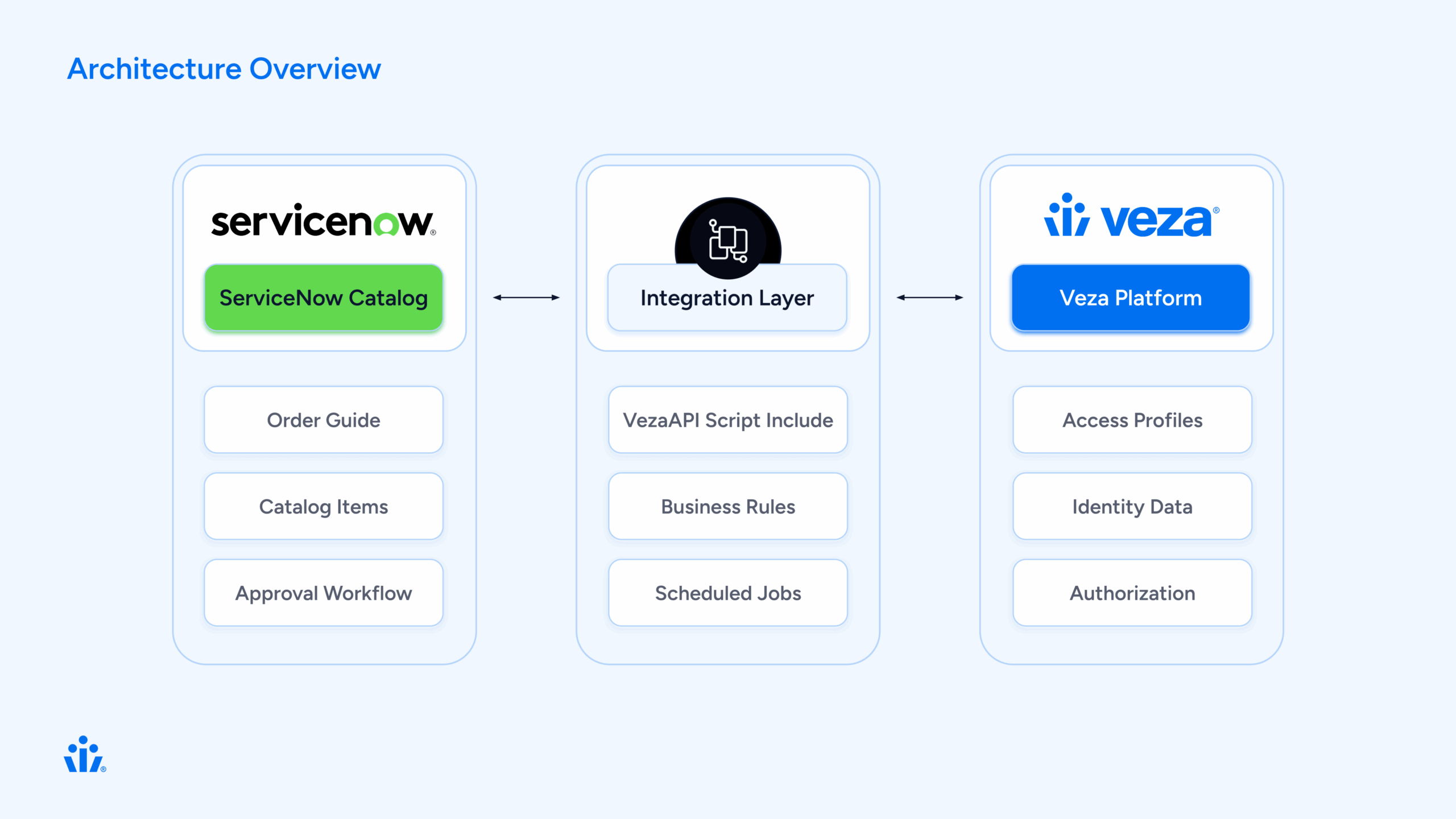
How It Works: The User Journey
Let’s walk through a typical access request from start to finish.
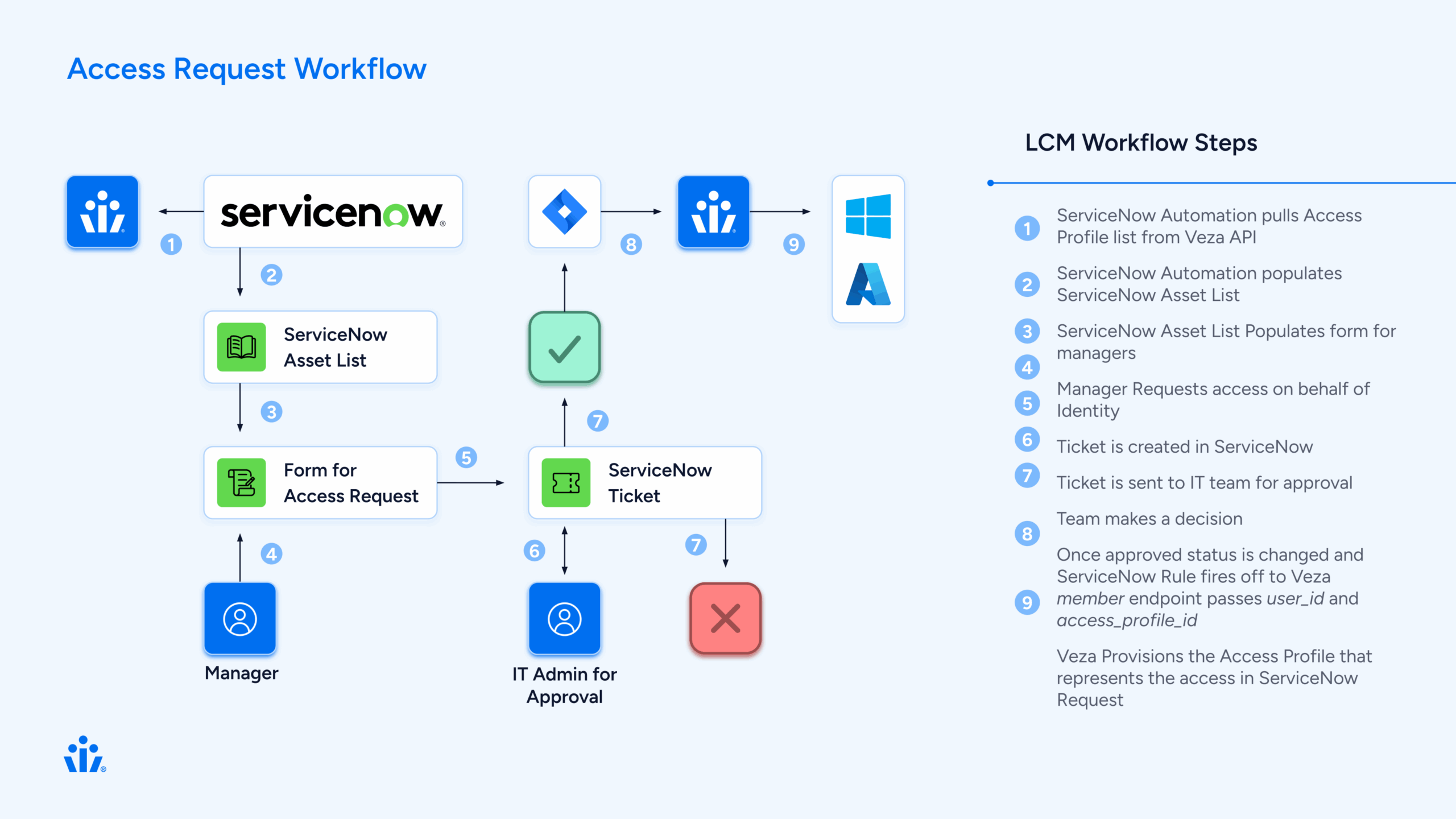
Step 1: User Requests Access
Sarah, a new data analyst, needs access to several shared drives and applications to do her job.
 Sending emails to her manager
Behind the scenes
ServiceNow creates three separate Requested Items (RITMs), one for each profile. Each RITM will follow the same approval workflow independently.
Step 2: Manager Approval
David, Sarah’s manager, receives an approval notification in ServiceNow. He can:
- Review the request details
- See the business justification
- Approve or reject each profile individually
Behind the scenes
A business rule (Veza Create Manager Approval) automatically created the approval record when the RITM was created. The approval is linked to Sarah’s manager from her user profile in ServiceNow.
Step 3: IT Review (Optional)
For sensitive access profiles, an IT task is created after manager approval:
- IT staff reviews the request
- Verifies the user’s need for access
- Completes the task
Behind the scenes
Another business rule (Veza Create IT Task) creates the IT task when the manager approves. This step is optional and can be configured per profile.
Step 4: Admin Approval
For high-privilege access, an admin provides final approval:
- Security admin reviews the complete request chain
- Sees manager and IT approvals
- Makes final decision
Behind the scenes
The admin approval is created automatically when the IT task is completed.
Step 5: Automatic Provisioning
This is where the magic happens. When all approvals are complete:
The business rule triggers:
// Veza Access Grant Handler triggers on IT task close
1. Get the RITM associated with the task
2. Extract the veza_profile_id from the RITM variables
3. Look up Sarahs identity in Veza
4. Call Veza API: addMembersToAccessProfile()
5. Veza adds Sarah to the access profile
6. Veza syncs to downstream systems (AD, AWS, etc.)
7. Update RITM: "Access granted successfully"
Within minutes, Sarah has access to all three systems she requested. No manual work required.
Step 6: Confirmation
Sarah receives a notification:
“Your access request has been fulfilled. You now have access to Data Analytics – Shared Drive.”
The RITM closes with complete audit trail:
- Who requested
- Who approved (and when)
- What access was granted
- When provisioning occurred
Technical Deep Dive
 Component 1: VezaAPI Script Include
This is the heart of the integration—a JavaScript class that wraps the Veza REST API.
Key Methods:
var VezaAPI = Class.create();
VezaAPI.prototype = {
    initialize: function() {
        this.baseUrl = gs.getProperty('veza.api.url');
        this.apiToken = gs.getProperty('veza.api.token');
    },

    // Get all access profiles from Veza
    getAccessProfiles: function() {
        var endpoint = '/api/private/lifecycle_management/access_profiles';
        return this._makeRequest('GET', endpoint);
    },

    // Look up a user by email
    getUserByEmail: function(email) {
        var response = this.getIdentities();
        // Search through identities to find matching email
        // Return user ID if found
    },

    // Add user to access profile
    addMembersToAccessProfile: function(profileId, userIds) {
        var endpoint = '/api/private/lifecycle_management/access_profiles/'
                      + profileId + '/versions/1/members';
        var payload = {
            access_profile_id: profileId,
            identity_ids: userIds,
            type: 'ADD',
            version_number: 1
        };
        return this._makeRequest('PUT', endpoint, payload);
    }
};
What makes it robust:
- Proper error handling with try/catch
- Consistent response format: {success, status, data, error}
- Configurable via system properties (no hardcoded credentials)
- Debug logging for troubleshooting
Component 2: Catalog Sync
The catalog sync process keeps ServiceNow in sync with Veza’s access profiles.
The sync script:
function syncVezaCatalogItems() {
    // 1. Connect to Veza
    var vezaAPI = new VezaAPI();
    var response = vezaAPI.getAccessProfiles();

    // 2. For each profile from Veza
    for (var i = 0; i < profiles.length; i++) {
        var profile = profiles[i];

        // 3. Create or update catalog item
        var grItem = new GlideRecord('sc_cat_item');
        grItem.name = profile.name;
        grItem.category = 'Veza Access Profiles';
        grItem.insert();

        // 4. Create variables
        // Variable 1: business_justification (user input)
        // Variable 2: veza_profile_id (hidden, from Veza)
    }
}
Scheduled to run daily, this ensures:
- New Veza profiles appear in ServiceNow automatically
- Updated descriptions sync from Veza
- Decommissioned profiles can be marked inactive
Component 3: Approval Workflow
One of the trickiest parts of the integration was getting the approval workflow right. There were many iterations using multiple flows but we were able to distill the process into one buisness rule.
The Solution: Keep only ONE business rule that creates approvals.
// Veza Create Manager Approval (order 50)
(function executeRule(current, previous) {
    // Only run for Veza catalog items
    if (!isVezaAccessRequest(current)) return;

    // Create manager approval
    var grApproval = new GlideRecord('sysapproval_approver');
    grApproval.sysapproval = current.sys_id;
    grApproval.approver = current.request.requested_for.manager;
    grApproval.state = 'requested';
    grApproval.insert();
})(current, previous);
Key insight: Disable all other approval-creating business rules to prevent duplicates. Each RITM should have exactly 1 approval, not 2, not 0.
Component 4: Access Provisioning
The final piece: actually granting access in Veza when approvals complete.
// Veza Access Grant Handler
// Triggers: After IT task is closed complete
(function executeRule(current, previous) {
    // 1. Verify task was approved
    if (current.state != 3 || current.approval != 'approved') return;

    // 2. Get the RITM
    var grRITM = new GlideRecord('sc_req_item');
    grRITM.get(current.request_item);

    // 3. Get Veza profile ID from RITM variables
    var profileId = getVariable(grRITM, 'veza_profile_id');

    // 4. Look up user in Veza
    var userEmail = grRITM.request.requested_for.email;
    var vezaUserId = getVezaUserId(userEmail);

    // 5. Grant access via Veza API
    var vezaAPI = new VezaAPI();
    var result = vezaAPI.addMembersToAccessProfile(profileId, [vezaUserId]);

    // 6. Update RITM
    if (result.success) {
        grRITM.state = 3; // Closed Complete
        grRITM.work_notes = 'Access granted successfully in Veza.\n' +
                           'Veza User ID: ' + vezaUserId;
        grRITM.update();
    }
})(current, previous);
What Veza does next:
- Adds user to access profile
- Queues sync actions for downstream systems
- Executes provisioning (add to AD group, AWS role, etc.)
- Returns success confirmation
The Order Guide Approach
We chose to use ServiceNow’s Order Guide feature rather than building a custom spawner. Here’s why:
Order Guide (What we use):
- Native ServiceNow functionality
- Users can select multiple items from a list
- Each selection creates a separate RITM
- Each RITM follows standard approval workflow
- No custom code needed for RITM creation
- Easy to maintain and troubleshoot
The ServiceNow Order Guide gives users a familiar shopping cart experience: browse profiles, add the ones you need, and check out once.
Data Flow: Request to Provisioning
Let’s trace a single request through the entire system:
Initial Request (t=0)
User submits Order Guide with 3 profiles
    ↓
ServiceNow creates 3 RITMs
    ↓
RITM 1: "Data Analytics - Shared Drive"
  Variables:
    - business_justification: "Need access for Q4 reporting"
    - veza_profile_id: "019838eb-fc0e-7797-9bee-ea38534fb7c3"
  State: Open
  Approval: Requested
Manager Approval (t=5 minutes)
Manager approves RITM 1
    ↓
Business Rule: VezaCreateITTask triggers
    ↓
IT Task created for RITM 1
  State: Open
  Assignment: IT Ops group
IT Task Completion (t=30 minutes)
IT staff closes IT task as "Approved"
    ↓
Business Rule: VezaAccessGrantHandler triggers
    ↓
Step 1: Get RITM data
  - Requested for: [email protected]
  - Profile ID: 019838eb-fc0e-7797-9bee-ea38534fb7c3
    ↓
Step 2: Look up user in Veza
  - API: GET /api/private/lifecycle_management/identities
  - Find: [email protected]
  - Result: Veza User ID = 01982f77-588b-79b7-bd67-bcc6513344dd
    ↓
Step 3: Grant access in Veza
  - API: PUT /access_profiles/{profileId}/versions/1/members
  - Body: {
      access_profile_id: "019838eb...",
      identity_ids: ["01982f77..."],
      type: "ADD",
      version_number: 1
    }
  - Response: 200 OK
    ↓
Step 4: Veza provisions access
  - Veza adds user to access profile
  - Queues sync to Active Directory
  - Adds user to "Data-Analytics-SharedDrive" AD group
  - Group permissions grant access to shared drive
    ↓
Step 5: Update ServiceNow
  - RITM state: Closed Complete
  - Work notes: "Access granted successfully in Veza.\nVeza User ID: 01982f77..."
  - User notified via email
Total time: Under 1 hour (vs. days for manual process)
Key Design Decisions
1. Why Store Profile ID in Variables?
Each catalog item has a hidden variable called veza_profile_id that stores the Veza profile UUID.
Alternatives we considered:
- Store in catalog item custom fields → Harder to access in business rules
- Look up by name → Fragile, names can change
- Hardcode in business rules → Impossible to maintain
Why variables work:
- Automatically copied to each RITM
- Easy to access in business rules
- Can be updated via catalog sync
- Standard ServiceNow pattern
2. Why One Approval Business Rule?
We initially had three business rules creating approvals, resulting in 2-3 approvals per RITM.
The solution: Disable all but one.
Key lesson: ServiceNow business rules run in order. If multiple rules can create approvals, they will. Better to have one well-designed rule than multiple competing ones.
3. Why Trigger on IT/Manager Task Close?
We trigger access provisioning when the IT task closes (not when admin approves).
Reasoning:
- IT/Manager task is the final approval step
- Gives IT or Manager a chance to review before provisioning
- Clear trigger point (state change to “Closed Complete”)
- Easy to modify if approval chain changes
4. Why Not Cache Veza Data?
We call Veza APIs in real-time rather than caching user data in ServiceNow.
Why no cache:
- Always current data (no stale cache)
- Veza is source of truth for identities
- API calls are fast (~200ms)
- Simpler architecture (no cache invalidation)
Trade-off:
Extra API calls, but negligible impact given request volume.
Implementation Timeline

Challenges We Overcame
 Challenge 1: Duplicate Approvals
Problem: Each RITM was getting 2-3 approval records instead of 1.
Root cause: Multiple business rules all thought they should create approvals.
Solution: Disabled all but one approval-creating business rule. Added logging to track which rules were firing.
Lesson: Less is more. One well-designed rule beats multiple competing ones.
Challenge 2: Variable Access in Business Rules
Problem: Accessing catalog variables from business rules is tricky in ServiceNow.
Variables exist in three tables:
- item_option_new – Variable definition
- sc_item_option – Variable value
- sc_item_option_mtom – Links value to RITM
Solution: Built a helper function that navigates these relationships:
function getVariable(ritm, varName) {
    var grMTOM = new GlideRecord('sc_item_option_mtom');
    grMTOM.addQuery('request_item', ritm.sys_id);
    grMTOM.query();

    while (grMTOM.next()) {
        var grOption = new GlideRecord('item_option_new');
        if (grOption.get(grMTOM.sc_item_option.item_option_new)) {
            if (grOption.name == varName) {
                return grMTOM.sc_item_option.value.toString();
            }
        }
    }
    return null;
}
Challenge 3: User Identity Mapping
Problem: ServiceNow and Veza might have users with different identifiers.
ServiceNow: [email protected]
Veza: UUID 01982f77-588b-79b7-bd67-bcc6513344dd
Solution: VezaAPI.getUserByEmail() searches Veza identities by email and returns the Veza UUID.
Fallback: If email doesn’t match exactly, we:
- Normalize emails (lowercase, trim)
- Check multiple email fields (email, primary_email, username)
- Log detailed error if user not found
Challenge 4: API Error Handling
Problem: What if Veza API is down when we try to provision?
Solution: Comprehensive error handling:
try {
    var result = vezaAPI.addMembersToAccessProfile(profileId, [userId]);

    if (result.success) {
        grRITM.state = 3; // Closed Complete
        grRITM.work_notes = 'Access granted successfully';
    } else {
        grRITM.state = 4; // Closed Incomplete
        grRITM.work_notes = 'ERROR: Failed to grant access - ' + result.error;
    }
} catch (ex) {
    grRITM.state = 4; // Closed Incomplete
    grRITM.work_notes = 'ERROR: Exception - ' + ex.message;
}
RITM is marked “Closed Incomplete” so IT can intervene and retry manually.
Results & Benefits

Lessons Learned
1. Start Simple, Iterate
We initially tried to build a complex “spawner” pattern with custom RITM creation logic. This worked but was fragile and hard to maintain.
Better approach: Use native ServiceNow features (Order Guide) whenever possible. Custom code should be a last resort.
2. Logging Is Your Friend
Comprehensive logging made troubleshooting 10x easier:
gs.info('VezaGrant: Processing approved task ' + current.number);
gs.info('VezaGrant: Found profile ID: ' + profileId);
gs.info('VezaGrant: User ID: ' + userId);
gs.info('VezaGrant: API call result: ' + result.success);
Every log statement paid dividends during debugging.
3. Test With Real Data Early
Testing with mock data missed issues we only found with real Veza profiles and real user identities.
Example: Email normalization issues only appeared with production data where some emails had uppercase characters.
4. Documentation Matters
We created three levels of documentation:
- Quick Start – Get running in 30 minutes
- Complete Setup Guide – All details for production deployment
- Architecture Documentation – For future developers
This made handoff to operations smooth and enabled others to maintain the integration.
5. Keep It Maintainable
We went through 100+ diagnostic scripts during development. Before releasing, we:
- Consolidated to 7 essential files
- Deleted all one-off testing scripts
- Organized utilities in a separate folder
- Wrote clear README files
Result
Next developer can understand the entire integration in one hour.
Future Enhancements
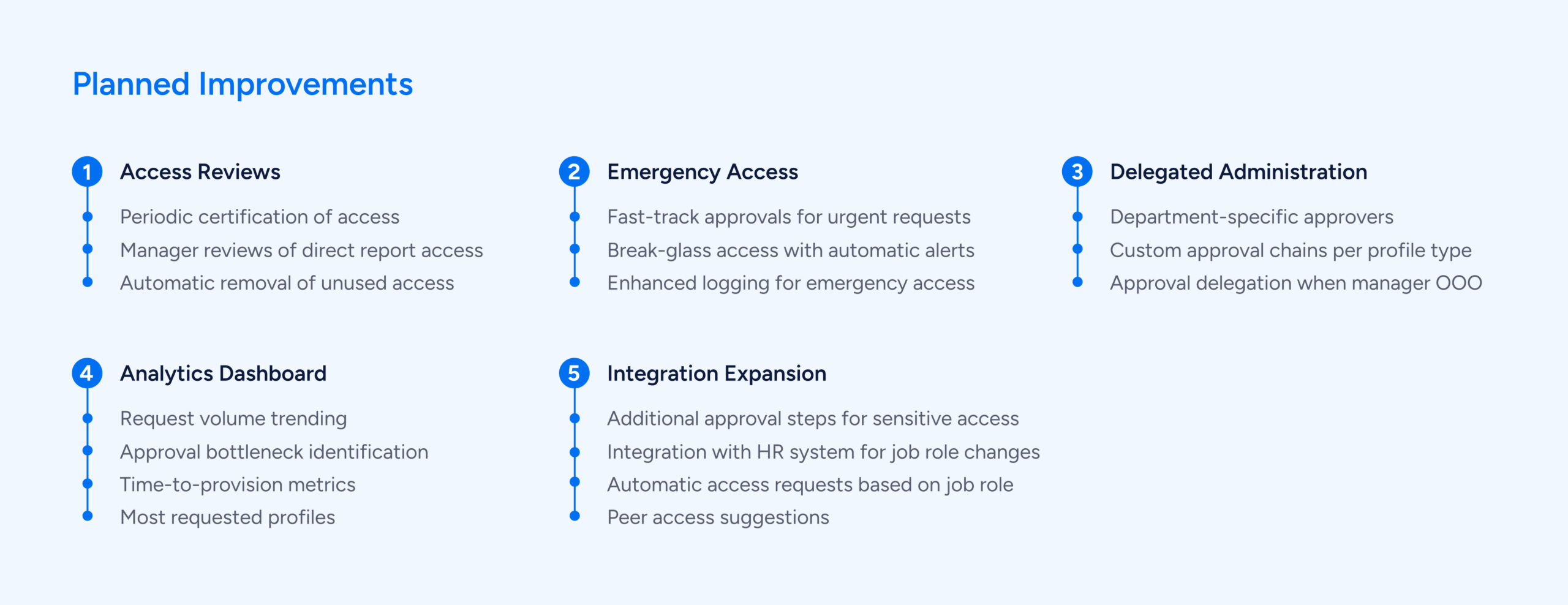
Conclusion
Building this Veza-ServiceNow integration transformed our access management process from manual and error-prone to automated and reliable.
The result is a system that serves everyone:
- Users get faster access to the resources they need
- Managers maintain proper oversight without being bottlenecks
- IT/Security enforce policies consistently with less manual work
- The organization becomes more agile and secure
Technical Specifications
Platform Versions:
- ServiceNow: Tokyo release or later
- Veza: Lifecycle Management API v1
Veza API Endpoints Used:
GET /api/private/lifecycle_management/identities

GET /api/private/lifecycle_management/access_profiles

PUT /api/private/lifecycle_management/access_profiles/{id}/versions/1/members
ServiceNow Tables Modified:
sc_cat_item - Catalog items

sc_req_item - Requested items

sc_task - IT tasks

sysapproval_approver - Approvals

item_option_new - Variable definitions
Custom Components:
- 1 Script Include (VezaAPI)
- 3 Business Rules (approvals, IT tasks, access grant)
- 1 Scheduled Job (catalog sync)
- 1 Order Guide
Resources
Veza Documentation: https://docs.veza.com/
ServiceNow Documentation: https://docs.servicenow.com/
Interested in learning more? Contact [email protected]
The post Automating Veza Access Requests for the Enterprise: Integrating Veza with ServiceNow appeared first on Veza.
]]>