Virtual Button Bar (Trial)2.9.4
Publisher Description
*Now with unlimited colours*
*ROOT required for full functionality* Menu, Back and Search are rooted-only buttons - all others work on non-rooted devices.
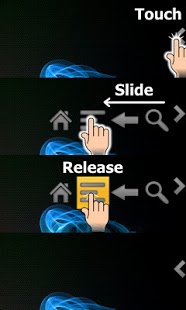
Emulates hardware keys (Home, Menu, Back etc) and overlays them on the screen, on top of all applications. Single-swipe action (see video):• Choose the number of buttons you want, position them• Lock Screen animations including Gingerbread-style TV off (requires 2.2)• Change button function (vol up/down, lock device, expand Notification Bar, Camera, Search)• Alt-Tab functionality• Change Button sizes and colour• Adjustable Transparency• Separate, independent configurations for portrait and landscape
Trial version. 36 hours after being started, the trial will expire and you won't be able to start the overlay. Please consider purchasing the full version!
▷◈To uninstall◈: If you've enabled Device Administration for the lockscreen, you need to disable it before uninstalling. Uncheck the permission in-app or go to Settings -> Location and Security -> Select device administrators and uncheck Virtual Button Bar.
About Virtual Button Bar (Trial)
The company that develops Virtual Button Bar (Trial) is Opotech. The latest version released by its developer is 2.9.4. This app was rated by 6 users of our site and has an average rating of 4.0.
To install Virtual Button Bar (Trial) on your Android device, just click the green Continue To App button above to start the installation process. The app is listed on our website since 2013-10-07 and was downloaded 227 times. We have already checked if the download link is safe, however for your own protection we recommend that you scan the downloaded app with your antivirus. Your antivirus may detect the Virtual Button Bar (Trial) as malware as malware if the download link to opotech.virtualbuttonbartrial is broken.
How to install Virtual Button Bar (Trial) on your Android device:
- Click on the Continue To App button on our website. This will redirect you to Google Play.
- Once the Virtual Button Bar (Trial) is shown in the Google Play listing of your Android device, you can start its download and installation. Tap on the Install button located below the search bar and to the right of the app icon.
- A pop-up window with the permissions required by Virtual Button Bar (Trial) will be shown. Click on Accept to continue the process.
- Virtual Button Bar (Trial) will be downloaded onto your device, displaying a progress. Once the download completes, the installation will start and you'll get a notification after the installation is finished.
Program Details
System requirements
Download information
Pricing
Version History
version 2.9.4
posted on 2013-10-07
V2.9.4:,• Added option to disable foreground service. Uncheck to dismiss the permanent notification in 4.3+ but have higher chance of app being closed at low memory
version 1.1
posted on 2011-05-13
Several fixes and updates