Visual Comparer1.70
Publisher Description
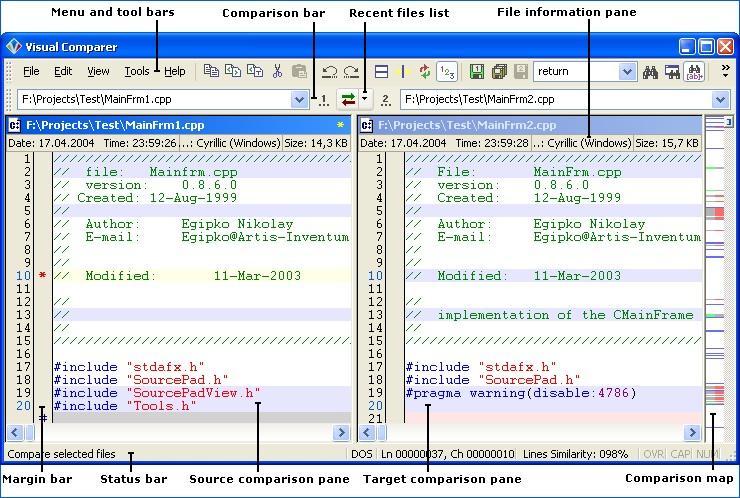
Visual Comparer its all-inclusive text files visual comparison software allowing end-users see all the differences between two text files in a split screen view mode. Visual Comparer includes full-featured text editor that supports both ANSI and Unicode files (separate versions are available for download) as well as syntax highlighting for most popular programming languages, including C++, C#, JavaScript, Perl, Visual Basic, VBScript and Pascal (Delphi). The application is very handy when there is a need to display file version changes. Visual Comparer represents all differences between two text files using graphical pane, with color lines representing new fragments of text, changed text and lines of text that were left intact. This way, finding the differences is just the matter of seconds.
Visual Comparer is intended mainly for software and web site developers that require dedicated text editor with syntax highlighting and visual comparison feature. However, the application can be used by anyone who has to deal with several versions of the same text file. Visual Comparer is highly configurable, allowing customization of nearly every single part of the interface. Besides that, Visual Comparer supports plug-in architecture, which in turn allows end users expand the program functionality by adding new syntax highlighting patterns. The ability to display line numbers and create custom bookmarks makes navigating text documents real easy, while the reporting feature allows for creation of printable HTML reports covering all the differences between files.
About Visual Comparer
This File & Disk Management program is available in English. It was last updated on 08 March, 2026. Visual Comparer is compatible with the following operating systems: Windows.
The company that develops Visual Comparer is Nikeware. The latest version released by its developer is 1.70. This version was rated by 1 users of our site and has an average rating of 5.0.
The download we have available for Visual Comparer has a file size of 3.1 MB. Just click the green Download button above to start the downloading process. The program is listed on our website since 2011-02-18 and was downloaded 212 times. We have already checked if the download link is safe, however for your own protection we recommend that you scan the downloaded software with your antivirus. Your antivirus may detect the Visual Comparer as malware if the download link is broken.
How to install Visual Comparer on your Windows device:
- Click on the Download button on our website. This will start the download from the website of the developer.
- Once the Visual Comparer is downloaded click on it to start the setup process (assuming you are on a desktop computer).
- When the installation is finished you should be able to see and run the program.
Program Details
System requirements
Download information
Pricing
Version History
version 1.70
posted on 2011-02-18
- manual/auto codepage selection support. Now you can select required codepage for a file before comparing (only unicode version);
Fixes:
- illegal displaying of unicode/language specific characters in message boxes;
- few other little bugs;
version 1.60
posted on 2007-01-09
- new look of icons on toolbars; - advanced file masks in file filters. Now you can make complex file masks; - "swap pathes" and "copy left path to right" commands on "Comparison" toolbar; - alternative font (F11 - to quick toggle between general and alternative fonts);