最后,我想和大家分享一个小技巧,它可以帮助我们在不依赖任何第三方API的情况下,为自己的博客添加一个有趣的“随机一言”功能。这个小功能不仅能为读者带来惊喜,也能增加博客的互动性和趣味性。通过几句简单的代码,就可以轻松实现这一功能,让我们的博客更加生动和吸引人。
忙碌依旧、陪伴依旧
从这个月的月初开始,我们公司就陷入了无尽的忙碌之中。每天除了忙,还是忙。而我的工作呢,同样也是忙着整理资料,忙着补资料,忙着加班加点。毫不夸张地说,这个月以来,我几乎没有好好休息过一天了。
原本心情也是挺无奈,挺崩溃的。好在这段时间天气一直都挺不错,不下雨,太阳也挺不错。忙归忙,但如果每天把每件事都做得规规整整的、有条理了,似乎也感觉不那么忙了(这只是对于我个人而言哈)。也许这就是我的工作常态吧。
人总是纠结的,不是想着天气好怎么出去玩,就是想着怎么在办公室里偷懒。但话说回来,天气好不好与我有什么关系呢?我一直坐在办公室里,外面的风景看不到,外面的太阳感受不到,外面的新鲜空气呼吸不到,再好的天气对我来说似乎也没什么用。
总归一句话,好好工作,努力工作,完成自己手上的每一件工作任务。至于其他时间嘛,摸鱼,划水…… 哈哈,前提是把该做的工作做好。
昨天媳妇儿给我说,天气真好……我给媳妇儿说,要不我请个假,带你和孩子们出去感受一下这个冬天的太阳。媳妇儿直接回了句“算了吧”…… 其实我也知道媳妇儿这是在体谅我的工作,知道我在公司抽不开身。这件事也只好作罢。
看了看天气预报,过了明天,也就是周五,天气也要开始出现断崖式的下降了。冬天真的要来了。虽然这半个月的忙碌让我错过了不少好天气,但至少我知道,我努力工作不仅仅是为了我个人,而是为了这个小家。(工作虽忙,但每天下班回家后,我也会尽可能的抽出更多时间陪陪媳妇儿,陪陪孩子们。)
新闻联播里的大学问
新闻联播,对我来说,最初感觉就像是每天重复播放的单调旋律一样无聊。我曾以为,只有那些年龄大一些的长者们、或者是那些时事新闻的忠实追随者、又或是那些政客们才会对它情有独钟。当然了,除非有特别吸引我的新闻,我才会去留意一下。然而,最近我看到了一段视频,大概意思就是教我们如何去看懂新闻,如何从中提取有价值的信息,如何真正读懂新闻联播。在这儿,分享给大家!
比如关于各国领导人来华访问的新闻,这意味着可能达成了一些协议,很多外贸机会就从这里产生:
如果新闻里说双方进行了亲切友好的交谈,那表示合作的可能性非常大;如果是坦率的交谈,那就说明分歧很大,没法沟通;如果是交换了意见,那就是各说各的,没达成什么协议;如果是深度交换了意见,那就是吵得很厉害,没能达成协议;如果是增进双方了解,那也是分歧很大;如果说的是会谈是不易的,说明双方的目标虽然差距大,但能坐下来聊聊也不容易。
领导人去哪里出差也是个很重要的信息:如果你是做金融投资的,当领导去上市公司参观时,第二天你就可以关注这家公司的股票了;如果领导参加某个展会,那这个行业的股票就要留意了;如果领导在某个地方开会,并播出了会议部分内容,那这个地方可能会有变更。
每年国家或者地方发布的几号文件也很关键,这可能代表着某个领域的政策支持。比如,1号文件如果说大力发展高新科技、农业、新能源,那么赶紧投资这些行业,坐等政策扶持就好了。
跟着领导出差的团队也要注意,这些团队成员通常会随行签一些订单,一般这些企业家在当前是比较安全的,所以这些企业还是值得相信和关注的。如果一个企业做大做强了,就不仅仅是经商这么简单了。(这样的例子有很多,比如这次M国总统大选中,支持特朗普的马斯克。在特朗普大选获胜以后,就被提任为M国“效率部”的高管……)
地方领导的调动也很重要,经济发达地区的领导调到经济落后地区,那么后者城市的机会就来了。比如北京的领导调到贵州,那贵州的房价和电商、物流相关的行业就值得关注了。反之,如果经济落后的领导跌到经济发达地区,那么这个地方关注度可能会降低,因为会相对保守和稳定。如果你喜欢买房卖房这类新闻的,特别需要留意。
新闻里有些事情,我们不能只看表面。比如,有时候一些有影响力的坏人会出来道歉,这可能是为了让大家平静下来,也可能是为了警告其他人别走他们的老路。就像那些搞电信诈骗的,被抓了之后公开道歉,其实是在告诉其他人别干这行。
另外,新闻里有些消息,我们得反过来想想。比如,如果新闻说国家开始控制外汇,或者外汇储备减少了,我们就得想想,是不是有人在大量换钱,他们为什么要这么做。还有,如果哪个老板在新闻里说自己的员工不行,我们也别急着相信,可能背后有其他故事。
写在最后
新闻联播不只是新闻,它其实更像一个藏宝图。就比如领导人的会谈、出差、政策文件,甚至是地方领导的调动,都能给我们透露出赚钱的机会。所以,下次别一看到新闻联播,就直接换台或者…… (哈哈,当然了,我自己也喜欢刷短视频,也不喜欢看新闻联播,但学点知识始终还是不错的!)
实现"随机一言"功能,无需第三方Api
给自己的博客或者网站添加一个“随机一言”的功能,不但可以增加网站趣味性、提高用户留存率、传达正能量,同时还能凸显个性的品牌形象。
我发现普遍的"随机一言"功能一般都是调用的第三方api。其实,只需要通过短短的几行代码就可以实现该功能!
具体操作
方法1
1.新建文件
首先准备一个代码编辑器,然后新建一个 php 文件,命名为 api.php;再新建一个文件,命名为 jcyulu.dat 。
注意:两个文件均需采用 UTF-8 编码,否则会乱码。
然后打开 jcyulu.dat,在里面贴入要随机显示出来的文本,一行一条(可以去百度搜、也可以自己写)。
2.复制代码
<?php
// 存储数据的文件
$filename = 'jcyulu.dat';

// 指定页面编码
header('Content-type: text/html; charset=utf-8');

if(!file_exists($filename)) {
    die($filename . ' 数据文件不存在');
}

$data = array();

// 打开文档
$fh = fopen($filename, 'r');

// 逐行读取并存入数组中
while (!feof($fh)) {
    $data[] = fgets($fh);
}

// 关闭文档
fclose($fh);

// 随机获取一行索引
$result = $data[array_rand($data)];

echo $result;
将上面的代码复制并粘贴到 api.php 中保存,你的专属“一言” API 就搭建完成了!超简单是不是!
方法2
上面的代码是用 fopen + fgets 函数实现的,有些朋友似乎不是特别喜欢,觉得“效率低”。别急,这儿还有个 file_get_contents 函数实现的版本:
<?php
// 存储数据的文件
$filename = 'jcyulu.dat';

// 指定页面编码
header('Content-type: text/html; charset=utf-8');

if(!file_exists($filename)) {
    die($filename . ' 数据文件不存在');
}

// 读取整个数据文件
$data = file_get_contents($filename);

// 按换行符分割成数组
$data = explode(PHP_EOL, $data);

// 随机获取一行索引
$result = $data[array_rand($data)];

// 去除多余的换行符(保险起见)
$result = str_replace(array("\r","\n","\r\n"), '', $result);

echo $result;
注意:方法1和方法2除了代码部分不一样,其他操作流程是一样的。
]]>效果展示

源码
<!DOCTYPE html>
<html>
<head>
    <meta charset="UTF-8">
<meta name="viewport" content="width=device-width, initial-scale=1.0">
    <title>配色表 刘郎阁</title>
</head>
<body>
<div class="article"><div class="article-title"><a class="left"><i class="fa fa-calendar-minus-o"></i></a><a class="article-title-back"><i class="fa fa-reply">
</i></a></div>
<div class="clear"></div><div class="article-page-content"><table width="100%" cellspacing="0" cellpadding="5" border="0" class="tableborder">
  <tbody><tr>
    <td width="25%" bgcolor="#f7acbc" class="tdborder"><font color="#ffffff">鸨色<br>#f7acbc</font></td>
    <td width="25%" bgcolor="#deab8a" class="tdborder"><font color="#ffffff">赤白橡<br>#deab8a</font></td>
    <td width="25%" bgcolor="#817936" class="tdborder"><font color="#ffffff">油色<br>#817936</font></td>
    <td width="25%" bgcolor="#444693" class="tdborder"><font color="#ffffff">绀桔梗<br>#444693</font></td>
  </tr>
  <tr>
    <td bgcolor="#ef5b9c" class="tdborder"><font color="#ffffff">踯躅色<br>#ef5b9c</font></td>
    <td bgcolor="#fedcbd" class="tdborder"><font color="#000000">肌色<br>#fedcbd</font></td>
    <td bgcolor="#7f7522" class="tdborder"><font color="#ffffff">伽罗色<br>#7f7522</font></td>
    <td bgcolor="#2b4490" class="tdborder"><font color="#ffffff">花色<br>#2b4490</font></td>
  </tr>
  <tr>
    <td bgcolor="#feeeed" class="tdborder"><font color="#000000">桜色<br>#feeeed</font></td>
    <td bgcolor="#f47920" class="tdborder"><font color="#ffffff">橙色<br>#f47920</font></td>
    <td bgcolor="#80752c" class="tdborder"><font color="#ffffff">青丹<br>#80752c</font></td>
    <td bgcolor="#2a5caa" class="tdborder"><font color="#ffffff">瑠璃色<br>#2a5caa</font></td>
  </tr>
  <tr>
    <td bgcolor="#f05b72" class="tdborder"><font color="#ffffff">蔷薇色<br>#f05b72</font></td>
    <td bgcolor="#905a3d" class="tdborder"><font color="#ffffff">灰茶<br>#905a3d</font></td>
    <td bgcolor="#87843b" class="tdborder"><font color="#ffffff">莺色<br>#87843b</font></td>
    <td bgcolor="#224b8f" class="tdborder"><font color="#ffffff">琉璃绀<br>#224b8f</font></td>
  </tr>
  <tr>
    <td bgcolor="#f15b6c" class="tdborder"><font color="#ffffff">韩红<br>#f15b6c</font></td>
    <td bgcolor="#8f4b2e" class="tdborder"><font color="#ffffff">茶色<br>#8f4b2e</font></td>
    <td bgcolor="#726930" class="tdborder"><font color="#ffffff">利久色<br>#726930</font></td>
    <td bgcolor="#003a6c" class="tdborder"><font color="#ffffff">绀色<br>#003a6c</font></td>
  </tr>
  <tr>
    <td bgcolor="#f8aba6" class="tdborder"><font color="#ffffff">珊瑚色<br>#f8aba6</font></td>
    <td bgcolor="#87481f" class="tdborder"><font color="#ffffff">桦茶色<br>#87481f</font></td>
    <td bgcolor="#454926" class="tdborder"><font color="#ffffff">媚茶<br>#454926</font></td>
    <td bgcolor="#102b6a" class="tdborder"><font color="#ffffff">青蓝<br>#102b6a</font></td>
  </tr>
  <tr>
    <td bgcolor="#f69c9f" class="tdborder"><font color="#ffffff">红梅色<br>#f69c9f</font></td>
    <td bgcolor="#5f3c23" class="tdborder"><font color="#ffffff">枯茶<br>#5f3c23</font></td>
    <td bgcolor="#2e3a1f" class="tdborder"><font color="#ffffff">蓝海松茶<br>#2e3a1f</font></td>
    <td bgcolor="#426ab3" class="tdborder"><font color="#ffffff">杜若色<br>#426ab3</font></td>
  </tr>
  <tr>
    <td bgcolor="#f58f98" class="tdborder"><font color="#ffffff">桃色<br>#f58f98</font></td>
    <td bgcolor="#6b473c" class="tdborder"><font color="#ffffff">焦茶<br>#6b473c</font></td>
    <td bgcolor="#4d4f36" class="tdborder"><font color="#ffffff">青钝<br>#4d4f36</font></td>
    <td bgcolor="#46485f" class="tdborder"><font color="#ffffff">胜色<br>#46485f</font></td>
  </tr>
  <tr>
    <td bgcolor="#ca8687" class="tdborder"><font color="#ffffff">薄柿<br>#ca8687</font></td>
    <td bgcolor="#faa755" class="tdborder"><font color="#ffffff">柑子色<br>#faa755</font></td>
    <td bgcolor="#b7ba6b" class="tdborder"><font color="#ffffff">抹茶色<br>#b7ba6b</font></td>
    <td bgcolor="#4e72b8" class="tdborder"><font color="#ffffff">群青色<br>#4e72b8</font></td>
  </tr>
  <tr>
    <td bgcolor="#f391a9" class="tdborder"><font color="#ffffff">薄红梅<br>#f391a9</font></td>
    <td bgcolor="#fab27b" class="tdborder"><font color="#ffffff">杏色<br>#fab27b</font></td>
    <td bgcolor="#b2d235" class="tdborder"><font color="#ffffff">黄緑<br>#b2d235</font></td>
    <td bgcolor="#181d4b" class="tdborder"><font color="#ffffff">铁绀<br>#181d4b</font></td>
  </tr>
  <tr>
    <td bgcolor="#bd6758" class="tdborder"><font color="#ffffff">曙色<br>#bd6758</font></td>
    <td bgcolor="#f58220" class="tdborder"><font color="#ffffff">蜜柑色<br>#f58220</font></td>
    <td bgcolor="#5c7a29" class="tdborder"><font color="#ffffff">苔色<br>#5c7a29</font></td>
    <td bgcolor="#1a2933" class="tdborder"><font color="#ffffff">蓝铁<br>#1a2933</font></td>
  </tr>
  <tr>
    <td bgcolor="#d71345" class="tdborder"><font color="#ffffff">红色<br>#d71345</font></td>
    <td bgcolor="#843900" class="tdborder"><font color="#ffffff">褐色<br>#843900</font></td>
    <td bgcolor="#bed742" class="tdborder"><font color="#ffffff">若草色<br>#bed742</font></td>
    <td bgcolor="#121a2a" class="tdborder"><font color="#ffffff">青褐<br>#121a2a</font></td>
  </tr>
  <tr>
    <td bgcolor="#d64f44" class="tdborder"><font color="#ffffff">赤丹<br>#d64f44</font></td>
    <td bgcolor="#905d1d" class="tdborder"><font color="#ffffff">路考茶<br>#905d1d</font></td>
    <td bgcolor="#7fb80e" class="tdborder"><font color="#ffffff">若緑<br>#7fb80e</font></td>
    <td bgcolor="#0c212b" class="tdborder"><font color="#ffffff">褐返<br>#0c212b</font></td>
  </tr>
  <tr>
    <td bgcolor="#d93a49" class="tdborder"><font color="#ffffff">红赤<br>#d93a49</font></td>
    <td bgcolor="#8a5d19" class="tdborder"><font color="#ffffff">饴色<br>#8a5d19</font></td>
    <td bgcolor="#a3cf62" class="tdborder"><font color="#ffffff">萌黄<br>#a3cf62</font></td>
    <td bgcolor="#6a6da9" class="tdborder"><font color="#ffffff">藤纳戸<br>#6a6da9</font></td>
  </tr>
  <tr>
    <td bgcolor="#b3424a" class="tdborder"><font color="#ffffff">臙脂色<br>#b3424a</font></td>
    <td bgcolor="#8c531b" class="tdborder"><font color="#ffffff">丁子色<br>#8c531b</font></td>
    <td bgcolor="#769149" class="tdborder"><font color="#ffffff">苗色<br>#769149</font></td>
    <td bgcolor="#585eaa" class="tdborder"><font color="#ffffff">桔梗色<br>#585eaa</font></td>
  </tr>
  <tr>
    <td bgcolor="#c76968" class="tdborder"><font color="#ffffff">真赭<br>#c76968</font></td>
    <td bgcolor="#826858" class="tdborder"><font color="#ffffff">丁子茶<br>#826858</font></td>
    <td bgcolor="#6d8346" class="tdborder"><font color="#ffffff">草色<br>#6d8346</font></td>
    <td bgcolor="#494e8f" class="tdborder"><font color="#ffffff">绀蓝<br>#494e8f</font></td>
  </tr>
  <tr>
    <td bgcolor="#bb505d" class="tdborder"><font color="#ffffff">今様色<br>#bb505d</font></td>
    <td bgcolor="#64492b" class="tdborder"><font color="#ffffff">黄栌<br>#64492b</font></td>
    <td bgcolor="#78a355" class="tdborder"><font color="#ffffff">柳色<br>#78a355</font></td>
    <td bgcolor="#afb4db" class="tdborder"><font color="#ffffff">藤色<br>#afb4db</font></td>
  </tr>
  <tr>
    <td bgcolor="#987165" class="tdborder"><font color="#ffffff">梅染<br>#987165</font></td>
    <td bgcolor="#ae6642" class="tdborder"><font color="#ffffff">土器色<br>#ae6642</font></td>
    <td bgcolor="#abc88b" class="tdborder"><font color="#ffffff">若草色<br>#abc88b</font></td>
    <td bgcolor="#9b95c9" class="tdborder"><font color="#ffffff">藤紫<br>#9b95c9</font></td>
  </tr>
  <tr>
    <td bgcolor="#ac6767" class="tdborder"><font color="#ffffff">退红色<br>#ac6767</font></td>
    <td bgcolor="#56452d" class="tdborder"><font color="#ffffff">黄枯茶<br>#56452d</font></td>
    <td bgcolor="#74905d" class="tdborder"><font color="#ffffff">松叶色<br>#74905d</font></td>
    <td bgcolor="#6950a1" class="tdborder"><font color="#ffffff">青紫<br>#6950a1</font></td>
  </tr>
  <tr>
    <td bgcolor="#973c3f" class="tdborder"><font color="#ffffff">苏芳<br>#973c3f</font></td>
    <td bgcolor="#96582a" class="tdborder"><font color="#ffffff">狐色<br>#96582a</font></td>
    <td bgcolor="#cde6c7" class="tdborder"><font color="#000000">白緑<br>#cde6c7</font></td>
    <td bgcolor="#6f60aa" class="tdborder"><font color="#ffffff">菫色<br>#6f60aa</font></td>
  </tr>
  <tr>
    <td bgcolor="#b22c46" class="tdborder"><font color="#ffffff">茜色<br>#b22c46</font></td>
    <td bgcolor="#705628" class="tdborder"><font color="#ffffff">黄橡<br>#705628</font></td>
    <td bgcolor="#1d953f" class="tdborder"><font color="#ffffff">薄緑<br>#1d953f</font></td>
    <td bgcolor="#867892" class="tdborder"><font color="#ffffff">鸠羽色<br>#867892</font></td>
  </tr>
  <tr>
    <td bgcolor="#a7324a" class="tdborder"><font color="#ffffff">红<br>#a7324a</font></td>
    <td bgcolor="#4a3113" class="tdborder"><font color="#ffffff">银煤竹<br>#4a3113</font></td>
    <td bgcolor="#77ac98" class="tdborder"><font color="#ffffff">千草色<br>#77ac98</font></td>
    <td bgcolor="#918597" class="tdborder"><font color="#ffffff">薄色<br>#918597</font></td>
  </tr>
  <tr>
    <td bgcolor="#aa363d" class="tdborder"><font color="#ffffff">银朱<br>#aa363d</font></td>
    <td bgcolor="#412f1f" class="tdborder"><font color="#ffffff">涅色<br>#412f1f</font></td>
    <td bgcolor="#007d65" class="tdborder"><font color="#ffffff">青緑<br>#007d65</font></td>
    <td bgcolor="#6f6d85" class="tdborder"><font color="#ffffff">薄鼠<br>#6f6d85</font></td>
  </tr>
  <tr>
    <td bgcolor="#ed1941" class="tdborder"><font color="#ffffff">赤<br>#ed1941</font></td>
    <td bgcolor="#845538" class="tdborder"><font color="#ffffff">胡桃色<br>#845538</font></td>
    <td bgcolor="#84bf96" class="tdborder"><font color="#ffffff">浅緑<br>#84bf96</font></td>
    <td bgcolor="#594c6d" class="tdborder"><font color="#ffffff">鸠羽鼠<br>#594c6d</font></td>
  </tr>
  <tr>
    <td bgcolor="#f26522" class="tdborder"><font color="#ffffff">朱色<br>#f26522</font></td>
    <td bgcolor="#8e7437" class="tdborder"><font color="#ffffff">香色<br>#8e7437</font></td>
    <td bgcolor="#45b97c" class="tdborder"><font color="#ffffff">緑<br>#45b97c</font></td>
    <td bgcolor="#694d9f" class="tdborder"><font color="#ffffff">菖蒲色<br>#694d9f</font></td>
  </tr>
  <tr>
    <td bgcolor="#d2553d" class="tdborder"><font color="#ffffff">洗朱<br>#d2553d</font></td>
    <td bgcolor="#69541b" class="tdborder"><font color="#ffffff">国防色<br>#69541b</font></td>
    <td bgcolor="#225a1f" class="tdborder"><font color="#ffffff">草色<br>#225a1f</font></td>
    <td bgcolor="#6f599c" class="tdborder"><font color="#ffffff">江戸紫<br>#6f599c</font></td>
  </tr>
  <tr>
    <td bgcolor="#b4534b" class="tdborder"><font color="#ffffff">红桦色<br>#b4534b</font></td>
    <td bgcolor="#d5c59f" class="tdborder"><font color="#ffffff">练色<br>#d5c59f</font></td>
    <td bgcolor="#367459" class="tdborder"><font color="#ffffff">木贼色<br>#367459</font></td>
    <td bgcolor="#8552a1" class="tdborder"><font color="#ffffff">紫<br>#8552a1</font></td>
  </tr>
  <tr>
    <td bgcolor="#ef4136" class="tdborder"><font color="#ffffff">红绯<br>#ef4136</font></td>
    <td bgcolor="#cd9a5b" class="tdborder"><font color="#ffffff">肉色<br>#cd9a5b</font></td>
    <td bgcolor="#007947" class="tdborder"><font color="#ffffff">常盘色<br>#007947</font></td>
    <td bgcolor="#543044" class="tdborder"><font color="#ffffff">灭紫<br>#543044</font></td>
  </tr>
  <tr>
    <td bgcolor="#c63c26" class="tdborder"><font color="#ffffff">桦色<br>#c63c26</font></td>
    <td bgcolor="#cd9a5b" class="tdborder"><font color="#ffffff">人色<br>#cd9a5b</font></td>
    <td bgcolor="#40835e" class="tdborder"><font color="#ffffff">緑青色<br>#40835e</font></td>
    <td bgcolor="#63434f" class="tdborder"><font color="#ffffff">葡萄鼠<br>#63434f</font></td>
  </tr>
  <tr>
    <td bgcolor="#f3715c" class="tdborder"><font color="#ffffff">铅丹色<br>#f3715c</font></td>
    <td bgcolor="#b36d41" class="tdborder"><font color="#ffffff">土色<br>#b36d41</font></td>
    <td bgcolor="#2b6447" class="tdborder"><font color="#ffffff">千歳緑<br>#2b6447</font></td>
    <td bgcolor="#7d5886" class="tdborder"><font color="#ffffff">古代紫<br>#7d5886</font></td>
  </tr>
  <tr>
    <td bgcolor="#a7573b" class="tdborder"><font color="#ffffff">赭<br>#a7573b</font></td>
    <td bgcolor="#df9464" class="tdborder"><font color="#ffffff">小麦色<br>#df9464</font></td>
    <td bgcolor="#005831" class="tdborder"><font color="#ffffff">深緑<br>#005831</font></td>
    <td bgcolor="#401c44" class="tdborder"><font color="#ffffff">暗红<br>#401c44</font></td>
  </tr>
  <tr>
    <td bgcolor="#aa2116" class="tdborder"><font color="#ffffff">绯色<br>#aa2116</font></td>
    <td bgcolor="#b76f40" class="tdborder"><font color="#ffffff">琥珀色<br>#b76f40</font></td>
    <td bgcolor="#006c54" class="tdborder"><font color="#ffffff">萌葱色<br>#006c54</font></td>
    <td bgcolor="#472d56" class="tdborder"><font color="#ffffff">葡萄<br>#472d56</font></td>
  </tr>
  <tr>
    <td bgcolor="#b64533" class="tdborder"><font color="#ffffff">丹<br>#b64533</font></td>
    <td bgcolor="#ad8b3d" class="tdborder"><font color="#ffffff">木兰色<br>#ad8b3d</font></td>
    <td bgcolor="#375830" class="tdborder"><font color="#ffffff">青白橡<br>#375830</font></td>
    <td bgcolor="#45224a" class="tdborder"><font color="#ffffff">茄子绀<br>#45224a</font></td>
  </tr>
  <tr>
    <td bgcolor="#b54334" class="tdborder"><font color="#ffffff">土<br>#b54334</font></td>
    <td bgcolor="#dea32c" class="tdborder"><font color="#ffffff">栀子色<br>#dea32c</font></td>
    <td bgcolor="#274d3d" class="tdborder"><font color="#ffffff">革色<br>#274d3d</font></td>
    <td bgcolor="#411445" class="tdborder"><font color="#ffffff">紫绀<br>#411445</font></td>
  </tr>
  <tr>
    <td bgcolor="#853f04" class="tdborder"><font color="#ffffff">焦香<br>#853f04</font></td>
    <td bgcolor="#d1923f" class="tdborder"><font color="#ffffff">朽叶<br>#d1923f</font></td>
    <td bgcolor="#375830" class="tdborder"><font color="#ffffff">麹尘<br>#375830</font></td>
    <td bgcolor="#4b2f3d" class="tdborder"><font color="#ffffff">浓色<br>#4b2f3d</font></td>
  </tr>
  <tr>
    <td bgcolor="#840228" class="tdborder"><font color="#ffffff">真红<br>#840228</font></td>
    <td bgcolor="#c88400" class="tdborder"><font color="#ffffff">萱草色<br>#c88400</font></td>
    <td bgcolor="#27342b" class="tdborder"><font color="#ffffff">仙斎茶<br>#27342b</font></td>
    <td bgcolor="#402e4c" class="tdborder"><font color="#ffffff">二蓝<br>#402e4c</font></td>
  </tr>
  <tr>
    <td bgcolor="#7a1723" class="tdborder"><font color="#ffffff">绯<br>#7a1723</font></td>
    <td bgcolor="#c37e00" class="tdborder"><font color="#ffffff">黄金<br>#c37e00</font></td>
    <td bgcolor="#65c294" class="tdborder"><font color="#ffffff">若竹色<br>#65c294</font></td>
    <td bgcolor="#c77eb5" class="tdborder"><font color="#ffffff">菖蒲色<br>#c77eb5</font></td>
  </tr>
  <tr>
    <td bgcolor="#a03939" class="tdborder"><font color="#ffffff">红海老茶<br>#a03939</font></td>
    <td bgcolor="#c37e00" class="tdborder"><font color="#ffffff">金色<br>#c37e00</font></td>
    <td bgcolor="#73b9a2" class="tdborder"><font color="#ffffff">青磁色<br>#73b9a2</font></td>
    <td bgcolor="#ea66a6" class="tdborder"><font color="#ffffff">牡丹色<br>#ea66a6</font></td>
  </tr>
  <tr>
    <td bgcolor="#8a2e3b" class="tdborder"><font color="#ffffff">浅苏芳<br>#8a2e3b</font></td>
    <td bgcolor="#e0861a" class="tdborder"><font color="#ffffff">金茶<br>#e0861a</font></td>
    <td bgcolor="#72baa7" class="tdborder"><font color="#ffffff">青竹色<br>#72baa7</font></td>
    <td bgcolor="#f173ac" class="tdborder"><font color="#ffffff">赤紫<br>#f173ac</font></td>
  </tr>
  <tr>
    <td bgcolor="#8e453f" class="tdborder"><font color="#ffffff">鸢色<br>#8e453f</font></td>
    <td bgcolor="#ffce7b" class="tdborder"><font color="#000000">卵色<br>#ffce7b</font></td>
    <td bgcolor="#005344" class="tdborder"><font color="#ffffff">铁色<br>#005344</font></td>
    <td bgcolor="#fffffb" class="tdborder"><font color="#000000">白<br>#fffffb</font></td>
  </tr>
  <tr>
    <td bgcolor="#8f4b4a" class="tdborder"><font color="#ffffff">小豆色<br>#8f4b4a</font></td>
    <td bgcolor="#fcaf17" class="tdborder"><font color="#ffffff">山吹色<br>#fcaf17</font></td>
    <td bgcolor="#122e29" class="tdborder"><font color="#ffffff">锖鼠<br>#122e29</font></td>
    <td bgcolor="#fffef9" class="tdborder"><font color="#000000">胡粉色<br>#fffef9</font></td>
  </tr>
  <tr>
    <td bgcolor="#892f1b" class="tdborder"><font color="#ffffff">弁柄色<br>#892f1b</font></td>
    <td bgcolor="#ba8448" class="tdborder"><font color="#ffffff">黄土色<br>#ba8448</font></td>
    <td bgcolor="#293047" class="tdborder"><font color="#ffffff">铁御纳戸<br>#293047</font></td>
    <td bgcolor="#f6f5ec" class="tdborder"><font color="#000000">生成色<br>#f6f5ec</font></td>
  </tr>
  <tr>
    <td bgcolor="#6b2c25" class="tdborder"><font color="#ffffff">栗梅<br>#6b2c25</font></td>
    <td bgcolor="#896a45" class="tdborder"><font color="#ffffff">朽叶色<br>#896a45</font></td>
    <td bgcolor="#00ae9d" class="tdborder"><font color="#ffffff">青緑<br>#00ae9d</font></td>
    <td bgcolor="#d9d6c3" class="tdborder"><font color="#000000">灰白<br>#d9d6c3</font></td>
  </tr>
  <tr>
    <td bgcolor="#733a31" class="tdborder"><font color="#ffffff">海老茶<br>#733a31</font></td>
    <td bgcolor="#76624c" class="tdborder"><font color="#ffffff">空五倍子色<br>#76624c</font></td>
    <td bgcolor="#508a88" class="tdborder"><font color="#ffffff">锖浅葱<br>#508a88</font></td>
    <td bgcolor="#d1c7b7" class="tdborder"><font color="#000000">石竹色<br>#d1c7b7</font></td>
  </tr>
  <tr>
    <td bgcolor="#54211d" class="tdborder"><font color="#ffffff">深绯<br>#54211d</font></td>
    <td bgcolor="#6d5826" class="tdborder"><font color="#ffffff">莺茶<br>#6d5826</font></td>
    <td bgcolor="#70a19f" class="tdborder"><font color="#ffffff">水浅葱<br>#70a19f</font></td>
    <td bgcolor="#f2eada" class="tdborder"><font color="#000000">象牙色<br>#f2eada</font></td>
  </tr>
  <tr>
    <td bgcolor="#78331e" class="tdborder"><font color="#ffffff">赤铜色<br>#78331e</font></td>
    <td bgcolor="#ffc20e" class="tdborder"><font color="#ffffff">向日葵色<br>#ffc20e</font></td>
    <td bgcolor="#50b7c1" class="tdborder"><font color="#ffffff">新桥色<br>#50b7c1</font></td>
    <td bgcolor="#d3d7d4" class="tdborder"><font color="#000000">乳白色<br>#d3d7d4</font></td>
  </tr>
  <tr>
    <td bgcolor="#53261f" class="tdborder"><font color="#ffffff">赤褐色<br>#53261f</font></td>
    <td bgcolor="#fdb933" class="tdborder"><font color="#ffffff">郁金色<br>#fdb933</font></td>
    <td bgcolor="#00a6ac" class="tdborder"><font color="#ffffff">浅葱色<br>#00a6ac</font></td>
    <td bgcolor="#999d9c" class="tdborder"><font color="#ffffff">薄钝<br>#999d9c</font></td>
  </tr>
  <tr>
    <td bgcolor="#f15a22" class="tdborder"><font color="#ffffff">金赤<br>#f15a22</font></td>
    <td bgcolor="#d3c6a6" class="tdborder"><font color="#ffffff">砂色<br>#d3c6a6</font></td>
    <td bgcolor="#78cdd1" class="tdborder"><font color="#ffffff">白群<br>#78cdd1</font></td>
    <td bgcolor="#a1a3a6" class="tdborder"><font color="#ffffff">银鼠<br>#a1a3a6</font></td>
  </tr>
  <tr>
    <td bgcolor="#b4533c" class="tdborder"><font color="#ffffff">赤茶<br>#b4533c</font></td>
    <td bgcolor="#c7a252" class="tdborder"><font color="#ffffff">芥子色<br>#c7a252</font></td>
    <td bgcolor="#008792" class="tdborder"><font color="#ffffff">御纳戸色<br>#008792</font></td>
    <td bgcolor="#9d9087" class="tdborder"><font color="#ffffff">茶鼠<br>#9d9087</font></td>
  </tr>
  <tr>
    <td bgcolor="#84331f" class="tdborder"><font color="#ffffff">赤锖色<br>#84331f</font></td>
    <td bgcolor="#dec674" class="tdborder"><font color="#ffffff">淡黄<br>#dec674</font></td>
    <td bgcolor="#94d6da" class="tdborder"><font color="#ffffff">瓮覗<br>#94d6da</font></td>
    <td bgcolor="#8a8c8e" class="tdborder"><font color="#ffffff">鼠色<br>#8a8c8e</font></td>
  </tr>
  <tr>
    <td bgcolor="#f47a55" class="tdborder"><font color="#ffffff">黄丹<br>#f47a55</font></td>
    <td bgcolor="#b69968" class="tdborder"><font color="#ffffff">亜麻色<br>#b69968</font></td>
    <td bgcolor="#afdfe4" class="tdborder"><font color="#ffffff">水色<br>#afdfe4</font></td>
    <td bgcolor="#74787c" class="tdborder"><font color="#ffffff">薄墨色<br>#74787c</font></td>
  </tr>
  <tr>
    <td bgcolor="#f15a22" class="tdborder"><font color="#ffffff">赤橙<br>#f15a22</font></td>
    <td bgcolor="#c1a173" class="tdborder"><font color="#ffffff">枯色<br>#c1a173</font></td>
    <td bgcolor="#5e7c85" class="tdborder"><font color="#ffffff">蓝鼠<br>#5e7c85</font></td>
    <td bgcolor="#7c8577" class="tdborder"><font color="#ffffff">利休鼠<br>#7c8577</font></td>
  </tr>
  <tr>
    <td bgcolor="#f3704b" class="tdborder"><font color="#ffffff">柿色<br>#f3704b</font></td>
    <td bgcolor="#dbce8f" class="tdborder"><font color="#ffffff">鸟子色<br>#dbce8f</font></td>
    <td bgcolor="#76becc" class="tdborder"><font color="#ffffff">秘色<br>#76becc</font></td>
    <td bgcolor="#72777b" class="tdborder"><font color="#ffffff">铅色<br>#72777b</font></td>
  </tr>
  <tr>
    <td bgcolor="#da765b" class="tdborder"><font color="#ffffff">肉桂色<br>#da765b</font></td>
    <td bgcolor="#ffd400" class="tdborder"><font color="#ffffff">黄色<br>#ffd400</font></td>
    <td bgcolor="#90d7ec" class="tdborder"><font color="#ffffff">空色<br>#90d7ec</font></td>
    <td bgcolor="#77787b" class="tdborder"><font color="#ffffff">灰色<br>#77787b</font></td>
  </tr>
  <tr>
    <td bgcolor="#c85d44" class="tdborder"><font color="#ffffff">桦色<br>#c85d44</font></td>
    <td bgcolor="#ffd400" class="tdborder"><font color="#ffffff">蒲公英色<br>#ffd400</font></td>
    <td bgcolor="#009ad6" class="tdborder"><font color="#ffffff">青<br>#009ad6</font></td>
    <td bgcolor="#4f5555" class="tdborder"><font color="#ffffff">钝色<br>#4f5555</font></td>
  </tr>
  <tr>
    <td bgcolor="#ae5039" class="tdborder"><font color="#ffffff">炼瓦色<br>#ae5039</font></td>
    <td bgcolor="#ffe600" class="tdborder"><font color="#ffffff">中黄<br>#ffe600</font></td>
    <td bgcolor="#145b7d" class="tdborder"><font color="#ffffff">蓝色<br>#145b7d</font></td>
    <td bgcolor="#6c4c49" class="tdborder"><font color="#ffffff">煤竹色<br>#6c4c49</font></td>
  </tr>
  <tr>
    <td bgcolor="#6a3427" class="tdborder"><font color="#ffffff">锖色<br>#6a3427</font></td>
    <td bgcolor="#f0dc70" class="tdborder"><font color="#ffffff">刈安色<br>#f0dc70</font></td>
    <td bgcolor="#11264f" class="tdborder"><font color="#ffffff">浓蓝<br>#11264f</font></td>
    <td bgcolor="#563624" class="tdborder"><font color="#ffffff">黒茶<br>#563624</font></td>
  </tr>
  <tr>
    <td bgcolor="#8f4b38" class="tdborder"><font color="#ffffff">桧皮色<br>#8f4b38</font></td>
    <td bgcolor="#fcf16e" class="tdborder"><font color="#ffffff">黄檗色<br>#fcf16e</font></td>
    <td bgcolor="#7bbfea" class="tdborder"><font color="#ffffff">勿忘草色<br>#7bbfea</font></td>
    <td bgcolor="#3e4145" class="tdborder"><font color="#ffffff">黒橡<br>#3e4145</font></td>
  </tr>
  <tr>
    <td bgcolor="#8e3e1f" class="tdborder"><font color="#ffffff">栗色<br>#8e3e1f</font></td>
    <td bgcolor="#decb00" class="tdborder"><font color="#ffffff">緑黄色<br>#decb00</font></td>
    <td bgcolor="#33a3dc" class="tdborder"><font color="#ffffff">露草色<br>#33a3dc</font></td>
    <td bgcolor="#3c3645" class="tdborder"><font color="#ffffff">浓鼠<br>#3c3645</font></td>
  </tr>
  <tr>
    <td bgcolor="#f36c21" class="tdborder"><font color="#ffffff">黄赤<br>#f36c21</font></td>
    <td bgcolor="#cbc547" class="tdborder"><font color="#ffffff">鶸色<br>#cbc547</font></td>
    <td bgcolor="#228fbd" class="tdborder"><font color="#ffffff">缥色<br>#228fbd</font></td>
    <td bgcolor="#464547" class="tdborder"><font color="#ffffff">墨<br>#464547</font></td>
  </tr>
  <tr>
    <td bgcolor="#b4532a" class="tdborder"><font color="#ffffff">代赭<br>#b4532a</font></td>
    <td bgcolor="#6e6b41" class="tdborder"><font color="#ffffff">海松色<br>#6e6b41</font></td>
    <td bgcolor="#2468a2" class="tdborder"><font color="#ffffff">浅缥<br>#2468a2</font></td>
    <td bgcolor="#130c0e" class="tdborder"><font color="#ffffff">黒<br>#130c0e</font></td>
  </tr>
  <tr>
    <td bgcolor="#b7704f" class="tdborder"><font color="#ffffff">骆驼色<br>#b7704f</font></td>
    <td bgcolor="#596032" class="tdborder"><font color="#ffffff">鶸茶<br>#596032</font></td>
    <td bgcolor="#2570a1" class="tdborder"><font color="#ffffff">薄缥<br>#2570a1</font></td>
    <td bgcolor="#281f1d" class="tdborder"><font color="#ffffff">黒铁<br>#281f1d</font></td>
  </tr>
  <tr>
    <td bgcolor="#de773f" class="tdborder"><font color="#ffffff">黄茶<br>#de773f</font></td>
    <td bgcolor="#525f42" class="tdborder"><font color="#ffffff">山鸠色<br>#525f42</font></td>
    <td bgcolor="#2585a6" class="tdborder"><font color="#ffffff">薄花色<br>#2585a6</font></td>
    <td bgcolor="#2f271d" class="tdborder"><font color="#ffffff">蝋色<br>#2f271d</font></td>
  </tr>
  <tr>
    <td bgcolor="#c99979" class="tdborder"><font color="#ffffff">洗柿<br>#c99979</font></td>
    <td bgcolor="#5f5d46" class="tdborder"><font color="#ffffff">生壁色<br>#5f5d46</font></td>
    <td bgcolor="#1b315e" class="tdborder"><font color="#ffffff">绀青<br>#1b315e</font></td>
    <td bgcolor="#1d1626" class="tdborder"><font color="#ffffff">紫黒<br>#1d1626</font></td> </tr>
</tbody></table></div><div class="clear"></div><div class="article-markdown markdown-css" id="article-markdown">
</div>
</div>
</div><div class="clear"></div>
</div>
</body>
</html>
根据自己的需求加入自己网站对应位置即可。
补充
除了以上的方法外,我们还可以具体到按色相的搭配来分类和按印象的搭配来分类:
此方法来自KEVIN'S
效果展示


完!
]]>可腾讯云验证码官方收费着实有些高昂,对于我们这些资金有限(穷鬼)的人来说,那价格实在是让人望而却步,只能无奈地望其兴叹,仅仅是看看罢了。
好在今天看到一个不错的替代方法,功能和样式大同小异而且还免费。在这里分享给大家!
效果展示

具体操作
1.新建前端框架
新建一个 index.html 文件,将以下 HTML 代码添加到其中:
<!DOCTYPE html>
<html lang="zh">

<head>
    <meta charset="UTF-8">
    <meta http-equiv="X-UA-Compatible" content="IE=edge">
    <meta name="viewport" content="width=device-width, initial-scale=1.0">
    <title>滑动验证码 刘郎阁</title>
<style>
body{margin:50px 0;text-align:center;font-family:PingFangSC-Regular,"Open Sans",Arial,"Hiragino Sans GB","Microsoft YaHei",STHeiti,"WenQuanYi Micro Hei",SimSun,sans-serif}
.btn{display:inline-block;box-sizing:border-box;border:1px solid #ccc;border-radius:2px;width:100px;height:40px;line-height:40px;font-size:16px;color:#666;cursor:pointer;background:#fff linear-gradient(180deg,#fff 0,#f3f3f3 100%)}
</style>
    <!-- 验证码程序依赖(必须)。请勿修改以下程序依赖,如使用本地缓存,或通过其他手段规避加载,会影响程序的正常使用。 -->
    <script src="https://ssl.captcha.qq.com/TCaptcha.js"></script>
</head>

<body>
    <button id="TencentCaptcha" class="btn" type="button">验证</button>
</body>

<script src="//apps.bdimg.com/libs/jquery/1.9.1/jquery.js"></script>
<script>
var tcaptchaCallback = function(res){
    // 返回结果
    // ret         Int       验证结果,0:验证成功。2:用户主动关闭验证码。
    // ticket      String    验证成功的票据,当且仅当 ret = 0 时 ticket 有值。
    // CaptchaAppId       String    验证码应用ID。
    // bizState    Any       自定义透传参数。
    // randstr     String    本次验证的随机串,请求后台接口时需带上。
    console.log('callback:', res);
    // res(用户主动关闭验证码)= {ret: 2, ticket: null}
    // res(验证成功) = {ret: 0, ticket: "String", randstr: "String"}
    // res(客户端出现异常错误 仍返回可用票据) = {ret: 0, ticket: "String", randstr: "String",  errorCode: Number, errorMessage: "String"}
    if (res.ret === 0) {
        $.ajax({
            type: "POST",
            dataType: "html",
            data: {ticket: res.ticket, randstr: res.randstr},
            url: "api.php",
            success: function (data) {
                alert(data);
            },
            error: function (data) {
                alert('服务器错误');
            }
        });
    }
}
$(document).ready(function(){
    var captcha1 = new TencentCaptcha('2046626881', tcaptchaCallback);
    $("#TencentCaptcha").click(function(){
        captcha1.show();
    })
})
</script>

</html>
2.后端处理
新建一个 api.php 文件,将以下 php 代码添加到其中:
<?php

@header('Content-Type: text/html; charset=UTF-8');

$ticket = $_POST['ticket'];
$randstr = $_POST['randstr'];

if(!$ticket || !$randstr) exit('参数不能为空');

$result = check_ticket($ticket, $randstr);
if($result === 1){
    exit('验证通过');
}elseif($result === -1){
    exit('接口已失效');
}elseif($result === 0){
    exit('验证不通过');
}


function check_ticket($ticket, $randstr)
{
    $url = 'https://cgi.urlsec.qq.com/index.php?m=check&a=gw_check&callback=url_query&url=https%3A%2F%2Fwww.qq.com%2F'.rand(111111,999999).'&ticket='.urlencode($ticket).'&randstr='.urlencode($randstr);
    $ch = curl_init();
    curl_setopt($ch, CURLOPT_URL, $url);
    curl_setopt($ch, CURLOPT_SSL_VERIFYPEER, false);
    curl_setopt($ch, CURLOPT_SSL_VERIFYHOST, false);
    $httpheader[] = "Accept: application/json";
    $httpheader[] = "Accept-Language: zh-CN,zh;q=0.8";
    $httpheader[] = "Connection: close";
    curl_setopt($ch, CURLOPT_HTTPHEADER, $httpheader);
    curl_setopt($ch, CURLOPT_REFERER, 'https://urlsec.qq.com/check.html');
    curl_setopt($ch, CURLOPT_USERAGENT, 'Mozilla/5.0 (Windows NT 10.0; WOW64) AppleWebKit/537.36 (KHTML, like Gecko) Chrome/86.0.4240.198 Safari/537.36');
    curl_setopt($ch, CURLOPT_RETURNTRANSFER, 1);
    $ret = curl_exec($ch);
    curl_close($ch);

    $arr = jsonp_decode($ret, true);
    if(isset($arr['reCode']) && $arr['reCode'] == 0){ //验证通过
        return 1;
    }elseif($arr['reCode'] == -109){ //验证码错误
        return 0;
    }else{ //接口已失效
        return -1;
    }
}
function jsonp_decode($jsonp, $assoc = false)
{
    $jsonp = trim($jsonp);
    if(isset($jsonp[0]) && $jsonp[0] !== '[' && $jsonp[0] !== '{') {
        $begin = strpos($jsonp, '(');
        if(false !== $begin)
        {
            $end = strrpos($jsonp, ')');
            if(false !== $end)
            {
                $jsonp = substr($jsonp, $begin + 1, $end - $begin - 1);
            }
        }
    }
    return json_decode($jsonp, $assoc);
}
使用方法
1.将以上两个新建好的文件放在同一个目录一下,上传到服务器(你需要使用的位置,如:评论验证、登录验证都可以)。
2.使用时根据自己的实际情况,对验证码返回的验证状态做判断,然后再跳转即可!
相关文章推荐:
完!
]]>分享此方法的目的是为了让更多的友友能够使用到。当然也包括自己,也许以后自己琢磨(可能也会用到)。所以,避免源资源失效或者其他某些原因… 照葫芦画瓢,它来了!
具体操作
1.全局引入
在网站目录中引入以下代码:
<!-- 引入VUE -->
<script src="https://unpkg.com/[email protected]/dist/vue.min.js"></script>
<!-- 引入样式 -->
<script src="https://unpkg.com/[email protected]/lib/index.js"></script>
<!-- 引入组件库 -->
<link rel="stylesheet" href="https://unpkg.com/[email protected]/packages/theme-chalk/lib/index.css">
2.后面的代码均在全局引用 JS 的文件中添加。
代码实现
1.复制提醒


/* 复制提醒 */
document.addEventListener("copy",function(e){
    new Vue({
        data:function(){
            this.$notify({
                title:"嘿!复制成功",
                message:"若要转载请务必保留原文链接!爱你呦~",
                position: 'bottom-right',
                offset: 50,
                showClose: false,
                type:"success"
            });
            return{visible:false}
        }
    })
})
2.禁用右键菜单并提醒

/* 禁用右键菜单并提醒 */
document.oncontextmenu = function () {
new Vue({
    data:function(){
        this.$notify({
            title:"嘿!没有右键菜单",
            message:"复制请用键盘快捷键",
            position: 'bottom-right',
            offset: 50,
            showClose: false,
            type:"warning"
        });
        return{visible:false}
    }
})
return false;
}
3.禁用F12按键并提醒

/* 禁用F12按键并提醒 */
document.onkeydown = function () {
if (window.event && window.event.keyCode == 123) {
  event.keyCode = 0;
  event.returnValue = false;
    new Vue({
            data:function(){
                this.$notify({
                    title:"嘿!别瞎按",
                    message:"坏孩子!",
                    position: 'bottom-right',
                    offset: 50,
                    showClose: false,
                    type:"error"
                });
                return{visible:false}
            }
        })
  return false;
}
};
4.禁用左键选择

//禁用复制
      document.oncopy = function () {
        return false;
     }
5.禁用Ctrl+Shift+I
//禁用Ctrl+Shift+I
        if ((event.ctrlKey) && (event.shiftKey) && (event.keyCode == 73)) {
          return false;
}此方法来自六月是只猫。
完!
]]>接上次分享的不错的CSS特效1,今天再给大家分享一些不错的css特效!
索引
1.列表文字图标
2.动态圆点水波纹
3.呼吸灯效果
4.简约动态按钮
5.输入框选中交互动效
6.Loading动画
7.聚光灯效果
8.文字上下浮动效果
9.汉堡菜单按钮
10.抖动的按钮
11.简约动态输入框
12.搜索框动态特效
13.新拟态输入框
14.多彩动态按钮
15.创意菜单鼠标悬停效果
16.边框流动特效
17.限制显示两行,超出显示...
18.星空
19.圆弧转动
20.流星雨
1.列表文字图标
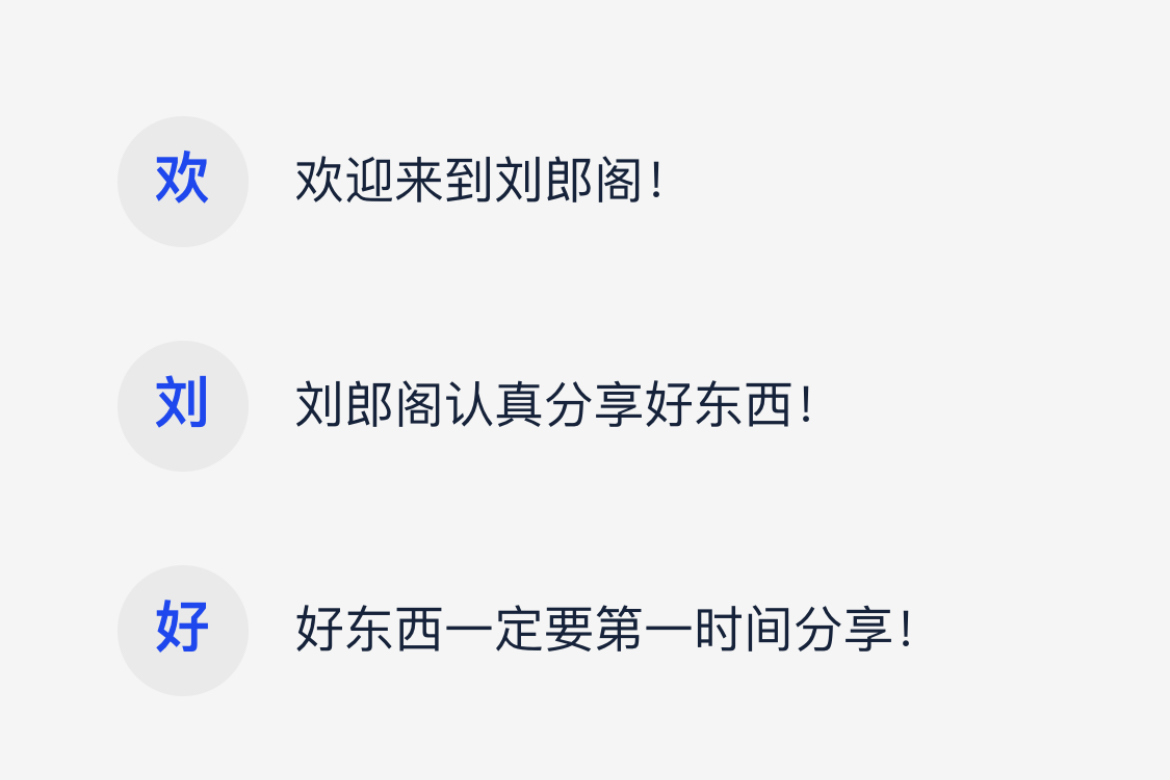
<!DOCTYPE html>
<html lang="zh">
<head>
    <meta charset="UTF-8">
    <meta name="viewport" content="width=device-width, initial-scale=1.0">
    <link rel="stylesheet" href="style.css">
    <title>第一个字符串生成文字图标_刘郎阁</title>
</head>
<body>
    <div class="app">
        <ul>
          <li><span>欢迎来到刘郎阁!</span>欢迎来到刘郎阁!</li>
          <li><span>刘郎阁认真分享好东西!</span>刘郎阁认真分享好东西!</li>
          <li><span>好东西一定要第一时间分享!</span>好东西一定要第一时间分享!</li>
        </ul>
    </div>
<style>
*{
    margin: 0;
    padding: 0;
    list-style: none;
    transition: .5s;
}
html,body{
    background-color: #f5f5f5;
    color: #fff;
    font-size: 14px;
}
.app{
    width: 100%;
    height: 100vh;
    position: relative;
    display: flex;
    justify-content: center;
    align-items: center;
}
.app ul {
  max-width: 300px;
}
.app ul li{
  width: 100%;
  color: #152239;
  font-size: 16px;
  line-height: 42px;
  margin: 15px 0;
  float: left;
}
.app ul li span{
  width: 42px;
  height: 42px;
  line-height: 40px;
  color: #1E47ED;
  font-size: 18px;
  font-weight: 700;
  text-indent: 12px;
  border-radius: 50%;
  display: block;
  float: left;
  overflow: hidden;
  background-color: #eaeaea;
  letter-spacing: 20px;
  margin-right: 15px;
}
</style>
</body>
</html>
2.动态圆点水波纹

<!DOCTYPE html>
<html lang="en">
<head>
  <meta charset="UTF-8">
  <meta name="viewport" content="width=device-width, initial-scale=1.0">
  <link rel="stylesheet" href="style.css?k3f22ww">
  <title>圆点水波纹效果_刘郎阁</title>
</head>
<body>
  <div class="app">
    <label class="dot"></label>
  </div>
<style>

*{
  margin: 0;
  padding: 0;
  list-style: none;
  transition: .5s;
}
html,body{
  background-color: #f5f5f5;
  color: #fff;
  font-size: 14px;
}
.app{
  width: 100%;
  height: 100vh;
  position: relative;
  display: flex;
  justify-content: center;
  align-items: center;
}
.dot {
  width: 48px;
  height: 48px;
  display: block;
  position: relative;
  border-radius: 50%;
  background-color: blue;
  z-index: 1;
}
.dot::after {
  width: 100%;
  height: 100%;
  content: "";
  border-radius: 50%;
  position: absolute;
  top: 0;
  left: 0;
  z-index: -2;
  background-color: blue;
  animation: dot-play 4s linear 400ms infinite;
}
.dot::before {
  width: 100%;
  height: 100%;
  content: "";
  border-radius: 50%;
  position: absolute;
  top: 0;
  left: 0;
  z-index: -1;
  background-color: blue;
  animation: dot-play 4s linear 200ms infinite;
  animation-delay: 2s; /* 延迟 2s */
}
@keyframes dot-play{
  from{
    transform: scale(1);
    opacity: .2;
  }
  to{
    transform: scale(4);
    opacity: 0;
  }
}

</style>
</body>
</html>
3.呼吸灯效果

<!DOCTYPE html>
<html lang="en">
<head>
    <meta charset="UTF-8">
    <meta name="viewport" content="width=device-width, initial-scale=1.0">
    <link rel="stylesheet" href="style.css">
    <title>呼吸灯效果_刘郎阁</title>
</head>
<body>
  <div class="app">
    <span class="red"></span>
    <span class="green"></span>
    <span class="blue"></span>
  </div>
<style>

*{
  margin:0;
  padding: 0;
}
body,html{
  background-color: #000;
}
.app{
  width:100%;
  height: 100vh;
  display: flex;
  justify-content: center;
  align-items: center;
}
span{
  width: 60px;
  height: 60px;
  margin: 40px;
  border-radius: 50%;
}
.red{
  animation: just1 2s ease-in-out infinite alternate;
}
.green{
  animation: just2 3s ease-in-out infinite alternate;
}
.blue{
  animation: just3 4s ease-in-out infinite alternate;
}
@keyframes just1{
  0%{
    border: 5px solid rgba(255,0,0,0);
    box-shadow: 0 0 0 rgba(255,0,0,0),0 0 0 rgba(255,0,0,0) inset;
  }
  100%{
    border: 5px solid rgba(255,0,0,1);
    box-shadow: 0 0 70px rgba(255,0,0,0.7),0 0 15px rgba(255,0,0,0.5) inset;
  }
}
@keyframes just2{
  0%{
    border: 5px solid rgba(0,255,0,0);
    box-shadow: 0 0 0 rgba(0,255,0,0),0 0 0 rgba(0,255,0,0) inset;
  }
  100%{
    border: 5px solid rgba(0,255,0,1);
    box-shadow: 0 0 70px rgba(0,255,0,0.7),0 0 15px rgba(0,255,0,0.5) inset;
  }
}
@keyframes just3{
  0%{
    border: 5px solid rgba(0,0,255,0);
    box-shadow: 0 0 0 rgba(0,0,255,0),0 0 0 rgba(0,0,255,0) inset;
  }
  100%{
    border: 5px solid rgba(0,0,255,1);
    box-shadow: 0 0 70px rgba(0,0,255,0.7),0 0 15px rgba(0,0,255,0.5) inset;
  }
}
</style>
</body>
</html>
4.简约动态按钮

<!DOCTYPE html>
<html lang="zh">
  <head>
    <meta charset="UTF-8">
<meta name="viewport" content="width=device-width, initial-scale=1.0">
    <link rel="stylesheet" href="style.css">
    <title>简约动态按钮_刘郎阁</title>
  </head>
  <body>
    <div class="app">
      <button>刘郎阁</button>
    </div>
<style>

.app{
  width: 100%;
  height: 100vh;
  position: relative;
  display: flex;
  justify-content: center;
  align-items: center;
}
button{
  width: 140px;
  height: 46px;
  font-size: 16px;
  font-family: Arial, Helvetica, sans-serif;
  font-weight: 700;
  color: #333;
  background-color: transparent;
  border: none;
  position: relative;
  box-sizing: border-box;
  transition: all 0.4s ease-in-out;
}
button:before{
  content: '';
  width: 4px;
  height: inherit;
  position: absolute;
  top: 0;
  left: 0;
  z-index: -5;
  background-color: #333;
  transition: all 0.4s ease-in-out;
}
button:hover{
  cursor: pointer;
  color: #fff;
}
button:hover:before{
  width: 100%;
  border-radius: 6px;
}
</style>
  </body>
</html>
5.输入框选中交互动效

<!DOCTYPE html>
<html lang="zh">
  <head>
    <meta charset="UTF-8">
<meta name="viewport" content="width=device-width, initial-scale=1.0">
    <link rel="stylesheet" href="style.css">
    <title>输入框选中交互动效_刘郎阁</title>
  </head>
  <body>
    <div class="app">
      <label>
        <input type="text" required>
        <span>用户名</span>
      </label>
    </div>
<style>

.app{
  width: 100%;
  height: 100vh;
  position: relative;
  display: flex;
  justify-content: center;
  align-items: center;
}
input{
  list-style: none;
  outline-style: none;
}
label{
  width: 240px;
  position: relative;
  display: flex;
  align-items: center;
}
input{
  width: 240px;
  height: 32px;
  line-height: 32px;
  padding: 0 10px;
  border: 2px solid transparent;
  border-bottom-color: #333;
  background-color: transparent;
  box-sizing: border-box;
  transition: all 0.3s;
  font-size: 14px;
  color: #333;
}
span{
  position: absolute;
  font-size: 14px;
  color: #999;
  left: 10px;
  cursor: text;
  z-index: 1;
  transition: all 0.3s;
}
label:hover input,input:focus{
  border-color: blue;
  border-radius: 8px;
}
input:focus+span,input:valid+span{
  transform: translateY(-32px);
}

</style>
  </body>
</html>
6.Loading动画

<!DOCTYPE html>
<html lang="zh">
  <head>
    <meta charset="UTF-8">
<meta name="viewport" content="width=device-width, initial-scale=1.0">
    <link rel="stylesheet" href="style.css">
    <title>Loading效果_刘郎阁</title>
  </head>
  <body>
    <div class="app">
      <div class="loading"></div>
    </div>
<style>
.app{
    width: 100%;
    height: 100vh;
    position: relative;
    display: flex;
    justify-content: center;
    align-items: center;
}

.loading {
    width: 50px;
    height: 50px;
    border: 4px solid rgba(0, 0, 0, 0.2);
    border-top-color: #000000;
    border-radius: 50%;
    animation: loading 1s linear infinite;
}

@keyframes loading {
    to {
        transform: rotate(360deg);
    }
}
</style>
  </body>
</html>
7.聚光灯效果

<!DOCTYPE html>
<html lang="zh">
  <head>
    <meta charset="UTF-8">
<meta name="viewport" content="width=device-width, initial-scale=1.0">
    <link rel="stylesheet" href="style.css">
    <title>聚光灯效果_刘郎阁</title>
  </head>
  <body>
    <div class="app">
      <div class="spotlight18" data-cont="刘郎阁 YJVC.CN">刘郎阁 YJVC.CN</div>
    </div>
<style>

.app{
  width: 100%;
  height: 100vh;
  background-color: #ffffff;
  position: relative;
  display: flex;
  justify-content: center;
  align-items: center;
}
.spotlight18{
  color: #eaeaea;
  font-size: 40px;
  font-weight: 900;
  text-transform: uppercase;
  position: relative;
}
.spotlight18:before{
  width: inherit;
  height: inherit;
  content: attr(data-cont);
  color: transparent;
  background-image: linear-gradient(90deg, #4158D0 0%, #C850C0 30%, #FFCC70 66%, #56e28d 100%);
  -webkit-background-clip: text;
  position: absolute;
  top: 0;
  left: 0;
  animation: spotlight18 8s linear infinite;
}
@keyframes spotlight18{
  0%{
    clip-path: ellipse(32px 32px at 0 50%);
  }
  50%{
    clip-path: ellipse(32px 32px at 100% 50%);
  }
  100%{
    clip-path: ellipse(32px 32px at 0 50%);
  }
}

</style>
  </body>
</html>
8.文字上下浮动效果

<!DOCTYPE html>
<html lang="zh">
  <head>
    <meta charset="UTF-8">
<meta name="viewport" content="width=device-width, initial-scale=1.0">
    <link rel="stylesheet" href="style.css">
    <title>文字上下浮动效果_刘郎阁</title>
  </head>
  <body>
    <div class="app">
      <div class="loading17">
        <span class="load-span17">刘</span>
        <span class="load-span17">郎</span>
        <span class="load-span17">阁</span>
        <span class="load-span17">欢</span>
        <span class="load-span17">迎</span>
        <span class="load-span17">您</span>
      </div>
    </div>
<style>

.app{
  width: 100%;
  height: 100vh;
  background-color: #ffffff;
  position: relative;
  display: flex;
  justify-content: center;
  align-items: center;
}
.loading17{
  height: 48px;
  font-size: 32px;
  font-weight: 700;
  letter-spacing: 24px;
  color: black;
  display: flex;
  justify-content: center;
  align-items: center;
}
.loading17 .load-span17{
  animation: text-load17 2.8s linear infinite;
}
.loading17 .load-span17:nth-of-type(1){
  color: #3185fa;
  animation-delay: 0.4s;
}
.loading17 .load-span17:nth-of-type(2){
  color: #fc3621;
  animation-delay: 0.8s;
}
.loading17 .load-span17:nth-of-type(3){
  color: #fcbb02;
  animation-delay: 0.12s;
}
.loading17 .load-span17:nth-of-type(4){
  color: #3285ff;
  animation-delay: 1.6s;
}
.loading17 .load-span17:nth-of-type(5){
  color: #2ab148;
  animation-delay: 2.0s;
}
.loading17 .load-span17:nth-of-type(6){
  color: #fb3320;
  animation-delay: 2.4s;
}
@keyframes text-load17{
  0%{
    transform: translateY(0);
  }
  50% {
    transform: translateY(-20px);
  }
  100%{
    transform: translateY(0);
  }
}
</style>
  </body>
</html>
9.汉堡菜单按钮

<!DOCTYPE html>
<html lang="zh">
  <head>
   <meta charset="UTF-8">
<meta name="viewport" content="width=device-width, initial-scale=1.0">
    <link rel="stylesheet" href="style.css">
    <title>汉堡菜单按钮_刘郎阁</title>
  </head>
  <body>
    <div class="app">
      <label class="label16">
        <input class="inp16" type="checkbox">
        <span class="line16"></span>
        <span class="line16"></span>
        <span class="line16"></span>
      </label>
    </div>
<style>

.app{
  width: 100%;
  height: 100vh;
  background-color: #ffffff;
  position: relative;
  display: flex;
  justify-content: center;
  align-items: center;
}
.label16{
  width: 48px;
  height: 36px;
  display: block;
  position: relative;
  cursor: pointer;
}
.inp16{
  display: none;
}
.line16{
  width: inherit;
  height: 4px;
  border-radius: 2px;
  display: block;
  background-color: #3d3d3d;
  position: absolute;
  top: 0;
  transition: all 0.24s ease-in-out;
}
.line16:nth-of-type(2){
  top: 16px;
}
.line16:nth-of-type(3){
  top: 32px;
}
.inp16:checked ~ .line16:nth-of-type(1){
  transform: rotate(45deg);
  top: 16px;
}
.inp16:checked ~ .line16:nth-of-type(2){
  width: 0;
}
.inp16:checked ~ .line16:nth-of-type(3){
  transform: rotate(-45deg);
  top: 16px;
}
</style>
  </body>
</html>
10.抖动的按钮

<!DOCTYPE html>
<html lang="zh">
  <head>
    <meta charset="UTF-8">
<meta name="viewport" content="width=device-width, initial-scale=1.0">
    <link rel="stylesheet" href="style.css">
    <title>抖动的按钮_刘郎阁</title>
  </head>
  <body>
    <div class="app">
      <button class="btn15">动起来</button>
    </div>
<style>

.app{
  width: 100%;
  height: 100vh;
  background-color: #ffffff;
  position: relative;
  display: flex;
  justify-content: center;
  align-items: center;
}
.btn15{
  width: 140px;
  height: 48px;
  line-height: 48px;
  background-color: #eee;
  border: none;
  border-radius: 24px;
  font-size: 16px;
  color: #333333;
  text-align: center;
  transition: all 0.24s linear;
}
.btn15:hover{
  cursor: pointer;
  color: #fff;
  background-color: #253ed2;
  animation: yizhidong 0.24s linear infinite;
}
@keyframes yizhidong{
  0%{
    transform: translate(0);
  }
  20%{
    transform: translate(-3px, 3px);
  }
  40%{
    transform: translate(-2px, -3px);
  }
  60%{
    transform: translate(3px, 2px);
  }
  80%{
    transform: translate(2px, -3px);
  }
  100%{
    transform: translate(0);
  }
}

</style>
  </body>
</html>
11.简约动态输入框

<!DOCTYPE html>
<html lang="zh">
  <head>
    <meta charset="UTF-8">
<meta name="viewport" content="width=device-width, initial-scale=1.0">
    <link rel="stylesheet" href="style.css">
    <title>简约动态输入框_刘郎阁</title>
  </head>
  <body>
    <div class="app">
      <label>
        <input type="text" placeholder="在此输入文字" required>
        <span class="line"></span>
      </label>
    </div>
<style>
.app{
  width: 100%;
  height: 100vh;
  background-color: #ffffff;
  position: relative;
  display: flex;
  justify-content: center;
  align-items: center;
}
label{
  position: relative;
}
input{
  width: 140px;
  height: 36px;
  line-height: 36px;
  outline-style: none;
  font-size: 16px;
  color: #333;
  border: none;
  padding: 0 8px;
  box-sizing: border-box;
}
.line{
  width: 0;
  height: 2px;
  display: block;
  background-color: #4158D0;
  background-image: linear-gradient(90deg, #4158D0 0%, #C850C0 48%, #FFCC70 100%);
  transition: all 0.24s ease-in-out;
}
input:focus+.line,input:valid+.line{
  width: 100%;
}
</style>
  </body>
</html>
12.搜索框动态特效

<!DOCTYPE html>
<html lang="zh">
  <head>
    <meta charset="UTF-8">
<meta name="viewport" content="width=device-width, initial-scale=1.0">
    <link rel="stylesheet" href="style.css">
    <title>搜索框动态特效_刘郎阁</title>
  </head>
  <body>
    <div class="app">
      <label>
        <input type="text" required>
        <span class="line"></span>
      </label>
    </div>
<style>

.app{
  width: 100%;
  height: 100vh;
  background-color: #ffffff;
  position: relative;
  display: flex;
  justify-content: center;
  align-items: center;
}
label{
  position: relative;
}
input{
  width: 38px;
  height: 38px;
  line-height: 38px;
  outline-style: none;
  font-size: 16px;
  color: #333;
  border: 3px solid #a8a8a8;
  border-radius: 19px;
  padding: 0 16px;
  box-sizing: border-box;
  transition: all 1s ease-in-out;
}
.line{
  width: 3px;
  height: 14px;
  display: block;
  background-color: #a8a8a8;
  transform: rotate(320deg);
  position: absolute;
  left: 30px;
  top: 32px;
  z-index: 10;
  opacity: 1;
  transition: all 1s ease-in-out;
}
input:focus,input:valid{
  width: 180px;
}
input:focus+.line,input:valid+.line{
  width: 1px;
  height: 16px;
  left: 19px;
  top: 10px;
  opacity: 0;
  transform: rotate(360deg);
}

</style>
  </body>
</html>
13.新拟态输入框

<!DOCTYPE html>
<html lang="zh">
  <head>
  <meta charset="UTF-8">
<meta name="viewport" content="width=device-width, initial-scale=1.0">
    <link rel="stylesheet" href="style.css">
    <title>新拟态输入框_刘郎阁</title>
  </head>
  <body>
    <div class="app">
      <input type="text" placeholder="用户名/邮箱">
    </div>
<style>

.app{
  width: 100%;
  height: 100vh;
  background-color: #e0e0e0;
  position: relative;
  display: flex;
  justify-content: center;
  align-items: center;
}
input {
  width: 180px;
  height: 56px;
  border: none;
  outline-style: none;
  font-size: 16px;
  color: #333333;
  padding: 0 28px;
  border-radius: 28px;
  background: #e0e0e0;
  box-shadow: 6px 6px 12px #b8b8b8, -6px -6px 12px #ffffff, inset 0 0 0 #b8b8b8, inset 0 0 0 #ffffff;
  transition: all .24s ease-in-out;
}
input:focus{
  box-shadow: 0 0 0 #b8b8b8, 0 0 0 #ffffff, inset 6px 6px 12px #b8b8b8, inset -6px -6px 12px #ffffff;
}
input::placeholder {
  color: rgba(0, 0, 0, 0.4);
  font-size: 16px;
  font-weight: 700;
  transition: all .24s ease-in-out;
}
input:focus::placeholder {
  color: rgba(0, 0, 0, 0.8);
}

</style>
  </body>
</html>
14.多彩动态按钮

<!DOCTYPE html>
<html lang="zh">
  <head>
    <meta charset="UTF-8">
<meta name="viewport" content="width=device-width, initial-scale=1.0">
    <link rel="stylesheet" href="style.css">
    <title>多彩动态按钮_刘郎阁</title>
  </head>
  <body>
    <div class="app">
      <button>戳一下</button>
    </div>
<style>

.app{
  width: 100%;
  height: 100vh;
  position: relative;
  display: flex;
  justify-content: center;
  align-items: center;
}
button{
  width: 140px;
  height: 46px;
  font-size: 16px;
  font-weight: 700;
  color: black;
  border: 2px solid #ffffff;
  border-radius: 10px;
  background-color: #4158D0;
  background-image: linear-gradient(90deg, #4158D0 0%, #C850C0 17%, #e6a731 39%, #8329e2 60%, #3fb75f 80%, #4158D0 100%);
  box-shadow: 0 0 0 2px #000000;
  cursor: pointer;
  transition: all 0.5s ease;
}
button:hover{
  color: #ffffff;
  animation: quick 0.5s linear infinite;
}
@keyframes quick{
  to {
    background-position: 140px;
  }
}
button:active{
  transform: translateY(1px);
}
</style>
  </body>
</html>
15.创意菜单鼠标悬停效果

HTML代码:
<body>
<ul>
<li style="--clr:#00ade1"><a href="" data-text=" Home"> Home </a></li>
<li style="--clr:#ff6493"><a href="" data-text=" About"> About </a></li>
<li style="--clr:#ffdd1c"><a href="" data-text=" Services"> Services </a></li>
<li style="--clr:#00dc82"><a href="" data-text=" Teams"> Teams </a></li>
<li style="--clr:#dc00d4"><a href="" data-text=" Contact"> Contact </a></li>
</ul>
</body>CSS代码:
*,a{
    margin: 0;
    padding: 0;
    box-sizing: border-box;
    font-family: Helvetica, sans-serif;
    text-decoration: none;
}
body{
    display: flex;
    justify-content: center;
    align-items: center;
    min-height: 100vh;
    background-color: #252839;
}
ul,li{
    margin: 0;
    list-style: none;
}
ul{
    position: relative;
    display: flex;
    flex-direction: column;
    gap: 30px;
}

ul li a{
    font-size: 4em;
    position: relative;
    letter-spacing: 2px;
    text-transform: uppercase;
    color: transparent;
    -webkit-text-stroke: 1px rgba(255,255,255,0.5);
}
ul li a::before{
    content: attr(data-text);
    position: absolute;
    color: var(--clr);
    overflow: hidden;
    width: 0%;
    transition: all ease-in-out .3s;
    border-right: 8px solid var(--clr);
    -webkit-text-stroke: 1px var(--clr);
}
ul li a:hover::before{
    width: 100%;
    filter: drop-shadow(0px 0px 15px var(--clr));
}
16.边框流动特效

<!DOCTYPE html>
<html>
<head>
<meta charset="UTF-8">
<meta name="viewport" content="width=device-width, initial-scale=1.0">
    <title></title>
</head>
<body>
    <body>
    <div class="box">
        <h2>刘郎</h2>
    </div>
<style>

        html{
            height: 100%;
        }
        body{
            height: 100%;
            margin: 0;
            display: flex;
            align-items: center;
            justify-content: center;
            background-color: #444;
        }
        .box{
            box-shadow: 0 0 180px #666;
            position: relative;
            width: 180px;
            height: 180px;
            background-color: rgba(0,0,0,0.8);
            border-radius: 20px;
            display: flex;
            align-items: center;
            justify-content: center;
            overflow: hidden;
        }
        .box h2{
            margin: 0;
            color: #fff;
            font-size: 4em;
            font-family: Helvetica, sans-serif;
            text-shadow: 2px 2px paleturquoise;
            z-index: 1;
        }
        .box::before{
            position: absolute;
            width: 100px;
            height: 200%;
            content: "";
            background: linear-gradient(#00ccff,#d500f9);
            animation: rotate 5s linear infinite;


        }
        .box::after{
            content: "";
            position: absolute;
            background: #0e1538;
            inset: 2px;
            border-radius: 20px;
        }
        @keyframes rotate {
            from{
                transform: rotate(0deg);
            }
            to{
                transform: rotate(360deg);
            }
        }

</style>
</body>
</body>
</html>
17.限制显示两行,超出显示...
display: -webkit-box;
-webkit-box-orient: vertical;
-webkit-line-clamp: 2;
overflow: hidden;
18.星空

<!DOCTYPE html>
<html lang="en">
<head>
   <meta charset="UTF-8">
<meta name="viewport" content="width=device-width, initial-scale=1.0">
    <title>星空 刘郎阁</title>
    <meta name="viewport" content="width=device-width, user-scalable=no, initial-scale=1.0">
    <script src="https://cdnjs.cloudflare.com/ajax/libs/gsap/3.9.1/gsap.min.js"></script>
    <script src="https://cdnjs.cloudflare.com/ajax/libs/three.js/r128/three.min.js"></script>
    <style>
        body{
            margin: 0;
        }
    </style>
</head>
<body>
</body>
<script>

    let camera
    let scene
    let renderer
    let material
    let mouseX = 0
    let mouseY = 0
    let windowHalfX = window.innerWidth / 2
    let windowHalfY = window.innerHeight / 2

    init()
    animate()

    function init () {
        camera = new THREE.PerspectiveCamera(50, window.innerWidth / window.innerHeight, 5, 2000)
        camera.position.z = 500

        scene = new THREE.Scene()
        scene.fog = new THREE.FogExp2(0x0000ff, 0.001)

        const geometry = new THREE.BufferGeometry()
        const vertices = []
        const size = 2000

        for ( let i = 0; i < 20000; i ++ ) {
            const x = (Math.random() * size + Math.random() * size) / 2 - size / 2
            const y = (Math.random() * size + Math.random() * size) / 2 - size / 2
            const z = (Math.random() * size + Math.random() * size) / 2 - size / 2

            vertices.push(x, y, z)
        }

        geometry.setAttribute('position', new THREE.Float32BufferAttribute(vertices, 3))

        material = new THREE.PointsMaterial({
            size: 2,
            color: 0xffffff,
        })

        const particles = new THREE.Points(geometry, material)
        scene.add(particles)

        renderer = new THREE.WebGLRenderer()
        renderer.setPixelRatio(window.devicePixelRatio)
        renderer.setSize(window.innerWidth, window.innerHeight)
        document.body.appendChild(renderer.domElement)

        document.body.style.touchAction = 'none'
        document.body.addEventListener('pointermove', onPointerMove)
        window.addEventListener('resize', onWindowResize)
    }

    function onWindowResize () {
        windowHalfX = window.innerWidth / 2
        windowHalfY = window.innerHeight / 2

        camera.aspect = window.innerWidth / window.innerHeight
        camera.updateProjectionMatrix()
        renderer.setSize(window.innerWidth, window.innerHeight)
    }

    function onPointerMove (event) {
        mouseX = event.clientX - windowHalfX
        mouseY = event.clientY - windowHalfY
    }

    function animate () {
        requestAnimationFrame(animate)
        render()
    }

    function render () {
        camera.position.x += (mouseX * 2 - camera.position.x) * 0.02
        camera.position.y += (-mouseY * 2 - camera.position.y) * 0.02
        camera.lookAt(scene.position)
        renderer.render(scene, camera)
        scene.rotation.x += 0.001
        scene.rotation.y += 0.002
    }

</script>
</html>
19.圆弧转动

<!DOCTYPE html>
<html lang="en">
<head>
    <meta charset="UTF-8">
    <meta http-equiv="X-UA-Compatible" content="IE=edge">
    <meta name="viewport" content="width=device-width, initial-scale=1.0">
    <title>圆弧转动 刘郎阁</title>
</head>
<link rel="stylesheet" href="../common.css">
<style>
    :root {
        --color: orange;
        --lineColor: rgba(102, 163, 224, .2);
    }
    body {
        background: #222;
        overflow: hidden;
    }
    section {
        position: relative;
        width: 200px;
        height: 200px;
    }
    section::before {
        content: '';
        position: absolute;
        height: 10px;
        width: 10px;
        border-radius: 100%;
        border-top: 1px solid orange;
        top: 50%;
        left: 50%;
        margin-top: -5px;
        margin-left: -5px;
        animation: turn 1s infinite linear;
        filter:
            drop-shadow(0 0 2px var(--color)) drop-shadow(0 0 5px var(--color)) drop-shadow(0 0 10px var(--color)) drop-shadow(0 0 20px var(--color));
    }
    .box,
    .box::after,
    .box::before {
        border: 2px solid var(--lineColor);
        border-left: 2px solid var(--color);
        border-right: 2px solid var(--color);
        border-radius: 50%;
    }
    .box::after,
    .box::before {
        position: absolute;
        content: '';
        left: 50%;
        top: 50%;
    }
    .box {
        width: 200px;
        height: 200px;
        position: relative;
        animation: turn 1s linear infinite;
        transform-origin: 50% 50%;
    }
    .box::before {
        width: 180px;
        height: 180px;
        margin-top: -90px;
        margin-left: -90px;
        animation: turn2 1.25s linear infinite;
    }
    .box::after {
        width: 160px;
        height: 160px;
        margin-top: -80px;
        margin-left: -80px;
        animation: turn 1.5s linear infinite;
    }
    .box-circle,
    .box-circle1,
    .box-circle2 {
        border: 2px solid var(--color);
        opacity: .9;
        border-radius: 50%;
        position: absolute;
        left: 50%;
        top: 50%;
        transform-origin: 50% 50%;
        transform: translate(-50%, -50%);
        width: 100px;
        height: 100px;
        animation: rotate 3s linear infinite;
    }
    .box-circle {
        animation-delay: 0.2s;
    }
    .box-circle1 {
        animation-delay: 1.2s;
    }
    .box-circle2 {
        animation-delay: 2.2s;
    }
    @keyframes turn {
        100% {
            transform: rotateZ(-1turn);
        }
    }
    @keyframes turn2 {
        100% {
            transform: rotateZ(1turn);
        }
    }
    @keyframes rotate {
        100% {
            border: none;
            border-top: 2px solid var(--color);
            border-bottom: 2px solid var(--color);
            transform: translate(-50%, -50%) rotate3d(.5, 0.5, 0.5, -720deg);
        }
    }
</style>
<body>
    <section>
        <div class="box"></div>
        <div class="box-circle"></div>
        <div class="box-circle1"></div>
        <div class="box-circle2"></div>
    </section>
</body>

</html>
20.流星雨
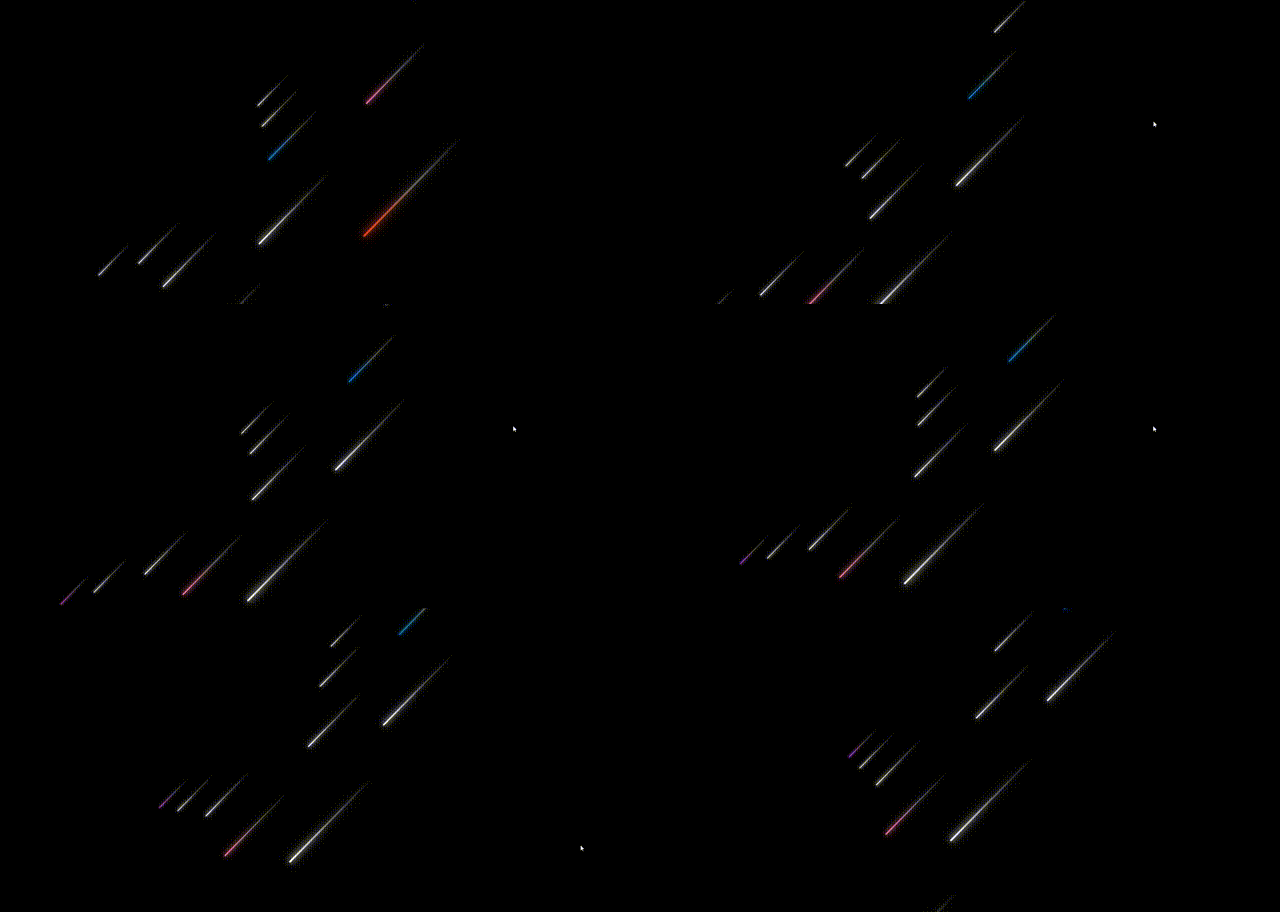
<!DOCTYPE html>
<html>
    <head>
        <meta charset="utf-8">
        <title>漫天流星雨 刘郎阁</title>
        <link rel="stylesheet" type="text/css" href="index.css"/>
    </head>
    <body>

        <div class="container">
            <div class="line" style="--color:#ec3e27;--x:3;--z:3;--d:1;"></div>
            <div class="line" style="--color:#fff;--x:3;--z:2;--d:2;"></div>
            <div class="line" style="--color:#fff;--x:4;--z:1;--d:3;"></div>
            <div class="line" style="--color:#fd79a8;--x:4;--z:0;--d:1;"></div>
            <div class="line" style="--color:#fff;--x:6;--z:-1;--d:2;"></div>
            <div class="line" style="--color:#0984e3;--x:6;--z:-2;--d:3;"></div>
            <div class="line" style="--color:#fff;--x:8;--z:-3;--d:1;"></div>
            <div class="line" style="--color:#fff;--x:10;--z:-4;--d:2;"></div>
            <div class="line" style="--color:#fff;--x:12;--z:-5;--d:3;"></div>
            <div class="line" style="--color:#fff;--x:14;--z:-6;--d:1;"></div>
            <div class="line" style="--color:#fff;--x:16;--z:-7;--d:2;"></div>
            <div class="line" style="--color:#fff;--x:18;--z:-8;--d:3;"></div>
            <div class="line" style="--color:#e056fd;--x:20;--z:-9;--d:1;"></div>


        </div>
<style>
:root {
    --background-color: #2c3e50;
    --border-color: #7591AD;
    --text-color: #34495e;
    --color1: #ec3e27;
    --color2: #fd79a8;
    --color3: #0984e3;
    --color4: #00b894;
    --color5: #fdcb6e;
    --color6: #e056fd;
    --color7: #F97F51;
    --color8: #BDC581;
}

* {
    margin: 0;
    padding: 0;
}

html {
    font-size: 14px;
}

body {
    width: 100vw;
    height: 100vh;
    background-color: var(--background-color);
    display: flex;
    justify-content: center;
    align-items: center;
    /* font-family: 'Times New Roman', Times, serif; */
}

.channel {
    position: absolute;
    width: 80%;
    text-align: center;
    top: 50%;
    left: 50%;
    transform: translate(-50%, -200px);
    font-size: 30px;
    font-weight: bold;
    color: #fff;
    z-index: 999;
}

.container {
    position: relative;
    width: 100vw;
    height: 100vh;
    background-color: #000;
    overflow: hidden;
    display: flex;
    justify-content: center;
    align-items: center;
    perspective: 800px;
    /* perspective-origin: left bottom; */
    transform-style: preserve-3d;

}

.line {
    position: absolute;
    width: 200px;
    height: 3px;
    border-radius: 3px;
    /* background-color: #fff; */
    background-image: linear-gradient(to right, var(--color), #ffffff50, transparent);
    animation: down 1s linear infinite both;
    animation-delay: calc(var(--d) * 0.3s);

}

.line::before,
.line::after {
    position: absolute;
    content: "";
    width: inherit;
    height: inherit;
    background-image: inherit;

}

.line::before {
    filter: blur(5px);
}

.line::after {
    filter: blur(10px);
}


@keyframes down {
    0% {
        transform: translateY(calc(var(--z) * 60px))
        translateZ(calc(var(--z) * 100px))
        rotate(-45deg)
        translateX(calc(var(--x) * 100px));
    }
    100% {
        transform: translateY(calc(var(--z) * 60px))
         translateZ(calc(var(--z) * 100px))
         rotate(-45deg)
         translateX(calc(var(--x) * -100px));

    }
}

</style>
    </body>
</html>以上方法(部分)来自满心记,总而言之,当我发现有什么好的资源,肯定会第一时间与大家一起分享。如果喜欢或者是对你有用的,那就拿去食用吧!
完!
]]>相关文章推荐:不错的CSS特效2
索引
1.动态波纹字
2.静态格栅字
3.旋转的金币
4.霓虹灯文字
5.故障字体效果
6.乱码效果
7.输入框交互效果
8.圆点交互按钮
9.文字上下滑动按钮
10.音频特效
11.文字跳动的输入框
12.暗黑模式切换开关
13.呼吸灯按钮
14.新拟态按钮
15.网站底部徽章样式
16.网站LED灯公告
17.HTML滚动播报
18.七彩圆环
19.科幻404
1.动态波纹字

<!DOCTYPE html>
<html lang="zh">
  <head>
  <meta charset="UTF-8">
    <link rel="stylesheet" href="style.css">
    <title>动态的波纹字_刘郎阁</title>
  </head>
  <body>
    <div class="app">
      <div class="font20">刘郎阁<br>欢迎您!</div>
    </div>
    </div>
<style>
.app{
  width: 100%;
  height: 100vh;
  background-color: #ffffff;
  position: relative;
  display: flex;
  justify-content: center;
  align-items: center;
}
.font20{
  color: transparent;
  font-size: 70px;
  font-weight: 900;
  background-image: linear-gradient(-45deg, #fff 0%, #fff 25%, green 25%, green 50%, #fff 50%, #fff 75%, green 75%, green 100%);
  -webkit-background-clip: text;
  animation: font20 10s ease infinite;
}
@keyframes font20{
  0%{
    background-size: 1px 2px;
  }
  20%{
    background-size: 4px 5px;
  }
  40%{
    background-size: 3px 4px;
  }
  60%{
    background-size: 5px 6px;
  }
  80%{
    background-size: 2px 3px;
  }
  100%{
    background-size: 7px 6px;
  }
}
</style>
  </body>
</html>
2.静态格栅字

<!DOCTYPE html>
<html lang="zh">
  <head>
    <meta charset="UTF-8">
<meta name="viewport" content="width=device-width, initial-scale=1.0">
    <link rel="stylesheet" href="style.css">
    <title>静态格栅字_刘郎阁</title>
  </head>
  <body>
    <div class="app">
      <div class="font21" data-text="刘郎阁 欢迎您">刘郎阁<br>欢迎您</div>
    </div>
    </div>
<style>

.app{
  width: 100%;
  height: 100vh;
  background-color: #ffffff;
  position: relative;
  display: flex;
  justify-content: center;
  align-items: center;
}
.font21{
  color: transparent;
  font-size: 70px;
  font-weight: 900;
  letter-spacing: 10px;
  background-image: linear-gradient(-45deg, #ffffff 0%, #ffffff 25%, green 25%, green 50%, #ffffff 50%, #ffffff 75%, green 75%, green 100%);
  background-size: 4px 4px;
  -webkit-background-clip: text;
  position: relative;
}
.font21:before{
  content: attr(data-text);
  letter-spacing: 10px;
  color: green;
  position: absolute;
  top: -6px;
  left: -6px;
  text-shadow: 2px 2px #ffffff;
}

</style>
  </body>
</html>
3.旋转的金币

<!DOCTYPE html>
<html lang="zh">
  <head>
  <meta charset="UTF-8">
<meta name="viewport" content="width=device-width, initial-scale=1.0">
    <link rel="stylesheet" href="style.css">
    <title>旋转的金币_刘郎阁</title>
  </head>
  <body>
    <div class="app">
      <div class="icon22">¥</div>
    </div>
<style>
.app{
  width: 100%;
  height: 100vh;
  background-color: #ffffff;
  position: relative;
  display: flex;
  justify-content: center;
  align-items: center;
}
.icon22{
  width: 72px;
  height: 72px;
  line-height: 72px;
  text-align: center;
  color: #daa500;
  font-size: 40px;
  font-weight: 900;
  background-color: #ffee00;
  border-radius: 50%;
  box-shadow: inset 0 0 0 4px #ffee00,inset 0 0 0 5px #daa500,0 5px 12px rgba(0,0,0,0.2);
  animation: ani-icon22 5s ease infinite;
}
@keyframes ani-icon22{
  0%{
    transform: rotateY(0deg);
    animation-timing-function: cubic-bezier(0.5, 0, 1, 0.5);
  }
  50%{
    transform: rotateY(900deg);
    animation-timing-function: cubic-bezier(0, 0.5, 0.5, 1);
  }
  100%{
    transform: rotateY(1800deg);
    animation-timing-function: cubic-bezier(0.5, 0, 1, 0.5);
  }
}

</style>
  </body>
</html>
4.霓虹灯文字

<!DOCTYPE html>
<html lang="zh">
  <head>
  <meta charset="UTF-8">
<meta name="viewport" content="width=device-width, initial-scale=1.0">
    <link rel="stylesheet" href="style.css">
    <title>闪烁的霓虹灯文字_刘郎阁</title>
  </head>
  <body>
    <div class="app">
      <div class="light23">
        <div class="title23">
          <span>刘</span>
          <span>郎</span>
          <span>阁</span>
        </div>
        <div class="info23">
          <span>Welcome to vjo.cc</span>
        </div>
      </div>
    </div>
<style>

.app{
  width: 100%;
  height: 100vh;
  background-color: #ffffff;
  position: relative;
  display: flex;
  justify-content: center;
  align-items: center;
}
.light23{
  cursor: default;
}
.title23{
  color: #eaeaea;
  font-size: 32px;
  font-weight: 900;
}
.info23{
  color: #eaeaea;
  font-size: 16px;
  letter-spacing: 1px;
  text-transform: capitalize;
}
.light23:hover .title23 span{
  animation: light 0.4s ease forwards;
}
.light23:hover .title23 span:nth-of-type(2){
  animation-delay: .14s;
}
.light23:hover .title23 span:nth-of-type(3){
  animation-delay: .42s;
}
.light23:hover .title23 span:nth-of-type(4){
  animation-delay: .78s;
}
@keyframes light{
  10%,30%,50%{
    color: #eaeaea;
    text-shadow: none;
  }
  20%,40%,60%{
    color: #318BF6;
    text-shadow: 0px 0px 20px #1ABFED,0px 0px 40px #1ABFED,0px 0px 60px #1ABFED;
  }
  100%{
    color: #318BF6;
    text-shadow:0px 0px 20px #1ABFED,0px 0px 40px #1ABFED,0px 0px 60px #1ABFED;
  }
}
.light23:hover .info23 span{
  animation: light 0.4s ease forwards;
  animation-delay: 1s;
}

</style>
  </body>
</html>
5.故障字体效果

<!DOCTYPE html>
<html lang="zh">
  <head>
<meta charset="UTF-8">
<meta name="viewport" content="width=device-width, initial-scale=1.0">
    <link rel="stylesheet" href="style.css">
    <title>故障字体效果_刘郎阁</title>
  </head>
  <body>
    <div class="app">
      <div class="font24" data-text="404">404</div>
    </div>
<style>.app{
  width: 100%;
  height: 100vh;
  background-color: #ffffff;
  position: relative;
  display: flex;
  justify-content: center;
  align-items: center;
}
.font24 {
  width: 156px;
  height: 98px;
  position: relative;
  font-size: 70px;
  font-weight: 900;
  color: transparent;
  letter-spacing: 10px;
  z-index: 10;
  animation: text-skew 4s linear infinite;
}
.font24:before,.font24:after {
  display: block;
  content: attr(data-text);
  position: absolute;
  top: 0;
  left: 0;
}
.font24:before {
  animation: text-light 1s alternate-reverse infinite;
  color: #ff0000;
  z-index: -5;
  text-shadow: 2px 2px 0 #00ff00;
  mix-blend-mode: darken;
}
.font24:after {
  animation: text-light2 0.5s alternate-reverse infinite;
  color: #00ff00;
  z-index: -10;
  text-shadow: 2px 2px 0 #ff0000;
}
@keyframes text-light{
  10% {
    transform: translate(-2px,4px);
  }
  50% {
    transform: translate(2px, 2px);
  }
  100% {
    transform: translate(-4px,4px);
  }
}
@keyframes text-light2{
  0% {
    transform: translate(0,0);
  }
  20% {
    transform: translate(-2px,2px);
  }
  40% {
    transform: translate(-2px,2px);
  }
  60% {
    transform: translate(2px, -2px);
  }
  80% {
    transform: translate(2px, 2px);
  }
  100% {
    transform: translate(0,0);
  }
}
@keyframes text-skew{
  29%{
    color: transparent;
    transform: skew(0deg,0deg);
  }
  30%{
    color: #000000;
    transform: skew(10deg,40deg);
  }
  31%{
    color: transparent;
    transform: skew(0deg,0deg);
  }
  69%{
    color: transparent;
    transform: skew(0deg,0deg);
  }
  70%{
    color: #000000;
    transform: skew(180deg,10deg);
  }
  71%{
    color: transparent;
    transform: skew(0deg,0deg);
  }
}
</style>
  </body>
</html>
6.乱码效果

<!DOCTYPE html>
<html lang="zh">
<head>
<meta charset="UTF-8">
<meta name="viewport" content="width=device-width, initial-scale=1.0">
<link rel="stylesheet" href="style.css">
<title>乱码效果_刘郎阁</title>
</head>
<body>
<div class="app">
<div class="font25">YJVC.CN</div>
</div>
<style>
.app{
width: 100%;
height: 100vh;
background-color: #ffffff;
position: relative;
display: flex;
justify-content: center;
align-items: center;
}
.font25{
position: relative;
font-size: 24px;
font-weight: 900;
color: #1630f1;
letter-spacing: 10px;
background-color: #ffffff;
}
.font25:after{
content: '';
position: absolute;
top: 0;
z-index: 10;
background-color: inherit;
animation: text-ani25 2.4s linear infinite;
animation-delay: 2s;
}
@keyframes text-ani25{
0%{
content: "$-";
left: 0;
}
5%{
content: ";y";
left: 0;
}
10%{
content: "*&#H";
left: 0;
}
15%{
content: "-!);";
left: 0;
}
20%{
content: "#$_}-'";
left: 0;
}
25%{
content: ":0^!$.";
left: 0;
}
30%{
content: "#{+.-?#u";
left: 0;
}
35%{
content: "f7*%}-;#";
left: 0;
}
40%{
content: "^='?'*$!";
left: 0;
}
45%{
content: "+0^&!`^-";
left: 0;
}
50%{
content: "&-?>-=|`";
left: 0;
}
55%{
content: "u<|:#-";
left: auto;
right: 0;
}
60%{
content: ";~0
<!DOCTYPE html>
<html lang="zh">
  <head>
    <meta charset="UTF-8">
<meta name="viewport" content="width=device-width, initial-scale=1.0">
    <link rel="stylesheet" href="style.css">
    <title>输入框交互_刘郎阁</title>
  </head>
  <body>
    <div class="app">
      <label class="label28">
        <span class="span28">用户名</span>
        <input class="inp28" type="text" required>
      </label>
    </div>
<style>

.app{
  width: 100%;
  height: 100vh;
  background-color: #ffffff;
  position: relative;
  display: flex;
  justify-content: center;
  align-items: center;
}
.label28{
  width: 190px;
  height: 68px;
  position: relative;
  display: flex;
  flex-direction: column;
  justify-content: flex-end;
  cursor: text;
}
.span28{
  width: 100%;
  color: #000;
  font-size: 14px;
  margin-bottom: 6px;
  padding: 0 10px;
}
.inp28{
  width: 100%;
  padding: 0 10px;
  height: 2px;
  border: 0;
  font-size: 14px;
  box-sizing: border-box;
  background-color: rgba(0,0,0,0.1);
  transition: .3s;
}
.inp28:hover{
  background-color: rgba(50,133,255,0.7);
}
.inp28:focus,.inp28:valid{
  background-color: rgba(50,133,255,0.2);
  border: 2px solid rgba(50,133,255,0.7);
  border-radius: 4px;
  height: 42px;
  color: #000;
}

</style>
  </body>
</html>
8.圆点交互按钮

<!DOCTYPE html>
<html lang="zh">
  <head>
<meta charset="UTF-8">
<meta name="viewport" content="width=device-width, initial-scale=1.0">
    <link rel="stylesheet" href="style.css">
    <title>圆点交互按钮_刘郎阁</title>
  </head>
  <body>
    <div class="app">
      <div class="btn29">
        <span class="btn29-bg"></span>
        <span class="btn29-span-text">查看详情</span>
      </div>
    </div>
<style>

.app{
  width: 100%;
  height: 100vh;
  background-color: #ffffff;
  position: relative;
  display: flex;
  justify-content: center;
  align-items: center;
}
.btn29{
  width: 100px;
  height: 42px;
  line-height: 42px;
  position: relative;
  cursor: pointer;
}
.btn29-bg{
  width: 30px;
  height: 30px;
  display: block;
  border-radius: 15px;
  position: absolute;
  left: 0;
  bottom: 0;
  background-color: #97E138;
  transition: 0.24s;
}
.btn29-span-text{
  width: 100%;
  text-align: center;
  display: block;
  font-size: 16px;
  font-weight: 700;
  color: #056C00;
  position: absolute;
}
.btn29:hover .btn29-bg{
  width: 100%;
  height: 42px;
  border-radius: 21px;
}

</style>
  </body>
</html>
9.文字上下滑动按钮

<!DOCTYPE html>
<html lang="zh">
  <head>
<meta charset="UTF-8">
<meta name="viewport" content="width=device-width, initial-scale=1.0">
    <link rel="stylesheet" href="style.css">
    <title>文字上下滑动按钮_刘郎阁</title>
  </head>
  <body>
    <div class="app">
      <div class="btn30">
        <span class="btn-text30">探</span>
        <span class="btn-text30">索</span>
        <span class="btn-text30">未</span>
        <span class="btn-text30">知</span>
      </div>
    </div>
<style>

.app{
  width: 100%;
  height: 100vh;
  background-color: #ffffff;
  position: relative;
  display: flex;
  justify-content: center;
  align-items: center;
}
.btn30{
  height: 42px;
  position: relative;
  cursor: pointer;
  display: flex;
  overflow: hidden;
}
.btn-text30{
  width: 36px;
  height: 42px;
  line-height: 42px;
  text-align: center;
  display: block;
  background-color: #457356;
  color: #ffffff;
  font-size: 16px;
  font-weight: 700;
  position: relative;
}
.btn-text30:after{
  width: 36px;
  height: 42px;
  position: absolute;
  background-color: #3185fa;
  color: #ffffff;
  z-index: 99;
  transition: 0.3s ease-in-out;
}
.btn-text30:nth-of-type(1):after{
  content: '学';
  top: -42px;
  left: 0;
}
.btn-text30:nth-of-type(2):after{
  content: '无';
  top: 42px;
  left: 0px;
}
.btn-text30:nth-of-type(3):after{
  content: '止';
  top: -42px;
  left: 0;
}
.btn-text30:nth-of-type(4):after{
  content: '境';
  top: 42px;
  left: 0px;
}
.btn30:hover .btn-text30:after{
  top: 0;
}

</style>
  </body>
</html>
10.音频特效

<!DOCTYPE html>
<html lang="zh">
  <head>
<meta charset="UTF-8">
<meta name="viewport" content="width=device-width, initial-scale=1.0">
    <link rel="stylesheet" href="style.css">
    <title>音频特效_刘郎阁</title>
  </head>
  <body>
    <div class="app">
      <div class="audio-box37">
        <div class="audio37-block"></div>
        <div class="audio37-block"></div>
        <div class="audio37-block"></div>
        <div class="audio37-block"></div>
        <div class="audio37-block"></div>
        <div class="audio37-block"></div>
        <div class="audio37-block"></div>
      </div>
    </div>
<style>

.app{
  width: 100%;
  height: 50vh;
  background-color: #ffffff;
  position: relative;
  display: flex;
  justify-content: center;
  align-items: center;
}
.audio-box37{
  width: 84px;
  height: 62px;
  display: flex;
  justify-content: space-between;
  align-items: flex-end;
}
.audio37-block{
  width: 6px;
  box-sizing: border-box;
  background-color: #97E138;
  animation: audio73-eff 2s linear infinite;
  box-shadow: 0 -1px 0 #ffffff, 0 -2px 0 #97E138;
}
.audio37-block:nth-of-type(2){
  background-color: #FF3A85;
  animation-delay: .3s;
  animation-duration: 2.4s;
  box-shadow: 0 -1px 0 #ffffff, 0 -2px 0 #FF3A85;
}
.audio37-block:nth-of-type(3){
  background-color: #A2DAF6;
  animation-delay: .38s;
  box-shadow: 0 -1px 0 #ffffff, 0 -2px 0 #A2DAF6;
}
.audio37-block:nth-of-type(4){
  background-color: #FFD6D0;
  animation-delay: .5s;
  box-shadow: 0 -1px 0 #ffffff, 0 -2px 0 #FFD6D0;
}
.audio37-block:nth-of-type(5){
  background-color: #FF472C;
  animation-duration: 2.7s;
  box-shadow: 0 -1px 0 #ffffff, 0 -2px 0 #FF472C;
}
.audio37-block:nth-of-type(6){
  background-color: #DE74CE;
  animation-delay: .6s;
  animation-duration: 1.4s;
  box-shadow: 0 -1px 0 #ffffff, 0 -2px 0 #DE74CE;
}
.audio37-block:nth-of-type(7){
  background-color: #36AFCA;
  animation-delay: .8s;
  box-shadow: 0 -1px 0 #ffffff, 0 -2px 0 #36AFCA;
}
@keyframes audio73-eff{
  0%{
    height: 0;
  }
  50%{
    height: 32px;
  }
  100%{
    height: 0;
  }

</style>
  </body>
</html>
11.文字跳动的输入框

<!DOCTYPE html>
<html lang="zh">
  <head>
    <meta charset="UTF-8">
<meta name="viewport" content="width=device-width, initial-scale=1.0">
    <link rel="stylesheet" href="style.css">
    <title>提示文字跳起来的输入框_刘郎阁</title>
  </head>
  <body>
    <div class="app">
      <label class="label35">
        <input class="inp35" type="text" required>
        <span class="span35-box">
          <span class="span35-info">用</span>
          <span class="span35-info">户</span>
          <span class="span35-info">名</span>
        </span>
      </label>
    </div>
<style>
.app{
  width: 100%;
  height: 100vh;
  background-color: #ffffff;
  position: relative;
  display: flex;
  justify-content: center;
  align-items: center;
}
.label35{
  width: 180px;
  position: relative;
  cursor: text;
}
.inp35{
  width: 100%;
  padding: 0 10px;
  height: 42px;
  border: 0;
  border-bottom: 2px solid #414141;
  font-size: 16px;
  outline: none;
  box-sizing: border-box;
  transition: .3s;
}
.span35-box{
  width: 100%;
  padding: 0 10px;
  color: #aaa;
  font-size: 16px;
  position: absolute;
  top: 9px;
  box-sizing: border-box;
  display: flex;
}
.span35-info{
  transition: .3s cubic-bezier(0.5, -0.5, 0.5, 1.5);
}
.span35-info:nth-of-type(2){
  transition-delay: 100ms;
}
.span35-info:nth-of-type(3){
  transition-delay: 200ms;
}
.inp35:focus + .span35-box .span35-info,.inp35:valid + .span35-box .span35-info{
  color: #3034d4;
  transform: translateY(-30px);
}
.inp35:focus,.inp35:valid{
  border-bottom: 2px solid #3034d4;
}
</style>
  </body>
</html>
12.暗黑模式切换开关

<!DOCTYPE html>
<html lang="zh">
  <head>
  <meta charset="UTF-8">
<meta name="viewport" content="width=device-width, initial-scale=1.0">
    <link rel="stylesheet" href="style.css">
    <title>暗黑模式切换开关_刘郎阁</title>
  </head>
  <body>
    <div class="app">
      <label class="label34">
        <input class="inp34" type="checkbox">
        <span class="check-span34"></span>
      </label>
    </div>
<style>

.app{
  width: 100%;
  height: 100vh;
  background-color: #ffffff;
  position: relative;
  display: flex;
  justify-content: center;
  align-items: center;
}
.label34{
  width: 60px;
  height: 32px;
  position: relative;
  cursor: pointer;
}
.inp34{
  display: none;
}
.check-span34{
  width: 100%;
  height: 100%;
  display: block;
  background-color: #383838;
  border: 2px solid #383838;
  box-sizing: border-box;
  border-radius: 16px;
  transition: 0.3s linear;
}
.check-span34:after{
  content: '';
  width: 22px;
  height: 22px;
  background-color: #383838;
  box-shadow: inset -8px -4px 0 #ffffff;
  border-radius: 11px;
  position: absolute;
  top: 5px;
  left: 6px;
  box-sizing: border-box;
  transition: 0.3s ease-in-out;
}
.inp34:checked + .check-span34{
  background-color: #ffffff;
}
.inp34:checked + .check-span34:after{
  transform: translateX(26px);
  background-color: orange;
  box-shadow: none;
}

</style>
  </body>
</html>
13.呼吸灯按钮

<!DOCTYPE html>
<html lang="zh">
  <head>
 <meta charset="UTF-8">
<meta name="viewport" content="width=device-width, initial-scale=1.0">
    <link rel="stylesheet" href="style.css">
    <title>呼吸灯按钮_刘郎阁</title>
  </head>
  <body>
    <div class="app">
      <button class="btn31">按住说话</button>
    </div>
<style>

.app{
  width: 100%;
  height: 100vh;
  background-color: #ffffff;
  position: relative;
  display: flex;
  justify-content: center;
  align-items: center;
}
.btn31{
  width: 190px;
  height: 42px;
  cursor: pointer;
  border: none;
  border-radius: 4px;
  background-color: #333;
  font-size: 16px;
  font-weight: 700;
  color: #fff;
  transition: 0.3s;
}
.btn31:hover{
  background-color: #3185fa;
}
.btn31:active{
  animation: btn31-eff 3s linear infinite;
}
@keyframes btn31-eff{
  0%{
    box-shadow: 0 0 2px #3185fa;
  }
  50%{
    box-shadow: 0 0 40px #3185fa;
  }
  100%{
    box-shadow: 0 0 2px #3185fa;
  }
}
</style>
  </body>
</html>
14.新拟态按钮

<!DOCTYPE html>
<html lang="zh">
  <head>
<meta charset="UTF-8">
<meta name="viewport" content="width=device-width, initial-scale=1.0">
    <link rel="stylesheet" href="style.css">
    <title>新拟态按钮_刘郎阁</title>
  </head>
  <body>
    <div class="app">
      <button class="btn32">FUN</button>
    </div>
<style>
.app{
  width: 100%;
  height: 100vh;
  background-color: #d1d1d1;
  position: relative;
  display: flex;
  justify-content: center;
  align-items: center;
}
.btn32{
  height: 70px;
  padding: 0 20px;
  cursor: pointer;
  border: 1px solid rgba(255,255,255,0.8);
  border-radius: 10px;
  background-color: #f2fff7;
  font-size: 32px;
  font-weight: 700;
  color: #44d431;
  box-shadow: 6px 6px 16px rgba(0,0,0,0.2),-6px -6px 16px rgba(255,255,255,0.8),inset 0px 0px 0px rgba(0,0,0,0.2),inset 0px 0px 0px rgba(255,255,255,0.8);
  transition: 0.2s;
}
.btn32:hover{
  color: #3034d4;
  background-color: #f2f3ff;
  border: 1px solid rgba(255,255,255,1);
  box-shadow: 0px 0px 0px rgba(0,0,0,0.2),0px 0px 0px rgba(255,255,255,0.8),inset 6px 6px 12px rgba(0,0,0,0.2),inset -6px -6px 12px rgba(255,255,255,0.8);
  transform: translateY(10px) scale(0.98);
}
</style>
  </body>
</html>
15.网站底部徽章样式

<!DOCTYPE html>
<html>
<head>
    <meta charset="UTF-8">
    <title>网站底部徽章样式_刘郎阁</title>
</head>
<body>
    <style>
/*底部页脚css*/
.github-badge {
  display: inline-block;
  border-radius: 4px;
  text-shadow: none;
  font-size: 12px;
  color: #fff;
  line-height: 15px;
  background-color: #abbac3;
  margin-bottom: 5px
}
.github-badge .badge-subject {
  display: inline-block;
  background-color: #ffa500;
  padding: 4px 4px 4px 6px;
  border-top-left-radius: 4px;
  border-bottom-left-radius: 4px
}
.github-badge .badge-value {
  display: inline-block;
  padding: 4px 6px 4px 4px;
  border-top-right-radius: 4px;
  border-bottom-right-radius: 4px
}
.github-badge .bg-fen {
  background-color: #e76dcb
}
.github-badge .bg-red {
  background-color: #f55066
}
.github-badge .bg-green {
  background-color: #3bca6e
}
.github-badge .bg-bei {
  background-color: #32CD32
}

.github-badge .bg-cai {
    background-image: -webkit-linear-gradient(
0deg, #3ca5f6 0%, #a86af9 100%);
</style>

<div class="github-badge">
  <span class="badge-subject">名称</span>
  <a style="color:#fff" href="#" rel="external nofollow"  target="_blank">
    <span class="badge-value bg-red">vjo.cc</span></a>
</div>

<div class="github-badge">
  <span class="badge-subject">名称</span>
  <a style="color:#fff" href="#" rel="external nofollow"  target="_blank">
    <span class="badge-value bg-fen">vjo.cc</span></a>
</div>

<div class="github-badge">
  <span class="badge-subject">黔ICP备</span>
  <a style="color:#fff" href="#" rel="external nofollow"  target="_blank">
    <span class="badge-value bg-bei">666666号-1</span></a>
</div>

<div class="github-badge">
  <span class="badge-subject">网站运行</span>
  <a style="color:#fff" href="#" rel="external nofollow"  target="_blank">
    <span class="badge-value bg-cai"><SPAN id=span_dt_dt style="color: #b5c4c3;"></SPAN> <SCRIPT language=javascript>function show_date_time(){
window.setTimeout("show_date_time()", 1000);
BirthDay=new Date("5/5/2023 16:34:13");
today=new Date();
timeold=(today.getTime()-BirthDay.getTime());
sectimeold=timeold/1000
secondsold=Math.floor(sectimeold);
msPerDay=24*60*60*1000
e_daysold=timeold/msPerDay
daysold=Math.floor(e_daysold);
e_hrsold=(e_daysold-daysold)*24;
hrsold=Math.floor(e_hrsold);
e_minsold=(e_hrsold-hrsold)*60;
minsold=Math.floor((e_hrsold-hrsold)*60);
seconds=Math.floor((e_minsold-minsold)*60);
span_dt_dt.innerHTML='<font style=color:#00ffff>'+daysold+' 天</font> <font style=color:#00ffff>'+hrsold+' 时</font> <font style=color:#00ffff>'+minsold+' 分</font> <font style=color:#00ffff>'+seconds+' 秒</font>';
}
show_date_time();</script></span></a>
</div>
</body>
</html>
16.网站LED灯公告
<!DOCTYPE html>
<html>
<head>
  <meta charset="UTF-8">
<meta name="viewport" content="width=device-width, initial-scale=1.0">
    <title>网站LED灯公告_刘郎阁</title>
</head>
<body>
        <div style="margin:0 auto; overflow: hidden;width: 100%;font-size:21px;font-weight:bold;border: dashed 2px #999;color: red;vertical-align: middle;line-height: 30px;background: url('data:image/png;base64,iVBORw0KGgoAAAANSUhEUgAAAAgAAACJCAIAAACege6hAAAAl0lEQVRIie3PMQ7EIAwEwAXDopAmD4jy/4fxAwJSHFCuOOm6tFfZ1VbeHcQYAZAE8AsxRgcgpbTv+7quAFprpZTruoTkcRzbtjnnvPfLsqSUzvMMqppznnN+f973nXNWVY+X8yR77yIyxhhjiEjvnaTMOVtrJEMIz/PUWkspqoq3ua8d5jCHOcxhDnOYwxzmMIc5zPEvxwfkpZxZE+b6hQAAAABJRU5ErkJggg==');">
<marquee scrollamount="3" scrolldelay="1" direction="left">
公告:刘郎阁 YJVC.CN 欢迎大家光临寒舍!
</marquee></div>
</body>
</html>
17.HTML滚动播报

<!DOCTYPE html>
<html>
<head>
 <meta charset="UTF-8">
<meta name="viewport" content="width=device-width, initial-scale=1.0">
    <title>HTML滚动播报 刘郎阁</title>
</head>
<body>
  <div class="textwidget custom-html-widget">
  <aside id="php_text-8"
  class="widget php_text wow fadeInUp" data-wow-delay="0.3s">
  <div class="textwidget widget-text">
    <style type="text/css">#container-box-1{color:#526372;text-transform:uppercase;width:100%;font-size:16px;
    line-height:50px;text-align:center}#flip-box-1{overflow:hidden;height:50px}#flip-box-1 div{height:50px}#flip-box-1>div>div{color:#fff;display:inline-block;text-align:center;height:50px;width:100%}#flip-box-1
    div:first-child{animation:show 8s linear infinite}.flip-box-1-1{background-color:#FF7E40}.flip-box-1-2{background-color:#C166FF}.flip-box-1-3{background-color:#737373}.flip-box-1-4{background-color:#4ec7f3}
    .flip-box-1-5{background-color:#42c58a}.flip-box-1-6{background-color:#F1617D}@keyframes
    show{0%{margin-top:-300px}5%{margin-top:-250px}16.666%{margin-top:-250px}21.666%{margin-top:-200px}33.332%{margin-top:-200px}38.332%{margin-top:-150px}49.998%{margin-top:-150px}54.998%{margin-top:-100px}66.664%{margin-top:-100px}71.664%{margin-top:-50px}83.33%{margin-top:-50px}88.33%{margin-top:0px}99.996%{margin-top:0px}100%{margin-top:300px}}</style><div id="container-box-1">

<div class="container-box-1-1"> 欢迎来到刘郎阁! </div>

<div id="flip-box-1"><div><div class="flip-box-1-1">源代码中寻快乐,</div>

</div><div><div class="flip-box-1-2">实用好玩花样多。</div></div>

<div><div class="flip-box-1-3">新鲜资源眼前过,</div></div><div>

  <div class="flip-box-1-4">技术分享共切磋。</div></div>

  <div><div class="flip-box-1-5"> 奇思妙想灵感落,</div></div>

<div><div class="flip-box-1-6">知识宝库用心掘。</div></div>

</div><div class="container-box-1-2">刘郎阁里收获多!</div>

</div></div>
<div class="clear"></div>
</aside></div>
</section>
</body>
</html>
18.七彩圆环

<!DOCTYPE html>
<html>
  <head>
  <meta charset="UTF-8">
<meta name="viewport" content="width=device-width, initial-scale=1.0">
    <title>七彩圆环 刘郎阁</title>
  </head>
  <link rel="stylesheet" href="../common.css" />
  <style>
    :root {
      --border: 5px;
      --gap: 15px;
      --w: 200px;
    }
    section {
      width: var(--w);
      height: var(--w);
      position: relative;
    }
    .loader-item {
      --width: calc(var(--w) - var(--gap) * 2 * var(--i));
      width: var(--width);
      height: calc(var(--width) / 2);
      border: var(--border) solid var(--c);
      border-radius: 50% 50% 0 0/100% 100% 0 0;
      border-bottom: none;
      position: absolute;
      left: calc(50% - var(--width) / 2);
      top: calc(var(--gap) * var(--i));
      transform-origin: 50% 100%;
      animation: rotate 2s cubic-bezier(0.11, 0.85, 0.22, 1.3) infinite;
      animation-delay: calc(-60ms * var(--i));
      transition: all 0.5s;
    }
    section:hover .loader-item {
      filter: brightness(1.5);
      animation-play-state: paused;
    }
    @keyframes rotate {
      0%,
      25% {
        transform: rotate(0deg);
      }
      100% {
        transform: rotate(360deg);
      }
    }
  </style>
  <body>
    <section>
      <div class="loader-item" style="--c: #e94545; --i: 0"></div>
      <div class="loader-item" style="--c: #eb8f34; --i: 1"></div>
      <div class="loader-item" style="--c: #eecf69; --i: 2"></div>
      <div class="loader-item" style="--c: #215221; --i: 3"></div>
      <div class="loader-item" style="--c: #87bb80; --i: 4"></div>
      <div class="loader-item" style="--c: #87ceeb; --i: 5"></div>
      <div class="loader-item" style="--c: #c393eb; --i: 6"></div>
    </section>
  </body>
</html>
19.科幻404

<!DOCTYPE html>
<html lang="en">
<head>
<meta charset="UTF-8">
<title>科幻404-刘郎阁</title>
<script src="https://cdnjs.cloudflare.com/ajax/libs/three.js/r125/three.min.js"></script>
<script src="https://unpkg.co/gsap@3/dist/gsap.min.js"></script>
<script src="https://assets.codepen.io/16327/MorphSVGPlugin3.min.js"></script>
<script src="https://assets.codepen.io/16327/DrawSVGPlugin3.min.js"></script>
<style>
body {
width: 100vw;
height: 100vh;
margin: 0;
background: #34496a;
overflow: hidden;
display: flex;
justify-content: center;
align-items: center;
}
#webgl {
width: 800px;
height: 600px;
position: absolute;
z-index: -1;
}
#webgl2 {
position: absolute;
top: 0;
left: 0;
outline: none;
z-index: 2;
}
#bg-box {
width: 802px;
height: 602px;
position: absolute;
z-index: -1;
}
.svg-box {
width: 800px;
height: 600px;
position: absolute;
z-index: 1;
}
.svg-box #robot {
cursor: pointer;
}
</style>
</head>
<body>
<div id="webgl"></div>
<div id="bg-box">
<svg xmlns="http://www.w3.org/2000/svg" viewBox="0 0 800 600">
<path fill="#34496a" d="M0 0v600h800V0zm405.6 458.4C217 458.4 64.1 360.6 64.1 240S217 21.5 405.6 21.5 747.3 119.3 747.3 240s-153 218.4-341.6 218.4z" />
</svg>
</div>
<div class="svg-box">
<svg xmlns="http://www.w3.org/2000/svg" viewBox="0 0 800 600">
<defs />
<defs>
<clipPath id="clip-path">
<rect id="graph-line-mask" width="105.2" height="66.7" x="439.5" y="186.6" fill="none" />
</clipPath>
<clipPath id="clip-path-2">
<path id="body-mask" fill="none" d="M490.4 368.3c0 63.7-38 140-84.7 140s-84.8-76.3-84.8-140 38-90.6 84.8-90.6 84.7 26.9 84.7 90.6z" />
</clipPath>
</defs>
<g id="Ship">
<g id="mid-display">
<rect width="320.3" height="207" x="248.8" y="116.3" fill="#282e39" stroke="#0ff" stroke-miterlimit="10" stroke-width="5" opacity=".8" rx="18.4" />
<g id="graph-btm">
<path id="graph-left" fill="#0ff" d="M439.7 292.1s4.5-19.4 8.7-19c3.6.3 4.6 9.2 7.3 9 3.4-.2 4-14 7.3-14.3 3-.2 4.7 10 8.3 10 4 0 5.1-12.6 8.8-12.8 4.1-.2 7.2 27.1 7.2 27.1z" />
<path id="graph-morph1" fill="none" d="M439.7 292.1s2.2-10.8 6.5-10.4c3.5.3 8.3-18.9 11-19 3.4-.3 5.6 9 9 8.7 3-.3 3.5-3.2 7-3.2 4 0 5.9 10.6 9.5 10.4 4.2-.2 4.7 13.5 4.7 13.5z" />
<path id="graph-right" fill="#34496a" d="M502.6 292.1s4.5-19.4 8.8-19c3.5.3 4.6 9.2 7.3 9 3.4-.2 3.9-14 7.3-14.3 3-.2 4.7 10 8.3 10 4 0 5-12.6 8.7-12.8 4.2-.2 7.3 27.1 7.3 27.1z" />
<path id="graph-morph2" fill="none" d="M502.6 292.1s4.5-9.8 8.8-9.4c3.5.3 4.6-6.8 7.3-7 3.4-.2 3.9 6.6 7.3 6.4 3-.3 4.7-17.9 8.3-17.9 4 0 5 16.5 8.7 16.3 4.2-.2 7.3 11.6 7.3 11.6z" />
</g>
<g id="planet">
<circle id="planet-base" cx="332.2" cy="207.8" r="37.3" fill="#34496a" />
<ellipse id="planet-circle" cx="331.5" cy="207.8" fill="none" stroke="#0ff" stroke-miterlimit="10" stroke-width="5" rx="61.8" ry="12.7" />
<path id="planet-top" fill="#34496a" d="M294.9 207.8a37.3 37.3 0 0174.6 0z" />
</g>
<g class="graph-circle-lb" id="graph-cir-left">
<circle cx="290.4" cy="287.5" r="20.8" fill="#34496a" />
<path fill="#0ff" d="M290.4 287.5l5.3-20.1a20.8 20.8 0 0115.5 20z" />
</g>
<g class="graph-circle-lb" id="graph-cir-mid">
<circle cx="345.4" cy="287.5" r="20.8" fill="#34496a" />
<path fill="#0ff" d="M345.4 287.5l5.2-20.1a20.8 20.8 0 0115.5 20z" />
</g>
<g id="graph-cir">
<circle cx="396.4" cy="292.1" r="16.4" fill="none" stroke="#34496a" stroke-miterlimit="10" stroke-width="2" />
<circle cx="396.4" cy="292.1" r="20.8" fill="none" stroke="#34496a" stroke-miterlimit="10" stroke-width="2" />
<circle cx="396.4" cy="292.1" r="11.6" fill="none" stroke="#34496a" stroke-miterlimit="10" stroke-width="2" />
<circle id="graph-cir-1" cx="408" cy="292.1" r="2.3" fill="#0ff" />
<circle id="graph-cir-2" cx="396.4" cy="275.7" r="2.3" fill="#0ff" />
<circle id="graph-cir-3" cx="417.2" cy="292.1" r="2.3" fill="#0ff" />
<circle id="graph-cir-mid-2" cx="396.4" cy="292.1" r="2.3" fill="#0ff" data-name="graph-cir-mid" />
</g>
<g id="graph-big" clip-path="url(#clip-path)">
<path id="graph-line" fill="none" stroke="#0ff" stroke-miterlimit="10" stroke-width="5" d="M439.7 206.4c26.3 0 26.3 34.2 52.6 34.2s26.3-34.2 52.6-34.2 26.3 34.2 52.6 34.2 26.3-34.2 52.6-34.2" />
</g>
<circle cx="275.7" cy="139.7" r="11.8" fill="#34496a" />
<circle id="left-top-circle" cx="275.7" cy="139.7" r="11.8" fill="#0ff" />
<line x1="300.8" x2="387.1" y1="134.3" y2="134.9" fill="none" stroke="#34496a" stroke-linecap="round" stroke-miterlimit="10" stroke-width="5" />
<line x1="300.8" x2="338.5" y1="143.7" y2="143.9" fill="none" stroke="#34496a" stroke-linecap="round" stroke-miterlimit="10" stroke-width="5" />
<circle cx="448.1" cy="161.4" r="13.3" fill="none" stroke="#34496a" stroke-miterlimit="10" stroke-width="5" />
<path class="circles-top" id="circle-l" fill="none" stroke="#0ff" stroke-miterlimit="10" stroke-width="5" d="M448 148.2a13.3 13.3 0 11-13.2 13.3 13.3 13.3 0 0113.3-13.3" />
<circle cx="491.2" cy="161.4" r="13.3" fill="none" stroke="#34496a" stroke-miterlimit="10" stroke-width="5" />
<path class="circles-top" id="circle-m" fill="none" stroke="#0ff" stroke-miterlimit="10" stroke-width="5" d="M491.2 148.2a13.3 13.3 0 11-13.3 13.3 13.3 13.3 0 0113.3-13.3" />
<circle cx="534.4" cy="161.4" r="13.3" fill="none" stroke="#34496a" stroke-miterlimit="10" stroke-width="5" />
<path class="circles-top" id="circle-r" fill="none" stroke="#0ff" stroke-miterlimit="10" stroke-width="5" d="M534.4 148.2a13.3 13.3 0 11-13.3 13.3 13.3 13.3 0 0113.3-13.3" />
</g>
<g id="btm-display">
<g id="right-display">
<g id="right-display-display">
<path fill="#282e39" stroke="#0ff" stroke-miterlimit="10" stroke-width="5" d="M654.7 461H508.6c-10.5 0-15.8-8.5-12-19l26.2-72a29.9 29.9 0 0125.8-18.9h146c10.5 0 15.8 8.5 12 19l-26.2 72a29.9 29.9 0 01-25.7 18.8z" opacity=".8" />
<g id="bars">
<polygon id="bar-3-btm" fill="#34496a" points="656.9 441.2 642.4 441.2 667.6 371.7 682.2 371.7 656.9 441.2" />
<polygon id="bar-3-top" fill="#0ff" points="656.9 441.2 642.4 441.2 653 412 667.5 412 656.9 441.2" />
<polygon id="bar-2-btm" fill="#34496a" points="633.7 441.2 619.2 441.2 644.5 371.7 659 371.7 633.7 441.2" />
<polygon id="bar-2-top" fill="#0ff" points="633.7 441.2 619.2 441.2 636 395.1 650.5 395.1 633.7 441.2" />
<polygon id="bar-1-btm" fill="#34496a" points="610.6 441.2 596.1 441.2 621.4 371.7 635.9 371.7 610.6 441.2" />
<polygon id="bar-1-top" fill="#0ff" points="610.6 441.2 596.1 441.2 604 419.5 618.5 419.5 610.6 441.2" />
</g>
<g id="btns" fill="#0ff">
<ellipse cx="546.8" cy="379.3" rx="6.5" ry="4.6" transform="rotate(-39.8 546.8 379.3)" />
<ellipse cx="562.7" cy="379.3" rx="6.5" ry="4.6" transform="rotate(-39.8 562.7 379.3)" />
<ellipse cx="578.6" cy="379.3" rx="6.5" ry="4.6" transform="rotate(-39.8 578.6 379.3)" />
<ellipse cx="594.5" cy="379.3" rx="6.5" ry="4.6" transform="rotate(-39.8 594.5 379.3)" />
<ellipse cx="540.6" cy="396.3" rx="6.5" ry="4.6" transform="rotate(-39.8 540.6 396.3)" />
<ellipse cx="556.5" cy="396.3" rx="6.5" ry="4.6" transform="rotate(-39.8 556.5 396.3)" />
<ellipse cx="572.4" cy="396.3" rx="6.5" ry="4.6" transform="rotate(-39.8 572.4 396.3)" />
<ellipse cx="588.3" cy="396.3" rx="6.5" ry="4.6" transform="rotate(-39.8 588.4 396.3)" />
<ellipse cx="534.4" cy="413.3" rx="6.5" ry="4.6" transform="rotate(-39.8 534.4 413.3)" />
<ellipse cx="550.3" cy="413.3" rx="6.5" ry="4.6" transform="rotate(-39.8 550.3 413.3)" />
<ellipse cx="566.2" cy="413.3" rx="6.5" ry="4.6" transform="rotate(-39.8 566.2 413.3)" />
<ellipse cx="582.1" cy="413.3" rx="6.5" ry="4.6" transform="rotate(-39.8 582.2 413.3)" />
<ellipse cx="528.2" cy="430.3" rx="6.5" ry="4.6" transform="rotate(-39.8 528.2 430.3)" />
<ellipse cx="544.1" cy="430.3" rx="6.5" ry="4.6" transform="rotate(-39.8 544.1 430.3)" />
<ellipse cx="560" cy="430.3" rx="6.5" ry="4.6" transform="rotate(-39.6 562.3 429.7)" />
<ellipse cx="575.9" cy="430.3" rx="6.5" ry="4.6" transform="rotate(-39.8 576 430.3)" />
</g>
</g>
<ellipse id="right-display-shadow" cx="593.3" cy="508.4" fill="#1e3855" rx="74" ry="10.9" />
</g>
<g id="left-display">
<g id="left-display-display">
<path fill="#282e39" stroke="#0ff" stroke-miterlimit="10" stroke-width="5" d="M299 461H153c-10.4 0-22-8.5-25.8-19L101 370c-3.8-10.4 1.6-18.9 12-18.9h146c10.5 0 22 8.5 25.9 18.9l26.2 72c3.8 10.4-1.6 19-12 19z" opacity=".8" />
<polygon fill="#0ff" points="153.1 433.3 155.7 440.3 158.2 447.3 153.6 443.8 148.9 440.3 151 436.8 153.1 433.3" />
<polygon fill="#0ff" points="143 433.3 146.4 433.3 151.9 448.4 148.5 448.4 143 433.3" />
<polygon fill="#0ff" points="193.8 448.4 191.3 441.4 188.7 434.4 193.4 437.9 198 441.4 195.9 444.9 193.8 448.4" />
<polygon fill="#0ff" points="203.9 448.4 200.6 448.4 195.1 433.3 198.4 433.3 203.9 448.4" />
<polygon fill="#0ff" points="164.4 433.3 167.8 433.3 173.3 448.4 169.9 448.4 164.4 433.3" />
<polygon fill="#0ff" points="174 433.3 177.4 433.3 182.9 448.4 179.5 448.4 174 433.3" />
<ellipse cx="199" cy="377.7" fill="#34496a" rx="5.4" ry="7.7" transform="rotate(-50.2 199 377.7)" />
<polygon fill="#0ff" points="198.2 380.9 197 377.7 195.9 374.6 199.2 376.1 202.6 377.7 200.4 379.3 198.2 380.9" />
<line x1="217.3" x2="267.5" y1="377.7" y2="377.7" fill="#282e39" stroke="#0ff" stroke-linecap="round" stroke-miterlimit="10" stroke-width="5" opacity=".8" />
<ellipse cx="206.2" cy="397.6" fill="#34496a" rx="5.4" ry="7.7" transform="rotate(-50.2 206.2 397.6)" />
<polygon fill="#0ff" points="205.4 400.7 204.2 397.6 203.1 394.4 206.4 396 209.8 397.6 207.6 399.2 205.4 400.7" />
<line x1="224.5" x2="274.8" y1="397.6" y2="397.6" fill="#282e39" stroke="#0ff" stroke-linecap="round" stroke-miterlimit="10" stroke-width="5" opacity=".8" />
<ellipse cx="213.5" cy="417.5" fill="#34496a" rx="5.4" ry="7.7" transform="rotate(-50.2 213.4 417.4)" />
<polygon fill="#0ff" points="212.6 420.6 211.5 417.5 210.3 414.3 213.7 415.9 217 417.5 214.8 419 212.6 420.6" />
<line x1="231.8" x2="282" y1="417.5" y2="417.5" fill="#282e39" stroke="#0ff" stroke-linecap="round" stroke-miterlimit="10" stroke-width="5" opacity=".8" />
<ellipse cx="220.7" cy="437.3" fill="#34496a" rx="5.4" ry="7.7" transform="rotate(-50.2 220.7 437.3)" />
<polygon fill="#0ff" points="219.8 440.5 218.7 437.3 217.6 434.2 220.9 435.8 224.3 437.3 222.1 438.9 219.8 440.5" />
<line x1="239" x2="289.2" y1="437.3" y2="437.3" fill="#282e39" stroke="#0ff" stroke-linecap="round" stroke-miterlimit="10" stroke-width="5" opacity=".8" />
<path fill="#34496a" d="M190.5 424.4h-46a7.4 7.4 0 01-6.5-4.7l-15.8-43.5c-1-2.6.4-4.7 3-4.7h46a7.4 7.4 0 016.5 4.7l15.8 43.5c1 2.6-.4 4.7-3 4.7z" />
<ellipse cx="157.8" cy="398" fill="#282e39" rx="17.5" ry="25.1" transform="rotate(-50.2 157.8 398)" />
<ellipse cx="157.8" cy="398" fill="#282e39" rx="5.1" ry="7.3" transform="rotate(-50.2 157.8 398)" />
<path fill="#0ff" d="M159.8 405a10 10 0 01-8.8-6.4 5.8 5.8 0 01.5-5.4 5.3 5.3 0 014.4-2.2 10 10 0 018.8 6.4 5.8 5.8 0 01-.5 5.4 5.3 5.3 0 01-4.4 2.1zm-3.9-10.6a2 2 0 00-1.6.7 2.5 2.5 0 000 2.3 6.6 6.6 0 005.4 4 2 2 0 001.7-.6 2.5 2.5 0 000-2.3 6.6 6.6 0 00-5.5-4zM173.6 405h14.5l-5.1-14h-14.4a1.8 1.8 0 00-1.7 2.6l3.2 8.7a4.1 4.1 0 003.5 2.6z" />
</g>
<ellipse id="left-display-shadow" cx="224.5" cy="511.5" fill="#1e3855" rx="74" ry="10.9" />
</g>
</g>
<g id="robot">
<path id="body-base" fill="#fff" d="M490.4 368.3c0 63.7-38 140-84.7 140s-84.8-76.3-84.8-140 38-90.6 84.8-90.6 84.7 26.9 84.7 90.6z" />
<g id="robot-body">
<ellipse id="robot-shadow" cx="405.6" cy="543.9" fill="#1e3855" rx="44.5" ry="7.1" />
<g clip-path="url(#clip-path-2)">
<g id="faces">
<g id="face">
<ellipse id="face-back" cx="560" cy="340.9" fill="#34496a" rx="61.5" ry="32.2" />
<g class="eyes" id="eyes" fill="#0ff">
<ellipse cx="539.8" cy="340.9" rx="7.3" ry="13.7" />
<ellipse cx="579.1" cy="340.9" rx="7.3" ry="13.7" />
</g>
</g>
<g id="face-2" data-name="face">
<ellipse id="face-back-2" cx="256.9" cy="340.9" fill="#34496a" data-name="face-back" rx="61.5" ry="32.2" />
<g class="eyes" id="eyes-2" fill="#0ff" data-name="eyes">
<ellipse cx="236.7" cy="340.9" rx="7.3" ry="13.7" />
<ellipse cx="275.9" cy="340.9" rx="7.3" ry="13.7" />
</g>
</g>
<g id="charge">
<circle cx="406.8" cy="340.9" r="16.2" fill="#34496a" />
<rect width="4.1" height="13.9" x="398.7" y="334" fill="#fff" />
<rect width="4.1" height="13.9" x="410.8" y="334" fill="#fff" />
</g>
</g>
</g>
</g>
<path id="right-hand" fill="#fff" d="M549.7 400.7c0 15.6-31.2 28.2-56.2 28.2s-34.2-12.6-34.2-28.2 9.2-28 34.2-28 56.2 12.5 56.2 28z" />
<path id="left-hand" fill="#fff" d="M255.6 400.7c0-15.5 31.2-28 56.2-28s34.2 12.5 34.2 28-9.3 28.2-34.2 28.2-56.2-12.6-56.2-28.2z" />
</g>
<path id="note-1" fill="none" d="M180 317l-3.5-3.8a1 1 0 00-1.7.7v8.1a6 6 0 00-2-.3c-2.5 0-4.6 1.6-4.6 3.5s2 3.5 4.7 3.5 4.6-1.5 4.6-3.5a3 3 0 00-.7-1.9v-6.8l1.7 1.8a1 1 0 101.5-1.4z" />
<path id="note-2" fill="none" d="M203.4 323.4v-9.5a1 1 0 00-1-1h-9.3a1 1 0 00-1 1v8.1a6 6 0 00-2-.3c-2.5 0-4.6 1.6-4.6 3.5s2 3.5 4.7 3.5 4.6-1.5 4.6-3.5a2.9 2.9 0 00-.7-1.9V315h7.3v7.1a5.8 5.8 0 00-1.9-.3c-2.6 0-4.7 1.6-4.7 3.5s2.1 3.5 4.7 3.5 4.7-1.5 4.7-3.5a2.9 2.9 0 00-.8-1.8z" />
</g>
</svg>
</div>
<canvas class="webgl2"></canvas>
</body>
<script>
/* svg 动画 */
function animation() {
let isLeft = false;
/**
* 机器人
*/
gsap.set("#left-hand", {
x: 30,
transformOrigin: "right center"
});
gsap.set("#right-hand", {
x: -30,
transformOrigin: "left center"
});
const eyesTl = gsap
.timeline({
repeat: -1,
repeatDelay: 1
})
.to(".eyes", {
opacity: 0,
duration: 0.1
})
.to(".eyes", {
opacity: 1,
duration: 0.1
});
const robotTl = gsap
.timeline({
repeat: -1
})
.to(
"#robot",
{
x: 100,
onStart: () => {
isLeft = false;
}
},
"right"
)
.to(
"#faces",
{
x: -60
},
"right"
)
.to(
"#left-hand",
{
x: 80
},
"right"
)
.to(
"#charge",
{
scaleX: 0.8
},
"right"
)
.to("#right-hand", {
rotation: 20,
repeat: 2,
yoyo: true,
ease: "power2.inOut",
duration: 0.4
})
.to(
"#robot",
{
x: -100,
onStart: () => {
isLeft = true;
}
},
"left"
)
.to(
"#faces",
{
x: 60
},
"left"
)
.to(
"#charge",
{
scaleX: 0.8
},
"left"
)
.to(
"#left-hand",
{
x: 30
},
"left"
)
.to(
"#right-hand",
{
x: -80
},
"left"
)
.to("#left-hand", {
rotation: -20,
repeat: 3,
yoyo: true,
ease: "power1.inOut",
duration: 0.4
})
.to(
"#robot",
{
x: 0
},
"center"
)
.to(
"#faces",
{
x: 0
},
"center"
)
.to(
"#charge",
{
scaleX: 1
},
"center"
)
.to("#left-hand", {
y: -50,
x: -10,
rotation: 30
})
.to("#left-hand", {
rotation: 50,
repeat: 1,
yoyo: true,
ease: "sine.inOut"
})
.to("#left-hand", {
y: 0,
x: 30,
rotation: 0
});
robotTl.timeScale(0.8);
/**
* 显示屏
*/
//左上的圈圈
gsap.set("#left-top-circle", {
transformOrigin: "center",
scale: 0
});
gsap.to("#left-top-circle", {
transformOrigin: "center",
scale: 1,
fill: "#34496a",
repeat: -1,
duration: 2
});
gsap.to(".graph-circle-lb", {
rotation: 360,
transformOrigin: "center",
duration: 2,
stagger: {
amount: 1,
ease: "sine.inOut",
repeat: -1
}
});
//行星
const planetTl = gsap
.timeline({
repeat: -1,
yoyo: true
})
.set("#planet-circle", {
rotation: 10,
transformOrigin: "center"
})
.to("#planet-circle", {
rotation: -10,
transformOrigin: "center",
ease: "power1.inOut"
});
gsap.to("#graph-cir-1", {
rotation: 360,
ease: "none",
transformOrigin: "-9px center",
duration: 3,
repeat: -1
});
gsap.to("#graph-cir-2", {
rotation: 360,
ease: "none",
transformOrigin: "center 18px",
duration: 4,
repeat: -1
});
gsap.to("#graph-cir-3", {
rotation: 360,
ease: "none",
transformOrigin: "-19px center",
duration: 5,
repeat: -1
});
gsap.to("#graph-cir-mid-2", {
scale: 1.5,
ease: "sine.inOut",
transformOrigin: "center",
repeat: -1,
yoyo: true
});
//右下图
gsap.to("#graph-left", {
morphSVG: "#graph-morph1",
repeat: -1,
yoyo: true,
ease: Elastic.easeOut.config(1, 0.8),
duration: 2
});
gsap.to("#graph-right", {
morphSVG: "#graph-morph2",
repeat: -1,
yoyo: true,
ease: "power3.inOut",
duration: 1
});
//由上图
gsap.to(".circles-top", {
rotation: 360,
duration: 10,
transformOrigin: "center",
stagger: {
each: 0.5,
ease: "none",
repeat: -1
}
});
gsap.to("#circle-l", {
drawSVG: "20",
repeat: -1,
yoyo: true,
ease: Bounce.easeOut,
duration: 1
});
gsap.to("#circle-m", {
drawSVG: "80 30",
repeat: -1,
yoyo: true,
ease: Bounce.easeOut,
duration: 1.5
});
gsap.to("#circle-r", {
drawSVG: "0",
repeat: -1,
yoyo: true,
ease: SteppedEase.config(12),
duration: 3
});
/**
* 左边显示屏
*/
gsap.to("#left-display-display", {
y: 10,
ease: "sine.inOut",
repeat: -1,
yoyo: true,
duration: 2
});
gsap.to("#left-display-shadow", {
scale: 1.1,
transformOrigin: "center",
ease: "sine.inOut",
repeat: -1,
yoyo: true,
duration: 2
});
const songTl = gsap
.timeline({
repeat: -1
})
.to("#left-display-display line", {
stroke: "#34496a",
stagger: {
each: 0.5
}
})
.to("#left-display-display line", {
stroke: "#0ff",
stagger: {
each: 0.5
}
});
for (let i = 0; i < 3; i++) {
let clone1 = document.querySelector("#note-1").cloneNode(true);
let clone2 = document.querySelector("#note-2").cloneNode(true);
clone1.classList.add("notes");
clone2.classList.add("notes");
gsap.set(clone1, {
attr: {
d:
"M180 317l-3.5-3.8a1 1 0 00-1.7.7v8.1a6 6 0 00-2-.3c-2.5 0-4.6 1.6-4.6 3.5s2 3.5 4.7 3.5 4.6-1.5 4.6-3.5a3 3 0 00-.7-1.9v-6.8l1.7 1.8a1 1 0 101.5-1.4z",
fill: "#0ff"
},
y: 40,
opacity: 0
});
gsap.set(clone2, {
attr: {
d:
"M203.4 323.4v-9.5a1 1 0 00-1-1h-9.3a1 1 0 00-1 1v8.1a6 6 0 00-2-.3c-2.5 0-4.6 1.6-4.6 3.5s2 3.5 4.7 3.5 4.6-1.5 4.6-3.5a2.9 2.9 0 00-.7-1.9V315h7.3v7.1a5.8 5.8 0 00-1.9-.3c-2.6 0-4.7 1.6-4.7 3.5s2.1 3.5 4.7 3.5 4.7-1.5 4.7-3.5a2.9 2.9 0 00-.8-1.8z",
fill: "#0ff"
},
x: -10,
y: 40,
opacity: 0
});
document.querySelector("svg").appendChild(clone1);
document.querySelector("svg").appendChild(clone2);
}
gsap.to(".notes", {
y: gsap.utils.random(-50, -100, 10, true),
x: gsap.utils.random(-50, 50, 25, true),
opacity: 1,
duration: gsap.utils.random(1.5, 3, 1.5, true),
stagger: {
each: 0.5,
ease: "sine.in",
repeat: -1
}
});
/**
* 右边显示屏
*/
gsap.to("#right-display-display", {
y: 10,
ease: "sine.inOut",
repeat: -1,
yoyo: true,
duration: 2,
delay: 1.5
});
gsap.to("#right-display-shadow", {
scale: 1.1,
transformOrigin: "center",
ease: "sine.inOut",
repeat: -1,
yoyo: true,
duration: 2,
delay: 1.5
});
gsap.to("#graph-line", {
x: -105,
ease: "none",
repeat: -1,
duration: 2
});
gsap.to("#bar-1-top", {
morphSVG: "#bar-1-btm",
repeat: -1,
yoyo: true
});
gsap.to("#bar-2-top", {
morphSVG: "#bar-2-btm",
repeat: -1,
yoyo: true,
duration: 1.5
});
gsap.to("#bar-3-top", {
morphSVG: "#bar-3-btm",
repeat: -1,
yoyo: true,
duration: 2
});
gsap.to("#btns ellipse", {
fill: "#34496a",
stagger: {
amount: 1,
grid: [4, 4],
repeat: -1,
yoyo: true,
from: "random"
}
});
const sizes = {
width: window.innerWidth,
height: window.innerHeight
};
let mouseX = 0;
let mouseY = 0;
window.addEventListener("mousemove", (e) => {
mouseX = (e.clientX / sizes.width) * 2 - 1;
mouseY = -(e.clientY / sizes.height) * 2 + 1;
gsap.to("#mid-display", {
x: -mouseX * 10,
y: mouseY * 10
});
gsap.to("#btm-display", {
x: -mouseX * 20,
y: mouseY * 10
});
});
document.getElementById("robot").addEventListener("click", () => {
robotTl.pause();
const helloTl = gsap
.timeline({
paused: true
})
.to("#faces", {
x: isLeft ? 150 : -150,
ease: "sine.inOut",
repeatDelay: 1,
repeat: 1,
yoyo: true,
onComplete: () => {
robotTl.resume();
}
});
helloTl.restart();
});
}
animation();
let scene, camera, renderer, stars, startGeometry;
const count = 5000;
function init() {
scene = new THREE.Scene();
startGeometry = new THREE.BufferGeometry();
const positions = new Float32Array(count * 3);
for (let i = 0; i < count; i++) {
positions[i] = Math.random() * 600 - 300;
}
startGeometry.setAttribute(
"position",
new THREE.BufferAttribute(positions, 3)
);
let sprite = new THREE.TextureLoader().load(
"https://i.postimg.cc/T25jx3S9/circle-05.png"
);
let starMaterial = new THREE.PointsMaterial({
size: 2,
sizeAttenuation: true,
transparent: true,
alphaMap: sprite
});
stars = new THREE.Points(startGeometry, starMaterial);
scene.add(stars);
camera = new THREE.PerspectiveCamera(
60,
window.innerWidth / window.innerHeight,
1,
1000
);
camera.position.z = 1;
camera.rotation.x = Math.PI / 2;
window.addEventListener("resize", () => {
camera.aspect = 800 / 600;
camera.updateProjectionMatrix();
renderer.setSize(800, 600);
});
renderer = new THREE.WebGLRenderer();
renderer.setSize(800, 600);
renderer.setClearColor("#282e39", 0.5);
document.getElementById("webgl").appendChild(renderer.domElement);
function animate() {
for (let i = 0; i < count; i++) {
const i3 = i * 3;
startGeometry.attributes.position.array[i3 + 1] -= 3;
if (startGeometry.attributes.position.array[i3 + 1] < -100) {
startGeometry.attributes.position.array[i3 + 1] = 300;
}
}
startGeometry.attributes.position.needsUpdate = true;
stars.rotation.y += 0.002;
renderer.render(scene, camera);
requestAnimationFrame(animate);
}
animate();
}
init();
function objects() {
const canvas = document.querySelector("canvas.webgl2");
const scene2 = new THREE.Scene();
const objects = [];
const objectGeometry = new THREE.IcosahedronGeometry(1, 0);
const objectMaterial = new THREE.MeshStandardMaterial({
color: 0x6699ff,
metalness: 0,
roughness: 0
});
for (let i = 0; i < 3; i++) {
const object = new THREE.Mesh(objectGeometry, objectMaterial);
object.scale.set(0.4, 0.4, 0.4);
scene2.add(object);
objects.push(object);
}
objects[0].position.set(3, 0.5, 0);
objects[1].position.set(-3.5, 2, 0);
objects[2].position.set(1, 3, 0);
objects.forEach((object) => {
gsap
.to(object.rotation, {
x: Math.PI * 2,
z: Math.PI * 2,
repeat: -1,
ease: "none",
duration: 8 + Math.random() * 5,
delay: Math.random() * 50
})
.seek(100);
gsap
.to(object.position, {
y: 1.5,
z: -1,
repeat: -1,
yoyo: true,
ease: "sine.inOut",
duration: 4 + Math.random() * 5
})
.seek(100);
});
const light = new THREE.AmbientLight(0xffffff, 1.0);
scene2.add(light);
const directionalLight = new THREE.DirectionalLight(0xff0000, 0.8);
directionalLight.position.set(5, 10, 0);
scene2.add(directionalLight);
const directionalLight2 = new THREE.DirectionalLight(0xff000, 0.7);
directionalLight2.position.set(-5, -5, 2);
scene2.add(directionalLight2);
const sizes = {
width: window.innerWidth,
height: window.innerHeight
};
window.addEventListener("resize", () => {
sizes.width = window.innerWidth;
sizes.height = window.innerHeight;
camera2.aspect = sizes.width / sizes.height;
camera2.updateProjectionMatrix();
renderer2.setSize(sizes.width, sizes.height);
renderer2.setPixelRatio(Math.min(window.devicePixelRatio, 2));
});
const camera2 = new THREE.PerspectiveCamera(
75,
sizes.width / sizes.height,
0.1,
100
);
camera2.position.z = 5;
scene2.add(camera2);
const renderer2 = new THREE.WebGLRenderer({
canvas: canvas,
alpha: true
});
renderer2.setSize(sizes.width, sizes.height);
renderer2.setPixelRatio(Math.min(window.devicePixelRatio, 2));
renderer2.setClearColor(0xffffff, 0);
const clock = new THREE.Clock();
let currentIntersect = null;
const tick = () => {
const elapsedTime = clock.getElapsedTime();
renderer2.render(scene2, camera2);
window.requestAnimationFrame(tick);
};
tick();
}
objects();
</script>
</html>完!
]]>