

Facebook share button missing?
-
Hi,
Could someone please confirm whether a Facebook share button is visible on the bottom of any of my blog posts? When I view any post all the share buttons (X, Pinterest, threads, bluesky, etc ) are there but NOT Facebook anymore.
If it’s indeed missing, is there any way to get it back? I have a good amount of traffic from Facebook and don’t want to lose this due to the missing share button. Thank you for any help
The blog I need help with is: (visible only to logged in users)
-
Hi there,
To add a Facebook icon, go to edit your Single Post template by navigating to Appearance > Editor > Templates > All Templates. Then, click the Plus icon in the Sharing Buttons block and select the Facebook icon, as shown in the screenshot below.
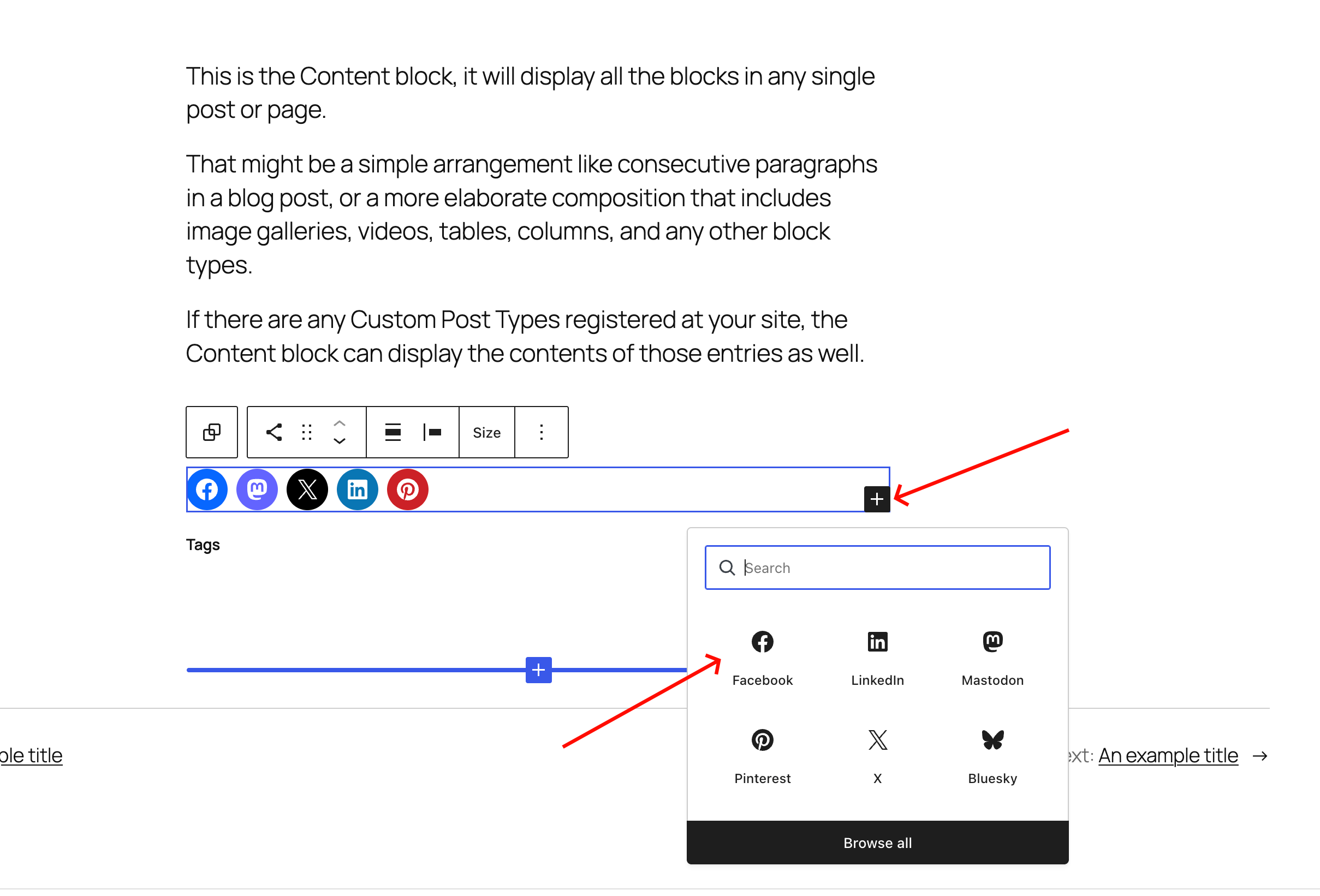
–
For more details, check the documentation below.
 Use the Sharing Buttons block to let readers share your content to social platforms like Facebook, LinkedIn, WhatsApp, and others. In this guide, you’ll learn how to add and customize sharing buttons on your site. In this guideVideo tutorialAdd the Sharing Buttons blockAdd sharing buttonsReorder sharing buttonsRemove a sharing buttonCustomize the Sharing Buttons blockAdjust ali
Give it a try, and let me know how that goes! 😄
-
I’ve been using the classic editor rather than blocks. I dont even know where to start going with these instructions
 .
. -
Could you please confirm which theme you are using? This will help me reproduce the issue and find a workaround for you.
-
It looks like your above site is using the Rowling theme
Looking at your post from the 14th, I do not see the Facebook sharing button there.
You can check your sharing buttons in your dashboard at Settings>Sharing.
If it is there in the enabled sharing buttons, try changing the style of the button to something else, saving and then changing back to your preferred sharing style and saving again.
Let us know how that goes.
-
Hi, yes I’m using the Rowling theme. I’ve just tried changing it to text and icons, icons only and text only and all three work! It seems only the official Facebook button doesn’t work. Thank you for your help. Is there any way of notifying wordpress of this issue?
-
@themusingmeow Good news then! Thanks for letting us know.
I’ve added a tag to bring your thread to staff attention.
Staff, is there a known problem with the official Facebook sharing button on a Classic theme (sorry for repeating the issue)? TIA


 WordPress.com Forums