Hello Data my old friend – A first look at Fabric Data Agents

The ways how we interact with our data systems are changing almost every day.

Think about our way of working with data two years ago…

Who would have thought of having AI assistents helping us to formulate data queries, help us with coding complex data engineering tasks or even allow us to automagically build Power BI reports based on our prompts?

It looks like we have to deal with the everchanging nature of AI getting more and more space in our daily work.

Today, I wanted to give the new Fabric Data Agents a try. According to the documentation, a Fabric Data Agent is defined as follows:

Data agent in Microsoft Fabric is a new Microsoft Fabric feature that allows you to build your own conversational Q&A systems using generative AI. A Fabric data agent makes data insights more accessible and actionable for everyone in your organization. With a Fabric data agent, your team can have conversations, with plain English-language questions, about the data that your organization stored in Fabric OneLake and then receive relevant answers. This way, even people without technical expertise in AI or a deep understanding of the data structure can receive precise and context-rich answers.

Let’s give it a try and build our first Data Agent.

What are the steps needed to create my first Data Agent?

Pre-Requisites

Well, it’s quite easy. We need a paid Fabric capacity (F2 or larger) and some tenant settings turned on (Prerequisites – https://learn.microsoft.com/en-us/fabric/data-science/how-to-create-data-agent#prerequisites)

Data For your Data Agent

Second, we need a data source. In my case I did not wanted to create a sample dataset on my own, so I created a new Warehouse in Fabric using the Sample warehouse option (this creates you a new Warehouse plus several tables containing NY City taxi data).

Create a new Warehouse in Fabric – and fill it with sample data (NYC Taxi data)
the sample data process in the Fabric Warehouse

At the end of the assistent, those tables are created

The NYC Taxi sample data in my Warehouse

I also edited the Model Layout to create some relationships between the tables. At the end, this is my data model for my first Data Agent

The NYC Taxi Warehouse data model

Let’s create the Data Agent

Back to the workspace and in the New Item dialog, please select the Data agent (preview) option. It’s still in preview – so let’s see what the possiblities already are. Give it a name and an empty Data agent is created.

Create a new Data agent (using the new Item action button)

What we need to do first is to select some data sources for the Data agent. In my case, I will add the newly created Warehouse.

The empty Data agent user interface

In the OneLake catalog screen, I selected the Warehouse and added that one to my Data agent..

Select the sources for your Data agent using OneLake catalog

As of today, you can add up to five sources (Fabric lakehouses, warehouses, Power BI semantic models or KQL databases). (1)

The Data agent user interface

The textbox / prompt input (2) allows us to talk to and ask our Data agent some questions.

For fine-tuning, we can add some instructions, prompts and clarifications for the AI (3) – I will not focus on this one, but maybe will write another blog post in the future.

The first try…

My first question – tell me more about your data sources

Hmm.. this is strange. I added a data source but Data agent does not know about it. What could have been wrong? Well, the Agent needs some more hints; which parts of the data source should be made available to the agent?

By default, none of the tables have been selected. So I selected all (except the Payment view) and tried it again.

Select the tables/objects from your source for your Data agent

And that helped..

And now.. the Data agent can tell you more about its knowledge

And now to the real questions.. 🙂

As the documentation states, Data agents are there for non-technical users that are not required to know the “real” tech details or even SQL to query the data source.

How many trips are stored?

If you want to know more (how Data Agent got its answer), you can expand the “x step completed” section.

and behind the scenes – the SQL generated statement

Some more example questions..

Another sample question

The question “What is the average tripduration in minutes per year and month?” got answered by Data agent as follows:

  • Some remarks here: the output for the data user is sorted by the month numbers but showing month names.
  • the query output details contain the month number.
Average trip duration – User output, query output and…

The generated query contains a divide by 60 – but why? because AI helped us to convert the information stored in Trip table, column TripDurationSeconds, to the requested minutes value.

.. the generated SQL query includind a conversion from seconds to minutes
Sample question

Sample question extended

Another interesting one – It’s important to work with the right naming and prompting.

You need to be specific…

Hmm.. My first intention was to get the average duration for all days, but Data agent used the information stored in the Date table to only analyze weekdays

The weekday filter added by Data agent

And now, with a slightly changed prompt we get the average values for every day of the week

Be specific with your questions and Data agents is helpful 😉

Not only the data counts, also the AI helps you..

Evening.. what’s the evening?

Tell me more.. 🙂

My Data agent is ready – publish – go

My first version of the Data agent is ready – with the Publish button, I start the publish workflow to share the agent to my co-workers. And also to have a URL ready if we want to use this data agent programmatically.

Publish Data agent

Each publish action creates a new version of the Data agent. Plus – you’ve got the draft version where we can work and fine-tune our Data agent development.

Data Agent versions – the published one and the draft version for development
The detaily you need to know when you want to programmatically use your data agent.

But how does the question to query to answer works?

In our sample (as I use a Warehouse as source), it’s NL2SQL that “does the magic”. Read the question/instructions, incorporate the data source(s), generate the queries and return the results to the user.

https://learn.microsoft.com/en-us/fabric/data-science/how-to-create-data-agent#tool-invocation-based-on-query-needs

To summarize my first Data agent impressions

I had my first Data agent up and running within a few minutes. After creating the sample warehouse I could (almost) immediately ask questions and Data agent answered them for me.

Some points not to forget (for future-Wolfi)

  • Tenant settings need to be enabled
  • Not only select data sources but also select specific tables/objects
  • Specific prompting is key. In another blog I will show you how to add AI instructions to give the Data agent more knowledge about your data.

More information about Data agents

Posted in Microsoft Fabric | Leave a comment

Get together with the Microsoft Purview community..

If you found the way to my blog, you maybe are a user of Microsoft Purview. As the Purview universe is a quite diverse one, the communities and forums are somehow separated.

The Microsoft Purview universe

Well, they were..

Today, when I entered the Purview portal (https://purview.microsoft.com), I was presented with a hint and link to the Microsoft Purview Community.

Link and information about the Purview community portal.

The link (https://techcommunity.microsoft.com/category/microsoft-purview) itself leads us to the entry point to the forums dealing with the different aspects of Microsoft Purview.

See you there!

Posted in InformationSharing | Leave a comment

Microsoft Purview – See what’s planned in the published Roadmap Documents

In the past, there was no (public) roadmap information for Microsoft Purview available. With the GA release beginning of September 2024, many people interested Data Governance with Purview asked about the next steps and features to come.

AND – here they are – the Roadmap documents for

  • Microsoft Purview data governance (DG) solutions and
  • Microsoft Purview data security and risk and compliance solutions

You can find the link to the most recent version here: https://learn.microsoft.com/en-us/purview/whats-new#whats-planned-for-microsoft-purview

Roadmap section at the “What’s new in Microsoft Purview” page

The data governance roadmap links to a PDF document listing the plans for the next upcoming periods (up to Q1 2025) whereas the second roadmap link opens the Microsoft 365 roadmap (interactive portal with all the planned features)

Microsoft Purview Data Governance Roadmap PDF (screenshot taken 2024-09-15)

Microsoft Purview roadmap for data security, risk and compliance

What is your favorite feature to come in Microsoft Purview?

Links

#TreatYourDataBetter,

Wolfgang

Posted in Azure Purview, InformationSharing, Microsoft Purview | Leave a comment

Fabric Security is a Team Sport Now – For Everyone

In times of data breaches and millions of customer entries breached, the security of your data platform is one of the things you need to consider upfront and – preferably in all your data solutions.

When Microsoft Fabric was announced the concepts of connecting to other parts of your already secured data platform in Azure was not possible. The options to (securely) connect Fabric to other parts of your Azure platform were not available initially.

February 2024 – Managed Private Endpoints and Trusted Workspace Access in Fabric… but…

In the past – when building data platforms in Azure – like using Synapse Analytics, Azure Data Factory, Azure SQL, Azure Data Lake Storage, … we implemented our platforms using private endpoints, managed vNets, .. and private connectivity between the involved data services. Especially in customer discussions we mentioned the importance of securing your data platform.

But Data Connection Security in Fabric? Well.. after public preview and GA, there were no options to use the security concepts we knew for several years now.

But in February 2024, the long awaited mechanism to use private endpoints for data connectivity were introduced (Feb 2024 – Introducing Managed Private Endpoints for Microsoft Fabric in Public Preview).

What are private endpoints in Microsoft Fabric?

Managed Private Endpoints in Fabric – source: https://support.fabric.microsoft.com/de-at/blog/introducing-managed-private-endpoints-for-microsoft-fabric-in-public-preview?ft=Data-engineering:category

Managed private endpoints allow secure and private access to other data services (in Azure) without using public access. (documentation). The connection is provided by dedicated managed virtual networks

Managed private endpoint configuration in Workspace settings
Enter the details for the new managed private endpoint

What is Trusted Workspace Access in Fabric?

Trusted Workspace Access allows a secure access to ADLS Gen2 storage accounts using the concept of workspace identities. This concept was announced in February 2024.

step 1 – create a workspace identity
step 2 – allow secure access to storage account (image source: https://blog.fabric.microsoft.com/en-us/blog/introducing-trusted-workspace-access-for-onelake-shortcuts/)

And now comes the .. but .. section of the announcements

Although Microsoft Fabric got the features to securely connect to other data services there was one blocker to implement this needed security feature in the wild. The initial licensing blocked all the Fabric projects/implementations using Fabric capacities smaller than F64 (see Fabric SKU pricing).

Most of our customers are small-medium sized companies in Europe which do not require or use those kind of large(r) Fabric-capacities. Therefore – no entry to security beyond this point.

Security only for F64+ capacities – https://support.fabric.microsoft.com/de-at/blog/introducing-managed-private-endpoints-for-microsoft-fabric-in-public-preview?ft=Data-engineering:category

The same applied to the Trusted Workspace Access feature – same licensing requirements having a F64+ capacity in place.

source: https://blog.fabric.microsoft.com/en-us/blog/introducing-trusted-workspace-access-for-onelake-shortcuts/

This blocker was unfortunately one of the missing pieces for some of our customers to start the first Fabric PoC or even a Fabric project. And I was not the only one. The discussions in the Data community started immediately after the announcement but Microsoft enforced the decision with “security only for capacities larger than F64”.

#CommunityRocks – The big change in August 2024 – Security for everyone

Months of the initial announcements, many discussions, hints and suggestions how the networking security features in Microsoft Fabric can be brought to a broader audience – out of a sudden – a blog post was published.

And this blog post changed the licensing for Managed Private Endpoints and Trusted Workspace Access in Fabric completely.

Trusted Workspace access and Managed Private Endpoints in Fabric – in ANY F capacity (https://blog.fabric.microsoft.com/de-at/blog/announcing-the-availability-of-trusted-workspace-access-and-managed-private-endpoints-in-any-fabric-capacity?WT.mc_id=DP-MVP-5001676)

Beginning with August 2024, ..

  • Trusted Workspace Access * and
  • Managed Private Endpoints (MPE) **

.. in Fabric are available using any F capacity*

* trusted workspace Access (in any purchased F capacity)

** MPE in any purchased F capacity + Trial capacities.

In my session at Fabric Conference in Las Vegas (March 2024) – Anton Fritz and I – we talked about data security as a team sport. In the context of this session we discussed the different data roles – Data Analyst, Data Engineers, Fabric Admins, Security admins.

In the context of Security in Microsoft Fabric, the Game changed – it’s now a team sport for everyone. In the weeks of the olympic games in Paris, it changed from a team sport for the athlets and well-trained, well funded only to a highly needed foundation for powerful data architectures.

Thanks again to the Fabric leadership team that you changed your minds – we know that we directed our feedback in many, multiple, and even more ways. Data Security is key – and a Team sport everyone needs to have access to.

Posted in Best Practices, Cloud, Microsoft Fabric | 1 Comment

Purview Portal is GA (general available) with July 2024

Back in the early days, Azure Purview and the Microsoft 365 Security and Compliance were separated and so had different administration consoles.

In April 2020, the product term Microsoft Purview (the unified Security, Compliance and Data Governance) tool suite from Microsoft was announced. And that announcement (at that time) was not really more than a naming change.

But things changed – a unified Microsoft Purview was announced in public preview. The first versions of this portal were somehow not more than links to the different admin experiences still residing in the Microsoft 365 admin console.

Purview Portal – GA in July 2024

In July 2024, the new portal went into GA-state (general availability). If you still see the new portal in preview mode in your tenant – the documentation states that it’s currently rolling out.

The new portal slightly changed between public preview and the GA version. The menu on the left got some work and with the solutions menu entry, you now can open the different service parts of Microsoft Purview.

If you want to see the new portal in a short video, I’ve recorded another edition for my Purview Quickstart Youtube series

Links:

Posted in Azure Purview, Microsoft Fabric, Microsoft Purview | Leave a comment

Microsoft Purview Data Governance – GA dates revealed

It’s been a while since my last blogpost. I’ve been busy with work, presentations and other stuff.

In the last weeks, some GA (general availabilty) dates for the Microsoft Purview Data Governance service have been announced.

The unified Microsoft Purview Portal enters GA.

In the past, the (former known) Azure Purview portal and all other Purview suite administration portals have been separated. Every one of these had it’s own management portal. By the end of 2023, the unified portal went into preview and with July 2024 the unified portal – reachable at https://purview.microsoft.com

Microsoft Purview – Preview hint for the unified portal.

The new portal now combines links and already integrates most of the Purview services in one single portal.

The unified Purview portal – purview.microsoft.com

Microsoft Purview Data Governance – GA on 1st, September 2024

Maybe you’ve heard, seen or even tried it out – the Purview Data Governance part (data catalog, ..) got some huge feature extensions in May/June 2024. You are able to manage your

  • business domains
  • data products,
  • OKRs,
  • critical data elements,
  • new glossary terms and even
  • data quality

in Purview now.

Business Domains in Purview Data Governance
Data Products in Purview Data Governance
Purview Data Quality

Those new features bring in the business side of data governance into your Purview account which – my opinion – brings the data governance options in Purview to another level. According to https://www.microsoft.com/en-us/security/blog/2024/07/16/microsoft-purview-data-governance-will-be-generally-available-september-1-2024/?WT.mc_id=DP-MVP-5001676, not only myself tried the new features also many others (400% more usage since the new feature launch).

No more information about the licensing / costs for the new features – I hope we’ll get to know more about this soon.

Btw – I really like the mention of Security and governance have become a team sport. I included that reference in my session at FabricConf Las Vegas in March because I think, that for a successful security, compliance and governance story you need all your team members on board and working together.

slides from my session at FabricConf March 2024 – Data Security and Governance is a team sport

Summary

  • Microsoft Purview Unified portal (purview.microsoft.com) is GA (with July 2024)
  • Microsoft Purview Data Governance gets GA on 1st, September 2024
Posted in InformationSharing | 1 Comment

Data Saturday Munich 2024 – Slides for my “Data Engineering in Microsoft Fabric” session

I am on the train back to Austria after another successful edition of Data Saturday Munich. The event took place in the Microsoft Germany offices in Munich and it was nice to be back there after almost a four years break.

In my session I talked about the data engineering options in Microsoft Fabric – with “only” 60 minutes for this huge topic it was quite challenging to prepare and squeeze all the content into this presentation..

You can plan for many things.. but …

During my session, the projector in my session room did not work well. It turned off after around 10 minutes, came back for some minutes and at the end it did not work again.

Which is not ideal for a full room with added additional seats in the background. Although we had a huge Surface Hub at one end of the session room – and I used that for the rest of the session – this was for sure not the session I planned to deliver. Sorry again to everyone sitting at the other end of the session room!!

As I already mentioned during the session, I will share the slides.

In addition – if I find the time – I will record the session and you will get the chance to see all the slides and demos is a reasonable screen size.

Posted in Conference, Microsoft Fabric | Leave a comment

Copilot for Microsoft Fabric not available because its capacity is located outside your tenant’s region

⚠️ If your Fabric tenant is located outside of the US or France, this blog post is for you! (addition to the already existing documentation)

Today was the day – Copilot for Microsoft Fabric was released into public preview for everyone. As of today, you can enable and use Copilot in your Fabric tenant. And not only Copilot for Power BI, but also Copilot for Data Factory as well as Copilot for Data Science and Data Engineering in your notebooks.

There are some requirements to be met (see here ) before you can start using Copilot in Fabric.

Requirements to enable Fabric Copilot

And those were the steps I’ve gone through

  • enabled the Fabric Copilot in the tenant settings ✅
  • Checked if Copilot is available in my Fabric tenants location (North Europe) ✅
  • I created a Fabric capacity ( F64 SKU) because Copilot does not work with trial SKUs. ✅

The first thing I wanted to try was the Power BI Copilot. I created a new workspace, assigned the F64 capacity and uploaded a demo PBIX file (Dashboard in a Day).

Switched into edit mode – et voila – it looked like Copilot is ready.

Copilot is ready.. is it?

But – nope. Before I could use Copilot, I got the message: “Copilot not available“. The additional text mentioned “You can’t use Copilot in this workspace because it’s capacity is located outside your tenant’s region.

Sorry, Copilot is not available here..

Which is strange, as I checked for the same region upfront (Fabric tenant in North Europe, capacity in North Europe)

My Fabric tenant location
My Fabric capacity location

After some reading and documentation deep dive, I found the solution. It’s another tenant setting (related to Copilot) that prevented Copilot in my environment to work. I found the missing link/hint in the Copilot announcement blog

THE hint – Copilot is disabled by default if your data is not stored in the US or France

There are two settings in your Fabric Copilot section (Admin Portal -> Tenant settings)

Here is the magic – enable the second option to enable Copilot for your tenant.

I enabled the second one – waited for a couple of minutes for the setting to be applied.

Et voila – Copilot appeared and worked in my Fabric environment.

Copilot and Power BI 💗 Better together

Happy travel with your Power BI Copilot!

Enjoy

Read more here:

Posted in InformationSharing, Microsoft Fabric, PowerBI | Leave a comment

Microsoft Fabric is part of Azure Core Services and therefore part of EU Data Boundary Services

I do not know when the status changed (but I assume beginning of December 2023), but Microsoft Fabric is now part of the Azure Core Services (source: https://www.microsoft.com/licensing/terms/product/PrivacyandSecurityTerms/MPSA)

What I even like more is that Microsoft Fabric is now part of the EU Data Boundary Services – i.e. “For EU Data Boundary Services, Microsoft will store and process Customer Data (including any Personal Data contained therein) within the EU Data Boundary as detailed below.”

Your (customer) data will stay in the EU boundary if you follow some rules (they are also listed on this site: https://www.microsoft.com/licensing/terms/product/PrivacyandSecurityTerms/MPSA )

What is the EU Data Boundary ?

https://learn.microsoft.com/en-us/privacy/eudb/eu-data-boundary-learn

🤔 https://www.rakoellner.de/2021/06/was-bedeutet-das-microsoft-eu-data-boundary-program-fuer-deutsche-kunden/ (german)

Thanks to https://www.pexels.com/photo/grayscale-photography-of-chain-220237/ for the header photo

Posted in Business Intelligence, Cloud, Data Governance, InformationSharing, Microsoft Fabric, Microsoft Purview | 1 Comment

Domains in Microsoft Purview

For those of you that have already worked with Microsoft Purview Data Governance (the data catalog), you already know the concept of collections to logically group your data map.

TL;TR (a video for you)

Collections

Collections allow you to …

  • … assign data sources and the data assets found during a scan into different collections.
  • … set permissions at different levels and therefore separate your data map. The permissions can be inherited and/or set at a specific level.
  • … create a hierarchy of collections
Collections in Purview data map

One Purview Account to rule it all?

In the past, you were allowed to create multiple Purview accounts per tenant (I think the default maximum number of accounts was set to 4). During summer 2023, there was a change in this behavior. The new approach is to only have onle Purview account per domain.

From multiple Purview accounts to a tenant wide one

Existing (multiple) Purview accounts were/can be merged into one single main Purview account. This results in a more tough decision how to structure your data map. And I think this was one of the reasons, why the new hierarchy level – Domains – was added by the Purview team.

Introducing Domains – another level of hierarchy in your Purview data map

Domains reside one level below your tenant account and above all collections and glossaries.

The “new” hierarchy structure in Purview – including domains

As of today (2023-12-01), only one domain (=the default one) exists in your Purview account – and no other domain can be created.

This will change in the future (according to the documentation – see the links below).

In my demo account I already see the new Domain menu and my form rootcollection is now a domain.

Purview menu and hierarchy in Purview data map

New permission role – Domain admins

This new hierarchy level required a new level for permissions – We now have Domain admins to set – they are allowed to create new collections and assign new domain admins.

Domain admins as a new security role in Purview

Where are my assets, my scans, my sources, … stored now?

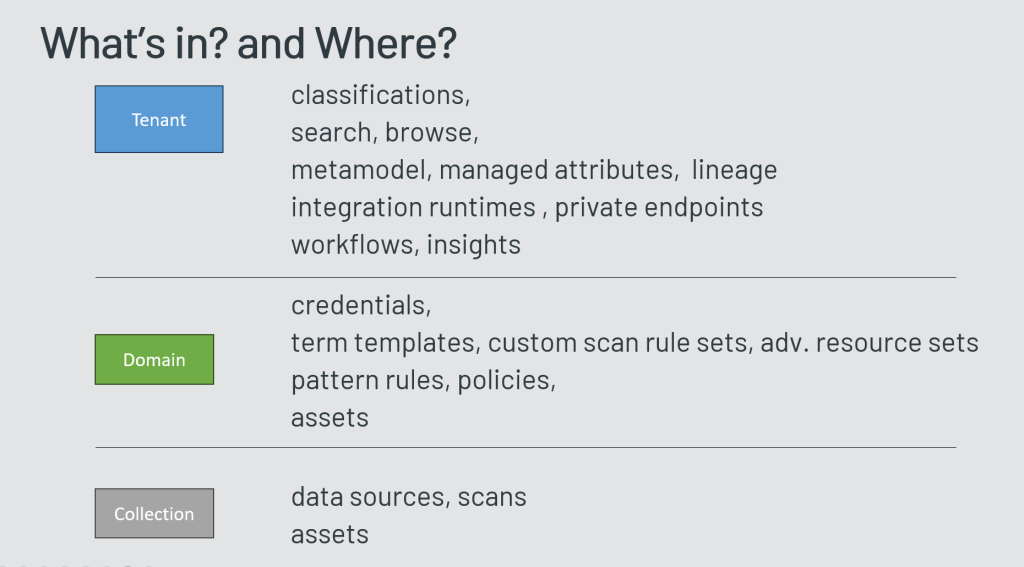
With this new level of hierarchy the mode to item assignment changed a little bit – the documentation lists the following distribution:

hierarchy levelcontent
tenantclassifications,
search, browse,
metamodel, managed attributes,  lineage
integration runtimes , private endpoints
workflows, insights
domaincredentials,
term templates, custom scan rule sets, adv. resource sets
pattern rules, policies,
assets
collectiondata sources, scans
assets
which items are stored where in Purview data map (now with domains included)

documentation links:

Posted in Azure Purview, Microsoft Purview | 1 Comment