
Exception Handling in Java is a mechanism used to handle runtime errors so that the normal flow of the program can continue without crashing.
- Handles abnormal conditions that occur during program execution.
- Helps maintain program stability by preventing unexpected termination.
Basic try-catch Example
- The try block contains code that might throw an exception,
- The catch block handles the exception if it occurs.
class Geeks{
    public static void main(String[] args) {

        int n = 10;
        int m = 0;

        try {
            int ans = n / m;
            System.out.println("Answer: " + ans);
        } catch (ArithmeticException e){
            System.out.println("Error: Division by 0!");
        }
    }
}
Output
Error: Division by 0!
Finally Block
The finally block executes after the try and catch blocks in most situations, whether an exception arised or not. It is typically used for closing resources such as database connections, open files, or network connections.
Finally may not execute in cases like:
- System.exit()
- JVM crash
- infinite loop before finally
class FinallyExample {
    public static void main(String[] args){

        int[] numbers = { 1, 2, 3 };
        try {
            // This will throw ArrayIndexOutOfBoundsException
            System.out.println(numbers[5]);

        }
        catch (ArrayIndexOutOfBoundsException e){

            System.out.println("Exception caught: " + e);
        }
        finally{
            System.out.println("This block always executes.");
        }
        System.out.println("Program continues...");
    }
}
Output
Exception caught: java.lang.ArrayIndexOutOfBoundsException: Index 5 out of bounds for length 3
This block always executes.
Program continues...
throw and throws Keywords
1. throw: Used to explicitly throw a single exception. We use throw when something goes wrong (or “shouldn’t happen”) and we want to stop normal flow and hand control to exception handling.
class Demo {
    static void checkAge(int age) {

        if (age < 18) {
            throw new IllegalArgumentException("Age must be 18 or above");
        }
    }

    public static void main(String[] args) {

        checkAge(15);
    }
}
Output:
Exception in thread "main" java.lang.IllegalArgumentException: Age must be 18 or above
	at Demo.checkAge(Demo.java:5)
	at Demo.main(Demo.java:11)
2. throws: Declares exceptions that a method might throw, informing the caller to handle them. It is mainly used with checked exceptions (explained below). If a method calls another method that throws a checked exception, and it doesn’t catch it, it must declare that exception in its throws clause
import java.io.*;

class Demo {

    // Method declares that it may throw IOException
    static void readFile(String fileName) throws IOException {

        // Using try-with-resources to automatically close FileReader
        try (FileReader file = new FileReader(fileName)) {
            int data;
            while ((data = file.read()) != -1) {
                System.out.print((char) data); // Read and print file content
            }
        }
        // No need for finally block to close the resource
    }

    public static void main(String[] args) {

        try {
            readFile("test.txt"); // Attempt to read file
        } catch (IOException e) {
            System.out.println("File not found or error reading file: " + e.getMessage());
        }

        System.out.println("\nProgram continues after file operation.");
    }
}
Output
File not found or error reading file: test.txt (No such file or directory)

Program continues after file operation.
Internal Working of try-catch Block:
- JVM executes code inside the
tryblock. - If an exception occurs, remaining
trycode is skipped and JVM searches for a matchingcatchblock. - If found, the
catchblock executes. - Control then moves to the
finallyblock (if present). - If no matching
catchis found, the exception is handled by JVM’s default handler. - The
finallyblock always executes, whether an exception occurs or not.
Note: When an exception occurs and is not handled, the program terminates abruptly and the code after it, will never execute.
Java Exception Hierarchy
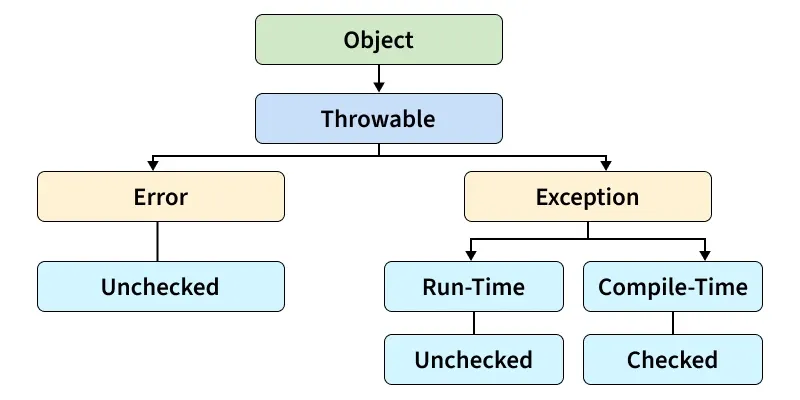
In Java, all exceptions and errors are subclasses of the Throwable class. It has two main branches
- Exception.
- Error
The below figure demonstrates the exception hierarchy in Java:
Types of Java Exceptions
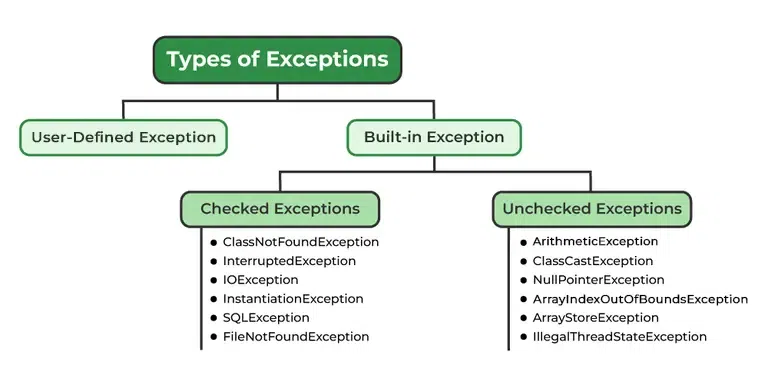
Java defines several types of exceptions that relate to its various class libraries. Java also allows users to define their it's exceptions.
1. Built-in Exception
Built-in Exception are pre-defined exception classes provided by Java to handle common errors during program execution. There are two type of built-in exception in java.
- Checked Exception: These exceptions are checked at compile time, forcing the programmer to handle them explicitly.
- Unchecked Exception: These exceptions are checked at runtime and do not require explicit handling at compile time.
To know more about Checked and Unchecked Exception -> Checked and Unchecked Exception
2. User-Defined Exception
Sometimes, the built-in exceptions in Java are not able to describe a certain situation. In such cases, users can also create exceptions, which are called "user-defined Exceptions".
Methods to Print the Exception Information
- printStackTrace(): Prints the full stack trace of the exception, including the name, message and location of the error.
- toString(): Prints exception information in the format of the Name of the exception.
- getMessage() : Prints the description of the exception
Nested try-catch
In Java, you can place one try-catch block inside another to handle exceptions at multiple levels.
public class NestedTryExample {
    public static void main(String[] args) {
        try {
            System.out.println("Outer try block");
            try {
                int a = 10 / 0; // This causes ArithmeticException
            } catch (ArithmeticException e) {
                System.out.println("Inner catch: " + e);
            }
            String str = null;
            System.out.println(str.length()); // This causes NullPointerException
        } catch (NullPointerException e) {
            System.out.println("Outer catch: " + e);
        }
    }
}
Output
Outer try block
Inner catch: java.lang.ArithmeticException: / by zero
Outer catch: java.lang.NullPointerException: Cannot invoke "String.length()" because "<local1>" is null
Handling Multiple Exception
We can handle multiple type of exceptions in Java by using multiple catch blocks, each catching a different type of exception.
try {

    // Code that may throw an exception

} catch (ArithmeticException e) {

    // Code to handle the exception

} catch(ArrayIndexOutOfBoundsException e){

    // Code to handle the another exception

}catch(NumberFormatException e){

     // Code to handle the another exception
}
How Does JVM Handle an Exception?
When an Exception occurs, the JVM creates an exception object containing the error name, description, and program state. Throwing an exception means creating an exception object and transferring control to the nearest appropriate exception handler using the throw keyword. There might be a list of the methods that had been called to get to the method where an exception occurred. This ordered list of methods is called call stack. Now the following procedure will happen:
- The run-time system searches the call stack for an exception handler
- It starts searching from the method where the exception occurred and proceeds backward through the call stack.
- If a handler is found, the exception is passed to it.
- If no handler is found, the default exception handler terminates the program and prints the stack trace.
Exception in thread "abc" Name of Exception : Description
// Call Stack
Look at the below diagram to understand the flow of the call stack:
Illustration:
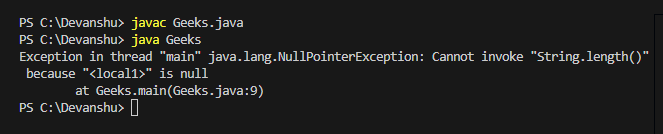
class Geeks{

    public static void main(String args[])
    {
        // Taking an empty string
        String s = null;

        // Getting length of a string
        System.out.println(s.length());
    }
}

Output:
Difference Between Exception and Error
| Feature | Exception | Error |
|---|---|---|
| Definition | An event that occurs during program execution, disrupting normal flow, which can be handled using try-catch. | A serious problem that occurs in the JVM, generally cannot be handled by the application. |
| Package | java.lang.Exception | java.lang.Error |
| Recoverable | Yes, can be caught and handled. | No, usually not recoverable. |
| Examples | IOException, SQLException, ArithmeticException | OutOfMemoryError, StackOverflowError |