
In Python, there are two types of loops: for loop and while loop. Using these loops, we can create nested loops, which means loops inside a loop. For example, a while loop inside a for loop, or a for loop inside another for loop.
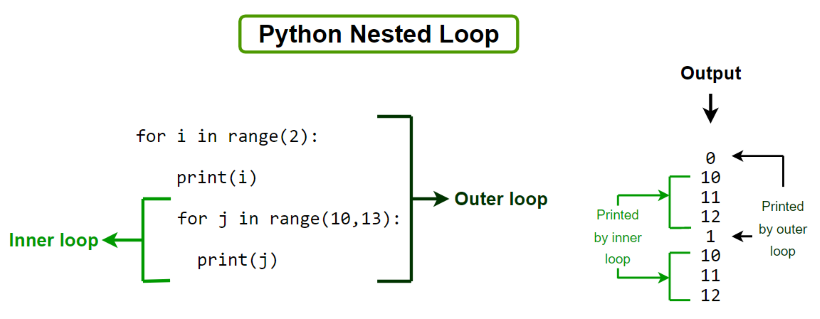
Syntax:
Outer_loop Expression:
Inner_loop Expression:
Statement inside inner_loop
Statement inside Outer_loop
Examples
Example 1: Basic Example of Python Nested Loops
x = [1, 2]
y = [4, 5]

for i in x:
  for j in y:
    print(i, j)
Output
1 4
1 5
2 4
2 5
Example 2: Printing multiplication table using Python nested for loops
for i in range(2, 4):
    for j in range(1, 11):
        print(i, "*", j, "=", i*j)
    print()
Output
2 * 1 = 2
2 * 2 = 4
2 * 3 = 6
2 * 4 = 8
2 * 5 = 10
2 * 6 = 12
2 * 7 = 14
2 * 8 = 16
2 * 9 = 18
2 * 10 = 20

3 * 1 = 3
3 * 2 = 6
3 * 3 = 9
3 * 4 = 12
3 * 5 = 15
3 * 6 = 18
3 * 7 = 21
3 * 8 = 24
3 * 9 =...
Explanation: Outer loop runs from 2 to 3. Inner loop runs from 1 to 10. Each inner loop iteration multiplies the outer loop value with the inner loop value.
Example 3: Printing using different inner and outer nested loops
l1 = ['I am ', 'You are ']
l2 = ['healthy', 'fine', 'geek']

l2_size = len(l2)
for item in l1:

    print("start outer for loop ")
    i = 0
    while(i < l2_size):

        print(item, l2[i])
        i = i+1
    print("end for loop ")
Output
start outer for loop
I am  healthy
I am  fine
I am  geek
end for loop
start outer for loop
You are  healthy
You are  fine
You are  geek
end for loop
Explanation: The code goes through each item in l1 and pairs it with every item in l2. It prints all combinations, showing when each outer loop starts and ends.
Using break statement in nested loops
It is a type of loop control statement. In a loop, we can use the break statement to exit from the loop. When we use a break statement in a loop it skips the rest of the iteration and terminates the loop. let's understand it using an example.
for i in range(2, 4):
    for j in range(1, 11):
      if i==j:
        break
      print(i, "*", j, "=", i*j)
    print()
Output
2 * 1 = 2

3 * 1 = 3
3 * 2 = 6
Explanation: When i == j in the inner loop, it stops that inner loop, skipping remaining iterations.
Using continue in Nested loops
The continue statement skips the rest of the code for the current iteration and moves to the next iteration of the loop.
for i in range(2, 4):
    for j in range(1, 11):
      if i==j:
        continue
      print(i, "*", j, "=", i*j)
    print()
Output
2 * 1 = 2
2 * 3 = 6
2 * 4 = 8
2 * 5 = 10
2 * 6 = 12
2 * 7 = 14
2 * 8 = 16
2 * 9 = 18
2 * 10 = 20

3 * 1 = 3
3 * 2 = 6
3 * 4 = 12
3 * 5 = 15
3 * 6 = 18
3 * 7 = 21
3 * 8 = 24
3 * 9 = 27
3 * 10 = 30
Explanation: When i == j, the iteration is skipped, so 2*2=4 and 3*3=9 are not printed.
Single-Line Nested Loops Using list Comprehension
To convert the multiline nested loops into a single line, we are going to use list comprehension in Python. List comprehension includes brackets consisting of expression, which is executed for each element, and the for loop to iterate over each element in the list.
Syntax:
newList = [expression(element) for element in oldList if condition]
l1 = [[j for j in range(3)]
         for i in range(5)]
print(l1)
Output
[[0, 1, 2], [0, 1, 2], [0, 1, 2], [0, 1, 2], [0, 1, 2]]
Explanation: [j for j in range(3)] creates [0, 1, 2] for each iteration of the outer loop.