The post Notebooks 13 for iPhone & iPad appeared first on Notebooks.
]]>A More Powerful Way to Write and Organize on iPhone and iPad
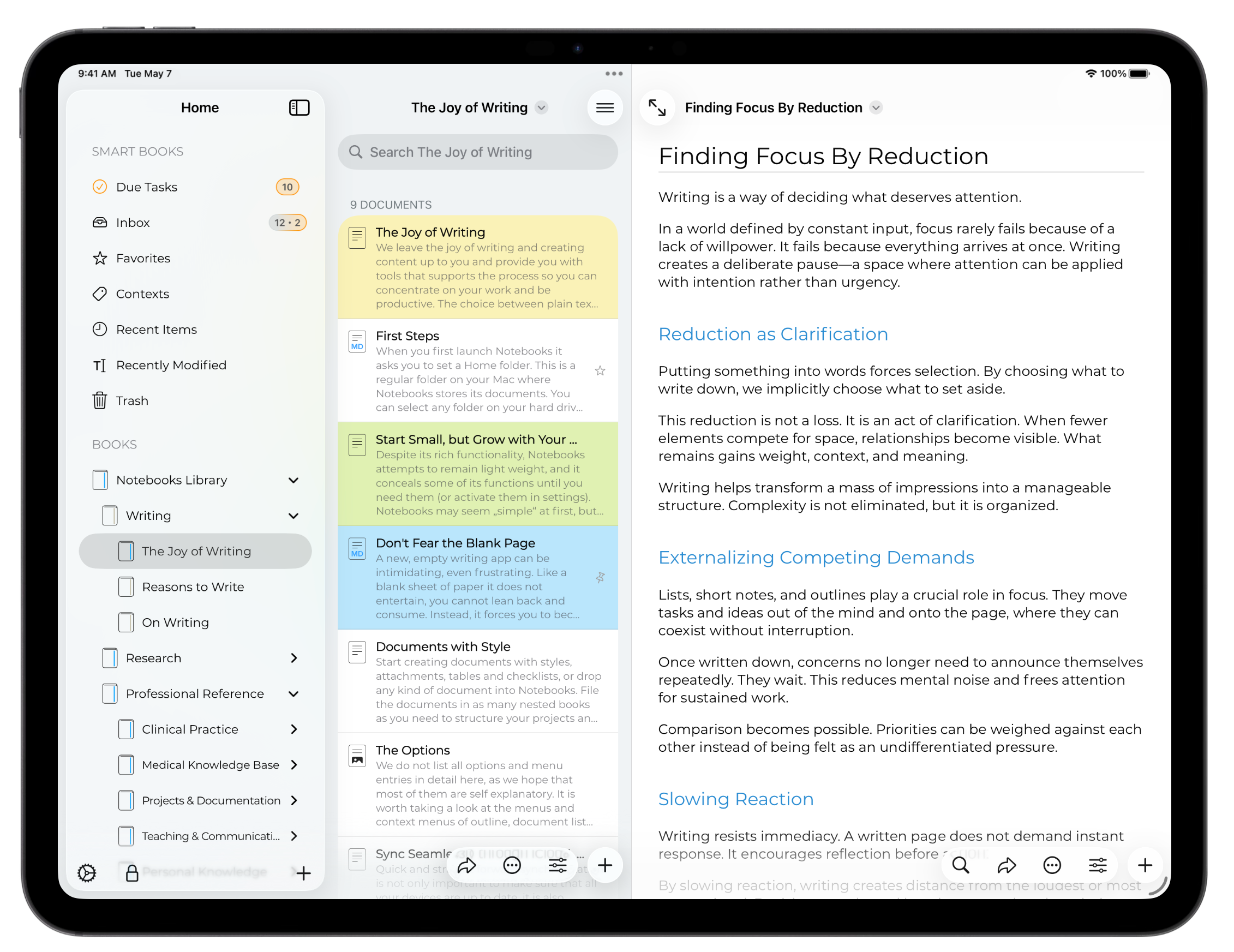
Notebooks 13 brings a redesigned interface with better structure, clearer navigation, and modern system integration.
- Better structure with a new sidebar and collapsible lists
- More room to think with multi-window support on iPad
- A modern iOS experience, built with the latest system technologies
The update is available on the App Store. If you have any questions or feedback, don’t hesitate to reach out to us.
The Changes in Detail
Notebooks 13 is a major upgrade which focuses on a refined and more flexible user experience. It introduces multi-window support and three-column split view on iPad, Liquid Glass support, and a new hierarchical list of books. You’ll also notice new icons, menus, and countless adjustments that give Notebooks a more modern appearance, while continuing to support iOS versions back to 16.4.
Overall, this release is about making your everyday work in Notebooks smoother and more enjoyable.
New: Collapsible Book List
In its new sidebar, Notebooks presents your Smart Books and your regular books as a collapsible list, allowing you to quickly navigate even deeply nested hierarchies.
- On iPad, the sidebar appears in the first column of the three-column display.
- On iPhone, the sidebar becomes the new top level, from where you cannot navigate back any further.
- Selecting a book in the sidebar takes you directly to that book, without stepping through its hierarchy. Tapping the back button in the list of books and documents immediately returns you to the sidebar.
- From the sidebar you can create new books, delete existing ones, and reorganize books using drag and drop. Rename and delete are also available via long press.
- Because the sidebar already displays your Smart Books, the top-level book (Notebooks Library) in the second column does not show them by default. On iPad, Smart Books appear there when the sidebar is hidden. On iPhone, a setting allows you to change this behavior if you prefer.
New on iPad: Three-Column Split View
On iPad, Notebooks displays up to three columns: a sidebar with the collapsible list of books, the list with books and documents, and the document itself. Depending on display and window size, iPadOS may show and hide the first two columns automatically, but Notebooks provides buttons to selectively display them as well.
On iPhone, Notebooks internally uses this three-column architecture, too, although only one column is visible at any time. Notebooks’ “top level”, from where you cannot navigate back any further, is no longer the top level book, it is now the leftmost column with the sidebar.
New on iPad: Multiple Windows
Long overdue, but now Notebooks 13 allows you to open multiple windows. Each window is full featured with three-column view, so you can resize and arrange them independently, and navigate to, open and edit documents simultaneously.
- To open a document in a separate window, tap and hold its title in the document list and choose Open in New Window. The selected document opens in a separate window in document only mode (the left columns hidden).
- Notebooks’ two-up mode, which displays two documents side by side, operates slightly differently now, due to the new architecture. “Two Up” is reachable from the swipe-right or the long-tap gesture in the list. When selected, Notebooks displays the selected document in a separate window, but also hides the left columns for the current document, leaving you with two windows in document only mode. Notebooks is not permitted to tile the two windows side by side, but you can quickly arrange them with a long-press on the window’s traffic light icon.
Appearance
The overall appearance of Notebooks 13 has been modernized and streamlined with
- Liquid Glass support
- updated app icon and launch screen
- improved grouping for menus across the app
Some menu items have changed their position or moved to other menus, so a little muscle memory adjustment may be needed. Overall, we tried to clearly divide into actions for sharing or export, actions for processing, and actions referring to the document itself, like rename, move or delete, available from the item’s title menu.
A book’s sort order is one such example: there is no longer a dedicated button, it is now available from the title menu. When custom sort is selected, a Reorder button appears in the list header.
Documents
In addition to the familiar typewriter mode on iPad, Notebooks now offers a more regular fullscreen mode, which resizes the document to fill the entire window while keeping the toolbar visible.
Tasks
- Tapping a task state button now opens a menu instead of immediately toggling the state. This makes task handling more deliberate and reliable.
- Changing a task’s alert time is now saved immediately, without requiring confirmation.
Images & PDF Viewer
- New viewers provide smoother zooming and more reliable double-tap behavior when switching between fit and 100% views.
- Tapping an embedded image opens it in a slide-over window, making it much easier to return to the original document.
Search
The search bar in the document list header has been redesigned and now integrates more naturally with the navigation bar.
Protection
Improved passcode flow when locking and unlocking Notebooks, or when opening protected items.
General Stability & Fixes
- When sending multiple files to Notebooks from a share sheet, original filenames are now reliably preserved whenever possible.
- Countless minor layout refinements and stability improvements throughout the app.
The post Notebooks 13 for iPhone & iPad appeared first on Notebooks.
]]>The post Free Major Upgrade Coming Soon appeared first on Notebooks.
]]>As the year 2025 comes to an end, we’re putting the final touches on a major new version of Notebooks for iPhone and iPad, with multi window support on iPad, collapsible folder list, refreshed user interface — including Liquid Glass — and much more. This will be a free upgrade for all existing users of Notebooks 12, and it is scheduled for release early 2026. Of course there will be a free update for Notebooks for Mac as well.
So if you’re considering a purchase during our Holiday Special promotion, there’s no need to wait. Buying now gives you immediate access to the current version, and you’ll receive the upcoming upgrades automatically once they become available — at no additional cost.
We want to thank you for your continued support and wish you a Happy New Year.
The post Free Major Upgrade Coming Soon appeared first on Notebooks.
]]>The post Notebooks 3.8.4 for Mac appeared first on Notebooks.
]]>This is a just quick update with a couple of improvements.
- Callouts Document Style fixes a small layout issue.
- Internal Links are resolved more effectively.
- MultiMarkdown correctly interprets the TOC tag as table of contents.
- Search Results: In plain text, search terms containing single quotes (‘) are correctly highlighted.
- Create PDF includes an option to create one PDF for each selected document instead of combining all documents in a single PDF.
- Extracting Tasks: When extracting tasks from text, special characters in the task’s title no longer create duplicates.
- Cleanup Document more carefully removes even deprecated HTML tags.
Users of the non-Mac App Store version of Notebooks may need to re-enter their license code. This is due to a change in the Paddle framework, intended to ensure full compatibility with macOS 26. We’re sorry for this inconvenience.
The update is available from this website and from the Mac App Store. Users of the non-Mac App Store version can use Notebooks‘ automatic update option as well.
As always, if you have any questions or feedback, don’t hesitate to reach out to us.
The post Notebooks 3.8.4 for Mac appeared first on Notebooks.
]]>The post Notebooks 12.8.4 for iPhone & iPad appeared first on Notebooks.
]]>This is just a quick update with a few additions, and some changes to ensure compatibility with iOS 26. A more substantial update is on its way.
- Notifications and Reminders. When a notification pops up, you can mark them as completed or snooze them for 10 minutes on your Apple Watch or from Notification Center.
- Search Results: In plain text, search terms containing single quotes (‘) are correctly highlighted.
- Create PDF now includes an option to create one PDF for each selected document instead of combining all documents in a single PDF.
- Extracting Tasks: When extracting tasks from text, special characters in the task’s title no longer create duplicates.
- Formatted documents: The use of the
<return>key no longer inadvertently selects the entire subsequent line. - Callouts Document Style fixes a small layout issue.
- Internal Links are resolved more effectively.
The update is available on the App Store. If you have any questions or feedback, don’t hesitate to reach out to us.
The post Notebooks 12.8.4 for iPhone & iPad appeared first on Notebooks.
]]>The post Notebooks 3.8 for Mac appeared first on Notebooks.
]]>New features in Notebooks 3.8 include task badges for documents (checklist items), improved default theme, improvements for automatic task extraction, Wiki Link creation in formatted documents, PDF annotation summarization, and much more.
The update is available from this website and from the Mac App Store. Users of the non-Mac App Store version can use Notebooks‘ automatic update option as well.
As always, if you have any questions or feedback, don’t hesitate to reach out to us.
Notebooks 3.8.2 reverts a change we made for Extract Tasks and creates a dedicated book again if required. Moreover, it provides an improved dialog to Edit Links and makes sure that text remains visible when renaming books.
Additions
Checklists: You can now have the number of open checklist items displayed for each formatted or Markdown document—perfect for quickly identifying what needs attention. Enable it in Settings > Tasks or from any book’s ••• menu.
Summarize PDF Annotations: Quickly review highlights, comments, and notes with a new option to summarize PDF annotations.
Context Tags: Context tags are now colorized and highlighted in plain text and rendered Markdown, making them easy to spot at a glance.
Accent Color Support: Notebooks now adopts your system’s custom accent color for selected interface elements, bringing a more personalized touch to your workspace.
Send to Things: A new “Send to Things” action appears in the Share menu when Things.app is installed, making it even easier to integrate tasks into your workflow.
Enhancements
Extract Task: New tasks are saved in a book with the same name as the current document (if it exists). If the book doesn’t exist, Notebooks falls back to the default inbox or the current book. This feature no longer automatically creates a new book or falls back to Notebooks’ top level. Moreover, new tasks now reliably use the selected default document type.
Turn Text into Wiki Links: Easily link related documents by turning selected text into Wiki Links in formatted documents.
Plain Text Lists: In plain text, lines starting with your selected task marker now behave more like list items for better structure and navigation.
Smarter Compilation: The “Compile Documents” feature now automatically selects the most suitable output format and lets you define a title and separator.
Edit Images: In formatted documents, right-click an image to open and edit it in your Mac’s default app.
As always, this update includes performance improvements and bug fixes, too.

The post Notebooks 3.8 for Mac appeared first on Notebooks.
]]>The post Notebooks 12.8 for iPhone & iPad appeared first on Notebooks.
]]>New features in Notebooks 12.8 for iPhone & iPad include task badges for documents (checklist items), improved default theme, improvements for automatic task extraction, Wiki Link creation in formatted documents, PDF annotation summarization, and much more.
The update is available on the App Store. If you have any questions or feedback, don’t hesitate to reach out to us.
Notebooks 12.8.1 addresses an issue with formatted documents, while Notebooks 12.8.2 reverts a change we made for Extract Tasks and creates a dedicated book again if required. Notebooks 12.8.3 ensures that embedded images display reliably on iOS 18.2 and earlier, keeps the keyboard visible on iPad devices when creating a formatted document (iOS 18.3 and later), and fixes a crash that can occur when Notebooks is in the background.
Additions
New Shortcuts: Quickly add Photos, Scans, and Note from Notebooks’ app icon. The resulting documents are stored in the default inbox or at the top level.
Checklists: You can now have the number of open checklist items displayed for each formatted or Markdown document—perfect for quickly identifying what needs attention. Enable it in Settings > Tasks or from any book’s ••• menu.
Summarize PDF Annotations: Quickly review highlights, comments, and notes with a new option to summarize PDF annotations.
Context Tags: Context tags are now colorized and highlighted in plain text and rendered Markdown, making them easy to spot at a glance.

Enhancements
Extract Task: New tasks are saved in a book with the same name as the current document (if it exists). If the book doesn’t exist, Notebooks falls back to the default inbox or the current book. This feature no longer automatically creates a new book or falls back to Notebooks’ top level. Moreover, new tasks now reliably use the selected default document type.
Turn Text into Wiki Links: Easily link related documents by turning selected text into Wiki Links, in formatted documents and plain text.
Plain Text Lists: In plain text, lines starting with your selected task marker now behave more like list items for better structure and navigation.
Smarter Compilation: The “Compile Documents” feature now automatically selects the most suitable output format and lets you define a title and separator.
Notebooks Watch App: Now uses a long touch to display options and transfers large numbers of documents more reliably.
Formatted Documents: When sharing a formatted document, images are correctly embedded, especially on iOS 18.
Dropbox sync: Prevents the reappearance of deleted items after manual synchronization.
As always, this update includes performance improvements and bug fixes, too.
The post Notebooks 12.8 for iPhone & iPad appeared first on Notebooks.
]]>The post Secure Document Encryption in Notebooks for Mac appeared first on Notebooks.
]]>Privacy and security are becoming increasingly important, especially when dealing with confidential documents. While Notebooks does not offer native document encryption, there are multiple ways to use secure document encryption in Notebooks. One option is using a secure disk image, a built-in macOS feature, while another is utilizing third-party encryption tools like Encrypto.
This article primarily focuses on Notebooks for Mac. However, similar options might be available on iOS as well.
Why Doesn’t Notebooks Offer Native Encryption?
Notebooks prioritizes flexibility, openness, and cross-platform accessibility. Implementing native encryption would require managing encryption keys and authentication, which could make accessing files across different devices and applications more complicated. Instead, Notebooks allows users to choose third-party encryption tools, enabling them to secure their files in a way that best suits their needs.
Option 1: Using an Encrypted Disk Image (macOS)
An effective way to secure your documents is by choosing an encrypted disk image, a built-in feature on macOS, as storage location for Notebooks. This allows you to create a secure, password-protected container for storing your files.
How to Set Up an Encrypted Disk Image:
- Open Disk Utility on your Mac.
- Go to File > New Image > Blank Image.
- Choose a name, size, and format for your disk image.
- Under Encryption, select AES-128 or AES-256 encryption and set a strong password.
- Save the disk image to a location of your choice.
- Once created, double-click the disk image to mount it, enter the password,
- Select the disk image or one of its contained folders as storage location for Notebooks and work on the documents as usual.
- When done, eject the disk image to lock it again.
This method provides strong encryption while keeping files easily accessible when needed. Storing the disk image on iCloud Drive allows you to sync these documents between Macs, but please keep in mind that you cannot access the Disk Image from iOS devices.
Option 2: Encrypting Individual Files with Third-Party Tools
Encryption tools like Encrypto by MacPaw encrypt files and add a unique file extension (e.g., .crypto). When such a file is stored in Notebooks, only its name is visible. A right-click on the file typically opens a context menu with an option to open it using the corresponding encryption tool.
Selecting this option launches the encryption app with the chosen file. After entering the previously set password, the file is decrypted. It can then be viewed within the encryption tool or opened in its associated program.
Encrypting Files Directly from Notebooks
Some encryption tools allow users to export documents directly into an encrypted file. This can work for Formatted Documents, Markdown, and Text Files.
Here’s how it works with an encryption tool like Encrypto:
- Right-click on the file in Notebooks
- Select the Share option from the context menu
- Choose the encryption tool as the target app
- The encryption tool launches, allowing you to set a password
- Use Save as to store the file or Share File to place it directly in Notebooks
Conclusion
Notebooks users have multiple options to enhance document security. Whether encrypting individual files with a third-party tool or storing multiple files inside a macOS-encrypted disk image, these methods provide flexibility and protection for sensitive data.
Disclaimer: Notebooks is not affiliated with Encrypto or any other third-party encryption tool. Their functionality is subject to change by their respective developers. The encrypted disk image method is a native macOS feature and may vary in implementation across different macOS versions.
The post Secure Document Encryption in Notebooks for Mac appeared first on Notebooks.
]]>The post Notebooks 12.7.3 for iPhone & iPad appeared first on Notebooks.
]]>Notebooks 12.7.3 is a minor update with several enhancements and corrections.
The Changes in Detail
- Settings: Fixed an issue that the automatic link management setting could have been cleared after restart.
- Plain Text: Improved typing performance in long text when power-saving mode is active.
- Insert Photos: When adding photos from album, preserve the original size and format when possible.
- Due Tasks: When a task’s alert time is updated on another device, make sure to display a notifications at alert time.
- Markdown: Accept Markdown tasks starting with
*(e.g., “* [ ]”). - Mermaid: Make sure that graphs render correctly on older iOS versions.
- Miscellaneous improvements and fixes.
The update is available on the App Store. If you have any questions or feedback, don’t hesitate to reach out to us.
The post Notebooks 12.7.3 for iPhone & iPad appeared first on Notebooks.
]]>The post Notebooks 3.7.3 for Mac appeared first on Notebooks.
]]>Notebooks 3.7.3 is a minor update with several enhancements and corrections.
The Changes in Detail
- iCloud: Further reduce risk of freeze on startup while checking the sync status of documents.
- Open in… no longer skips duplicate app names and sorts available apps by title.
- Due Tasks: When a task’s alert time is updated on another device, make sure to display a notifications at alert time.
- Markdown: Accept tasks starting with
*(e.g., “* [ ]”). - Mermaid: Make sure that graphs render correctly on older macOS versions.
- Miscellaneous improvements and fixes.
The update is available from this website and from the Mac App Store. Users of the non-Mac App Store version can use Notebooks‘ automatic update option as well.
As always, if you have any questions or feedback, don’t hesitate to reach out to us.
The post Notebooks 3.7.3 for Mac appeared first on Notebooks.
]]>The post Notebooks 3.7.1 for Mac appeared first on Notebooks.
]]>Notebooks for Mac 3.7.1 is a minor update to address a potential freeze when downloading a large number of documents from iCloud. It also contains a few enhancements and corrections.
The Changes in Detail
- iCloud: Reduced the risk of freezes or hangs when downloading a large number of documents from iCloud.
- Duplicate as… Plain Text generates more refined results for Markdown and formatted documents.
- Links in formatted Documents: When selecting Insert/Edit Link with a URL selected (not even copied), that URL is suggested as link target. Moreover, pasting links to PDF documents functions as intended.
- Fixed a potential crash that could occur on startup in Notebooks 3.7.
- Miscellaneous improvements and fixes.
The update is available from this website and from the Mac App Store. Users of the non-Mac App Store version can use Notebooks‘ automatic update option as well.
As always, if you have any questions or feedback, don’t hesitate to reach out to us.
The post Notebooks 3.7.1 for Mac appeared first on Notebooks.
]]>