For enterprises running Oracle Fusion Cloud Applications and complex ERP environments, the difference between data that powers AI and data that merely exists comes down to architecture. Orbit Analytics is building that architecture.
Ask any data team what slows them down, and the answer is rarely a shortage of data. It’s the opposite: too much data, poorly structured, with unclear definitions, fractured lineage, and no consistent logic from one report to the next. Analysts spend the majority of their time not analyzing, but cleaning, reconciling, and debating what a metric actually means.
This is the problem Orbit Analytics has been solving for Oracle Cloud ERP and EBS environments and increasingly, it’s the problem standing between enterprises and genuinely useful AI.
The AI Readiness Gap
When organizations talk about deploying AI for financial forecasting, anomaly detection, or operational planning, they imagine sophisticated models surfacing insights automatically. What they often encounter is far less glamorous: months of data preparation, broken pipelines, unstable keys, and metric drift that corrupts model outputs.
The core issue is simple: most enterprise data was never designed with AI in mind.
ERP systems like Oracle Fusion contain rich operational data, but it’s distributed across dozens of modules, structured for transaction processing rather than analytics, and constantly changing as business processes evolve. Running machine learning on raw ERP data doesn’t just produce poor results, it can produce confidently wrong results.
The Real Bottleneck: Data Preparation
Studies consistently show that data scientists spend 60–80% of their time on data preparation rather than modeling or analysis. AI-ready data models are designed to eliminate this overhead.
AI-ready data is fundamentally different. It is:
- Clean and consistently defined
- Point-in-time accurate
- Built on stable keys
- Validated with quality signals
- Traceable with clear lineage
- Resistant to metric drift
Most importantly, it can be trusted to mean the same thing tomorrow as it means today, which is the minimum requirement for training any reliable model.
What Makes a Data Model “AI-Ready”?
The term gets used loosely, but there are specific technical and governance properties that separate an AI-ready model from a well-organized spreadsheet. Orbit Analytics has codified these properties in its Fusion Data Models, and they’re worth unpacking.
1) Stability and Non-Leakage
One of the most damaging failure modes in enterprise AI is data leakage, training a model on data that inadvertently contains information from the future. That kind of model looks brilliant in testing and fails catastrophically in production.
Orbit’s Fusion Data Models are architected to be point-in-time accurate, meaning every snapshot reflects exactly what was known at a given moment, with no forward contamination.
2) Surrogate Keys and SCD Patterns
Real business entities change:
- A customer changes address
- An employee changes last name
- A user changes role
Without Slowly Changing Dimension (SCD) patterns, historical analysis becomes meaningless because definitions shift underneath the data. Orbit generates surrogate keys and applies SCD logic so attributes can evolve without breaking historical continuity which is essential for time-series analytics and AI forecasting.
3) Proactive Schema Management
Oracle Fusion is a living system. Columns appear, field names change, data type change. In traditional pipelines, these changes can silently corrupt downstream reports and models sometimes for weeks before anyone notices.
Orbit proactively monitors and manages schema changes before they break pipelines, eliminating a major source of “silent failure” that erodes trust over time.
“AI-ready Fusion data models provide clean, well-defined, point-in-time accurate datasets with stable keys and quality signals so teams can build reliable AI features, forecasts, and copilots without data leakage or metric drift.”
The Three-Layer Architecture That Accelerates Everything
One of the most practically powerful aspects of Orbit’s approach is its layered Fusion data model architecture. Instead of treating data as a single undifferentiated mass, Orbit structures it into three distinct tiers each with a clear purpose and audience:

Bronze: Raw Source Data
- Full traceability back to Oracle Fusion
- Complete audit trail for compliance and debugging
Silver: Cleaned and Conformed
- Normalized, deduplicated, and joined tables
- Optimized for nuanced analysis and reconciliation
Gold: Business-Ready Facts and Dimensions
- Pre-modeled business logic and KPI definitions
- Analytics-ready tables for dashboards, AI, and self-service reporting
This layered design resolves a persistent enterprise challenge: the tension between speed
and rigor.
- Business users move fast with Gold models (dashboards, self-service, KPIs).
- Data scientists go deeper with Silver for custom modeling and nuance.
- Auditors and engineers validate everything through Bronze lineage.
Because the layers are explicitly defined and maintained, teams stop spending cycles arguing about where a number came from—and start focusing on what it means.
Accelerating Enterprise Analysis: From Weeks to Hours
The speed gains from pre-built, governed data models can be dramatic. Orbit’s partnership with Databricks (announced in early 2026) made the impact concrete: Orbit’s data pipelines enable teams to move from Oracle ERP source systems to analytics-ready tables in hours or days rather than weeks or months without stitching together multiple tools.
To appreciate why that matters, consider the alternative. A typical enterprise building its own Fusion-to-warehouse pipeline often requires:
- Custom BICC extracts
- Complex ETL jobs
- Custom key management
- Manual schema monitoring
- Ongoing engineering support as Fusion evolves
The result is often a pipeline that’s fragile, expensive, and perpetually behind the business’s questions.
With AI-ready models, teams can deliver outcomes faster, including:
- Financial consolidation across geographies and business units in near-real time
- AI forecasting for cash flow, risk, and demand planning
- Faster month-end close through automated GL and sub-ledger flows
- Cross-domain analysis combining ERP with sales, supply chain, and operations
End-to-End Data Lineage: Trust at Scale
Speed means nothing if analysts don’t trust what they’re looking at.
One of the most consequential features of Orbit’s Fusion Data Models is end-to-end lineage. the ability to trace any metric or field from a Gold business model through Silver transformations all the way back to the Bronze source system.
This matters enormously in large organizations where data passes through many systems and stakeholders. When a CFO asks why the receivables aging report differs from last quarter by two percent, the answer shouldn’t require a week of investigation. With complete lineage, an analyst can quickly identify:
- What transformation was applied
- When it changed
- Which downstream reports are affected
Lineage becomes even more critical as AI adoption scales. When a forecasting model produces unexpected outputs, debugging requires knowing exactly what data went into it and what that data meant at the time. Without lineage, it’s guesswork. With it, it’s engineering.
Why This Architecture Matters Now
The enterprise AI wave is arriving with real momentum. Organizations that have invested in clean, governed, AI-ready data foundations will find that deploying forecasting, anomaly detection, and natural language querying becomes relatively straightforward—because the hard work of architecture was done upfront.
Organizations that haven’t faced will face painful reckoning: months of retroactive data engineering, repeated model retraining, and trust rebuilding after early AI deployments produce unreliable results.
Orbit Analytics has made a clear bet that enterprise data readiness is the decisive competitive variable. Their Fusion Data Models represent a considered answer to the most important question in enterprise analytics right now:
Not “how do we use AI?”
…but “how do we make sure our data is worthy of it?”
For Oracle-driven enterprises, the answer is increasingly clear.
The post Why AI-Ready Oracle Fusion Cloud Data Models Are the Backbone of Modern Enterprise Analysis appeared first on Orbit Analytics.
]]>Organizations moving to Oracle Fusion Cloud quickly run into the same analytics fork in the road:
- Do we adopt Oracle’s delivered, Oracle-managed analytics (Oracle Fusion Analytics / Fusion ERP Analytics on the Fusion AI Data Platform / Fusion Data Intelligence)?
- Or do we implement a more open, modern-data-platform approach that can unify Fusion (sometimes multiple fusion instances) with other sources (including Oracle E-Business Suite history) and power multiple BI tools?
This blog compares Orbit Fusion Analytics (Orbit Analytics) with Oracle Fusion ERP Analytics (Oracle Fusion Analytics / FDI) and lays out practical “best fit” scenarios so customers can choose with confidence.
Two products, two approaches
Oracle Fusion Analytics (Oracle Fusion ERP Analytics on FDI / Fusion AI Data Platform)
Oracle Fusion Analytics is a prebuilt, cloud-native analytics application family for Oracle Cloud Applications (ERP, HCM, SCM, CX), with prebuilt pipelines, a prebuilt data model, semantic layer, and dashboards/KPIs.
Under the hood, Oracle Fusion Data Intelligence (FDI) is:
- Built on Oracle Analytics Cloud + Oracle Autonomous Data Warehouse
- Delivered as an Oracle-managed service (deployment, upgrades, monitoring, maintenance of the prebuilt content).
- Designed for quick rollout with prebuilt pipelines, KPIs, dashboards, and ML features.
Orbit Fusion Analytics (Orbit Analytics)
Orbit Analytics’ Fusion analytics is an end-to-end extraction + modeling + analytics approach where you can:
- Extract Oracle Fusion Cloud data and land it in your choice of enterprise data warehouse (including Oracle ADW, Snowflake, Databricks, Redshift, etc.), then combine it with other enterprise sources.
- Use prebuilt data models across multiple functional areas (Finance, HCM, SCM, Projects, Grants), and extend models to include other applications.
- Standardize pipelines and connectors for Oracle systems (Fusion + EBS) and broader enterprise sources.
A key Orbit theme is flexibility: run analytics where your data lives and reuse your existing BI and data platform investments.

At-a-glance comparison
| Decision area | Orbit Fusion Analytics | Oracle Fusion Analytics (FDI / Fusion ERP Analytics) |
|---|---|---|
| Primary philosophy | “Bring Fusion data into your data platform and BI ecosystem.” | “Oracle-delivered, Oracle-managed analytics app for Fusion.” |
| Data sources | Strong focus on Fusion + EBS connectivity and unification (plus many other sources). | Starts with Fusion Cloud Applications; external sources can be loaded into the associated ADW. |
| EBS historical analytics | Explicit positioning around bringing legacy EBS history alongside Fusion for unified reporting and analytics. | Oracle recognizes the need and documents approaches for combining EBS + Fusion (often requiring an approach/framework and integration work). |
| Target data warehouse | Supports multiple modern warehouses (ADW, Databricks, Snowflake, Redshift, Microsoft Fabric) and even on-prem options. | Uses an embedded Oracle Autonomous AI Database / ADW as the analytics store. |
| BI / visualization tools | Supports Orbit BI plus strong emphasis on integrating with Oracle OAC, Power BI. | Designed around Oracle Analytics Cloud workbooks/dashboards and Oracle’s semantic model. |
| Data model approach | Layered modeling patterns (bronze/silver/gold), lineage and quality checks, and a “governed model layer” concept. | Prebuilt pipelines load into star schema + prebuilt semantic layer; external data is added via custom schemas for extension. |
| Speed to value | Prebuilt Dashboards + models + pipelines, but you’ll still decide your target warehouse/BI architecture. | Commonly attractive when you want quick deployment of an Oracle-delivered solution with prebuilt content. |
| Lock-in vs openness | More open to non-Oracle cloud data stacks and multi-tool BI strategies. | Strong Oracle-native stack alignment (OAC + ADW + Oracle-managed pipelines/model). |
Oracle Fusion Analytics (FDI) strengths (and when they matter most)
1) Quick, Oracle-delivered deployment with a prebuilt analytics workflow
Oracle Fusion ERP Analytics is a prebuilt cloud-native analytics solution for Fusion Cloud ERP (finance/procurement/projects, etc.).
Oracle Fusion Analytics covers the full workflow: pipelines → data model → semantic layer → analytics, reducing design and integration effort.
2) Oracle-native technology stack and Oracle-managed service
- FDI is built mostly on Oracle Analytics Cloud and Oracle Autonomous Data Warehouse
- Oracle manages deployment, upgrades, and maintenance of the prebuilt content.
If you want a consistent Oracle roadmap, Oracle’s option is structurally advantaged.
3) Strong prebuilt modeling and semantic layer
Oracle notes that its prebuilt pipelines can refresh incrementally/on-demand and automatically extract and load Oracle Cloud Applications data.
It also highlights:
- Data is loaded into a single prebuilt data model in an embedded Autonomous database with a star schema
- Conformed dimensions and prebuilt “business subject areas” simplify cross-domain analysis.
4) Built-in KPI library and ML direction
Oracle positions Fusion Analytics with a ready-to-use KPI library and prebuilt ML use cases.
Orbit Fusion Analytics strengths (and when they matter most)
1) Built for Multiple Oracle Fusion instances + Oracle EBS coexistence (especially during/after migration)
Many customers discover the “analytics clock reset” problem: Fusion dashboards show post-go-live activity, while meaningful trends live in EBS history. Orbit explicitly frames a solution pattern where DataJump + prebuilt models bring legacy EBS extracts alongside Fusion data into a unified analytics foundation.
If you’re in an EBS → Fusion migration and leadership needs multi-year KPIs, this is often the single biggest differentiator.
2) Your choice of modern warehouse (not just one stack)
Orbit’s Fusion data models and deployment guidance explicitly call out support for Oracle ADW, Databricks, Snowflake, Redshift, and Microsoft Fabric, plus on-prem connectivity options.
This matters when:
- Your enterprise data strategy is already centered on Snowflake/Databricks/Fabric
- You want Fusion analytics to live in the same platform as CRM, POS, manufacturing, or data science workloads
3) BI-tool flexibility
If your business standard is Power BI, Orbit heavily emphasizes streamlining and automating Fusion data flows into Power BI-ready models for near real-time insights.
This matters when:
- You don’t want to retrain the business on a new BI front end
- You already have a Power BI Center of Excellence and governance model
4) Easier multi-source analytics beyond Fusion
Orbit’s approach is designed to make it easier to combine Fusion data with other data in the warehouse and extend prebuilt models to incorporate other applications.
The most important choice point: “Where should the analytic truth live?”
Here’s the simplest way to decide:
Choose Oracle Fusion Analytics (FDI) when…
You want Fusion analytics to be an Oracle-managed SaaS analytics application with minimal architecture decisions:
- You’re largely Oracle-first (OCI + ADW + OAC)
- You want the quickest path to a working set of prebuilt dashboards/KPIs for Fusion
- You’re comfortable with the analytics warehouse being the embedded Autonomous database that comes with the service
Typical best-fit customer: Oracle-centric enterprise, limited appetite for building/operating data pipelines, wants a packaged analytics product with an Oracle roadmap.
Choose Orbit Fusion Analytics when…
You want Fusion analytics to be part of a broader enterprise data platform:
- You must unify Oracle Fusion + Oracle EBS history for long-term trending and audit-friendly continuity
- You already run a strategic warehouse/lakehouse (Snowflake/Databricks/Redshift/Fabric) and want Fusion data there
- You need to serve multiple BI tools, like Power BI, Tableau without forcing the business into a single front end
Typical best-fit customer: Multi-cloud or Microsoft-centric BI shop, or any organization treating Fusion as one source among many.
What about EBS history? Both can do it, but the “out-of-the-box” level differs
- Oracle acknowledges EBS + Fusion consolidated reporting needs and publishes solution approaches, including use of FDI in the target state.
- Orbit’s harmonizing semantics and KPI comparability across eras/systems and prebuilt models/pipelines to accelerate.
So if EBS history is a top requirement, your evaluation should focus on:
- How much history (months vs years)?
- Do you need transaction-level drilldown or KPI snapshots?
- How much master data/COA/org hierarchy change happened during migration?
A practical checklist to pick the “best” option (in 10 questions)
- Is your executive KPI story dependent on EBS history (3–7 years trending)?
- Do you need a single enterprise analytics platform across ERP + CRM + supply chain + external data?
- Is your strategic BI tool critical for your organization (standardized across the company)?
- Are you committed to Oracle Analytics Cloud as the analytics front end?
- Do you want Oracle to manage upgrades/content end-to-end?
- Where do your data engineering and governance teams already operate (Snowflake/Databricks/Fabric/ADW)?
- How important is to accelerate your analytics requirements?
- Do you need to blend data from multiple Fusion Instances as part of the roadmap?
- Do you want an immutable prebuilt star schema approach, or a more flexible layered modeling approach?
- Who is the primary buyer: Finance looking for packaged KPIs fast, or a data/analytics org building an enterprise platform?
Bottom line
If your priority is quick deployment of Oracle-delivered analytics for Fusion, and you’re happy staying largely inside the Oracle analytics stack, Oracle Fusion Analytics (FDI / Fusion ERP Analytics) is often the cleanest path.
If your priority is unifying Fusion with EBS history and the rest of your enterprise data, while supporting modern warehouse choices and your enterprise BI tools, Orbit Fusion Analytics is typically the more flexible option.
The post Picking Your Oracle Fusion Analytics Platform: A Practical Guide appeared first on Orbit Analytics.
]]>It is 8:40 a.m. The calendar says you have two working days left. A business leader pings for a quick view of cash flow, profit margin, and operating expenses by cost center, right before a steering committee meeting. Your finance team already has the answers, because the real work is done in Excel. The question is whether your Excel reports behave like living statements that refresh on demand, or like static snapshots that need rework every time someone asks, “one more cut.”
That is exactly why the Smart View vs GLSense decision matters. For CFO teams evaluating Oracle Cloud ERP reporting tools, this is a practical Oracle ERP reporting software comparison focused on how Excel behaves during month end. Both keep Excel at the center of finance workflows. Both can connect reporting to governed Oracle Cloud ERP data. The difference lies in how they support the realities of financial reporting: statement layouts, drill paths, refresh performance, controls, and distribution.
A quick reality check: Excel remains the most-used tool in many FP&A teams, even as organizations modernize their ERP and analytics stack. The best reporting approach is not about replacing Excel. It is about upgrading Excel reporting so your close pack, variance analysis, and board-ready statements move at the speed your business expects.
Why Excel-based reporting still wins for finance teams
Finance professionals uses Excel because it matches how financial thinking works: statement-shaped layouts, familiar calculations, fast what-if analysis, and presentation-ready outputs. The modern requirement is simple: Excel flexibility with enterprise-grade trust.
When Oracle Cloud ERP becomes the source of record, finance teams typically want four outcomes:
- Refreshed balances and activity directly from the source
- Drill from summary to journals and supporting details
- Repeatable statement formats for close and reporting cycles
- Centralized governance for sharing, scheduling, and audit readiness.
What Smart View brings to Oracle Cloud ERP financial reporting
Smart View is Oracle’s Office add-in designed to bring ERP, EPM, and BI content into Microsoft Office, especially Excel, so users can view, import, refresh, and share data in familiar spreadsheets. In Oracle Cloud Financials, Smart View supports real-time analysis by enabling spreadsheets that refresh account balances and activity directly from Oracle sources.
One of Smart View’s strengths is its natural fit within the Oracle ecosystem. In many Oracle Cloud ERP setups, users access Smart View through the Financial Reporting Center, and it is installed as an Excel add-in on each client machine. That same Oracle documentation also notes Smart View installs on Windows as an Office add-in, which aligns with many enterprise desktop standards.
Smart View is also valuable when teams want BI-style content in Excel. Oracle’s Smart View documentation for BI integration states that users can import views from the Oracle BI Presentation Catalog into Excel (tables, pivots, and graphs) as refreshable objects, preserving Excel formatting on refresh.
Where Smart View tends to fit best (in practice):
Smart View shines when you are heavily invested in Oracle-native reporting content (ERP, BI, EPM), and your reporting model leans toward ad hoc analysis, pivots, and Oracle-managed artifacts that you want available inside Excel.
What GLSense brings for Excel-first financial statements and close workflows
Orbit’s approach starts with a finance-user lens: keep the statement-building experience in Excel while improving data access, drill-down, governance, and repeatability. Orbit GLSense is positioned as an Excel-based financial reporting solution that connects to Oracle Cloud ERP and Oracle EBS and supports the preparation of financial statements and GL and subledger analysis.
The key concept is “statement-shaped reporting.” Instead of treating Excel as a place where users paste outputs, GLSense is designed so finance teams can create layouts like trial balances, account analyses, and financial statements in Excel and refresh them against live GL data, with drill-down capability into supporting details.
GLSense also positions itself as a bridge for organizations running hybrid finance environments, such as Oracle EBS plus Oracle Fusion Cloud ERP, during a transition period. That continuity matters when your finance team wants to keep close formats consistent while the underlying ERP platform evolves.
A notable difference from many Excel-only tools is that GLSense is commonly described as offering both an Excel experience and a browser-based layer for centralized sharing and governance, which helps when the same pack needs to reach stakeholders beyond spreadsheet power users. This is often a key expectation for CFO reporting tools Oracle Cloud when distribution and controls matter as much as analysis.
Smart View vs GLSense: a practical comparison for finance reporting
Here is the simplest way to evaluate the two: Smart View is optimized for Oracle-connected Office analysis. GLSense is optimized for Excel-native financial statements and close operations, with governance built around finance reporting workflows.
A quick note on the wider Excel reporting landscape
Smart View and GLSense are not the only routes to Excel-based Oracle reporting. Tools like insightsoftware Wands also focus on refreshable Oracle ERP reporting inside Excel, positioned for Oracle finance teams. In a CFO evaluation, these options often show up as Oracle ERP reporting alternatives.
That broader market reality is useful because it reinforces the real selection criteria: your team is choosing a reporting operating model, not just an add-in. The best operating model also supports downstream financial analytics tools for Oracle ERP without changing the numbers every time a dashboard refreshes.
How to choose confidently
If you want a clean, low-friction way to decide, use a two-week proof-of-value built around one real close deliverable:
- Pick one close pack (P and L, balance sheet, cash flow, or a management variance pack).
- Define the drill expectation (balance to journals, journals to subledger support).
- Define the distribution expectation (who consumes it, how often, and in what format).
- Measure success as “time to refresh and explain” rather than “time to export and rebuild.”
Smart View often wins when Oracle-managed BI and EPM content in Office is the center of your reporting pattern. GLSense tends to win when Excel statement-building is the core workflow, and you want that workflow to refresh, drill, and distribute with stronger governance across Oracle Cloud ERP and hybrid ERP realities.
Ready to make Excel financial statements refresh like a live close pack?
See how Orbit Orbit Analytics GLSense turns Oracle Cloud ERP financial data into statement-ready Excel reports with refresh, drill, and controlled distribution. Request a GLSense demo, and we will walk through one real report layout from your close pack so you can judge speed, usability, and reporting confidence in a single session.
The post Best Excel financial reporting tool: Smart View vs GLSense appeared first on Orbit Analytics.
]]>Complete the Story: Unifying Oracle EBS History with Oracle Fusion Analytics
Picture this: Your CFO pulls up a dashboard showing this quarter’s Days Sales Outstanding trending down 15%. Great news, right? But then someone asks, “How does this compare to three years ago?” Silence. That data lived in Oracle E-Business Suite and it never made the journey to Fusion during the EBS to Fusion migration.
This isn’t just an inconvenience. It’s a fundamental gap that turns your analytics from a strategic asset into an incomplete narrative, especially when Oracle E-Business Suite analytics history stays stranded outside your Fusion Cloud Analytics view.
The Real Cost of Starting from Zero
When your Oracle Fusion Analytics only show post-go-live data, you’re not just missing old records. You’re missing the context that makes business intelligence intelligent. This is the real impact of missing historical data in oracle Fusion analytics.
1. Your trends aren’t really trends
Executive decisions depend on patterns: year-over-year growth, seasonal cycles, long-term margin baselines. But if your dataset starts at Fusion go-live, you’re not seeing trends, you’re seeing post-migration noise. Implementation hiccups, process redesigns, chart of accounts overhauls, supplier cleanups—all of it skews what looks like a “trend” but is really just stabilization.
2. KPIs become dangerously misleading
Take something as fundamental as DPO (Days Payable Outstanding) or cash conversion cycle. These metrics need years of history to mean anything. Without your closed EBS invoices and EBS closed transactions in Fusion analytics:
- Historical payment patterns disappear
- Average payment days look artificially skewed
- Vendor dispute and resolution patterns vanish
- Early payment discount trends are incomplete
- Your “improvement story” rests on a vanished baseline
You are essentially claiming victory against a benchmark that no longer exists. This is where Oracle Fusion AP reporting gaps show up most clearly, in KPIs that need multi-year baselines.
3. The trust problem
Finance teams live and die by reconciliation. When your analytics can’t tie back to historical financial statements, every report becomes suspect. “Why doesn’t this match last year’s close?” “Where did those paid invoices go?” “Why can’t I see the full supplier relationship?”
Even if your Fusion data is pristine, trust evaporates when the historical foundation is missing.
4. Lifecycle questions become unanswerable
The most valuable business questions span systems:
- Which customers have been profitable over five years, not five months?
- How did supplier performance change after that contract renewal two years ago?
- What was the actual impact of that category strategy shift we made before Fusion?
If Fusion resets your analytic clock, you can’t answer any of these. Strategic decisions get made in a vacuum.
5. You can’t learn from the past
Operations teams constantly need to ask: “How did we handle this situation before?” “What were our prior terms?” “What’s the historical exception rate?” Without EBS history, analytics becomes a rearview mirror that only shows the last few feet of road.
Why This Happens (The Honest Truth)
Most Fusion implementations migrate only what’s operationally necessary—open transactions, current balances. That makes sense for running the business. But Fusion Analytics (and the pipelines feeding it) typically start from Fusion’s configured window, starting fresh. Everything else especially closed transactions stays marooned in Oracle EBS unless you deliberately integrate it into your analytics layer to integrate EBS history with Fusion analytics.
And yes, Oracle does provide an Oracle E-Business Suite adapter in Oracle Cloud, along with prebuilt connectivity patterns through Oracle’s integration services. That helps you connect to EBS and move data out more cleanly.
But here’s the part most teams discover late: connectivity isn’t the problem history is.

The Oracle EBS Adapter Helps… but It Doesn’t Solve the Historical Story
Oracle’s EBS adapter (and related Oracle Cloud integration tooling) can make it easier to extract datasets, schedule integrations, and reduce some of the plumbing. It’s a good starting point.
But it still doesn’t automatically give you what the business actually needs: EBS history that behaves like it belongs inside the Fusion Analytics model.
Because the hard part isn’t “can we pull the data?”
It’s:
- Can we model it the same way Fusion Analytics expects?
- Can we harmonize master data across time and systems?
- Can we preserve historical truth while supporting today’s hierarchies?
- Can we do it without turning every dashboard into a reconciliation project?
That’s why Oracle EBS historical data remains a challenge to show in Fusion Analytics—even when you use Oracle’s own adapter.
In simple terms: the adapter helps you extract, but it does not automatically help you migrate oracle EBS data to Fusion analytics in a way that preserves semantic consistency and KPI comparability.
Real Options to Bring Oracle EBS Historical Data into Fusion Analytics
There isn’t a single universal approach. Most customers pick based on how much history they need, how far back they want to trend, and how governed the reporting must be.
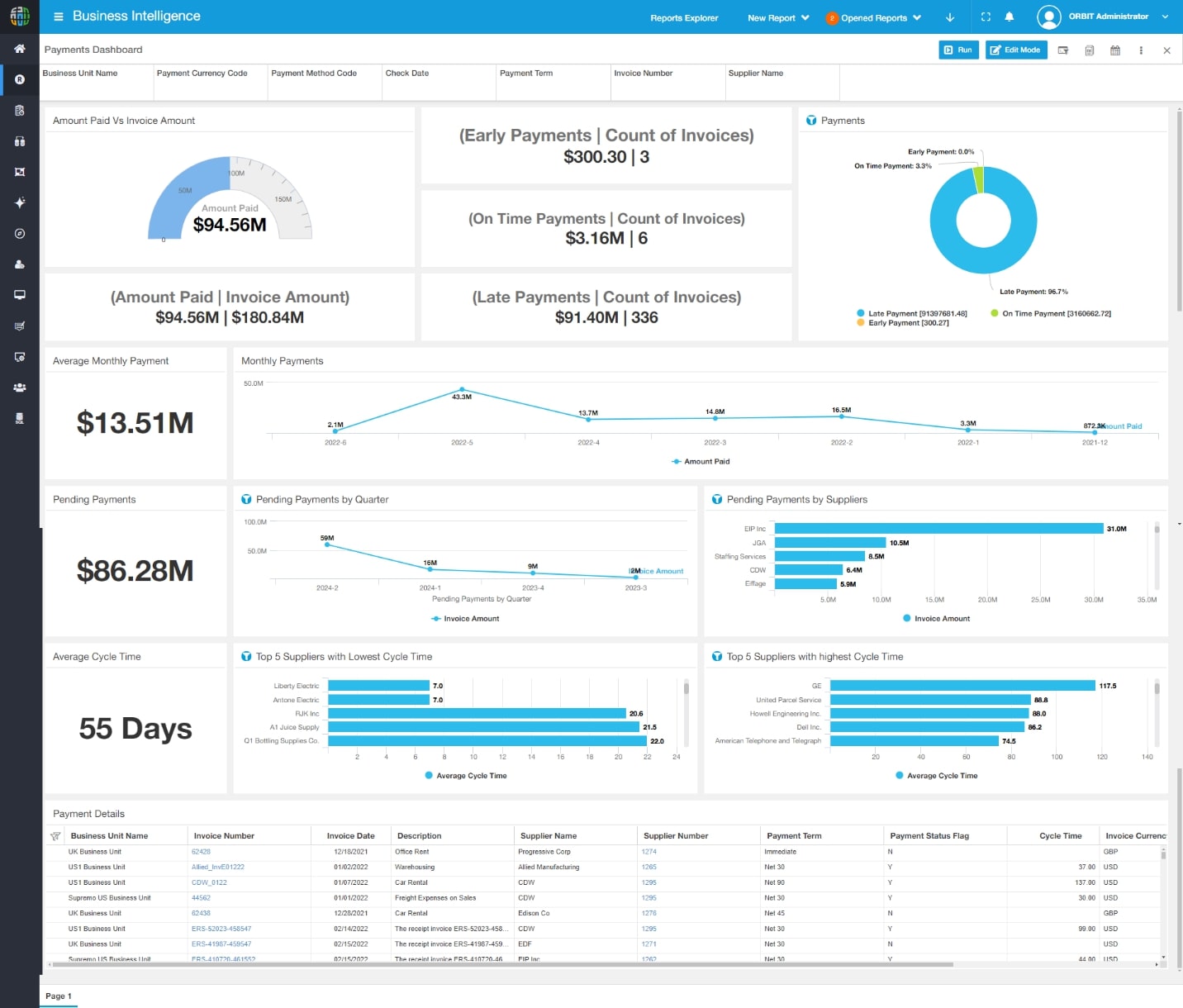
Option 1: Land Oracle EBS history in a staging layer, then publish a unified semantic model
This is the most complete option: extract EBS history into a cloud data store, curate it into conformed facts and dimensions, and align it to the same KPI logic used in Fusion Analytics. This is how you get true time-series reporting across “before and after” migration.
It’s also the route that supports drill-down, audits, and enterprise-grade trust—because the model is designed, not improvised.
Option 2: Use Oracle’s EBS adapter + extend it into an analytics-ready pipeline
This is a practical hybrid approach: let the adapter handle access and extraction patterns, but don’t stop there. Add the missing steps—historical dimension logic, mappings, conformed COA, and data quality controls—so what you extract can actually behave inside analytics.
This works well when teams want Oracle-native integration, but still need a proper analytics foundation.
Option 3: Snapshot only the historical KPIs you care about
Some organizations don’t need every historical transaction in analytics. They need the baseline: monthly AP aging, payments behavior, revenue trends, DSO/DPO over time. In that case, you can snapshot curated KPIs at a consistent grain and load those into a unified timeline.
This avoids “move everything” projects while still restoring context.
Option 4: Keep Oracle EBS history outside Fusion Analytics, unify at the reporting layer
This is the fastest but also the most fragile approach: leave EBS history in a separate store and stitch dashboards together. It can work short-term—but it often creates two KPI definitions, two sets of dimensions, and two versions of truth.
Why Historical Oracle EBS Data Is Still Hard in Analytics (Even After You Extract It)
This is where most projects stall—because historical data isn’t just old data. It’s old data with old meaning.
1) Oracle Fusion and Oracle EBS don’t share the same semantic model
Fusion Analytics is built around Fusion’s canonical definitions—dimensions, hierarchies, grains, and KPI calculations. EBS often stores similar concepts, but not in the same structures or grain. You can extract the data and still be miles away from usable analytics.
2) Your org and COA changed, history didn’t
Most migrations involve a chart of accounts redesign, cost center cleanup, supplier consolidation, BU changes, ledger shifts. Your business wants to compare “then vs now” under current definitions—but the historical transactions were recorded under prior structures.
If you don’t deliberately handle this, historical reporting becomes either wrong or unusable.
3) Effective dating and “as-of” reporting gets messy fast
If you join old transactions to today’s supplier, customer, or org dimensions, you can accidentally rewrite history. Accurate trend reporting often requires slowly changing dimension logic and “as-of” views—not just a copy of current master data.
4) Reconciliation becomes the hidden requirement
The moment Finance can’t reconcile a trend line back to a prior close, trust collapses. This isn’t a technical nuance—it’s the price of adoption. If historical EBS isn’t modeled for reconciliation, you don’t get confidence, and without confidence, dashboards don’t get used.
What Complete Analytics Actually Looks Like
A unified model should:
- Preserve EBS historical facts across modules like GL, AP, AR, procurement
- Harmonize master data (suppliers, customers, COA) across both worlds
- Apply consistent KPI definitions across the timeline
- Enable seamless time-series reporting before, during, and after migration
No artificial boundaries. No missing chapters.
This is the standard you should hold any approach to whether you use an Oracle EBS Adapter, an Oracle E-Business Suite Adapter, or a custom pipeline, because the goal is not extraction, it is continuity.
The Orbit Solution: Bridge the Gap, Fast
This is exactly what Orbit DataJump with prebuilt data models solve:
Accelerated integration: Orbit DataJump brings legacy EBS extracts alongside Fusion data into one unified foundation—no more “analytics from activation onward.”
Prebuilt intelligence: Instead of spending months building a custom Oracle EBS + Oracle Fusion Cloud semantic layer from scratch, Orbit’s canonical models give you ready-made facts, dimensions, mappings, and KPI-ready structures.
Faster time to trust: Harmonized finance and operations metrics with consistent definitions across systems, out of the box. Weeks, not quarters.
For teams actively trying to migrate oracle EBS data to Fusion analytics, this removes the most time-consuming work: harmonising semantics, master data, and KPI logic across the EBS-to-Fusion timeline.
The Bottom Line
Analytics without history isn’t insight, it’s just a snapshot. If your dashboards can’t show the full arc from EBS through Fusion, you’re making decisions with half the story.
Orbit DataJump with prebuilt models eliminates the heavy lifting of integrating and modeling historical EBS data, so your business gets what it actually needs: continuous, end-to-end truth.
Because the best analytics don’t just tell you what’s happening now. They show you how you got here, and where you are really headed.
The post Unifying Oracle EBS history with Oracle Fusion Analytics appeared first on Orbit Analytics.
]]>Picture a monthly close review where the income statement looks clean, the balance sheet ties out, and someone asks one question: “What is driving the variance in operating expenses this period?” The best finance teams answer in the same moment, inside the same workbook, by drilling from the statement line to account balances, to journals, to the originating transactions, without switching tools or rebuilding reports.
That is the real promise of automated financial statements from Oracle Cloud ERP: a familiar Excel front end, powered by governed Oracle data, with drilldown that turns summary numbers into a transparent story.
Why Excel continues to be the finance delivery format
Excel remains the daily workspace for finance and FP&A, even as analytics stacks modernize. In the 2024 FP and A Trends survey, 52 percent of teams reported using Excel for planning. That staying power makes sense: Excel supports structured statement packs, repeatable formats, commentary, scenario tweaks, and distribution workflows that are already embedded in finance operations.
So the strategic question is not whether finance uses Excel. The question is how to make Excel financial statements Oracle ERP consistently refreshable, secure, and traceable back to Oracle Cloud ERP details.
What “automated financial statements with drilldown” actually means
In practical terms, automation is not a single button. It is a set of capabilities that make financial statements predictable, fast to refresh, and easy to validate.
A modern automated statement process typically includes:
- Standardized statement templates: Balance sheet, income statement, and cash flow layouts that reflect your chart of accounts, hierarchies, and reporting rules, built once and reused every period.
- Live refresh with controlled filters: One refresh updates all linked statements for the right ledger, period, currency, and entity scope.
- Drilldown that preserves context: A user can drill from a statement line to balances, to journals, and into subledger details to confidently explain movements.
- Role-aligned access in the workbook: A finance user sees only what their Oracle role allows, even inside Excel.
- Scheduled distribution: A close pack can be refreshed and delivered on a defined cadence, with consistent definitions every time.
Benchmarks make the business case clear. An analysis published by CFO.com, referencing APQC survey data from 2,300 organizations, reported a median monthly close of 6.4 days, with top performers at 4.8 days or less and bottom performers at 10 days or more. When statement production becomes repeatable and drilldown becomes instant, finance time shifts naturally toward analysis and advisory work.
How common approaches stack up for Oracle Cloud ERP statement automation
Most Oracle Cloud ERP reporting programs follow one or more of these paths. Each can work, and each has tradeoffs.
Path 1: Native Oracle reporting and Smart View driven workflows
Oracle provides Smart View for Office, which integrates ERP, EPM, and BI data into Microsoft Office, including Excel. Smart View also supports drill through patterns, including options that launch drill through in a browser or in a new Excel sheet.
This path is attractive when teams want to stay tightly aligned to Oracle delivered tools, especially for standardized reporting use cases. Many organizations still want more statement pack flexibility, more finance owned templating, and deeper drill paths that feel natural to controllers inside Excel.
Path 2: Analytics platforms and curated models for dashboards
Oracle Fusion Analytics Warehouse and Oracle Fusion Data Intelligence have evolved, including Oracle Fusion AI Data Platform, which is described by Oracle as a unified managed experience for connecting and analyzing business data with curated data and prebuilt analytics.
This path is excellent for cross functional analytics, visual dashboards, and broad KPI adoption. Finance teams often keep Excel as the last mile for statutory packs, board packs, and controlled close deliverables, because Excel remains the preferred format for commentary, structured layouts, and distribution.
Path 3: Excel first financial reporting add ins purpose built for Oracle ERP
This category has grown because it matches how finance teams actually work. Vendors in this space typically focus on Excel as the primary experience, with prebuilt Oracle aware functions, refreshable templates, and drilldown.
The best fit here is usually determined by depth of Oracle coverage, finance-owned report building, drill detail level, governance, and speed to value.
The Excel drilldown experience that finance teams actually want
A drilldown experience earns adoption when it feels like a guided explanation, not a data dump. A typical controller workflow looks like this:
- Refresh the statement pack for the close period.
- Spot the movement on a line, for example travel, professional services, or accrued expenses.
- Drill to the account balance view that shows what changed by cost center, vendor, or category.
- Drill again into journals and supporting lines.
- Drill into subledger transactions where needed, so the explanation is tied to the source activity, not a separate export.
When drilldown follows this sequence, the workbook becomes a narrative tool: statement, detail, evidence, conclusion.
Where Orbit Analytics GLSense fits for Oracle Cloud ERP financial statements
Orbit positions GLSense as an Excel-based financial reporting capability that provides a 360-degree view of general ledger reporting in Excel and subledger details, integrating directly with ERP systems, including Oracle Cloud ERP. Orbit also describes its Excel reporting approach as role-authenticated, refreshing data in Excel while updating only what users can access based on their roles.
In practice, that combination is what finance teams look for when they want Excel statement packs that remain consistent across periods while still offering drilldown to the details that explain a number. This is also where Oracle Cloud ERP financial automation becomes practical for the close, because refresh, access, and drill paths stay controlled inside the same delivery format finance already uses.
The value for finance leaders is straightforward:
- Statement packs stay in Excel, so adoption is immediate, and distribution stays familiar.
- Drilldown adds transparency, so statement lines lead to balances, journals, and supporting details without losing the reporting context.
- Security aligns to Oracle roles, so the workbook remains controlled even when shared across teams.
- Close work becomes smoother because reconciliation and explanations happen in the same reporting flow that produced the statements.
A quick competitor checklist for choosing the right approach
If you are evaluating options, keep the comparison grounded in outcomes finance cares about:
- Drill depth: Can you drill from statement line to journals and subledger level detail in a few clicks.
- Oracle Cloud ERP coverage: Does the tool understand Fusion Cloud structures, ledgers, hierarchies, and reporting dimensions.
- Governance and security: Does access align to Oracle roles, and do definitions remain consistent across teams.
- Finance ownership: Can finance maintain statement templates without heavy technical dependency.
- Time to value: How quickly can you deliver the first automated statement pack with drilldown for a real close period.
When those criteria line up, Excel becomes a reliable reporting layer on top of Oracle Cloud ERP, and close conversations become faster, clearer, and easier to support.
Closing thought: turn statements into a living explanation
Automated financial statements with drilldown bring two worlds together: Oracle Cloud ERP as the system of record, and Excel as the system of action for finance. When summary numbers connect cleanly to supporting details, finance teams spend more time interpreting performance and guiding decisions, and less time assembling the pack. Ready to refresh Oracle Cloud ERP financial statements in Excel with drill-down details? Request a GLSense demo and see a close-ready statement pack run end to end.
The post Automating Financial Statements from Oracle Cloud ERP in Excel, With Drilldown to Details appeared first on Orbit Analytics.
]]>“If a line item moves, the question is not what the total is. The question is what caused it, and the drilldown needs to show it in the same meeting.”
That mindset is becoming the new standard for Oracle Cloud ERP finance leaders. Boards, CxOs, and operating teams are asking sharper questions, more frequently, and they expect finance to connect the headline number to the line-level detail with confidence. Oracle Cloud ERP is a strong system of record for financial control and compliance. The opportunity is making the drilldown journey just as strong: balance to journal, journal to subledger, subledger to the source transaction, with context intact through Oracle Fusion financial visibility.
This matters because the monthly close and executive reviews are still intense, even in modern finance organizations. In a 2025 survey referenced by CFO.com, only 18 percent of teams reported a 1 to 3 business days close, while 27 percent reported more than a week or two. Speeding up drilldown is one of the most practical ways to improve time-to-explain, reduce follow-up cycles, and keep decision-making moving.
The moment that defines reporting quality
Picture a standard close review. The CFO sees a balance sheet line that shifted month over month. The first question is simple: what has changed? The second question is the real one: where exactly did it come from? This is where Oracle Fusion CFO reporting becomes a decision advantage, because the answer needs to arrive while the discussion is still live.
A “fast answer” drilldown typically needs four layers:
- Balance view by ledger, entity, period, currency, and account hierarchy
- Journal activity that explains the movement
- Subledger accounting detail that ties journals to operational events
- Source transaction attributes like supplier, invoice, PO, asset, project, or customer document and more.
Oracle supports drill capabilities across these layers in its financial reporting toolset, including drilldown to detail balances, journal lines, and subledger transactions. The question is not whether drilldown is possible. The question is how to make it fast, intuitive, and repeatable for finance users through Oracle Cloud ERP drilldown reporting.
Why drilldown can feel slower than it should
In Oracle Cloud ERP, accounting truth is built from interconnected objects across GL, subledgers, and various other application modules. That wealth is valuable. It is also why reporting design matters.
Cross-module joins are real work
A complete drill path from GL balance to journals to subledger to source can involve many joins and large transaction volumes. Some architectural guidance notes that balance-to-subledger drilldowns can require joining dozens of tables and filtering on very large row counts, which can degrade query performance if every click triggers heavy processing.
Different tools solve different parts of the workflow
Oracle provides multiple reporting paths: OTBI analyses, BI Publisher outputs, Financial Reporting Center, and Excel-based access through Smart View. Smart View is an Excel add-in that can be installed from the Financial Reporting Center flow. In practice, organizations often end up with multiple report types for different audiences, which is normal, but it increases the importance of consistent definitions and drill paths across the estate.
Deep links and role-based access need alignment
Many teams explore deep-link drilldowns (e.g, from OTBI journal views to subledger forms) and discuss performance differences across user roles. This is a positive signal: finance wants self-serve answers. It also highlights that security, access context, and drill navigation need to be designed, not left to chance.
What decision makers typically evaluate in the market
When leaders modernize Oracle Cloud ERP reporting, they usually compare four approaches. Each can be valid depending on the goal.
1) Oracle-native analytics and packaged intelligence
Oracle Fusion Analytics Warehouse has been rebranded as Oracle Fusion Data Intelligence (FDI), with Oracle positioning it as an evolution in analytics and intelligence for Fusion customers. For organizations that want prebuilt analytics applications and curated models, this is often part of the evaluation.
2) BI dashboards layered on a warehouse or Lakehouse
Some organizations move ERP data into Snowflake, Databricks, or similar platforms and build BI on top. This supports cross-functional analytics and long-term history, but drilldown quality depends on how well the pipeline preserves Oracle accounting relationships and definitions.
3) Purpose-built Oracle reporting accelerators
This is where solutions like Orbit are evaluated: tools designed specifically for Oracle ERP reporting patterns, with prebuilt drill paths and finance workflows that remain complementary to Oracle.
A practical blueprint for faster drilldown in Oracle Cloud ERP reporting
Here is what consistently improves drilldown speed and confidence, without changing Oracle as the system of record.
1) Start with the questions, then design the drill paths
List the recurring leadership questions that appear in close reviews, forecast calls, and board pre-reads. Examples: what drove variance by cost center, why cash timing changed, which suppliers drove AP movement, why an account balance moved in one entity. Each question implies a drill path and the data grain needed to answer it.
2) Pre-build navigation, not just totals
Fast drilldown comes from predictable navigation tables and curated paths, not only summary reports. When the reporting layer pre-defines how balances map to journals and subledger events, finance can move through the story with fewer clicks and fewer reruns. The “pre-processing and caching” concept is a proven pattern for heavy-duty drilling. This is the heart of making Oracle Cloud ERP balance analysis actionable inside the review window.
3) Keep metric definitions governed across tools
A CFO trusts numbers when they are consistent across the close pack, the dashboard, and the detailed drilldown. Governance here is simple and powerful: one definition per key metric, one hierarchy per segment, one currency rule per view, and a visible “as-of” time for refresh.
4) Align refresh timing to finance moments
Not every report needs continuous refresh. What finance needs is predictable freshness aligned to decision windows. Close review packs, daily cash reviews, and executive flash reporting should have explicit refresh SLAs and visible timestamps.
5) Make Excel the drilldown cockpit, not a manual export destination
Excel is where finance teams validate, annotate, and communicate. The goal is not to replace it, but to remove the manual exporting and rework. Oracle supports Excel-based reporting through Smart View. Many organizations also adopt Excel-native drill solutions to keep the investigation inside the sheet while preserving links back to journals and subledgers.
Where Orbit fits for teams that need faster answers
Orbit complements Oracle Cloud ERP by making the balance-to-detail journey faster and more repeatable within the tools finance already uses, especially Excel. Instead of treating drilldown as a separate investigation step, Orbit helps teams move from a balance sheet number to journals, subledger accounting, and transaction-level context through guided drill paths that stay consistent across close cycles and reporting expansion.
For Oracle Fusion Cloud ERP environments, Orbit GLSense is positioned as an Excel-based financial and GL reporting solution designed to streamline financial reporting and reconciliation workflows, with drilldown from balances to journals and into subledger detail, plus prebuilt subledger drill reports across common modules.
A final takeaway for Oracle Cloud ERP leaders
Oracle Cloud ERP gives finance teams a strong foundation for trusted accounting. The next step is making “balance to detail” just as strong, so questions turn into answers while decisions are still being made. If you are evaluating options, prioritize one capability above all: a repeatable drilldown story that stays consistent across close cycles, security roles, and reporting growth.
Ready to get from balance sheet numbers to answers faster in Oracle Cloud ERP?
See how Orbit GLSense helps finance teams drill down from Excel financial statements to journals, subledger detail, and source transactions with clarity and confidence. Request a GLSense demo and get a tailored walkthrough for your close and monthly reporting workflows.
The post Oracle Cloud ERP Financial Reporting: How CFOs Get from Balance Sheet Numbers to Answers Faster appeared first on Orbit Analytics.
]]>Audit season often brings a familiar request: “Show the full story across years through Oracle Fusion audit reporting.” Not just the current quarter. Not just a snapshot. A complete timeline with benchmarks, trends, and historical detail that gives every number context.
Why Oracle EBS Still Matters After Fusion Migration
Oracle Fusion Cloud provides a modern foundation for Finance, Supply Chain, and HCM operations. With every close cycle and planning cycle, Fusion delivers a strong current-state view organizations rely on.
But Oracle E-Business Suite adds something equally valuable:
- Long-run financial performance patterns
- Cross-business cycle comparisons
- Forecasting aligned with historical reality
- Traceability through Oracle Fusion audit trail reporting
When Fusion represents “today,” EBS brings “the years that shaped today.”
Cross-Period Reporting Creates a Single Performance Narrative
Cross-period reporting applies the same metrics, logic, and hierarchy views consistently across EBS history and Fusion operations. This approach strengthens Oracle EBS to Fusion audit analytics by keeping reporting definitions aligned across time.
- Consistent trend lines across years
- Comparable KPIs across pre- and post-migration periods
- Clear visibility across structural changes
- Refreshable reporting packs on cadence
The Management Pack Remains the Center of Gravity
Management reporting typically includes:
Executive Summaries
Variance Views
Cross-Period Comparisons
Commentary & Business Context
Drill Paths for Deeper Review
Many teams prefer a grid-style working model because it naturally supports structured comparisons and pack layouts.
Where GLSense WebSheets Fits
Orbit GLSense WebSheets provides a secure, governed, spreadsheet-style environment for analysis and management reporting across Oracle Fusion and Oracle EBS history.
- Familiar grid experience for variance analysis
- Controlled collaboration workflows
- Role-based access aligned to Finance and HR sensitivity
- Consistent metric logic shared across teams
- Scalable recurring reporting pack distribution
- Oracle ERP audit drilldown workflows
A Practical Cross-Period Reporting Setup
- Choose the first recurring management pack – Start with a finance performance pack.
- Establish a stable KPI dictionary – Keep definitions consistent across periods.
- Align key dimensions and hierarchies – Accounts, cost centers, business units.
- Build the pack in a grid-first workflow – Structure tables and variances clearly.
- Operationalize refresh and distribution – Establish cadence and review workflow.
A Continuous Performance Timeline
After a Fusion migration, organizations can present performance as a continuous story — powered by Fusion for current operations and EBS for the historical baseline. See GLSense WebSheets in Action Request a Demo
Audit season often brings a familiar request: “Show the full story across years through Oracle Fusion audit reporting.” Not just the current quarter in Oracle Fusion Cloud, and not just a snapshot. A complete timeline, benchmarks, trends, and historical detail that gives every number context.
That is why Oracle E-Business Suite (EBS) history continues to play a valuable role even after a successful migration to Oracle Fusion. It extends the timeline, preserves historical patterns, and supports cross-period clarity through Oracle EBS to Fusion audit analytics.
Oracle Fusion moves faster when history stays accessible
Oracle Fusion Cloud gives teams a modern foundation for Finance, Supply Chain, and HCM operations. With each close cycle, planning cycle, and operational review, Fusion provides the current-state picture organizations to rely on.
Oracle EBS adds something equally valuable: the historical baseline the earlier years that help teams:
- Spot long-run financial performance patterns,
- Compare outcomes across business cycles,
- Align forecasting and budgeting with historical reality,
- Support traceability needs through Oracle Fusion audit trail reporting and historical context.
When Fusion represents “today,” EBS brings “the years that shaped today.” Together, they support stronger management reporting.
Cross-period reporting creates a single performance narrative
Cross-period reporting simply means applying the same metrics, logic, and hierarchy views consistently across periods spanning EBS history and Fusion operations. This approach strengthens Oracle EBS to Fusion audit analytics by keeping reporting definitions aligned across time.
When cross-period reporting is designed intentionally, teams gain:
- Consistent trend lines across years,
- Comparable KPIs across pre- and post-migration periods,
- A clearer view of how performance evolved across structural changes,
- Reporting packs that refresh cleanly on cadence.
This creates a management reporting environment in which each pack tells a single continuous story.
The management pack remains the center of gravity
Even as analytics platforms evolve, management reporting often follows a familiar format:
- executive summaries
- variance views
- cross-period comparisons
- commentary and business context
- drill paths for deeper review.
Many teams still prefer a grid-style working model for this workflow because it naturally supports side-by-side comparisons and structured pack layouts.
That preference opens the door to a better approach: a spreadsheet-style experience designed for enterprise governance, shared definitions, and controlled collaboration.
Where GLSense WebSheets fits
Orbit GLSense WebSheets provides a secure, governed, spreadsheet-style environment for analysis and management reporting, designed to support refreshable reporting packs across Oracle Fusion and Oracle EBS history. It also supports Oracle Fusion audit reporting workflows by keeping packs consistent and refreshable.
GLSense WebSheets is especially effective when teams want:
- A familiar grid experience for variance analysis and pack creation,
- controlled collaboration for review and commentary cycles,
- role-based access aligned to Finance and HR sensitivity,
- consistent metric logic shared across teams,
- scalable distribution of recurring reporting packs.
- Always available on the move
GLSense Websheets also supports Oracle ERP audit drilldown patterns, where reviewers start at summary results and move into supporting details through consistent drill paths.
A practical cross-period reporting setup that teams adopt quickly
Here is a simple, positive rollout pattern that works well for Fusion plus EBS environments:
1) Choose the first management pack that leadership reviews every month
A finance performance pack is often the best starting point because it drives recurring cadence and clear ownership.
2) Establish a KPI dictionary that stays stable
Define the KPIs that matter most, and keep them consistent across periods.
3) Align key dimensions and hierarchy views
Accounts, cost centers, business units, supplier rollups, and org structures become the backbone of cross-period consistency.
4) Build the reporting pack in a grid-first workflow
Use GLSense WebSheets to structure the pack in a layout teams already understand: tables, variances, and commentary-ready sections.
5) Operationalize refresh and distribution
Refresh cadence, review workflow, and controlled sharing complete with the management reporting system.
This approach turns cross-period reporting into a repeatable capability that strengthens every monthly pack and supports Oracle Fusion audit trail reporting needs.
Conclusion
After a Fusion migration, organizations gain an opportunity: present performance as a continuous timeline, powered by Fusion for current operations and EBS for the historical baseline that adds depth and continuity through Oracle EBS historical audit data.
GLSense WebSheets supports that timeline with a governed, spreadsheet-style environment that helps teams build, refresh, and share management reporting packs confidently, while also supporting Oracle ERP audit drilldown when deeper detail is needed.
See GLSense WebSheets for cross-period management reporting.
Explore how teams unify Oracle Fusion performance with Oracle EBS history and deliver refreshable reporting packs in a governed grid experience.
The post Audit Season After Oracle Fusion Financials: Why EBS History Still Matters and How GLSense WebSheets Helps appeared first on Orbit Analytics.
]]>Orbit Analytics Data Pipelines accelerate ERP-to-Lakehouse integration with automated, governed, and ERP-aware data flows
ALPHARETTA, Ga., Jan. 27, 2026 /PRNewswire/ — Orbit Analytics, a leading provider of AI-powered enterprise reporting and analytics solutions for Oracle applications, today announced a partnership with Databricks, the Data and AI company, to deliver faster, smarter, and more unified data intelligence to enterprise customers.
The partnership combines the Databricks Data Intelligence Platform with Orbit Analytics’ direct-connect integration capabilities for Oracle Fusion, E-Business Suite (EBS), and other ERP systems. Together, they will enable enterprises to harness governed and timely insights across financial, operational, and strategic data while dramatically reducing implementation time and cost.
“Modern enterprises face a critical challenge: unlocking near-real-time insights from complex ERP environments,” said Rupesh Sharma, CEO of Orbit Analytics. “By joining forces with Databricks, we’re simplifying that process. Customers can now use a single, scalable platform to unify ERP reporting, advanced analytics, and AI-driven decision making—without the traditional data silos or latency that slow business responsiveness.”
Introducing Orbit Data Pipelines
As part of the partnership, Orbit Analytics is releasing Data Pipelines, a purpose-built, ERP-aware pipeline framework that lands curated ERP data into Delta Lake with end-to-end governance through Unity Catalog, Databricks’ unified and open governance solution for data and AI.
The solution enables teams to move from source systems to analytics-ready tables in hours or days rather than weeks or months—without stitching together multiple tools.
Through the partnership, customers will gain native integration with the Databricks Data Intelligence Platform, allowing them to seamlessly ingest, transform, and analyze ERP data using SQL, Python, and AI models.
Key Benefits for Joint Customers
- Native integration between Oracle ERP systems, Orbit Analytics, and the Databricks Data Intelligence Platform
- Automated data ingestion and transformation pipelines for ERP data
- Enhanced support for AI-powered forecasting, anomaly detection, and financial planning
- Lower total cost of ownership compared to traditional data warehouse architectures
- Accelerated reporting implementation leveraging Orbit’s prebuilt analytics templates
Customer Success Story: MARTA
A joint customer, The Metropolitan Atlanta Rapid Transit Authority (MARTA), one of the largest public transit agencies in the U.S., serving over 65 million passengers annually, needed to bring data from multiple source systems such as Oracle Fusion ERP and HCM.
“One of the major challenges we faced was extracting data from Fusion ERP into Databricks using PVOs,” said Madhu Chava, Cloud Solutions expert, MARTA. “We onboarded Orbit Analytics, which has greatly simplified this process. The tool enables us to build pipelines seamlessly, extracting data from Oracle Fusion into Databricks. It is very user-friendly, significantly reduces development effort, and provides a wide range of source and destination adapters.”
About Orbit Analytics
Orbit Analytics is an AI-powered business intelligence and data analytics solutions company designed to empower organizations to unlock the full potential of their data. Seamlessly integrating with ERP systems, cloud data platforms, and essential business applications, Orbit Analytics delivers real-time access to unified data from diverse sources via its core products GL Sense and Data Pipelines.
Orbit’s solutions accelerate report migration from Oracle ERP systems and legacy tools, making it easier to modernize analytics workflows. By transforming raw data into actionable insights, Orbit Analytics empowers industries to enhance operational efficiency and drive exceptional business performance.
Visit www.orbitanalytics.com to learn more.
Media Contact
Sarah Shackley
Head of Marketing
Email: [email protected]
Phone: +1 215-796-5143
The post Orbit Analytics Announces Partnership with Databricks to Empower Enterprises with Modern, Unified Data Intelligence appeared first on Orbit Analytics.
]]>During a quarter close at a multi-country manufacturer, Finance is still exporting CSVs from Oracle Fusion Cloud to explain a three-percent margin swing, while Operations asks for today’s procurement variance. The last batch was already outdated, and leadership demanded a single near–real-time Snowflake view.
A study by the Centre for Economics and Business Research, reported at the Gartner Data and Analytics Summit 2022, that 80 percent of companies increased revenue after adopting real-time analytics, with a potential uplift of 2.6 trillion dollars across sectors. When extraction, ingestion, and ELT are executed with dependable consistency, an Oracle-to-Snowflake connector is no longer just a technical preference—it’s a business requirement.
What a “Connector” really means
There’s no universal plug-in. An Oracle Fusion Cloud to Snowflake connector follows a proven pattern: extract from Oracle Fusion Cloud or Oracle Database, land the data securely or stream it in real time, and then perform ELT within Snowflake. Fusion SaaS delivers standardized exports on a predictable increment, while databases provide continuous deltas through CDC. The result is a governed, analytics-ready layer that remains current without relying on brittle point-to-point integrations.
Oracle Fusion Cloud to Snowflake with Orbit Data Pipelines
Orbit Data Pieplines turns Fusion SaaS replication into configuration. You pick subject areas such as Payables, Receivables, Procurement, or Projects, set a cadence, and Data Pipelines orchestrates BICC incremental data end to end. Extracts land in your object storage with clean partitions by module and time window, then loads into Snowflake through a managed path. No custom loaders, no break-prone scripts. With tested, safely promoted schema changes, your models remain stable across every Fusion update rollout.
This pattern enables near–real-time Oracle-to-Snowflake replication for your highest-priority modules by combining frequent BICC increments with orchestrated loading through an Oracle-to-Snowflake connector. For teams exploring how to connect Oracle Fusion Cloud to Snowflake, Orbit provides a guided onboarding path that accelerates you from initial extract to analytics-ready tables. The outcome is a sustainable, cost-efficient Oracle-to-Snowflake integration that underpins a long-term Oracle ERP to Snowflake pipeline
Oracle Database to Snowflake Real Time CDC
Setup is configuration-driven: choose schemas and tables, register secure connections, and define freshness targets. Data Pipelines manages dependency ordering, retries failed batches safely, and promotes tested schema changes to keep models stable as applications evolve. High-value tables—Orders, Shipments, Payments—can run at short intervals, while lower-value domains run less frequently, all merging into consistent curated datasets
Operational systems like order management and logistics often demand fresh data. Orbit Data Pipelines handles landing and modeling while integrating with native APIs that read committed changes from Oracle Cloud. It ingests those change streams, preserves natural keys, and performs deterministic merges, so updates and deletes appear accurately in Snowflake without modifying the source.
ELT in Snowflake: reliable change application
Inside Snowflake, the ELT layer turns raw landings into governed, analytics-ready tables. Orbit Data Pipelines automates this stage so changes can be applied cleanly and repeatedly without custom scripts.
Practical pattern
- Land each feed in raw tables with load time, source, and batch identifiers, and keep Oracle natural keys unchanged.
- Create a Stream on each raw table to capture inserts, updates, and deletes at the row level.
- Use a Task that triggers only when change data is present, , then perform a single MERGE per target to upsert updates and apply deletes atomically.
- When Fusion’s quarterly updates introduce new columns, let them land in raw with safe defaults, test the transforms, and promote them only after validation succeeds.
This keeps the curated layer stable as the scope expands, and it aligns with an Oracle to Snowflake integration that scales into a durable Oracle ERP to Snowflake pipeline.
Performance and cost levers
Performance and cost are largely determined by a few controllable design choices. Orbit Data Pipelines Jump standardizes these choices, so freshness remains predictable, and warehouse credits stay manageable.
Right-size batches:
Steady, moderately sized files outperform massive drops by improving parallelism, isolating errors, and avoiding long single-file bottlenecks.
Use continuous loading only when required:
If your service level tolerates minute-level freshness, short, recurring batches scheduled by Data PipelinesJump are the most efficient approach.
Use continuous loading only when required:
If your service level tolerates minute-level freshness, short, recurring batches scheduled by Data PipelinesJump are the most efficient approach.
Promote schema changes safely:
Let new columns land in raw with safe defaults, validate the transformations, and promote them to curated only after they pass checks—ensuring updates don’t break pipelines.
Separate lanes by value:
Prioritize refresh rates: run high-value tables such as Orders and Shipments on short intervals while placing lower-value domains on longer cadences.
These practices keep the Oracle-to-Snowflake connector efficient today and scalable as data volumes grow.
Security and connectivity
Security and connectivity determine whether pipelines remain compliant, resilient, and audit-ready. Orbit Data Pipelines enforces secure paths and role-based access, so Snowflake replication aligns with policy from day one.
Prioritize private connectivity:
Use private endpoints whenever available to keep traffic off the public internet.
Apply least privilege:
Map users and services to Snowflake roles via external OAuth, grant only required object access, and rotate credentials regularly.
Use storage integrations instead of static keys:
Configure stage access through cloud roles, so no secrets are embedded in jobs.
Enforce network allowlists:
Restrict access to approved source ranges and service endpoints only.
Control sensitive fields:
Mask or exclude regulated attributes during extraction or modeling so they never land in raw storage.
Control sensitive fields:
Mask or exclude regulated attributes during extraction or modeling so they never land in raw storage.
Govern schema changes:
Promote changes only after validation and record each promotion for audit purposes.
These practices harden an Oracle-to-Snowflake connector, ensure the integration meets compliance requirements, and align with best practices for Oracle-to-Snowflake data replication at scale—including automated Oracle Fusion to Snowflake pipelines.
Pattern selection guide
If your source is Fusion SaaS and you need 15 to 60 minute freshness
Choose BICC subject areas in Orbit Data Pipelines, land them to object storage, and load them into Snowflake on a predictable cadence. This delivers real-time Oracle to Snowflake replication for priority modules without custom loaders and fits a scalable Oracle to Snowflake connector pattern.
If your source is an Oracle Database and you need sub-minute freshness
Pair Orbit Data Pipelines modeling with CDC from Oracle to Snowflake so committed redo changes arrive quickly. Use short, recurring merges to keep curated tables upto date. This path fits seamlessly into an Oracle-to-Snowflake integration alongside batch feeds.
If you have both Fusion SaaS and operational databases
Adopt a hybrid model—use frequent BICC increments for Fusion, streaming for high-value operational tables, and a unified ELT layer for keys and history. This provides the most straightforward route to automating Oracle Fusion–to–Snowflake and evolving into a long-term Oracle ERP to Snowflake pipeline as requirements expand.
Where Orbit fits
Orbit Data Pipelines is a no-code orchestration and modeling layer purpose-built specifically for Oracle sources with Snowflake as a first-class destination. Teams simply configure subject areas and define freshness targets, Orbit’s Data Pipelines manages extraction, secure landing, and ELT so analytics-ready tables appear in warehouse schemas without custom loaders. This accelerates the time to value for an Oracle to Snowflake connector and keeps models consistent as the scope expands.
Data Pipelines coordinates frequent Fusion increments and database change streams for mixed needs, then standardizes keys, history, and naming in one curated layer. That is how organizations evolve a pilot into a maintainable Oracle to Snowflake integration and ultimately a durable Oracle ERP to Snowflake pipeline that serves finance and operations together.
If self-service analytics on Snowflake is needed, Orbit Websheets deliver a governed, spreadsheet-style experience, while SQLEdge supports Excel-based analysis with role-based access. Ready to modernize from Oracle-to-Snowflake with less custom code and faster time to value? Request a demo to start a focused pilot.
FAQs
How can I replicate Oracle Fusion data into Snowflake?
Use Orbit’s Data Pipelines to select Fusion subject areas, schedule BICC increments, land files in object storage, and load them into Snowflake through a managed path.
Data Pipelines preserves natural keys and applies merges; so models stay consistent. This delivers an Oracle to Snowflake connector, follows Oracle to Snowflake data replication best practices, and helps automate Oracle Fusion to Snowflake quickly.
What is the best way to integrate Oracle ERP with Snowflake?
Adopt a two-lane pattern. Keep Fusion SaaS on frequent BICC increments and load on a predictable cadence, and use database log-based capture for sub-minute tables. Unify both in ELT with reusable models so the outcome is a maintainable Oracle to Snowflake integration that scales into an Oracle ERP to Snowflake pipeline.
Does Orbit support real time CDC for Oracle to Snowflake?
Yes. Orbit Data Pipelines operates alongside Oracle-to-Snowflake log-based CDC, processing change streams and performing deterministic merges to ensure inserts, updates, and deletes appear correctly in curated Snowflake tables.. This enables real-time Oracle to Snowflake replication, where freshness within seconds is required.
The post Oracle Fusion Cloud-to-Snowflake Connector for Operational Data appeared first on Orbit Analytics.
]]>If you have ever tried to pull data out of Oracle Fusion Cloud and into a data warehouse, you already know it can feel like trying to get water from a stone. Not because Oracle Fusion lacks data, quite the opposite. It’s full of incredibly rich information across Finance, Procurement, HCM, Projects, SCM, and more. For most teams, turning that raw application data into a reliable Oracle Fusion to Data Warehouse pipeline is where the real struggle begins.
The problem?
Getting that data out, structured, and analytics-ready is harder than it should be.
Let’s explore why, the options available today, and a game-changing alternative that’s built specifically for this challenge.
The Reality: Extracting Oracle Fusion Data Is a Puzzle
Oracle Fusion is a powerful enterprise application suite, but it’s also a black box. There’s no direct database access, the schema is deeply normalized, and the integration tools feel like they were created for transactional workflows, not modern analytics. That is why every Oracle Fusion to Data Warehouse initiative feels less like standard ETL and more like solving a moving puzzle.
Here’s the short version of what makes Fusion → Data Warehouse so challenging:
No Direct Database Access
You can not query Fusion tables. Everything must go through:
- BICC extract jobs
- BI Publisher reports
- OTBI subject areas
- REST/SOAP APIs
Each method exposes only part of the puzzle.
A Beautifully Complex… But Painfully Complex Data Model
Fusion’s data architecture is meticulously engineered for the application layer, not analytics.
It’s full of:
- Multi-level joins
- Effective-dated tables
- Cross-module relationships
- Normalized structures only Fusion developers truly understand
Modeling this for a warehouse is a major lift, especially when your Oracle Fusion to Data Warehouse strategy needs consistent, analytics-ready tables across finance, HCM, procurement, and projects.
Incremental Loads Are a Guessing Game
- Some objects offer lastUpdateDate fields. Others don’t.
- Some track versions. Others don’t.
- Some require snapshots and differencing.
If you have written your own incremental logic for Fusion, you’ve likely aged 5 years doing it. For Oracle Fusion to Data Warehouse projects, this guesswork becomes one of the biggest ongoing maintenance headaches.
API Limits and Performance Bottlenecks
- Fusion APIs throttle you.
- BIP reports time out.
- OTBI isn’t designed for ETL.
Your data engineering team ends up with a patchwork of pipelines each fragile in its own special way.
So What Are the Options?
Organizations typically choose from four native approaches and a handful of third-party tools. Each has its strengths and baggage. The pattern is similar across most Oracle Fusion to Data Warehouse journeys: you get part of the solution from Oracle tools and the rest from custom engineering.
Option 1: BICC — Oracle’s Heavy Lifter (Sometimes)
Business Intelligence Cloud Connector (BICC) is Oracle’s sanctioned method for large-scale ERP/HCM extracts.
It’s good at one thing: Dumping lots of data into object storage.
But BICC comes with caveats:
- Coverage varies by module
- The output is raw and needs heavy transformation
- Incremental logic doesn’t always available
- You still need to model everything yourself
For Oracle Fusion to Data Warehouse use cases, that means BICC acts as the raw landing zone, not the full solution. Think of BICC as the “truckload drop-off” of data movement. Useful, but not enough.
Option 2: BI Publisher — Build It Yourself
BIP lets you write SQL-like queries and generate files.
Sounds nice, but…
- Reports time out for large volumes
- It doesn’t scale
- It has no incremental framework
Great for a small dataset. Risky for a data warehouse strategy, particularly when you are trying to standardize an Oracle Fusion to Data Warehouse architecture that must run reliably every day.
Option 3: REST APIs — Real-Time, But Not Real-Big
Fusion REST APIs are ideal for small updates or near-real-time integrations.
But they are not designed for:
- Historical loads
- High volumes
- Multi-million-row fact tables
Imagine pushing a watermelon through a drinking straw. That’s Fusion APIs for data warehousing, and it is rarely a viable foundation for any serious Oracle Fusion to Data Warehouse rollout.
Option 4: OTBI — Friendly for Reports, Not ETL
Oracle Transactional BI gives you nice subject areas and prejoined views.
But:
- It doesn’t expose the full data model
- It’s slow for large extracts
- It isn’t intended for onboarding data into a warehouse
Think of OTBI as a quick snack, not a full meal. It can supplement an Oracle Fusion to Data Warehouse approach with ad hoc analytics, but it cannot replace a proper pipeline.

Option 5: Generic ETL Tools — Flexible, But Fusion-Unaware
Many companies turn to popular ETL/ELT platforms like:
- Informatica
- Talend
- Fivetran
- Matillion
- Boomi
They are great general-purpose integration tools. But here’s the catch: They do not understand Oracle Fusion.
So you still must:
- Configure BICC/APIs manually
- Build all data models from scratch
- Write the incremental logic
- Handle effective dating
- Stitch together cross-module relationships
- Maintain brittle pipelines
You end up doing heavy engineering on top of already expensive tooling. In Oracle Fusion to Data Warehouse projects, that often means you pay twice: once for the platform and again in engineering effort.

Orbit Analytics DataJump — Built For Fusion, Not Just Compatible With Fusion
- What if you didn’t need to reverse-engineer Fusion’s schema?
- What if you didn’t have to build your own incremental logic?
- What if your data warehouse tables came modeled, conformed, and analytics-ready?
That’s Orbit Analytics DataJump.
And it takes an entirely different approach, especially for teams who want an opinionated Oracle Fusion to Data Warehouse blueprint instead of a toolbox of disconnected components.
What Makes DataJump Different?
1. It Knows Oracle Fusion Inside and Out
Orbit DataJump doesn’t treat Fusion like “just another source.”
It orchestrates:
- BICC jobs
- REST API calls
- BIP/OTBI fallback methods
All automatically. No manual plumbing.
2. It Comes With Prebuilt Oracle Fusion Data Models
This is the game changer.
DataJump ships with ready-made analytical models for: Finance, Procurement, Projects, HCM, SCM
These models include:
- Facts and dimensions
- Surrogate keys
- Ledger/calendar logic
- HR effective dating
- Predefined joins and relationships
- SCD handling
Generic ETL tools start with nothing.
DataJump starts with the entire Fusion data model, already mapped for analytics.
3. It Automates Incremental Loading
Fusion incremental loads are notoriously tricky.
DataJump handles:
- lastUpdateDate deltas
- version changes
- snapshot differencing
- CDC-compliant logic
No manual scripts. No guessing. No aging prematurely.
4. It Delivers Analytics-Ready Warehouse Tables
DataJump writes directly to:
- Snowflake
- BigQuery
- Redshift
- Databricks
- Oracle ADW
- Azure Synapse
Modeled. Conformed. Ready for dashboards.

So… How Does Orbit DataJump Compare?
| Need | BICC | APIs | Generic ETL | Orbit DataJump |
|---|---|---|---|---|
| Bulk extraction | Yes | No | Yes | Yes |
| Incremental loads | Partial | Manual | Custom | Automatic |
| Fusion data model understanding | No | No | No | Native |
| Warehouse-ready models | No | No | No | Provided |
| Pipeline maintenance | High | High | High | Low |
| Time to insights | Slow | Slow | Medium | Fastest |
Turning Oracle Fusion to Data Warehouse into an Advantage
DataJump does not just move data.
It interprets Fusion. Models Fusion. And prepares analytics-ready datasets, automatically.
Extracting Oracle Fusion data and shaping it into a modern analytics platform has traditionally been one of the hardest engineering challenges in the enterprise ERP world. Native options help, but only partially. Generic ETL tools offer flexibility but require extensive custom engineering.
Orbit Analytics DataJump bridges that gap.
By understanding Fusion’s schema, automating its extraction processes, and delivering ready-made analytical models, DataJump finally makes Oracle Fusion to Data Warehouse a clean, elegant, and scalable solution.
The post Oracle Fusion to Data Warehouse: Challenges & Options appeared first on Orbit Analytics.
]]>