The post Как установить VPN (ZoogVPN) если он недоступен в App Store в России first appeared on ZoogVPN.
]]>Если же вы хотите установить ZoogVPN в первый раз, или установить его заново, пожалуйста, воспользуйтесь одним из методов представленных ниже.
Метод 1: Использование предоставленного (временного) Apple ID (рекомендуемый способ)
Рекомендуется использовать этот метод, если у вас есть подписки на вашем Apple аккаунте и вы не хотите их отменять. Для вашего удобства мы подготовили специальный аккаунт Apple ID, который вы можете использовать для загрузки ZoogVPN и других приложений, мы вам предоставим его немного ниже, а для начала:
Шаг 1: Выйдите из текущего Apple ID
- Откройте “Настройки” и нажмите на аватар с вашим именем в верхней части экрана:

- Выберите секцию Контент и покупки

- Нажмите Выйти.
Шаг 2: Войдите в предоставленный Apple ID
- Снова нажмите на Контент и покупки, нажмите на опцию “Не [ваше имя]?”
- Далее используйте для входа логин и пароль, предоставленные в нашей инструкции по этой ссылке. Чтобы получить готовый логин и пароль, вам нужно выбрать “Использование предоставленного Apple ID”, и потом в шаге 3 этой инструкции вам будет выдан аккаунт, в который вы можете легко авторизоваться.
- После входа выберите “Другие возможности” и нажмите “Не улучшать”.

Шаг 3: Скачайте ZoogVPN
- Перейдите в App Store по этой ссылке или просто найдите там “ZoogVPN”.
- Завершите загрузку и наслаждайтесь VPN!
 Важно: После загрузки приложения рекомендуется выйти из предоставленного Apple ID и войти обратно в свой личный аккаунт.
Как обновить приложение, скачанное с предоставленного Apple ID
- Выйдите из своего текущего Apple ID:
- Откройте приложение “Настройки”.
- Нажмите на аватар в верхней части экрана.
- Выберите “Контент и покупки” и нажмите “Выйти”.
- Войдите в общий Apple ID, как вы это делали ранее, используя предоставленные данные для входа, взятые по ссылке.
- Перейдите в App Store и найдите приложение ZoogVPN. Если доступно обновление, нажмите “Обновить”.
- После обновления выйдите из предоставленного Apple ID и снова войдите в свой личный аккаунт.
Метод 2: Изменение региона в текущем Apple ID
Если вы не хотите создавать новый аккаунт, можно изменить регион в текущем Apple ID. Учтите, что это может повлиять на доступ к локальным приложениям в зависимости от региона, на который вы хотите перейти.
Шаг 1: Войдите в ваш Apple ID
- Перейдите на страницу входа в Apple ID.
- Войдите в аккаунт, используя свои учетные данные.
Шаг 2: Измените регион
- В меню выберите “Личная информация”.
- Прокрутите вниз до раздела “Страна или регион” и нажмите “Изменить”. Если такая опция недоступна, то тут вы можете узнать, по какой причине вы не можете менять регион. Как правило, это происходит из-за активных подписок, незавершенных заказов, а также доступного баланса в текущем аккаунте Apple.
- Укажите новый регион (например, Италия, Испания, Польша, или любой другой регион).
Шаг 3: Обновите данные
- Выберите способ оплаты “Нет” или добавьте действующий способ оплаты для выбранного региона.
- Заполните адрес. Вы можете использовать генератор адресов для страны, которую вы выбрали. Например, вот генератор рандомных адресов для Италии.
- Сохраните изменения и войдите в App Store для загрузки приложения.
Метод 3: Создание нового Apple ID для другого региона
Этот способ самый надежный и удобный, если вы хотите разблокировать ZoogVPN в России. Будьте внимательны, если у вас есть подписки на старом аккаунте Apple ID, то их следует отменить заранее. Этот способ подразумевает создание нового аккаунта Apple ID с регионом отличным от РФ, что сделает доступным все приложения заблокированные на территории РФ, следователь и ZoogVPN.
Шаг 1: Создайте новый Apple ID
- Перейдите на страницу регистрации Apple ID либо начните процесс на телефоне.
- В разделе “Страна или регион” выберите любую другую страну кроме России, где доступно приложение.
- Укажите электронную почту, которая никогда ранее не использовалась для регистрации Apple ID.
- Введите номер телефона. Apple позволяет использовать номер телефона с любым международным кодом, включая российский (+7), при регистрации Apple ID для другой страны. Номер телефона используется для подтверждения учетной записи и восстановления доступа, но он не привязан к региону Apple ID.
Шаг 2: Настройте новый Apple ID на устройстве
- Откройте приложение “Настройки” на вашем устройстве.
- Нажмите на ваш аватар в верхней части экрана.
- Пролистайте данную секцию вниз и нажмите “Выйти”.
- Войдите в систему с помощью нового Apple ID.
Шаг 3: Скачайте приложение ZoogVPN
- Перейдите в App Store.
- Используя новый Apple ID, найдите ZoogVPN и загрузите его.
Полезные советы
- Сохраните инструкции. Сохраните эту страницу в закладки, чтобы она всегда была под рукой.
- Генератор адресов. Если вам нужно указать адрес для другого региона, воспользуйтесь онлайн-генераторами, они доступны для абсолютно любой страны.
- Будьте осторожны с Apple ID. Используйте предоставленный аккаунт только для загрузки приложений, затем вернитесь к своему личному аккаунту.
Мы прилагаем все усилия, чтобы сделать ZoogVPN доступным для наших пользователей в любых условиях.
Даже в условиях жесткой интернет-цензуры вы можете установить VPN на iOS-устройство и обеспечить себе доступ к свободному интернету. Выберите наиболее актуальный для вас метод в зависимости от ваших возможностей и предпочтений. Конечно же, самый удобный и быстрый – использование предоставленного Apple ID.
Столкнулись с дополнительными вопросами или сложностями? обратитесь в нашу службу поддержки или по адресу [email protected]. Мы всегда готовы помочь, ZoogVPN всегда на связи с вами 24/7!
The post Как установить VPN (ZoogVPN) если он недоступен в App Store в России first appeared on ZoogVPN.
]]>The post VPNs could be banned in France due to new Internet bill. What to do now? first appeared on ZoogVPN.
]]>The famous Liberté, Égalité, Fraternité motto seems to be losing the first part due to strict censorship and lack of freedom of speech.
What is SREN bill about?
The bill, popularly known as the SREN Bill (for “Securing and Regulating the Digital Space”), was originally designed to combat online scams, cyberbullying, and to protect children from harmful content. It’s a good cause, but the method might be not the best, as a lot of cybercrime has little to do with Internet privacy, but hindering people’s personal data may lead to a lot worse consequences. What’s even more bizarre, recent amendments proposed by the center-right political party have sparked controversy. The amendments aim to prevent VPN apps from enabling users to access internet networks outside the scope of French or European regulations.
The Implications of the Proposed Bill
The proposed amendments have raised questions about the feasibility and the potential impact on digital privacy and freedom. People argue that enforcing a ban on VPNs that connect to servers outside Europe is a complex task that could lead to far-reaching implications for French internet users. On the one hand, the amendments aim to address legitimate security concerns. On the other hand, they threaten to restrict vital tools for safeguarding digital privacy and enabling unrestricted internet access.
Either way, this bill hinders people’s privacy, especially those who are constantly traveling, expats, journalists, and many more users relying on VPN services to gain access to blocked websites or to protect their digital footprint from bad actors. When it comes to cybersecurity, one can hardly imagine what is this bill going to achieve when hundreds of thousands of users are exposed to hackers, scalpers, DDoS attacks and many more “pleasantries”.
The tech industry has voiced significant concerns about the proposed bill. Tech companies argue that VPNs are crucial for preserving privacy, ensuring security, and accessing a free and uncensored internet.
Some of our colleagues warned about the threats to the security and privacy of French citizens. They argue that prohibiting such technologies would violate individuals’ fundamental rights, which are central to France and European values. It appears that the famed French freedom of speech is a tale of the past in many instances. Privacy advocates have been closely watching the developments of this issue. They argue that VPNs are critical for safeguarding individual rights and privacy, and any move to restrict their availability raises serious questions about the impact on individual freedoms and digital privacy.
What is a VPN?
Virtual Private Networks offer an essential service in the modern digital era. They encrypt internet connections, thereby enhancing privacy, and spoofing user IP addresses to bypass censorship and other limitations. This capability allows users to access a free, uncensored internet, ensuring safety and security. Many people use VPNs for accessing restricted content like streaming services and social media websites, but others rely on VPNs in order to have a secure line for their field of work, like journalists, activists and political experts.
A VPN ban would not only impact citizens but also the business sector. VPNs are currently used by numerous companies and public bodies across France for secure communication. Such a ban could increase the scale and severity of cyberattacks targeting French companies, potentially impacting the entire French economy.
Authoritarian Internet
What France is proposing may lead them among other authoritarian states like China, Russia and Iran, where VPN usage is outlawed. These countries have either outlawed or heavily regulated VPNs, leading to restrictions on internet freedom and privacy. In order to access social media websites and unbiased media in these countries, they would have to rely on strong VPN services with capabilities of outmaneuvering strict restrictions imposed by the government. ZoogVPN is among these VPN services, that operate in heavily restricted countries like China and Iran. Read more about our way of providing safe and unrestricted internet in areas with heavy censorship.
The Importance of Getting a VPN Subscription Now
Considering the current situation, it’s crucial for French citizens and businesses to secure a VPN subscription now before any potential ban takes effect. One such reliable service provider is ZoogVPN.
ZoogVPN offers apk. and exe. installers for various platforms, allowing users to download the VPN directly, bypassing the Play Market or AppStore. This feature ensures that users can continue to enjoy the benefits of a VPN even if the proposed bill becomes law.
Get your VPN subscription today!
Conclusion
As the situation evolves, it’s essential for French citizens and businesses to stay informed and prepare for any potential changes to their digital landscape. While the aim of the proposed bill is to enhance online safety, the potential consequences for digital privacy and internet freedom are significant. The future of this issue will undoubtedly continue to be closely watched by privacy advocates, internet users, and businesses worldwide.
As these developments unfold, securing a reliable VPN service like ZoogVPN is a proactive step that French internet users can take to safeguard their digital rights and freedoms. By securing a VPN subscription now, users can ensure uninterrupted access to a free and uncensored internet, regardless of any potential changes to the digital landscape in France.
Get your VPN subscription today!
The post VPNs could be banned in France due to new Internet bill. What to do now? first appeared on ZoogVPN.
]]>The post Common Booking.com scams: How to protect yourself? first appeared on ZoogVPN.
]]>What is Booking.com and why is it targeted by bad actors
Booking.com is a well-known and trusted platform for reserving accommodations worldwide. It offers a vast selection of properties, including hotels, guest houses, and vacation homes, making it a favorite among travelers.
Despite its reliability and popularity, the platform has been exploited by cyber criminals, resulting in the infamous “booking com scams” you may have heard about on their own forum, or god forbid have experienced yourself. This scam involves fraudsters posing as legitimate property owners or Booking.com representatives to deceive unsuspecting users. In many cases, Booking serves as a medium between the business/property owner and a client. So, there are certain dangers that can arise.
Different Types of Booking.com Scams
It’s crucial to understand the different types of Booking.com scams out there. These scams can take various forms, but the most common ones include phishing scams, payment scams, and survey scams.
Phishing Scams
In a phishing scam, fraudsters attempt to steal your personal information or money by impersonating someone else. They often disguise themselves as Booking.com representatives or property owners and send emails, text messages, or make calls to trick you into sharing sensitive information. What scammers will usually do is try to make you click a phishing link that will look like a Booking com link, but have some difference in the way of spelling, like “Boooking” or have a word or two after “Booking” in the link. Make sure NOT to open those links.
Payment Scams
Payment scams typically involve fraudsters tricking guests into making payments outside of the official booking platform. They usually send a message through the platform or email, asking guests to complete their payment through a different method or website. Usually, they will contact you asking if you can pay outside of the Booking com system, explaining that their bank account is linked with a different website yada yada. Ignore requests like these and never pay outside the system, or you’ll simply lose money and won’t have a place to stay. This type of scam occurs more and more lately, so be extremely cautious.
Identifying Signs of a Scam
To protect yourself from falling victim to a booking com scam, it’s essential to recognize the signs of a scam. Here are a few red flags to look out for:
Suspicious Emails or Messages
One common sign of a scam is receiving suspicious emails or messages. These messages often have a sense of urgency, pressuring you to take immediate action. They could ask you to verify your booking, provide your bank details, or make a payment.
Misspellings and Grammatical Errors
Another sign to watch out for is misspellings and grammatical errors in the messages or emails you receive. Professional companies like Booking.com ensure their communications are well-written and error-free.
Unusual Payment Requests
If you receive a request to make a payment through a method not officially supported by Booking.com, it’s likely a scam. Remember, Booking.com doesn’t ask for payments to be made outside of their platform.
Steps to Protect Yourself from Booking.com Scams
Armed with the knowledge of what to look out for, let’s discuss the steps you can take to safeguard yourself from these scams.
Be Wary of Suspicious Emails and Messages
Always scrutinize any emails or messages you receive related to your bookings. Be wary of any message that asks for personal or financial information or urges you to take immediate action.
Check the Sender’s Email Address
Before engaging with any email, double-check the sender’s email address. Legitimate emails from Booking.com should come from an official Booking.com email address.
Use Secure Payment Methods
Always use the secure payment methods provided by Booking.com. Avoid making payments outside of the platform, no matter how convincing the request may seem.
Regularly Update Your Passwords
Regularly updating your passwords is a good practice to maintain online security. Make sure your passwords are unique and not easily guessable.
Reporting a Booking.com Scam
If you suspect that you’ve been targeted by a booking.com scam, it’s essential to report it immediately. You can contact Booking.com’s customer service or report the issue to your local law enforcement agency.
About us
We hope this article was helpful! ZoogVPN is a team of enthusiasts focused on providing the best VPN service for the most affordable price without any compromises. Our service ticks all the boxes when it comes to securing your connection, helping get around censorship and unlocking streaming services of any kind. If you’re looking for the best budget solution for your mobile device, ZoogVPN is your best bet. Stay safe!
Get the best VPN for your journeys today!
The post Common Booking.com scams: How to protect yourself? first appeared on ZoogVPN.
]]>The post ZoogVPN Review by WebsiteRadar first appeared on ZoogVPN.
]]>The post ZoogVPN Review by WebsiteRadar first appeared on ZoogVPN.
]]>The post How to unblock Instagram at school? 3 tried-and-true methods first appeared on ZoogVPN.
]]>In this article, we’ll explore three tried-and-true methods on how to make Instagram unblocked at school while addressing the concerns and consequences associated with circumventing school restrictions. Our aim is to provide a balanced perspective and help students make informed choices about their Instagram usage in an academic setting.
How to make Instagram unblocked at school?
Making Instagram unblocked at school can be a bit of a challenge, but fear not! In this section, we’ll unveil three proven methods to help you access Instagram and stay connected with your social circle, even within the confines of your school’s network restrictions. Whether you’re looking to sneak in a quick scroll during lunch or simply stay connected throughout the day, we’ve got you covered. So, if you’re ready to bypass those school filters and get back to scrolling, read on to discover the secrets of unblocking Instagram!
Use a reliable VPN to unblock Instagram at school.
First, let’s demystify the term VPN. VPN stands for Virtual Private Network, and it’s a powerful tool that can be your ally in the battle against online restrictions. At its core, a VPN creates a secure, encrypted tunnel between your device and the internet. This tunnel not only shields your data from prying eyes but also allows you to access the internet as if you were in a different location altogether.
When it comes to making an unblocked Instagram site at school, ZoogVPN emerges as the undisputed champion, outshining other VPNs in numerous ways. ZoogVPN offers lightning-fast connection speeds, ensuring that you can enjoy seamless browsing and content streaming on Instagram. Slow, laggy connections are a thing of the past, allowing you to make the most of your precious time. Your privacy and online security are paramount. ZoogVPN employs state-of-the-art encryption protocols to safeguard your data from prying eyes. With ZoogVPN, you can trust that your personal information remains confidential, even while using public Wi-Fi networks at school.
Using ZoogVPN to unblock Instagram at school is straightforward:
1. Sign Up: First, sign up for a ZoogVPN account. They offer both free and premium plans, so you can choose the one that suits your needs.
2. Download the App: Download the ZoogVPN app on your device. They have apps for Windows, macOS, iOS, and Android, ensuring compatibility with all your devices.
3. Connect: Launch the app, log in with your credentials, and connect to one of ZoogVPN’s servers. For unblocking Instagram, select a server in a location where Instagram is accessible.
4. Enjoy Instagram: Once connected, you’re all set. You can now access Instagram without any restrictions, even within the confines of your school’s network.
Unblock Instagram at School using a proxy.
When it comes to unblocking Instagram at school, using proxies can be a powerful strategy. Proxies act as intermediaries between your device and the internet, helping you bypass school filters and access your favorite social media platform. And if you’re looking for the best proxies to get the job done, ZoogVPN has you covered.
How to set up a proxy on Windows:
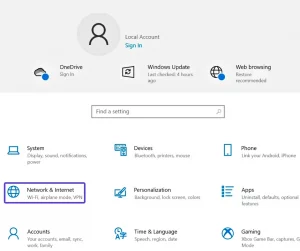
1. Click on Start, then go to Settings. In the Settings, go to Network & Internet.
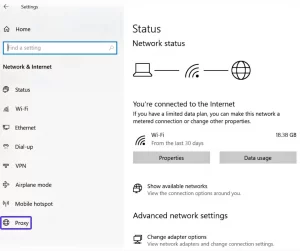
2. Click on the Proxy tab and select Set up in the manual proxy setup.
3. To manually configure a proxy, activate the “Use a proxy server” option and use such data to configure it:

After clicking Save, your proxy setup will get to work and you will be able to access Instagram.
Instructions on how to set up a proxy from ZoogVPN on MacOS:
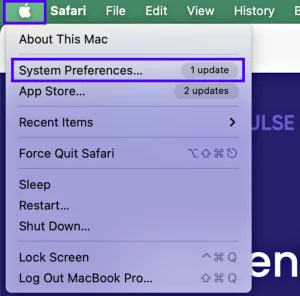
1. Click on the Apple icon in the upper left corner and go to System Preferences.
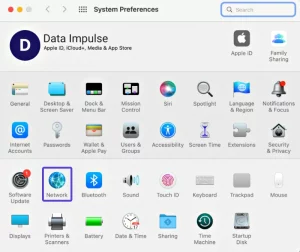
2. In the settings, click on the Network icon.
3. In the window that opens, open Advanced.
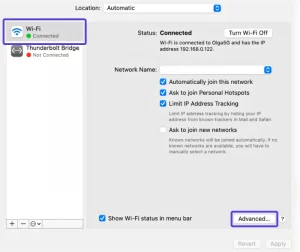
4. Next, as shown in the screenshot below, select Proxy in the top row and go to the SOCKS Proxy section.

5. Enter data on the blank lines:
SOCKS Proxy Server – enter the server addresses that are provided to you in your account on the site. Next, specify the port, 1080.
In the Username and Password lines, enter the data from your ZoogVPN account that you specified during registration.

At the end, just click OK and now you will have proxies configured that you can use to access the services that were previously blocked for you.
Download the Tor browser and unblock Instagram and other websites from the school
In this section, we’ll explore how the Tor Browser can empower you to make unblocked Instagram site and other restricted websites, allowing you to navigate the online world freely, even from your school’s network.
The Tor Browser, short for The Onion Router, is a powerful tool that enables users to browse the internet anonymously and access websites that might otherwise be blocked by school or workplace filters. It achieves this by routing your internet traffic through a network of volunteer-run servers, making it nearly impossible for anyone to trace your online activity back to you. This anonymity opens up a world of possibilities, including unblocking Instagram and other sites at school.
So, how can you use the Tor Browser to make Instagram unblocked for school? Here’s a step-by-step guide:
1. Visit the Tor Project Website: To get started, go to the official Tor Project website to download the Tor Browser for your operating system.
2. Download and Install: Select your operating system (Windows, macOS, or Linux) and download the Tor Browser bundle. Once downloaded, follow the installation instructions to set up the browser on your computer.
3. Launch the Tor Browser: After installation, launch the Tor Browser. It will connect to the Tor network and provide you with an anonymous IP address.
4. Access Instagram and Other Blocked Websites: With the Tor Browser running, you can now access Instagram and other restricted websites from your school network. The Tor network will help you bypass filters and access the content you desire.
How to unblock Instagram at school without a VPN?
While using a VPN is a standard method to bypass these restrictions, there are alternative solutions to make Instagram unblocked for school without the need for a VPN.
- Web proxy servers act as intermediaries between your computer and the websites you want to visit. They can help you access blocked websites like Instagram by routing your traffic through their servers, effectively bypassing school filters.
- If your school’s Wi-Fi network is the source of restrictions, you can use your mobile data connection to access Instagram. Simply disable Wi-Fi on your device and switch to mobile data. This way, you’ll use your cellular network to access the internet, bypassing school restrictions.
- Sometimes, school network restrictions may apply only to specific web browsers. Try using a less commonly used browser like Opera or Brave, as these browsers have built-in features that can help you access blocked websites.
Conclusion
In conclusion, when it comes to unblocking Instagram at school and reclaiming your online freedom, there are a few methods to choose from. We’ve discussed the most common ones, such as proxy servers, TOR browsers, and mobile data, but if you’re looking for a reliable, efficient, and foolproof solution, ZoogVPN stands out as the best choice.
So, whether you’re a high schooler trying to sneak a peek at your friends’ latest posts during lunch break or a college student looking to stay connected with the world between classes, ZoogVPN has got your back. Say goodbye to frustrating blocks and hello to endless Instagram scrolling. Unblock Instagram with ease, and stay connected to the moments that matter most. Try ZoogVPN today and experience the difference for yourself!
The post How to unblock Instagram at school? 3 tried-and-true methods first appeared on ZoogVPN.
]]>The post Best new and returning TV shows of the Fall 2023 first appeared on ZoogVPN.
]]>This article will take you through the must-see TV shows premiering in Fall 2023, from the long-awaited comeback of the incredible Invincible animated series to the comedic return of Frasier. The fall is going to be extremely rich on quality entertainment, including quite a few brand-new premieres and even more returning beloved TV shows. October and November are fruitful on thrillers and superhero shows with a darker vibe. Fans of gritty satiric show The Boys can dive into the comic book universe with a brand-new show Gen V premiering on Amazon Prime Video. If you’re unable to access Prime Video from your current location, then check out our detailed instruction on how to access it from anywhere, but more on that later. For now, let’s look at the most anticipated premieres of this fall.

What to watch in October-November 2023?
Gen V
Streaming on: Amazon Prime Video Release date: September 23, 2023
A spinoff of a critically acclaimed Amazon Prime Video show is promising to give us a wagon of witty humor and cover our screens in blood and explosions, starting on September 23. The easiest explanation of the series we could come up with is the Xavier’s School for Gifted Youngsters meets a Jordan Peele thriller.
Our Flag Means Death
Streaming on: Max Release date: October 5, 2023
The popular pirate-themed show, Our Flag Means Death, is making its much-anticipated return for season 2. The show follows Stede Bonnet and Blackbeard as they navigate through the trials and tribulations of their unlikely yet endearing romance. If you’re in a mood for some pirate love, you can catch the episodes on MAX (formerly known as HBO Max).
The Wheel of Time
Streaming on: Amazon Prime Release date: September 1, 2023
Based on Robert Jordan’s best-selling fantasy novels, The Wheel of Time is an epic tale of magic, adventure, and prophecy. The show offers a fascinating blend of Eastern and Western mythologies. You can catch the adventures of a powerful mage Moiraine played by Rosamund Pyke starting September 1 on Amazon Prime Video.
The Fall of the House of Usher
Streaming on: Netflix Release date: October 12, 2023
The Fall of the House of Usher is an upcoming gothic horror drama by Mike Flanagan based on a short story of the great Edgar Allan Poe. The show follows the Usher siblings as they uncover dark family secrets. The series promises to be an intoxicating mix of horror, drama, and mystery, premiering on Netflix on October 12, 2023.
The Crown
Streaming on: Netflix Release date: TBA
The Crown, the acclaimed historical drama about the British Monarchs and Queen Elizabeth II, is slated to return for its sixths and final season. The show’s meticulous attention to detail, sterling performances, and compelling storytelling have made it a must-watch for fans of historical dramas. The release date of the Season 6 is yet to be announced, but expected to come to our screens this Fall.
Lupin
Streaming on: Netflix Release date: October 5, 2023
The French thriller-drama inspired by Maurice Leblanc’s Gentleman-thief character returns for its third season. The show follows Assane Diop as he uses his skills to expose corruption and seek justice. Its intricate plotting and charismatic lead performance have made it a hit with viewers worldwide. The show comes back on Netflix on October 5, 2023.
Loki
Streaming on: Disney+ Release date: October 5, 2023
As we have mentioned previously, this fall seems to be extremely superhero-rich. The Marvel’s trickster Loki is set to return for a second season on October 5, 2023 on Disney+. The show follows the adventures of the Asgardian god, whose adventures are accompanied by his female trickster counterpart. We sure hope this show will not disappoint us, as The Secret Invasion did.
Bodies
Premiering on: Netflix Streaming on: Netflix Release date: November 19, 2023
Anything that Stephen Graham does is worth watching. This time, the master of accents appears in the Netflix original, Bodies, a psychological detective drama, where four detectives are solving the case in different timeline’s with one body. Coming to your TV screens on November 19, 2023.
The Gilded Age
Streaming on: MAX (HBO Max) Release date: October 29, 2023
Season 2 of a historical drama that explores the lives of the wealthy elite in 19th century New York comes back on October 29, 2023 on MAX. The show is created by Julian Fellowes, the mastermind behind Downton Abbey, and promises to deliver a lavish portrayal of this decadent era.
Invincible
Streaming on: Amazon Prime Release date: November 3, 2023
Season 2 of Invincible, the animated superhero series, is returning on November 3, 2023. The show follows a teenager who develops superpowers and learns to navigate his new abilities while dealing with the complexities of his personal life and finding out that his father is not really a hero he thought he was (to say the least). Quite possibly the best show produced by Amazon Studios, don’t miss out on this one!
Frasier
Streaming on: Paramount+ Release date: October 12
Paramount+ decided to play the nostalgia note by reviving the beloved sitcom, Frasier, 19 years after the last episode. The show follows the life of psychiatrist Frasier Crane as he returns to his hometown of Seattle and starts a new life and rekindle the relationship with his son. The show’s witty humor and engaging characters have made it a classic.
How to Access Streaming Platforms with a VPN
Many streaming platforms, such as Netflix, HBO Max, Disney+, and Amazon Prime, are region-restricted due to licensing policies. This means that some content may not be available in certain countries. Aside from Netflix, many popular streaming services are restricted to a certain region, like MAX and ITV. However, using a Virtual Private Network like ZoogVPN can help get around these circumstances. A VPN masks your IP address, making it seem like you’re browsing from a different location. This allows you to access content from any region, ensuring that you don’t miss out on your favorite shows. Plus, a VPN also provides an added layer of security, protecting your data from potential threats, especially if you’re traveling a lot and happen to use public Wi-Fi hotspots or hotel Wi-Fi.
Get the best VPN for streaming today!
The post Best new and returning TV shows of the Fall 2023 first appeared on ZoogVPN.
]]>The post How to disable NameDrop on iOS 17? first appeared on ZoogVPN.
]]>
What is NameDrop?
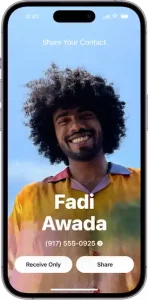
The NameDrop feature is a part of Apple’s newest iOS 17 software update. It allows users to share their contact information with others simply by bringing their iPhones close together. When two iPhones with this feature enabled come into close proximity, NameDrop is activated, allowing for the exchange of contact cards between the two devices. Oh, and it only works if you don’t have a contact of another person, so new contacts only.
The Safety Aspect of NameDrop
Though the NameDrop feature is designed with user convenience in mind, it does raise legitimate privacy concerns. As it is automatically enabled on devices running iOS 17, it’s easy for users to unintentionally share their contact information. Although the NameDrop feature requires physical proximity to function, there is still the potential for accidental or unwanted data sharing, especially in crowded public spaces.
However, it’s important to understand that the NameDrop feature is not inherently unsafe. Apple has implemented safeguards to protect users’ privacy. For instance, users have the option to decide which pieces of information are shared when using NameDrop and can choose whether to share their info, receive only, or disable the feature entirely.
This feature won’t be met too kindly by Persona 5 Strikers fan base as well, hehe.
How Does NameDrop Work on iOS 17?
NameDrop uses a combination of Bluetooth and Wi-Fi signals to detect the proximity of another iPhone with the same feature enabled. Once the devices are close enough, each device displays the owner’s contact card. Users then have the option to either share their own details, receive the other person’s details, or both.
How to Turn Off NameDrop on iOS 17
If you’re feeling some type of way about NameDrop, there’s a simple way of disabling it. There’s no foul in prioritizing privacy over innovativeness. Here’s how you turn off NameDrop on your iPhone:
- First, open the Settings app on your iPhone.
- Scroll down and tap on General.
- In the General settings, select AirDrop.
- You will see an option labeled Bringing Devices Together. Toggle this setting off.
By following these easy steps, you can effectively disable the NameDrop feature. Your device will no longer initiate or respond to NameDrop prompts, even when in close proximity to another iPhone.
Though the NameDrop feature is an innovative addition to the Apple ecosystem, it is not for everyone. The potential for unwanted data sharing is a legitimate concern for many users. Thankfully, Apple has provided an easy way to disable this feature for those who prefer to manually manage their contact information exchange. As always, when it comes to technology and privacy, it’s essential to stay informed and make the choices that best suit your comfort level and lifestyle.
About us
We hope this article was helpful! ZoogVPN is a team of enthusiasts focused on providing the best VPN service for the most affordable price without any compromises. Our service ticks all the boxes when it comes to securing your connection, helping get around censorship and unlocking streaming services of any kind. If you’re looking for the best budget solution for your iOS device, ZoogVPN is your best bet.
Get the best VPN for your iPhone today!
The post How to disable NameDrop on iOS 17? first appeared on ZoogVPN.
]]>The post How to Safely Access The Pirate Bay From Anywhere in 2023 first appeared on ZoogVPN.
]]>Is it safe to use The Pirate Bay?
When using The Pirate Bay, it’s important to be aware of the risks associated with torrenting. Since the platform operates in a legal gray area, users might inadvertently download copyrighted material, which could lead to potential legal consequences. Furthermore, not all files shared through torrents are safe; malicious actors have been known to disguise malware within seemingly harmless downloads.
While there are risks involved in using The Pirate Bay, there are steps you can take to mitigate them and ensure a safer experience:
- Use a Reliable VPN: A Virtual Private Network (VPN) can help protect your identity and data by encrypting your internet connection. This adds an extra layer of security when accessing torrent websites, including The Pirate Bay.
- Read User Comments and Ratings: Many torrent websites, including The Pirate Bay, allow users to comment on and rate torrent files. Pay attention to these comments and ratings to gauge the authenticity and safety of a particular file.
- Utilize Trusted Torrent Clients: Opt for reputable torrent clients that have built-in security features. These clients can help you identify and avoid potentially harmful files.
- Enable Anti-Malware Software: Install reliable anti-malware software on your device to scan downloaded files for any potential threats. This extra layer of protection can help you avoid downloading malicious content.
Is The Pirate Bay still working?
Since its inception in 2003, The Pirate Bay has faced numerous legal battles, domain seizures, and attempts to shut it down. Despite these challenges, the website has displayed remarkable resilience, often reappearing under new domains and adapting to changing circumstances. Its continued existence speaks to the complex nature of online piracy and the difficulty in fully eradicating such platforms.
As of the last available information, The Pirate Bay is still operational, allowing users to search for and download torrents. However, its accessibility can vary based on geographic location and the actions taken by Internet service providers (ISPs) and government authorities. Some users may experience difficulties accessing the site due to domain blocks or other restrictions implemented in certain countries.
Issues With Pirates Bay
While Pirate Bay is undoubtedly a popular platform for accessing a wide range of content, it’s essential to address the various issues associated with its use.
Perhaps the most significant issue with The Pirate Bay is its association with copyright infringement. The platform has been at the center of numerous legal battles due to its hosting and distribution of copyrighted material without the consent of content creators.
Another concern users face when navigating The Pirate Bay is the lack of quality control. Given the open nature of the platform, anyone can upload files, which can lead to misleading content or torrents with malware. Users who download files without caution risk exposing their devices to viruses, phishing attempts, or other cybersecurity threats.
The Pirate Bay’s frequent domain changes, often in response to legal actions, can create a sense of instability for users. Additionally, varying levels of accessibility across different countries can make it challenging for users to reliably access the website. While virtual private networks can circumvent these restrictions, the need to do so underscores the ongoing difficulties the platform faces.
Pirates Bay Mirror Site
Mirror sites essentially serve as replicas of the original Pirate Bay website, designed to preserve its functionality and content. These sites step in when the primary domain faces legal action or domain blocks. Operating under different web addresses, mirror sites give users a way to bypass censorship and access the torrents they are looking for. However, it’s important to note that not all mirror sites are created equal—some might be more reliable and secure than others.
One of the primary benefits of Pirate Bay mirror sites is their ability to maintain access to torrents in the face of legal obstacles. When a primary domain is taken down, mirror sites provide users with an alternative way to continue their digital media consumption. This can be particularly valuable for users in regions where access to certain content is restricted or unavailable.
While mirror sites aim to replicate the original Pirate Bay experience, not all of them are managed by the same administrators. This introduces the possibility of unscrupulous individuals creating mirror sites for malicious purposes, such as spreading malware or tricking users into disclosing personal information. Users must exercise caution and use reliable sources to find trustworthy mirror sites that prioritize security and content authenticity.
Do I need a VPN to Access?
A VPN is a tool that encrypts your internet connection, routing it through servers located in different regions or countries. This process masks your IP address, making it appear as if you’re connecting from a different location. VPNs are widely used for various purposes, from safeguarding personal data on public Wi-Fi networks to ensuring anonymity online.
When it comes to accessing pirated content, a VPN can provide a layer of anonymity that adds a degree of protection against potential legal and security risks.
Furthermore, a VPN can also help users bypass geographical restrictions imposed on certain websites and platforms. This is particularly relevant for accessing content that may be regionally blocked due to licensing agreements or government regulations. A VPN can route a user’s connection through a server in a different location, allowing them to appear as if they are accessing the internet from a different country.
Thus, using a VPN is not mandatory to access torrent sites such as Pirates Bay, but if you want to protect yourself from unnecessary problems that may arise during the use of these services, we highly recommend using reliable VPN providers. We will familiarize ourselves with the rating of the most reliable providers in the next section.
The Best Torrenting VPN for The Pirate Bay
When it comes to safely navigating the world of torrenting, particularly when accessing platforms like The Pirate Bay, a Virtual Private Network can be your best ally. Among the array of VPN options available, ZoogVPN stands out as the best choice for Pirate Bay enthusiasts.
- No-Log Policy
ZoogVPN’s strict no-log policy ensures that your online activities remain private. They don’t keep records of your browsing history, ensuring that your torrenting endeavors remain confidential.
- Robust Security Measures
ZoogVPN places a strong emphasis on security, a crucial aspect of torrenting. It employs high-grade encryption protocols like OpenVPN, WireGuard, and IKEv2 to shield your online activities from prying eyes. This level of encryption ensures that your connection is secure, even when accessing potentially copyrighted content.
- Global Server Network
ZoogVPN boasts an extensive network of servers across multiple countries, allowing users to strategically select their virtual location. This capability is especially useful when navigating geographic restrictions and accessing content that might be limited in certain regions.
- Torrent-Friendly Approach
Recognizing the needs of torrent users, ZoogVPN embraces a torrent-friendly stance. Its servers are optimized for P2P file sharing, ensuring that you can enjoy smooth and efficient torrenting sessions without compromising on security or speed.
Access The Pirate Bay: FAQ
Do I really need a VPN to download from The Pirate Bay?
Certainly, having a VPN for downloading from The Pirate Bay is a smart move. It shields your identity, secures your connection, and can help bypass any access limitations, enhancing your overall online safety.
What are the risks of not using a VPN with The Pirate Bay?
Without a VPN while using The Pirate Bay, you risk:
- Privacy Exposure: Your online activities, including downloads, can be tracked by your ISP and potentially other parties.
- Legal Consequences: Downloading copyrighted content without authorization may lead to legal penalties.
- Security Threats: Files from torrent sites can contain malware, putting your device at risk.
- Geo-Restrictions: You may be unable to access the site due to regional blocks.
A VPN mitigates these risks by providing anonymity, security, and access, making it a wise choice.
Is it illegal to torrent from The Pirate Bay?
Torrenting from The Pirate Bay itself is not inherently illegal. However, many files shared on The Pirate Bay are copyrighted materials, and downloading or sharing these without authorization constitutes copyright infringement, which is illegal in many countries. It’s crucial to use discretion and respect copyright laws when using such platforms.
Can I use a free VPN with Pirate Bay?
Certainly! While you can use a free VPN with The Pirate Bay, it’s essential to choose a trusted option like ZoogVPN. ZoogVPN offers a free plan with no speed limits, ensuring a seamless torrenting experience.
Conclusion
As we’ve explored, using a Virtual Private Network (VPN) is a key strategy to ensure your safety while accessing The Pirate Bay or engaging in any online activities. By encrypting your connection and masking your IP address, a VPN offers an extra layer of privacy and security. This becomes crucial when navigating potentially restricted or sensitive content. Opting for a reliable and established VPN provider, such as ZoogVPN, can provide you with the peace of mind you need. ZoogVPN’s trustworthy services encompass the necessary features to ensure a safe and anonymous browsing experience. Whether you’re bypassing geo-restrictions, safeguarding your data, or maintaining your privacy, this VPN provider’s commitment to quality and security sets it apart. Elevate your digital experience today by taking advantage of ZoogVPN’s reliable services and staying connected with confidence.
The post How to Safely Access The Pirate Bay From Anywhere in 2023 first appeared on ZoogVPN.
]]>The post What Can Hackers Do With Your IP Address? first appeared on ZoogVPN.
]]>What is an IP Address?
An Internet Protocol address, more commonly known as an IP address, is a unique numerical label assigned to each computer taking part in a network. Think of it as a digital identity card, crucial for delivering online traffic to the correct destination. An IP address is essential if you’re willing to use the Internet.
Your device has two types of IP addresses: public and private. The public IP address is visible on the Internet and is assigned by your Internet Service Provider (ISP). On the other hand, the private IP address is used within your private network and isn’t exposed to the broader internet.
There is also a distinction between dynamic and static IP addresses, which determines whether your IP address is constantly changing or stays the same.
How can one see your IP Address?
While it’s not directly identifiable information, your IP address can be found in various ways:
- Via Emails: Certain email services include your IP address in the email header, making it visible to the recipient. It is rather a rare case, as most popular services like Gmail, Yahoo, Outlook don’t offer such information due to improved security.
- While Torrenting: Participating in Peer-to-Peer (P2P) file sharing exposes your IP address to other users in the download/upload network. Downloading torrent files from random websites is quite dangerous for your Internet privacy.
- Through Online Ads and Email Spam: Clicking on digital advertisements can reveal your IP address to the ad publisher. Clicking various suspicious links in an email from an unknown sender is even worse.
- By Visiting Websites: Every website you visit logs your IP address, which can be accessed by the site’s administrators.
- Through Social Engineering Attacks: Hackers may trick you into revealing your IP address by impersonating trusted entities.
What can someone do with your IP address?
While your IP address alone can’t leak sensitive personal information, it can provide a gateway for hackers to exploit you in the following ways:
Track Your Geographic Location
Your IP address can disclose your approximate geographic location (city, state, or ZIP code). While it doesn’t reveal your exact address, it can provide enough information for hackers to tailor their social engineering or phishing attacks more effectively. Moreover, providing your geolocation to bad actors can lead to cases of threats, blackmailing and even swatting.
Send Personalized Spam
Advertisers or hackers can record your IP address to send you targeted spam or ads based on your browsing habits and location. As soon as you click a suspicious link, they gain access to your IP address and can bombard you with annoying spam letters.
Restrict Access to Certain Services
Your IP address reveals your geographic location and online services often use this information to restrict access to their content based on geographic location, a practice known as geoblocking. While it is an unpleasant practice, it is mostly used by streaming services and websites that offer some sort of on-demand content, due to having licensing obligations to broadcast certain content within geographical borders. For example, for many years, Netflix was exclusively available for audiences in the US and a few other countries, while viewers from outside the US couldn’t access the service.
Execute DDoS Attacks
Your IP address can be targeted for Distributed Denial of Service (DDoS) attacks. In a DDoS attack, multiple compromised computers are used to flood your network with traffic, causing it to crash. DDoS attacks may cause irreversible damage to your device, so it is better to avoid such cases.
Impersonate You for Illegal Activities
Cybercriminals can use your IP address to engage in illegal activities. They can impersonate you online, making it appear as if the illicit activities originated from your IP address. This is an extremely dangerous practice as it may endanger you in real life, due to the severity of repercussions for criminal activities online.
Sell Your IP on the Dark Web
While your IP address alone may not be valuable, when packaged with other personal information, it can be sold on the dark web for illicit purposes, including your browsing history and other sensitive information.
What should you do to avoid it?
If you suspect that your IP address has been compromised, here are some steps you can take:
- Change your IP address: Contact your ISP to request a new IP address or reset your modem to automatically assign a new one.
- Update your privacy settings: Ensure that your privacy settings on all your apps and online services are set to the maximum.
- Avoid phishing links: Don’t open any sort of links from unknown senders in your email inbox. Reply only to messages that you’re sure are safe and don’t contain any kind of suspicious information.
- Use a VPN: A Virtual Private Network (VPN) can help mask your real IP address, making it harder for hackers to target you. Using a VPN is the most crucial and important step to protect your IP address from bad actors
Why you should get a VPN to protect your IP address?
Virtual Private Networks like ZoogVPN are currently the best tools for safeguarding your online privacy. They establish a secure, encrypted connection between your device and a remote server operated by the VPN service. Here are some benefits of using a VPN:
Hides Your IP Address
When connected to a VPN, your internet traffic is routed through the VPN server, effectively hiding your real IP address. This makes it nearly impossible for anyone to trace your online activities back to you.
Encrypts Your Internet Traffic
VPNs use robust encryption protocols to secure your data while it’s in transit. This means that even if a hacker intercepts your data, they won’t be able to decipher it due to the encryption.
Bypasses Geo-restrictions
VPNs can help you bypass geoblocking by masking your real IP address. By connecting to a server in a different country, you can access content that’s otherwise unavailable in your location.
Protects Against DDoS Attacks
Since VPNs hide your real IP address, cybercriminals would find it challenging to target your device for DDoS attacks.
In conclusion, while your IP address can potentially be exploited for malicious activities, you can take certain steps to safeguard it. Regularly updating your privacy settings, using secure passwords, and especially using a VPN can go a long way in protecting your IP address and maintaining your online privacy and security.
About us
We hope this article was helpful! ZoogVPN is a team of enthusiasts focused on providing the best VPN service for the most affordable price without any compromises. Our service ticks all the boxes when it comes to securing your connection, helping get around censorship and unlocking streaming services of any kind. If you’re looking for the best budget solution for accessing AI services currently unavailable at your location, ZoogVPN is your best bet.
Get the best IP protection today!
The post What Can Hackers Do With Your IP Address? first appeared on ZoogVPN.
]]>The post How to use Claude AI chatbot outside the US and the UK? first appeared on ZoogVPN.
]]>Where can I use Claude 2?
Unfortunately, Claude 2 is only available in the United States and in the UK right now. It is obvious that Anthropic is aiming to share its creation with users from all over the world, but due to safety risks and concerns, Claude is only available for users in the UK and the US. However, considering that Claude AI provides more natural conversations and a hefty number of benefits, you should consider unblocking it even if you’re located outside the US and the UK.
Why is Claude 2 available only in the UK and the US?
A few months earlier, we covered a temporary ban on ChatGPT by the Italian government due to the supposed unethical use of information. Center for AI and Digital Policy published a complaint stating that OpenAI’s model fails to comply with the standards laid out by FTC, urging OpenAI to halt the further development of ChatGPT. The report says that the chatbot is “biased, deceptive, and a risk to privacy and public safety.” That’s where the concerns for the AI usage began in Europe, and it’s not without a reason. For example, a recent study showed that ChatGPT tends to be significantly left-wing biased, which means that it follows some sort of agenda and is influenced by OpenAI.
How to sing up for Claude AI?
In order to access and unblock Claude 2 from anywhere, you have to get a VPN service with servers located in the US or in the UK. Aside from that, you’ll need an SMS confirmation code from a US-based number. Luckily for you, there are many services providing SMS verification like Hushed, TextNow, Textfree etc. Here’s the algorithm on how to unblock Claude 2 from anywhere:
- Subscribe for one of our premium plans or get a free plan worth 10 GB of monthly bandwidth and get the ZoogVPN app on your device
- Launch the app, sign in using your credentials
- In app, select a server located in the US or the UK (both premium and free plan have servers in said locations)
- Click Connect to establish connection with a server
- Go to Claude website in your browser
- Start the registration via your email address or your Gmail account
- Once you’ll receive a temporary code, you can type your details, confirm your age and read the Terms
- When asked for a UK/US phone number, use one of the SMS verification services like Hushed, TextNow, Textfree in order to confirm your account
- Use your Claude AI login and password to sign the next time you use the chatbot
- Now you can input your prompts and use Claude 2!
Important note. We advise using a credible VPN service like ZoogVPN so that you’re not putting your personal information at risk. Many so-called free VPN services have little-to-no security features, and some of them go as far as collecting your personal data for their benefit by selling it to third parties and advertisers. ZoogVPN operates with strirct No-Logs policy, meaning that we don’t collect your personal information and Internet history, hence, we don’t give it to someone else. Aside from that, even our free VPN plan offers a strong 128-bit encryption cipher to all users, making it impossible for bad actors to access your info and data.
How to use Claude AI?
In order to use AI Claude 2 chatbot, simply input your prompts. Type in any question on your mind in the box and click Start a new chat in order to initiate the conversation. Don’t forget that Claude 2 can analyze huge prompts, so that you can look through every detail and be as precise as you need.
About us
ZoogVPN is a team of enthusiasts focused on providing the best VPN service for the most affordable price without any compromises. Our service ticks all the boxes when it comes to securing your connection, helping get around censorship and unlocking streaming services of any kind. If you’re looking for the best budget solution for accessing AI services currently unavailable at your location, ZoogVPN is your best bet.
Get the best VPN for accessing Claude 2 today!
The post How to use Claude AI chatbot outside the US and the UK? first appeared on ZoogVPN.
]]>