-
-
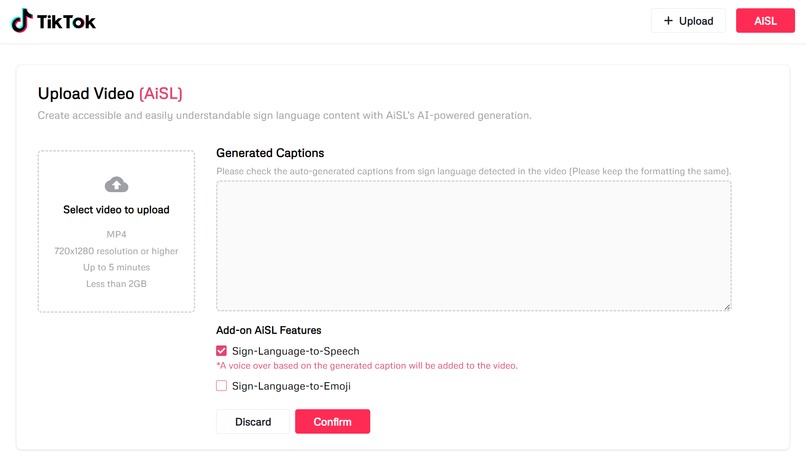
Video Upload and Editing Interface
-
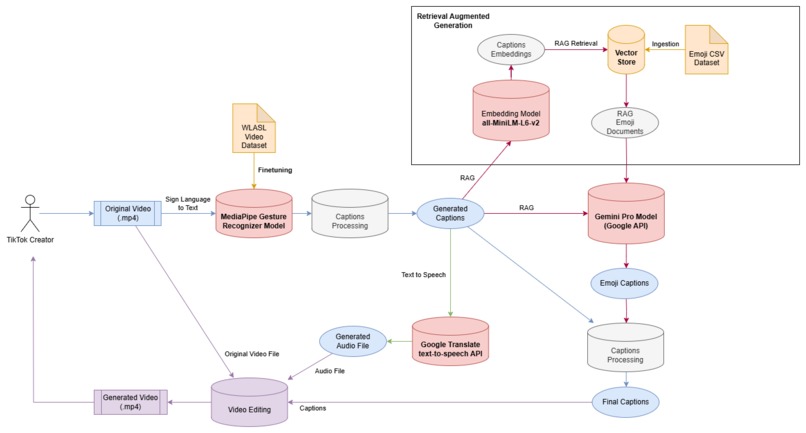
AiSL AI Architecture
Problem Statement 2 - Inspiring Creativity with Generative AI
Inspiration
TikTok has a thriving community of deaf creators (Ella Glover, 2022). While the introduction of Auto Captioning to TikTok in 2021 has changed the game for deaf consumers, deaf creators still struggle to reach out to the hearing consumers effectively due to the lack of Sign Language captions.
Thus, deaf creators have to spend more time and effort to create inclusive content as they need to translate sign language to text, and subsequently audio if needed in order to allow the hearing community to understand their content.
However, this is a challenge for the deaf creators as deaf people struggle with written text (Sign Solution, 2012), and have immense difficulties with speaking clearly (Ahmed Khalifa, 2020).
On the hearing consumer side, they struggle to understand deaf creators when there are no captions/spoken words available.
The TikTok deaf community has the potential to make significant impacts on the platform. Past examples have revealed so - A video captioned "Deaf Ears in a Hearing World," which depicted a day in the life of a deaf person and received 33.5 million views; Mingin's (a deaf TikTok creator) most viewed videos, with more than 9 million views, was a sarcastic response to a comment that asked if her throat hurt due to how she talks: "Really?" she said. "No, only my ears don't work. Nothing to do with my throat." (Ella Glover, 2022).
Therefore, there is a need to enhance inclusivity and productivity for TikTok deaf creators.
What it does
Introducing AiSL, an AI-powered tool that turns videos with sign language into inclusive and exciting videos with auto-generated captions, auto-generated voice-over, and auto-generated emoji captions.
The 3 key features of AiSL include:
- Sign Language to Text
- Sign-Language-to-Text converts sign language to text captions as sign language appears in the video.
- Sign Language to Speech
- Sign-Language-to-Speech converts sign language to a voiceover that plays over the video as the sign language appears in the video.
- Sign Language to Emoji
- Sign-Language-to-Emoji converts sign language to emoji text captions as the sign language appears in the video.
TikTok Creator User Flow
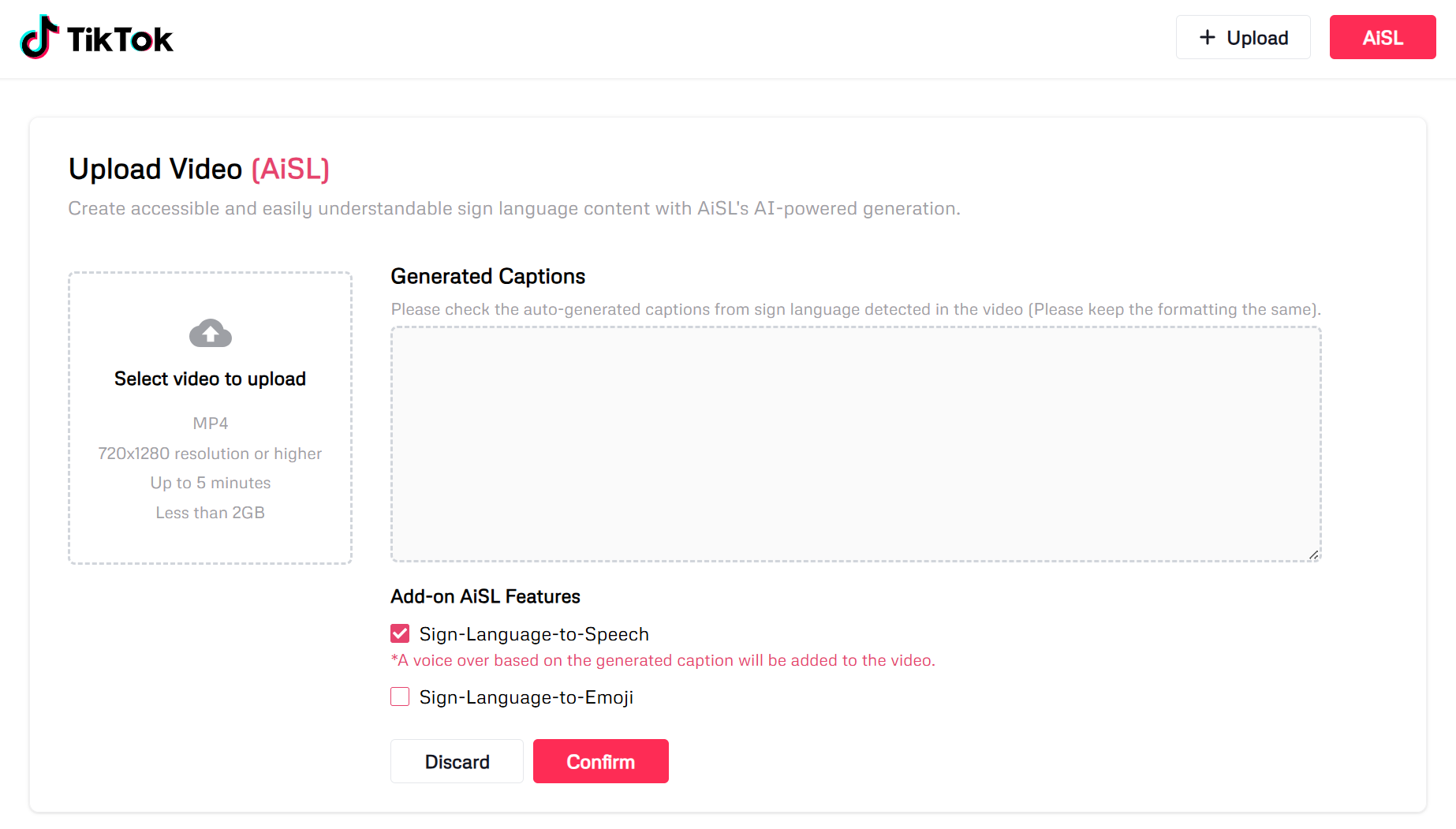
- A TikTok Creator can upload a video with sign language incorporated onto AiSL.
- Upon uploading to the AiSL, text captions will be auto generated based on the timestamp when sign language is being used. These captions can be edited by the user.
- The TikTok Creator can then also choose whether to use the AiSL add-on features - Sign Language to Speech and Sign Language to Emoji.
- Once the TikTok Creator clicks "Confirm", AiSL will process the video and generate a new video based on the features selected.
- The TikTok Creator can view the generated video and download it for uploading to the TikTok platform.
How we built it
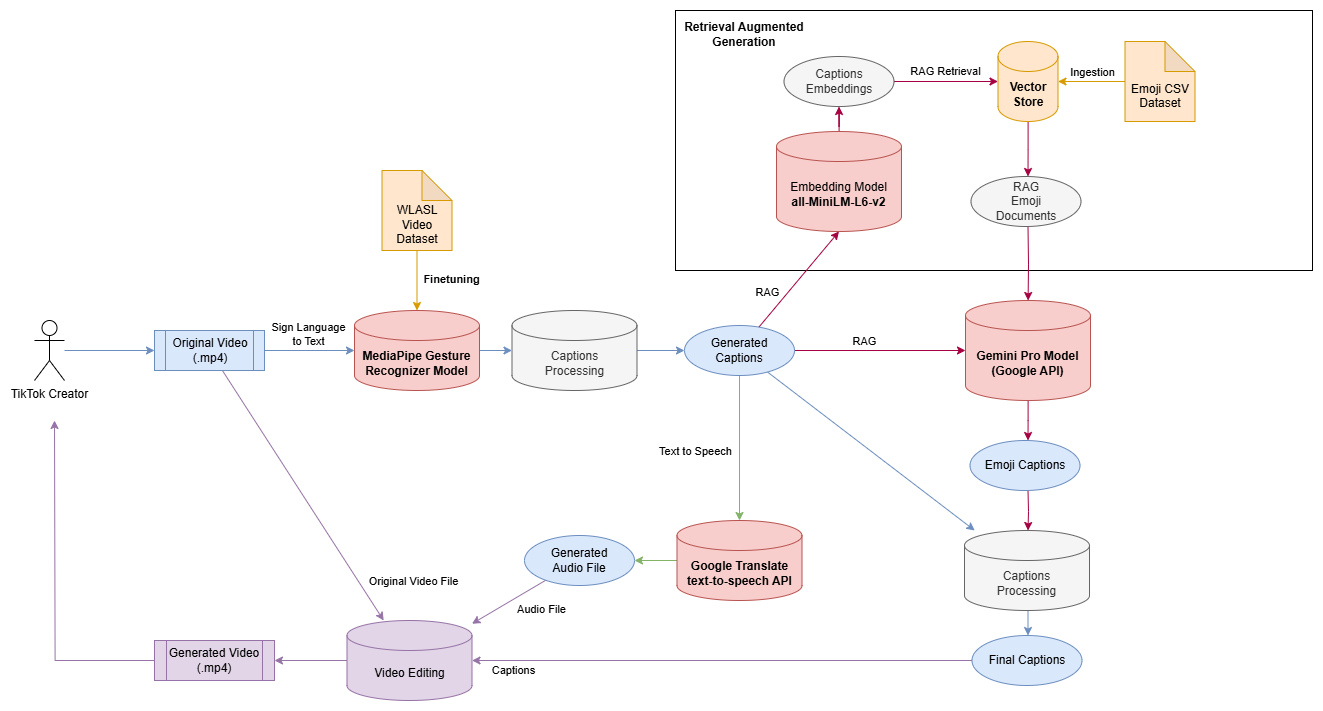
AiSL AI Architecture
- User's original video (in .mp4) is passed as input to the MediaPipe Gesture Recognizer model that we have fine tuned, and the model outputs the captions with the appropriate time stamps.
- The output captions with time stamps are processed algorithmically before passing to the next processing stage.
- The output captions are passed as inputs to the Text-to-Speech model (Google Translate text-to-speech API). An audio file is outputted here.
- At the same time, the output captions are turned into embeddings using
sentence-transformers/all-MiniLM-L6-v2before conducting RAG retrieval from the vector store containing documents of emojis and descriptions. The retrieved documents (context) are passed as prompt together with the original generated captions to the Gemini Pro model for text to emoji translation. - The generated captions, generated audio file, and generated emoji captions are processed together with the original video to generate an edited video using python
cv2package.
Frontend
- Next.js (Deployed on Vercel)
Backend
- FastAPI (Deployed on Google Cloud Run)
Video Editing
- CV2 python package.
AI Models
- Sign Language to Text
- Model: MediaPipe Gesture Recognizer (Finetune)
- Finetune Dataset: WLASL Video (https://www.kaggle.com/datasets/risangbaskoro/wlasl-processed)
- Text to Speech
- Model: Google Translate text-to-speech API
- Text to Emoji
- Vectorstore (RAG) with emoji.csv as datasource
- Embeddings: sentence-transformers/all-MiniLM-L6-v2
- LLM Model: gemini-pro
Datasets (Assets)
- Finetune Dataset: WLASL Video (https://www.kaggle.com/datasets/risangbaskoro/wlasl-processed)
- RAG Dataset: Emoji.csv (~500 records of emoji with description generated from OpenAI ChatGPT)
APIs used
- HuggingFace API
- Embeddings: sentence-transformers/all-MiniLM-L6-v2
- Google API
- LLM Model: gemini-pro
- Text to Speech: Google Translate text-to-speech API
Challenges we ran into
- While there were many fingerspelling sign language to text models, there is a lack of word level sign language to text models thus making the task challenging
- Due to computational constraints, we were only able to train about 50 words
Accomplishments that we're proud of
- We managed to train and build a basic word level sign language to text model.
- We managed to incorporate Retrieval Augmented Generation (RAG) Technique to make text to emoji translation better.
What we learned
- Sign Language to Text Generation
- Text to Speech Generation
- Text to Emoji Generation
- Retrieval Augmented Generation
- Importance of Accessibility
What's next for AiSL
- Streaming content to extend beyond just video to include live streams.
- Customize position and size of the captions.
- Customizable generated voice (Sign Language to Voice) - Language, Gender, etc.
- Captions Translation to different languages.
- Customizable style of emoji translation (e.g.: professional style, funny style, etc)
Built With
- faissvectorstore
- fastapi
- gemini-pro
- google-cloud-run
- gtts-api
- huggingface
- langchain
- mediapipe-gesture-recognizer
- next.js
- python
- python-cv2
- rag
- typescript
- vercel


Log in or sign up for Devpost to join the conversation.