Important Notes
- This branch non-editable.
- Generate all your private files from master branch (token.pickle, config.env, drive_folder, cookies.txt ...).
- You can only edit a2c.conf(aria2c) and qBittorrent.conf.
- Don't add variables in heroku Environment, you can only add
CONFIG_FILE_URL. BASE_URL_OF_BOTvariable is required to start the bot.- Incase any extra file added or any edit in dockerfile or edit file not mentioned in note
3your bot will not start. - Shell and Eval commands disabled in this branch.
- This branch uses megasdkrest and latest version of qBittorrent.
- Clone this repo:
git clone https://github.com/anasty17/mirror-leech-telegram-bot mirrorbot/ && cd mirrorbot
- Switch to heroku branch
- NOTE: Don't commit changes in master branch. If you have committed your changes in master branch and after that you switched to heroku branch, the new added files(private files) will
NOTappear in heroku branch.
- NOTE: Don't commit changes in master branch. If you have committed your changes in master branch and after that you switched to heroku branch, the new added files(private files) will
git checkout heroku
- After adding your private files
git add . -f
- Commit your changes
git commit -m token
- Login to heroku
heroku login
- Create heroku app
heroku create --region us YOURAPPNAME
- Add remote
heroku git:remote -a YOURAPPNAME
- Create container
heroku stack:set container
- Push to heroku
git push heroku heroku:master -f
- To create heroku-postgresql database
heroku addons:create heroku-postgresql
- To delete the app
heroku apps:destroy YOURAPPNAME
- To restart dyno
heroku restart
- To turn off dyno
heroku ps:scale web=0
- To turn on dyno
heroku ps:scale web=1
- To set heroku variable
heroku config:set VARNAME=VARTEXT
- To get live logs
heroku logs -t
- Go to Repository Settings -> Secrets

-
Add the below Required Variables one by one by clicking New Repository Secret every time.
- HEROKU_EMAIL: Heroku Account Email Id in which the above app will be deployed
- HEROKU_API_KEY: Your Heroku API key, get it from https://dashboard.heroku.com/account
- HEROKU_APP_NAME: Your Heroku app name, Name Must be unique
- CONFIG_FILE_URL: Copy This in any text editor.Remove the REMOVE_THIS_LINE=True line and fill the variables. For details about config you can see Here. Go to https://gist.github.com and paste your config data. Rename the file to config.env then create secret gist. Click on Raw, copy the link. This will be your CONFIG_FILE_URL. Refer to below images for clarity.
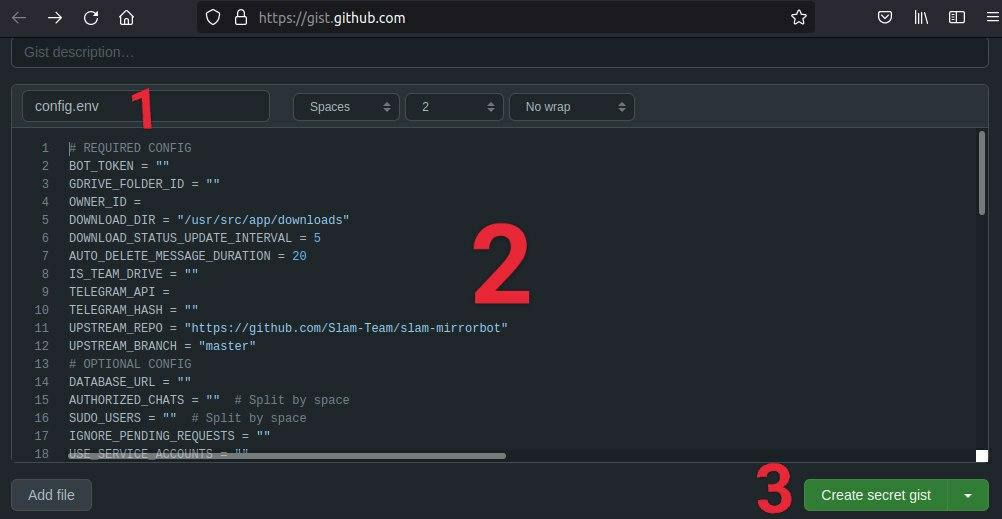


-
Remove commit id from raw link to be able to change variables without updating the CONFIG_FILE_URL in secrets. Should be in this form: https://gist.githubusercontent.com/username/gist-id/raw/config.env
-
After adding all the above Required Variables go to Github Actions tab in your repository.
- Select Manually Deploy to Heroku workflow as shown below:

- Click on Run workflow
