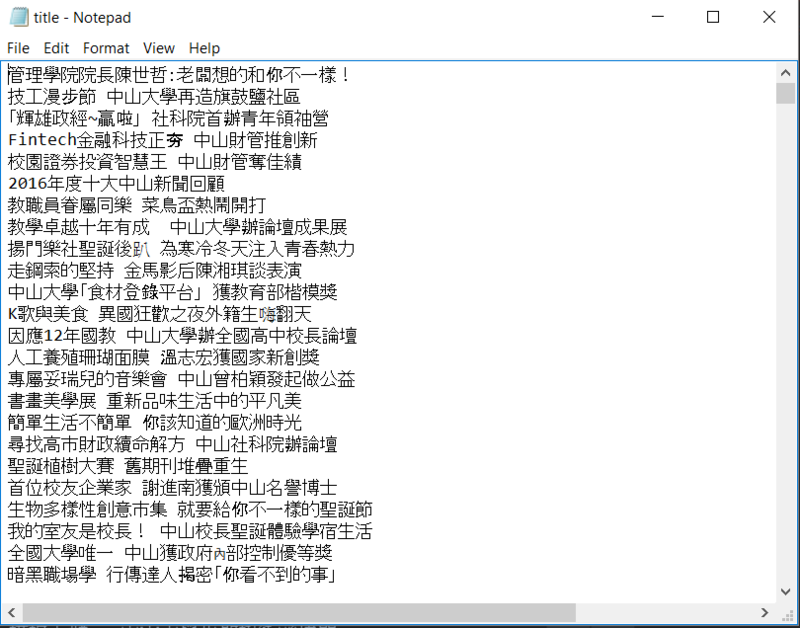
這學期作業系統課程學習到multi-threads及synchronization,因此決定寫一個爬取中山大學校園新聞標題的應用, 用多線程爬取標題後,再同步寫入txt檔內。
- python 2.7
- PyCharm Community
先將所有校園新聞的網址丟進Queue,再讓每個線程拿取, parse出標題後寫入txt,最後比較單一線程與多線程完成寫入的速度差異。
使用python內建的物件Queue的好處在於已寫好的底層同步保護機制,夠能確保每一條thread正確的取得URL。 Queue預設為FIFO,可參考文件。
Queue.put()將值加入queue,
Queue.get()刪除並傳回刪除值。
titles = Queue() #建立queue物件
for i in range(187):
  url = "http://news.nsysu.edu.tw/files/40-1342-2910-" + str(i + 1) + ".php?Lang=zh-tw"
titles.put(url) #加入url,titles將會有187個urlParser物件繼承threading模組裡的Thread物件,
因此每個Parser就是一條thread,
覆寫 run()函數,指定工作給Parser,
run()會在線程啟動後執行。
class Parser(threading.Thread): # 此為python繼承語法
    def __init__(self, name): #constructor 接受 name 參數
        threading.Thread.__init__(self) # initialize super class
        self.name = name # 每條Parser的名子

    def run(self): # thread啟動後執行函數
        while titles.empty() is False:  #檢查titles queue不為空的話,獲取URL後parse
            current_url = titles.get()
parse(current_url)要爬標題的html長這樣:
<div class="h5">
	<a href="http://news.nsysu.edu.tw/files/14-1342-163015,r2910-1.php?Lang=zh-tw" title="管理學院院長陳世哲:老闆想的和你不一樣!">管理學院院長陳世哲:老闆想的和你不一樣!
  </a>
	<span class="date "> [ 2017-01-19  ] </span>
</div>取得html後,使用Beautifulsoup及re模組取得標題後寫入txt, 檔案寫入同步問題使用semaphore:
def parse(current_url):
    u = urllib.urlopen(current_url) #取得url 的 html
    html = u.read()
    soup = BeautifulSoup(html, "html.parser") # 將html丟給Beautifulsoup parsing

    title_tags = soup.find_all("div", {"class": "h5"}) # 取得class為h5的div標籤,回傳所有div.h5的list

    for tag in title_tags:
        title = re.findall('title="(.+)"', str(tag)) # 取得<a>裡面的title值
        try:
            line = title[0].strip('\n') + '\n'

            # 檔案寫入區塊
            semaphore.acquire() # 用binary semaphore控制一次只能一條thread對檔案做寫入
            # critical section
            with open(fname, "a") as myfile:
                myfile.write(line)
            counter += 1 # 寫入成功加1
            semaphore.release() # 寫完釋放semaphore
        except:
passdef main():
for i in range(187):
url = "http://news.nsysu.edu.tw/files/40-1342-2910-" + str(i + 1) + ".php?Lang=zh-tw"
titles.put(url)
threads = []
for j in range(4):
c = Parser('c' + str(j)) # 建立Parser物件
c.start() # 啟動thread
threads.append(c)
for thread in threads:
thread.join() # 主線程必須等到所有threads執行完畢才繼續執行
if __name__ == '__main__':
tStart = time.time() # 起始時間
print "start parsing..."
main()
tEnd = time.time() # 結束時間
print 'total numbers of titles : ' + str(counter) # 總共抓取標題數
print 'Cost %d seconds' % (tEnd - tStart) # 完成花費時間from bs4 import *
import urllib
import re
import time
import threading
from Queue import Queue
titles = Queue() #建立 queue 物件
fname = "title.txt"
semaphore = threading.Semaphore(value=1) # 建立semaphore物件 value預設值為1 當value小於1時必須等到有thread release()
counter = 0 # 計算寫入標題數使用三個threads: 

title.txt
##參考文件 threading beautifulsoup