
Deploy and manage large language models on Kubernetes — no YAML required.
Note
AI Runway is still under heavy development and the APIs are not currently considered stable. Feedback is welcome! ❤️
AI Runway gives you a web UI and a unified Kubernetes CRD (ModelDeployment) to deploy models across multiple inference providers. Browse HuggingFace, pick a model, click deploy.
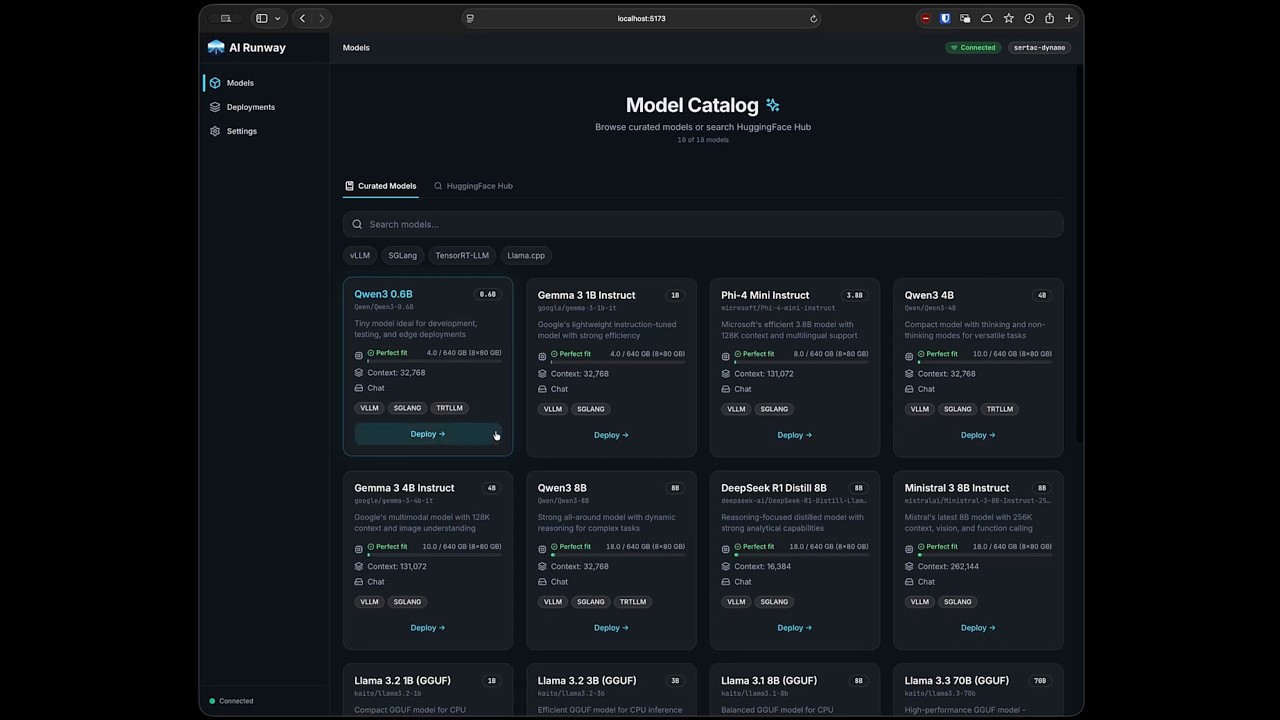
- 🚀 One-Click Deploy — Browse models, check GPU fit, and deploy from the UI
- 🎯 Unified CRD — Single
ModelDeploymentAPI across all providers - 🔧 Multiple Engines — vLLM, SGLang, TensorRT-LLM, llama.cpp
- 📈 Live Monitoring — Real-time status, logs, and Prometheus metrics
- 💰 Cost Estimation — GPU pricing and capacity guidance
- 🌐 Gateway API Integration — Unified inference endpoint via Gateway API Inference Extension with auto-detected setup
- 🔌 Headlamp Plugin — Full-featured Headlamp dashboard plugin
| Provider | Description | Provider Shim |
|---|---|---|
| NVIDIA Dynamo | GPU-accelerated inference with aggregated or disaggregated serving | dynamo.yaml |
| KubeRay | Ray-based distributed inference | kuberay.yaml |
| KAITO | vLLM (GPU) and llama.cpp (CPU/GPU) support | kaito.yaml |
| LLM-D | vLLM (GPU) with aggregated or disaggregated serving | llmd.yaml |
- Kubernetes cluster with
kubectlconfigured helmCLI installed- GPU nodes with NVIDIA drivers (KAITO also supports CPU-only)
Download the latest release and run:
./airunwaymacOS: Remove quarantine if needed:
xattr -dr com.apple.quarantine airunway
# Install CRDs and controller (required)
kubectl apply -f https://raw.githubusercontent.com/kaito-project/airunway/main/deploy/controller.yaml

# Install dashboard UI (optional)
kubectl apply -f https://raw.githubusercontent.com/kaito-project/airunway/main/deploy/dashboard.yaml
kubectl port-forward -n airunway-system svc/airunway 3001:80
Open http://localhost:3001 — see deployment docs for more options.
- Install a provider shim — Apply one or more provider shims to register providers with AI Runway. See Supported Providers for available options.
- Install the provider — Go to the Installation page and install the upstream provider via Helm
- Connect HuggingFace — Sign in via Settings → HuggingFace (optional for non-gated models)
- Deploy a model — Browse the catalog, pick a model, configure, and deploy
- Monitor — Track status, stream logs, and view metrics on the Deployments page
Deployed models expose an OpenAI-compatible API:
kubectl port-forward svc/<deployment-name> 8000:8000 -n <namespace>
curl http://localhost:8000/v1/chat/completions \
  -H "Content-Type: application/json" \
-d '{"model": "<model-name>", "messages": [{"role": "user", "content": "Hello!"}]}'apiVersion: airunway.ai/v1alpha1
kind: ModelDeployment
metadata:
name: my-model
spec:
model:
id: "Qwen/Qwen3-0.6B"The controller automatically selects the best engine and provider, creates provider-specific resources, and reports unified status. See CRD Reference for details.
| Topic | Link |
|---|---|
| Architecture | docs/architecture.md |
| CRD Reference | docs/crd-reference.md |
| Providers | docs/providers.md |
| Observability | docs/observability.md |
| Development | docs/development.md |
| Kubernetes Deployment | deploy/README.md |
| Gateway Integration | docs/gateway.md |
| Headlamp Plugin | docs/headlamp-plugin.md |
See CONTRIBUTING.md for development setup. We also accept AI-assisted prompt requests.