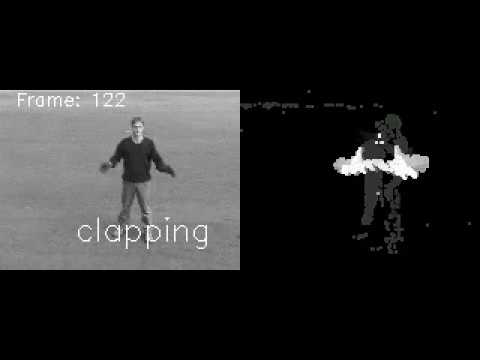
This package implements Gesture Recognition in video through based on Motion History Images (MHI). We use computer vision techniques to extract relevant motion history from individual frames of a trainig set of action video.. The extracted frames are used to train a Random Forest Classifier model. The test video is run through through the classifier and the individual frames are label with the classification results.
The package contains all source files used to generate images and output shown in the final report.
experiments.py - Execution entry point, all output was generated using this module.
core.py - Contains the core classes and functionality of the investigation.
utils.py - Helper methods
config.py - Defines constants and settings.
create_action_compilation_video.py - Script to create a video of mixed actions.
Using this package requires additional files that are not included here due to file size restrictions. These additional files can be downloaded from: https://drive.google.com/open?id=1ahTThAxqL_oJ12lbpfwzXryYld3tnRHP
Once downloaded unzip the folder here. The final folder structure should be similar to
package_root_folder
    ├── README.md
    ├── config.py
    ├── core.py
    ├── create_action_compilation_video.py
    ├── download_video_files.sh
    ├── environment.yml
    ├── experiment.py
    ├── input_files
    ├── saved_objects   <-- this folder added
    └── utils.py

The final output video can be viewed here: https://youtu.be/293_idvQvFM

# Activate the virutal enviroment
conda env create -f environment.yml
conda activate aparmar_cv_proj

# View help on experiments.py for experiment descriptions and runtimes.
python experiment.py -h

# Verify the models have been loaded properly
python experiment.py --exp 1

# Run experiment to generate video.
python experiment.py --exp 5

# To change the video source file:
#    1. Copy the new video file under the `input_files` directory.
#    2. Change the filename in experiment.py line 455 under section to the new filename.
# Then run the experiment again:
python experiment.py --exp 5

# Run other expriments e.g.
python experiment.py --exp 2
python experiment.py --exp 3
python experiment.py --exp 4
Note: --exp 0 generates raw data and trains the classifier, this takes a long time to run. It also requires all the raw video files from https://web.archive.org/web/20190901190223/http://www.nada.kth.se/cvap/actions/. To retrieve all video files from the video database run:
# From the package_root_folder
bash download_video_files.sh