
A keyboard-driven terminal UI for OpenStack.
Installation ·
Features ·
Keybindings ·
Configuration ·
License
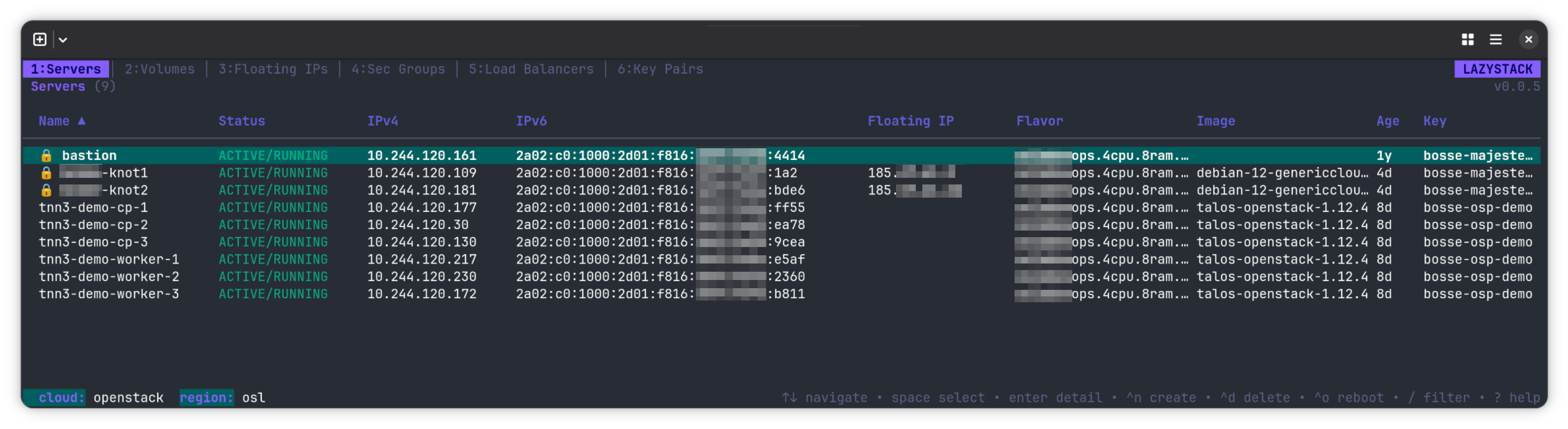
lazystack is a fast, keyboard-first TUI for managing OpenStack resources from the terminal. It follows the "lazy" convention (lazygit, lazydocker) to provide an intuitive alternative to Horizon and the verbose OpenStack CLI.
Single binary. No runtime dependencies. Reads your standard clouds.yaml.
- Server management — list, create, delete, rename, rebuild, reboot, stop/start, pause, suspend, shelve, lock/unlock, rescue/unrescue, resize, snapshot, with bulk operations
- Volume management — list, detail, create, delete, attach (server picker), detach
- Floating IPs — allocate, associate, disassociate, release
- Security groups — create/delete groups, create/delete rules, expandable rule view
- Networks — create/delete networks, create/delete subnets, read-only port listing
- Routers — create/delete routers, add/remove interfaces (subnet picker), detail with routes
- Key pairs — create (RSA 2048/4096, ED25519), import with ~/.ssh/ file browser, detail view, save private key to file
- Images — list, detail, delete, deactivate/reactivate with status-aware coloring
- Load balancers (Octavia) — list, detail tree (listeners/pools/members), cascade delete
- Project switching — switch between accessible Keystone projects without restarting
- Quota overlay — compute, network, and storage quotas with color-coded progress bars
- Confirmation dialogs — all server state-change actions require explicit confirmation
- Dynamic tabs — tabs appear based on available services (no Cinder? no Volumes tab)
- Auto-refresh — all views refresh in the background at a configurable interval
- SSH integration — launch SSH sessions directly from the TUI, or copy the SSH command to clipboard
- Console access — retrieve noVNC console URL, open in browser or copy to clipboard
- Server cloning — clone servers with one keypress
- Cross-resource navigation — jump from server detail to attached volumes, security groups, or networks
- Console log and action history per server
- Column sorting on all list views
- Client-side filtering with
/
- Bulk select with
space for multi-server operations
- Self-update —
--update flag to update to latest release
- Solarized Dark color scheme with status-aware coloring
brew install larkly/tap/lazystack
Download the .deb from the releases page and install:
sudo dpkg -i lazystack_*.deb
Download the .rpm from the releases page and install:
sudo rpm -i lazystack-*.rpm
Grab the latest release for your platform from the releases page.
go install github.com/larkly/lazystack/cmd/lazystack@latest
- Go 1.26+ (build only)
- OpenStack cloud with Keystone v3 and Nova v2.1+
- A valid
clouds.yaml
lazystack reads clouds.yaml from these locations (first match wins):
./clouds.yaml (current directory)$OS_CLIENT_CONFIG_FILE~/.config/openstack/clouds.yaml/etc/openstack/clouds.yaml
No additional configuration is needed. If only one cloud is defined, lazystack connects automatically.
| Flag |
Default |
Description |
--pick-cloud |
false |
Always show cloud picker, even with one cloud |
--cloud NAME |
|
Connect directly to named cloud, skip picker |
--refresh N |
5 |
Auto-refresh interval in seconds |
--idle-timeout N |
0 |
Pause polling after N minutes of no input (0 = disabled) |
--no-check-update |
false |
Skip the automatic update check on startup |
--update |
false |
Self-update to the latest release |
--version |
|
Print version and exit |
| Key |
Action |
q / Ctrl+C |
Quit |
? |
Toggle help overlay |
C |
Switch cloud |
P |
Switch project |
Q |
Quota overlay |
1-9 / Left / Right |
Switch tab |
R |
Force refresh |
s / S |
Sort column / reverse sort |
PgUp / PgDn |
Page up / down |
Ctrl+R |
Restart app |
| Key |
Action |
j / k |
Navigate |
Enter |
View detail |
Space |
Select for bulk action |
/ |
Filter |
Ctrl+N |
Create server |
Ctrl+D |
Delete |
Ctrl+O |
Soft reboot |
o |
Stop / start |
p |
Pause / unpause |
Ctrl+Z |
Suspend / resume |
Ctrl+E |
Shelve / unshelve |
Ctrl+L |
Lock / unlock |
Ctrl+W |
Rescue / unrescue |
Ctrl+F |
Resize |
Ctrl+A |
Attach volume |
Ctrl+U |
Assign floating IP |
r |
Rename |
Ctrl+G |
Rebuild with new image |
Ctrl+S |
Create snapshot |
c |
Clone server |
x |
SSH into server |
y |
Copy SSH command |
V |
Console URL (noVNC) |
L |
Console log |
a |
Action history |
| Key |
Action |
j / k |
Scroll |
Ctrl+D |
Delete |
Ctrl+O / Ctrl+P |
Soft / hard reboot |
o |
Stop / start |
p |
Pause / unpause |
Ctrl+Z |
Suspend / resume |
Ctrl+E |
Shelve / unshelve |
Ctrl+L |
Lock / unlock |
Ctrl+W |
Rescue / unrescue |
Ctrl+F |
Resize |
Ctrl+Y / Ctrl+X |
Confirm / revert resize |
Ctrl+A |
Attach volume |
Ctrl+U |
Assign floating IP |
r |
Rename |
Ctrl+G |
Rebuild with new image |
Ctrl+S |
Create snapshot |
c |
Clone server |
x |
SSH into server |
y |
Copy SSH command |
V |
Console URL (noVNC) |
v |
Jump to volumes |
g |
Jump to security groups |
N |
Jump to networks |
L |
Console log |
a |
Action history |
Esc |
Back to list |
| Key |
Action |
Enter |
View detail |
Ctrl+N |
Create volume |
Ctrl+D |
Delete |
Ctrl+A |
Attach to server (from detail) |
Ctrl+T |
Detach (from detail) |
| Key |
Action |
Ctrl+N |
Allocate |
Ctrl+T |
Disassociate |
Ctrl+D |
Release |
| Key |
Action |
Enter |
Expand / collapse rules |
Ctrl+N |
Create group (or add rule when in rules) |
Ctrl+D |
Delete group (or rule when in rules) |
| Key |
Action |
Enter |
Expand / collapse subnets |
Ctrl+N |
Create network (or subnet when expanded) |
Ctrl+D |
Delete network (or subnet in subnets) |
| Key |
Action |
Enter |
View detail (interfaces) |
Ctrl+N |
Create router |
Ctrl+D |
Delete router |
Ctrl+A |
Add interface (from detail) |
Ctrl+T |
Remove interface (from detail) |
| Key |
Action |
Enter |
View detail (public key) |
Ctrl+N |
Create / import |
Ctrl+D |
Delete |
| Key |
Action |
Enter |
View detail tree |
Ctrl+D |
Delete (cascade) |
| Key |
Action |
Enter |
View detail |
Ctrl+D |
Delete image |
| Key |
Action |
Tab / Shift+Tab |
Next / prev field |
Enter |
Open picker |
Ctrl+S |
Submit |
Esc |
Cancel |
Built with:
src/internal/
  app/            # Root model, routing, actions, rendering (8 files)
  cloud/          # Auth, service detection, project listing
  compute/        # Nova: servers, flavors, keypairs, actions
  image/          # Glance: images
  network/        # Neutron: networks, subnets, ports, routers, floating IPs, security groups
  volume/         # Cinder: volumes, volume types
  loadbalancer/   # Octavia: LBs, listeners, pools, members
  quota/          # Quota fetching (compute, network, storage)
  selfupdate/     # GitHub release self-update
  shared/         # Keys, styles, messages
  ui/             # All view components (38 packages)
Apache 2.0

