

A modern, real-time facial recognition pipeline built with Python. This project leverages the high-performance MediaPipe for face detection, keras-facenet for generating accurate facial embeddings, ChromaDB for efficient vector storage and search, and Streamlit for creating interactive web applications.
It's designed to be simple to set up and use, providing a solid foundation for various computer vision projects, from smart home security to personalized user experiences.
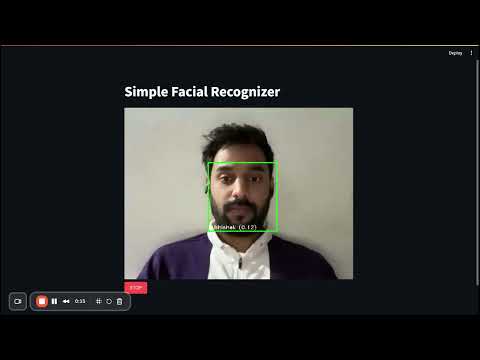
- ⚡ Real-Time Recognition: Identifies faces smoothly from a live webcam feed.
- 📸 Easy Dataset Creation: An interactive Streamlit app to capture and add new faces to your dataset on the fly.
- 🧠 Modern Tech Stack: Uses state-of-the-art libraries for detection (MediaPipe) and recognition (FaceNet).
- 🔍 Vector Search: Employs ChromaDB for fast and scalable similarity searches of facial embeddings.
- 🌐 Interactive UI: Built with Streamlit for a user-friendly and intuitive experience.
- ⚙️ CPU Optimized: Implements a frame-skipping technique in the main recognizer for smooth performance even without a dedicated GPU.
Each file in this project serves a specific purpose, creating a modular and understandable pipeline.
| File | Description |
|---|---|
create_dataset.py |
An interactive Streamlit app to build your face dataset. Enter a name, and capture images directly from your webcam. The images are saved into the face_images directory. |
data_loader.py |
Processes the images in face_images/. It uses MediaPipe to detect faces, generates high-quality embeddings with keras-facenet, and stores them in a ChromaDB vector database. |
facial_recognizer.py |
The main real-time recognition app. It captures video from your webcam, detects faces, and identifies them by querying the vector database for the closest match. |
query_database.py |
A utility app to test the recognition pipeline by uploading a single image. It will detect faces in the image and show the closest matches found in the database. |
data_viewer.py |
A simple tool to inspect the contents of your ChromaDB vector database. It helps you see the IDs and metadata of the faces you have stored. |
utils.py |
A helper script that automatically downloads the required blaze_face detection model from MediaPipe on the first run, ensuring you have the necessary files without manual downloads. |
requirements.txt |
Lists all the Python dependencies required to run the project. |
flowchart LR
    subgraph "Input"
        A[Webcam]
        B[Face Images]
    end

    subgraph "Processing"
        C[MediaPipe<br/>Face Detection]
        D[FaceNet<br/>Embedding Generation]
        E[ChromaDB<br/>Vector Search]
    end

    subgraph "Output"
        F[Real-time Recognition]
        G[Database Management]
    end

    A --> C
    B --> C
    C --> D
    D --> E
    E --> F
    E --> G

    style A fill:#e3f2fd,stroke:#000000,color:#000000
    style B fill:#e3f2fd,stroke:#000000,color:#000000
    style C fill:#f3e5f5,stroke:#000000,color:#000000
    style D fill:#f3e5f5,stroke:#000000,color:#000000
    style E fill:#e8f5e8,stroke:#000000,color:#000000
    style F fill:#fff3e0,stroke:#000000,color:#000000
    style G fill:#fff3e0,stroke:#000000,color:#000000
Follow these steps to get the facial recognition system up and running.
git clone https://github.com/mrgehlot/facial_recognition.git
cd facial_recognitionIt's recommended to use a virtual environment.
python -m venv venv
source venv/bin/activate  # On Windows, use `venv\Scripts\activate`
pip install -r requirements.txt
The required face detection model will be downloaded automatically the first time you run any of the apps.
Run the dataset creation app. Enter a name for each person and capture a few images.
streamlit run create_dataset.pyRun the data loader script. This will process all images in the face_images folder and create your vector database.
python data_loader.pyLaunch the main application to see the real-time recognition in action.
streamlit run facial_recognizer.pyThis project is a great starting point for many exciting applications. Here are a few ideas:
- 🏠 Smart Home Automation: Grant access to your home or specific rooms only to authorized users. Trigger personalized scenes (e.g., lighting, music) when a specific family member is detected.
- 🖥️ Personalized Experiences: Imagine a smart mirror that shows your personal calendar, news feed, or weather forecast when you look at it.
- 🏢 Automated Attendance Systems: Track student or employee attendance automatically, saving time and reducing manual errors.
- 🔒 Enhanced Security: Create a simple security system that logs unrecognized faces or sends an alert when an unknown person is detected in a restricted area.
- 🎨 Interactive Art Installations: Build an art piece that reacts differently based on who is viewing it.
- Python
- Streamlit: For building the interactive web UI.
- MediaPipe: For fast and efficient face detection.
- Keras-FaceNet: For generating high-quality facial embeddings.
- TensorFlow: As the backend for the FaceNet model.
- ChromaDB: As the vector database for storing and querying embeddings.
- OpenCV: For image processing and handling.
- Streamlit-WebRTC: For handling the real-time video stream from the webcam.
Feel free to fork this project, add your own features, and make it even better! If you love it, please give it a ⭐!