🌐 Language: English | 中文
An MVP launchpad for AI model tokens built on Base, integrating the Aerodrome liquidity protocol to enable one-click token deployment and initial liquidity seeding.
🌐 Live Demo: aerodrome-ai-launchpad.vercel.app
🎬 Demo Video:
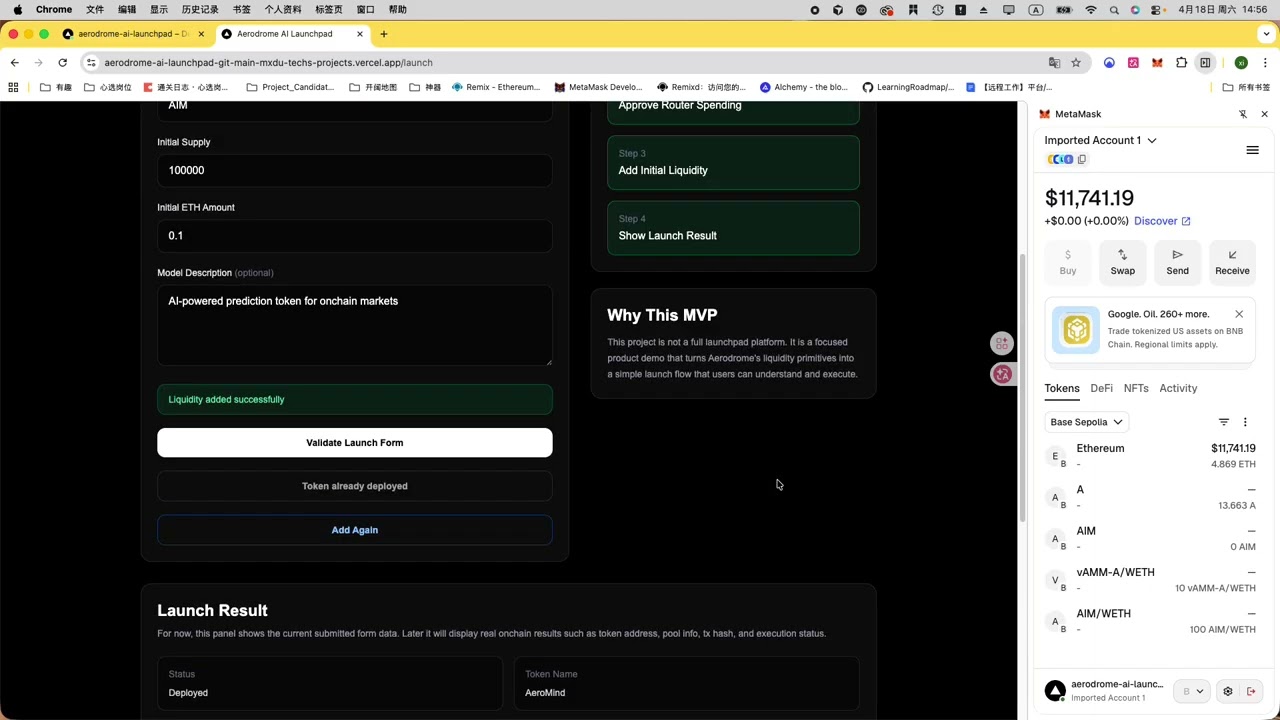
Aerodrome AI Launchpad is a minimal viable product for launching AI model tokens. Users simply fill in a few parameters to complete the full on-chain launch flow on Base Sepolia:
- Deploy a standard ERC20 token contract
- Approve the router to spend tokens
- Create a liquidity pool on Aerodrome and seed initial liquidity
- Display launch results (token address, pool address, LP token balance, etc.)
- Framework: Next.js 16 + TypeScript
- Styling: Tailwind CSS
- Chain Interaction: viem + wagmi
- Wallet Connection: RainbowKit
- Target Chain: Base Sepolia (testnet)
- DEX Protocol: Aerodrome Finance (Velodrome architecture)
- Fill in token name, symbol, initial supply, initial ETH amount, and description
- One-click ERC20 deployment after form validation
- Automatically detects and creates an Aerodrome pool if one doesn't exist
- Automatically approves and calls
addLiquidityETHto seed liquidity - Real-time step status display (deploying / approving / adding liquidity)
- Shows final results: token address, tx hash, pool address, LP token balance
- Three modes: Buy (ETH → Token), Sell (Token → ETH), Swap (Token → Token)
- Real-time quotes via router
getAmountsOut - Price impact calculation based on AMM reserves
- Slippage tolerance and minimum received amount protection
- Friendly balance-check messages instead of raw contract errors
- Node.js >= 18
- pnpm or npm
pnpm installCreate a .env.local file:
NEXT_PUBLIC_WALLETCONNECT_PROJECT_ID=your_walletconnect_project_idpnpm devDeployment config is in deployments/baseSepolia.json:
| Contract | Address |
|---|---|
| Router | 0x65E6dCab69A049eC2c319d59f4e6BF600079fc16 |
| Factory | 0xD6a0348b93F0FF2Ce8314875E40549844BF0d020 |
| WETH | 0x04C41560cf85C8948C39Cc2cB8b3b1069D5aF722 |
├── app/
│   ├── launch/          # Token launch page
│   └── trade/           # Trade page
├── components/
│   └── Header.tsx       # Navigation header
├── deployments/
│   └── baseSepolia.json # Contract address config
├── lib/
│   └── contracts/
│       └── LaunchToken  # ERC20 ABI and bytecode
Validate Form → Deploy ERC20 → Check/Create Pool → Approve Router → addLiquidityETH → Read LP Balance
The pool address is extracted from logs[0].data of the createPool transaction receipt (first 32 bytes decode to the pool address).
Enter Amount → getAmountsOut Quote → Check Balance → Approve → Swap
- Buy mode: calls
swapExactETHForTokens - Sell mode: calls
swapExactTokensForETH - Swap mode: calls
swapExactTokensForTokens(two-hop route via WETH)
- This project runs on Base Sepolia testnet only — make sure your wallet is on the correct network
- Adding liquidity requires testnet ETH, available from the Base Sepolia Faucet
- LP token balance has a ~2 second delay after the transaction confirms while waiting for chain state to sync
MIT