Automate the distribution of supply chain operational reports with visuals built in HTML emails with Python

Automate the decision-making process for the yearly budget allocation of an International Logistics Company.
In this Article, we will build a fully automated solution to share a one-page operational report in an HTML email using Python.
60+ case studies with source code, dummy data and mathematical concepts here 👉 Analytics Cheat Sheet
Click on the image below to access a full tutorial video to understand the concept behind this solution
You are a continuous improvement manager at an international clothing group with stores worldwide.
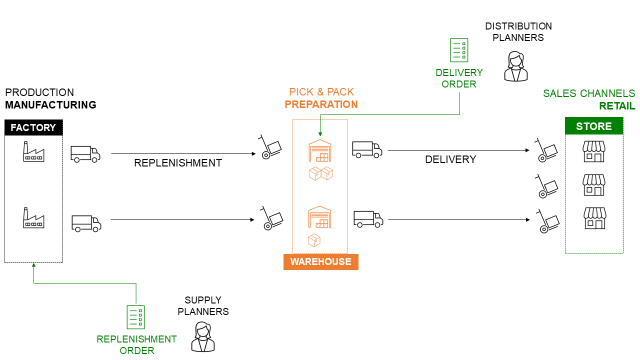
The company produces garments, bags, and accessories in factories in Asia.
Stores are supplied from local warehouses, which factories directly replenish.
Regularly, you have to share warehouse operational metrics with your management.
This is a manual process in which you need to
- Extract data from the Warehouse Management System (WMS)
- Process data and build visuals with Excel
- Send a short report by email with the visuals and comments
To be efficient, you would like to automate this process using Python.
Your solution will be a simple Python script, deployed on the cloud, that will automatically perform these four steps:
- Extract prepared order lines of last week from the WMS SQL database
- Process the data and compute KPIs with key insights
- Automatically send an HTML email with visuals and comments

In this repository, you will find all the code used to explain the concepts presented in the article.
Automate Reporting.ipynb- Jupyter notebook with step-by-step analysisautomated_report.py- Standalone Python script
pip install -r requirements.txt
python automated_report.py- pandas
- matplotlib
Senior Supply Chain and Data Science consultant with international experience working on Logistics and Transportation operations.
For consulting or advising on analytics and sustainable supply chain transformation, feel free to contact me via Logigreen Consulting.
For more case studies, check my Personal Website.