This repository is a practical Mocha + Jira integration example using @testream/mocha-reporter. It shows how to upload Mocha results from local runs and GitHub Actions into Jira through Testream.
If you are searching for "Mocha Jira reporter", "Mocha GitHub Actions Jira integration", or "send Mocha results to Jira", this repo is the implementation template.
- CI-ready: Includes a complete GitHub Actions workflow.
- Fallback-safe: Uses standard
specreporter when no API key is present. - Strict upload behavior:
failOnUploadError=trueis set in reporter options. - Real failure triage: Intentional failing tests demonstrate error flow in Jira.
Testream is an automated test management and reporting platform for Jira teams. It ingests results from frameworks like Mocha, Jest, Vitest, and Playwright, then provides failure diagnostics and run trends directly in Jira.
If this sample repository is not the framework you need, browse all native reporters in the Testream docs: https://docs.testream.app/.
Click to see how Testream turns raw CI test results into actionable Jira insights (failures, trends, and release visibility):
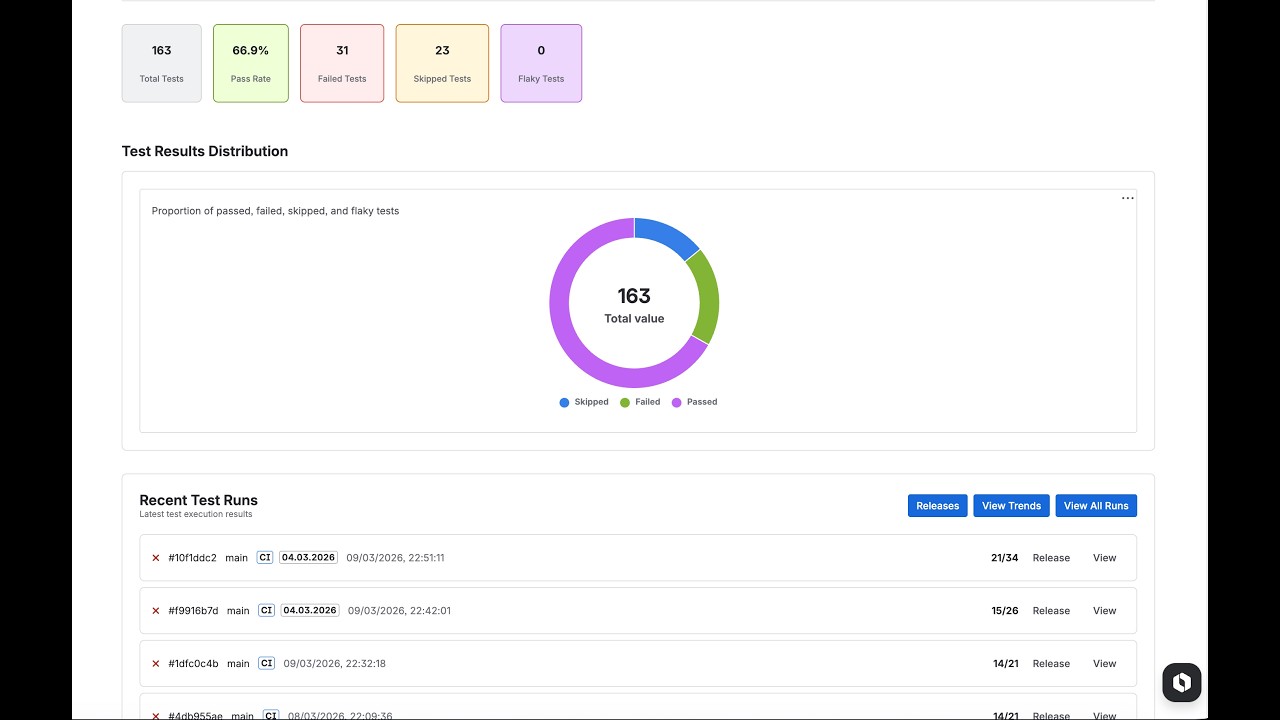
Install Testream Automated Test Management and Reporting for Jira in your Jira workspace to view uploaded runs.
src/
  cart.ts          - Cart class and checkout behavior
  product.ts       - Product validation and pricing helpers
  discount.ts      - Coupon validation and discount helpers
test/
  cart.spec.ts     - Cart tests (passing + 1 intentional failure)
  product.spec.ts  - Product tests (passing + 1 intentional failure)
  discount.spec.ts - Discount tests (passing + 1 intentional failure)
.mocharc.js
.github/workflows/mocha.yml
.env.example
The intentional failures help you verify how Mocha failures are represented in Testream/Jira.
- Sign in at testream.app.
- Create a project.
- Copy your API key.
npm installcp .env.example .envSet at least:
TESTREAM_API_KEY=<your key>npm testWith TESTREAM_API_KEY, results are uploaded automatically. Without a key, tests still run with Mocha spec output and upload is skipped.
This setup conditionally switches Mocha reporter:
- Uses
@testream/mocha-reporterwhen API key exists. - Uses default
specreporter when API key is missing. - Sets
failOnUploadError=true,appName,appVersion,testEnvironment, andtestType. - CI metadata (
branch,commitSha,repositoryUrl,buildNumber,buildUrl) is auto-detected.
Reporter docs: https://docs.testream.app/reporters/mocha
The workflow at .github/workflows/mocha.yml runs on pushes and pull requests to main.
Add this repository secret:
Settings -> Secrets and variables -> Actions -> New repository secret
| Name | Value |
|---|---|
TESTREAM_API_KEY |
Your Testream API key |
Workflow env examples already set:
| Variable | Example |
|---|---|
TESTREAM_APP_VERSION |
${{ github.sha }} |
TEST_ENV |
ci |
After connecting Testream to Jira, you get:
- Dashboard-level pass/fail visibility
- Failure diagnostics with assertion diffs and stack traces
- Trend analysis across runs
- Jira issue creation from failed tests
- Confirm
TESTREAM_API_KEYis present in.envor CI secrets. - Verify
.mocharc.jsloaded your environment variables.
- Confirm secrets are available to the workflow.
- Keep
failOnUploadError=trueif you want CI to fail on upload issues.
- Verify your Testream project is connected to the intended Jira workspace.
It is an example repository with production-style setup intended to be cloned and adapted.
To demonstrate how failures, diffs, and stack traces appear in Testream/Jira.
Yes. Mocha runs as usual; upload only activates with an API key.
| Approach | Benefit | Tradeoff |
|---|---|---|
| Raw console logs/artifacts | Minimal setup | Limited Jira-native reporting |
| Custom upload tooling | Flexible | More maintenance complexity |
| Testream Mocha reporter (this repo) | Native integration + Jira workflows | Requires Testream setup |
- Testream app: https://testream.app
- Testream Automated Test Management and Reporting for Jira: https://marketplace.atlassian.com/apps/3048460704/testream-automated-test-management-and-reporting-for-jira
- Mocha reporter docs: https://docs.testream.app/reporters/mocha
- Mocha docs: https://mochajs.org