
A software KVM that lets you share one keyboard and mouse across multiple PCs on your local network. Move your cursor to the edge of a screen and it seamlessly transitions to the next machine — no hardware switch required.
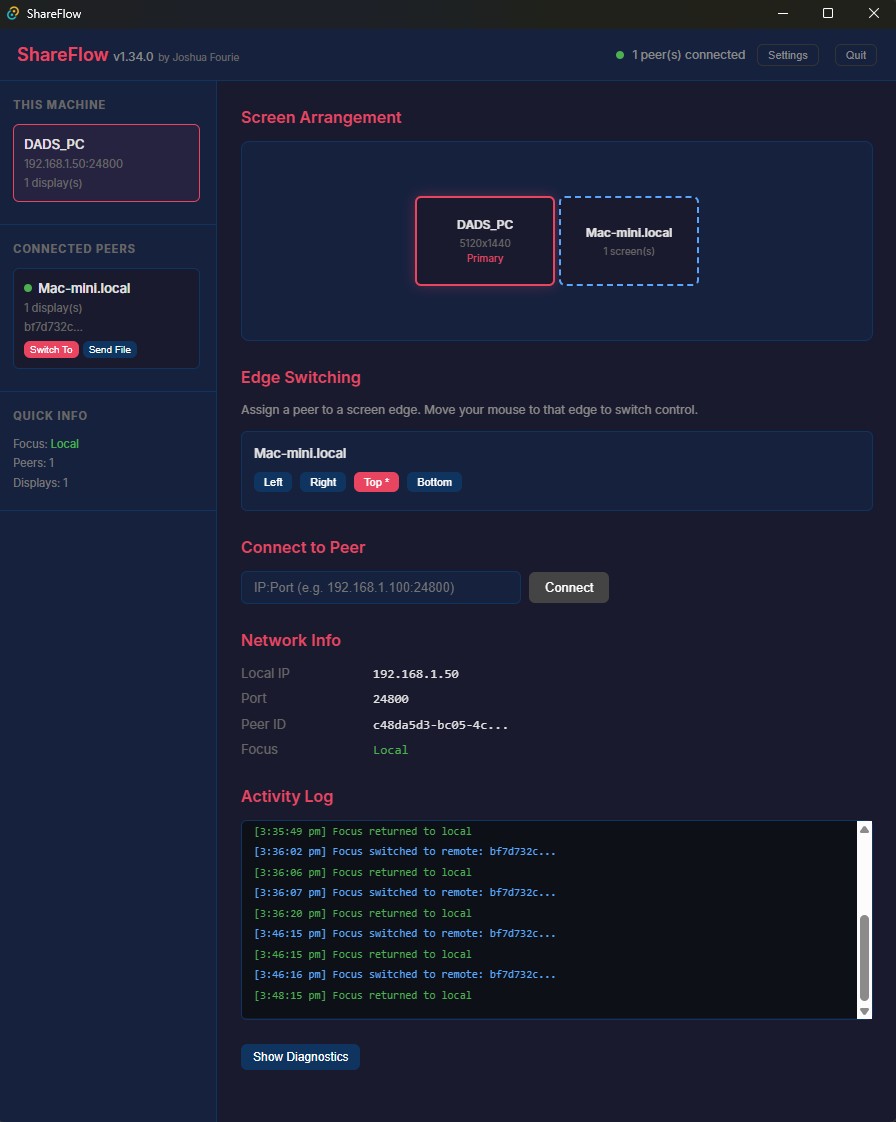
- Edge switching — push the cursor to any screen edge to move focus to the next machine
- Directional gate — only triggers when moving toward the edge, not during horizontal drags
- Clipboard sync — text and images transfer automatically between machines
- File transfer — drag and drop files across machines
- LAN auto-discovery — peers appear automatically, no IP configuration needed
- TLS encrypted — all traffic is encrypted with TOFU certificate pinning
- Multi-monitor aware — correctly maps cursor position across screens of different sizes
- Hotkey return — press Scroll Lock to snap back to local control
- Windows + macOS — Windows as primary controller, macOS as peer (Linux experimental)
On launch, each machine broadcasts a UDP announcement on port 24801 with a magic header (SFLO). Other machines on the same subnet listen for these broadcasts and surface discovered peers in the UI. Announcements are timestamped to prevent replay attacks and expire after 30 seconds.
Once a peer is accepted, a TLS TCP connection is established. On first connect, the certificate fingerprint is stored (trust-on-first-use). Subsequent connections verify against the stored fingerprint. All messages are encoded as length-prefixed bincode frames.
Each machine tracks which machine currently has "focus" — the one receiving physical keyboard and mouse input.
When the cursor reaches the boundary of the local desktop:
- Edge detection fires if the movement direction is predominantly toward the edge (45 degrees — prevents accidental triggers during near-edge drags)
- A
SwitchFocusmessage is sent to the target peer with the cursor entry coordinates - The sending machine suppresses all local input (cursor hidden, events blocked)
- The receiving machine injects the cursor at the mapped entry point and begins injecting all forwarded events
Position is mapped proportionally between screens — crossing at 30% from the top on the sending screen places the cursor at 30% from the top on the receiving screen, regardless of resolution differences.
A 300ms cooldown prevents oscillation after any switch.
Windows (sender/primary):
- Low-level
WH_MOUSE_LLandWH_KEYBOARD_LLhooks capture all input before it reaches applications - Warp-to-center technique keeps the physical cursor stationary while computing virtual deltas
- Cursor is hidden via
ShowCursorduring remote control
macOS (peer/receiver):
CGEventTapatkCGHIDEventTapcaptures input with full suppression capability- Injection uses
CGWarpMouseCursorPosition+CGEventCreateMouseEventwith both absolute position and relative delta fields set (required for apps that read deltas — window dragging, creative apps, 3D viewports) - Modifier key state is tracked independently to prevent stuck modifiers across transitions
When focus switches to a remote machine, the local clipboard is pushed immediately so Ctrl+V works straight away on the remote machine. Both text and image clipboard content are supported.
All messages are serialised with bincode and framed with a 4-byte big-endian length prefix. Key message types:
| Message | Description |
|---|---|
Hello / HelloAck |
Handshake, exchanges peer ID, name, screen layout |
MouseMove |
Absolute cursor position |
MouseButton |
Button press/release |
MouseScroll |
Scroll delta |
Key |
Hardware scancode press/release |
SwitchFocus |
Trigger focus transition with entry coordinates |
ClipboardUpdate |
Clipboard content push |
FileStart/Chunk/Done |
Chunked file transfer |
Ping / Pong |
Keepalive (3 missed pongs closes the connection) |
All platforms:
Windows:
- Visual C++ Build Tools (Desktop development with C++)
- WebView2 (included with Windows 11, installer available for Windows 10)
- WiX Toolset v3 — required for .msi builds only
macOS:
- Xcode Command Line Tools:
xcode-select --install
npm installnpm run tauri devWindows (produces .msi and .exe installer):
npm run tauri buildOutput: src-tauri/target/release/bundle/msi/ShareFlow_x.x.x_x64_en-US.msi
macOS (produces .dmg):
npm run tauri buildOutput: src-tauri/target/release/bundle/dmg/ShareFlow_x.x.x_x64.dmg
macOS builds must be run on a Mac. Windows builds must be run on Windows. Cross-compilation is not supported.
On macOS, ShareFlow requires Accessibility permission to capture and inject input events.
- Open System Settings > Privacy & Security > Accessibility
- Add ShareFlow to the allowed list
- Restart ShareFlow
Without this permission the event tap will fail silently and input will not be captured or injected.
shareflow/
├── src/                        # React/TypeScript frontend (Tauri UI)
└── src-tauri/
    └── src/
        ├── core/
        │   ├── engine.rs       # Focus state machine, edge switching logic
        │   ├── screen.rs       # Edge detection, boundary validation
        │   ├── protocol.rs     # Message types, encode/decode
        │   ├── config.rs       # App configuration, neighbour layout
        │   └── hotkey.rs       # Scroll Lock hotkey detection
        ├── input/
        │   ├── windows.rs      # Windows low-level hooks (capture + injection)
        │   ├── macos.rs        # macOS CGEventTap (capture + injection)
        │   └── linux.rs        # Linux (experimental)
        ├── network/
        │   ├── discovery.rs    # UDP LAN broadcast discovery
        │   ├── server.rs       # TLS TCP server, message routing
        │   ├── connection.rs   # Framed message reader/writer
        │   └── tls.rs          # Certificate generation and pinning
        ├── clipboard/
        │   └── sync.rs         # Clipboard monitoring and sync
        └── file_transfer/
            ├── sender.rs       # Chunked streaming file sender
            └── receiver.rs     # File receiver with bounds checking
| Port | Protocol | Purpose |
|---|---|---|
24801 |
UDP broadcast | LAN peer discovery |
24800 |
TCP (TLS) | Peer communication (configurable) |
MIT