Advent of Code using OCaml


To get started with OCaml development locally:
- Install Opam using this link: Opam Installation Guide per OS
- Follow the guidelines on this page to setup OCaml: OCaml By Example
This project includes a comprehensive Makefile with various commands to help you build, test, and run solutions efficiently.
How to Use It:
Auto-detection (default): Run make or any target without specifying YEAR. It will use the latest year directory (e.g., 2025 if it exists).
For example:
  make test → Runs tests for the latest year projects.
  make run-day DAY=01 INPUT=download → Runs day 01 for the latest year.
  make clean → Cleans build artifacts for the latest year.
Manual selection: Specify YEAR on the command line, e.g.:
  make YEAR=2024 test → Runs tests for 2024 projects.
  make YEAR=2024 run-day DAY=01 INPUT=download → Runs day 01 for 2024.
  make YEAR=2024 clean → Cleans build artifacts for 2024.
This works for all targets that use $(YEAR), such as test, run-day, run-release, submit, etc.
If the specified year directory doesn't exist, the Makefile will error out, so ensure the directory is present.
  # Run tests for all days
  make test

  # Run tests for a specific day (e.g., day 01)
make test-01 # Format all code using dune fmt
make fmt
# Format code for a specific day (e.g., day 01)
make fmt-01 # Run a specific day with downloaded input (auto-saves answers)
make run-day DAY=01 INPUT=download
# Run a specific day with custom input file
make run-day DAY=01 INPUT=path/to/input.txt
# Run a specific day using repository inputs or fallback locations
make run-day DAY=01 INPUT=puzzle_input
# Run in release mode (faster execution, auto-saves answers)
make run-release DAY=01 INPUT=download
make run-release DAY=01 INPUT=puzzle_input
# Run the most recently modified day with input (workflow-aware, no answer saving)"
make run-current INPUT=download
make run-current INPUT=puzzle_input # Create a new day from template (interactive, auto-fetches problem title)
make new-day
# Download puzzle input (requires AUTH_TOKEN in .env file)
make download DAY=01
# Force download input (overwrite existing)
make download DAY=01 FORCE=1
# Clean all build artifacts
make clean # Run benchmark for a specific day
make benchmark-01 # Check submission status for a day
make check-status DAY=01
# Submit an answer (requires AUTH_TOKEN in .env file)
make submit DAY=01 PART=1
make submit DAY=01 PART=2
# Run solution with interactive submission prompts
make run-submit DAY=01 INPUT=download # Show all available commands
make help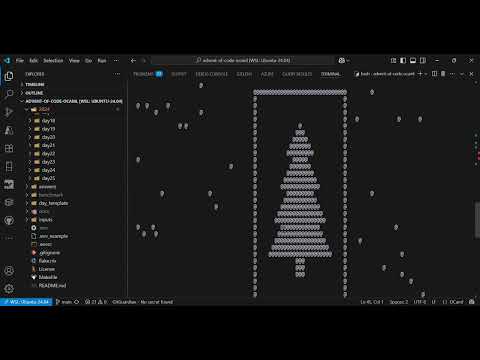
🎄 Watch the Complete Automation Pipeline in Action!
See how this project eliminates all manual steps between solving and submitting Advent of Code solutions:
🚀 What the video demonstrates:
- Automatic puzzle input downloading with authentication
- Lightning-fast OCaml solution execution (0.3s runtime!)
- Beautiful Christmas tree visualization for Day 14 Part 2
- Smart submission system that prevents duplicate submissions
- Individual part submission (Part 1 & Part 2 separately)
- Bulk submission with interactive prompts
- Complete terminal-based workflow - no browser switching!
⚡ Key features shown:
make new-day- Creates day template with problem title fetchingmake download DAY=14- Auto-downloads puzzle inputmake run-current INPUT=download- Runs latest solution with downloaded inputmake submit DAY=14 PART=1- Smart individual part submissionmake run-submit DAY=14 INPUT=download- Complete pipeline: download → run → submit
For manual execution without using the Makefile commands, navigate to the specific day directory first:
cd 2024/day01Then use the appropriate command for your operating system:
Windows:
type "../../inputs/2024/day01.txt" | dune exec ./test.exeLinux:
cat "../../inputs/2024/day01.txt" | dune exec ./test.exeNote: The Makefile commands (like make run-day DAY=01 INPUT=download) are recommended as they handle paths automatically and provide additional features like answer saving.
For automatic input downloading and submission features, create a .env file in the project root:
AUTH_TOKEN=your_advent_of_code_session_tokenYou can find your session token by:
- Going to Advent of Code
- Logging in
- Opening browser developer tools
- Finding the
sessioncookie value
2024/dayXX/- Individual day solutionsday_template/- Template for creating new daysinputs/2024/- Downloaded puzzle inputsanswers/2024/- Generated answers for submissionbenchmark/- Benchmark results
Nix provides a fully reproducible development environment with all dependencies pre-configured.
- Nix (version 2.4+ with flakes enabled)
- Add to
/etc/nix/nix.conf:experimental-features = nix-command flakes
# Enter development environment
nix develop or make flake

# Or with direnv (auto-loads environment when entering directory)
direnv allowOnce inside nix develop, you have access to all Makefile commands:
  make test-01                           # Run tests for day01
  make run-day DAY=01 INPUT=download     # Run with downloaded input
make new-day # Create new day from template# First download the input (pickes the recent year automatically)
make download DAY=02
# Then run as
nix run .#day02-2025
nix run .#day01-2024# Build a specific day
nix build .#day01-2025
# Build all solutions for a year
nix build .#all-2024
# View available packages
nix flake show
# Update dependencies
nix flake updateIf you don't have Nix or prefer containerized development:
# Build the Docker image
  docker compose build

# Start an interactive container (recommended)
  docker compose run --rm aoc-ocaml
Set up your AUTH_TOKEN as described in the Configuration section
# Inside the container, you can run all the same Makefile commands:
# Run `make` to see all available commands
  make

# Create a new day (interactive, auto-fetches problem title)
  make new-day

# Inside the container, you can run all the same Makefile commands:
  make test
make run-day DAY=01 INPUT=download# Build image
docker compose build
# Run container interactively (recommended for development)
docker compose run --rm aoc-ocaml
# Stop and clean up
docker compose down- Starts the container with your project files mounted
- Puts you in
/app(the working directory) with all your files - Gives you a Bash prompt to work with OCaml and your project
- Container is removed when you exit due to (
--rmflag) - All Makefile commands work exactly like local development
- The parse function for each challenge question's input file was designed to handle the
LFend of line sequence.