Control Twitter right from your NodeCG dashboard!
This is a bundle for NodeCG; if you do not understand what that is, we advise you read their website first for more information.
speedcontrol-tweetr is a bundle for NodeCG to allow users to schedule and post tweets without actually logging into the website. This bundle is meant for speedrunning marathons, therefore it includes all the features one might need to pull off an online marathon. Gone are the days where you need to use Tweetdeck or manually schedule tweets for your marathon!
- Post tweets directly from the dashboard, without having to login to the website!
- Schedule tweets based on the active run, or create new tweets and send them instantly
- Include embedded images and videos in your tweets
To install, navigate to your root NodeCG directory and run the following command.
nodecg install nicnacnic/speedcontrol-tweetr
After the installation completes, create a config file by running nodecg defaultconfig speedcontrol-tweetr.
You will need to create a Twitter Developer account and get an API key/secret and an access token/secret to connect to Twitter.
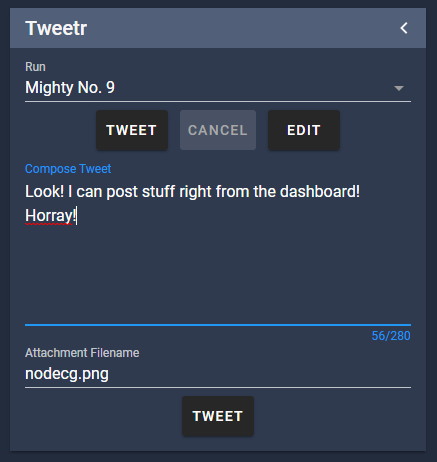
Once the bundle is configured properly, usage is pretty simple. On first load, the bundle should automatically retrieve all runs and load them into the bundle. To edit tweets, simply select your game in the dropdown and press Edit. There is a 280 character limit. Make sure to save, then press anywhere outside of the dialog to exit.
For media, place your file in <path_to_nodecg>/bundles/tweetr/media. In the Attachment Filename field, enter the full filename (including the file extension!). Supported formats are png, jpg, gif and mp4. Images can not be larger than 5 MB, GIF's 15 MB, and videos 512 MB. Exceeding these size limits could cause NodeCG to crash.
To enable Auto Tweet, set autoTweet to true in the config. tweetDelay specifies how long you have to cancel the tweet, 30 seconds is recommended. Once you switch runs, the button will show a countdown, you can either cancel the tweet (you can always tweet it later!), or wait for the countdown to finish, then the tweet will be sent.
The text box at the bottom is for when you want to quickly compose and post a tweet without attaching it to a run. The limits to character count and media size still apply here as well.
If you would like your social media team to use Tweetr, but don't want to give them the link to the dashboard, you can always pop out Tweetr to a standalone window. To do this, press the new window button in Tweetr's panel, this should pop out the window into a new tab. Alternativly, you can also use this link: http://<your_ip>:9090/bundles/speedcontrol-tweetr/dashboard/tweetr.html?standalone=true. Everything but the edit dialog works (this is a limitation with NodeCG).
Commission work is available! If you don't have any coding experience, or simply don't have time to develop, I can help bring your project or event to life. More information can be found by visiting my website at https://www.nicnacnic.com/commission-work or contacting me through Discord.
- speedcontrol-layouts A pack of simple yet easily customizable layouts, works very well with this bundle!
- obs-control A NodeCG bundle to control an instance of OBS.
There is a lot of inefficient code in this bundle. If you can optimize the code, or add new features, submit a pull request! Before you do, please make sure to test your code.
Bugs or glitches should first be checked against the list of known bugs, then by creating an issue in the issue tracker. Suggestions are always welcome!
If you're having issues or just want to chat, I can be reached on my Discord server.
MIT License
Copyright (c) 2021 nicnacnic
Permission is hereby granted, free of charge, to any person obtaining a copy of this software and associated documentation files (the "Software"), to deal in the Software without restriction, including without limitation the rights to use, copy, modify, merge, publish, distribute, sublicense, and/or sell copies of the Software, and to permit persons to whom the Software is furnished to do so, subject to the following conditions:
The above copyright notice and this permission notice shall be included in all copies or substantial portions of the Software.
THE SOFTWARE IS PROVIDED "AS IS", WITHOUT WARRANTY OF ANY KIND, EXPRESS OR IMPLIED, INCLUDING BUT NOT LIMITED TO THE WARRANTIES OF MERCHANTABILITY, FITNESS FOR A PARTICULAR PURPOSE AND NONINFRINGEMENT. IN NO EVENT SHALL THE AUTHORS OR COPYRIGHT HOLDERS BE LIABLE FOR ANY CLAIM, DAMAGES OR OTHER LIABILITY, WHETHER IN AN ACTION OF CONTRACT, TORT OR OTHERWISE, ARISING FROM, OUT OF OR IN CONNECTION WITH THE SOFTWARE OR THE USE OR OTHER DEALINGS IN THE SOFTWARE.