To design a website to perform mathematical calculations in server side.
Desing your website for calculation using wireframe work
Then to execute the wireframe work desing use html,css
Use views.py to execute the coding in serverside.
Mention the path of the website in urls.py.
Publish the website in the given URL
<!DOCTYPE html>
<html>
<head>
<meta charset='utf-8'>
<meta http-equiv='X-UA-Compatible' content='IE=edge'>
<title>Area of Rectangle</title>
<meta name='viewport' content='width=device-width, initial-scale=1'>
<link rel='stylesheet' type='text/css' media='screen' href='main.css'>
<script src='main.js'></script>
</head>
<style>
*{
box-sizing: border-box;
font-family:Arial, Helvetica, sans-serif ;
}
body{
background-color:rebeccapurple;
}
.container{
width: 1080px;
height: 500px;
margin-top: 100px;
margin-left: auto;
margin-right: auto;
border-radius: 10px;
border: 10px solid rgb(72, 0, 87);
background-color:rgb(175, 93, 223);
}
h1{
text-align: center;
padding-top: 20px;
}
.calculate{
padding-top: 10px;
padding-bottom: 10px;
padding-left: 10px;
padding-right:10px;
text-align: center;
font-size: 20px;
}
.footer {
display: block;
width: 100%;
height: 40px;
background-color: rgb(72,0,87);
text-align: center;
padding-top: 10px;
padding-right: 5px;
margin-right: 15px;
margin-bottom: 20px;
color: white;
margin-top: 150px;
}
</style>
<body>

VIEWS.PY :

<div class="container">
<h1>Area Of Rectangle</h1>
<form method ="POST">
{% csrf_token %}
<div class="calculate">
Length=<input type="text" name="length" value=" "></input></br>
</div>
<div class="calculate">
Breadth=<input type="text" name="breadth" value=" "></input></br>
</div>
<div class="calculate">
<input type="submit" value="calculationarea"></input></br>
</div>
<div class="calculate">
area=<input type="text" name="area" value=" "></input></br>
</div>
<br>
<div class="footer">
Developed by SIRISHA 22003264
</div>
</form>
</body>
</html>

Views:

from django.shortcuts import render
# Create your views here.
def rectarea(request):
context={}
context['area'] = "0"
context['l'] = "0"
context['b'] = "0"
if request.method == 'POST':
print("POST method is used")
l = request.POST.get('length','0')
b = request.POST.get('breadth','0')
print('request=',request)
print('Length=',l)
print('Breadth=',b)
area= int(l) * int(b)
context['area'] = area
context['l'] = l
context['b'] = b
print('Area=', area)
return render(request,"myapp/math.html",context)

Urls:

from django.contrib import admin
from django.urls import path
from myapp import views
urlpatterns = [
path('admin/', admin.site.urls),
path('area/',views.rectarea),
]
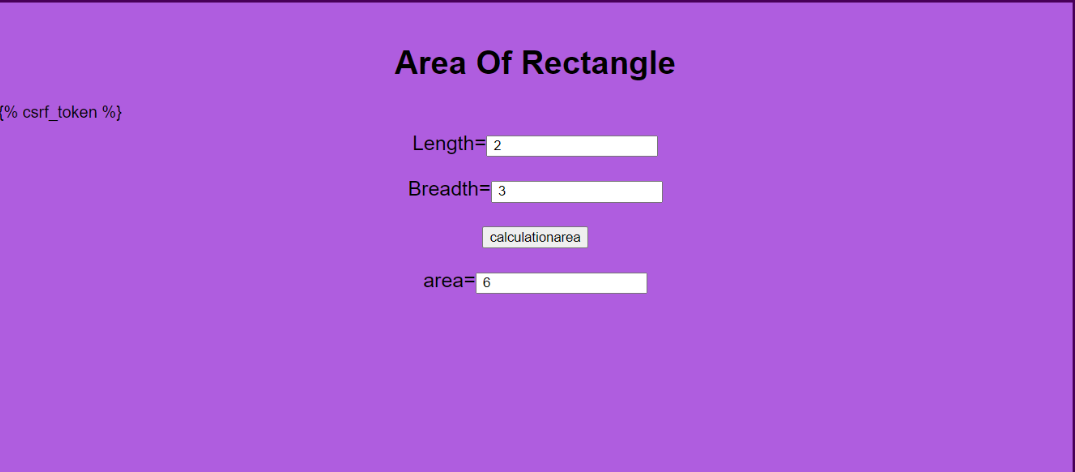
The program is executed succesfully