
Close Every Security Gap — Before Attackers Do
Sentrilite's built-in Vulnerability Assessment scans your entire infrastructure in minutes — Linux servers, Kubernetes clusters, and cloud environments — and delivers a prioritised, plain-English report of every misconfiguration and risk.
No external scanner. No agents to manage. Just run one command and get a full picture of your security posture.
▶ Get Started in MinutesWhat Sentrilite Scans
Every scan covers your entire host in one pass — no configuration files, no per-service setup, no external credentials required. Sentrilite automatically detects whether it is running on a Kubernetes node or a standalone Linux server and adjusts its checks accordingly. AWS, GCP, and Azure environments are detected and scanned automatically.
Authentication & Access Control
Weak credentials and misconfigured access are the most common entry point for attackers. Sentrilite checks every account and privilege configuration on your host.
- Accounts with empty or never-expiring passwords
- Hidden root accounts (UID 0 assigned to non-root users)
- Overly broad sudo privileges and NOPASSWD entries
- Missing password complexity and account lockout policies
- System service accounts with interactive login shells
- Legacy trust files (.rhosts, hosts.equiv) that bypass authentication
Network & Firewall Exposure
Every open port and every missing firewall rule is an opportunity for an attacker. Sentrilite gives you a precise inventory of what is exposed and what is unprotected.
- Services listening on all network interfaces (not just localhost)
- Missing or inactive firewall (checks ufw, firewalld, iptables, nftables)
- Network interfaces in promiscuous mode (packet sniffers)
- ICMP redirect acceptance (enables network traffic hijacking)
- IP source routing and other network-level attack vectors
- TCP SYN flood protection disabled
SSH Configuration
SSH is the front door of every Linux server. A single misconfiguration turns it into an open invitation. Sentrilite checks every SSH setting that matters.
- Root login and password authentication enabled
- Weak or deprecated ciphers, MACs, and key exchange algorithms
- Excessive authentication retry limits (brute-force exposure)
- No idle session timeout
- Authorized keys files in unexpected locations (backdoors)
- SSH host private keys accessible by non-root users
Kernel Security Configuration
Kernel hardening settings control whether an attacker who gains limited access can escalate to full system control. Sentrilite verifies all critical kernel parameters.
- ASLR (memory randomisation) disabled — makes exploits trivially reliable
- Kernel pointers exposed to unprivileged users
- Unrestricted process inspection (enables code injection into any process)
- Kernel module loading enabled (rootkit installation vector)
- Unprivileged user namespaces enabled (container escape vector)
- AppArmor and SELinux enforcement status
Packages & Known Vulnerabilities
Outdated software is the most exploited attack vector in the world. Sentrilite identifies pending patches and verifies the integrity of installed packages.
- Pending security updates (apt and yum/dnf)
- End-of-life software versions (OpenSSL 1.0.x, Python 2)
- Package integrity verification — detects tampered system binaries
- Integration with trivy for CVE-level vulnerability scanning
- GRUB bootloader password check (physical/console access protection)
- Automatic update configuration status
Filesystem & Permissions
A misconfigured file permission can hand an attacker root access without any exploit at all. Sentrilite finds every dangerous permission configuration.
- World-writable files in system directories (/etc, /bin, /usr)
- Unexpected SUID/SGID binaries (privilege escalation paths)
- /etc/passwd and /etc/shadow wrong permissions
- Files with no valid owner (may indicate tampered state)
- Private key files readable by non-owners
- Sensitive credential files (.netrc, .rhosts)
Kubernetes Security
Kubernetes misconfigurations are notoriously easy to introduce and hard to find manually. Sentrilite checks every workload and cluster configuration against security best practices.
- Privileged containers and dangerous Linux capabilities
- Pods sharing host network, PID, or IPC namespaces
- Overly permissive RBAC roles and cluster-admin bindings
- Missing Network Policies (unrestricted pod-to-pod traffic)
- Secrets stored in environment variables or default namespace
- Containers without resource limits, health probes, or seccomp profiles
- etcd encryption at rest, TLS configuration, and access control
Cloud Environment Checks
Cloud misconfigurations are responsible for the majority of major data breaches. Sentrilite automatically detects your cloud provider and runs the right checks.
- AWS: IMDSv2 enforcement, IAM instance profile, public IP, secrets in user-data, static credentials on disk
- GCP: Metadata header protection, default service account, OS Login, project SSH keys, startup script secrets
- Azure: IMDS header protection, managed identity, disk encryption, service principal credentials
Container Runtime
Your container runtime is a high-value target — full control over Docker or containerd means full control over every container on the host.
- Docker and containerd socket permissions (world-accessible = root access)
- Docker user namespace remapping (containers running as host root)
- Container image signature verification (supply chain protection)
- Docker daemon exposed on unencrypted TCP port
- Containers running as root with no user set
Finding Severity Levels
Every finding is assigned a severity level so you know exactly where to focus first.
| Severity | What it means | Example findings |
|---|---|---|
| CRITICAL | Immediate risk of full system compromise. No exploit required — the misconfiguration itself provides root access or exposes credentials directly. | Empty password accounts, world-writable /etc/passwd, Docker socket accessible, ASLR disabled, IMDSv1 SSRF exposure |
| HIGH | Significant security gap that provides a clear path to escalation or data breach. Should be remediated within days. | SSH root login enabled, no firewall, auditd inactive, Kubernetes privileged container, pending security updates |
| MEDIUM | Security policy or hardening gap that increases risk without being immediately exploitable. Remediate as part of regular security hygiene. | No password expiry, NTP not synced, no remote logging, single-replica deployments, SUID binary outside known set |
| LOW | Informational findings and best-practice gaps. Address in scheduled maintenance windows. | User crontabs present, system services lacking health probes, deprecated service versions |
Turn Findings into Protection — Instantly
Every finding in the Vulnerability Assessment report comes with a Suggested Rule — a ready-to-use security rule you can add to Sentrilite's live runtime detection engine in seconds. This is how you protect against vulnerabilities you can't patch immediately.
For example, if Sentrilite finds that an old OpenSSL version is installed and you cannot update immediately, it can generate a rule that:
- Alerts immediately if any process attempts to exploit a known OpenSSL syscall pattern
- Blocks shell spawning from web service processes (a common post-exploit step)
- Alerts on outbound data transfers from the affected service (exfiltration detection)
- Blocks kernel module loading attempts (rootkit installation prevention)
Sentrilite's custom rules use risk_level 0 for active blocking and risk_level 1–3 for alerting — giving you surgical control over what gets blocked versus monitored. No redeployment needed. Rules take effect within seconds.
What You Get
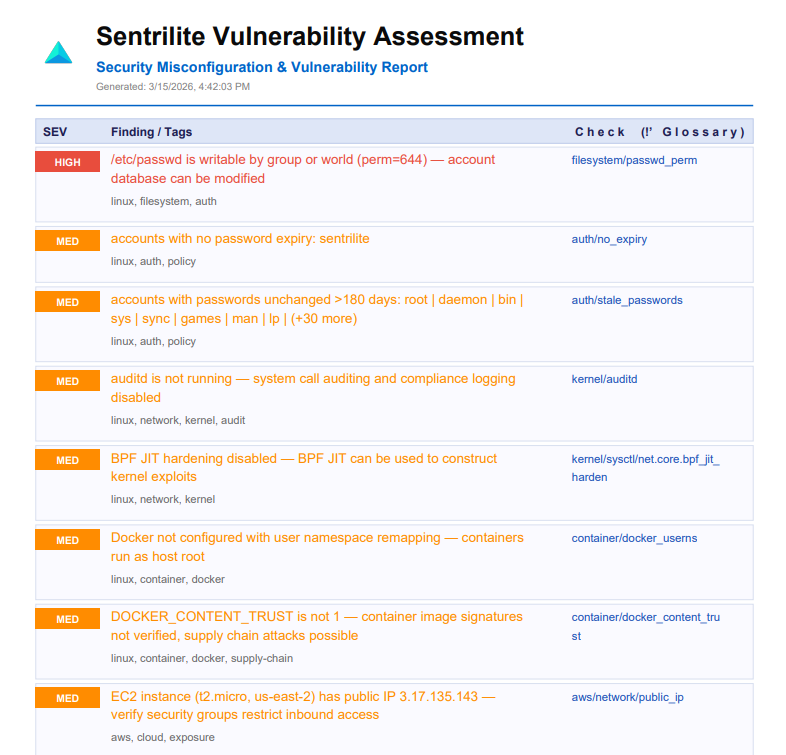
Every Vulnerability Assessment run generates a structured PDF report you can share with your security team, compliance auditors, or executives.
Prioritised Findings Report
All findings sorted by severity with a plain-English description of what was found and why it matters to your business — not just a raw technical dump.
Detection Glossary
Every finding type includes a detailed explanation of the attack scenario it enables and the business risk if it were exploited — perfect for briefing non-technical stakeholders.
Suggested Rules
Ready-to-add detection rules for each finding category. Copy them into Sentrilite's rule editor and get immediate runtime protection — even before you can patch the underlying issue.
Clickable Glossary Links
Every finding in the report links directly to its glossary entry. Navigate instantly from a finding to the full explanation of what it means and how to fix it.