Generate PDFs from AI Assistants
with MCP

Install the TemplateFox MCP server and let Claude, Cursor, or Windsurf generate PDFs directly from your conversation. Open-source, 8 tools, zero config.

Install with one command:

npx -y @templatefox/mcp-server

Works with your AI assistant

Any MCP-compatible client can use the TemplateFox server out of the box.

Claude Desktop

Anthropic's desktop app

Claude Code

CLI for developers

Cursor

AI-first code editor

Windsurf

Agentic IDE

Why MCP + TemplateFox?

AI assistants need structured output. That's where we come in.

MCP connects AI to tools

Model Context Protocol is the open standard for AI-tool communication. Your assistant discovers available tools, understands their parameters, and calls them — no glue code, no manual API calls.

  • Open standard by Anthropic, adopted across the industry
  • Tools are discoverable — the AI reads the schema
  • Natural language in, structured action out
TemplateFox

TemplateFox delivers precision

AI output is unpredictable. Your documents can't be. TemplateFox provides deterministic PDF templates — pixel-perfect output every time. The AI extracts data, the template renders. Invoices, receipts, certificates, labels.

  • Visual template editor, no code required
  • QR codes, barcodes, dynamic tables
  • 8 MCP tools for full workflow control
Three steps to AI-powered PDFs

Install the MCP server, set your API key, and start generating.

1

Install the server

Add the MCP server to your AI assistant:

npx -y @templatefox/mcp-server
2

Set your API key

Set TEMPLATEFOX_API_KEY with your key from the Dashboard.

3

Ask your AI

“Generate an invoice for John Doe, $150, using my Invoice template.” The AI handles the rest.

8 MCP tools

Everything your AI needs

The MCP server exposes tools for the full PDF generation workflow — from template discovery to credit management.

generate_pdf

Generate a PDF from a template with dynamic data

generate_pdf_async

Queue async PDF generation with optional webhook

list_templates

Discover all available PDF templates

get_template_fields

Get the fields and variables for a template

get_pdf_job_status

Check the status of an async PDF job

list_pdf_jobs

List all async PDF generation jobs

get_account_info

Check remaining credits and account info

list_transactions

View credit transaction history

Precision Engineering
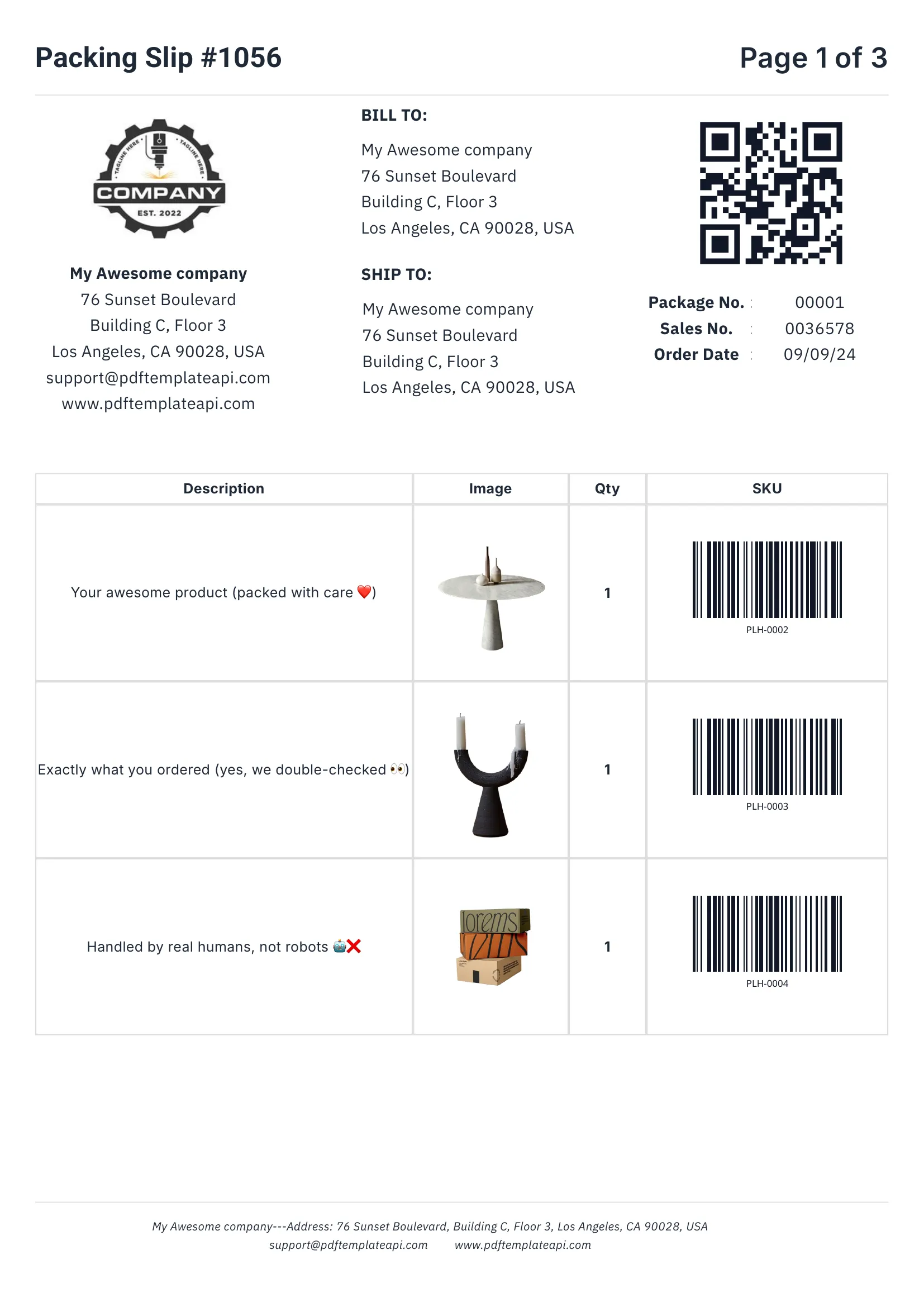
PDF template example - Packing Slip
1
2
3
4

Built for real-world documents

Everything you need to create professional business documents, from invoices to packing slips.

1

Headers & footers that just work

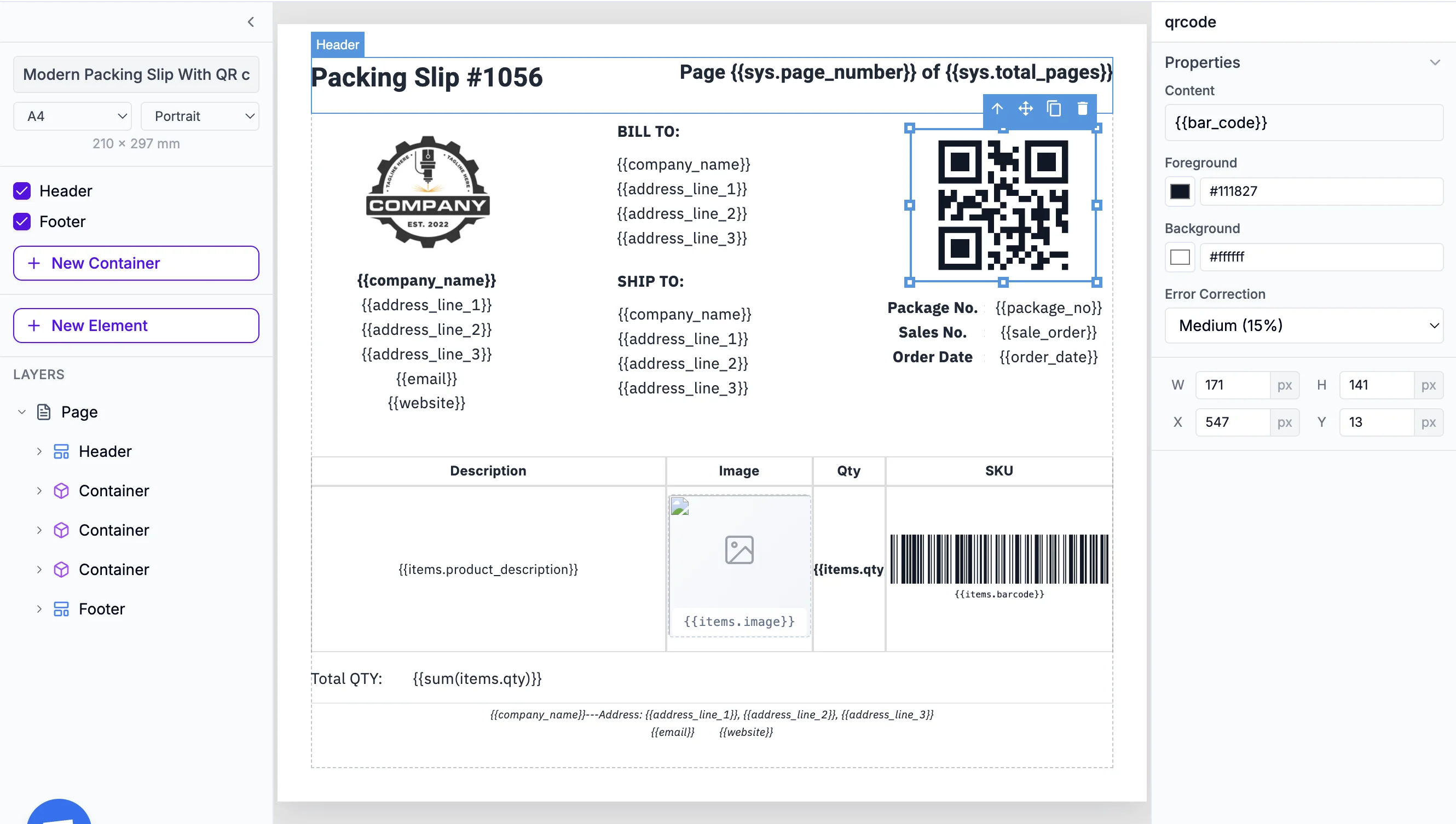
Define once, repeat on every page automatically. Perfect for logos, page numbers, and legal mentions.

2

Dynamic data binding

Inject any data into your templates. Names, addresses, prices, etc. — everything updates automatically.

3

Tables that grow with your data

Rows grow automatically with your data. 3 items or 300, the table adapts and spans multiple pages if needed.

4

Built-in QR codes & barcodes

Generated on the fly from your data. Supports Code128, EAN-13, QR codes and more — all scanner-ready.

Try it free

60 free PDFs/month

Easy to use

Documents that adapt to your data

Go beyond simple placeholders. Use expressions to format, calculate, and control your content.

1

Use system variables

Access page numbers, total pages, and current date and more automatically with {{sys.page_number}} and friends.

2

Customize every component

Fine-tune content, borders, colors, sizes, positions, and more. Each element has its own properties panel.

3

Built-in functions

Format dates, calculate totals, round numbers, and more. Use 100+ built-in functions or create your own.

Start building

No credit card required

Template editor with expressions
1
2
3
Coming soon

Remote MCP Server

A hosted HTTP MCP endpoint is coming — no local installation required. Point your MCP client to https://api.templatefox.com/mcp and connect from anywhere.

Read the MCP documentation

Is MCP right for you?

MCP is ideal for AI-assisted workflows and developer tooling. Here's how to decide.

Recommended
MCP Server

Use MCP Server if you need:

  • Native AI assistant integration — no HTTP calls to write
  • 8 tools: generate, list templates, check credits, and more
  • Open-source, MIT licensed
  • Works with Claude, Cursor, Windsurf, and any MCP client

Or consider:

REST API
  • Full control over HTTP requests
  • Works with any language or platform
Zapier
Zapier
  • No-code automation
  • 8,000+ app connections

Open-source, MIT licensed

The TemplateFox MCP server is fully open-source. Star it, fork it, contribute.

Frequently asked questions

What is MCP (Model Context Protocol)?

MCP is an open standard created by Anthropic that lets AI assistants discover and use external tools. Instead of writing API calls manually, you install an MCP server and your AI assistant can call its tools directly. Think of it as a plugin system for AI.

Which AI assistants support MCP?

Claude Desktop, Claude Code, Cursor, Windsurf, and any client that implements the MCP protocol. The list is growing — MCP is becoming the standard way for AI assistants to interact with external services.

How does the TemplateFox MCP server work?

Install @templatefox/mcp-server via npx, set your API key, and your AI assistant gets 8 tools: generate PDFs, list templates, check fields, manage credits, and more. Just ask in natural language — "generate an invoice using my Invoice template for John Doe, $150" — and the AI handles the rest.

Is it open-source?

Yes! The MCP server is fully open-source under the MIT license. You can view the code, contribute, or fork it on GitHub.

How many credits does each PDF cost?

Each PDF generation costs 1 credit, whether triggered via MCP, REST API, or any integration. TemplateFox offers 60 free PDFs/month on the free plan. Check pricing for higher volumes.

Can I use MCP in production workflows?

MCP is ideal for developer tooling, internal automation, and AI-assisted document workflows. For high-volume production pipelines, the REST API or integrations like Zapier and Make may be more appropriate since they don't require an AI assistant in the loop.

Will there be a remote MCP server?

Yes! A hosted HTTP MCP endpoint at https://api.templatefox.com/mcp is coming soon. This will let you connect without installing anything locally — just point your MCP client to the URL.

Do I need to write any code?

No. Once the MCP server is installed (one command), you interact with it through natural language in your AI assistant. The assistant discovers templates, fills in fields, and generates PDFs — all from your conversation.

Automate your PDF generation

Complete documentation, no-code integrations, and a powerful API to help you generate PDFs at scale. Let us handle the boring stuff.