JavaScript Arrays: Complete Guide with Methods & Examples
Written By: Avinash Malhotra
Updated on
Understanding JavaScript Arrays
Welcome to the complete JavaScript Arrays tutorial. Arrays are fundamental list-type objects used to store multiple data values in a single variable. As part of JavaScript's reference data types, arrays are built-in objects that store ordered collections of data, similar to lists in HTML. This comprehensive guide covers array declaration, methods, iteration techniques, and advanced array operations for modern JavaScript development.
Arrays are indexed collections in JavaScript, allowing access to elements by numeric index starting from 0. Unlike regular JavaScript objects which use key-value pairs, arrays provide sequential indexing for ordered data management.
Unlike strictly-typed programming languages, JavaScript arrays can store multiple data types in a single variable—combining strings, numbers, objects, and more. This flexibility makes JavaScript arrays powerful tools for storing heterogeneous data collections. A single JavaScript array can contain strings, numbers, booleans, objects, or even nested arrays, providing maximum versatility for dynamic data management.
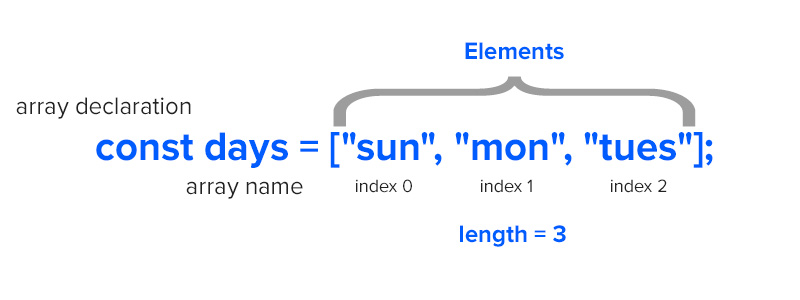
How to Declare Arrays in JavaScript - Literal vs Constructor
Arrays in JavaScript can be declared using two methods: the bracket literal [] syntax (recommended) or the new Array() constructor. Both approaches create array instances, but the literal syntax is preferred in modern JavaScript for its simplicity and readability.
Array Literal Syntax (Recommended)
The array literal syntax using square brackets [] is the most common and recommended method for creating arrays. It's simpler, more readable, and performs better than the constructor method.
    const month=[];            // Empty array
    const days=["Sun","Mon","Tue"];    // Array with elements
Array Constructor Method
The Array constructor method uses the new keyword to create array instances. While both methods produce identical results, the literal syntax is preferred in modern JavaScript development.
    const month=new Array();        // Empty array
    const days=new Array("Sun","Mon","Tue");    // Array with elements
All arrays declared using [] or new Array() are instance of Array Class or Function. The typeof Array is Object in JavaScript as array are objects build using new keyword.
[]==[] or new Array()==new Array() is always false in javascript.
The reason is both left and right sided are a new instance. That's why they are not same.
Check Array datatype
Arrays are Reference data types. typeof operator will return "object". To check datatype of a arrays, use Array.isArray() function or method. Array.isArray() function will determine whether the passed value is an Array or not.
const x=[];
typeof x;            // return "object"
Array.isArray(x);    // return true
Traversal values of array
To check element inside array, we can call array followed by index value in brackets. To find first element, call array[0]. This index notation starts from 0 to array.length-1.
const days=["sun","mon","tues"];

days[0];        return "sun";
days[1];        return "mon";
days[2];        return "tues";
days[3];        return undefined;
Array.at
Array.at is also used to traversal array. Array.at() accept integer argument and return the element at that index. Argument can be both positive, negative or zero.
sun
const days=["sun","mon","tues"];
console.log( days.at(0) )
tues
const days=["sun","mon","tues"];
console.log( days.at(-1) )
Array Length Property: Get and Modify Array Size
The array.length property returns the total number of elements inside an array and is a key property for array manipulation. The default length of an empty array is zero, while arrays with elements show positive numbers corresponding to their element count.
const x=[];
const y=["jan","feb","mar"];

x.length;        return 0;
y.length;        return 3;
In JavaScript, Array length is mutable. This means, we can manually change length of an array. If default length is 3, and we assign array.length=5, new length of array will be 5 with two undefined.
let days=["sun","mon","tues"];
days.length;   //return 3

days.length=5;
days.length;   //return 5

days           //return ["sun","mon","tues",,] 2 empty

days.length=6;
days.length;   //return 6

days           //return ["sun","mon","tues",,,] 3 empty
Common Array Methods - Complete Reference Guide
JavaScript provides numerous built-in array methods to manipulate and transform array data. Understanding these methods is essential for effective array operations. Array methods fall into categories: mutating methods that change the original array, and non-mutating methods that return new arrays without modifying the original.
sort()
array.sort() will sort the order an array. This will change Alphabetical order of an array. array.sort() will also change order of an array permanently.
["fri", "mon", "sat", "sun", "thurs", "tues", "wed"]
const days=["sun","mon","tues","wed","thurs","fri","sat"];

days.sort();
console.log(days);
sort method will also sort numeric array in alphabetical order.
[1,10,2,20,3]
const i=[1,3,10,2,20];
i.sort();
console.log(i);
Sort numeric array
To sort numeric array, pass a callback function in sort method. There are two arguments in callback a and b. a is first element and b is second. If the return value a-b is position, the elements will be swapped.
[1,2,3,10,20]
const i=[1,3,10,2,20];
function srt(a,b){ return a-b };
i.sort(srt);
console.log(i);  //return [1,2,3,10,20];
Sort using ES6 way
[1,2,3,10,20]
const i=[1,3,10,2,20];
i.sort((a,b)=>a-b);
console.log(i);
toSorted()
Array.toSorted() introduced in JS2023 (ES14) sort the array elements and return a new array, but does not change actual array. Array.sort() sort the actual array. Array.toSorted() is recommended where we actually don't want to sort actual array.
[1,2,3,10,20]
[1,3,10,2,20]
const arr=[1,3,10,2,20];
const sort=i.toSorted((a,b)=>a-b);

console.log(sort);
console.log(arr);
reverse()
array.reverse() method is used to reverse an array. this will bring last element to first and first element to last.
["sat", "fri", "thurs", "wed", "tues", "mon", "sun"]
const days=["sun","mon","tues","wed","thurs","fri","sat"];
days.reverse();
console.log(days);
toReversed()
Array.toReversed() reverse the array elements and return a new array, but Array.reverse() reverse the actual array. Array.toReversed() is recommended where we actually don't want to reverse array.
[20,2,10,3,1]
[1,3,10,2,20]
const arr=[1,3,10,2,20];
const reverse=i.toReversed();

console.log(reverse);
console.log(arr);
indexOf()
array.indexOf() method is used to check index of first element in array.
const days=["sun","mon","tues","wed","thurs","fri","sat"];

days.indexOf("sun");         // return 0
days.indexOf("sat");         // return 6
days.indexOf("SUN");         // return -1
use array.lastIndexOf() to check last index of an element in array.
shift
array.shift() method is used to remove first element from an array. This will reduce array length by 1 as first element is removed.
const days=["sun","mon","tues"];

days.shift();        // return "sun"
console.log(days);   //return ["mon","tues"]
unshift
array.unshift() method is used to add first element in an array. This will increase array length by 1 as one element is added on zero index.
const days=["sun","mon","tues"];

days.unshift("DAYS");     // return 4
console.log(days);        //return ["DAYS","sun","mon","tues"]
pop
array.pop() method is used to remove last element from an array. This will also decrease array length by 1 as last element is removed .
const days=["sun","mon","tues"];

days.pop();     // return "tues"
days;                     //return ["sun","mon"]
push
array.push() method is used to add an element in array at last position. This will also increase array length by 1 as one element is added.
const days=["sun","mon","tues"];

days.push("wed");     // return 4
days;                     //return ["sun","mon","tues","wed"]
splice
array.splice() method is used to add or remove n number of elements from an array at any position. This will also increase or decrease array length by n as n elements are added or removed.
const days=["sun","mon","tues"];

days.splice(0,1);  // remove 1 element from 0 index
days               // return  ["mon","tues"];

days.splice(1,1);  // remove 1 element from 1 index
days               // return  ["sun","tues"];

days.splice(0,2);  // remove 2 element from 0 index
days               // return  ["tues"];

days.splice(0,0,"days"); // add 1 element at 0 index
days                     // return  ["days","sun","mon","tues"];

days.splice(0,1,"days"); // add 1 element by removing element at 0 index
days                     // return  ["days","mon","tues"];
pop, push, shift, unshift and splice methods can manipulate array data.
with
Array.with method change value of given index and returns a new array. with does not change actual array, instead return a new array with replaced value at given index.
["sun","MON","tues"]
["sun","mon","tues"]
    const x=["sun","mon","tues"];
    const y=x.with(1,"MON");

    console.log(y);
    console.log(x);
slice
array.slice() method is used to slice a single element or multiple elements from array. This will not change actual array. slice can return single element if parameter passed is single. For two parameter(x,y), slice can return y-x elements.
const days=["sun","mon","tues"];

days.slice(0);        return ["sun","mon","tues"];
days.slice(1);        return [mon","tues"];
days.slice(2);        return ["tues"];
days.slice(1,3);      return ["mon","tues"];
join
array.join() method is used to convert an array to string with all elements inside array, separated by commas. To change default separator from commas to any other character by passing that inside parenthesis.
const days=["sun","mon","tues"];

days.join();        return "sun,mon,tues";
days.join(":");     return "sun:mon:tues";
days.join("-");     return "sun-mon-tues";
concat
array.concat() method is used to merge or concat an array to another array. After join, we will get a new array.
const days1=["sun","mon","tues"];
const days2=["wed","thurs","fri","sat"];

const days=days1.concat(days2);

days;  // return ["sun","mon","tues","wed","thurs","fri","sat"]
concat using es6 spread operator ...
In ES6, we can also use spread operator, i.e ... to concat array elements.
const days1=["sun","mon","tues"];
const days2=["wed","thurs","fri","sat"];

const days=[...days1,...days2];

days;  // return ["sun","mon","tues","wed","thurs","fri","sat"]
flat method
Array.flat() method create a new array from existing nested arrays upto specific depth.
const arr1=[1,2,3,[4,5]];
const arr2=arr1.flat();
console.log(arr2);           // [1,2,3,4,5]
flat depth
we can optionally pass depth parameter in flat method to specify how deep the nested array should flattened.
const arr1=[1,2,3,[[4,5]]];

const arr2=arr1.flat();
console.log(arr2);           // [1,2,3,[4,5]]

const arr3=arr1.flat(2);
console.log(arr3);           // [1,2,3,4,5]
Advanced Array Methods - Transform & Process Data
Advanced array methods are powerful tools for functional programming in JavaScript. Methods like map(), filter(), reduce(), find() and others allow you to transform arrays, extract specific data, and perform complex operations without traditional loops. These methods are essential for modern JavaScript development and clean, readable code.
Map - Transform Array Elements
Array.map() is an advanced method that creates a new array by transforming each element using a callback function. Map is commonly used to convert array values—for example, doubling numbers, extracting properties from objects, or converting data types. The original array remains unchanged, making map a non-mutating method.
Map requires a callback function with a parameter representing the current array element. This functional programming approach is essential for data transformation without traditional loops.
[2,4,6]
const arr=[1,2,3];
const arr2=arr.map(i=>i+i);

console.log(arr2);
[1,4,9,16]
const arr=[1,2,3,4];
const arr2=arr.map(i=>i*i);

console.log(arr2);
Reduce - Aggregate Array Data Into Single Value
Array.reduce() is a powerful method that reduces an array to a single value by applying a callback function to each element. Common use cases include calculating sums, products, finding maximum/minimum values, or building objects from array data. The reduce() method is ideal for aggregating data and performing complex accumulation operations.
Reduce takes a callback with two parameters: an accumulator (the running total) and the current element. An optional initial value can be provided as the starting accumulator value.
Sum using reduce method
10
const arr=[1,2,3,4];
const red=arr.reduce((i,j)=>{ return i+j});

console.log(red);
Multiply using reduce method
24
const arr=[1,2,3,4];
const red=arr.reduce((i,j)=>{ return i*j});

console.log(red);
Filter - Select Array Elements Based on Conditions
Array.filter() creates a new array containing only elements that meet specified conditions. This method is ideal for extracting data matching specific criteria—such as filtering even numbers, finding long strings, or selecting objects by properties. The filter() method is non-mutating and always returns an array (possibly empty if no elements match).
Filter accepts a callback function that returns true for elements to keep and false for elements to discard. This makes it perfect for data validation and selective data extraction.
Filter strings by length
["tues", "thurs"]
const days=["sun","mon","tues","wed","thurs","fri","sat"];
const filter=days.filter( i => i.length>=4 );
Filter numbers greater than
[5,7,9]
[1,3,5,7,9].filter(i=> i>3 );
Filter Even numbers
[10,4,22]
[10,3,4,9,22].filter(i=> i%2==0 );
find
Array.find method returns first match element in given array based on condition. This method will iterate over array and return first matched element.
5
[1,3,5,7,9].find(i => i>=5 );
1
[1,13,5,17,9].find(i => i<5 );
findIndex
Array.findIndex method returns index of first match element in given array based on condition. This method will iterate over array and return first matched element.
2
[1,3,5,7,9].findIndex(i => i>=5 );
3
[1,13,5,17,9].findIndex(i => i>=15 );
fill
Array.fill method fill array elements with a static value. We can also set start index and end index using 2nd and 3rd parameters.
[0,0,0,0,0]
[1,3,5,7,9].fill( 0 );
[1,3,0,0,0]
[1,3,5,7,9].fill( 0,2 );
[1,3,0,0,9]
[1,3,5,7,9].fill( 0,2,4 );
some
Array.some method test whether at least one element in given array fulfill test condition in callback. The possible output are true or false.
false
[1,3,5,7,9].some( i=> i>=10 );
false
[1,3,5,7,9].some( i=> i%2==0 );
true
[1,3,5,7,9].some( i=> i%5==0 );
every
Array.every method test whether all elements in given array fulfill test condition in callback. This will also returns true or false.
true
[1,3,5,7,9].every( i=> i<10 );
true
[1,3,5,7,9].every( i=> i%2!=0 );
false
[1,3,5,7,9].every( i=> i%5==0 );
Array like Objects
In JavaScript, there are both Array and Arrays-like Object. Here is a list of some array-like objects in javascript. Arrays-like Objects behave like array and both length property and indexing, but the datatype is not array.
Array like Objects example
- document.images
- document.getElementsByTagName
- document.getElementsByClassName
- document.getElementsByName
- document.querySelectorAll
- strings
datatype of array-like objects
const obj=document.querySelectorAll('p');
console.log(typeof obj); // object
console.log(Array.isArray(obj)); // false
Array.from()
To convert Array like Objects to Arrays , use Array.from() method in ES6.
const obj=document.querySelectorAll('p');
const arr=Array.from(obj);

console.log(Array.isArray(obj)); // false
console.log(Array.isArray(arr)); // true
String to Array
['a', 'b', 'c', 'd']
const str="abcd";
const arr=Array.from(str);

console.log(arr);
Array Iteration Methods - forEach, for-in, for-of Loops
There are multiple ways to iterate over array elements in JavaScript. Understanding the differences between forEach(), for-in, and for-of loops is crucial for choosing the right iteration method. Each approach has distinct use cases, performance characteristics, and return values that affect how you process array data.
forEach
forEach method is used to get all elements in array one by one without using loop. A callback function is added as a parameter in forEach.
Get all elements from array using forEach
sun
mon
tues
wed
thurs
fri
sat
const days=["sun","mon","tues","wed","thurs","fri","sat"];

days.forEach(i=>console.log(i));
Get all elements with index from array using forEach
sun 0
mon 1
tues 2
wed 3
thurs 4
fri 5
sat 6
const days=["sun","mon","tues","wed","thurs","fri","sat"];

days.forEach((i,j)=>console.log(i,j));
For in loop Array
For in loop is also used for arrays to get each element one by one. The advantage of for in over simple for loop is that for in loop require variable initialization and array name. Increment is not required. See example
const days=["sun","mon","tues","wed","thurs","fri","sat"];

for( let i in days){
    console.log(i);            // index
    console.log(days[i]);      // element
}
For of Loop Array
forEach method is best for traversal of arrays as the value of i in callback function is each element. For in loop is also good, but to get elements, we have to use array[i]. Now we have forEach features in for loop using For of.
For of loop in ES6 returns array element, instead of index.
const days=["sun","mon","tues","wed","thurs","fri","sat"];

for( let i of days){
    console.log(i);            // element
}
Bind array data is select dropdown
const days=["sun","mon","tues","wed","thurs","fri","sat"];

for( let i of days){
    document.querySelector("select").innerHTML+=`<option> ${i} </option>`;
}
Multidimensional Array
Multidimensional Array means an Array inside another array or an array of arrays. We can store n numbers of arrays inside array.
    let students=[["g1","g2","g3"],["b1","b2","b3","b4"]];

    students.length;               // 2 arrays in array
    students[0];                   // first array in students
    students[1];                   // second array in students
    students[0].length              // 3
    students[1].length              // 4
    students[0][0];                // "g1"
    students[0][1];                // "g2"
    students[0][2];                // "g3"
    students[1][0];                // "b1"
    students[1][1];                // "b2"
    students[1][2];                // "b3"
    students[1][3];                // "b4"
Bind 2d array in table
const data=[["g1","g2","g3","g4"],["b1","b2","b3","b4"]];

for( let i of data){
let tr = document.createElement("tr");
for( let j of i){
    tr.innerHTML+="<td>"+ j+"</td>";
}
document.querySelector("table").appendChild(tr);
}
JavaScript Arrays Video
For Video tutorial, please visit youtube channel or click link below.
JavaScript Arrays Video Tutorial Advance Arrays Tutorial Tech Altum Tutorial