

TL;DR: There are 10 open source GitHub repositories that transform Claude Code from a basic AI coding assistant into a full productivity system. The repos cover agent orchestration, skill frameworks, memory management, code review automation, browser control, and workflow optimization. Combined, they represent over 500,000 GitHub stars and are all free to use. The most impactful are OpenClaw (210k+ stars, full personal AI assistant), Hermes Agent (61k stars, self improving agent with persistent memory), and n8n (183k stars, visual workflow automation with native AI support). Each repo is linked with setup instructions and a breakdown of what it actually does. Best for developers and technical users who already use Claude Code and want to push it further. Not ideal for non technical users or anyone looking for plug and play solutions.
Best for: Claude Code users who want to extend Claude’s capabilities with open source skills, agents, and workflow tools. Developers and non-developers alike.
Not ideal for: People who only use Claude through the web chat. Most of these require Claude Code (terminal) to install and use.
| # | Repo | Stars | Best For |
|---|---|---|---|
| 1 | Repomix | 20.9k | Packing entire codebases for AI context |
| 2 | Everything Claude Code | 128k | Complete skills, agents, and commands library |
| 3 | Dify | 130k+ | Visual AI workflow builder (enterprise) |
| 4 | Flowise | 30k | Drag-and-drop AI agent builder (simple) |
| 5 | Onyx | 17.3k | Self-hosted private ChatGPT alternative |
| 6 | Claude Skills (Official) | 112k | Anthropic’s official skill templates |
| 7 | Awesome Claude Skills | 22k+ installs | Community curated skill marketplace |
| 8 | Obsidian Skills | — | Claude + Obsidian knowledge integration |
| 9 | NotebookLM Skill | — | Claude + NotebookLM bridge |
| 10 | Marketing Skills | 23 skills | Full marketing workflow suite |
Most people use Claude Code the default way. These open source projects unlock an entirely different tier.
Most people open Claude Code, type a question, and get an answer. That’s it. That’s the whole experience.
There’s nothing wrong with that. Claude is genuinely good at answering questions. But it’s like buying a Swiss Army knife and only using the bottle opener. The tool does more. Significantly more. You just haven’t been shown how to unlock it.
There’s an entire open source ecosystem on GitHub built around making Claude and Claude Code dramatically more capable. Skills that teach Claude how to handle specific types of work. Agents that let it delegate tasks to specialized sub processes. Frameworks that let you build AI workflows without writing code. And most of this is completely free.
We went through dozens of repositories and picked the 10 that are actually worth your time. Not the most stars. Not the most hype. The ones that change what Claude can do for you in practice.
How to Install Claude Code Skills
Before we get into the list, here’s the only thing you need to know about installing skills. It’s three lines in your terminal:
# For a specific project
git clone [repo URL] .claude/skills/[skill-name]

# Globally for all projects
git clone [repo URL] ~/.claude/skills/[skill-name]
Or if the repo supports the plugin marketplace:
/plugin marketplace add [repo-owner]/[repo-name]
/plugin install [skill-name]
That’s it. No build steps. No configuration files. Clone and go.
Claude Code Repos for Better Context
1. Repomix
github.com/yamadashy/repomix — 20.9k stars
Here’s a problem you’ve probably run into. You want Claude to understand your entire project, not just one file at a time. But you can’t paste 200 files into a chat window. So you paste one, explain the rest, and hope Claude fills in the gaps. It doesn’t.
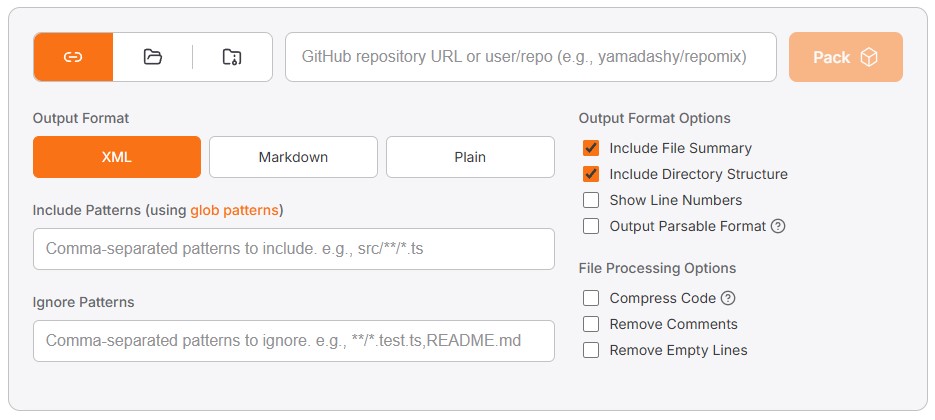
Repomix solves this with a single command. It packs your entire codebase, folder structure, documentation, and all into one AI friendly file with smart token compression. You drop that file into Claude and it sees the full picture.
npx repomixThat’s it. One command. Repomix generates a repomix-output.xml file containing your entire repository in an AI readable format. You can also point it at any GitHub repo remotely:
npx repomix --remote user/repoOr compress the output for larger projects:
npx repomix --compressThere’s also a web version at repomix.com where you just type a repository name and click Pack. No terminal required. And a Chrome extension that adds a Repomix button directly to GitHub repository pages.
The practical use case for non developers: pack your WordPress theme folder into one file and ask Claude to find CSS conflicts, suggest performance improvements, or explain what every template file does. Full project context in one shot.
2. Everything Claude Code
github.com/affaan-m/everything-claude-code — 128k stars
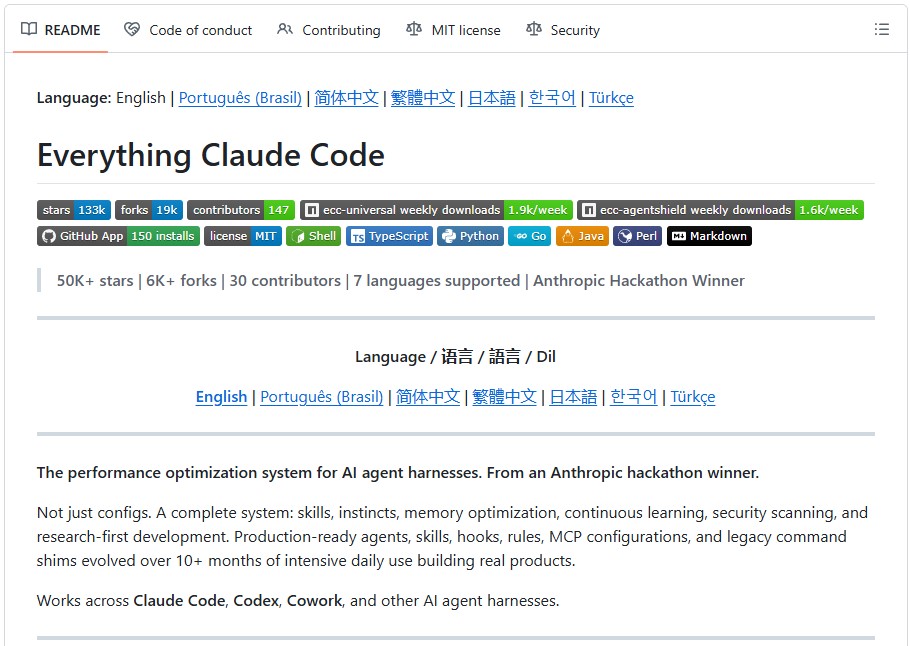
This is the single most comprehensive Claude Code resource that exists. 30 specialized agents, 136 skills, 60 slash commands, and automated hook workflows. All built over 10+ months of daily use by an Anthropic hackathon winner.
The structure looks like this:
agents/     — 30 specialized subagents
skills/     — 136 workflow skills
commands/   — 60 slash commands
hooks/      — Trigger-based automations
rules/      — Always-follow guidelines
scripts/    — Cross-platform utilities
mcp-configs/ — 14 MCP server configurations
Think of it as the ultimate cheat sheet. Not a single tool but a complete system for making Claude Code operate at a professional level. It includes agents for security auditing, code review, testing, research, and documentation. Skills for TDD workflows, backend patterns, frontend design, and API architecture. Commands that turn complex multi step processes into single shortcuts.
Install the rules for your stack:
git clone https://github.com/affaan-m/everything-claude-code.git

# Pick your language
cp -r everything-claude-code/rules/common ~/.claude/rules/
cp -r everything-claude-code/rules/typescript ~/.claude/rules/
cp -r everything-claude-code/rules/python ~/.claude/rules/
The repo also works with OpenAI’s Codex, Cursor, Gemini CLI, and other AI coding tools. It’s not locked to Claude.
If you’re just getting started with Claude Code, this is the map. If you’ve been using it for months, there’s almost certainly something in here you missed. For a different approach to agent skills that improve autonomously over time, Hermes Agent builds its own reusable skills from experience rather than relying on manually installed ones.
Claude Code Repos for AI Workflows Without Code
3. Dify
github.com/langgenius/dify — 130k+ stars
Dify is what happens when someone builds a serious AI platform and makes it open source. 130,000 stars. $30 million in funding. Used by Maersk, Novartis, and over 2,000 teams in production.
The pitch is simple. You want to build an AI powered app, a chatbot that knows your documents, an agent that handles customer support, a workflow that processes data automatically. Instead of writing code from scratch, you drag and drop components on a visual canvas. Connect your LLM, add your data sources, define the logic, deploy.
Get it running in under five minutes:
git clone https://github.com/langgenius/dify.git
cd dify/docker
cp .env.example .env
docker compose up -d
Then open http://localhost and you’re in the visual workflow builder.
Dify works with every major model provider: OpenAI, Anthropic, Mistral, open source models. It includes built in RAG (so your AI can read and reference your actual documents), agent capabilities, and an observability dashboard for monitoring how your AI apps perform in production.
You can self host it for free or use their cloud version starting at $59 a month. The self hosted option means your data never leaves your servers, which matters a lot after the <a href=”https://virtualuncle.com/perplexity-ai-lawsuit-data-sharing-meta-google-2026/”>Perplexity data sharing lawsuit</a> this week.
4. Flowise
github.com/FlowiseAI/Flowise — 30k stars
If Dify is the enterprise platform, Flowise is the weekend project version. Same concept, smaller scope, faster to get running.
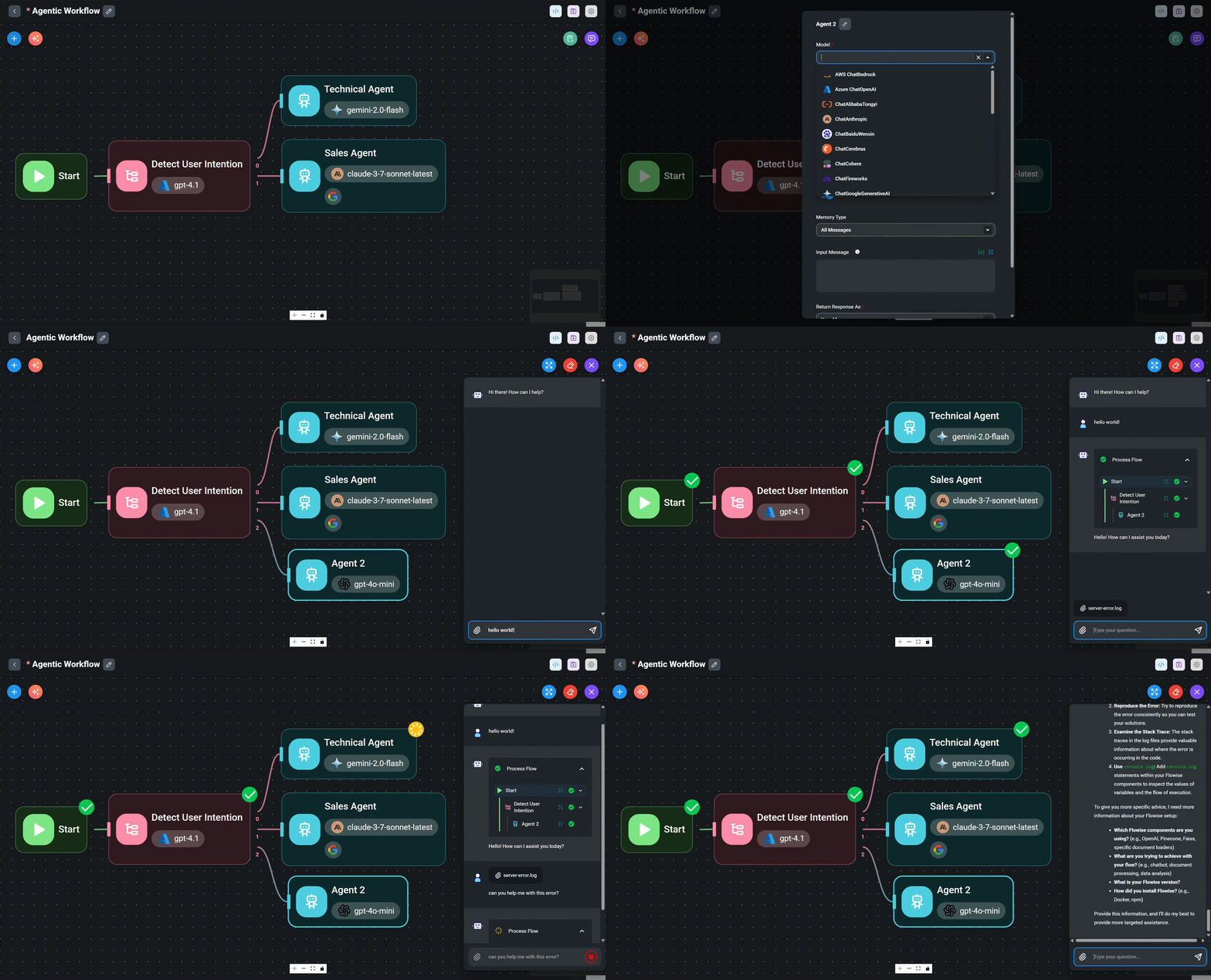
Flowise is a drag and drop AI agent builder. You connect blocks like LEGO. One block is your LLM. Another is your document source. Another is the chat interface. Snap them together and you have a working AI app.
npm install -g flowise
npx flowise start
Two commands. Open your browser. Start building.
Made at Y Combinator. Actively developed. And genuinely usable for people who have never touched a command line.
The fastest use case: connect Claude to a folder of your documents and a chat interface. In about an hour you have a working bot that answers questions about your specific content. Deploy it on your website, share it with your team, or use it internally for research.
If you’ve been reading about automation tools like Make.com and n8n and wondering what the AI native equivalent looks like, Flowise is the answer.
5. Onyx
github.com/onyx-dot-app/onyx — 17.3k stars
Onyx is a self hosted AI chat platform that works with any LLM. Think of it as building your own private ChatGPT that you control completely.
Why would you want that? Because every time you paste sensitive information into ChatGPT or Claude’s web interface, that data goes to their servers. For personal use that’s fine. For business documents, client data, financial information, or anything you wouldn’t want a third party to see, it’s a problem.
One command gets it running:
curl -fsSL https://raw.githubusercontent.com/onyx-dot-app/onyx/main/deployment/docker_compose/install.sh > install.sh && chmod +x install.sh && ./install.shOnyx connects to 40+ knowledge sources including Google Drive, Slack, Notion, and Confluence. It has built in RAG, deep research capabilities, MCP support, and web search. You can run it in a completely airgapped environment where nothing ever touches the internet. If you want an agent that acts on your behalf rather than just answering questions, OpenClaw takes a different approach by connecting to your messaging apps and executing tasks autonomously.
The interface looks and feels like ChatGPT but everything runs on your machine. Your conversations, your documents, your data. Nobody else sees it. Given what we just learned about Perplexity secretly sharing user conversations with Meta and Google, self hosting your AI isn’t paranoia anymore. It’s reasonable.
Claude Code Repos That Level Up Claude Itself
6. Claude Skills (Official)
github.com/anthropics/skills — Anthropic’s official repository
This is where skills started. Anthropic’s own collection of ready made SKILL.md files for Claude Code.
Each skill teaches Claude how to handle a specific type of task correctly. Working with PDFs, creating Word documents, building spreadsheets, generating presentations. Instead of explaining to Claude every time how to process an Excel file, you install the skill once and it always knows what to do.
# Copy a skill to your project
cp -r skills/pdf .claude/skills/

# Or install globally
cp -r skills/pdf ~/.claude/skills/
The skills follow a simple structure:
skills/
├── pdf/
│   └── SKILL.md          # Instructions Claude follows
├── docx/
│   └── SKILL.md
├── xlsx/
│   └── SKILL.md
└── pptx/
    └── SKILL.md
Each SKILL.md file contains YAML frontmatter that tells Claude when the skill is relevant, and markdown instructions it follows when activated. Claude scans available skills automatically (~100 tokens per scan) and loads the full instructions only when they apply (<5k tokens). Multiple skills can be available without overwhelming the context window.
These are the foundation. The community built everything else on top of this standard.
7. Awesome Claude Skills
github.com/travisvn/awesome-claude-skills — 22k+ installs
If the official Anthropic repo is the App Store, Awesome Claude Skills is the curated “best of” list. Community built skills gathered across every category you can think of: SEO, marketing, design, security, writing, research, testing, and dozens more.
Install any skill from the marketplace:
/plugin marketplace add travisvn/awesome-claude-skills
/plugin install [skill-name]
The repo also includes important safety notes. Skills can execute arbitrary code in Claude’s environment, so you should only install from trusted sources. That warning applies to everything in this list. If you can’t verify what a skill does, don’t install it.
Worth browsing even if you don’t install anything immediately because it shows you the full range of what’s possible. Most people have no idea Claude can be extended this way. We did a full breakdown of the agent skills marketplace including what to install, what to avoid, and the security issues nobody else is talking about.
8. Obsidian Skills
github.com/kepano/obsidian-skills
Made by the CEO of Obsidian personally. If you take notes in Obsidian and use Claude, this is the missing connection.
The skill teaches Claude how to work with Obsidian’s specific formats: automatic tagging, linking between notes, understanding your vault structure, working with Obsidian’s Bases feature, JSON Canvas, and CLI workflows. Claude stops being a generic assistant and starts being one that understands how your personal knowledge system is organized.
git clone https://github.com/kepano/obsidian-skills.git ~/.claude/skills/obsidianFor people who live in Obsidian and Claude at the same time (and there are a lot of you), this bridges the gap between your thinking tool and your doing tool.
9. NotebookLM Integration
github.com/PleasePrompto/notebooklm-skill
Claude and NotebookLM together. A bridge between two of the best tools for working with knowledge.
The skill lets Claude create summaries, mind maps, and flashcards directly from your sources in NotebookLM. If you’re a researcher, student, or someone who constantly processes large amounts of information, this combination saves hours of manual synthesis.
git clone https://github.com/PleasePrompto/notebooklm-skill.git ~/.claude/skills/notebooklmThe use case is straightforward: you have sources in NotebookLM, you want Claude to help you process them into usable outputs. This skill teaches Claude how to interact with that specific workflow instead of you copying and pasting between tools.
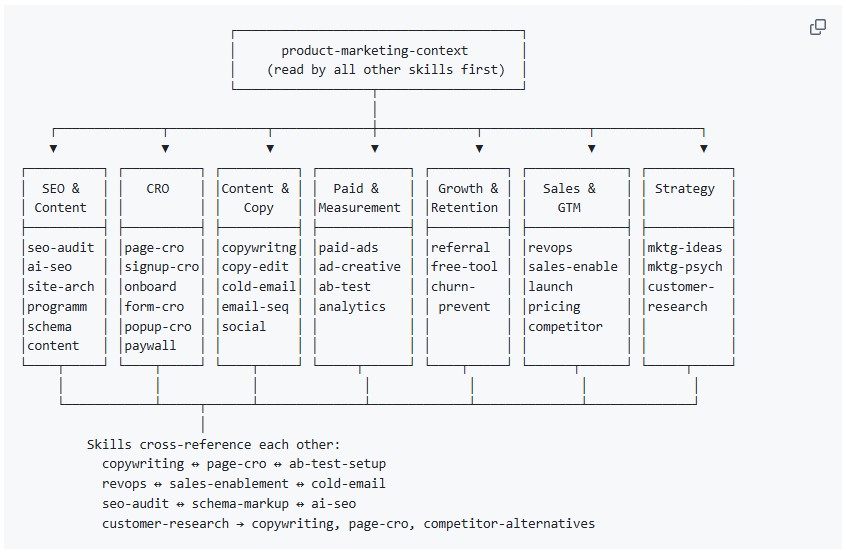
10. Marketing Skills by Corey Haines
github.com/coreyhaines31/marketingskills — 23 skills
This is the one that matters most for anyone using AI for marketing, content, or business growth.
Corey Haines (founder of Swipe Files, a well known marketing newsletter) built a full suite of Claude Code skills specifically for marketers. Not generic “write me a blog post” prompts. Structured, professional marketing workflows.
The skill architecture covers the full stack:
SEO & Content:    seo-audit, ai-seo, site-arch, programmatic-seo
CRO:              page-cro, signup-cro, onboarding, form-cro
Content & Copy:   copywriting, copy-editing, cold-email, email-sequence
Paid & Measurement: paid-ads, ad-creative, ab-test, analytics-tracking
Growth & Retention: referral, free-tool-strategy, churn-prevention
Sales & GTM:      revops, sales-enablement, launch-strategy
Strategy:         marketing-ideas, marketing-psychology, customer-research
Install the whole suite:
npx skills add coreyhaines31/marketingskillsOr install specific skills:
npx skills add coreyhaines31/marketingskills --skill seo-audit copywriting email-sequenceThe ai-seo skill is particularly relevant right now. It optimizes your content to appear in AI generated answers, not just traditional search results. With Shopify just making 5.6 million stores shoppable inside ChatGPT, showing up in AI conversations is becoming as important as showing up in Google.
Which Claude Code Repos Should You Install First?
You don’t need to install everything at once. Here’s where to start depending on what you do:
Working with text and content: Obsidian Skills + NotebookLM + Marketing Skills. These three turn Claude from a generic writing assistant into something that understands your notes, your research, and your marketing strategy.
Building a product or automating workflows: Flowise + Dify + Claude Skills. Start with Flowise to prototype, graduate to Dify when you need production infrastructure, and use Claude Skills to handle the document and data processing.
Want the full picture: Everything Claude Code as your map, then install individual pieces as you need them.
If you’re already using Claude Pro, every single one of these tools works with your existing subscription. You’re already paying for the engine. These repos are the upgrades you bolt onto it.
All ten repositories are open source and free. The only investment is the time it takes to set them up. In most cases that’s 15 to 30 minutes. The return on that time starts the first time Claude does something it couldn’t do before because you taught it how.
Claude Code GitHub Repos FAQ
The top GitHub repos for Claude Code in 2026 include Repomix (20.9k stars) for packing entire codebases into AI-readable context, Everything Claude Code (128k stars) for a complete library of 136 skills and 30 agents, Dify (130k+ stars) for visual AI workflow building, and Anthropic’s official Claude Skills repository for document and file handling. The best starting point depends on whether you need better context, workflow automation, or Claude Code skill extensions.
Clone the skill repository into your Claude Code skills directory. For a specific project, run git clone [repo URL] .claude/skills/[skill-name]. For global installation across all projects, run git clone [repo URL] ~/.claude/skills/[skill-name]. If the repo supports the plugin marketplace, use /plugin marketplace add [repo-owner]/[repo-name] followed by /plugin install [skill-name]. No build steps or configuration files are needed.
Repomix is an open source tool with 20.9k GitHub stars that packs your entire codebase, folder structure, and documentation into one AI-friendly file with smart token compression. Run npx repomix in your project directory and it generates a single file you can drop into Claude Code for full project context. It also works with a web interface at repomix.com and has a Chrome extension that adds a Pack button to GitHub repository pages.
Most of these repos work with any Claude Code subscription, not just Claude Pro. The skills and agents from Everything Claude Code, Anthropic’s official skills, and the community skill repositories all install the same way regardless of your plan. Dify, Flowise, and Onyx are standalone platforms that work with any LLM provider including free local models through Ollama, so they do not require a Claude subscription at all.
Some do. Everything Claude Code explicitly supports OpenAI’s Codex, Cursor, Gemini CLI, and other AI coding tools in addition to Claude Code. Dify and Flowise work with every major model provider. The SKILL.md format is specific to Claude Code, so Anthropic’s official skills and community skills built on that standard are Claude Code only. The broader trend is toward cross-platform compatibility but most skills are still built for Claude Code first.