
The SQL ALTER TABLE statement is used to modify an existing table’s structure without deleting it. It helps update the design of a database as requirements change.
- Can add, delete or modify columns in a table.
- Can also rename a table or change data types and constraints.
- Useful for adjusting database structure without losing data.
Example: First, we will create a demo SQL database and Employees table, on which we will use the ALTER TABLE command.
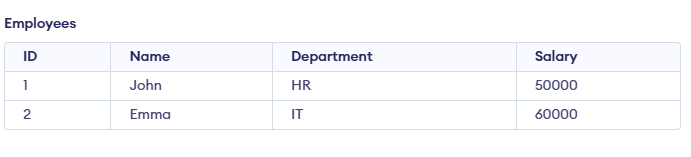
Query:
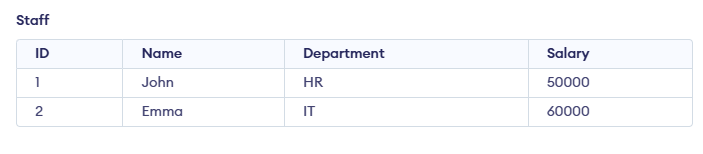
ALTER TABLE Employees RENAME TO Staff; Output:
Syntax:
ALTER TABLE table_name [ADD | DROP | MODIFY] column_name datatype;- table_name: name of the table you want to modify.
- ADD: used to add a new column.
- DROP: used to remove an existing column.
- MODIFY: used to change datatype or definition of an existing column.
Use Cases for SQL ALTER TABLE
Here are several usages of SQL ALTER TABLE
1. ADD
The ADD clause is used to add a new column to an existing table. You must specify the name of the new column and its data type.
Syntax:
ALTER TABLE table_name
ADD column_name datatype;
Query:
ALTER TABLE Staff
ADD Email VARCHAR(100);
Output:
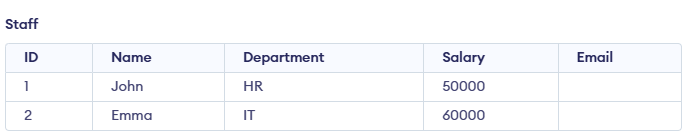
Here, we are adding a column named Email to Stafftable
2. MODIFY
The MODIFY (or ALTER COLUMN in some databases like SQL Server) clause is used to modify the definition of an existing column, such as changing its data type or size.
Syntax:
ALTER TABLE table_name
MODIFY COLUMN column_name datatype;
Query:
ALTER TABLE Staff
MODIFY COLUMN Address VARCHAR(100);
Here, we are modifying the column named Address datatype that is VARCHAR(100).
3. DROP
The DROP clause allows you to remove a column from a table. Be cautious when using this command as it will permanently remove the column and its data.
Syntax:
ALTER TABLE table_name
DROP COLUMN column_name;
Query:
ALTER TABLE Staff
DROP COLUMN Grade;
Here, we are removing a column named Grade from Staff table
4. RENAME COLUMN
We can rename an existing column using RENAME COLUMN clause. This allows you to change the name of a column while preserving its data type and content.
Syntax:
ALTER TABLE table_name
RENAME COLUMN old_name TO new_name;
Query:
ALTER TABLE Staff
RENAME COLUMN Name TO EmployeeName;
Output:

This renames the column Name to EmployeeName in the Staff table.
5. RENAME TO
We can rename an entire table using the RENAME TO clause. This changes the name of the table while preserving its structure and data.
Syntax:
ALTER TABLE table_name
RENAME TO new_table_name;
Query:
ALTER TABLE Staff
RENAME TO Employees;
Output:
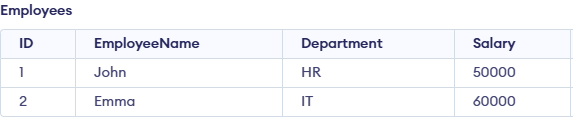
This renames the table from Staff to Employees.