
Structured Query Language (SQL) is the standard language used to interact with relational databases.
- It allows users to store, retrieve, update and manage data efficiently through simple commands.
- It is known for its user-friendly syntax and powerful capabilities, SQL is widely used across industries.
SQL Working
We interact with databases using SQL queries. DBMS tools like MySQL and SQL Server have their own SQL engine and an interface where users can write and execute SQL queries.
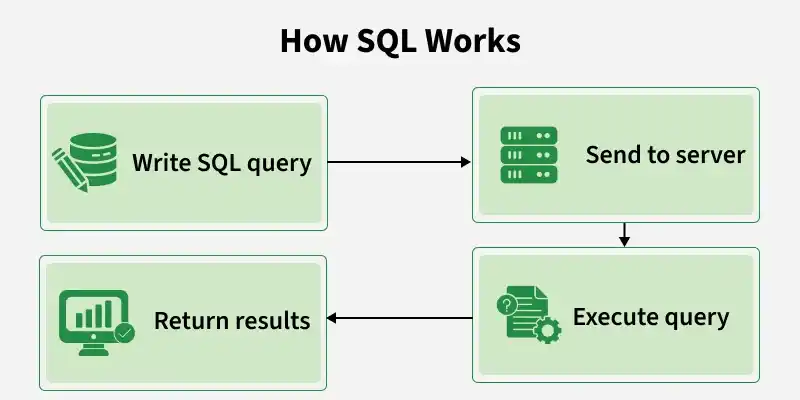
Below are the detailed steps involved in the SQL query execution.
- Input: The user sends a SQL query (like SELECT or INSERT).
- Parsing: The system checks if the query is written correctly.
- Optimization: It chooses the fastest way to run the query.
- Execution: The database runs the query.
- Output: The result or confirmation is sent back to the user.
Components of a SQL System
Here are some key components of SQL system:
- Database: A structured collection of data stored in tables with rows and columns.
- Tables: Store data and apply rules to keep it accurate and consistent.
- Indexes: Help the database find data faster without scanning the whole table.
- Views: Virtual tables created from SELECT queries for easy access to data.
- Stored Procedures: Pre-saved SQL code that runs tasks and improves performance and security.
- Transactions: Group of SQL actions that either all succeed or all fail to keep data safe.
- Security & Permissions: Control who can view, change, or manage database data.
- Joins: Combine data from different tables based on relationships.
Rules for Writing SQL Queries
There are certain rules for SQL which would ensure consistency and functionality across databases. By following these rules, queries will be well formed and well executed in any database.
- Semicolon (;): Ends an SQL statement.
- Case-Insensitive: SQL keywords like SELECT and INSERT are not case-sensitive.
- Whitespace: Spaces and new lines are allowed for better readability.
- Reserved Words: Do not use SQL keywords as names, or write them in quotes/backticks.
Comments:
- Single-line: -- comment
- Multi-line: /* comment */
Data Constraints: Use NOT NULL, UNIQUE, PRIMARY KEY, etc., to ensure data accuracy.
String Values: Enclose strings in single quotes ('text').
Naming Rules:
- We Start with a letter
- We can only use Max 30 characters
- We only use letters, numbers and underscores (_)
Different SQL Commands or Queries
Structured Query Language (SQL) commands are standardized instructions used by developers to interact with data stored in relational databases. These commands allow for the creation, manipulation, retrieval and control of data, as well as database structures. SQL commands are categorized based on their specific functionalities:
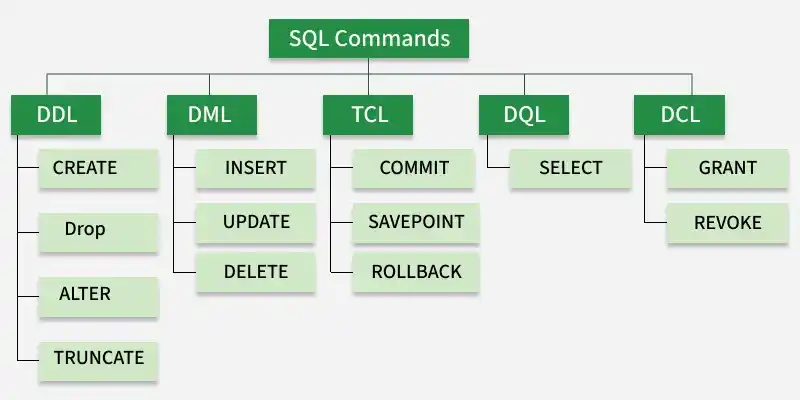
1. Data Definition Language
DDL (Data Definition Language) commands are used to create, change, and delete database objects.Database engineers use commands like CREATE to make tables, views, and indexes, and ALTER or DROP to modify or remove them.
Command | Description |
|---|---|
CREATE | Creates a new table, a view on a table, or some other object in the database. |
ALTER | Modifies an existing database object, such as a table |
DROP | Deletes an entire table, a view of a table, or other objects in the database |
TRUNCATE | Removes all records from a table but keeps the table structure intact. |
RENAME | It is used to change the name of an existing database object, such as a table. |
2. Data Manipulation Language
A relational database can be updated with new data using data manipulation language (DML) statements. The INSERT command, for instance, is used by an application to add a new record to the database.
Command | Description |
|---|---|
INSERT | Creates a record. |
UPDATE | Modifies records. |
DELETE | Deletes records. |
3. Data Query Language
Data retrieval instructions are written in the data query language (DQL), which is used to access relational databases. The SELECT command is used by software programs to filter and return particular results from a SQL table.
4. Data Control language
DCL commands manage user access to the database by granting or revoking permissions. Database administrators use DCL to enforce security and control access to database objects.
Command | Description |
|---|---|
GRANT | Gives a privilege to the user. |
REVOKE | Takes back privileges granted by the user. |
5. Transaction Control Language
TCL commands manage transactions in relational databases, ensuring data integrity and consistency. These commands are used to commit changes or roll back operations in case of errors.
Command | Description |
|---|---|
COMMIT | Saves all changes made during the current transaction on a permanent basis. Some databases provide an auto-commit feature, which can be configured using settings. |
ROLLBACK | Reverts changes made during the current transaction, ensuring no unwanted changes are saved. |
SAVEPOINT | Sets a point within a transaction to which changes can be rolled back, allowing partial rollbacks |
Benefits of SQL
- Efficient: Works fast even with large and complex data.
- Standard: Works on most database systems.
- Scalable: Can handle small to very large databases.
- Flexible: Supports advanced logic using extensions like PL/SQL or T-SQL.
Limitations of SQL
- Complex: Advanced tuning and optimization can be difficult.
- Scalability Issues: Not ideal for huge or unstructured data.
- Different Versions: Some SQL features vary by database.
- Not Real-Time: Traditional SQL is not built for real-time analytics.
Applications of SQL
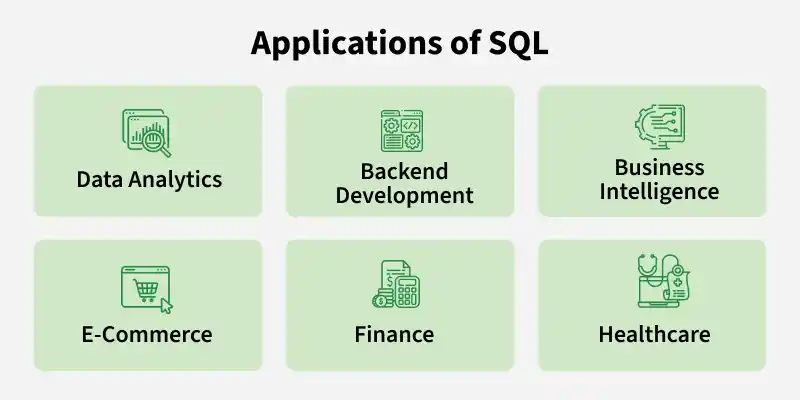
- E-Commerce: Manage customer orders, product catalogs and inventory.
- Healthcare: Maintain patient records and appointment schedules.
- Banking: Analyze transaction histories and generate financial reports.
- Web Development: Power dynamic websites with user-specific content.
- Machine Learning and Data Science: Combine SQL databases with tools like Python, R and TensorFlow to streamline machine learning workflows.