
The CREATE INDEX statement in SQL is used to create indexes on tables to improve data retrieval speed and enhance query performance.
- Used to create indexes on one or more columns.
- Improves query performance by speeding up data retrieval.
- Works in the background without affecting table structure.
Example: First, we create a demo SQL database and table, on which we use CREATE INDEX command.
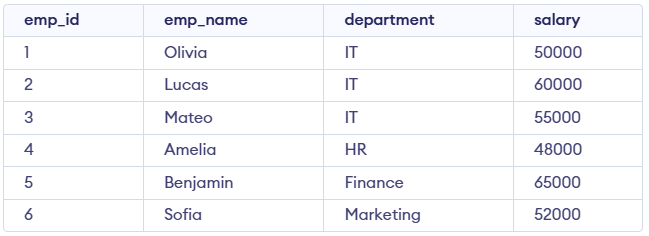
Query:
CREATE INDEX idx_employees_department
ON employees(department);

SELECT emp_name, salary
FROM employees
WHERE department = 'IT';
Output:

The CREATE INDEX command enables us to create an index on a table, improving query performance by providing a faster way to retrieve rows.
Syntax:
CREATE INDEX index_name
ON table_name  (column1, column2.....);
- index_name: The name of the index.
- table_name: The name of the table on which the index is created.
- column1, column2, ...: The columns that the index will be applied to.
Creating a Unique Index:
A unique index ensures that all values in the indexed columns are unique preventing duplicate values.
CREATE UNIQUE INDEX index_name
ON table_name (column1, column2.....);
Example of SQL CREATE INDEX Statement
Let’s look at an example where we use the CREATE INDEX command on a Students table given below

Step 1: Create an Index
In this example, we will create an index on the name column of the Students table to speed up queries that search by name.
Query:
CREATE INDEX idx ON
 Students(NAME);

--Creating a Unique Index
CREATE UNIQUE INDEX idx_student_id ON
 Students(student_id);
Explanation:
- The first query creates a non-unique index on the NAME column to speed up search and sorting operations.
- The second query creates a unique index on student_id to prevent duplicate values and maintain data integrity.
Step 2: Retrieve Data Using the Index
After creating the index, queries that use the name column in their WHERE clause will benefit from the faster data retrieval provided by the index. The USE INDEX hint directs the query to use the idx_name index to speed up data retrieval.
Query:
SELECT * FROM Students USE INDEX(idx_name);Output:
Step 3: Verifying the Index Creation
We can view all the indexes in a database to understand which ones are in use and confirm their structure. In SQL, the following query helps us see the indexes for a given table:
Syntax:
SHOW INDEXES FROM Students;Output:

- Shows the list of indexes available on the table.
- Indicates one non-unique index on name and one unique index on student_id.