
SQL ORDER BY is used to sort the result set of a query in either ascending (ASC) or descending (DESC) order. By default, ORDER BY sorts in ascending order. Sorting can be applied to one or more columns, which helps organize and analyze data effectively.
Example: First, we will create a demo SQL database and table, on which we will use the ORDER BY command.

Query:
SELECT EmpID, Name, Department, Salary
FROM Employees
ORDER BY
 Salary DESC;
Output:

Syntax:
SELECT * FROM table_name ORDER BY column_name ASC | DESC; - table_name: name of the table.
- column_name: name of the column according to which the data is needed to be arranged.
- ASC: to sort the data in ascending order.
- DESC: to sort the data in descending order.
Examples
We have created a Student table that stores student data including their roll_no, name, age, addess, and phone. Let's look at some examples of the SQL ORDER BY clause to understand it's working in SQL. We will use the following table in examples.
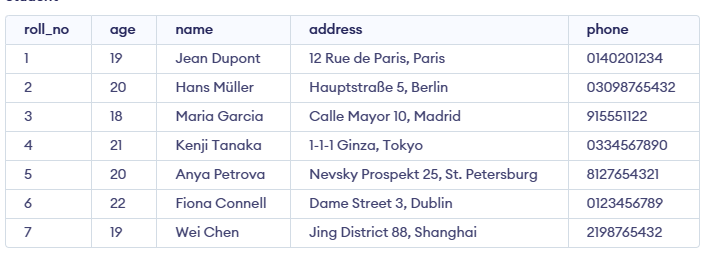
Now consider the above database table and find the results of different queries.
Example 1 : Sort by a Single Column
In this example, we will fetch all data from the table Student and sort the result in descending order according to the column ROLL_NO.
Query:
SELECT * FROM students ORDER BY ROLL_NO DESC;Output:
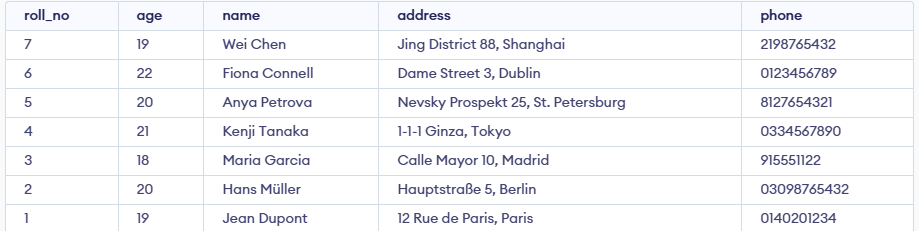
In the above example, if we want to sort in ascending order we have to use ASC in place of DESC.
Example 2 : Sort by Multiple Columns
In this example, we will fetch all data from the table Student and then sort the result in descending order first according to the column age and then in ascending order according to the column name.
To sort according to multiple columns, separate the names of columns by the (,) operator.
Query:
SELECT * FROM students ORDER BY age DESC , name ASC; Output:
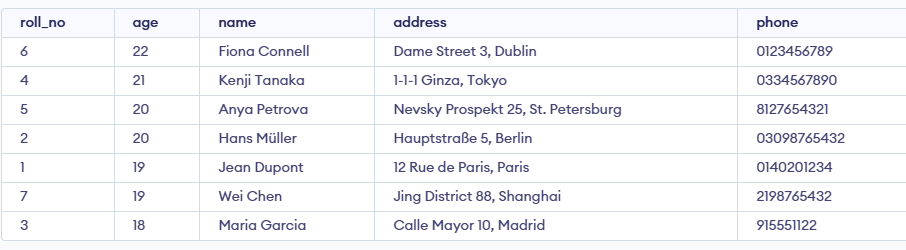
The result is first sorted by Age in descending order. For rows with the same Age, it’s further sorted by Name in ascending order.
Sorting By Column Number
Instead of using column names, you can sort results using the position of a column in the SELECT list. The number must be greater than 0 and not exceed the number of selected columns.
- Using column numbers in ORDER BY reduces query readability.
- Referring to columns by name is clearer and easier to understand.
- Changing column order in SELECT doesn’t affect ORDER BY when using names.
- Prefer column names over numbers for maintainable SQL code.
Syntax:
ORDER BY Column_Number asc/desc;Example of Sorting By Column Number
Here we take an example to sort a database table according to column 1 i.e Roll Number. For this a query will be:
Query:
CREATE TABLE studentinfo
( Roll_no INT,
NAME VARCHAR(25),
Address VARCHAR(20),
CONTACTNO BIGINT NOT NULL,
Age INT );
INSERT INTO studentinfo
VALUES
(7, 'LUCAS', 'BERLIN', 4915123456789, 18),
(4, 'EMILIA', 'WARSAW', 481234567890, 18),
(1, 'HUGO', 'PARIS', 331234567890, 18),
(8, 'SOFIA', 'MADRID', 341612345678, 19),
(5, 'OLIVER', 'LONDON', 447912345678, 19),
(2, 'MATEO', 'ROME', 390612345678, 19),
(6, 'ISABELLA', 'LISBON', 351912345678, 20),
(3, 'ANNA', 'PRAGUE', 420777123456, 20);
SELECT Roll_no, Name, Address
FROM studentinfo
ORDER BY 1
Output:
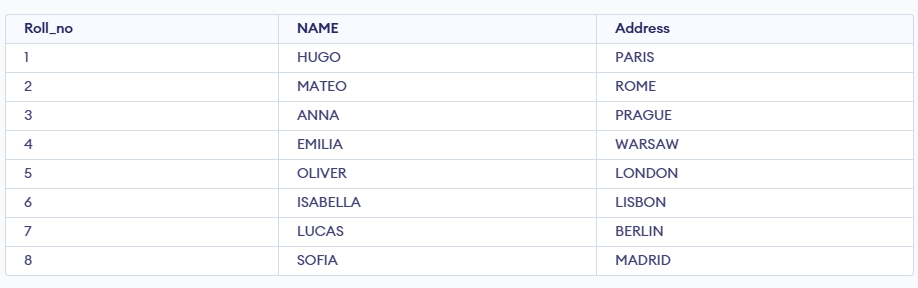
Explanation: ORDER BY 1 means sorting values according to first column in the SELECT statement.