
SQL provides the INSERT INTO statement to add new records into a table. It is a key part of Data Manipulation Language (DML) used for efficient data insertion.
- It is used to insert single or multiple rows into a table.
- It allows specifying values for selected columns.
- It supports inserting multiple records in a single query.
Example: First, we will create a demo SQL database and table, on which we will use the Insert Multiple Rows command:

Query:
INSERT INTO Employees (EmployeeID, EmployeeName, Age, Department)
VALUES
(1, 'John Doe', 30, 'Engineering'),
(2, 'Sarah Davis', 26, 'HR');
Output:

Syntax:
INSERT INTO table_name (column1, column2, column3)
VALUES
(value1, value2, value3),
(value4, value5, value6);
Insert Multiple Rows in SQL
Insertion is a DML (Data Manipulation Language) operation in SQL used to add data into a database. It can be done using the INSERT statement, either for single or multiple rows. Common methods include simple multi-value inserts, INSERT INTO ... SELECT, or batch inserts using transactions.
Query:
CREATE TABLE Employees (
    EmployeeID INT PRIMARY KEY,
    EmployeeName VARCHAR(100),
    Age INT,
    Department VARCHAR(50)
);
The simplest method to insert multiple rows is by using a single INSERT INTO statement followed by multiple sets of values. This approach allows you to insert multiple records in one go, improving efficiency.
INSERT INTO Employees (EmployeeID, EmployeeName, Age, Department)
VALUES
    (1, 'John Doe', 30, 'Engineering'),
    (2, 'Jane Smith', 28, 'Marketing'),
    (3, 'Sam Brown', 35, 'Sales'),
    (4, 'Lucy Green', 25, 'Human Resources');
Output:
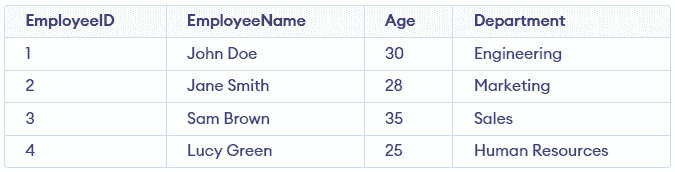
This query inserts four rows into the Employees table. It’s a simple, effective method for adding multiple records at once and it reduces the need for multiple INSERT statements.
Using INSERT INTO ... SELECT for Inserting Multiple Rows
INSERT INTO ... SELECT is used to insert multiple rows into a table by selecting data from another table or query result. It is commonly used when copying, filtering, or transforming data before insertion.
- Transfers data from one table to another without manually writing values.
- Allows inserting only selected or condition-based records into the target table.
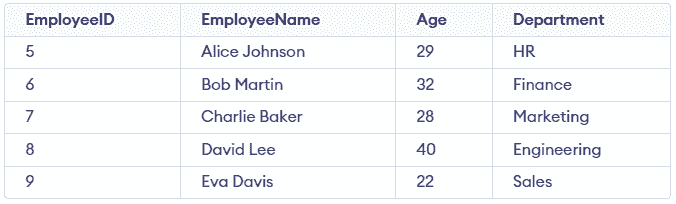
Consider the NewEmployees table shown below, for the following example:
Query:
INSERT INTO Employees (EmployeeID, EmployeeName, Age, Department)
SELECT EmployeeID, EmployeeName, Age, Department
FROM NewEmployees
WHERE Age > 30;
Output:
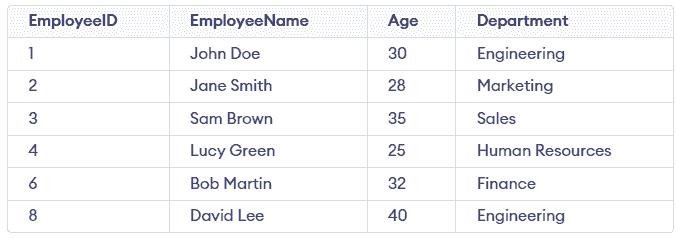
- The INSERT INTO ... SELECT statement copies data from the NewEmployees table to the Employees table.
- Only records where the employee’s age is greater than 30 are inserted.
Note: The number of values in each row must match the number of specified columns, otherwise the query will result in an error.
Inserting Data Using Transactions
When inserting large amounts of data, you can use SQL transactions to ensure that all rows are inserted correctly. A transaction groups multiple SQL operations into a single unit, so if one operation fails, the entire transaction is rolled back.
Query:
BEGIN TRANSACTION;

    INSERT INTO Employees (EmployeeID, EmployeeName, Age, Department)
    VALUES (10, 'Jack Brown', 29, 'HR');

    INSERT INTO Employees (EmployeeID, EmployeeName, Age, Department)
    VALUES (11, 'Amelia Wilson', 34, 'Finance');

COMMIT;
Output:
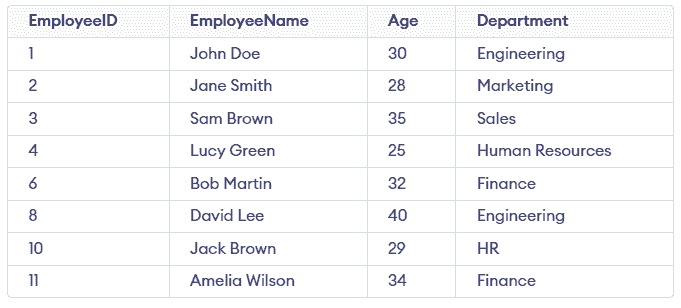
- BEGIN TRANSACTION starts a new transaction.
- COMMIT saves all successful changes permanently to the database.
- If any operation fails, ROLLBACK undoes all changes made during the transaction.
- This ensures data consistency and prevents partial updates.