
Renaming a view in SQL helps maintain clarity and consistency when database structures or business needs change, without affecting existing dependencies.
- Keeps view names aligned with updated business terminology.
- Improves database structure and readability.
- Preserves existing dependencies like permissions and stored procedures.
Renaming a View in SQL Server
The SQL RENAME VIEW command changes the name of an existing view without affecting its structure, data, or dependent objects such as other views, permissions, and stored procedures.
- SQL does not have a universal RENAME VIEW command, but views can be renamed using database-specific methods.
- Using sp_rename in SQL Server to rename the existing view directly.
Syntax:
EXEC sp_rename 'old_view_name', 'new_view_name';- sp_rename system stored procedure is used to rename a view in SQL.
- old_view_name denotes the current name of the view which is you want to rename the view in SQL.
- new_view_name denotes the new name of the view.
Example: Renaming a View in SQL Server
Let us use the sample Sales table given below, which contains two columns: product_id and quantity to create a view and then rename it. The product_id represents different products, and the quantity represents the number of units sold for each product.
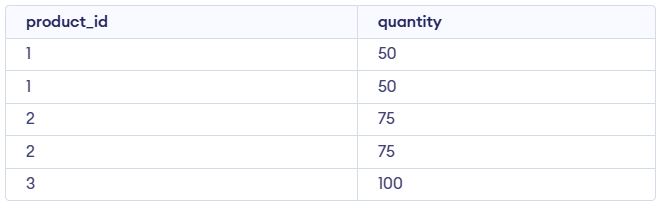
1. Create the sales_report View
The view sales_report aggregates the total quantity of each product from the Sales table.
Query:
CREATE VIEW sales_report AS
SELECT product_id, SUM(quantity) AS total_quantity
FROM Sales
GROUP BY product_id;

SELECT * FROM sales_report;
Output:

- This view calculates the total quantity for each product (product_id) by summing the quantity values.
- Creates a view that sums quantity by product.
- Displays data from the view.
2. Rename the sales_report View
We rename the sales_report view to monthly_sales_report using the sp_rename stored procedure in SQL Server.
Query:
EXEC sp_rename 'sales_report', 'monthly_sales_report';- In this step, we renamed the view from sales_report to monthly_sales_report.
- The operation does not affect the underlying data in the Sales table or any other dependent objects like stored procedures.
3. Verification
To verify that the view was successfully renamed, we query the newly named view.
Query:
select * from monthly_sales_report;Output:

- The output shows the total quantity of products, as calculated by the monthly_sales_report view.
- The view has been successfully renamed and continues to function as expected, displaying aggregated data from the Sales table.
Renaming views is essential for maintaining a well-organized and understandable database schema. Here are some key benefits:
- Adaptability: Update view names to reflect changing business logic.
- Consistency: Aligns object names with naming standards.
- Clarity: Improves schema readability and understanding.
- Dependency Safety: Keeps stored procedures and permissions intact.
- Efficiency: Saves time compared to dropping and recreating views.