
SQL Statistical Functions are built-in functions that help analyze numeric data by performing calculations like averages, totals, and variations. They are widely used to extract meaningful insights from database records.
- Perform calculations like AVG, SUM, COUNT, MIN, MAX
- Help measure data spread using STDDEV and VAR
- Used for quick data analysis and reporting
Statistical Functions in SQL
Here are Some Common Statistical Functions in SQL
Function | Output |
|---|---|
AVG() | Calculates the average value of a numeric column. |
SUM() | Calculates the sum of values in a numeric column. |
COUNT() | Counts the number of rows in a result set or the number of non-null values in a column. |
MIN() | Returns the minimum value in a column. |
MAX() | Returns the maximum value in a column. |
VAR() / VARIANCE() | Calculates the population variance of a numeric column. |
STDDEV() / STDDEV_POP() | Calculates the population standard deviation of a numeric column. |
CORR() | Calculates the correlation coefficient between two numeric columns. |
COVAR_POP() | Calculates the population covariance between two numeric columns. |
PERCENTILE_CONT() | Calculates a specified percentile value for a numeric column |
Working withStatistical Functions
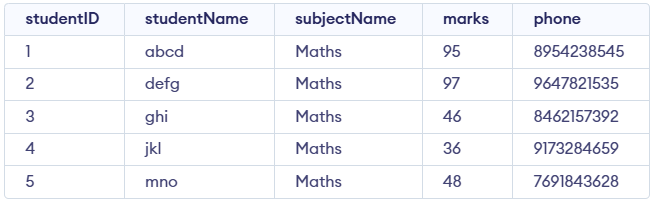
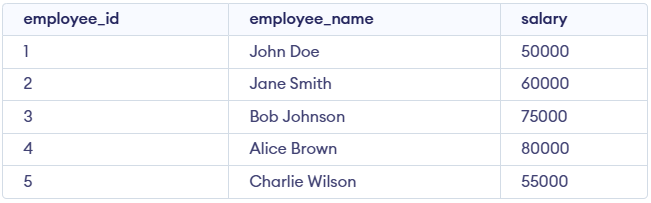
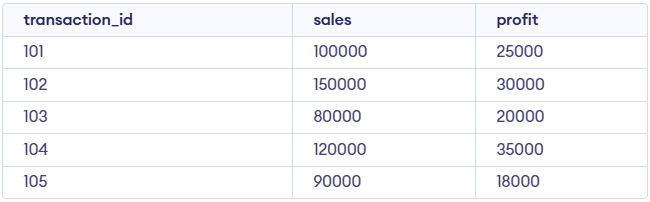
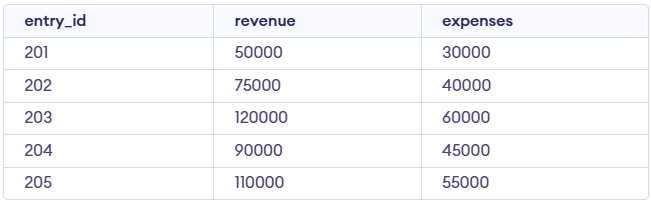
We consider the following four tables for the examples below: 'studentDetails,' 'employees,' 'sales_data,' and 'financial_data.'
1. AVG() Function
AVG() calculate the average or arithmetic mean for a group of numbers or a numeric column.
Syntax:
SELECT AVG(column_name) FROM table_name;Query:
SELECT AVG(marks) AS average_marks FROM studentDetails;Output:

2. SUM() Function
SUM() function returns the total of all numeric values in a column.
Syntax:
SELECT SUM(column_name) FROM table_name;Query:
SELECT SUM(marks) AS total_marks FROM studentDetails;Output:

3. Count() Function
COUNT() function counts the number of rows in a result set or the number of non-NULL numeric values in a column.
Syntax:
SELECT COUNT(*) FROM table_name;
SELECT COUNT(column_name) FROM table_name;- COUNT(*) counts all rows, including rows with NULL values.
- COUNT(column_name) counts only non-NULL values in that column.
Query:
SELECT COUNT(studentID) AS total_students FROM studentDetails;
SELECT COUNT(*) FROM studentdetails;
Output:
4. Max() Function
MAX() function returns the largest value from a numeric or date column.
Syntax:
SELECT MAX(column_name) FROM table_name;Query:
SELECT MAX(marks) AS highest_marks FROM studentDetails;Output:

5. MIN() Function
MIN() function returns the smallest value from a numeric or date column.
Syntax:
SELECT MIN(column_name) FROM table_name;Query:
SELECT MIN(marks) AS lowest_marks FROM studentDetails;Output:

6. VAR() / VARIANCE() Function
VAR() / VARIANCE() functions calculate the variance of numeric data, measuring how much the values spread out from the average.
Syntax:
SELECT VAR(column_name) FROM table_name;Query:
SELECT VARIANCE(marks) AS variance_marks FROM studentDetails;Output:

7. STDDEV() / STDDEV_POP() Function
STDDEV() / STDDEV_POP() functions calculate the standard deviation of numeric data to measure how much the values deviate from the average.
Syntax:
SELECT STDDEV(column_name) FROM table_name;Query:
SELECT STDDEV(marks) AS stddev_marks FROM studentDetails;Output:

8. PERCENTILE_CONT() Function
PERCENTILE_CONT() function returns a continuous percentile value (such as the median) by interpolating results within an ordered dataset.
Syntax:
SELECT PERCENTILE_CONT(0.5) WITHIN GROUP (ORDER BY column_name) FROM table_name;Query:
SELECT PERCENTILE_CONT(0.5) WITHIN GROUP (ORDER BY salary) AS median_salary
FROM employees;
Output:

9. CORR() Function
CORR() function calculates the correlation coefficient between two numeric columns, showing the strength and direction of their linear relationship.
Syntax:
SELECT CORR(column1, column2) FROM table_name;Query:
SELECT CORR(sales, profit) AS correlation_coefficient
FROM sales_data;
Output:

10 .COVAR_POP() Function
COVAR_POP() function calculates the population covariance between two numeric columns, showing how the values vary together.
Syntax:
SELECT COVAR_POP(column1, column2) FROM table_name;Query:
SELECT COVAR_POP(revenue, expenses) AS population_covariance
FROM financial_data;
Output:
