
The TRUNCATE TABLE statement is used to remove all records from a table while preserving its structure. It is especially useful when working with large tables.
- Executes faster than DELETE because it does not log individual row deletions.
- In most databases, the operation cannot be rolled back once executed.
Example: First, we will create a demo SQL database and table, on which we will use the TRUNCATE TABLE command.

Query:
TRUNCATE TABLE Students;Output:

Syntax:
TRUNCATE TABLE table_name;Example of SQL TRUNCATE TABLE
Here we will look at different examples of the SQL TRUNCATE TABLE command. Consider the EMPLOYEE table below for the following example:
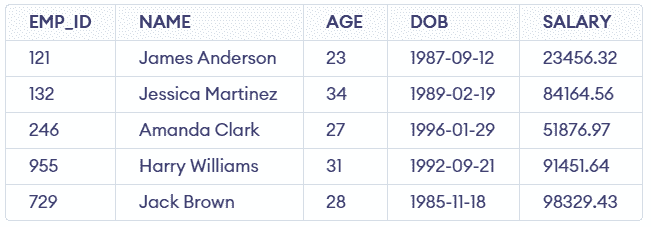
Query:
TRUNCATE TABLE EMPLOYEE;SELECT * FROM EMPLOYEE
Output:

- After truncating the table, all records are removed while the table structure remains intact.
- Executing SELECT * FROM EMPLOYEE will return an empty result set since all data has been erased.
But let's now check whether the structure of the table is deleted or it has been preserved so we again use the DESC command to see the structure of the table and we will see that the structure remains as it is.
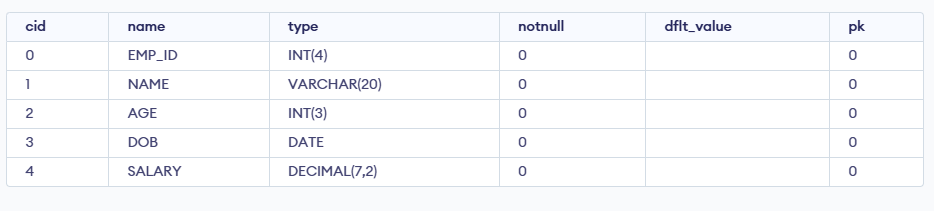
SQL TRUNCATE vs DELETE
Here's a comparison of the TRUNCATE and DELETE statements in SQL presented in a tabular format:
| TRUNCATE TABLE | DELETE |
|---|---|
| Removes all rows from a table | Removes rows based on a WHERE clause or all rows if no condition is specified |
| WHERE clause not supported | WHERE clause supported |
| Uses minimal logging and is faster | Fully logged and slower |
| Generally cannot be rolled back in some DBMS | Can be rolled back if within a transaction |
| Does not fire triggers | Fires triggers |
| Cannot truncate a table referenced by a foreign key (without disabling the constraint) | Can delete rows in a table referenced by a foreign key |
| Resets identity seed value (auto-increment counter) | Does not reset the identity seed value |
| Generally faster for large data volumes | Can be slower, especially for large data volumes |
| Typically used to quickly empty a table | Used to remove specific rows based on a condition |
| Releases the storage space used by the table rows | Does not automatically reclaim space, may require a VACUUM or similar command |
| Retains the table structure, constraints, and indexes | Retains the table structure, constraints, and indexes |
SQL TRUNCATE vs DROP
Here's a comparison of the SQL TRUNCATE TABLE and DROP TABLE commands in a tabular format:
| TRUNCATE TABLE | DROP TABLE |
|---|---|
| Removes all rows from a table, leaving the structure intact. | Deletes the entire table, including its structure. |
| Generally faster than DELETE since it deallocates data pages. | Fast operation since it removes both data and structure. |
| Minimal logging; typically logs page deallocations only. | Fully logged; the entire table drop is recorded. |
| Retained; only the data is removed. | Deleted; table structure and data are both removed. |
| Resets the auto-increment counter to the seed value (if present). | No impact, as the entire table is removed. |
| Triggers are not fired. | Not applicable, as the table no longer exists. |
| Cannot truncate a table if it is referenced by a foreign key. | Cannot drop a table if other tables reference it unless the foreign key constraint is removed first. |
| Used when you need to remove all data from a table but keep the table itself. | Used when you want to completely remove the table from the database. |
| Data cannot be recovered unless a backup is available (depends on the database system). | The table and its data cannot be recovered unless a backup is available. |
| Requires ALTER permission on the table. | Requires DROP permission on the table. |
Note: The TRUNCATE command can not be used to Truncate a Column or Database in SQL.