
The UNIQUE constraint in SQL prevents duplicate entries in specified column(s) while still allowing multiple NULL values. It helps maintain data accuracy without the strict non-NULL requirement of a PRIMARY key.
- Supports single or multi-column definitions.
- Can be added or removed using ALTER TABLE.
- Index creation depends on the database.
Query:
CREATE TABLE Employees (
    EmpID INT,
    Email VARCHAR(100) UNIQUE
);

-- Insert data into Employees table
INSERT INTO Employees (EmpID, Email) VALUES
(1, '[email protected]'),
(2, NULL),
(3, NULL);   -- Allowed because multiple NULLs are treated as unique
Output:
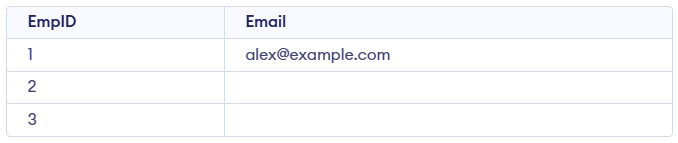
- UNIQUE prevents duplicates; only non-NULL values must remain strictly distinct.
- Multiple NULLs allowed because SQL treats every NULL as unique.
Query:
INSERT INTO Employees (EmpID, Email)
VALUES (4, '[email protected]');
Error:

- The value '[email protected]' already exists in the Email column.
- UNIQUE constraint blocks inserting a duplicate, so the query fails.
Syntax:
CREATE TABLE table_name (
 column1 datatype UNIQUE,
 column2 datatype,
 ...
);
Example of Using the SQL UNIQUE Constraint
In these examples, we demonstrate the implementation of SQL UNIQUE constraint:
Example 1: Creating a Table with UNIQUE Constraints
Let's create a Customers table where the Email column must be unique.
Query:
CREATE TABLE Customers (
    CustomerID INT PRIMARY KEY,
    Name VARCHAR(100),
    Email VARCHAR(100) UNIQUE,
    Country VARCHAR(50)
);

--Insert data into Customers table
INSERT INTO Customers (CustomerID, Name, Email, Country) VALUES
  (1, 'John Doe', '[email protected]', 'USA'),
  (2, 'Jane Smith', '[email protected]', 'Canada');
Output:

- The Email column uses a UNIQUE constraint, so no two customers can share the same email.
- Both inserted rows succeed because each email value is different.
Query:
-- This will fail because '[email protected]' already exists
INSERT INTO Customers (CustomerID, Name, Email, Country) VALUES
 (3, 'Alice Johnson', '[email protected]', 'UK');
Error:

- The insert fails because the Email value already exists in a UNIQUE-restricted column.
- UNIQUE prevents duplicate non-NULL emails, so the row is rejected.
Example 2: Using UNIQUE with Multiple Columns
We can also apply the UNIQUE constraint to multiple columns to ensure that the combination of those columns is unique.
Query:
CREATE TABLE Orders (
    OrderID INT PRIMARY KEY,
    CustomerID INT,
    ProductID INT,
    OrderDate DATE,
    UNIQUE (CustomerID, ProductID)
);

--Insert data into Orders table
INSERT INTO Orders (OrderID, CustomerID, ProductID, OrderDate) VALUES
(1, 101, 501, '2024-01-10'),
(2, 102, 501, '2024-01-12');
Output:

- The UNIQUE(CustomerID, ProductID) constraint ensures that the same customer cannot order the same product more than once.
- Both inserted rows are valid because each CustomerID and ProductID pair is different.
Query:
-- This will fail: duplicate CustomerID–ProductID pair
INSERT INTO Orders (OrderID, CustomerID, ProductID, OrderDate) VALUES
(3, 101, 501, '2024-01-15');
Error:

- The pair (101, 501) already exists, violating the UNIQUE(CustomerID, ProductID) constraint.
- UNIQUE prevents the same customer from ordering the same product twice, so the insert fails.